Please REGISTER or RENEW your account on RAPiDGATOR.net and support us by doing through all RAPiDGATOR working download links on main posts...
Mar 21

Bloom 1.5.31

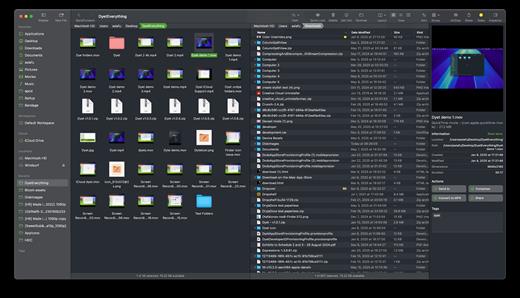
Bloom is a refined file management tool designed to enhance your search and navigation experience on macOS, offering a more intuitive and feature-rich alternative to Finder. With Bloom, you can instantly navigate to any location system-wide using the shortcut ⌘⇧⏎, making file access seamless and efficient .
Key Features


  • Enhanced Search Capabilities: Bloom allows you to search files by keyword within predefined locations, scanning tens of thousands of files in seconds for lightning-fast results. You can also search directly in any folder with ⌘F and refresh results with ⌘R .
  • Portal Mode: A compact window without sidebar or preview, Portal retains core functionalities and can be pinned on top of other windows or collapsed into the screen edge for convenience .
  • Archive Viewing: Browse contents of compressed files without extraction and preview text, images, or PDFs under 10MB by pressing Space or double-clicking .
  • Advanced File Management: Features like auto-resizing columns, advanced rename with regex support, workspace customization, iCloud Drive integration, and tag management elevate your file-browsing experience .
  • Media and Productivity Tools: Convert and optimize images, create various file types easily, paste images from the web, and organize files by kind or date. Additionally, Bloom records every operation for easy reversion and supports starting a terminal directly from a folder .
  • Disk Analysis and Task Management: Use Folder Scan to visualize disk usage through a treemap and manage file operations with a Task Scheduler to track progress .
What’s New

Version 1.5.31:


  • Release notes were unavailable when this listing was updated.
Compatibility

macOS 14.0 or later
Apple Silicon or Intel Core processor


Release Name: Bloom 1.5.31
Size: 15.4 MB
Links: HOMEPAGE – NFO – Torrent Search

Download: RAPiDGATOR

9 Comments
Mar 21

Space Drop 2.8

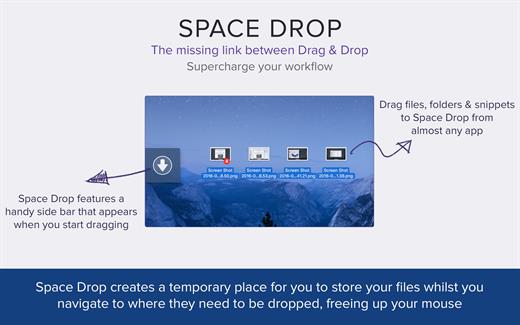
Space Drop is an essential utility for Mac users who want to seriously speed up their workflow. This app makes dragging-and-dropping files much easier with a handy dock that instantly appears whenever you start dragging a file. It creates a temporary place for you to store your files whilst you navigate to where they need to be dropped. This frees up your mouse and makes the process much more pleasant.

Features


  • Add single or multiple files into Space Drop in one go, if you drag in multiple files together, it’ll create a stack group of those files combined.
  • Allows you to create a temporary storage space for files and folders you need quick access to or need to collate before dragging them to another app or location.
  • Add files and folders to Space Drop by dragging them to the drop window, menubar icon and/or dock icon.
  • Supports multiple monitor set ups.
  • Supports almost every file type and cocoa application.
  • Control which apps Space Drop will detect dragging on.
  • Customize color, opacity, window position and much more.
  • Works with full screen apps.
  • Supports QuickLook to preview files within your Space Drop.
  • Configure the app to launch when you login to your Mac.
  • Toggle the Space Drop window using a hotkey if set.
  • Right click on files and select delete to remove them or press the trash can icon to remove all files.
What’s New

Version 2.8:


  • Release notes were unavailable when this listing was updated.
Compatibility

macOS 10.13 or later.


Release Name: Space Drop 2.8
Size: 11.3 MB
Links: HOMEPAGE – NFO – Torrent Search

Download: RAPiDGATOR
11 Comments
Mar 21

Cisdem VideoPaw 10.3.0

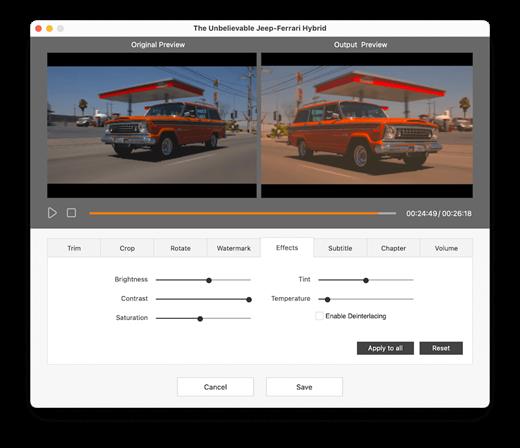
Convert almost all video and audio files in different encoding. Rip DVD/Blu-ray to share or backup digital media files with high quality. Download videos and music from 1000+ sites safely to play offline. Advanced compression and editing features ensure optimal outputs.

-Convert almost all video and audio files in different encoding.
-Rip DVD/Blu-ray to share or backup digital media files with high quality.
-Download videos and music from 1000+ sites safely to play offline
-Advanced compression and editing features ensure optimal outputs.

Excellent format support
Convert various videos and audios to 600+ popular and obscure formats, including MP4, AVI, MKV, MOV, WMV, M4V, WebM, MXF, MP3, M4A, FLAC, AIFF, WAV, WMA, M4B, etc.

What’s New

Version 10.3.0:


  • Release notes were unavailable when this listing was updated.
Compatibility

macOS 10.12 or later


Release Name: Cisdem VideoPaw 10.3.0
Size: 99.1 MB
Links: HOMEPAGE – NFO – Torrent Search

Download: RAPiDGATOR

10 Comments
Mar 21

ExactScan Pro 26.1

ExactScan Pro is the professional scan solution for a paperless office on the Mac. ExactScan comes with over 400 drivers for professional document scanners from Avision, Canon DR-series, Fujitsu fi-series, Kodak, Oki, Panasonic, Visioneer and Xerox, which otherwise do not come with a Mac driver.

Scan all your documents for fast retrieval, and get rid of dusty paper archives. Find searchable PDF everywhere with Spotlight in a snap.


  • Over 400 native built-in drivers for professional document scanners from Avision, Canon, Fujitsu, HP, Kodak, Oki, Panasonic, Visioneer and Xerox
  • Support for a variety of third party scanners via ImageCapture and TWAIN drivers
  • Save to PDF, TIFF, JPEG, JPEG 2000, PNG, BMP, PNM
  • Advanced and intelligent image processing algorithms
  • Auto-crop & de-skew
  • Blank page removal
  • Direct scan to print
  • Profiles to configure scan workflow
  • AppleScript support for professionals
ExactScan Pro additionally includes

  • OCR to directly create searchable PDF files
  • Content based page de-skew
  • Automatic rotation, color- and source detection
  • Imprinter to print flexible text into the scanned image
  • Barcode recognition to file stacks by barcodes
  • Batch processing of existing image files
The following languages are supported by the OCR

Bulgarian, Croatian, Czech, Danish, Dutch, English, Estonian, French, German, Hungarian, Italian, Latvian, Lithuanian, Polish, Portuguese, Rumanian, Russian, Serbian, Slovenian, Spanish, Swedish, Turkish, Ukrainian, and

What’s New

Version 26.1:


  • Release notes were unavailable when this listing was updated.
Compatibility

macOS 10.13 or later


Release Name: ExactScan Pro 26.1
Size: 20 MB
Links: HOMEPAGE – NFO – Torrent Search

Download: RAPiDGATOR
12 Comments
Mar 21

MouseBoost Pro 4.1.5

*** Main Features ***
– All menus support custom sorting.
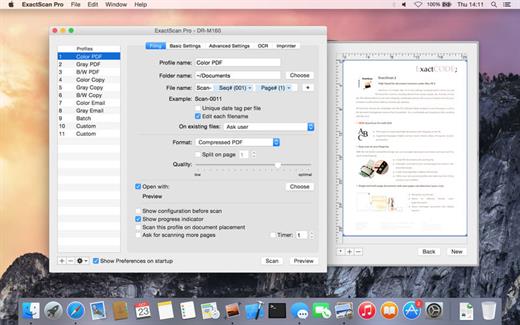
– Quickly create all kinds of commonly used files, and supports custom creation of various file types you want.
– Quickly open your terminal, iTerm2, and go to the directory you want.
– Quickly open VSCode, Sublime Text and Emacs, and customize the various apps you want to open.
– Quickly copy the current path power.
– Complete files deletion is supported.
– Supports files moving, copying and cutting.
– Supports files encrypted compression.
– Quickly open your favorite directory.
– Quickly get file MD5,SHA1,SHA256 and other information.
– Supports hiding and displaying of specified files.
– Supports modify folder icon.

What’s New

Version 4.1.5:


  • Release notes were unavailable when this listing was updated.
Compatibility

macOS 10.11 or later


Release Name: MouseBoost Pro 4.1.5
Size: 17.7 MB
Links: HOMEPAGE – NFO – Torrent Search

Download: RAPiDGATOR
8 Comments
Mar 21

Boxy SVG 4.103

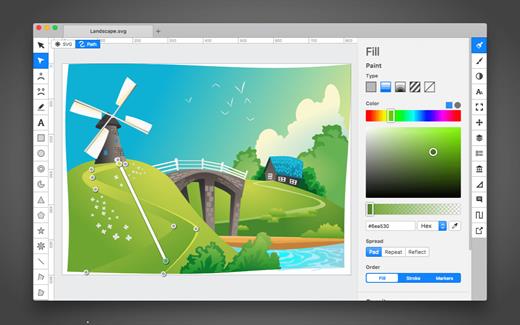
SVG is the standard format for storing vector graphics such as icons, banners, charts and illustrations.

Boxy SVG project goal is to create the best SVG editor for non-technical users as well as for professional designers and developers.

CORE FEATURES

• Clean and intuitive UI heavily inspired by Inkscape, Sketch and Adobe Illustrator
• Extensive support for on-canvas editing of object geometry, transform, paint and other properties
• Save to SVG and SVGZ formats, export to PNG, JPG, WebP, PDF and HTML5
• Open Clip Art Library integration with thousands of free stock vector arts
• Google Fonts integration with hundreds of free fonts
• Configurable keyboard shortcuts for over 100 commands
• Manual guides, smart guides and grid
• Path operations (unite, intersect, subtract, exclude, close, reverse, etc.)
• Arrangement operations (align to, rotate, flip, order, group, etc.)

FOR WEB DEVELOPERS

• Chromium-based rendering engine
• SVG and CSS code inspector similar to Chrome Dev Tools
• Clean SVG output that preserves IDs, classes, titles and other metadata
• SVG sprites editing support

What’s New

Version 4.103:


  • Release notes were unavailable when this listing was updated.
Compatibility

macOS 10.15 or later


Release Name: Boxy SVG 4.103
Size: 216.6 MB
Links: HOMEPAGE – NFO – Torrent Search

Download: RAPiDGATOR
12 Comments
Mar 21

File List Export 2.9.5

File List Export (was File list to Excel) is an easy to use application that will help you create list of files for any need. List all your photos, all your videos or all your files. If you need to create list of files this app is for you.

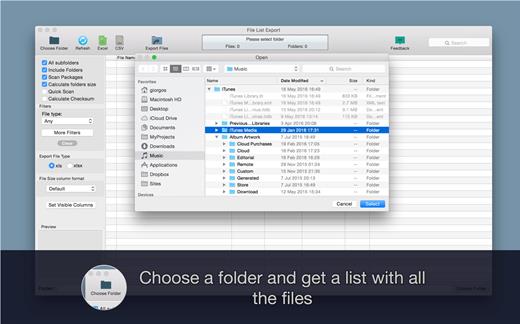
Just select a folder and get a list with all files and folders to Excel or to a CVS file. You can choose if you want to include the files from all subfolders. Preview and edit the list before export to file. Easily search and filter the file list records.

For every file you can get this info:


  • File name
  • Date modified
  • Date created
  • Kind
  • Size
  • Path (the location of the file)
  • Comments
  • Tags
  • Version
  • Pages
  • Authors/Artist
  • Title
  • Album
  • Track Number
  • Genre
  • Year
  • Duration
  • Audio BitRate
  • Audio Encoding Application
  • Audio Sample Rate
  • Audio Channels
  • Dimensions
  • Pixel Width
  • Pixel Height
  • Total Pixels
  • Height DPI
  • Width DPI
  • Color Space
  • Color Profile
  • Alpha Channel:
  • Creator
  • Video Bit Rate
  • Total Bit Rate
  • Codecs
  • Parent folder
  • Location (parent-folder path)
What’s New

Version 2.9.5:


  • You can now add filters based on image pixel width or height.
Compatibility

macOS 10.9 or later


Release Name: File List Export 2.9.5
Size: 25 MB
Links: HOMEPAGE – NFO – Torrent Search

Download: RAPiDGATOR

10 Comments
Mar 21

ExactScan Enterprise 26.1

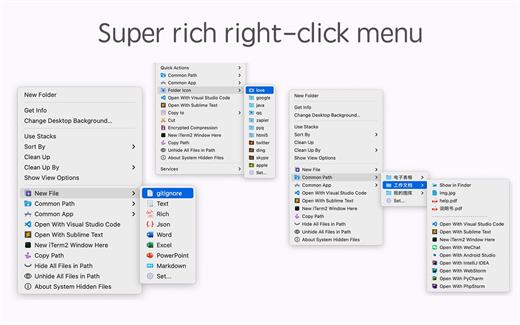
ExactScan Pro offers high-speed document scanning. It is a popular, easy-to-use OS X scanning app that utilizes built-in drivers for over 200 document scanners, including devices from Avision, Kodak, Oki, Visioneer, and Xerox.

With built-in OCR, ExactScan Pro recognizes the text in images and transform scans to editable and searchable documents, faster and more accurate than before. Together with the OS X Spotlight indexing system ExactScan Pro allows you to quickly find and retrieve archived documents.

What’s New

Version 26.1:


  • Release notes were unavailable when this listing was updated.
Compatibility

macOS 10.9 or later


Release Name: ExactScan Enterprise 26.1
Size: 20.4 MB
Links: HOMEPAGE – NFO – Torrent Search

Download: RAPiDGATOR
11 Comments
Mar 20

PDF Reader Pro 5.3.0

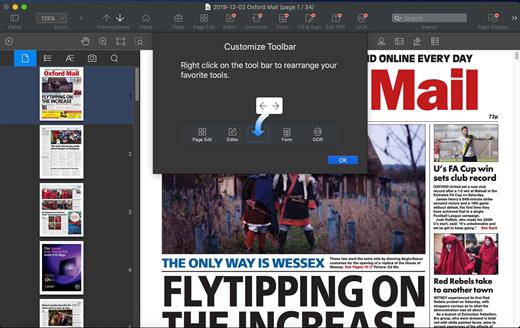
PDF Reader Pro is a PDF editing application that has a wide variety of tools. Building on solid features such as annotation, comment, OCR, Convert, form filling and bookmarking, PDF Reader Pro allows you to maneuver through your PDF files. PDF Reader Pro Edition offers even more – combining multiple documents, splitting your PDF into several files, inserting pages from another PDF and PDF files. The app has Text-to-Speech functionality that can read the doc to you in six different languages. You can simply sync your files with Dropbox to make the best use of PDF Reader Pro Edition. The app has a presentation mode that will allow you to showcase your PDF document to others.

Now you can enjoy the best PDF to Office Converter! Export from PDF to Microsoft Word (.docx), PowerPoint (.pptx), Excel (.xlsx), RTF, HTML, Text, Image, CSV, and more Offline

Support free trials and special education discounts

Main features:


  • Annotate PDFs with highlights, underlines, lines, circles, freehand writing, and so much more.
  • Create & Edit & Fill PDF Forms. Create fillable PDF Forms from interactive field objects, such as buttons, check boxes, radio buttons, list boxes, and drop-down lists.
  • Create tables. A table consists of rows and columns of cells. A cell is like a text frame in which you can add text, or other tables. You can use headers or footers to repeat the information at the top or bottom of each divided portion of the table.
  • Sign – Create multiple signatures for any situations with trackpad, keyboard or images
  • Insert stamps, comments and notes.
  • Link – Add hyperlinks to redirect other destinations, and edit your links as you like
  • Export from PDF to Microsoft Word (.docx), PowerPoint (.pptx), Excel (.xlsx), RTF, HTML, Text, Image, CSV, and more Offline
  • PDF to Image. Convert PDFs to JPG, PNG, bmp, gif, tiff, tga and jp2
  • OCR (Optical Character Recognition). Convert scanned PDF & images into editable and searchable PDFs or TXT files. 50+ languages supported!
  • Annotation history – Access important sections of documents instantly.
  • Edit pages with headers, footers, or page numbers
  • Add PDF watermarks to the background of pages
  • Bates number
  • Combine multiple files into one document
  • Insert another file (entire files or specific page ranges) into the existing file
  • Replace PDF pages from another PDF file
  • Merge, Split, Extract, Append, Rotate, delete, replace, and crop pdf pages
  • Directly present your PDFs with annotations
  • Supports radio boxes, check boxes, combo boxes, and list boxes
  • Reading modes: full-screen, page-fit, horizontal or vertical orientation, continuous and page break
  • Bookmark specific pages or sections of PDFs
  • Create, Edit and Search outlines to easily navigate through the whole file
  • Night mode supported
  • Reduce PDF size to make your documents much lighter
  • Create a new PDF by importing your clipboard content
  • Select a passage or document to be read aloud by the TTS engine
  • Set a password and authorization to edit, modify or print PDFs
What’s New

Version 5.3.0:


  • Release notes were unavailable when this listing was updated.
Compatibility

macOS 10.10 or later


Release Name: PDF Reader Pro 5.3.0
Size: 678.1 MB
Links: HOMEPAGE – NFO – Torrent Search

Download: RAPiDGATOR

8 Comments