Please REGISTER or RENEW your account on RAPiDGATOR.net and support us by doing through all RAPiDGATOR working download links on main posts...
Mar 16

RenameMe 2.3

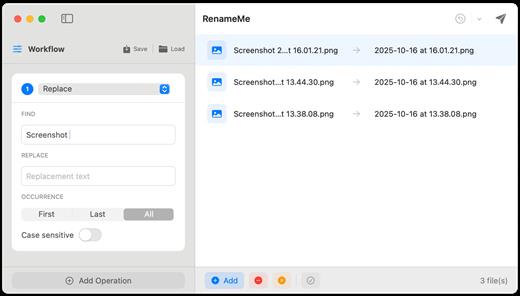
RenameMe is a lightweight Mac app designed to help you rename dozens or even hundreds of files at once—quickly, safely, and without the usual hassle. It lets you stack multiple renaming actions into a single workflow, preview results live before applying changes, and save your favorite workflows for repeat use—making bulk renaming feel effortless.
Key features


  • Stackable operations: Chain multiple actions (e.g., replace text → change case → add prefix/suffix → trim characters) in one run.
  • Live preview: View original and new names side-by-side and spot conflicts or issues before committing.
  • Saved workflows: Save custom workflows for repetitive tasks, and use built-in presets such as Photo Organization and Web‑Safe Names.
  • Smart sequencing: Add sequential numbering with custom padding and positioning—ideal for organizing photos, documents, and collections.
  • Powerful operations (incl. regex): Perform text replacement, case changes, trimming, regex-based patterns, and more across multiple operation types.
  • Full undo support: Instantly undo renames and restore previous states using the app’s undo history.
What’s New

Version 2.3:


  • Release notes were unavailable when this listing was updated.
Compatibility

macOS 13.0 or later


Release Name: RenameMe 2.3
Size: 3.9 MB
Links: HOMEPAGE – NFO – Torrent Search

Download: RAPiDGATOR

6 Comments
Mar 16

All to MP3 Audio Converter 3.4.1

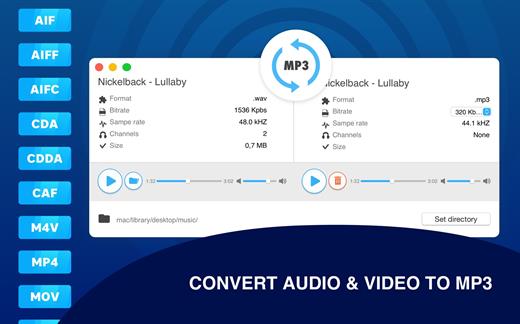
Any audio files to MP3 format in one click! Universally applicable audio utility – All To MP3 Audio Converter. Plenty of formats, bitrate setup and high-quality MP3 files as a result!

INPUT AUDIO FORMATS
AIF, AIFF, AIFC, CDA, CDDA, CAF, M4V, MP4, M4A, MOV, QT, WAV, WAVE, BWF, AMR, AC3 and more.

All To MP3 Audio Converter FUNCTIONALITY


  • Pre-listen uploaded (and converted) audio files
  • Output files bit rate setup (320, 256, 192, 128 kbps)
  • Playback on any devices after conversion
  • Audio channels and sample rate information
High-quality music in your favorite format with All To MP3 Audio Converter utility.

What’s New

Version 3.4.1:


  • Release notes were unavailable when this listing was updated.
Compatibility

macOS 10.12 or later


Release Name: All to MP3 Audio Converter 3.4.1
Size: 83.5 MB
Links: HOMEPAGE – NFO – Torrent Search

Download: RAPiDGATOR
7 Comments
Mar 16

Bloom 1.5.30

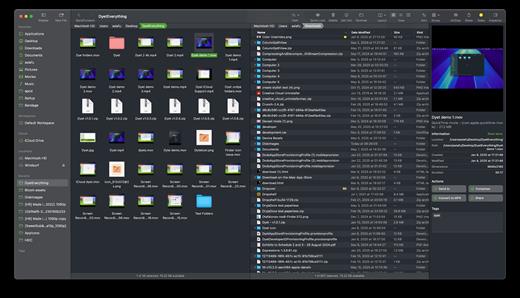
Bloom is a refined file management tool designed to enhance your search and navigation experience on macOS, offering a more intuitive and feature-rich alternative to Finder. With Bloom, you can instantly navigate to any location system-wide using the shortcut ⌘⇧⏎, making file access seamless and efficient .

Key Features


  • Enhanced Search Capabilities: Bloom allows you to search files by keyword within predefined locations, scanning tens of thousands of files in seconds for lightning-fast results. You can also search directly in any folder with ⌘F and refresh results with ⌘R .
  • Portal Mode: A compact window without sidebar or preview, Portal retains core functionalities and can be pinned on top of other windows or collapsed into the screen edge for convenience .
  • Archive Viewing: Browse contents of compressed files without extraction and preview text, images, or PDFs under 10MB by pressing Space or double-clicking .
  • Advanced File Management: Features like auto-resizing columns, advanced rename with regex support, workspace customization, iCloud Drive integration, and tag management elevate your file-browsing experience .
  • Media and Productivity Tools: Convert and optimize images, create various file types easily, paste images from the web, and organize files by kind or date. Additionally, Bloom records every operation for easy reversion and supports starting a terminal directly from a folder .
  • Disk Analysis and Task Management: Use Folder Scan to visualize disk usage through a treemap and manage file operations with a Task Scheduler to track progress .
What’s New

Version 1.5.30:


  • Release notes were unavailable when this listing was updated.
Compatibility

macOS 14.0 or later
Apple Silicon or Intel Core processor


Release Name: Bloom 1.5.30
Size: 15.3 MB
Links: HOMEPAGE – NFO – Torrent Search

Download: RAPiDGATOR

5 Comments
Mar 16

KCNcrew Pack 1.8 (03-15-26)

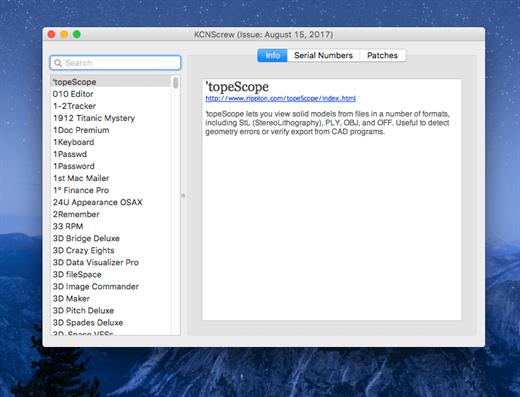
It’s like Serial Box, which has SN’s but KCN also has cracks and patches. It would be best to have both of these collections, as this often has serials you cannot find in Serial Box.

Unlike Serial Box, no readers are required. Just open the dmg file, drag and drop the application to where you like.

However, there is no way to view what serials, cracks and patches are new in this issue as compared to the previous like Serial Box.

Thanks to all contributors and supporters!

What’s New

Version 1.8 (03-15-26):


  • Release notes were unavailable when this listing was updated.
Compatibility

OS X 10.7 or later, 64-bit processor


Release Name: KCNcrew Pack 1.8 (03-15-26)
Size: 9.8 MB
Links: HOMEPAGE – NFO – Torrent Search

Download: RAPiDGATOR
5 Comments
Mar 16

Folder Designer: Custom Icons 1.9

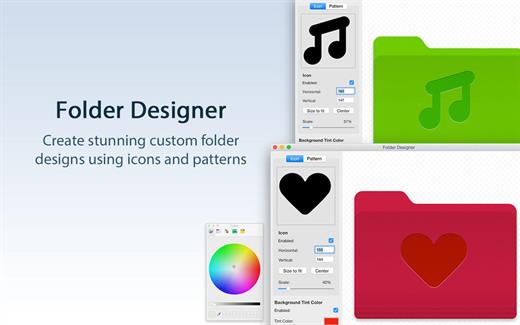
Folder Designer is the coolest and easiest way to customize Folders on your Mac. We’ve made this app perfectly simple to use so that anyone can give their Folders a totally unique appearance.

KEY FEATURES:


  • Customize your Mac’s folders with a unique new icon or pattern
  • Choose from a large selection of pre-installed icon images within the app
  • Ability to add any image/pattern of your choice to a Folder
  • Ability to edit the icon/pattern scale to allow a perfect fit according to your tastes
  • Auto center/auto fit an icon or pattern
  • Ability to position the icon using the mouse to exactly where you want
  • Change the background colour to one of your choice
BENEFITS OF FOLDER DESIGNER:

  • Instantly create Folders on your Mac that are entirely unique in appearance
  • Have Folders that feature either a unique icon, pattern or even a different background colour than the regular blue shade
  • Folders can be easily distinguishable and identifiable on your Mac directly by appearance
  • An extremely easy app to use offering infinite customization possibilities
  • Regular free updates
What’s New

Version 1.9:


  • Updated for macOS Tahoe
  • Bug fixes and performance optimizations
Compatibility

macOS 11.5 or later.


Release Name: Folder Designer: Custom Icons 1.9
Size: 17.1 MB
Links: HOMEPAGE – NFO – Torrent Search

Download: RAPiDGATOR

7 Comments
Mar 16

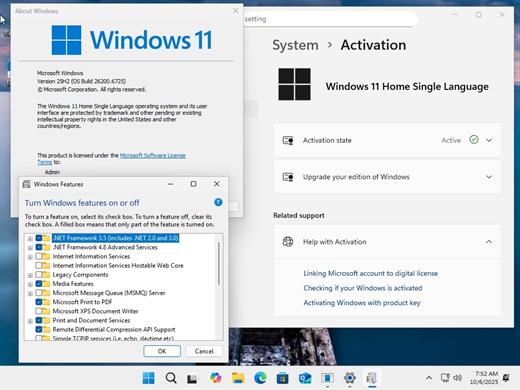
Windows 11 Aio 16in1 25H2 Build 26200.8037 (No TPM Required) Multilingual Preactivated March 2026

Edition includes
1. “Windows 11 Home”
2. “Windows 11 Home N”
3. “Windows 11 Pro”
4. “Windows 11 Pro N”
5. “Windows 11 Home Single Language”
6. “Windows 11 Enterprise”
7. “Windows 11 IoT Enterprise”
8. “Windows 11 IoT Enterprise Subscription”
9. “Windows 11 Enterprise multi-session”
10. “Windows 11 Education”
11. “Windows 11 Pro Education”
12. “Windows 11 Pro for Workstations”
13. “Windows 11 Enterprise N”
14. “Windows 11 Education N”
15. “Windows 11 Pro Education N”
16. “Windows 11 Pro N for Workstations”

Languages: Arabic,English,German,Greek,French,Spanish,Italian,Portuguese-Portuguese,Portuguese-Brazil,Turkish,Dutch,Czech,Norwegian | File size: 7.36 GB

What’s New

Version 26200.8037:


  • Release notes were unavailable when this listing was updated.
Compatibility

PC * 1 gigahertz (GHz) dual-core 64-bit processor


Release Name: Windows 11 Aio 16in1 25H2 Build 26200.8037 (No TPM Required) Multilingual Preactivated March 2026
Size: 7.5 GB
Links: HOMEPAGE – NFO – Torrent Search

Download: RAPiDGATOR
10 Comments
Mar 16

Downie 4.12

A simple download manager that offers you the possibility to quickly save videos from different websites to your own disk drive.

If you are using a poor internet connection, trying to visualize videos streamlined online might not work properly since the content is loaded too slowly. Downie is a simple Mac app that can help you download those videos to your computer, and then watch them by using your default media player.

User friendly video downloader featuring support for drag and drop actions

Working with Downie is extremely straightforward: simply drop the video URL on top of the app’s main window or on the Dock icon. Downie adds the video to your downloads list, so all you have to do next is start the process by pressing the appropriate button. Of course, you can also remove items from the list.

By default, Downie downloads MP4 files and places them in your default Downloads folder, but you can easily change this via the Preferences window. The same area allows you to setup notifications, or post processing actions (convert to MP4 if necessary, or extract audio only).

Effortlessly download videos from a wide collection of hosting websites

Downie provides support for more than 400 different websites that host video content, among which there are the most popular choices, such as YouTube, Apple, LiveLeak, Vimeo, BBC, and so on. If a certain website is not included, within the app you can send a request email to the Downie developers.
Moreover, Downie also provides matching extensions for various popular web browsers, such as Firefox, Safari, Google Chrome or Chromium. The add-ons are not installed by default: open the Preferences window and install only the ones you plan to use.

Straightforward solution for downloading video content hosted online

Downie is a great tool for saving videos posted on various websites to your Mac for offline playback. The application is extremely useful especially if you have a slow internet connection.

What’s New

Downie 4.12:


  • New: Support for Permute 4 beta.
  • Improved: arte.tv, bilibili.com, x.com, youtube.com.
Compatibility

macOS 10.12 or later
Apple Silicon or Intel Core processor


Release Name: Downie 4.12
Size: 42.2 MB
Links: HOMEPAGE – NFO – Torrent Search

Download: RAPiDGATOR

7 Comments
Mar 16

Stoic 2026.8

MENTAL HEALTH TOOLS:

stoic provides you with the tools you need to feel better, reduce stress & anxiety, manage ADHD, be mindful and more.


  • Meditation – unguided or guided sessions to help you meditate with background sounds and timed chimes.
  • Breathing – science-backed exercises to help you relax, focus, feel calm, sleep better and more.
  • Stoic Shield – block distracting apps and reduce screen time.
  • Sleep Better – journal your dreams, nightmares, and overcome insomnia with lessons by Huberman and Sleep Foundation.
  • Quotes & Affirmations – read up on stoic philosophy and better your mood.
  • Therapy Notes – prepare for your therapy sessions, track your progress, and reflect on them.
  • Daily Prompts – thought-provoking prompts to help you journal better.

What’s New

Version 2026.8:


  • Release notes were unavailable when this listing was updated.
Compatibility

macOS 12.0 or later.


Release Name: Stoic 2026.8
Size: 110.2 MB
Links: HOMEPAGE – NFO – Torrent Search

Download: RAPiDGATOR
7 Comments
Mar 16

Scrivener 3.5.2

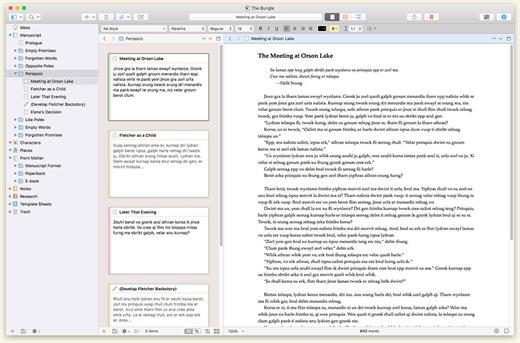
Scrivener is a project management and writing tool for writers of all kinds that stays with you from that first unformed idea all the way through to the first – or even final – draft. Outline and structure your ideas; take notes; storyboard your masterpiece using a powerful virtual corkboard; view research while you write; track themes using keywords; dynamically combine multiple scenes into a single text. Scrivener has already been enthusiastically adopted by best-selling novelists and novices alike.

Outline… Edit… Storyboard… Write.

What’s New

Version 3.5.2:


  • Release notes were unavailable when this listing was updated.
Compatibility

macOS 10.13 or later.


Release Name: Scrivener 3.5.2
Size: 123 MB
Links: HOMEPAGE – NFO – Torrent Search

Download: RAPiDGATOR
6 Comments
Mar 16

Prompt 3.5.0

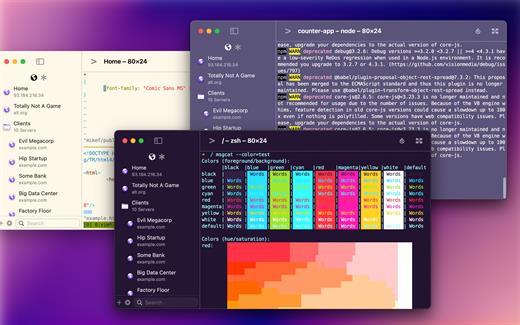
Prompt is the terminal that goes where you do, whether you’re on the road or at your desk. With Panic Sync, your servers are available on your iPhone, iPad, and Mac. With Mosh and Eternal Terminal support, you can stay connected even on the most unstable networks. And with both local terminals and remote connections on the Mac, Prompt is the SSH app that does it all.

Welcome to Prompt 3. For over a decade, Prompt has been the best SSH terminal on iOS and iPadOS, and we’re excited to finally release a much-requested Mac version. But that’s not all. With two new connection types, port forwarding, and a faster terminal, Prompt is better than ever.

Superfast SSH

We retooled the text engine in Prompt 3 to be up to 10x faster, and with improved terminal emulation, you can run nvim inside tmux without breaking a sweat.

Clips

Put your most-used commands and text bits into clips and access them with a single tap via Prompt’s keyboard bar. Clips can be stored globally or per-server.

Secure Enclave

Authenticate with FaceID and TouchID. The keys will stay secure on your device.

Panic Sync

Sync your favorite servers, passwords, private keys, and clips, between Prompt on all of your iOS devices.

Customizable

Make Prompt perfect with new themes, fonts, and a very configurable iOS keyboard.

Jump Hosts and Agent Forwarding

Access corporate servers, even at the beach.

Mosh and Eternal Terminal

Keep your terminal open, even when you get disconnected. Mosh is optimized for high-latency, low-throughput networks. Eternal Terminal is great for when you need to keep your full terminal history on a flaky connection.

Mouse Support

Use your mouse to interact with TUI-based apps that run through the terminal.

What’s New

Version 3.5.0:


  • Release notes were unavailable when this listing was updated.
Compatibility

macOS 13.0 or later.


Release Name: Prompt 3.5.0
Size: 30.1 MB
Links: HOMEPAGE – NFO – Torrent Search

Download: RAPiDGATOR
6 Comments