Please REGISTER or RENEW your account on RAPiDGATOR.net and support us by doing through all RAPiDGATOR working download links on main posts...
May 9

Loopback 2.4.10

Loopback makes it easy to pass audio between applications on your Mac. Create virtual audio devices to take the sound from applications and audio input devices, then send it to audio processing applications. Loopback gives you the power of a high-end studio mixing board, right inside your computer!
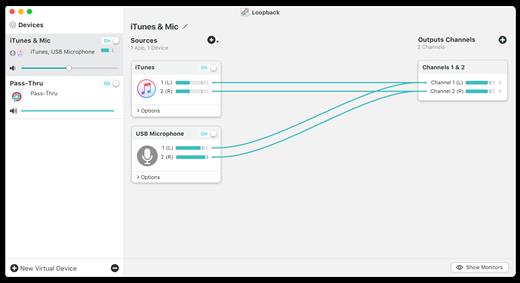

  • Play Audio to All Your Podcast Guests – Combine your mic with audio sources like iTunes or QuickTime Player, then select your Loopback device as your source in Skype. Presto! Your guests all hear both your voice and your audio add-ons.
  • Record Gameplay Videos – Making gameplay videos with great audio can often be very difficult. If you’re using a device like Elgato’s Game Capture hardware and you want to record both your microphone and the game’s audio at once, Loopback can assist!
  • Combine Hardware Devices – Apps like GarageBand, Logic, and Ableton Live only record from a single audio device at once. Thankfully, they offer recording from many channels. With Loopback, you can combine multiple input devices into one virtual device for easy recording.
  • Create Top-Notch Screencasts – Screen recorders, including QuickTime Player, allow you to include your mic’s audio. Some allow recording of system audio instead, but neither option is ideal. Create a virtual device that grabs just the mic and the app’s audio to get exactly the audio you want.
  • Route Audio For Broadcasts – Set a simple (pass-thru) device as the output at the end of an Audio Hijack chain, and then as the input source in Nicecast. Now listeners can tune in to a live stream of your podcast as you record it!
Features

  • Combine Audio Sources – Configuring a virtual audio device from multiple sources is easy. Just add the applications and physical audio devices you want to include to the Audio Sources table to get started.
  • Available System-Wide – Your Mac will show Loopback’s virtual devices exactly like physical devices. Find them listed among other devices in System Preferences or select them as an input or output in any audio app.
  • Send Audio Between Apps – Loopback can also create pass-thru devices, which send audio from one app to another. Set the Loopback device as the output in one app and the input in another to make audio flow directly between the applications.
  • Works With Any Application – Make a virtual audio device with audio from the applications on your Mac, including production apps like Logic or Reason, as well as simple audio players, like iTunes or QuickTime.
  • Works With Any Input Device – Pull audio from the physical audio devices connected to your Mac. Whether you’ve got simple USB microphones, or high-end studio mixers, Loopback can access it all.
  • Combine Apps and Physical Devices – Of course, you can create a virtual audio device that includes audio from both apps and physical audio devices.
  • Multichannel Audio – Your virtual audio devices can be configured to have up to 32 channels, providing tremendous power.
  • Custom Channel Mapping – By default, Loopback sets up channel mapping automatically. If you want to manually configure things, though, you’ve got powerful options!
  • Nested Devices – You can now nest one Loopback device inside another, allowing for easier configuration, as well as even more power and control.
What’s New

Version 2.4.10:


  • Release notes were unavailable when this listing was updated.
Compatibility

macOS 10.13.0 or later
Support M1 Apple silicon.


Release Name: Loopback 2.4.10
Size: 34.6 MB
Links: HOMEPAGE – NFO – Torrent Search

Download: RAPiDGATOR

6 Comments
May 9

GitFox 4.1.5

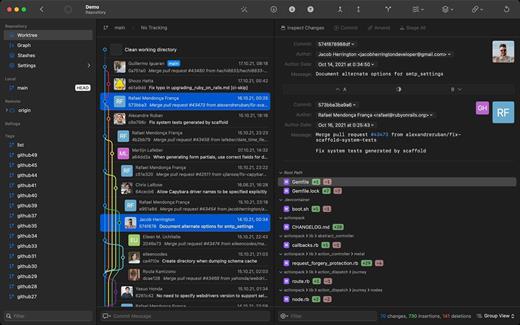
Gitfox is a light, fast and powerful Git client built exclusively for Mac. With its unique set of features like Image Diff, Multiple Identities, Automatic Project Linking, Quick Navigation and Advanced Search, it is perfect for web developers and teams that are involved in design work, while also not breaking the bank.

What’s New

Version 4.1.5:


  • Release notes were unavailable when this listing was updated.
Compatibility

macOS 26 or later


Release Name: GitFox 4.1.5
Size: 36.1 MB
Links: HOMEPAGE – NFO – Torrent Search

Download: RAPiDGATOR
6 Comments
May 7

Screens 5.8.6

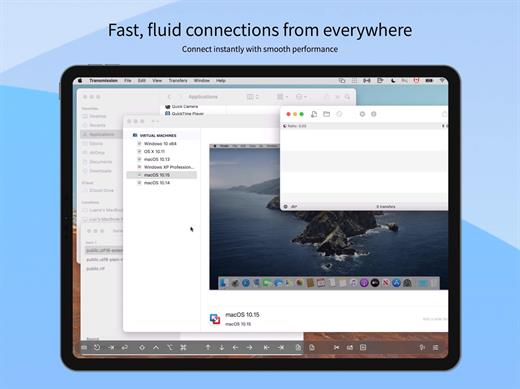
Streamlined and powerful VNC utility designed to provide you with all the tools you need to remotely connect to your devices from your Mac

Accessing your devices from anywhere in the world is surely great, especially if you need to perform some last minute modifications to a project or copy a certain file. This can be done from any computer that can access your device’s network using the VNC desktop sharing system.

Features


  • iCloud – Synchronize all your stored screens on all your iOS devices, including your Mac.
  • Use Screens in fullscreen mode to make it feel your remote computer is right there in front of you.
  • Easy to Use: Screens is an easy, user-friendly VNC client for Mac.
  • Secure: Screens can connect to your computer through an SSH tunnel so your session is encrypted and safe.
  • Multi-Touch: Screens supports many of the multi-touch features – such as pinch and navigation – you’re already used to on your trackpad.
  • Screens Connect: Make your computer available from anywhere with this optional helper app. Easy as flicking a switch. No messy router setup.
  • Works Anywhere: Through Wi-Fi or a 3G network.
What’s New

Version 5.8.6:


  • Release notes were unavailable when this listing was updated.
Compatibility

macOS 14.0 or later.


Release Name: Screens 5.8.6
Size: 39.2 MB
Links: HOMEPAGE – NFO – Torrent Search

Download: RAPiDGATOR

6 Comments
May 7

SimpleMind Pro 2.9.2

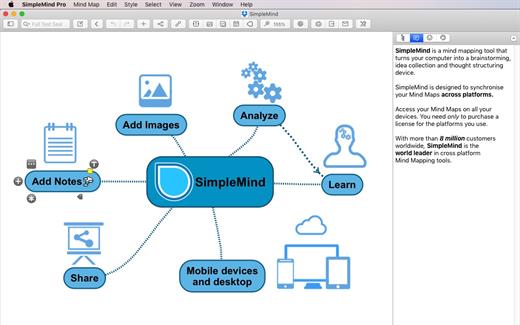
SimpleMind Desktop is a mind-mapping tool that turns your Mac into a brainstorming, idea-collecting, and thought-structuring device. It connects to the similar SimpleMind for iPhone/iPad app.

Features


  • Easy to use drag, arrange, and edit directly on the Mind Map page
  • Tap or drag Node Well to add new topics
  • Full Undo/Redo in the editor
  • Visual styles change colors, borders and lines for maximum presentation impact
  • Pick colors from style palette or custom colors
  • Cut/Copy/Paste – move or duplicate topics between mind maps
  • Create new mind map from selection or clipboard
  • Reconnect topics using drag-and-drop, aided by topic auto-layout
What’s New

Version 2.9.2:


  • Release notes were unavailable when this listing was updated.
Compatibility

macOS 10.12 or later
Apple Silicon or Intel Core processor


Release Name: SimpleMind Pro 2.9.2
Size: 19.5 MB
Links: HOMEPAGE – NFO – Torrent Search

Download: RAPiDGATOR
6 Comments
May 7

Litur 4.1.4

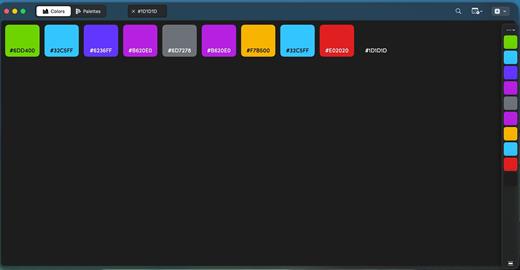
Litur is a cross-platform color picker and library app for macOS, iOS, and watchOS that captures real-world and on-screen colors into a personal, synced collection. It generates complementary, analogous, monochromatic, triadic, and tetradic palette combinations, outputs HEX, RGB, HSB, CMYK, NSColor, UIColor, and SwiftUI codes, and includes a WCAG contrast accessibility checker.

All new design
Litur sports an all-new design on macOS. How it looks, how it works, and how it feels.
Tabs or Windows, choose the best way to work with your colors and palettes, manage your workflow in the best way for you.

History
See every color you have collected and saved, synced across all your devices.

Color Anchor
Litur gives you a new docked window that allows you fast access to your color library or palettes. To help speed up your design or development workflow

Color Palette
Litur also generates a color palette for all colors you collect.

Color Combinations
See different color combinations for each color you collect: Complimentary, Analogous, Monochromatic, Triadic and Tetradic

Color Codes
Litur allows you get the color codes in hex, rgb, hsb, NSColor, UIColor and SwiftUI Color for use in your projects.

What’s New

Version 4.1.4:


  • Release notes were unavailable when this listing was updated.
Compatibility

macOS 13.0 or later


Release Name: Litur 4.1.4
Size: 5.6 MB
Links: HOMEPAGE – NFO – Torrent Search

Download: RAPiDGATOR
5 Comments
May 7

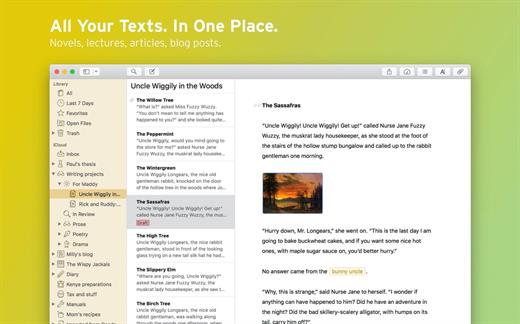
Ulysses 40.0

Ulysses lets you focus when you need to concentrate. It keeps all your texts neatly stuffed in its intuitive library. With a few clicks, Ulysses can create beautiful documents from your manuscripts: PDFs, web pages, even iBooks-ready ePubs. With its simple, clutter-free interface, it will turn work hours into fun time. And mere thoughts into powerful stories. If you love to write, and write a lot, Ulysses is made for you.

What’s New

Version 40.0:


  • Release notes were unavailable when this listing was updated.
Compatibility

macOS 14.0 or later.


Release Name: Ulysses 40.0
Size: 73.7 MB
Links: HOMEPAGE – NFO – Torrent Search

Download: RAPiDGATOR

6 Comments
May 7

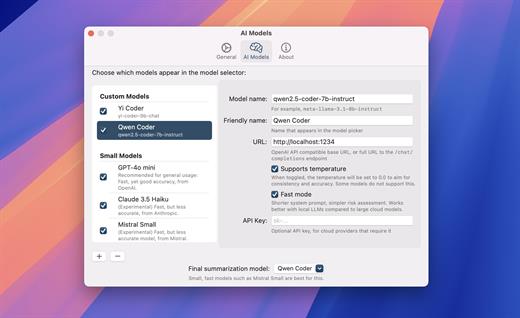
Substage 0.9.5

Substage is one of the most clever AI-powered utilities that I’ve used on my Mac so far. The app uses AI to translate natural language prompts into Terminal commands, simplifying the process of manipulating files. The clever bit is that instead of navigating to a different app to manage your files, Substage comes to the user, right in Finder.

1.Select files, enter prompt
Just tell Substage what you want to do with the files you have selected.

Make a jpg plz

2.Substage generates a command
Using an AI model such as GPT 4.1 mini, it creates a command to be run on your Mac’s terminal.

sips -s format jpeg ocean.png —out ocean.jpg

3.Confirm if necessary
Substage evaluates the risk of running the command and might require confirmation to proceed. You can sanity check the command if you’d like.

Converted successfully!

4.Command is run
Any output is boiled down into a summary of what happened.

What’s New

Version 0.9.5:


  • Release notes were unavailable when this listing was updated.
Compatibility

macOS 15.0 or later


Release Name: Substage 0.9.5
Size: 7.3 MB
Links: HOMEPAGE – NFO – Torrent Search

Download: RAPiDGATOR
3 Comments
May 7

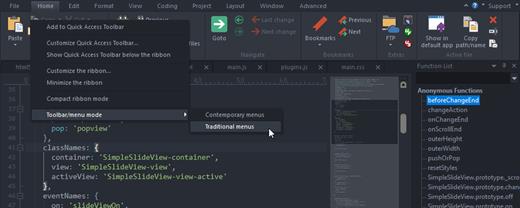
UltraEdit 23.0.0.25

UltraEdit is the world’s best text editor, now available for Mac. UltraEdit for Mac is a native Mac application based on the popular Windows text editor, UltraEdit! UE Mac offers a myriad of tools that make it ideal for anything from basic text editing, to a full-fledged development in languages such as C, Objective C, Javascript, XML, PHP, Perl, Python, and others. UltraEdit for Mac includes your favorite UltraEdit features such as Find in Files, Replace in Files, native FTP/FTPS, macros, scripting, column/block mode, and a lot more.

What’s New

Version 23.0.0.25:


  • Release notes were unavailable when this listing was updated.
Compatibility

macOS 10.12 or later


Release Name: UltraEdit 23.0.0.25
Size: 32.9 MB
Links: HOMEPAGE – NFO – Torrent Search

Download: RAPiDGATOR

6 Comments
May 7

Infuse Pro 8.4.4

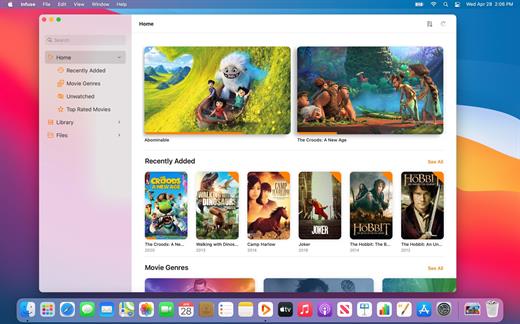
Ignite your video content with Infuse– the beautiful way to watch almost any video format on your iPhone, iPad, Apple TV, and Mac. No need to convert files! Infuse is optimized for macOS 12, with powerful streaming options, Trakt sync, and unmatched AirPlay & subtitle support. Gorgeous interface. Precise controls. And silky-smooth playback.

Play more video types

A powerful video player that plays just about anything, including the standard MP4, M4V and MOV – plus MKV, AVI, WMV, MTS, ISO, VIDEO_TS, FLV, OGM, OGV, ASF, 3GP, DVR-MS, WebM, and WTV. Includes fully certified Dolby® Digital Plus (AC3/E-AC3), DTS® and DTS-HD® audio.

Stream from other devices

Browse and play videos stored on your Mac, PC, NAS, Wi-Fi hard drive, apps like Plex, Emby, and Jellyfin, or from cloud services like Dropbox, Google Drive, OneDrive, Box, pCloud, Yandex.Disk, and Mega.nz – no syncing required!

Trakt 2-way sync

Connect with Trakt to sync watched history, submit ratings and post comments.

Optimized subtitles powered by opensubtitles

Bring your own subtitles, or download them on the fly (for free) in virtually any language.

The basics:


  • Silky-smooth video player (plays full 4K w/ HDR & Dolby Vision)
  • Stream from a Mac, PC, NAS or Wi-Fi enabled hard drive
  • Connect with Plex, Emby, Jellyfin, Kodi (XBMC), WMC and other media servers
  • Beautiful layout with quick access to video info
  • Artwork and metadata added automatically
  • Picture-in-Picture
  • Spatial audio
Supported formats:

  • Video: 3GP, AVI, ASF, BDMV, DIVX, DVDMEDIA, DVR-MS, FLV, ISO, M4V, MKV, MOV, MP4, M2TS, MTS, OGM, OGV, TP, TS, VIDEO_TS, WEBM, WMV, WTV
  • Audio: AAC, AC3/E-AC3, DOLBY TRUEHD, DTS, DTS-HD MA, FLAC, MP3, OGG, PCM, WMA
  • Subtitles: DVB, DVDSUB, MICRODVD, MPL2, PGS, SMI, SSA/ASS, SRT, SUB, TIMED TEXT, TMP, TXT, VOBSUB, VTT, XSUB
Player features:

  • Multiple audio tracks
  • Chapters
  • Gesture controls
  • 8 video zoom options
  • Continuous playback
  • Deinterlacing
Extras:

  • Library organization
  • Folders
  • One-click subtitle downloads from OpenSubtitles
  • Scrobble plays to Trakt
  • Download videos from networked devices
  • Drag and drop uploads via web browser
  • Get extra onboard storage by adding USB drives
Get more with infuse pro!

  • Play even more video formats
  • Enjoy Dolby® Digital Plus (AC3/E-AC3), DTS® and DTS-HD® mobile surround sound
  • Stream a wide variety of video types over AirPlay and Google Cast
  • Access videos stored in cloud services like Dropbox, Google Drive, Box, OneDrive, pCloud, Yandex.Disk, and Mega.nz
  • Sync libraries, settings, watched history, and playback progress between devices
What’s New

Version 8.4.4:


  • Release notes were unavailable when this listing was updated.
Compatibility

macOS 11.0 or later.
Apple Silicon or Intel Core processor


Release Name: Infuse Pro 8.4.4
Size: 107.7 MB
Links: HOMEPAGE – NFO – Torrent Search

Download: RAPiDGATOR
4 Comments
May 7

Steinberg WaveLab Pro 13.0.20

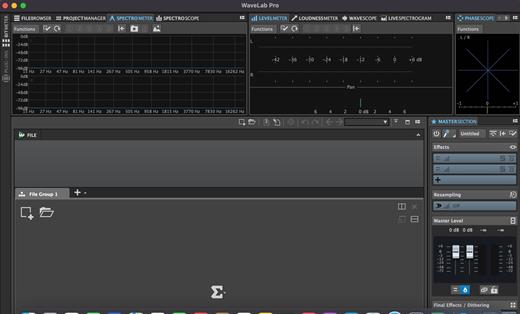
With significant new features for stem mastering, multitrack editing, plug-in parameter automation and podcast production, WaveLab 11 has the concept of “multi” running throughout it. With improved multi-channel file handling, multiple track sub-lanes and analysis meters, multi-core processing and more, WaveLab further enhances its status as the true art of mastering.

Multi-channel interleaved support

WaveLab 11 introduces extended support for multi-channel interleaved files and, for the first time, multi-channel interleaved editing in the Audio Editor. Supporting up to 22.2 surround layouts of WAV files (including Ambisonics files for pre-authoring purposes), a multi-channel file can be opened, edited and saved like any other set of mono/stereo files. Featuring comprehensive controls to make precise editing easier, it’s also possible for external editors to work on selected channels only. The detailed new selection options include highly flexible frequency-domain selection in the Spectrum Editor. In the Audio Montage, automatic splitting of multi-channel audio files into mono or stereo clusters makes it fast to import a large multi-channel file. This also allows plug-ins to process channel clusters independently of one another.

Track Groups for multitrack/stems workflows

Track Groups comprise audio tracks which are routed to a group bus, before the signal continues through the Montage output and then Master sections. This provides an additional summing stage with effects plug-ins, gain and pan controls. Track Groups are especially useful for stem mastering and, alongside Track Lanes, another way to apply a common track group effect chain to stem mastering projects.

Track Groups can be created by selecting tracks from a corresponding Group Channel. Using the Track Group Editor, tracks and track groups can be named/renamed, have colors assigned and moved per drag and drop.

Track Lanes for multitrack/stems workflows

Track Lanes is a flexible new feature that can divide an audio track into eight sub lanes, each lane hosting audio clips, a facility especially useful when working with mix stems inside the Montage. As well as clip effects, track effects can be applied to all clips, providing a final processing chain for all stems on the track. Track Lanes can also be used for sound design tasks like assembling, editing and processing sound effects from layered clips. Each Track Lane features comprehensive controls for selection, solo/mute, fold/unfold, lanes can be converted to tracks, selected tracks can be merged as lanes and more.

Parameter automation with clip envelopes

You can now use clip envelopes to automate the parameters of VST 3 plug-ins. Along with the volume, pan and effect wet/dry parameters, clip envelopes are managed from the new Automation Envelope panel in the Inspector window. Envelopes can be assigned to parameters by right-clicking on the parameter, single envelope points can be text edited, envelopes can be turned on/off and their visibility is easily managed, individually or globally.

What’s New

Version 13.0.20:


  • Release notes were unavailable when this listing was updated.
Compatibility

macOS 10.14 or later


Release Name: Steinberg WaveLab Pro 13.0.20
Size: 590.4 MB
Links: HOMEPAGE – NFO – Torrent Search

Download: RAPiDGATOR
6 Comments