Please REGISTER or RENEW your account on RAPiDGATOR.net and support us by doing through all RAPiDGATOR working download links on main posts...
May 7

Picmal 1.5.2

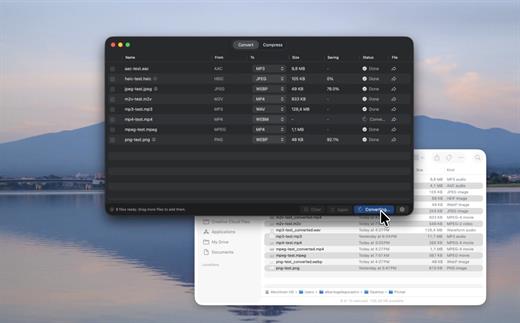
Picmal is an all-in-one offline macOS media converter and compressor for images, video, and audio, built around fast batch processing and a native Mac workflow. It supports 100+ formats, Finder integration, presets, detailed codec and bitrate controls, resizing, color space options, folder monitoring, Shortcuts automation, and privacy-friendly local processing.
What Picmal actually does
Convert, compress, and resize media files. Everything runs on your Mac, nothing touches a server.

Convert between multiple formats
Turn a PSD into a PNG, an AI file into SVG, a MOV into MP4. Pick the output format and go.

Batch processing
Drop hundreds of files at once. Drag them in, use File > Open, or right-click in Finder. No need to feed them one by one.

Presets for the usual stuff. Full control for the rest.
Built-in presets for web, social media, archival. If you want to get specific, tweak color space, resize, codecs, bitrates.

Shrink file sizes without visible quality loss
Same format, smaller file. Shrink photos before uploading or get a video under the email attachment limit

Designed for Mac
Lightweight, plays nice with Finder, Quick Actions, and Shortcuts.

Works offline
Works on a plane, at a café with terrible Wi-Fi, or when your connection just dies.

Privacy first
Your files stay on your Mac. Nothing gets uploaded anywhere.

What’s New

Version 1.5.2:


  • Release notes were unavailable when this listing was updated.
Compatibility

macOS 14 or later.

Release Name: Picmal 1.5.2
Size: 89.8 MB
Links: HOMEPAGE – NFO – Torrent Search

Download: RAPiDGATOR

5 Comments
May 7

Spectro 1.1.1

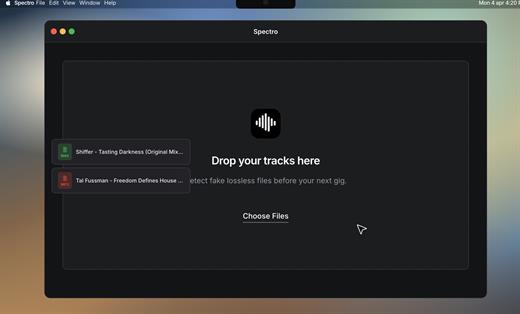
Spectro is a macOS audio analysis tool that detects fake lossless tracks by scanning WAV, AIFF, FLAC, and MP3 files for spectral cutoffs that reveal lossy sources disguised as high-quality audio. Built for DJs and collectors, it runs fully offline, batch-processes up to 100 files, integrates with Finder, and returns clear LOSSLESS, FAKE, or MEDIUM verdicts in seconds.

Scan your entire library at once.
Drop a folder of Beatport downloads or USB promo tracks. Spectro processes up to 100 files simultaneously and delivers an instant verdict for each one.

Fake lossless files, tagged in red.
Right in Finder.
Spectro writes color tags directly to your files in macOS Finder. Open your DJ Pool folder and every track is already marked — no app to keep open, no renaming, no extra steps.

What’s New
Version 1.1.1:


  • Release notes were unavailable when this listing was updated.
Compatibility

macOS 13 or later.


Release Name: Spectro 1.1.1
Size: 3.7 MB
Links: HOMEPAGE – NFO – Torrent Search

Download: RAPiDGATOR
6 Comments
May 7

HazeOver 1.9.7

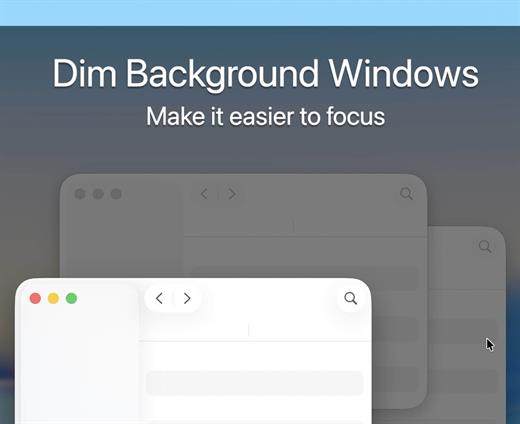
HazeOver helps you focus by emphasizing an active window by fading out inactive ones.


  • Heavy multi-tasking kills your concentration. All those tweets, emails, chat messages and lolcats staring back at you from the background. They strive for your attention. And you only have that much of it.
  • Don’t let yourself drown in scores of open windows. Hiding, switching, looking for the right one, more hiding, more switching. Calm down, breathe in, breathe out, launch HazeOver, and finally focus on what’s you’ve been up to.
  • HazeOver automatically highlights an active window or app when you switch windows. The less important things gently fade away in the background, improving your attention span.
  • Set the hazing intensity and speed to your liking. Be it a soft dimming, an undemanding hint of focus. Or a powerful dark background for outright dedication to your current task.
What’s New

Version 1.9.7:


  • Release notes were unavailable when this listing was updated.
Compatibility

macOS 12 or later


Release Name: HazeOver 1.9.7
Size: 4.5 MB
Links: HOMEPAGE – NFO – Torrent Search

Download: RAPiDGATOR

5 Comments
May 7

Mp3tag 1.12.1

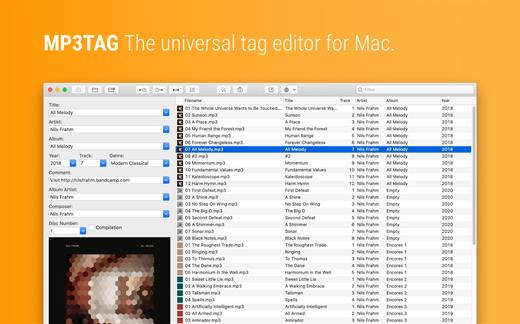
Mp3tag is a powerful and easy-to-use tool to edit metadata of audio files. Musicians, DJs, podcasters, and audio-enthusiasts use it for many different aspects of handling audio files.

It supports batch tag-editing for multiple files at once, covering many audio formats from MP3, over MP4, and M4V (yes, that’s video!) to FLAC, OGG, OPUS, AIF, DSF, MPC, and WAV.

Furthermore, it supports online database lookups from Discogs and MusicBrainz, allowing to gather proper tags and download cover art for music libraries.

It offers renaming files based on the tag information, replacing characters or words in tags and filenames, importing tag information, and adjusting the size and image format of embedded cover art.

Since some of the tasks in managing a digital library are repetitive, Mp3tag allows for combining tasks into action groups, which serve as workflows for keeping consistency and order. Examples are formatting tag fields, performing case conversion, removing unwanted fields, or adjusting embedded cover art to match required sizes.

Key Features


  • Bulk-Editing of Tags for multiple files at once.
  • Editing of cover-art.
  • Renaming files based on tags.
  • Importing metadata from filenames.
  • Assign track and disc numbers via the auto-numbering wizard.
  • Importing metadata from online Tag Sources.
  • Support for Flexible Tagging, allowing for user-defined tag fields in a standardized way.
  • Applying action groups with many tasks combined into reusable workflows.
  • Support for many file types under a universal user interface.
Supported File Formats

  • MP3 (ID3v1, ID3v2.3, ID3v2.4 with UTF-8)
  • MP4/M4A/M4B/M4V (iTunes and Nero)
  • FLAC (Vorbis Comments)
  • OGG (Vorbis Comments)
  • OPUS (Vorbis Comments)
  • AIF (RIFF INFO and RIFF ID3)
  • DSF (ID3v2)
  • MPC (APEv2)
  • WAV (RIFF INFO and RIFF ID3
What’s New

Version 1.12.1:


  • Release notes were unavailable when this listing was updated.
Compatibility

macOS 10.14 or later.


Release Name: Mp3tag 1.12.1
Size: 13.4 MB
Links: HOMEPAGE – NFO – Torrent Search

Download: RAPiDGATOR
6 Comments
May 7

VideoProc Converter AI 8.10 (2026050601)

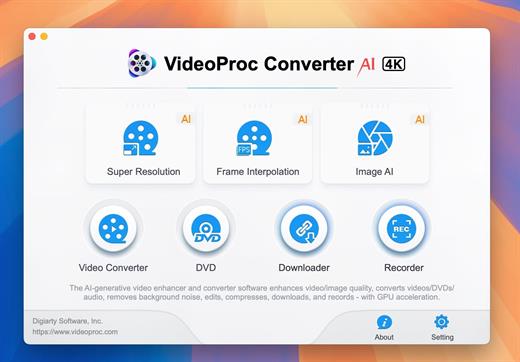
Built with AI tools for video/image/audio enhancement. Remaster, upscale, restore, colorize, convert, edit, compress, download, and record with GPU acceleration. The best video converter works with videos shot with GoPro, DJI, iPhone, Android, DSLR, mirrorless, camcorders, or other 4K cameras.

VideoProc peaks Level-3 Hardware Acceleration fully powered by Intel®, AMD®, NVIDIA® GPUs, and Apple M1/M2/M3/M4 (Pro/Max/Ultra), delivering buttery smooth (4K/8K) video processing and transcoding without compromising quality.

What’s New

Version 8.10:


  • Release notes were unavailable when this listing was updated.
Compatibility

macOS 10.15 or later


Release Name: VideoProc Converter AI 8.10 (2026050601)
Size: 256.4 MB
Links: HOMEPAGE – NFO – Torrent Search

Download: RAPiDGATOR

6 Comments
May 7

Polypane 29.0.0

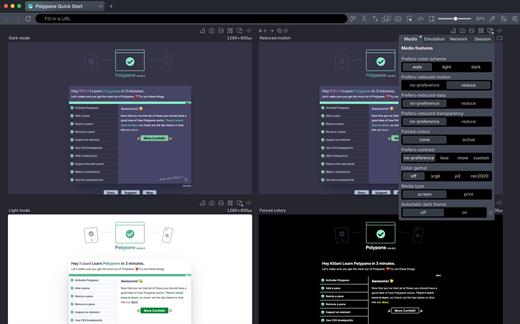
Polypane is the development browser for building responsive, fast, accessible, and SEO-friendly websites that work perfectly for everyone.
Use it alongside your editor to preview, debug and test sites across screens, devices, and user conditions. Every scroll, click, and edit is synchronized in all panes at once.

What’s New

Version 29.0.0:


  • Release notes were unavailable when this listing was updated.
Compatibility

macOS 10.15 or later


Release Name: Polypane 29.0.0
Size: 222.7 MB
Links: HOMEPAGE – NFO – Torrent Search

Download: RAPiDGATOR
6 Comments
May 7

Notepad.exe 1.4.1849

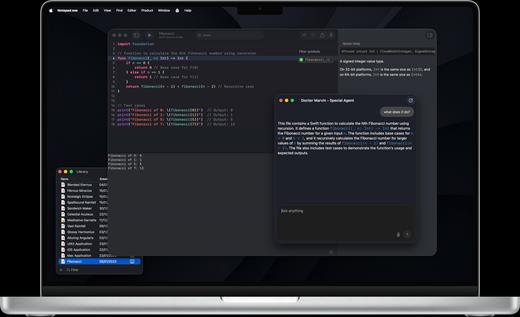
Notepad.exe is a native macOS application I’ve crafted with love to enhance your development experience. Built on a plug-and-play philosophy, it gets you coding instantly with zero setup, then scales with your needs. Whether you’re prototyping Swift apps, experimenting with Python scripts, building iOS apps with automatic simulator support, or exploring new ideas, Notepad.exe provides a streamlined environment that grows with your expertise – from simple snippets to complex projects.

Features

Built for how you actually work.
No New Project → Configure → Wait → Finally Code. Just code. Swift for iOS and Mac apps, Python for scripts and automation, JavaScript for web projects — all in one window that launches instantly.

Simple to start. Deep when you need it.
Open a file, hit run, see output — no project wizard, no indexing, no waiting. When the scratch turns serious, settings unlock the advanced setup: custom interpreters, build flags, targets.

AI completions that stay on your Mac.
Local AI processing, privacy-first. Your code never leaves your machine. Completions, refactors, and explanations from a model that runs on-device — not in someone else’s data center.

Run SwiftUI in the Simulator. No project file.
Prototype SwiftUI and UIKit screens. Test APIs. See your app on a real iPhone bezel without ever opening Xcode.

Edit SwiftPM packages. No Xcode required.
Run executables on macOS or Linux — the Linux subsystem installs itself. Recipe and oven, no kitchen remodel.

Add Swift packages without leaving the note.
Add and edit SwiftPM dependencies right in Notepad.exe, then run your project without dropping into Xcode.

Scripts and automation. Zero setup tax.
Run Python with custom interpreter settings and built-in documentation. Organize scripts in the Notes Library. Pip deps via a simple requirements panel.

Everything the big IDEs have. None of the weight.
Native performance, no splash screen, no indexing. Here’s what’s in the box.、

What’s New

Version 1.4.1849:


  • Release notes were unavailable when this listing was updated.
Compatibility

macOS 14.6 or alter


Release Name: Notepad.exe 1.4.1849
Size: 177 MB
Links: HOMEPAGE – NFO – Torrent Search

Download: RAPiDGATOR

7 Comments
May 7

OmniZip – Universal Extractor Pro 2.4.3

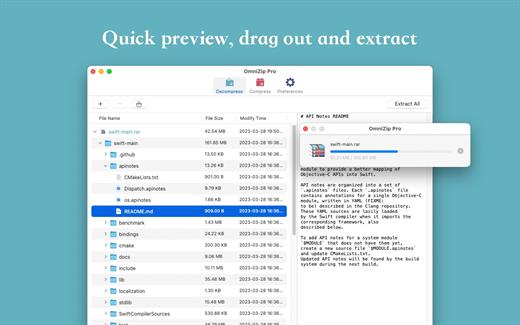
A super decompression tool, supports the decompression of RAR, 7Z, ZIP, TAR, GZIP and other more than 100 formats of files, as long as the compressed package, there is nothing OmniZip can not decompress.

Features


  • Double-click the compressed file to preview it or decompress it. You can customize the configuration.
  • Compressed package Select a file and then compress it.
  • Supports drag and unzip files directly.
  • Supports batch decompression.
  • Supports decompression of the decompressed volume package, ensuring that the compressed file of the volume is in the same directory.
  • Supports compression formats zip and 7z.
  • Supports encryption compression and volume separation compression.
  • Supports user-defined compression and decompression of filter files.
  • Supports recording previewed compressed files for next operation.
What’s New

Version 2.4.3:


  • Release notes were unavailable when this listing was updated.
Compatibility

macOS 10.13 or later


Release Name: OmniZip – Universal Extractor Pro 2.4.3
Size: 21.5 MB
Links: HOMEPAGE – NFO – Torrent Search

Download: RAPiDGATOR
4 Comments
May 6

Adobe Premiere Pro 2026 26.2.2

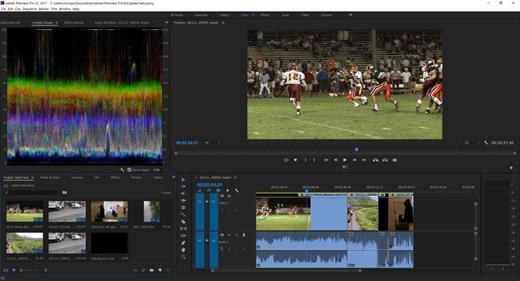
Description: Video editing that’s always a cut above. Premiere Pro is the leading video editing software for film, TV, and the web. Creative tools, integration with other Adobe apps and services, and the power of Adobe Sensei help you craft footage into polished films and videos in one seamless workflow. And Premiere Rush, our new app, is included with your subscription so you can capture footage and start editing on all your devices, anywhere.

Smart tools. Better storytelling.
Premiere Pro is used by Hollywood filmmakers, TV editors, YouTubers, videographers — anyone with a story to tell, including you.

Stay in your creative flow.
Premiere Pro is the industry leader for editing everything from fast-turn TV series to feature films. Integrated, efficient workflows let you polish your work without leaving your timeline. And automated tools powered by Adobe Sensei speed up time-consuming tasks, so you can focus on your story.

Any camera. Any format. Any platform.
Edit footage in any modern format, from 8K to virtual reality. Broad native file support and simple proxy workflows make it easy to work with your media, even on mobile workstations. Delivering content that’s optimized for any screen or platform is faster than ever.

Everything you need. Right where you need it.
Along with tools for color, audio, and graphics, Premiere Pro works seamlessly with other apps and services, including After Effects, Adobe Audition, and Adobe Stock. Open a Motion Graphics template from After Effects or download one from Adobe Stock and customize it — all without leaving the app. And Premiere Pro integrates with hundreds of partner technologies.

Precise and simple color grading
Take the guesswork out of curve adjustments with innovative Lumetri Color tools. Each curve has two axes with paired values, making selective color grading easy and accurate.

Improve audio instantly
New sliders in the Essential Sound panel let you dial down or remove background noise and reverb for incredible results.

Infographics with Motion Graphics templates
Drag and drop spreadsheets into new infographics Motion Graphics templates to quickly generate visualizations of your data. Any updates to your spreadsheets are automatically updated in your infographic.

Release Name: Adobe Premiere Pro 2026 26.2.2
Size: 4.1 GB
Links: HOMEPAGE – NFO – Torrent Search

Download: RAPiDGATOR

3 Comments
May 6

Adobe Media Encoder 2026 26.2.2

Description: Ingest, transcode, create proxies, and output any format you can imagine. This powerful media management tool allows you to work with media in a unified way across applications. Tight integration with Adobe Premiere Pro CC, After Effects CC, and other applications provides a seamless workflow.

Key Features
- Support for 8K H.264 export
- Export XAVC QFHD Long GOP 4:2:2 formats
- Hardware-accelerated HEVC encoding on Windows 10 with 7th Generation (or later) Intel® Core™ processors and Intel Graphics enabled
- Improved RED camera format decoding
- Improved Sony RAW/X-OCN camera format decoding
- Hardware-accelerated H.264 encoding on Windows 10 with 6th Generation (or later) Intel® Core™ processors and Intel Graphics enabled
- Hardware-accelerated H.264 and HEVC encoding on Mac OS 10.13 systems with supported hardware
- Support for importing Canon C200 camera formats
- Support for importing Sony Venice camera formats
- RED camera Image Processing Pipeline[IPP2] support
- Destination Publishing support for new Twitter 280-character limit
- Channel selection when publishing to YouTube and Vimeo
- Playlist selection when publishing to YouTube
- Page selection when publishing to Facebook
- Add custom titles when publishing to YouTube, Facebook, or Vimeo
- Add custom video thumbnails when publishing to YouTube
- Notification for missing items in queue before encoding
- H.264 adaptive bitrate presets automatically choose best output bitrate based on source frame size and frame rate
- Animated GIF export on macOS and Windows
- Time Tuner effect improvements
- Newly optimized list of H.264 presets
- Format support for RF64 WAV Decode/Encode, decode for Sony X-OCN, and QuickTime DNx Smart Rendering
- Warning when importing non-native QuickTime sources
- Timecode modification for 720p 59.94 media
- Destination Publishing to Adobe Stock Contributor
- Adobe Team Projects support
- Support for Color Profiles from After Effects sources
- Automatically relinked assets when importing a sequence
- Option to maintain playback in Premiere Pro while rendering in Media Encoder
- Streamlined bit depth and alpha channel settings (QuickTime only)
- Export support for ambisonic audio (H.264 only)
- Support for Hybrid LOG Gamma (HLG)
- Support for HDR in HEVC (H.265) export Export support for Panasonic AVC-Long GOP Op1b

Release Name: Adobe Media Encoder 2026 26.2.2
Size: 2.7 GB
Links: HOMEPAGE – NFO – Torrent Search

Download: RAPiDGATOR
2 Comments