Please REGISTER or RENEW your account on RAPiDGATOR.net and support us by doing through all RAPiDGATOR working download links on main posts...
May 6

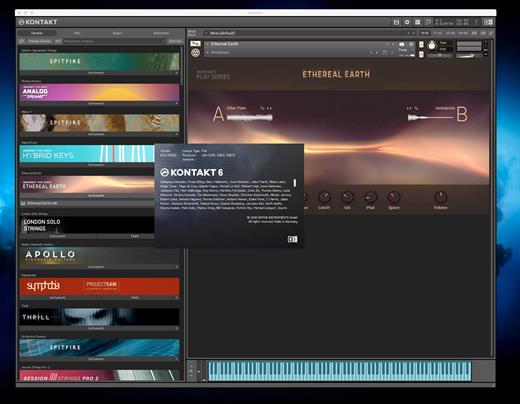
KONTAKT 8.10.1

KONTAKT 8 The virtual instrument platform reinvented.
Imagine any sound – Kontakt lets you find it, create it, and transform it. The latest edition of our revolutionary sampling platform combines a brand-new set of intelligent tools with countless sound design options, redefining how you generate ideas and make music. A huge choice of sound. Kontakt hosts the world’s largest range of virtual instruments. With thousands of libraries, it’s the gateway to quality sound from Native Instruments, our official partners, and scores of indie developers. Plus, everything is completely tweakable, so you can make any sound your own.

A huge choice of sound

Kontakt hosts the world’s largest range of virtual instruments. With thousands of libraries, it’s the gateway to quality sound from Native Instruments, our official partners, and scores of indie developers. Plus, everything is completely tweakable, so you can make any sound your own.

What’s new in Kontakt 8?

Our most feature-packed release yet is here to transform the way you generate, modulate, and playback sound. Plus, it’s packed with performance updates so you can work faster than ever.

Smash writer’s block

Tools add a completely new layer of creative features to get the ideas flowing. And they work with any Kontakt instrument, old and new. For our first drop, we’re launching MIDI content and randomization features with Chords and Phrases, designed to spark new ideas and get you in the zone fast.

Fast and fun loop control

Leap is an ultra-fast and playful way to play and manipulate loops. Spark fresh ideas, sprinkle in expressive performance effects, or just jam. Breathe new life into your sample collection or try something totally fresh with our new Leap Expansions series, starting with 12 curated packs for specific genres and styles.

Get going with hundreds of included instruments

Kontakt’s Factory Library comes packed with over hundreds of meticulously sampled instruments. Get started with a huge playable and tweakable selection of acoustic and electronic options, including the renowned collection from Orchestral Tools, plus Hybrid Keys.

Dream it, build it

All your favorite Kontakt instruments are built right here. The powerful feature set makes Kontakt the first choice for instrument developers worldwide, and it just got even bigger with enhanced synth capabilities, including real-time wavetable, frequency modulation, and ring modulation oscillators.

What’s New

Version 8.10.1:


  • Release notes were unavailable when this listing was updated.
Compatibility

macOS 13.0 or later

Release Name: KONTAKT 8.10.1
Size: 1.7 GB
Links: HOMEPAGE – NFO – Torrent Search

Download: RAPiDGATOR

4 Comments
May 5

Adobe Master Collection 2026 2.0

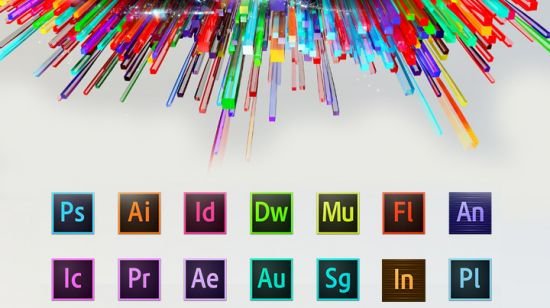
Description: As I hope you know, the Adobe Master Collection package does not officially exist in nature; Adobe has never released it. But, nevertheless, he is in front of you! Moreover, it is assembled on the basis of a modern installer produced by Adobe, the use of which for this assembly became possible thanks to the joint efforts of your humble servant and the well-known PainteR. We both worked hard to make this package come to life. Adobe Master Collection is a collection of applications from the Creative Cloud line, combined with a multilingual installer with the ability to select the installation path and interface language of the installed programs. In terms of functionality, everything is very similar to the well-proven Adobe Master Collection CS6 in the past. Only, the installer interface has undergone major changes compared to its namesake in the Creative Suite 6 line, the composition of the package has changed somewhat, and the versions of the programs themselves are definitely newer.
Pacakge Content
Adobe Acrobat Pro 64-bit (Russian and English)
Adobe Acrobat Pro 32-bit (Russian and English)
Adobe After Effects 2026 (Russian and English)
Adobe Animate 2024 (Russian and English)
Adobe Audition 2026 (English only)
Adobe Bridge 2026 (Russian and English)
Adobe Character Animator 2026 (Russian and English)
Adobe Dimension (English only)
Adobe Dreamweaver 2021 (Russian and English)
Adobe Fresco (Russian and English)
Adobe Illustrator 2026 (Russian and English)
Adobe InCopy 2026 (Russian and English)
Adobe InDesign 2026 (Russian and English)
Adobe Lightroom Classic (Russian and English)
Adobe Media Encoder 2026 (Russian and English)
Adobe Photoshop 2026 (Russian and English)
Adobe Premiere Pro 2026 (Russian and English)
Adobe Premiere Rush (Russian and English)
Adobe Substance 3D Designer (English only)
Adobe Substance 3D Modeler (English only)
Adobe Substance 3D Painter (English only)
Adobe Substance 3D Sampler (English only)
Adobe Substance 3D Stager (English only)
Adobe XD (Russian and English)

FAQ

Question: I can’t click the “Continue” button because the window contents don’t fit within the window itself, and the button is out of sight. What should I do?
Answer: This happens occasionally on poorly configured operating systems. There’s a TAB key on your keyboard. Use it to navigate to the desired menu item.
Question: The installation was not completed due to an unknown error. What should I do?
Answer: Please review the error code explanation . I also recommend reviewing the installation log. It is located at C:\Program Files (x86)\Common Files\Adobe\Installers\Install.log. You may find more detailed information about the problem and how to resolve it there.
Question: My antivirus detected a Trojan in this release. How so?
Answer: Some antivirus programs may falsely report that this release contains viruses. They typically point to the files crack.exe, Cinema 4D.exe, templib.dll, and xzlib0.dll. However, I can assure you that these are all false positives! To resolve this, simply disable your antivirus during the installation of Acrobat and the first launch of Cinema 4D (if you installed After Effects with it). I’ll explain how to do this using the Windows security mechanism as an example. First, I recommend disabling SmartScreen. And not just during installation, but PERMANENTLY! To do this, launch the Windows Security app and select “App & browser control” -* “Reputation-based protection settings” -* “Check apps and files” -* Disable. *In Windows 10, there’s one less intermediate step. Next, disable the main antivirus module. But this is temporary. In the Windows Security app, select “Virus & threat protection” -* “Manage settings” and move all the switches to the Off position. After the installation is complete, you can return the switches to their original positions. And if your antivirus complains about the last two files in the list, simply add them to the antivirus exclusions.
Question: What do I need to do to access cloud storage and other online services?
Answer: To do this, connect to the Adobe server with your ID by selecting “Help->Sign In” from the program menu and logging in. I strongly recommend closing the window prompting you to launch the trial version by clicking the “X.” This will prevent you from encountering the annoying trial expiration message in the future! Online services will be available after restarting the program.
Question: What’s the status of the medications in the current build?
Answer: The build was patched using the work of uncia & CGP Co. A number of files were patched, which I then integrated into the installer. You don’t need to do anything to patch them! Just in case, the original files are saved with the *.bak extension. If you want to get the original, unpatched product, simply remove this extension from these files and replace the existing patched files with them.
Question: What about disabling spyware modules?
Answer: The following spyware modules are disabled: Log Transport Application (LogTransport2.exe), CRLog Transport Application (CRLogTransport.exe), Adobe Crash Processor (Adobe Crash Processor.exe), Adobe Crash Report Window (AdobeCrashReportWindow.exe), Adobe Crash Report Service (AdobeCrashReport.exe), and Crashpad Handler (crashpad_handler.exe). Just in case, the files that initialize them are saved with the *.bak extension. If you suddenly want to restore their functionality, simply remove this extension from these files. The crack included in the build also removes Adobe Genuine Service if this module was previously installed with other Adobe programs (this module is not installed with this build).
Question: When opening a program, I get the error “Adobe Creative Cloud, needed to resolve the problem, is missing or damaged…”. What should I do?
Answer: You have leftover installations of Adobe Creative Cloud components on your system. These need to be removed. To do this, use the Adobe Creative Cloud Cleaner Tool . Select “All” as the component to remove, then “Adobe Creative Cloud Desktop”. Then, reinstall the offending program. This cleanup and reinstallation will not damage any previously installed programs.
Question: After installing Photoshop, I get the error “SSE 4.2 or later.” What should I do?
Answer: According to Adobe , Photoshop 2021 and later requires a processor with support for SSE 4.2 or later. Unfortunately, if your processor doesn’t support this architecture, this version of Photoshop will not work on your computer.
Question: I can’t download neurofilters in Photoshop. Why?
Answer: If you’re being denied downloading neurofilters, delete the folder C:\Users\<username>\AppData\Roaming\Adobe\UXP\PluginsStorage\PHSP\27\Internal\com.adobe.nfp.gallery\PluginData. See the number 27 in the path? If you have folders 26, 25, and so on in addition to 27, you need to delete them as well! Afterward, restart the program – the filters should start downloading. I recommend downloading all the necessary filters at once, as deleting this folder also deletes all previously downloaded neurofilters.
Question: My Generative AI isn’t working. Is there a way to resolve this?
Answer: Only paid subscribers can use generative tools. Even then, they have a limit on the number of generations. You can also use generative tools during a free 14-day trial period. So, if you really need generative tools, register a new business account (14-day trial vs. 7-day trial for personal accounts) and activate the trial period. Then, log in to the program using the “Help->Sign In” menu. After 14 days, register a new ID. Continue doing this until you’re done. Unfortunately, there are currently no other options. For residents of the Russian Federation, the process is somewhat more complicated. Since Adobe has officially withdrawn from Russia, you’ll need to use a VPN both during registration and while using generative tools. And not just in your browser! You need a VPN that intercepts internet connections and those of other programs on your computer, particularly Adobe applications. Oh, and before registering a new account, don’t forget to log out of your old one, both in your programs and your browser. It’s also a good idea to clear cookies for the Adobe website in your browser. That’s all! Please don’t bother me with any questions about generative options.
Question: When I launch Animate, the start screen is just a black background. What should I do?
Answer: If the start screen isn’t important to you, simply use the program menu to create or open a file. If you want to see the start screen at startup, you need to connect to the Adobe server with your ID by selecting “Help->Sign In” from the program menu and logging in. The start screen will work normally.
Question: Acrobat Pro requires authorization when launching. Is this normal?
Answer: Your Acrobat Pro installation was untreated. This most likely occurred because the program was installed via an update or because the crack was blocked by your antivirus. In this case, you need to run the cracker manually with your antivirus disabled. The cracker paths in the Master Collection distribution are: ..\Adobe 2026\products\APRO_x32\crack.exe for the 32-bit version, ..\Adobe 2026\products\APRO\crack.exe for the 64-bit version. Run the cracker as administrator and wait for the message “Cracking complete. Enjoy!” to appear. After that, you can freely use the cured application.
Question: Can I install both 32-bit and 64-bit Acrobat Pro simultaneously?
Answer: Yes, it’s possible, although I don’t understand why this is necessary…
Question: I can’t connect to the Adobe server with my ID from Acrobat Pro. What should I do?
Answer: Unfortunately, this is a quirk of the program. It’s a bit buggy.
Question: How do I switch between the old and new Acrobat Pro interfaces?
Answer: New -* Old: In the upper left corner of the program, click “Menu” and select “Disable new Acrobat” from the drop-down menu, then restart the program. Old -* New: In the top menu, click “View” and select “Enable new Acrobat” from the drop-down menu, then restart the program.
Question: Why am I blocked from creating new projects in Premiere Rush?
Answer: For the program to function properly, you need to connect to the Adobe server with your ID by selecting “Help->Sign In” from the program menu and logging in.
Question: Why does Fresco require authorization immediately after launch?
Answer: The program doesn’t allow use without authorization. No other option!
Question: After launching Fresco, it closes almost immediately with a notification that I don’t have time to read. What’s wrong?
Answer: The notification most likely states that the program requires a GPU with Direct X that supports Feature Level 12.1. Apparently, your GPU doesn’t support this version. I can’t help with that. Use version 5.5.5 or earlier. Although it lists similar system requirements, the program runs with Feature Level 12.0.
Question: After launching Fresco, a notification appears stating that the program requires Microsoft Edge WebView2 Runtime. What should I do?
Answer: In the notification window, click “Download.” The official Microsoft Edge WebView2 page will open in your browser. Scroll to the “Download the WebView2 Runtime” section. Under the “Evergreen Bootstrapper” heading, click “Download,” accept the license agreement, and download the Microsoft Edge WebView2 Runtime installer. Run the downloaded installer and wait for it to complete. Fresco will then start working.
Question: Even though I select English during installation, Fresco is still in Russian. What should I do?
Answer: This type of installer doesn’t allow the user to select a language for Fresco. The language is selected automatically based on the OS’s preferred language setting. If you want to change your preferred language, go to Settings->Time & Language->Language->Preferred languages ​​and select English above Russian in the list. This will change Fresco’s interface language. However, keep in mind that this is a system setting, not a specific program’s setting. The interface language of some other programs and even some OS interface elements may also change!
Question: Even though I select English during installation, XD is still in Russian? What should I do?
Answer: This type of installer doesn’t allow the user to select a language for XD. The language is selected automatically based on the operating system language. However, you can change the program interface language after the application is installed. To do this, launch the program and open any template. Then, log in by going to “Help->Sign In…” in the program menu. Restart the program, open the template again, then click “Edit->Preferences->Language” in the program menu and set the desired application interface language.
Question: When I try to save a file in InDesign, I see a black window with a waiting icon on top. What’s wrong?
Answer: InDesign has been able to save files to the cloud for some time now. And this saving option is selected by default. But you’re not logged in! This means the cloud is unavailable to you. Hence the unloading window. However, there are two solutions to this problem. First, disconnect from the internet and try saving the file; the window will now fill up, and due to the lack of an internet connection, the option “Save to your device” will appear. Second, log in to the program with your Adobe ID and try saving the file; the window will now load, and you’ll see the option to save the file to the cloud, but in the lower left corner of the window you’ll see an alternative save button, “On your computer.” You only need to do either of these steps once, and the option to save files to your computer will be selected by default.
Question: Illustrator and InDesign are consuming a lot of resources. Is there anything I can do?
Answer: Try killing the CoreSync.exe process in Task Manager. Then rename or delete the file that launches this process. It’s located at: C:\Program Files (x86)\Adobe\Adobe Sync\CoreSync\CoreSync.exe. According to reviews, this significantly reduces the program’s resource consumption. Another option: log in using the Help->Sign In… menu.
Question: When I first launch Premiere Pro, it starts in English, even though I selected a different interface language during installation. Why is that?
Answer: Another bug on the part of Adobe’s incompetent programmers. Apparently, they mixed up the order of the commands responsible for creating configs and reading them. The error is harmless. The second time I launch the program, it will start in the selected interface language.
Question: When I launch Premiere Pro, After Effects, Media Encoder, or Audition, the application closes with error 0xc0000142! The same thing happens with InDesign. What’s wrong?
Answer: Starting with version 24.1, these applications require your processor to support Advanced Vector Extensions 2 (AVX2). If your processor doesn’t support this technology, none of these programs will launch, returning the same error. I recommend rolling back to a version earlier than 24.1. For InDesign, roll back to a version earlier than 20.0.
Question: When trying to use the transcription plugin in Premiere Pro or Media Encoder, the program endlessly downloads language packs. What’s wrong?
Answer: Adobe Speech to Text language packs are not included in this build. They are large, 800 MB each. However, I’ve kept in mind the needs of those who actually use the plugin and created a build specifically for them called Adobe Speech to Text for Premiere Pro (also compatible with Media Encoder), which allows them to install any of the Speech to Text Language Packs. Look for it on trackers!
Question: Can you tell me more about the ability to use Maxon Cinema 4D as a standalone application?
Answer: Maxon Cinema 4D is forced to install as part of the Adobe After Effects 2026 suite. By default, it’s a trial version. But I’ve fixed it for you (using the n1z method). When you first launch the program, you’ll see a License Manager window with an error message. Just close it. The program will automatically launch again. But this time, it’s completely free of greed! Just to clarify, this is the version without RedShift. Also, you should know that the developers have removed the Russian interface from Maxon Cinema 4D starting with the 2024 version. So, don’t blame me for the lack of any of that.
Question: Is there any way to update applications included in the Master Collection?
Answer: I strongly advise against updating the applications themselves or using the Creative Cloud Desktop app, as this will almost certainly result in the installation failing. I recommend using my own builds with updated versions of the programs. The new version can be installed over the old one if both versions are from the same series (for example, both versions have the “2026” badge). If you have the Master Collection and only need to update Photoshop, you can use a separate Photoshop build—everything will update correctly, with all your settings carried over to the new version.

Notes

ATTENTION! The build includes a new, more advanced mechanism for blocking pop-up windows informing about the end of the trial period. A one-time OS reboot may be required to initiate it! I would also like to draw attention to the fact that all the “tails” from the old blocking methods will be cleaned up. This applies to entries in hosts, rules in Windows Firewall and tasks in the Task Scheduler. In this regard, I recommend that you reinstall programs installed from my builds earlier, even if their version has not changed with the release of the Master Collection. This ensures that programs will not be left without protection from ill-fated pop-ups.

Release Name: Adobe Master Collection 2026 2.0
Size: 42 GB
Links: HOMEPAGE – NFO – Torrent Search

Download: RAPiDGATOR

1 Comments
May 5

Adobe Media Encoder 2026 v26.2 [FINAL] (x64) Pre-Cracked

Description: Ingest, transcode, create proxies, and output any format you can imagine. This powerful media management tool allows you to work with media in a unified way across applications. Tight integration with Adobe Premiere Pro CC, After Effects CC, and other applications provides a seamless workflow.

Key Features
- Support for 8K H.264 export
- Export XAVC QFHD Long GOP 4:2:2 formats
- Hardware-accelerated HEVC encoding on Windows 10 with 7th Generation (or later) Intel® Core™ processors and Intel Graphics enabled
- Improved RED camera format decoding
- Improved Sony RAW/X-OCN camera format decoding
- Hardware-accelerated H.264 encoding on Windows 10 with 6th Generation (or later) Intel® Core™ processors and Intel Graphics enabled
- Hardware-accelerated H.264 and HEVC encoding on Mac OS 10.13 systems with supported hardware
- Support for importing Canon C200 camera formats
- Support for importing Sony Venice camera formats
- RED camera Image Processing Pipeline[IPP2] support
- Destination Publishing support for new Twitter 280-character limit
- Channel selection when publishing to YouTube and Vimeo
- Playlist selection when publishing to YouTube
- Page selection when publishing to Facebook
- Add custom titles when publishing to YouTube, Facebook, or Vimeo
- Add custom video thumbnails when publishing to YouTube
- Notification for missing items in queue before encoding
- H.264 adaptive bitrate presets automatically choose best output bitrate based on source frame size and frame rate
- Animated GIF export on macOS and Windows
- Time Tuner effect improvements
- Newly optimized list of H.264 presets
- Format support for RF64 WAV Decode/Encode, decode for Sony X-OCN, and QuickTime DNx Smart Rendering
- Warning when importing non-native QuickTime sources
- Timecode modification for 720p 59.94 media
- Destination Publishing to Adobe Stock Contributor
- Adobe Team Projects support
- Support for Color Profiles from After Effects sources
- Automatically relinked assets when importing a sequence
- Option to maintain playback in Premiere Pro while rendering in Media Encoder
- Streamlined bit depth and alpha channel settings (QuickTime only)
- Export support for ambisonic audio (H.264 only)
- Support for Hybrid LOG Gamma (HLG)
- Support for HDR in HEVC (H.265) export Export support for Panasonic AVC-Long GOP Op1b

Release Name: Adobe Media Encoder 2026 v26.2 [FINAL] (x64) Pre-Cracked
Size: 2.7 GB
Links: HOMEPAGE – NFO – Torrent Search

Download: RAPiDGATOR

2 Comments
May 5

Adobe Premiere Pro 2026 v26.2 [FINAL] (x64) Pre-Cracked

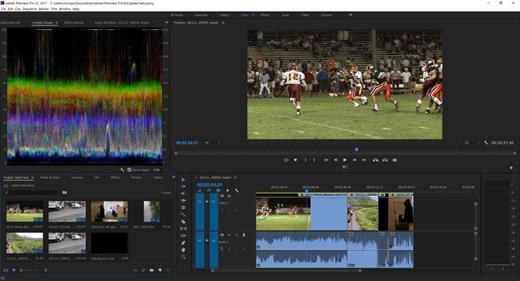
Description: Video editing that’s always a cut above. Premiere Pro is the leading video editing software for film, TV, and the web. Creative tools, integration with other Adobe apps and services, and the power of Adobe Sensei help you craft footage into polished films and videos in one seamless workflow. And Premiere Rush, our new app, is included with your subscription so you can capture footage and start editing on all your devices, anywhere.

Smart tools. Better storytelling.
Premiere Pro is used by Hollywood filmmakers, TV editors, YouTubers, videographers — anyone with a story to tell, including you.

Stay in your creative flow.
Premiere Pro is the industry leader for editing everything from fast-turn TV series to feature films. Integrated, efficient workflows let you polish your work without leaving your timeline. And automated tools powered by Adobe Sensei speed up time-consuming tasks, so you can focus on your story.

Any camera. Any format. Any platform.
Edit footage in any modern format, from 8K to virtual reality. Broad native file support and simple proxy workflows make it easy to work with your media, even on mobile workstations. Delivering content that’s optimized for any screen or platform is faster than ever.

Everything you need. Right where you need it.
Along with tools for color, audio, and graphics, Premiere Pro works seamlessly with other apps and services, including After Effects, Adobe Audition, and Adobe Stock. Open a Motion Graphics template from After Effects or download one from Adobe Stock and customize it — all without leaving the app. And Premiere Pro integrates with hundreds of partner technologies.

Precise and simple color grading
Take the guesswork out of curve adjustments with innovative Lumetri Color tools. Each curve has two axes with paired values, making selective color grading easy and accurate.

Improve audio instantly
New sliders in the Essential Sound panel let you dial down or remove background noise and reverb for incredible results.

Infographics with Motion Graphics templates
Drag and drop spreadsheets into new infographics Motion Graphics templates to quickly generate visualizations of your data. Any updates to your spreadsheets are automatically updated in your infographic.

Release Name: Adobe Premiere Pro 2026 v26.2 [FINAL] (x64) Pre-Cracked
Size: 4.1 GB
Links: HOMEPAGE – NFO – Torrent Search

Download: RAPiDGATOR

3 Comments
May 5

Adobe Photoshop 2026 v27.6 [FINAL] (x64) Pre-Cracked

Description: Reimagine reality with Photoshop. Millions of designers, photographers, and artists around the world use Photoshop to make the impossible possible. From posters to packaging, basic banners to beautiful websites, unforgettable logos to eye-catching icons, Photoshop keeps the creative world moving. With intuitive tools and easy-to-use templates, even beginners can make something amazing.

The creative world runs on Photoshop.
Millions of designers, photographers, and artists around the world use Photoshop to make the impossible possible.

Designed for anyone to design anything.
From posters to packaging, basic banners to beautiful websites, unforgettable logos to eye-catching icons, Photoshop keeps the creative world moving. With intuitive tools and easy-to-use templates, even beginners can make something amazing.

Not just photo taking. Breathtaking.
Whether you are looking for everyday edits or total transformations, our graphic design software offers a complete set of professional photography tools to turn your snapshots into works of art. Adjust, crop, remove objects, retouch, and repair old photos. Play with color, effects, and more to turn the ordinary into something extraordinary.

Power to the paintbrush.
Draw and paint whatever you dream up with tools designed especially for illustrators. Paint in perfectly symmetrical patterns. Get polished looks with stroke smoothing. And create with pencils, pens, markers, and brushes that feel real including more than 1,000 from celebrated illustrator Kyle T. Webster.

Symmetry mode
Paint in perfect symmetry with a new mode that lets you define your axes and choose from preset patterns like circular, radial, spiral, and mandala.

New Content-Aware Fill experience
A dedicated workspace lets you select the exact pixels to use for fills, and Adobe Sensei makes it easy to rotate, scale, and mirror them.

Frame tool
Create shape or text frames to use as placeholders on your canvas. Drag and drop images to fill the frames and they all scale to fit.

Release Name: Adobe Photoshop 2026 v27.6 [FINAL] (x64) Pre-Cracked
Size: 5.7 GB
Links: HOMEPAGE – NFO – Torrent Search

Download: RAPiDGATOR
2 Comments
May 5

Adobe Illustrator 2026 v30.4 [FINAL] (x64) + Fix

Description: The industry-standard vector graphics software is used by millions of designers and artists to create everything from gorgeous web and mobile graphics to logos, icons, book illustrations, product packaging, and billboards.

Iconic work at any size.
Get all the drawing tools you need to turn simple shapes and colors into sophisticated logos, icons, and graphics. Illustrator artwork is vector-based design software, so it can scale down for mobile screens and up to billboard size . and always look crisp and beautiful.

Gorgeous typography that says it all.
Incorporate a company name into a logo, create a flyer, or mock up a website design with the best type tools out there. Add effects, manage styles, and edit individual characters to create typographic designs that perfectly express your messages.

Draw attention everywhere.
Create freehand drawings, or trace and recolor graphics to turn them into works of art. Use your illustrations anywhere, including printed pieces, presentations, websites, blogs, and social media.

Pro power comes standard.
Illustrator launches, saves, and renders effects faster than ever before. Reuse your vector graphics and quickly access unlimited fonts. Work seamlessly with other Creative Cloud apps like Photoshop, InDesign, XD, and Premiere Pro. Your graphics, styles, and text are stored in the cloud, so they.re always up to date and at your fingertips.

Release Name: Adobe Illustrator 2026 v30.4 [FINAL] (x64) + Fix
Size: 2.9 GB
Links: HOMEPAGE – NFO – Torrent Search

Download: RAPiDGATOR

2 Comments
May 5

Topaz Video 1.4.1

Description: Ultra smooth. Ultra sharp. Ultra steady. Topaz Video is a professional, AI-powered video enhancement software that lets you denoise low-light footage, recover and upscale old archival videos to 4K, restore focus, and adjust frame rate by creating new frames out of thin air. Available on Mac and Windows.

Trusted by major film studios and creative pros everywhere.
Denoise with cinema-level detail. Create new frames with frame interpolation. And stabilize the camera after the moment has already passed.

Filmmakers & Editors
Restore, upscale, and refine footage for professional post-production workflows.

Archivists & Historians
Preserve and modernize archival film, VHS, and historical footage with clarity.

Creators & Influencers
Enhance social media videos with sharper detail, higher resolution, and smoother motion.

Hobbyists & Enthusiasts
Improve old family videos and personal projects to look like they were shot today.

System Requirements:
Windows Operating System: 11 (most updated version recommended)
CPU: Intel OR AMD with AVX2 instructions
System Memory (RAM): 16 GB (32 GB or more recommended)
Graphics Card (NVIDIA): NVIDIA GTX 900 series or higher, 6GB VRAM
Graphics Card (AMD): AMD Radeon 500 series or higher, 6GB VRAM
Graphics Card (Intel): Intel ARC A750
CPU Release Year: 2016 or newer

Release Name: Topaz Video 1.4.1
Size: 4.62 GB
Links: HOMEPAGE – NFO – Torrent Search

Download: RAPiDGATOR
1 Comments
May 5

Bandizip Enterprise v7.43 (x86/x64) + Fix

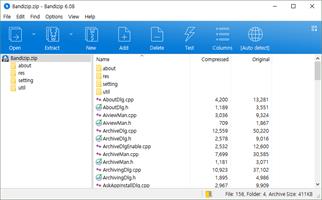
Description: BandiZip is an intuitive and fast archiving application that supports WinZip, 7-Zip, and WinRAR, as well as other archive formats. BandiZip supports for ZIP, 7Z, RAR, ALZ, EGG, TAR, BH, LZH, GZ, BZ2, ISO, CAB, WIM, XZ, ARJ, and Z archives files and users can create self-extracting files (.EXE) and multi-volume (split) archives files.


Features :


  • Bandizip has very fast Zip algorithm for compression & extraction by “Fast Drag and Drop” and “High Speed Archiving” function. When you archive multimedia files (AVI, WMV, MP3…) or archived files (ZIP, RAR, 7Z…), you can’t get good compression results.
  • These files are hard to compress and sometimes the file size could be bigger than the original one. Bandizip’s “High Speed Archiving” function will allow you to compress or bypass the files its own algorithm. It will increase the archiving speed dramatically.
  • A number of file archiving software extract files to temporary folder, and then it copies the files to the targeted folder. BandiZip’s “Fast Drag & Drop” function does not use temporary folder, and it just extracts to the targeted folder directly. It will increase the extraction speed dramatically.
  • Another advantage of BandiZip is that it supports Unicode system perfectly. BandiZip has “Code Page”, and it will allow you to select a language in archive without breaking international characters. With “Fast Drag & Drop”, “High Speed Archiving”, and “Code Page” functions, BandiZip might be the sensation in archiving software market.
Release Names: Bandizip Enterprise v7.43 (x86/x64) + Fix
Size: 13 MB
Links: HOMEPAGE – NFO – Torrent Search

Download: RAPiDGATOR
5 Comments
May 5

Bandizip Professional v7.43 + Fix

Description: BandiZip is an intuitive and fast archiving application that supports WinZip, 7-Zip, and WinRAR, as well as other archive formats. BandiZip supports for ZIP, 7Z, RAR, ALZ, EGG, TAR, BH, LZH, GZ, BZ2, ISO, CAB, WIM, XZ, ARJ, and Z archives files and users can create self-extracting files (.EXE) and multi-volume (split) archives files.


Features :


  • Bandizip has very fast Zip algorithm for compression & extraction by “Fast Drag and Drop” and “High Speed Archiving” function. When you archive multimedia files (AVI, WMV, MP3…) or archived files (ZIP, RAR, 7Z…), you can’t get good compression results.
  • These files are hard to compress and sometimes the file size could be bigger than the original one. Bandizip’s “High Speed Archiving” function will allow you to compress or bypass the files its own algorithm. It will increase the archiving speed dramatically.
  • A number of file archiving software extract files to temporary folder, and then it copies the files to the targeted folder. BandiZip’s “Fast Drag & Drop” function does not use temporary folder, and it just extracts to the targeted folder directly. It will increase the extraction speed dramatically.
  • Another advantage of BandiZip is that it supports Unicode system perfectly. BandiZip has “Code Page”, and it will allow you to select a language in archive without breaking international characters. With “Fast Drag & Drop”, “High Speed Archiving”, and “Code Page” functions, BandiZip might be the sensation in archiving software market.
Release Name: Bandizip Professional v7.43 + Fix
Size: 8 MB
Links: HOMEPAGE – NFO – Torrent Search

Download: RAPiDGATOR
4 Comments
May 5

MouseBoost Pro 4.3.2

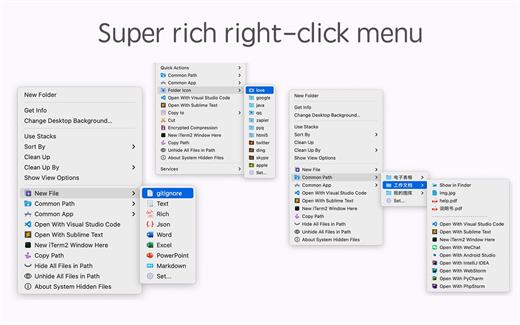
MouseBoost Pro integrates more than 30 kinds of small tools, and the operation way is very simple, as long as you click the right mouse button, you can activate all kinds of functions you want, so that your work efficiency is greatly improved.

You can create any file type you want, open any APP you want, self-sorting, fully customized!

*** Main Features ***
– All menus support custom sorting.
– Quickly create all kinds of commonly used files, and supports custom creation of various file types you want.
– Quickly open your terminal, iTerm2, and go to the directory you want.
– Quickly open VSCode, Sublime Text and Emacs, and customize the various apps you want to open.
– Quickly copy the current path power.
– Complete files deletion is supported.
– Supports files moving, copying and cutting.
– Supports files encrypted compression.
– Quickly open your favorite directory.
– Quickly get file MD5,SHA1,SHA256 and other information.
– Supports hiding and displaying of specified files.
– Supports modify folder icon.

What’s New

Version 4.3.2:


  • Release notes were unavailable when this listing was updated.
Compatibility

macOS 10.11 or later


Release Name: MouseBoost Pro 4.3.2
Size: 20 MB
Links: HOMEPAGE – NFO – Torrent Search

Download: RAPiDGATOR

8 Comments