Please REGISTER or RENEW your account on RAPiDGATOR.net and support us by doing through all RAPiDGATOR working download links on main posts...
May 5

System Dashboard Pro 3.1.5

The System Dashboard Pro is a modern reinterpretation of the System Dashboard and offers more information than ever. The app has been completely redeveloped and optimized for the latest systems.
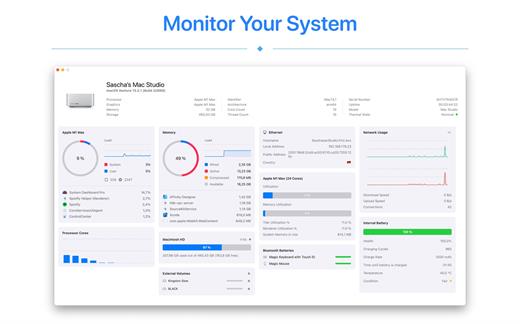
System Dashboard Pro offers the following features

• General System Information
Get an overview of the most important parameters of your system. This includes, for example, the macOS version used or details about your computer.

• Processor Usage
The processor panel shows important details about processor usage. The current load is displayed as well as that of the last few seconds. A list of processes that have the highest processor utilization is also displayed.

• Memory Usage
The Memory panel shows data related to memory. The current load is displayed as well as that of the last few seconds. A list of processes using the most memory is also displayed.

• Network Information
Basic network information such as the local and external IP address or the transfer rate of the WLAN connection is displayed on this panel.

• Network Usage
The network category shows the current download and upload speed and the number of open connections.

• Internal Battery
This panel is available if the app is running on a MacBook and displays basic battery parameters. Among others information, it displays the number of charging cycles and the health of the battery.

• Hard Disk
The computer’s hard drive can be kept under control with this panel. It shows how much space is used and how much is free. The current speed is also displayed.

• External Drives
SD cards and USB sticks are displayed here. The devices can also be ejected – either individually or all at once.

What’s New

Version 3.1.5:


  • Release notes were unavailable when this listing was updated.
Compatibility

macOS 13.0 or later


Release Name: System Dashboard Pro 3.1.5
Size: 7.7 MB
Links: HOMEPAGE – NFO – Torrent Search

Download: RAPiDGATOR

6 Comments
May 5

Timeless: Alarm Clock 1.95

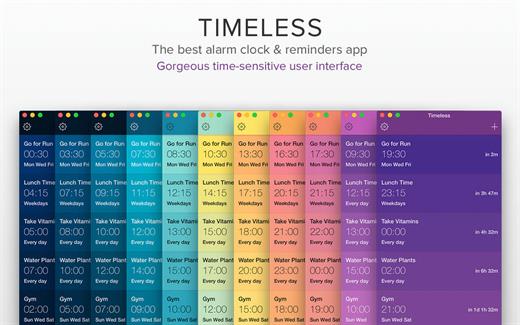
Timeless is the best and most gorgeous alarm clock and reminder app for your Mac. With its beautiful and easy to use interface, Timeless is a pleasure to use and will integrate seamlessly into your workflow, from morning till night.

Key Features:


  • Ability to set unlimited unique alarms
  • Ability to add custom titles to each alarm
  • Beautiful full screen Nightstand Mode
  • Choose from a wide array of alarm sounds
  • Ability to add in your own custom alarm sounds
  • Snooze functionality with adjustable snooze time
  • Alarm volume adjustability
  • Support for Fading In of alarms
  • Gorgeous time-based user interface colours
  • Ability to run the app via both the menu bar and the Dock
Benefits:

  • The slickest and best Alarm clock app for your Mac
  • Lightning fast and very easy to use
  • Pleasant colours and a user interface that adjusts according to the time of day
  • The ability to input unlimited alarms and reminder notes means you’ll never miss a beat!
  • Customizable to your personal tastes
  • Regular free updates
What’s New

Version 1.95:


  • Release notes were unavailable when this listing was updated.
Compatibility

macOS 12.0 or later.


Release Name: Timeless: Alarm Clock 1.95
Size: 20.9 MB
Links: HOMEPAGE – NFO – Torrent Search

Download: RAPiDGATOR
6 Comments
May 5

PullTube 1.8.6.29

Sharing videos via online hosting services, such as YouTube or Vimeo is a common practice, yet streaming the content might not work as expected if you have a slow internet connection.

PullTube offers you the possibility to download videos from both sources (YouTube and Vimeo), while other platforms might be added at a later time. The app can handle playlists, allows you to select the output quality, and can even extract only the audio.

Video downloader that can import links with drag and drop and can detect playlists

The PullTube user interface is represented by a small window where you get to quickly paste the video URL. Note that you can also add a video by dropping the link on top of the PullTube window.

Worth mentioning is that, if PullTube detects that the video is part of a playlist, will offer to download the entire collection: will fetch the data for each entry and handle the downloads consecutively.

Download videos hosted on YouTube or Vimeo to different output sizes and formats

PullTube will start fetching the video data right away so you can see the video name, duration, and a small thumbnail. When configuring a download, you get to select the output quality (highest, 4K, HD or regular with different resolutions) or choose to export only the audio to an M4A or MP3 file.

Via the PullTube Settings panel, you can change the default download location and the default MP3 bitrate (320Kbps, 256Kbps, 128Kbps, 64Kbps). You can also add the quality info to the video’s name and choose to quit the app when all downloads are completed.

Get offline access to videos hosted online in just a few steps

PullTube proposes a streamlined workflow for quickly downloading videos from YouTube or Vimeo, provides control over the output quality, and enables you to extract the audio to MP3 or M4A files.

However, during our tests, we have noticed that PullTube has trouble completing the download when handling videos that are longer that 2 minutes. The process stops without any explanation, and you can eventually complete the task, but you need to add the link to download tool multiple times.

What’s New

Version 1.8.6.29:


  • Release notes were unavailable when this listing was updated.
Compatibility

macOS 10.12 or later


Release Name: PullTube 1.8.6.29
Size: 231.4 MB
Links: HOMEPAGE – NFO – Torrent Search

Download: RAPiDGATOR

8 Comments
May 5

NetWorker Pro 11.0.11

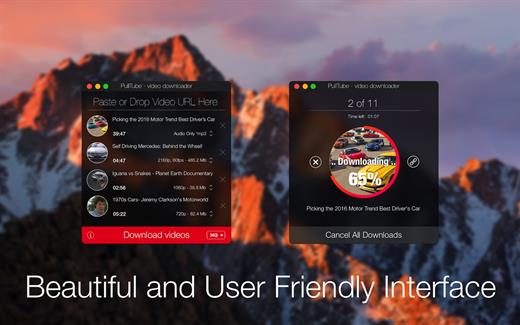
NetWorker is a lightweight and easy-to-use tool that shows either the current download and upload speed or the session traffic of your network adapter. The information is shown in a small view in your menu bar.

Features


  • You can switch between three modes: speed, traffic, or speed/traffic
  • You can choose the network adapter to observe, so both wired and wireless adapters are supported
  • Adjustable refresh interval
  • Support for auto-start
What’s New

Version 11.0.11:


  • Release notes were unavailable when this listing was updated.
Compatibility

macOS 11.0 or later


Release Name: NetWorker Pro 11.0.11
Size: 7.7 MB
Links: HOMEPAGE – NFO – Torrent Search

Download: RAPiDGATOR
7 Comments
May 5

Myary 2.7.0

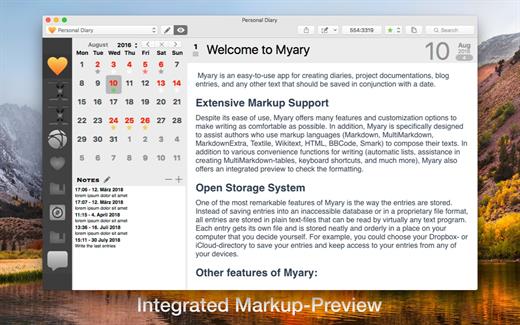
Myary is an easy-to-use app for creating diaries, project documentation, blog entries, and any other text that should be saved in conjunction with a date.

Extensive Markup Support

Despite its ease of use, Myary offers many features and customization options to make writing as comfortable as possible. In addition, Myary is specifically designed to assist authors who use markup languages ​​(Markdown, MultiMarkdown, MarkdownExtra, Textile, Wikitext, HTML, BBCode, Smark) to compose their texts. In addition to various convenience functions for writing (automatic lists, assistance in creating MultiMarkdown-tables, keyboard shortcuts, and much more), Myary also offers an integrated preview to check the formatting.

Open Storage System

One of the most remarkable features of Myary is the way the entries are stored. Instead of saving entries into an inaccessible database or in a proprietary file format, all entries are stored in plain text-files that can be read by virtually any text program. Each entry gets its own file and is stored neatly and orderly in a place on your computer that you decide yourself. For example, you could choose your Dropbox- or iCloud-directory to save your entries and keep access to your entries from any of your devices.

Other features of Myary:


  • You can add any kind of files as attachments to each of your entries
  • Extensive export manager (exports into the following formats are possible: TXT, RTF, RTFD, DOC, ODT, HTML, PDF, epub eBook, Textbundle, Textpack)
  • Tab-actions: Define keywords that use the Tab-key as a trigger to insert self-defined text-snippets
  • Edit entries in external text-apps or send them to other apps
  • Comfortable distraction-free mode, hide everything in order to be able to concentrate completely on the text
  • Automatic saving of entries: If you take a short break while typing, Myary automatically saves the written text
  • Textbundle-Format: instead of saving your texts in normal text-files, you can also save your texts in the Textbundle-format (more information on Textbundle can be found on www.textbundle.org)
  • In addition to the actual entries, you can also write or collect small notes, ideas, things to keep in mind
  • Extensive settings for the text editor: In addition to font, size and color, you can also customize the background color, line spacing, indents for new paragraphs and much more to your personal needs
  • Color labels: you can assign to each of your entries a color label, which appears as a small star in the calendar sheet. In this case, the standard color labels of the file system are used. Using the standard system color labels makes those labels visible in other apps like the Finder
  • Integrated search: if you want to search for a specific entry or search for a specific term within entries, the integrated search function will help you by listing all entries in chronological order which contain the search-term
  • Myary natively supports Mojave’s Dark Mode and also provides a dark mode for earlier macOS versions that can be easily turned on at any time. Simply select “Dark User Interface” under View from the menu bar and Myary will change its appearance.
Of course, Myary also offer the known features full-screen mode, send menu, in-text search / replace, spell check and text replacement.

What’s New

Version 2.7.0:


  • Release notes were unavailable when this listing was updated.
Compatibility

macOS 10.13 or later
Apple Silicon or Intel Core processor


Release Name: Myary 2.7.0
Size: 7.7 MB
Links: HOMEPAGE – NFO – Torrent Search

Download: RAPiDGATOR

7 Comments
May 5

Jettison 1.9.6

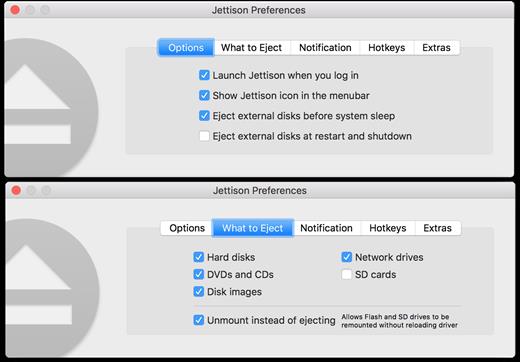
Jettison automatically ejects external disks from your Mac before your computer goes to sleep.

Simplify those last few seconds when you grab your MacBook and run out the door. Just close the lid and Jettison will automatically eject your backup drive, iPod, or whatever is connected so you can safely unplug it. Say goodbye to “disk was not ejected properly” errors and waking your computer back up because you forgot to eject everything.

Jettison even makes sure that Time Machine backups and file server volumes are properly shut down before they’re removed. Your backups and shared files are safe and sound.

And what if you decide not to leave, and open your MacBook back up? Jettison will check to see if your drives are still connected and will mount them back on the Desktop if they’re there.

What’s New

Version 1.9.6:


  • Release notes were unavailable when this listing was updated.
Compatibility

macOS 10.9 or late


Release Name: Jettison 1.9.6
Size: 7.4 MB
Links: HOMEPAGE – NFO – Torrent Search

Download: RAPiDGATOR
6 Comments
May 5

eBookBinder 1.13.0

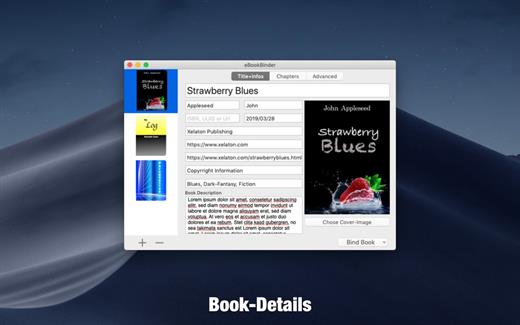
eBookBinder is the super-easy tool to create your own ebooks using your existing documents. When compiling your book project, eBookBinder creates an epub file. There are just three major steps to your very own eBook:


  1. Enter book details. Name of the book and its author, add an image for the book-cover, webpage of the publisher and other details can be entered. There is no need to fill all fields, at least you should enter a name for your book.
  2. Add text files as chapters to your book project. Every single text file you add to eBookBinder is treated as a single chapter. Give your chapters a name and order them per drag-and-drop to your desired sequence of chapters.
  3. Create your ebook. Just hit the “Bind Book” Button and eBookBinder will compile the ebook for you. That’s all!

What can be added to eBookBinder:


  • eBookBinder supports several different types of text files. Next to plain-text files also DOC, ODT, RTF, RTFD, HTML, Textbundle, Textpack and webarchive files are supported by eBookBinder.
  • Support of markup languages eBookBinder also accepts plain-text files written in Markdown, MultiMarkdown, Textile, Wikitext, and Smark as input. These will be converted on the fly when adding these as chapters to your book-process. Visit the preferences of eBookBinder to determine the file extensions which should be treated for conversion. All files with appropriate file extensions will be converted when imported.
Built-in editor – eBookBinder also features a built-in editor which offers some basic editing features like setting text bold, inverse, or underlined, and alignment of text. However, the best feature of the editor is the reduce feature: select the text you want to keep and hit the reduce button. Anything not selected will be removed. This is ideal for editing web articles to remove all the advertising and navigation stuff quickly.

What’s New

Version 1.13.0:


  • Release notes were unavailable when this listing was updated.
Compatibility

macOS 10.10 or later, 64-bit processor


Release Name: eBookBinder 1.13.0
Size: 6.1 MB
Links: HOMEPAGE – NFO – Torrent Search

Download: RAPiDGATOR

7 Comments
May 5

Fork 2.66.7

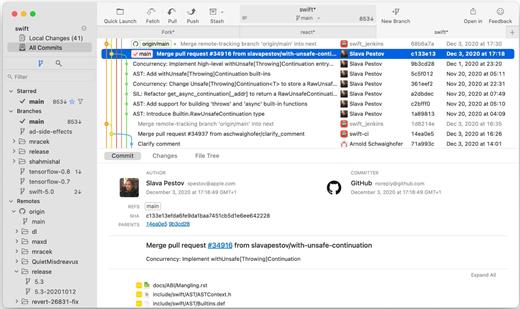
Fast and friendly git client. Fork is getting better and better day after day and we are happy to share our results with you. Commit List – Working Directory Changes – Side by Side Diff – Repository Manager Summary and Statistics

Basic features: Fetch, pull, push | Commit, amend | Create and delete branches and tags | Create and delete remote repos | Checkout branch or revision | Cherry-pick, revert | Merge, rebase | Stashes | Submodules

Work with repository: Create, clone or add existing repos | Open recent repository quickly

Commit view: Stage / unstage changes line-by-line | Access to recent commit messages

More features: Browse the repository file tree at any commit | Intuitive merge conflict resolving | See your stashes right in the commit list

What’s New

Version 2.66.7:


  • Release notes were unavailable when this listing was updated.
Compatibility

macOS 10.13 or later

Release Name: Fork 2.66.7
Size: 44.5 MB
Links: HOMEPAGE – NFO – Torrent Search

Download: RAPiDGATOR
6 Comments
May 5

SQLPro for SQLite 2026.90

SQLPro for SQLite is the top SQLite editor for OS X.

Features


  • Automatic data reloading when the database gets modified externally.
  • Backwards compatibility with SQLite 2.
  • Version integration. Mucked your database? Rollback to a previous version.
  • Semiautomatic dependency resolution.
  • Column reordering.
  • Import or export your data in CSV, mySQL, XML, or JSON formats.
  • Export custom result sets to CSV, XML, or JSON.
  • Full-screen support.
  • Inline filters allowing you to customize the way your data is displayed.
What’s New

Version 2026.90:


  • Release notes were unavailable when this listing was updated.
Compatibility

macOS 10.12 or later.


Release Name: SQLPro for SQLite 2026.90
Size: 24.8 MB
Links: HOMEPAGE – NFO – Torrent Search

Download: RAPiDGATOR

6 Comments
May 5

Topaz Photo 1.5.1

AI-powered photo editing tool that improves photos pixel by pixel.

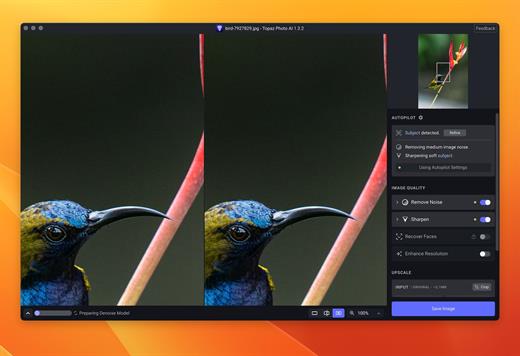
What is Topaz Photo AI? It is a new-generation photo editing tool that uses AI technology to perfect and denoise pictures pixel by pixel. Topaz Photo AI simplifies the editing process for photographers and designers. Its groundbreaking suite offers multiple tools to satisfy both amateurs and confident pros.

Topaz Photo AI allows editors to denoise, sharpen, upscale, preserve text, recover faces, remove objects, correct lighting, and balance color. Professional photo editors will be amazed at how much power Topaz Photo AI gives, and beginners will appreciate how easy and intuitive this tool is.

Topaz Photo AI helps you Sharpen, remove noise, and increase the resolution of your photos with tomorrow’s technology.

Maximize the potential of your photos.

Magically enhance image quality and resolution based on a deep understanding of the contents of your photo.

Enhance Quality

Maximize the visual quality of your images with best-in-the-world noise and blur reduction. Particularly useful in difficult settings with fast-moving subjects, low light, or atypical environments.

Crisp, clear, and noise-free.

It’s a magical feeling to see noise evaporate while sharp detail remains. Topaz Photo AI understands the contents of your image and accurately determines the difference between image detail and noise.

Tack-sharp subjects.

Unlike traditional sharpening, Topaz Photo AI’s Sharpen module naturally reverses root causes of blurriness (camera shake, motion blur, missed focus) to create more natural results. In the absence of blur, sharpness remains – crisp, clear detail that’s free of edge haloes or other artifacts.

Increase Resolution

Join hundreds of thousands of photographers and designers who use Topaz technology to generate real image detail for better printing, cropping, restoration, and more.

Magically add real detail.

Topaz Photo AI “remembers” real detail from millions of similar images, then fills in missing pixels based on that understanding. (It’s like how you can picture a friend’s face without being physically in front of them.) Add real image resolution to your photos for tighter crops or better prints.

Recover faces naturally.

Introduced in 2023, the breakthrough Face Recovery AI offers remarkable detail enhancement for low-resolution or blurry faces.

Intelligently improve lighting.

It’s a magical feeling to see noise evaporate while sharp detail remains. Topaz Photo AI understands the contents of your image and accurately determines the difference between image detail and noise.

Improve efficiency with Autopilot

Specify adjustments based on detected image attributes like subject, faces, noise, and blur levels. Autopilot allows you to mold Photo AI to your workflow and unique photographic style.

Easy workflow

Topaz Photo AI works directly on your Mac or PC. Use the standalone to batch process thousands of images in sequence, or use it as a Photoshop plugin for tight workflow integration. We’ve also partnered with major hardware manufacturers like Nvidia, AMD, and Intel to make Photo AI run as fast as possible for your computer.

What’s New

Version 1.5.1:


  • Release notes were unavailable when this listing was updated.
Compatibility

macOS 10.12 or later


Release Name: Topaz Photo 1.5.1
Size: 1.7 GB
Links: HOMEPAGE – NFO – Torrent Search

Download: RAPiDGATOR
5 Comments