Please REGISTER or RENEW your account on RAPiDGATOR.net and support us by doing through all RAPiDGATOR working download links on main posts...
May 5

Myary 2.7.0

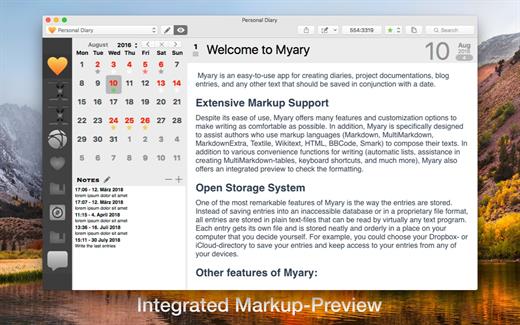
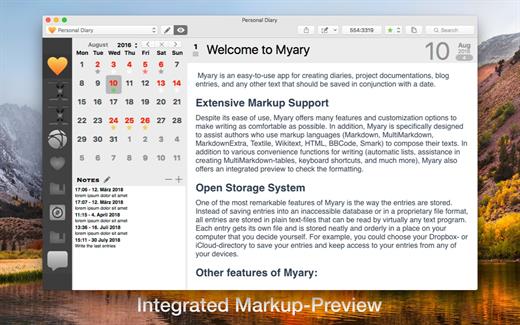
Myary is an easy-to-use app for creating diaries, project documentation, blog entries, and any other text that should be saved in conjunction with a date.
Extensive Markup Support

Despite its ease of use, Myary offers many features and customization options to make writing as comfortable as possible. In addition, Myary is specifically designed to assist authors who use markup languages ​​(Markdown, MultiMarkdown, MarkdownExtra, Textile, Wikitext, HTML, BBCode, Smark) to compose their texts. In addition to various convenience functions for writing (automatic lists, assistance in creating MultiMarkdown-tables, keyboard shortcuts, and much more), Myary also offers an integrated preview to check the formatting.

Open Storage System

One of the most remarkable features of Myary is the way the entries are stored. Instead of saving entries into an inaccessible database or in a proprietary file format, all entries are stored in plain text-files that can be read by virtually any text program. Each entry gets its own file and is stored neatly and orderly in a place on your computer that you decide yourself. For example, you could choose your Dropbox- or iCloud-directory to save your entries and keep access to your entries from any of your devices.

Other features of Myary:


  • You can add any kind of files as attachments to each of your entries
  • Extensive export manager (exports into the following formats are possible: TXT, RTF, RTFD, DOC, ODT, HTML, PDF, epub eBook, Textbundle, Textpack)
  • Tab-actions: Define keywords that use the Tab-key as a trigger to insert self-defined text-snippets
  • Edit entries in external text-apps or send them to other apps
  • Comfortable distraction-free mode, hide everything in order to be able to concentrate completely on the text
  • Automatic saving of entries: If you take a short break while typing, Myary automatically saves the written text
  • Textbundle-Format: instead of saving your texts in normal text-files, you can also save your texts in the Textbundle-format (more information on Textbundle can be found on www.textbundle.org)
  • In addition to the actual entries, you can also write or collect small notes, ideas, things to keep in mind
  • Extensive settings for the text editor: In addition to font, size and color, you can also customize the background color, line spacing, indents for new paragraphs and much more to your personal needs
  • Color labels: you can assign to each of your entries a color label, which appears as a small star in the calendar sheet. In this case, the standard color labels of the file system are used. Using the standard system color labels makes those labels visible in other apps like the Finder
  • Integrated search: if you want to search for a specific entry or search for a specific term within entries, the integrated search function will help you by listing all entries in chronological order which contain the search-term
  • Myary natively supports Mojave’s Dark Mode and also provides a dark mode for earlier macOS versions that can be easily turned on at any time. Simply select “Dark User Interface” under View from the menu bar and Myary will change its appearance.
Of course, Myary also offer the known features full-screen mode, send menu, in-text search / replace, spell check and text replacement.

What’s New

Version 2.7.0:


  • Release notes were unavailable when this listing was updated.
Compatibility

macOS 10.13 or later
Apple Silicon or Intel Core processor


Release Name: Myary 2.7.0
Size: 7.7 MB
Links: HOMEPAGE – NFO – Torrent Search

Download: RAPiDGATOR

7 Comments
July 15

Myary 2.4.0

Myary is a simple diary application.


  • Saving your entries. Every single entry will be stored in a separate file and you can freely choose where your entries should be saved to. Myary automatically creates a covenant folder hierarchy where you can find your entries fast, even outside of Myary. Additionally all entries will be saved in the open txt-file-format so you can open your entries in many text-editors. You keep full control over your entries.
  • Creating multiple diaries. Myary allows you to create multiple diaries, so you can diverse your entries by topics and projects.
  • Special editor and fullscreen-modes. The editor of Myary offers a lot of features to make writing more efficient and spare you using the mouse, like automatic list-creation (* and – signs) or moving of text-passages with keyboard-shortcuts. Additionally you can set the look of the editor to your preferences: colors of text and background, font-size and -type, text-margins and more. Also, Myary offers the well known fullscreen-mode (OS X 10.7 Lion and higher) and a distraction-free mode where you can concentrate on your text wholly.
  • Collecting external files You can add to each entry files which will be stored in a separate folder. Myary offers options to view these files in Myary itself or to open the files with an external application. Please Note: Files can’t be added directly within the text.
  • Markup-Support. Myary supports following markup-languages: Markdown, Textile, BBCode, Wikitext, HTML und Smark. Next to shortcuts for bold- and inverse-type and headlines. Further you can use markup while exporting your entries.
  • Notice-Collecting. Quickly writing a notice without starting a new entry, Myary offers an integrated notice-feature. To write notices, Myary offers diverse option. Next to writing a notice within the application itself, you can also use the status-bar feature to write a notice or use the Myary-bookmarklet from most Web browsers to send notices to Myary.
  • Exporting entries. Myary offers it’s own export-manager to export your entries to different text-formats. As formats available are plain text, RTF, RTFD, HTML, DOC, and PDF. Choosing these formats, you can also choose to export your entries into single files or to one file, which collects all selected entries. Additionally there is the option to export your selected entries as an ePub-eBook-file, so you can read your diary on an eBook-reader.
What’s New

Version 2.4.0:


  • All-new Distraction-Free Mode with extensive settings that can be adjusted directly in the active Distraction-Free Mode
  • Improvements when adding assets via drag’n drop
  • When selecting a directory for a diary, a directory within a package file can now also be selected
  • Animated start and end of the distraction free mode. If you don’t want animations, you can switch them off in the Myary preferences under „Reduce user interface animations".
  • Internal Textile parser: attributes can now be added to caption-, head- and foot-elements for tables
  • Improves the behavior switching between text area and preview, so that the text area no longer has to be explicitly reselected when switching back to text area from the preview **Bug fixes:**
  • Internal Textile parser: fixes a bug that could cause Myary to crash
  • Internal Textile parser: fixes a bug that prevented headings from being written across multiple lines
  • Internal Textile parser: fixes an error that under certain circumstances adds br-tags in table structures
  • Internal Textile parser: fixes an error when converting tables that could cause an abortion of the conversion
  • Internal Markup Parser: fixes a bug for Markdown, MultiMarkdown and MarkdownExtra for numbered lists when using the tab character that could cause Myary to hang or to display no formatted output at all
  • Internal Smark parser: fixes an issue with anchor links
  • Fixes a bug that could cause Myary to crash when deleting assets
  • Fixes a bug where the selection of the Markup-Language Textile would result in displaying an error message
Compatibility

macOS 10.10 or later.
Apple Silicon or Intel Core processor

Release Name: Myary 2.4.0
Size: 7.5 MB
Links: HOMEPAGE – NFO – Torrent Search

Download: UPLOADGiGNiTROFLARERAPiDGATOR

4 Comments