Please REGISTER or RENEW your account on RAPiDGATOR.net and support us by doing through all RAPiDGATOR working download links on main posts...
Apr 27

ProfiCAD 13.5.3

Description: ProfiCAD is designed for drawing electrical and electronic diagrams, schematics, and control circuit diagrams. It can also be used for pneumatics, hydraulics, and other types of technical diagrams.
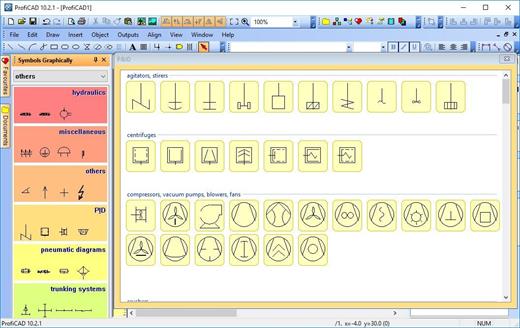
Print Reports
ProfiCAD generates essential project documentation, including bill of material, list of wires, a list of terminals, a list of cables, as well as other critical parts of an electrical project.

Symbols
The program includes over two thousand symbols. You can easily create your own symbols using the symbol editor.

Title block
The title block designed in accordance with ISO 7200 can be easily adapted, for example by inserting the logo of your company. Alternatively, you can create your own title block in the title block editor.

Cross references
The program supports cross-references between wires and between symbols belonging to one component (e.g., relay coil + contacts). You can access a linked symbol on a different page by clicking on the cross-reference.

Floor plans
The page scale allows you to enter the actual dimensions of objects. Dimensioning facilitates the drawing of floor plans and mechanical drawings.

Cables and terminals
The program supports drawing cable symbols. A cable listing is available, providing an overview of their cores, cable properties, and connected devices. Thanks to the terminal list, you have an overview of all project terminals and the cables and devices connected to them.

Advanced features
Some advanced features include automatic numbering of symbols, drawing of striped wires, instant symbol search, automatic insertion of symbols into a circuit, and others.

Release Name: ProfiCAD 13.5.3
Size: 19.6 MB
Links: HOMEPAGE – NFO – Torrent Search

Download: RAPiDGATOR

3 Comments
Apr 26

Topaz Video Pro 1.4.0

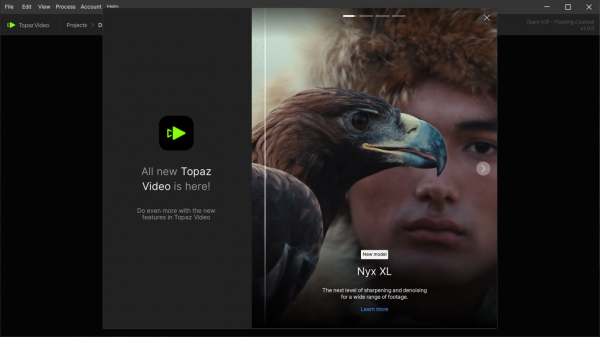
Description: Ultra smooth. Ultra sharp. Ultra steady. Topaz Video is a professional, AI-powered video enhancement software that lets you denoise low-light footage, recover and upscale old archival videos to 4K, restore focus, and adjust frame rate by creating new frames out of thin air. Available on Mac and Windows.

Features of Topaz Video


  • Trusted by major film studios and creative pros everywhere.
    Denoise with cinema-level detail. Create new frames with frame interpolation. And stabilize the camera after the moment has already passed.
  • Filmmakers & Editors
    Restore, upscale, and refine footage for professional post-production workflows.
  • Archivists & Historians
    Preserve and modernize archival film, VHS, and historical footage with clarity.
  • Creators & Influencers
    Enhance social media videos with sharper detail, higher resolution, and smoother motion.
  • Hobbyists & Enthusiasts
    Improve old family videos and personal projects to look like they were shot today.
System Requirements for Topaz Video

RAM: 16 GB

Processor: Intel OR AMD with AVX2 instructions

Operating System: Windows 11

Space Required: 30 GB

Release Name: Topaz Video Pro 1.4.0
Size: 300 MB
Links: HOMEPAGE – NFO – Torrent Search

Download: RAPiDGATOR
5 Comments
Apr 26

Topaz Photo Pro 1.5.0

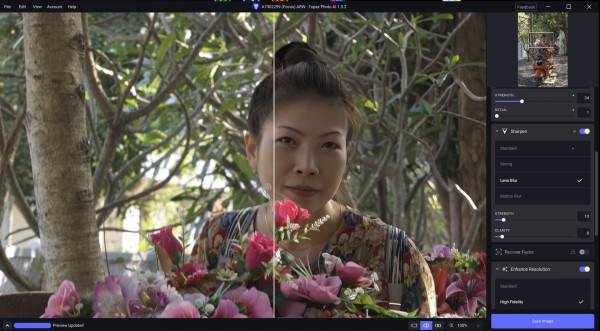
Description: Each tool gets it closer to perfect. The ultimate finishing step for every image. Fix issues. Restore focus. Remove noise. Enhance details. Crop in. Prepare for print. Topaz Photo is the magical last step before "done." All using AI trained on millions of images.

Wildlife & Astro Photography
Zoom in with lossless crop, sharpen details, and denoise high ISO shots captured in unpredictable conditions.

Sports Photography
Sharpen motion blur and denoise indoor shots with poor lighting.

Events & Weddings
Never miss the important moment to low lighting or soft focus. Topaz Photo lets you fix the details without reshooting.

Archival Images
Remove dust and scratches, adjust lighting and color, and restore images to their original sharpness.

System Requirements:
Windows Operating System: Windows 10 or 11
CPU: Intel OR AMD Processor2, with AVX instructions, released after 2016
System Memory (RAM): 16GB
Dedicated Graphics Card (NVIDIA): NVIDIA graphic card - 6GB VRAM4 | AMD graphic card - 6GB VRAM4 | Intel ARC graphic card - 6GB VRAM4
Dedicated Graphics Card (AMD): Intel UHD 600 Graphics5 | Intel Iris Xe5
Disk Space on C:/ 37GB of space6

Release Name: Topaz Photo Pro 1.5.0
Size: 940 MB
Links: HOMEPAGE – NFO – Torrent Search

Download: RAPiDGATOR

6 Comments
Apr 26

VirtualDJ 2026 Pro Infinity 8.5.9295

Description: VirtualDJ 2026 uses advanced technology and the power of modern computers to revolutionize what DJs can do. With this new version you can mix in real-time the various components of your tracks (vocals, instruments, kicks, hihats, etc). This opens the door to new ways of mixing that were simply not possible before, and will forever change the way DJs mix.


Features


  • Instant Acapella & Instrumental
    This new technology gives the DJ access to instant acapella and instrumental on any song, live during the mix! Real-time stems separation lets you easily remove or isolate parts of the song.
  • On-The-Fly Mashups
    Mix and remix songs live on the fly. Put vocals from one song over the beats from another song and explore new ways of mixing your tracks previously not possible.
  • Seamless Transitions
    Stem separation right on the EQs allows the DJ to transition seamlessly in whole new ways, allowing the DJ to fine-tune different elements of the songs live in the mix.
System Requirements for VirtualDJ

RAM: 8 GB

Processor: Intel i5, AMD Ryzen 7 or better

Operating System: Windows 10 and 11

Space Required: 2 GB

Release Name: VirtualDJ 2026 Pro Infinity 8.5.9295
Size: 572 MB
Links: HOMEPAGE – NFO – Torrent Search

Download: RAPiDGATOR
6 Comments
Apr 26

CleanMyMac 5.5.2

CleanMyMac is all-in-one package to awesomize your Mac. It cleans megatons of junk and makes your computer run faster. Just like it did on day one.

CleanMyMac makes space for the things you love. Sporting a range of ingenious new features, CleanMyMac lets you safely and intelligently scan and clean your entire system, delete large, unused files, reduce the size of your iPhoto library, uninstall unneeded apps or fix the ones that started to work improperly, manage all your extensions from one place and do much more – all from one newly designed and beautifully simple interface.

Note:

wait a second to let it activate itself

If prompted:”The application “CleanMyMac” can’t be opened.”

What’s New

Version 5.5.2:


  • Release notes were unavailable when this listing was updated.
Compatibility

macOS 14.0 or later


Release Name: CleanMyMac 5.5.2
Size: 152.7 MB
Links: HOMEPAGE – NFO – Torrent Search

Download: RAPiDGATOR

7 Comments
Apr 26

Wondershare PDFelement Pro 12.1.14 (OCR)

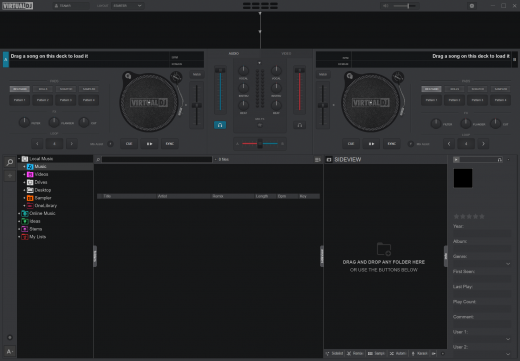
Wondershare PDFelement is a self-explanatory OS X application that makes it easier for your to preview, edit, join, split and convert PDF documents using a Mac.

The Wondershare PDFelement also features a simple, clean and intuitive interface that provide instantaneous access to all the tools and features you might need to complete your daily tasks.

Powerful and user-friendly PDF editor for everyday use

Moreover, with Wondershare PDFelement’s help, you can effortlessly edit PDF documents created using text files, web pages or scanned documents.

Consequently, you can add, remove or edit text, move and rearrange pages, insert or remove images and more.

Wondershare PDFelement’s top toolbar helps you hide, show and customize the sidebar in order to display the items and information you are interested in. In addition, you can browse through the loaded document, zoom in or out, print it or email it with just a couple of mouse clicks.

Advanced OCR capabilities make text editing a breeze

Furthermore, you can choose between the “Hand”, “Select” and “Edit” tool, use the advanced OCR feature and convert your source file into plain text or RTF document, ePUB, HTML, as well as file formats compatible with Microsoft Word, Excel, and PowerPoint.

The context menu also helps you switch between the “Move”, “Select” and “Touchup” tool, change the display mode and open the Inspector window to view detailed information about the loaded document.

As an added bonus, by accessing the Document menu, you have the option to add, update or remove an watermark, extract, insert and delete pages, split, merge or convert your document and crop or rotate a page with ease.

Full-featured tool designed to help you stamp, watermark, encrypt and decrypt PDF documents on a Mac

The complete list of all available editing tools, bookmark features, annotation tools and stamp options can be found under the Tools menu.

From here you can easily insert text boxes, add sticky notes, highlight, strike-through and underline text, insert various shapes and use the handy pencil or erase.

On the whole, Wondershare PDFelement comes with the right set of features to help you edit and annotate PDF documents using a Mac, as well as effortlessly add password protect and convert them other formats for easier sharing with your friends and colleagues.

What’s New

Version 12.1.14:


  • Release notes were unavailable when this listing was updated.
Compatibility

macOS 11.0 or later
Apple Silicon or Intel Core processor


Release Name: Wondershare PDFelement Pro 12.1.14 (OCR)
Size: 837.7 MB
Links: HOMEPAGE – NFO – Torrent Search

Download: RAPiDGATOR
7 Comments
Apr 26

Pixelstyle Photo Editor 4.5.0

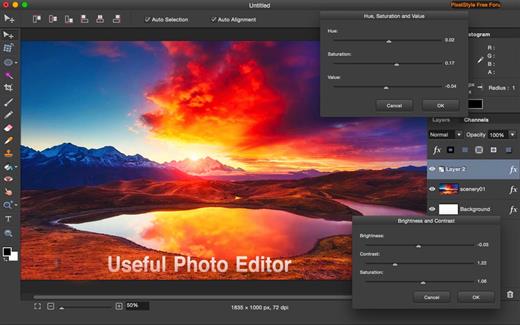
PixelStyle, full-featured graphic-design app, offers an alternative to PhotoShop. It includes all the essential tools you need for professional photo editing. It is painstakingly engineered for professionals with a large array of intuitive tools: filters, layers, special effects, editing, retouching, and photo enhancement. 100 brushes are built-in to offer an unparalleled drawing experience. With the state-of-art image-editing technology and fast, precise working capability, PixelStyle has become an indispensable tool for all photographic designers.

Features:


  • Professional Image Processing

    • Intuitive multifunction interface: A set of sophisticated but easy-to-use tools
    • Professional adjustments: Adjust exposure, hue, vibrance, white balance, shadows, highlights, brightness, contrast and much more
    • Photo retouching and correction tools: Immediately delete unwanted elements and retouch the images
    • Cutout tools: 1 min cut-out of an object from a photo and change its background
    • Precise Control: quickly and easily select any part of an image; edit and apply special effects to any portion of your pictures
    • Multi-panel: open multiple interfaces at the same time
    • Top Mac Drawing Tools: – More than 100 built-in drawing brushes (pencil, airbrush, watercolor brush, chalk, charcoal, neon pens…) for oil painting, sketch, texture painting… Create custom brushes and use different brush sizes, shapes, hardness, and blending modes
  • Support pixel-drawing

    • Fill in the object with texture and color – support for a variety of gradient modes including symmetrical, rotate, clockwise and counterclockwise
  • Powerful Layer Capabilities

    • Full support for unlimited layers and layer groups
    • Easily add non-destructive layer effects like shadows, fills, inner glow, outer glow, or strokes
    • Support over 50 different filter effects and blending mode options
    • Resize layers without any loss of quality–hide, duplicate, and merge layers easily
    • Select several layers at one time and freely align, flip, and transform (move, rotate, skew, affine) the layers
    • Support channel selection and alpha channel editing
    • Your file could be saved as a project – you can edit them next time
    • Work with all popular formats like TIFF, JPEG, PNG, GIF, BMP, etc.
  • Excellent Font Design Tools

    • Add text layer effects like shadows, strokes, inner glow, outer glow, or fills
    • Reshape the text to irregular shape such as fan-shaped
    • Freely transform the text, including moving, rotating, skewing, and affine
    • Convert type layers into raster layers
    • Enjoy a full set of advanced typography features like kerning, bold, italic, underline, strikethrough, and much more
  • Designed exclusively for Mac

    • Takes full advantage of the latest OS X technologies including OpenGL, Grand Central Dispatch, and Core Graphics
    • Use the Touch trackpad to paint with pressure sensitivity
    • Fully optimized for 64-bit and multi-core processors
    • Supports standard, Retina, and multi-monitor set ups
What’s New

Version 4.5.0:


  • Release notes were unavailable when this listing was updated.
Compatibility

macOS 10.9 or later.


Release Name: Pixelstyle Photo Editor 4.5.0
Size: 122.8 MB
Links: HOMEPAGE – NFO – Torrent Search

Download: RAPiDGATOR

5 Comments
Apr 26

MouseBoost Pro 4.3.1

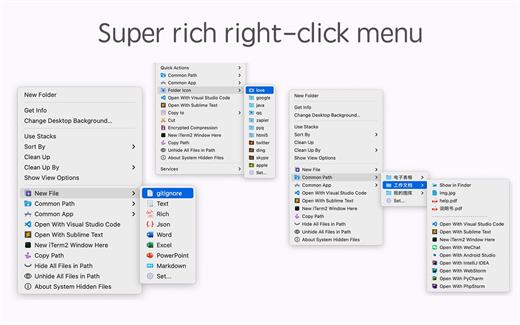
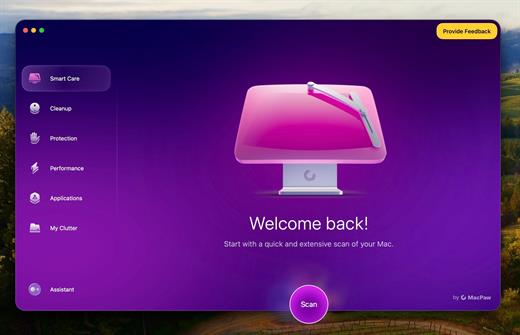
MouseBoost Pro integrates more than 30 kinds of small tools, and the operation way is very simple, as long as you click the right mouse button, you can activate all kinds of functions you want, so that your work efficiency is greatly improved.

You can create any file type you want, open any APP you want, self-sorting, fully customized!

*** Main Features ***
– All menus support custom sorting.
– Quickly create all kinds of commonly used files, and supports custom creation of various file types you want.
– Quickly open your terminal, iTerm2, and go to the directory you want.
– Quickly open VSCode, Sublime Text and Emacs, and customize the various apps you want to open.
– Quickly copy the current path power.
– Complete files deletion is supported.
– Supports files moving, copying and cutting.
– Supports files encrypted compression.
– Quickly open your favorite directory.
– Quickly get file MD5,SHA1,SHA256 and other information.
– Supports hiding and displaying of specified files.
– Supports modify folder icon.

What’s New

Version 4.3.1:


  • Release notes were unavailable when this listing was updated.
Compatibility

macOS 10.11 or later


Release Name: MouseBoost Pro 4.3.1
Size: 18.4 MB
Links: HOMEPAGE – NFO – Torrent Search

Download: RAPiDGATOR
4 Comments
Apr 26

Yate 9.1.0

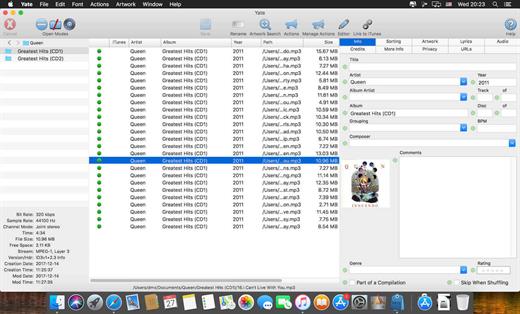
Yate was developed for people who want complete control over their tagging experience. Supports audio in AIFF, APE, DFF, DSF, FLAC, OGG OPUS, OGG VORBIS, M4A, M4B, MP3, MP2, MP4, STEM.MP4, WAV and WV files. Supports video in M4V and MP4.

Yate has a long list of features; most importantly, an innovative scripting system called actions. Actions can be used to update all of an album’s tags with a single operation. Yate also supports integration with AcouticBrainz, AcoustID, Beatport, Discogs, iTunes, MusicBrainz and TMDb. All changes can be easily reverted and individual changes can be undone in any order. Whether you want to automatically or manually tag your files, Yate can do it all!

What’s New

Version 9.1.0:


  • Release notes were unavailable when this listing was updated.
Compatibility

macOS 10.10 or later


Release Name: Yate 9.1.0
Size: 17 MB
Links: HOMEPAGE – NFO – Torrent Search

Download: RAPiDGATOR

5 Comments
Apr 26

HyperSnap 9.7.7

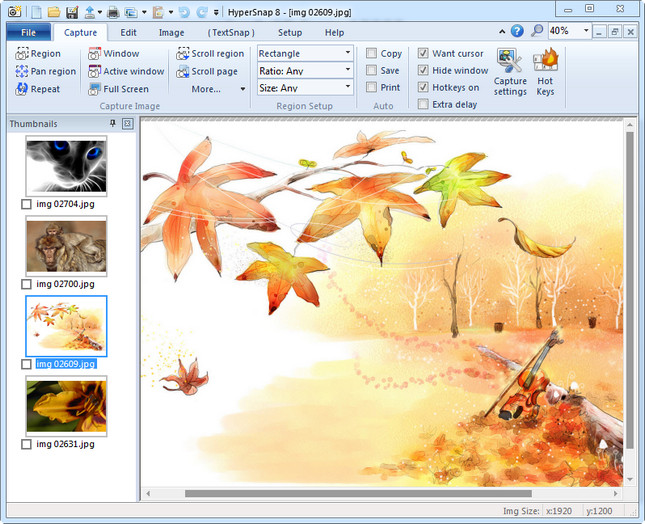
Description: HyperSnap 9 is the fastest and easiest way to take screenshots from Windows. HyperSnap combines the power of a first-class screen capture application with an advanced image editing utility, and editable text capture through OCR - wrapped into one easy-to-use tool. Windows 10 and 11 only.

HyperSnap is perfect for capturing images and texts that you want to include in your Help system, online tutorials, manuals, training handouts, presentations, marketing materials, Web pages, emails and more. Use HyperSnap to quickly share a picture-perfect representation of anything on your screen.

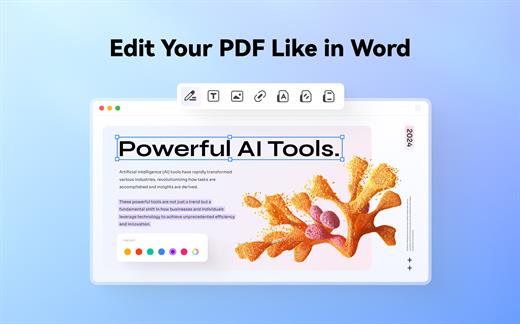
HyperSnap is versatile and extremely easy-to-use. You can switch between modern "ribbon" interface shown on the image above, or tranditional menu and toolbars.

Top Features
Image captures from any where on the screen or multiple monitors, in any shape or size.
New & powerful image capture, editing, annotation and  manipulation tools. Objects drawn over images can now be selected, edited, shown and hidden, moved, deleted any time. A new native file format saves the objects drawn for further editing later, or save a standard image and have the object "imprinted" permanently on them.
Unlimited undo/redo.
Capture dropdown menus and lists with hotkey feature or delayed capture.
Image stamps, frames, drop shadow, free-hand capture, FTP server uploads, more.
Automatic color substitution.
Non-rectangular window capture.
Button Capture  - perfect for professional technical writers who need to snap and document dozens of buttons!
Auto-scrolls and concurrently captures long web pages and other. documents, enabling it to grab more than is visible on the screen.
Tightly integrates with the MS Windows clipboard to automate repetitive tasks - will even automatically PASTE capture images where needed!
Automatically saves your captures to graphics files.
Doubles as effective image viewer, format converter (over 20 image formats supported).
Fully customizable user interface. Rearrange menus and toolbars any way you want, assign any keyboard shortcuts you like, tear off menus to create instant toolbars, even control HyperSnap with voice commands!

Release Name: HyperSnap 9.7.7
Size: 33 MB
Links: HOMEPAGE – NFO – Torrent Search

Download: RAPiDGATOR
7 Comments