Please REGISTER or RENEW your account on RAPiDGATOR.net and support us by doing through all RAPiDGATOR working download links on main posts...
Apr 25

Gilisoft Total Repair 12.0.0

Description: Total Repair Toolkit is an all - in - one system maintenance tool that integrates intelligent diagnosis, in - depth repair, and performance optimization. It features a one - click intelligent repair engine that can automatically resolve over 500 common issues such as system lag, game crashes, and file corruption.
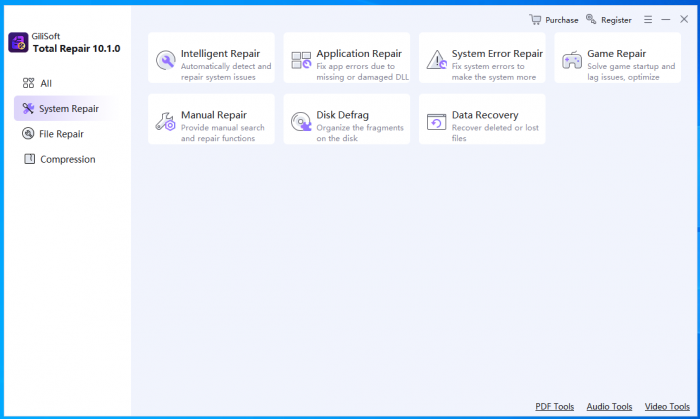
Meanwhile, it offers a professional manual repair module to meet advanced requirements. Its core functions include: application error repair based on a vast DLL library; in - depth diagnosis of system faults like the blue - screen error and registry issues; intelligent optimization of the game running environment (supporting automatic updates of DirectX and VC++ components); AI - driven multimedia file repair (supporting image, video, and document formats); an efficient compression and decompression tool (compatible with 12 common formats such as ZIP, RAR, and 7Z); and a differentiated defragmentation solution for HDDs and SSDs (automatically executing the TRIM command for SSDs). Driven by both "intelligent" and "professional" modes, the product ensures 99% system stability, achieves a data repair rate of up to 92%, and boosts game frame rates by 10% - 25%, providing a one - stop computer health management solution for both individual and enterprise users.

One-click intelligent repair
Through a rapid system scan, it automatically detects and fixes common issues such as application DLL errors, system glitches, and abnormal game operations. There's no need for manual intervention from users, which lowers the usage threshold.

Application DLL repair
It addresses errors caused by missing or damaged DLL files in applications. By leveraging a vast DLL file library, it precisely matches and automatically repairs these issues to ensure the normal operation of various software.

Game repair
It focuses on solving problems such as game startup failures, crashes, and stuttering. It intelligently optimizes the game running environment, updates necessary components, and enhances game smoothness and stability.

System error repair
It conducts a deep system scan to comprehensively diagnose and fix profound system problems like the blue - screen error, system file corruption, and registry errors, restoring system stability and performance.

Manual repair
It offers a manual repair module for professional users or those with specific needs, allowing users to select repair items on their own for refined operations.

Multimedia and document repair
It supports the repair of damaged pictures, videos, audios, and various document files. By using advanced algorithms, it restores data to the greatest extent and reduces data loss.

Compression and decompression
It integrates powerful compression and decompression functions, supporting multiple common formats such as ZIP, RAR, and 7Z, facilitating file storage and transfer.

Hard drive defragmentation
It supports differential treatment for hard disk drives (HDD) and solid - state drives (SSD). For SSDs, it automatically skips traditional defragmentation and uses the TRIM command to optimize storage performance. It effectively reduces the lag and delay caused by file fragmentation and extends the service life of the hard drive.

Release Name: Gilisoft Total Repair 12.0.0
Size: 219.1 MB
Links: HOMEPAGE – NFO – Torrent Search

Download: RAPiDGATOR
8 Comments
Apr 25

KeyCtrl Professional 2.200

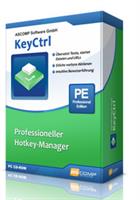
Description: Hotkey Manager KeyCtrl: Keyboard shortcuts for all tasks. Ctrl+C and Ctrl+V are the most used keyboard shortcuts on Windows. They save the user a lot of time and speed up working on the PC immensely.

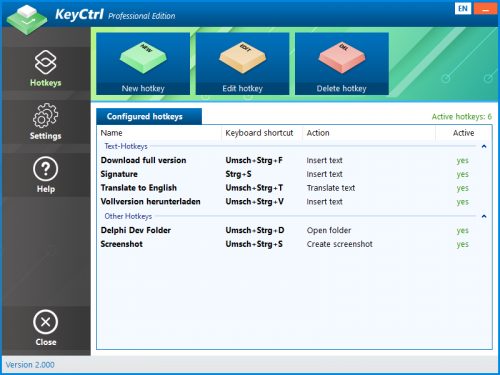
Wouldn't it be nice if you could use keyboard shortcuts for other tasks as well? For example, for the automatic insertion of frequently used texts in the e-mail program or in Word, to translate website content, to take screenshots or to open the most used folder in Windows Explorer? KeyCtrl is the key!

The right key combination and the defined task solve themselves as if by magic. Despite its ease of use, KeyCtrl also offers professional options. In this way, certain hotkeys can only be started when a specific window is displayed or a specified process is running. is loaded.

Automate your daily tasks now and define your own hotkeys. Increase productivity and minimize time spent with the right shortcuts!

Supported Operating Systems:
Windows 11
Windows 10 (32-bit & 64-bit)
Windows 8.1 (32-bit & 64-bit)
Windows 8 (32-bit & 64-bit)
Windows 7 (32-bit & 64-bit)
Windows Server 2022
Windows Server 2016/2019 (32-bit & 64-bit)
Windows Server 2012 (32-bit & 64-bit)

Release Name: KeyCtrl Professional 2.200
Size: 7.9 MB
Links: HOMEPAGE – NFO – Torrent Search

Download: RAPiDGATOR
6 Comments
Apr 25

FlowHeater 4.5.4

Description: FlowHeater is a powerful software solution that is specially designed for the integration and transformation of data. Our aim is to provide you with seamless and efficient data transfer. Whether you need to transform data between different systems, prepare it for external resources, or handle complex data processing tasks, FlowHeater gives you the flexibility and performance you need.

Smooth connectivity of data sources whose formats differ
FlowHeater lets you combine data from various sources and convert it to the format you need. With our simple to use drag-and-drop interface, you can transform data formats and at the same time perform calculations and conditional changes to the data. Our tool allows you to easily and intuitively integrate your data without calling for programming skills.

Convert data to suit your needs
FlowHeater allows you to flexibly convert your data. You can process and customize data formats like CSV, Excel, XML as well as many database formats. Whether you want to merge huge amounts of data, perform complex data manipulations or simplify your routine processes, FlowHeater gives you complete control over your data and lets you transform it precisely to whatever you need.

Automate your data processing
Save time with our optional FlowHeater Server solution. It can automatically transfer and customize your data formats in the background, thereby maximizing your efficiency.

Optimization of data processing
FlowHeater enables you to optimize your data processing and saves you lots of time . Our software also allows you to create customized data mappings and run them manually. You can also efficiently run your data integration processes automatically using scripts or have them always ready to run in the background with our optional server solution. With FlowHeater, you can tailor and enhance your data processing tasks precisely the way you want.

Text files
for reading and writing text files (CSV, TXT, ASCII, FlatFile, etc). Of course differing codepages and locales are handled automatically.

XML files
for the native import / export of "flat" XML files.

JSON
With the JSON Adapter it is possible to process JSON files that have a flat structure.

MS Excel
used for the import/export of spreadsheet data directly into/out of Microsoft Excel (XLS, XLSX) files. The Adapter supports all versions of Excel in Office 97 through Office 2021.

MS Access
used for importing and exporting data directly into and out of Microsoft Access MDB, MDE, ACCDB, ACCDE databases. All versions of Access 97 through Access 2021 are supported.

MS SQL Server
used to import, export and update data directly in MS SQL Server databases / tables. All versions of SQL Server 7.0 through SQL Server 2022 are supported.

Release Name: FlowHeater 4.5.4
Size: 29.5 MB
Links: HOMEPAGE – NFO – Torrent Search

Download: RAPiDGATOR
6 Comments
Apr 25

JP Software Take Command 36.00.35

Description: Replace Your Windows Console and CMD Command Prompt Windows. The Windows Command Prompt shortcut is a Windows console (command line, or character mode) session that runs the default Windows command shell CMD.EXE.

The command line is essential for developers, systems administrators and advanced users. Unfortunately, CMD Windows commands and the Windows console UI have always been woefully lacking in ability compared to what is available in most other operating systems. Because of the limitations in CMD and the Windows console, users have been forced to use the GUI for inappropriate tasks, or even to write custom programs to perform simple tasks that CMD should have been able to handle.

Take Command is a comprehensive interactive GUI and Windows command line toolkit that makes your command prompt windows easier to use and far more powerful. Take Command includes optional Windows Explorer integration, tabbed console windows, and major enhancements to standard Windows CMD commands such as COPY, DEL, DIR, FOR, MOVE, REN, SET, and START And it and adds more than 235 new commands, command dialogs, command line syntax coloring, vastly improved command line editing, programmable filename and directory tab completion, and thousands of other features.

Take Command is also a powerful batch file programming tool, including an integrated IDE with a sophisticated editor and batch debugger. Take Command offers extensions such as DO loops, SWITCH statements, error and exception handling, system monitoring and event triggers, and more than 780 built-in variables and functions. And you can extend that with 3rd-party plugins and user-defined functions.

12 Reasons Why You Should Replace Your Windows Console
The Windows console is responsible for running character-mode applications, including CMD, PowerShell, WSL bash, etc. It was introduced in Windows NT 3.1 in 1993, and some major internal architectural improvements were made in Windows 10 and 11.

Unfortunately, the improvements to the user interface were relatively minor, and though some efforts were made to improve the CMD console UI in Windows Terminal, they fall far short of what Take Command has been providing for years.

So why replace it with Take Command?

The Windows console is slow, and even slower when using Windows Terminal. Take Command's tab windows typically display output between 20% and 300% faster.
Take Command (like Windows Terminal) offers tabbed windows to run your character-mode applications. But Take Command takes it to another level by including vertical or horizontal tab groups and splitter windows.
Tabbed windows can be reordered, detached, or torn off, and existing console windows can be attached as new Take Command tab windows.
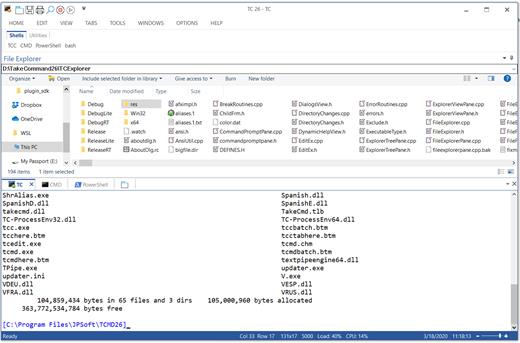
Take Command provides an optional embedded Windows File Explorer window that displays a tree view of the folders on your system and the contents of the selected folder (List View) on the right. You can drag folders and files from the Explorer window and drop them in a command prompt window.
Take Command can be easily configured for your preferences with its configuration dialogs.
Take Command has an optional tabbed tool bar that you can use to execute internal or external commands, aliases, or batch files with the click of a mouse (or an accelerator key). You can define up to 20 tabs, each with up to 50 toolbar buttons.
Take Command provides a configurable Status Bar that can display quick help for the current command, tooltips, and system information, including tab window size, CPU usage, memory usage, date & time, character values at the cursor location, and a slider control for window transparency.
Cut and Paste options are limited in the default CMD console or Windows Terminal. Take Command adds both line and column selection, double-click or triple-click selections, overwriting or appending to the Windows clipboard, and a variety of paste options.
Take Command windows can be styled with a choice of 18 themes.
Take Command and TCC offer a wide variety of colorization options, not just foreground and background colors.
Take Command includes invaluable tools, including a batch file debugging IDE, a regular expression creator / analyzer, search and replace in files, and a macro recorder / playback.
Extensive help (quick help, context sensitive help, and general help) is available in English, French, German, and Spanish at the touch of a button.

Release Name: JP Software Take Command 36.00.35
Size: 57.3 MB
Links: HOMEPAGE – NFO – Torrent Search

Download: RAPiDGATOR

7 Comments
Apr 25

JP Software CMDebug 36.00.35

Description: CMDebug is a stand-alone version of the Take Command IDE and batch debugger. CMDebug is intended to help developers create a batch file to run in CMD (the Windows default command processor) or TCC-RT (the free runtime version of TCC). It provides a comprehensive set of batch debugging features specifically designed for batch file development.

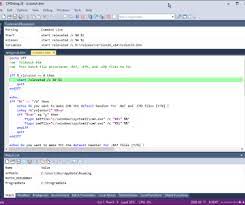
CMDebug allows you to write and debug your CMD batch files with the integrated graphical IDE. CMDebug includes tabbed edit windows and a sophisticated debugger with single stepping, conditional breakpoints, syntax coloring tooltips, bookmarks, and tabbed breakpoint, call stack, variable, alias, and watch windows. Windows batch file programming has never been easier or more powerful!

You can use CMDebug to develop either CMD-compatible batch files (*.BAT or *.CMD), or faster (and far more capable) TCC-RT-compatible batch scripts (.BTM). If you select the "TCC Syntax" option, CMDebug supports the full TCC-RT command set. If you select the "CMD Syntax" option, CMDebug will disable TCC-only internal commands, variables, and functions, and use the limited Windows CMD batch file commands syntax. Some internal CMD / TCC commands will also behave slightly differently or modify their display output in order to match CMD's behavior (and bugs!) more closely.

Using CMDebug with the TCC-RT syntax option allows you to create and debug (and optionally encrypt) batch files using the TCC command language, and then distribute them with the free TCC-RT runtime on an unlimited number of target machines.

Release Name: JP Software CMDebug 36.00.35
Size: 42.8 MB
Links: HOMEPAGE – NFO – Torrent Search

Download: RAPiDGATOR
7 Comments
Apr 25

JP Software TCC 36.00.35

Description: TCC: Upgrading the Windows CMD Command Line Prompt. The command line is essential for developers, systems administrators and advanced users, offering many advantages to anyone wanting to save time, expand their control and/or to automate their tasks.

TCC is our console mode Windows command processor (formerly known as 4NT). TCC is a replacement for CMD.EXE, the default Windows command processor. TCC is compatible with your existing Windows console applications and batch files, but offers major improvements to the CMD prompt in command line editing, interactive file and system management, batch file programming and debugging.

TCC is a superset of CMD, with 275+ internal commands (CMD has about 42), 800+ internal variables and functions (CMD has 6), hundreds of additional options for existing CMD commands, and thousands of additional features.

Whether you're a seasoned CMD prompt user or just getting started, TCC is the tool that will take your command line prompt experience to the next level.

Why Switch From the CMD Shell to TCC?

Familiarity
TCC is a CMD replacement Windows command processor that is compatible with your existing CMD commands and batch files while adding hundreds of new commands, variables, and variable functions.

Productivity
TCC provides vastly improved line editing and tab file completion, and adds thousands of new features. You're immediately more productive, and you can learn TCC's new features at your own pace.

Batch Files
Create and debug your batch scripts in a fraction of the time with TCC's integrated editor and batch file debugger.

Comprehensive Help
The extensive help (including context-sensitive popup help for command and variable syntax) speeds your development time and reduces errors.

Syntax
TCC's internal commands share a consistent syntax, reducing your learning and development time.

Multilingual
The user interface is available in English, French, German, Italian, Russian, and Spanish. (Online help is available in English, French, German, and Spanish.)

Release Name: JP Software TCC 36.00.35
Size: 55 MB
Links: HOMEPAGE – NFO – Torrent Search

Download: RAPiDGATOR
6 Comments
Apr 25

Nuclear Coffee VideoGet 8.0.11.142

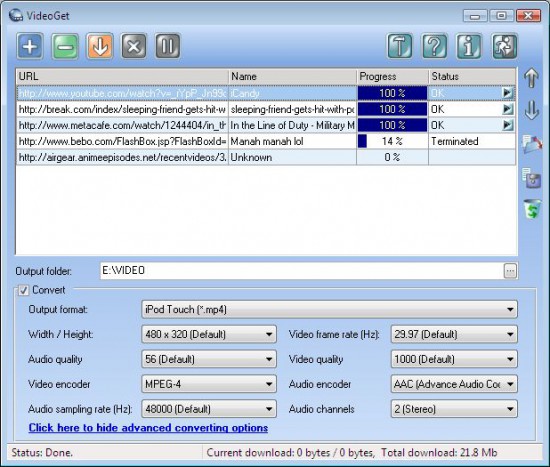
Description: Download YouTube videos. Also download from MySpace, Google Video, Yahoo Video, Break.com and more than 600+ video websites. With VideoGet you can Convert YouTube videos to AVI, WMV, iPod, iPhone, PSP, Zune, DVD, XVid, 3GP, etc.

Most of these video websites store video in FLV format. A lot of people don't know how to playback these files. VideoGet provides a possibility to convert such video into most popular formats for more comfortable playback. VideoGet allows you to convert YouTube video to 3GP, AVI, MPEG1, MPEG2, WMV, FLV, MP4, MP3 and more than 20 other file formats. This lets you not only view it, but also put it into your iPod Video, iPhone, Zune, PSP, mobile phone or any other portable device. Furthermore you can customize video/audio quality, video frame rate, width / height and audio sampling rate.

Release Name: Nuclear Coffee VideoGet 8.0.11.142
Size: 56.5 MB
Links: HOMEPAGE – NFO – Torrent Search

Download: RAPiDGATOR
6 Comments
Apr 25

Scrapbook Factory Deluxe 5.0.3.6

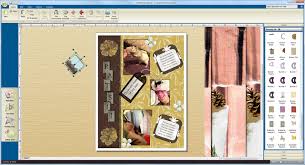
Description: Preserve precious memories with version 5.0 of America's #1 best-selling scrapbook software. Scrapbook Factory Deluxe 5.0 offers the ultimate collection of 6,500+ exclusive templates as well as 75,000+ beautiful graphics and 5000+ photorealistic embellishments sure to capture the excitement of any occasion.

Scrapbook Factory® Deluxe 5.0
Create memories to last a lifetime.
- 6,500+ Exclusive Templates and Customizable Projects
- 75,000+ Beautiful Graphics All Inside the Box
- 6,000+ Photorealistic Embellishments Included
- 1,500+ Creative Fonts
- Built-in Photo Editor

Digital Photo Editor
Fix or customize any photograph with Scrapbook Factory Deluxe's advanced photo editor. Add special effects, crop in unique shapes, remove "red-eye" and more.

Customize Your Pages with 6,000+ Photorealistic Embellishments
Drag and drop literally thousands of elements from the Scraps Gallery right onto your scrapbook page. No other software makes it this easy!

System Requirements
- Windows® XP, Vista®, 7, 8, 10, or 11
- 512 MB RAM
- Pentium® III 800 MHz or faster
- DVD drive
- Recordable or rewritable CD drive required to burn CD photo scrapbooks

* Beautiful results with all popular inkjet and laser printers, including Lexmark, HP, Epson, Canon & more.

Release Name: Scrapbook Factory Deluxe 5.0.3.6
Size: 8.3 GB
Links: HOMEPAGE – NFO – Torrent Search

Download: RAPiDGATOR
3 Comments
Apr 25

Greeting Card Factory Deluxe 11.0.1.2

Description: Customize, personalize and send the very best store-bought greeting cards with one great software product - Greeting Card Factory Deluxe 11! This new version contains the ultimate collection of retail-quality cards for every event and occasion.

With beautiful graphics, text effects and heartfelt sentiments to choose from, you'll create greeting cards that not only look incredible but express your inner-most feelings every time.

Greeting Card Factory® Deluxe 11
Bigger selection * Better graphics * More ways to show you care

- Customize! Create greeting cards, calendars, photo projects and more
- 27,000+ Cards and projects
- 94,000+ Graphics
- Easy! Complete projects in 3 easy steps
- Included! Advanced photo editor

Plus, Greeting Card Factory Deluxe 11 offers more than just cards. Increased content, contemporary new features, an easier to use interface and enhanced browser system let you search for other customizable projects like invitations, thank you notes, stationary, envelopes and more! Even correct and add your own digital photos to cards, calendars and crafts using the Advanced Digital Photo Editor.

Create the best in personalized greetings with 27,000 cards & projects and 94,000 graphics in the new Greeting Card Factory® Deluxe 11 today!

Spectacular Cards in 3 Easy Steps
Greeting Card Factory Deluxe 11 makes it easier than ever to create customized greetings with the ultimate collection of cards, invitations, announcements and more.

94,000+ Graphics in the Box
Only Greeting Card Factory Deluxe Version 11 gives you the creative edge with quality Art Explosion® graphics – the #1 choice of consumers.

Advanced Photo Editor
- Capture photos directly from your camera or scanner.
- Use powerful photo customization tools.
- Apply sensational photo effects.
- And much more!

System Requirements
- Windows XP, Windows Vista 32-bit, Windows 7, Windows 8, Windows 10, Windows 11
- 512 MB RAM
- Pentium III 800Mhz or Faster
- DVD Drive
- Internet connection required
- Recordable or rewritable CD Drive required to burn CD greeting cards

Release Name: Greeting Card Factory Deluxe 11.0.1.2
Size: 763.9 MB
Links: HOMEPAGE – NFO – Torrent Search

Download: RAPiDGATOR
9 Comments
Apr 25

Quicken WillMaker & Trust 26.4.3146

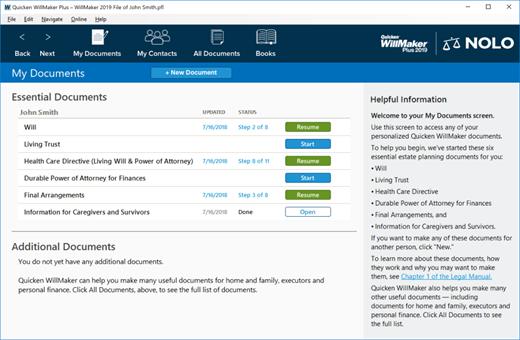
Description: Quicken WillMaker & Trust by Nolo is America's #1 estate planning software. Get immediate access to easy-to-use software and create your customized will today. Make a living trust, healthcare directive, power of attorney and so much more. There's never been an easier, more affordable way to protect your family, home and assets.

Why Choose WillMaker?
- Save on Legal Fees
- Easy to Use
- Trusted
- Convenient
- 100% Secure
- Legally Binding

Comprehensive Will
Take control of who inherits your property and who will care for your minor children. Appoint an executor to carry out your wishes and a guardian to manage property you leave to youth.

Health Care Directives
Lay out your medical care wishes and name someone to carry out your instructions.

Final Arrangements
Describe your preferences for burial, cremation, memorials, obituaries, and more.

Durable Power of Attorney
Name someone you trust to be on hand to manage the many financial tasks that will arise if you become incapacitated.

Letter to Survivors
Give your loved ones or caregivers the important details of your life — including bank accounts, passwords, and names of people you'd like contacted in the event of your illness or death.

Living Trust
Distribute your assets and provide property management while keeping your trust property out of lengthy and expensive probate proceedings after you die.

Transfer On Death Deed
Transfer your home to a beneficiary you name, without probate.

WillMaker Download
Make your WillMaker documents online or download and install the software on your computer.

Additional Documents
Use these smaller forms when you need them: Limited Power of Attorney, Promissory Note, and Temporary Guardianship Authorization.

Minimum System Requirements
- Computer: 1 GHz or higher
- Operating System: Windows 10/11
- Memory: Minimum 2GB
- Hard Disk Space: 54 MB free space; for Windows up to 1.5 GB if .NET is not installed
- Software: PDF Viewer

Release Name: Quicken WillMaker & Trust 26.4.3146
Size: 54.3 MB
Links: HOMEPAGE – NFO – Torrent Search

Download: RAPiDGATOR
8 Comments