Please REGISTER or RENEW your account on RAPiDGATOR.net and support us by doing through all RAPiDGATOR working download links on main posts...
Apr 24

Waves Ultimate 16 26.04.14

Description: Waves is the world’s leading developer of audio plugins and signal processors for the professional and consumer electronics audio markets. All 230+ Waves plugins. Create with Total Freedom: Everything Always at Your Fingertips

Let nothing stand between the sound you hear in your head—and what comes out of the speakers. With Waves Ultimate—the biggest option in our Waves Creative Access subscription—you get all the plugins you need, when you need them. Anything you want to create—you’re covered.

All of Waves’ popular vocal production plugins. All analog models, from Abbey Road to SSL. All Waves mastering plugins. All the compressors, all the EQs, all the effects, instruments, saturation plugins, artist signature plugins, channel strips, AI-powered noise reduction. Waves Ultimate offers the most complete set of pro-quality audio plugins, anywhere.

Over 230 plugins
7-day free trial: no commitment
All future updates included
New plugins added regularly
The industry’s largest, most diverse catalog of pro plugins
Includes StudioVerse: Thousands of mixing chains with AI search
2 licenses for activation on 2 machines at a time
Cancel anytime (your subscription will stop at the end of your current period)
Personal technical support by phone and email
From Waves Audio, winner of the Technical Grammy® Award

Release Name: Waves Ultimate 16 26.04.14
Size: 9.2 GB
Links: HOMEPAGE – NFO – Torrent Search

Download: RAPiDGATOR
1 Comments
Apr 24

PDF-XChange Editor Plus 10.8.5.410

Description: PDF-XChange Editor Plus is a hugely dynamic and fully-customizable PDF application. Create, view, edit, annotate, OCR and sign PDF files – and that’s just the beginning. If you work with PDF then this fully-customizable product will optimize your work process to levels that no other product can achieve. Create PDF files from scanned documents, images, text files, Markdown files and much more.

Convert Microsoft Office documents to PDF at the click of a button. Avail of over thirty tools to assist in the creation of document comments, annotations, links and fillable forms. These tools make editing PDFs a finely-tuned, precise process that produces documentation and image files of the highest quality. Our user-friendly functionality is diverse enough to meet the needs of all practitioners from novice users to professionals.

The following additional features are available in PDF-XChange Editor Plus:

Enhanced OCR Engine
PDF-XChange Editor Plus comes with an Enhanced OCR engine that is more accurate, dynamic and efficient than the default OCR engine in PDF-XChange Editor.

Create and Edit Fillable Forms
PDF-XChange Editor Plus features a range of dynamic form-creation options. Adjust form properties to avail of a range of customizable style, layout and function options for forms.

Compare Documents
The Compare Documents feature can be used to compare documents, and provides a summary of differences including replacements, insertions, deletions and style changes between documents

Identify Forms
The Identify Forms feature enables the automated conversion of image-based or non-interactive PDF files to fully-interactive forms with clickable form fields.

Release Name: PDF-XChange Editor Plus 10.8.5.410
Size: 458 MB
Links: HOMEPAGE – NFO – Torrent Search

Download: RAPiDGATOR
6 Comments
Apr 24

SayPaste 2.20260328.0

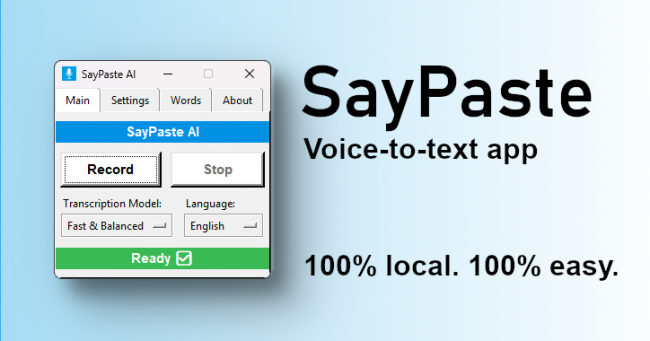
Description: Voice-to-text app for Windows. 100% local. 100% easy. SayPaste AI runs quietly in the background and only listens when you tell it to. Just press a keyboard shortcut to start recording, and another to stop and transcribe. After transcription, the result is instantly copied to your clipboard—no need to copy manually. Just paste it wherever you need.

- Instant Voice-to-Clipboard
- Automatic punctuation
- Built on OpenAI’s Whisper engine
- 100% Local & Private
- Lightning-fast keyboard shortcuts
- No subscriptions, ever!

How SayPaste Works
SayPaste AI runs quietly in the background and only listens when you tell it to. Just press a keyboard shortcut to start recording, and another to stop and transcribe. After transcription, the result is instantly copied to your clipboard—no need to copy manually. Just paste it wherever you need.

- Turn beep feedback on or off as you prefer
- Control SayPaste with global hotkeys or the simple control window
- Show or hide a transcript popup after each dictation
- Let SayPaste add punctuation automatically—or speak it yourself
- Use a custom dictionary to fix names and spoken punctuation
- Choose your Whisper model—from fastest to most accurate
- NEW! Use the Polish feature to turn rough dictation into polished text

Why SayPaste?
SayPaste AI is built for people who value privacy, speed, and control. Whether you’re a writer, researcher, or just tired of typing. It gets your voice to text in high quality—controlled by easy keyboard shortcuts—and sent straight to your clipboard.
100% Local & Private

100% Local & Private
Everything runs on your computer. Nothing is sent to the cloud.

Clean & Focused
No clutter. No ads.

No Subscription
Pay once. Use it forever.

Customizable
Use the app your way.

Easy
Just start recording right away. All self-explaining. No headache.

Built on OpenAI’s Whisper
Powerful, proven speech-to-text engine.

System Requirements
- Operating System: Windows 10 or 11 (64-bit)
- Disk Space: ~3.8 GB
- Install SayPaste in a local folder, not in cloud-synced locations like OneDrive or Google Drive.
- CPU: Modern quad-core (i5 / i7 / Ryzen 5 / 7 or better). ARM-based processors are not supported!
- Memory: 16 GB RAM recommended
- Microphone: Any basic microphone will work

Release Name: SayPaste 2.20260328.0
Size: 3.7 GB
Links: HOMEPAGE – NFO – Torrent Search

Download: RAPiDGATOR

3 Comments
Apr 24

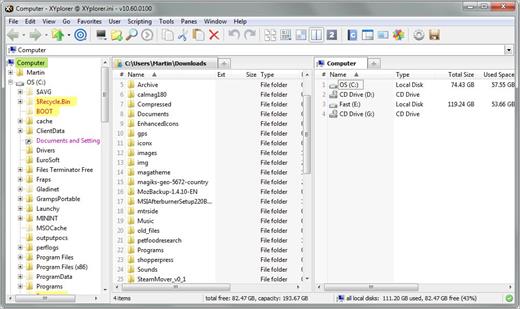
XYplorer 28.30.0400

Description: XYplorer is a file manager for Windows. It features tabbed browsing, a powerful file search, a versatile preview, a highly customizable interface, optional dual pane, and a large array of unique ways to efficiently automate frequently recurring tasks.

It's Tabbed
Tabs let you switch between folders most easily. Drag them around, hide them, lock them, name them, or drop files onto them. The tabs remember their configuration individually and across sessions. On top of this you get tabsets and dual pane.

t's Functional
XYplorer has been designed to make you faster. Numerous usability enhancements in an attractive interface help to streamline your workflow and increase your efficiency. You will definitely save a lot of time.

It's Scriptable
Yes, you can program this app. Individual solutions for individual tasks. No plugins needed, scripts run out-of-the-box. Even beginners can benefit from this feature since many ready-to-use scripts are available in the forum.

It's Fast
Speed has always been a major design goal with XYplorer. The code is constantly optimized for performance, zero tolerance for slowness. On top of that the app uses very little RAM, the executable is light (7 MB), and it loads almost instantly.

It's Reliable and Robust
You can trust XYplorer. It works as intended and expected, and is very hard to destroy. Any issues are immediately attended and usually fixed within hours. A large community is closely watching the development and permanently testing the frequent beta versions.

It's Customizable
You can fine-tune the app to look and behave exactly as you want it. This ranges from fonts and colors to custom toolbar buttons and even file icons and program associations. And every bit of it is fully portable. Even the dark mode.

It's Responsive
Your customer voice is listened to and taken seriously, most of the time you get instant feedback, and your wish might actually get implemented sooner than you'd think.

Operating System:
Windows 11, Windows 10, Server 2019, Server 2016, 8.1, 8, Server 2012, 7, Server 2008, Vista, XP, Server 2003; 32-bit and 64-bit versions.

Release Name: XYplorer 28.30.0400
Size: 11.4 MB
Links: HOMEPAGE – NFO – Torrent Search

Download: RAPiDGATOR
4 Comments
Apr 24

Final Draft 13.3.1 Build 110.2

The first-choice tool of professional screenwriters everywhere. Plan, create, collaborate. Write your screenplay with the most creator-centered, best-selling screenwriting software in the world.

The Industry Standard for Seamless Script Writing
Final Draft is the industry standard for professional screenwriters, studios and production companies around the world. Get the only tool that lets you fully customize your writing environment, streamlines your process, maximizes your productivity, and correctly formats your work. All so you can focus on what matters most—writing.

Just Add Words
No more fussing with formatting because Final Draft does it all automatically. Get the words down, let Final Draft do the rest.

Write It Your Way
Create your ideal writing environment, from dozens of professional templates to customizable workflows and modes.

Unleash Productivity
Use powerful story planning tools to help brainstorm and outline your script, whether by yourself or collaborating with partners in real time.

Deliver Professionalism
Generate production-ready scripts with the screenwriting platform trusted by 95% of the entertainment industry.

From Idea to Rough Draft to Finished Script

1. Set the Beat
Reimagine the index card with the Beat BoardTM. Build your story beat-by-beat with customizable, moveable, and manageable visual building blocks.

2. Build an Outline
Transfer your story beats to the Outline EditorTM for high-level structure planning on an easy-to-manage timeline. Then send the outline straight to the script, so you start with organized thoughts instead of a blank page.

3. Start Your Script
Choose from over 40 templates for screenplays, teleplays, comics, graphic novels and stage plays—or just start typing.

4. Write Your Heart Out
From productivity tools to easy editing, Final Draft’s fully customizable environment makes writing a joy.

5. Export a Professional Project
Professional tools like Navigator makes casting, diversity initiatives, production scheduling, and more a snap. Then, easily export your script in the format production professionals expect.

Release Name: Final Draft 13.3.1 Build 110.2
Size: 135.5 MB
Links: HOMEPAGE – NFO – Torrent Search

Download: RAPiDGATOR

6 Comments
Apr 24

Global Mapper Pro 27.0.0 Build 042226

Description: Global Mapper v27 Brings Geodetic Accuracy to Every Workflow. Go beyond analysis. Execute with confidence. Global Mapper v27 integrates GeoCalc, Blue Marble’s industry-standard geodetic library, directly into the platform, so you can move from analysis to real-world execution with greater accuracy, speed, and reliability.

Geodetic Accuracy Without the Complexity
Global Mapper 27 streamlines desktop GIS and advanced geodetics by fully integrating GeoCalc, our industry-standard geodetic library. High-precision transformations that once required multiple systems can now be completed within a single workflow, reducing complexity and delivering more consistent, reliable results.

Validate Aerial Lidar With Confidence
Ensure positional accuracy from the start. Advanced horizontal quality assurance (QA) and positional adjustment tools align flight paths, improve point cloud accuracy, and support rigorous quality control (QC) standards required for UAS and government mapping programs.

Meet Evolving Data Standards Across Every Delivery
Built-in ASPRS density measurement methods help ensure compliance, reduce risk, and streamline validation across every delivery.

Optimize Breakline Creation With Intelligent Automation
Replace manual digitizing with guided automation to enhance breakline creation and improve consistency and accuracy across terrain models.

Reduce Workflow Friction With Broader Format Support
Share point cloud data seamlessly with enhanced E57 export, leverage GPS time offsets with LAS 1.5 support, eliminate conversion steps with direct TFADS-O export, and integrate with GNSS workflows using GGF export.

Release Name: Global Mapper Pro 27.0.0 Build 042226
Size: 711.2 MB
Links: HOMEPAGE – NFO – Torrent Search

Download: RAPiDGATOR
6 Comments
Apr 24

Wondershare Recoverit 14.0.25.7

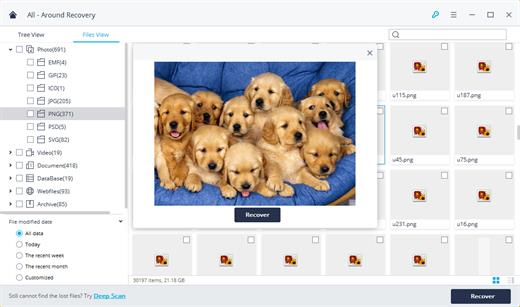
Description: Recover Files in Minutes, No Tech Skills Needed. 2000+ storage devices supported. Recover 1000+ file types. Success recovery rate of 99.5%. 3 simple steps to recover unlimited data.

2000+ Storage Devices Supported
The high-tech data recovery tool can easily recover lost data from almost any devices or storage media.

Laptops, PCs & NAS
Recyle bin, internal drives, partitions; NAS (Network Attached Storage)

Memory Cards
SD/CF card, microSD, miniSD, Sandisk, memory card/stick, TF memory card…

Internal Hard Drive
Hard Drive (Basic & Dynamic), SSD (Solid State Drive)

External Hard Drive
We Support Nearly All External Hard Drive That You Use

Flash Drives
USB Drives, Jump Drives, Pen Drives, Thumb Drives…

Other Storage Media
Camera (Canon, Sony, Nikon, Fuji), Music/Video Player, Camera Drones (GoPro, DJI)

Recoverit Support 1000+ File Types and Formats
We support recovery of all types of files and file systems, e.g. NTFS, FAT, HFS+, APF.

Document
DOC, DOCX, RTF, XLS, XLSX, XLSB, PPT, PPTX, PPS, PDF, DOT, DOTX, XLSB, XLT, XLTX, POT, PPSX, etc.

Photo
CRW, JPEG, JPG, PNG, PSD, RAW, RGB, 3DM, 3DMF, 3FR, ABM, AFX, ANI, ART, ARW, BIZ, BLD, etc.

Video
AVI, FLA, FLV, M4V, MOV, MP4, WMV, 3G2, 3GP, 3GP2, 3GPP, AMV, ANM, ASF, ASX, etc.

Audio
AAC, AIFF, ALAC, FLAC, MP3, OGG, PCM, WAV, WMA, A52, AA, AA3, AAC, AC3, ACC,AFC, AIF, etc.

Archive
7Z, WAR, ZIP, exe, 7zip, etc.

Other Files
MSG, PST, OST, EML, EMLX, MBOX, EPUB, JIS, KEY, LOG, MPS, 3DA, 3DS, 3TF, 3WS, ABD, etc.

Release Name: Wondershare Recoverit 14.0.25.7
Size: 209 MB
Links: HOMEPAGE – NFO – Torrent Search

Download: RAPiDGATOR

5 Comments
Apr 24

Office Tool Plus 11.3.12

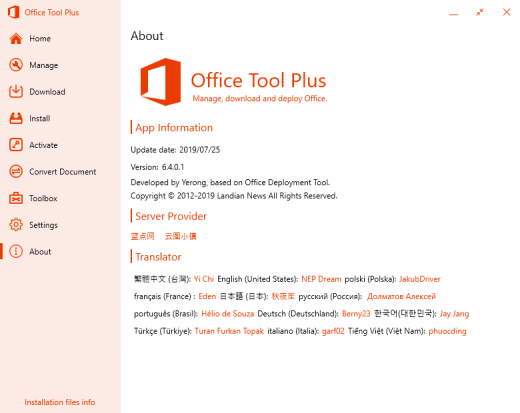
Description: Office Tool Plus based on Office Deployment Tool (ODT), you can deploy Office very easily.

Powerful Customization
Office Tool Plus support all features of Office Deployment Tool. You can deploy Office easily.

Rich Features
Office Tool Plus includes tools, you can fix, manage and configure Office very easily.

Generate Config
You can create XML profile with Office Tool Plus and use it to deploy Office on other computers.

Always up to date
Office Tool Plus get Office from Microsoft, make sure you can deploy the latest version of Office.

Fast & Easy, deploy Office in just two steps.

1. Config and Deploy Office
Office Tool Plus support multiple edition of Office, Visio and Project, you can configure more options for deploy.

2. Activate your Office
If you can't activate Office normally, you can use Office Tool Plus to install keys, get IID or set KMS to activate Office.

Release Name: Office Tool Plus 11.3.12
Size: 42.2 MB
Links: HOMEPAGE – NFO – Torrent Search

Download: RAPiDGATOR

5 Comments
Apr 24

GRAPHISOFT ArchiCAD 28.4.0 Build 7002

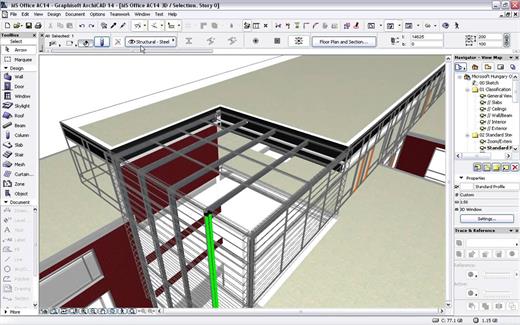
Description: Design, visualize, document, and deliver projects of all sizes with Archicad’s powerful set of built-in tools and easy-to-use interface that make it the most efficient and intuitive BIM software on the market. With Archicad, you can focus on what you do best: design great buildings.

Collaborate
Work with your team and other disciplines around the corner or around the world on projects of any size and complexity. Open standards and workflows mean collaboration is guaranteed — regardless of what software team members are using.

Design
Unleash your creativity with the leading BIM software developed by architects like you. With algorithmic design tools and large model support, you can do what you do best: design great architecture.

Visualize
Archicad’s professional architectural visualization tools translate your conceptual designs into compelling imagery of future buildings. Bring your models to life, inspire the audience, and invite stakeholders to engage with your designs.

Document
Complete, out-of-the-box documentation tools combined with a powerful publishing workflow that complies with local BIM requirements means you can focus on your designs, not the paperwork.

1. Simply start modeling
In Archicad, your intuition comes first. Just start working and let your ideas flow. It’s easy thanks to features like the wall tool and the large, integrated libraries with predefined objects such as windows, doors, and furnishings. Define component properties at any time, and to a high level of detail.

2. Designs are just a click away
Archicad saves you valuable time. You only need to create a 3D model once – and simply press a button to generate the associated floor plans, sections, and elevations. Every change you make to your building model is automatically transferred to all plans. This happens in the background, in a matter of seconds. Archicad intelligently taps into unused processor resources ensuring a smooth, uninterrupted workflow.

3. Always up-to-date material list
Archicad automatically creates lists of all model elements such as walls, windows, doors, railings, beams, or façade elements. View the current component schedules at any time and adjust the list directly.

4. Easy data exchange
Export and share model data with colleagues thanks to the integrated publisher — with just one click. Archicad supports more than 40 export formats and, with its IFC interface, facilitates open collaboration and integrated workflows with engineers.

5. Work in a team
Edit your project on multiple workstations, even simultaneously and from multiple locations. The Teamwork function in BIMcloud helps you stay in sync with all members of the project.

6. Compelling visualizations
Bring your project to life for your clients – with an impressive presentation via desktop, notebook, tablet, or even smartphone. Simply export a BIMx file. With the BIMx mobile app, you always have your designs at hand and can present them in 2D, 3D, and via a virtual walk-through.

7. Archicad Keeps Getting Better
One of Archicad’s strenghts is that it is constantly evolving. Our regular updates gives you access to significant productivity and efficiency improvements – especially when working in a team or together with external partners.

Release Name: GRAPHISOFT ArchiCAD 28.4.0 Build 7002
Size: 4.5 GB
Links: HOMEPAGE – NFO – Torrent Search

Download: RAPiDGATOR

4 Comments
Apr 24

Ashampoo Snap Pro 26.0.1

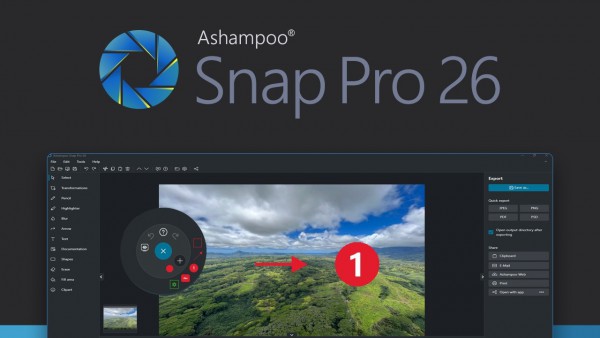
Description: With Ashampoo Snap Pro 26, creating screenshots and videos is easier than ever! Everything that appears on your screen can be captured in seconds. In the image editor, you can edit, annotate, save, and share your captures instantly. New: With Live Edit, you can even mark content directly on your Desktop before the screenshot is taken. Snap Pro 26 also enhances your screenshots with graphical elements such as automatic numbering, comments, stickers, and more. Whether you're working from home, explaining something quickly, or creating detailed tutorials, Snap Pro 26 lets you get the job done faster.

Screenshots and video recordings with scrolling function, sound option and quick access via hotkeys
Direct editing with text, highlighting, numbering, blur tools and a handy screenshot library
Ideal for instructions, tutorials and documentation with flexible export as PNG, JPG, PDF and cloud upload

Live Edit–Mark directly on your desktop
Live Edit places a transparent layer like a sheet of glass over your screen. On this layer, you can draw arrows, add text, or highlight areas directly on top of the content you want to explain. Unlike traditional screenshot tools, your screen does not freeze during this process. You can switch back to your Desktop at any time to move windows, adjust content, or let a video continue playing, and then continue working on your annotations. This way, the final screenshot evolves step by step without having to restart the process.

Prepare and create screenshots faster
With Live Edit, multiple screenshots can be prepared and created within a single workflow. Annotations remain visible while you continue working on your Desktop and can be adjusted at any time. Especially with large workspaces or multi-monitor setups, Live Edit provides plenty of screen estate to organize content clearly. The final screenshot is then created directly from the Live Edit view–What you see is always what you get!

Better performance, stability and resource efficiency
The new Ashampoo Snap is built on a fully modernized technical foundation: The program starts faster, responds more quickly, and operates more smoothly overall. At the same time, memory usage and background process activity has been significantly reduced so Snap remains responsive and stable even during longer sessions. This new foundation improves everyday performance while also preparing Snap for future enhancements and new features.

Enhanced workflow and modernized interface
We have also improved many details for everyday work with Snap. The image editor's toolbar is smarter and supports your workflow even better. The properties bar has been restructured to provide a clearer and more consistent user experience. The updated color scheme improves readability and makes longer working sessions less strainful. With Quick Scroll, you also get a smart thumbnail preview that automatically appears when needed and helps you navigate large captures more easily.

More practical improvements
Many already useful features have been further refined: Cliparts now support drag & drop and image imports are more convenient, tools like the arrow tool offer better precision, and additional output formats are available for emailing images. The print dialog has also been updated and now supports margin settings in centimeters. In addition, video exports now support a quality settings to save storage space or speed up exports.

Smart desktop capturing and sharing
Once active, Snap's magic eye auto-detects elements below your mouse pointer (browser windows, program menus, images, etc.) and offers instant 1-click capturing with pixel precision. But it doesn't stop there: Snap can also capture custom rectangular or freehand regions and even supports scrolling content! Naturally, the program supports all possible kinds of sharing options, including email and Ashampoo Web!

Optical character recognition (OCR) for your screenshots
As of now, Snap no longer recognizes just 7 but over 180 languages! Our new text recognition utilizes Windows' own language packs and produces better results faster. Chances are you won't be needing over 180 languages straight away so, in the interest of simplicity, we've limited the number of initially available languages to the system languages currently installed on your machine. You can easily add additional languages via the "Add language" menu item.

Fast and easy video cutting
Not every video recording is an instant success. Ads, extra steps or pauses are a frequent bother. The same applies to screen captures. Keep the important bits and get rid of the rest with Ashampoo Snap! Remove ads, glitches or superfluous scenes or split your video into individual episodes. It doesn't matter whether you're casually pointing and capturing, creating an extensive webinar or producing a high-quality presentation: With Ashampoo Snap, every video capture comes out a success!

Create videos for any purpose
Creating instructional videos or documentaries is a breeze with Ashampoo Snap. Recordings are live-annotable with texts, drawings and voice narration. Clear things up with visualized mouse clicks and key strokes and add watermarks to protect your intellectual property. Take it to the next level and add live feeds from your webcam in a single click. Here's your ticket to create engaging tutorials, prepare instructive webinars and to point the way to the things that matter most to you–literally!

Perfect for different screen resolutions and multi-display environments
Ashampoo Snap fully supports multi-display setups, even with different resolution and DPI combinations, e.g. mixed Full HD and 4K environments. Each display is captured at its individual resolution for maximum crispness and results are instantly editable. And once you're in the editor, it's smooth sailing for beginners and professionals alike!

Create GIFs from any video
What would the internet be without those charming GIF animations? But GIFs can also be used in tutorials or demonstrations to great effect. Ashampoo Snap can turn any video segment into GIFs. Just set the start and end positions, fire up the built-in converter and you're done!

More than a snipping tool: extensive comfort features
Ashampoo Snap does most of the heavy lifting for you. Automatic numbering or time-delayed captures will help you make the most of your shots. Freely annotate your captures with texts and drawings or use flood fills. Put the spotlight on individual portions, blur sensitive data and use the highlighter to direct attention in style!

Capture desktop contents and save videos or images from the internet
The internet is brimming with fascinating images, texts and videos. Ashampoo Snap makes it easy to capture what you like! Save image and videos and edit them on the fly and to your liking! Anything you see on your screen, or hear through your sound card, Snap can capture!

Release Name: Ashampoo Snap Pro 26.0.1
Size: 235.1 MB
Links: HOMEPAGE – NFO – Torrent Search

Download: RAPiDGATOR
4 Comments