Please REGISTER or RENEW your account on RAPiDGATOR.net and support us by doing through all RAPiDGATOR working download links on main posts...
Apr 24

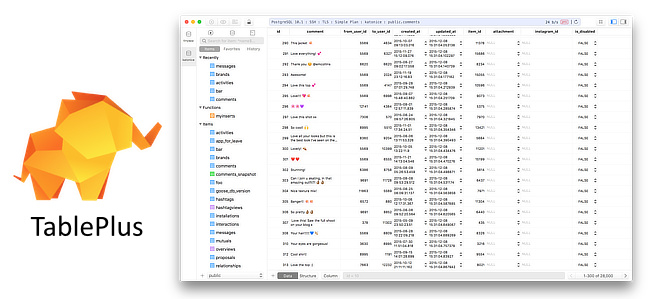
TablePlus 6.9.3

Description: Database management made easy. Modern, native, and friendly GUI tool for relational databases: MySQL, PostgreSQL, SQLite & more. Supports a whole set of relational databases and more. Modern native designs that match your beloved OS. With native build, simple design and powerful features, TablePlus makes database management easier, faster & more efficient for you.

Inline edit
Edit data rows, table structure, or query results directly with just a click.

Advanced filters
Quickly see the records you need using multiple advanced filters.

Code review
Always stay in control of what you have changed on your database.

Safe mode
Prevent any mistakes from being made on your production database.

Export & import database
Need to migrate a database to another server? Export and Import SQL Dump will get it done in no time.

Open anything
A quick jump to a table, schema, database, view, function, literally anything from your connection.

Multiple tabs & windows
Working with multiple databases or connections at the same time? Not a problem.

Metrics Board
With TablePlus, you can build internal dashboards fast and simply.

Customizable appearance
You can customize the appearance & configurations that best match your personal taste.

A smart query editor
We've built the best practices for SQL Editor into default to help you boost your productivity.

Release Name: TablePlus 6.9.3
Size: 90.3 MB
Links: HOMEPAGE – NFO – Torrent Search

Download: RAPiDGATOR

5 Comments
Apr 24

LumaBooth 8.1.23

Description: The long-loved dslrBooth has been renamed to LumaBooth for Windows. It’s the same powerful features and rock-solid reliability that photo booth professionals have relied on for years. LumaBooth for Windows is now part of the LumaBooth platform, which brings the added ability to create and edit events using a web-based dashboard, including hundreds of pre-made layouts and overlays to make it even easier to set up your events.

Capture
Capture photos, GIFs, boomerangs, videos, and 360s with the LumaBooth for Windows photo booth app.

Customize
Shape your photo booth experience to fit your event or brand from start screen to theme color to video and print layout customization.

Share
Share using email, SMS, Instagram, QR code, AirDrop, WhatsApp, or physical paper prints of any size.

The easiest photo booth software
Running a photo booth shouldn't be complicated or expensive. Run LumaBooth for Windows PC photo booth software on your pc, hook up your Canon, Nikon, Sony, GoPro, or Webcam and you have a professional photo, 360, video, and GIF booth.

Release Name: LumaBooth 8.1.23
Size: 238.5 MB
Links: HOMEPAGE – NFO – Torrent Search

Download: RAPiDGATOR

3 Comments
Apr 24

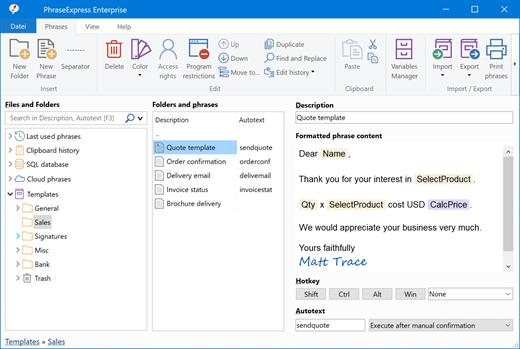
PhraseExpress 18.0.69

Description: No More Typing the Same Phrase Again. The text expander software PhraseExpress manages frequently used text templates for use in any program. Phrases can be shared in the cloud, on a NAS, or via Microsoft SQL Server.

Universal Text Snippet Manager
Speed up your typing in any program, such text editors, email programs, web browsers, database applications, EMR, etc.
Organize text snippets in customizable categories for instant access.
PhraseExpress can save hours of typing in help desk, call center, law offices, expert appraisers and medical transcription.

Text Expander Benefits
PhraseExpress offers a variety of benefits in the enterprise:
Time savings: Employees save time by not having to write repetitive texts repeatedly.
Consistent quality: A text template management system helps maintain consistency in style, tone, and language.
Cost savings: Communication becomes not only more consistent but also quicker. Pre-defined text snippets help prevent errors.
Customer Satisfaction: Clients or customers benefit from receiving consistent and prompt information.

AI Integration
Process your phrases with Artificial Intelligence
AI can summarize or rewrite your phrases in different styles (formal/informal). PhraseExpress stores the processed phrases, so you only need to AI-process the text once. PhraseExpress also allows you to use AI in any application on your computer at the touch of a button.

Privacy First
Your data remains on your computer!
PhraseExpress is locally installed, eliminating the need for external cloud services. No need to "log-in" into anything.
this includes AI language models, which run locally on your computer.
No data must be sent or stored off-site. You retain complete ownership of your data and maintain total control over the application.
For added security, phrases can be encrypted using AES and safeguarded with a password.

Share Phrases with your Team
Share phrases with other users in the local network or in the cloud – On-premise or over the internet.
Each phrase can be set private or made public to selected users.
The client-/server architecture prevents edit collisions.
PhraseExpress supports Microsoft SQL server and Citrix/TerminalServer.

Cloud Support
Optional cloud synchronisation allows you to share phrases with other users.
PhraseExpress supports any popular cloud service, such as Dropbox, Microsoft OneDrive, Google Drive and on-premise cloud solutions like OwnCloud and Synology CloudStation.
You can alternatively use any NAS or network-shared folder to sync your phrases between multiple Windows and Mac computers.

Cross-Platform Support. Work faster everywhere!
PhraseExpress is available for Windows and the TextExpander alternative saves typing on your Mac, too. The Free Text Expander App for iPhone and iPad provides the productivity benefits on tablet or smartphone devices.
* Features advertised on our website refer to the Windows version, unless specified otherwise.

Multi Language Phrases
Take your templates to the next level - Literally!
PhraseExpress can organize phrases not only in a tree structure but also in multiple dimensions.
The same phrase library can be switched instantly into different languages, making it an ideal solution for multi-lingual call centers!
PhraseExpress can even translate your phrases into another language.

Macro Automation
Takes out the tedious from your tasks
PhraseExpress integrates a powerful Macro Recorder to record and playback repetitive tasks.
Macro Recorder records your actions like a tape recorder for infinite playback.

Document Generator
The Document Generator can generate an entire document based on a custom selection of your text templates:
Lawyers create custom contracts in no time: Just select the terms to be included and PhraseExpress saves the custom contract as a Microsoft Word document on your desktop.
Technical writers can re-use common parts of a documentation to quickly create a variation of existing user manuals.
Medical doctors can select applicable items from the list of common procedures to create a customized medical report.

Release Name: PhraseExpress 18.0.69
Size: 57.1 MB
Links: HOMEPAGE – NFO – Torrent Search

Download: RAPiDGATOR

6 Comments
Apr 24

IObit Driver Booster Pro 13.4.0.234

Description: Updating drivers is usually an initial step to avoid hardware failure, system instability and hidden security vulnerabilities. To update drivers regularly is also an effective way to enhance your overall PC performance, and maximize your gaming experience. While this process could be risky and frustrating if done manually.

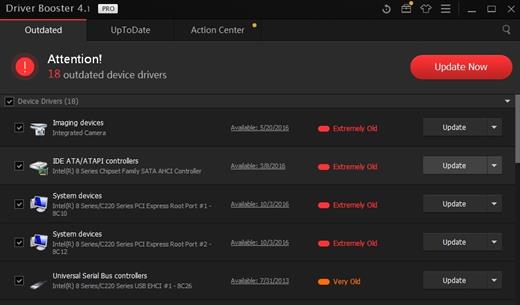
Driver Booster PRO is introduced to download and update drivers for you automatically with just one click. Based on cloud library, Driver Booster PRO can always be the first to identify outdated drivers, and download and update driver at an unrivaled speed. With the backup feature, it is an easy, effective and risk free solution to keep your drivers up-to-date.

Update Outdated Drivers Safely and Rapidly
- Support More Hardware Devices & Improve PC Performance
- Update Drivers 300% Faster with Just One Click
- Specialized Driver Tweaking for Top Gaming Experience
- Backup Drivers for Safe Restore

Driver Booster Pro Features:
- Download and Update Outdated Drivers with One Click
- Enhance Hardware Functionality for Top Performance
- Specialized Driver Tweaking for Top Gaming Experience
- Automatically Identify Outdated Drivers
- Support More Comprehensive Hardware Devices
- Enjoy Priority to Update Outdated Drivers Promptly
- Backup Drivers for Safe Restore
- Download and Update Drivers up to 300% Faster
- Automatically Update to the Latest Version

Release Name: IObit Driver Booster Pro 13.4.0.234
Size: 37.2 MB
Links: HOMEPAGE – NFO – Torrent Search

Download: RAPiDGATOR

6 Comments
Apr 24

Aiseesoft Burnova 1.5.56

Description: Burnova is the professional homemade DVD/Blu-ray burner, which creates local videos from computer to DVD or Blu-ray disc/ISO/folder.

Easy and capable of so much
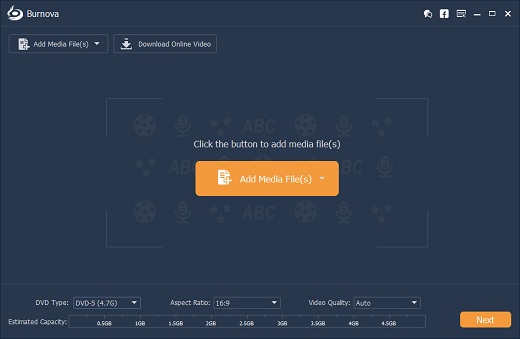
With friendly and intuitive interface, Burnova guarantees you to use this software easily, even for beginners. Equipped with the full of feature, it is able to meet all your DVD creation needs. Let's check what it can do for you:
Burn video to DVD
Burn video to Blu-ray
Customize output file
Audio track and subtitle
Rotate, Clip, Crop

Burn video to DVD disc/folder/ISO file
Burnova is the DVD maker which can create DVD disc/folder/ISO file from local video. You can make movies to various DVD types, like DVD-R, DVD+R, DVD-RW, DVD+RW, DVD+R DL, DVD-R DL, DVD-5, DVD-9, etc. and play them on any player. Moreover, you can use this DVD converter to burn ISO file or DVD folder to DVD disc, or make ISO file/DVD folder from various videos.

Create video to Blu-ray disc/folder/ISO file
Want to put your HD video from camcorder into Blu-ray disc for a gift for your lovers? Wish to burn your Blu-ray file or ISO folder into Blu-ray disc for a long preservation? Burnova can do you a great favor. This Blu-ray burner aims at burning movies to Blu-ray-25 and Blu-ray-50, so you can play it on your PS3, Sony, LG, Samsung, Philips Blu-ray player. And it also can burn the movies into Blu-ray folder/ISO file to play on your portable Blu-ray player.

Burn DVD/Blu-ray with various menu templates
If editing functions is to fulfill your video content, then menu editing will be necessary to string together all content. Burnova provides you various templates (holiday, family, travel, wedding and more styles) to specify your different type of movies or videos. You can also add your own images as the background to tell your own story for the video. For the title, menu and play button, you are allowed to edit or drag the buttons to the place where you want them to put. For the opening film, you are capable of importing your favorite video clips.

Edit videos before burning DVD/Blu-ray
You can edit your videos with built-in editor before you burning it to a DVD or Blu-ray disc. For your sideways video from iPad or iPhone camera, you can rotate or flip it. For those unwanted video, just clip it. The movies with annoyed letterboxing? Crop them. You could adjust the video brightness and contrast to get the ideal video, and watermark the video to give your mark. For the blur, sharpen, gray, sketch, canvas, mirror, sculpture, emboss and pixelate effects, you can also realize special video effects in the video with Burnova. Powerfully, Burnova is able to save the DVD project for further burning as well.

Make DVD/Blu-ray from various video formats
Burnova is compatible with almost all video formats for DVD/Blu-ray making. You are able to import video from MP4, AVI, WMV, MKV, M4V, MOV, M2TS/MTS, 3GP, VOB, FLV, MPEG, MPG, DV, RMVB, TOD, ASF, etc., even HD MPEG2, HD MPEG4, HD WMV, HD TS, HD MTS, HD TRP, and HD TP video files. It lets you add external audio track from MP3, AAC, AIFF, FLAC, WAV, WMA, OGG, AC3, MPA, MP2, etc. to make your own video.

Full of Great Features
This DVD & Blu-ray burning software has also made great efforts to personalize the video, improve the burning speed, and perfect their skills constantly to fulfill more diversified and individualized customer's demands.

Release Name: Aiseesoft Burnova 1.5.56
Size: 69.6 MB
Links: HOMEPAGE – NFO – Torrent Search

Download: RAPiDGATOR

5 Comments
Apr 24

My Music Collection 3.4.16.175

Description: My Music Collection is the most comprehensive music catalog software designed for organizing and managing music collections of any kind, including CD discs, MP3 files or vinyl records. This music organizer allows you to create an ordered CD database and view its contents, even if the disk is lying on a shelf or is being borrowed by a friend of yours. Now you can forget about creating music database on a paper, in Excel or text files.

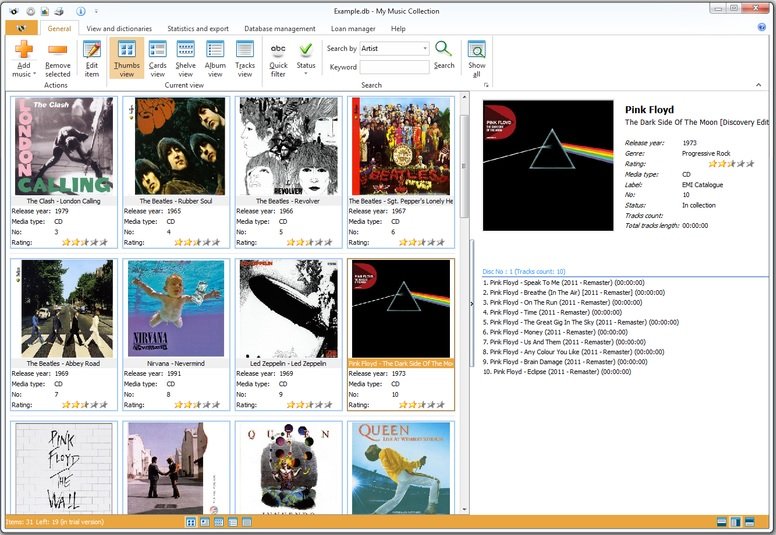
Simply insert a disc, scan barcode or type the title and My Music Collection will fetch all album information from the Internet, including artist, title, release year, country, track titles and cover image, etc.

Furthermore, this music organizer does not only allow you to create comprehensive music collection with a great amount of options, but it is also a great loan manager allowing you to keep track of albums borrowed to your friends.

Familiar and intuitive interface allows you to easily and quickly search and browse your music collection. You can sort albums by artist, release year or even by media type. Checking statistics is also easy - My Music Collection allows you to view statistics in a table view or use a variety of diagrams. With music database software you can export your list into almost all popular file formats, including HTML, Excel, PDF, Text file or XML.

Release Name: My Music Collection 3.4.16.175
Size: 76 MB
Links: HOMEPAGE – NFO – Torrent Search

Download: RAPiDGATOR

5 Comments
Apr 24

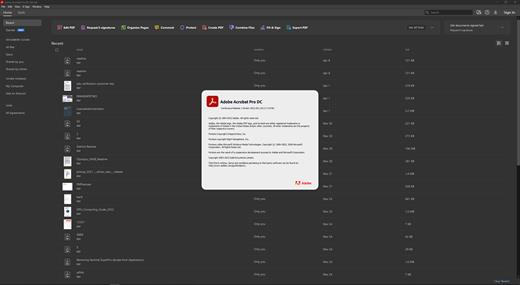
Adobe Acrobat Pro DC 2026.001.21483

Description: Adobe Acrobat Pro DC is the leading PDF converter and much more. Adobe Acrobat Pro DC software lets you deliver professional PDF communications. It's packed with smart tools that give you even more power to communicate. Create and edit PDF files with rich media included, share information more securely, and gather feedback more efficiently.

Adobe Acrobat Pro DC software is the advanced way for business professionals to create, combine, control, and deliver more secure, high-quality Adobe PDF documents for easy, more secure distribution, collaboration, and data collection.

Assemble electronic or paper files into reliable PDF documents that are easy to share with others using free Adobe Reader. You can assemble even Web sites, engineering drawings, and e-mail.

With Adobe Acrobat Pro DC you can manage document reviews, synthesizing feedback from multiple reviewers while preserving document format and integrity. Extend commenting capabilities to anyone using Adobe Reader. Windows users can design intelligent Adobe PDF forms that include business logic, such as calculations and data validations, to help increase the accuracy of data collection while reducing the costs of manual data entry.

Use Adobe Acrobat Pro DC to create high-impact PDF communications, collaborate more easily, and streamline reviews. Adobe Acrobat Dynamic PDF helps you get more done - easier, faster, better.

Edit PDF files
With Adobe Acrobat Pro DC, you can make minor edits to text and images right in your PDF file without requiring the original document or graphic. Edit text in a PDF. Fix a typo, change a font, or add a paragraph to your PDF as easily as you do in other applications using a new point-and-click interface. Edit images in a PDF. Resize, replace, and adjust images in your PDF with no need to track down the original file or graphic.

Export from PDF files
Reduce the time you spend retyping information stuck in PDF files. Convert PDF files to editable Microsoft Office documents. And save fonts, formatting, and effort.
Convert PDF files to Word. Save your PDF as a Microsoft Word document and take your fonts, formatting, and layouts with you. Convert PDF files to Excel. Turn your PDF or just part of it into an editable Excel spreadsheet you can use for data analysis right away. Convert PDF files to PowerPoint. Get a head start on new projects by saving a PDF file as a fully editable PowerPoint presentation.

Create PDF files
Stop worrying about whether the files you send will look right on other people's screens. Turn documents into PDF files anyone can reliably view with free Adobe Reader.
Convert Word, Excel, or PowerPoint to PDF. Right from your Office application in Windows, you can create PDFs, start a shared review, restrict PDF edits, and more. Print to PDF. Convert files to PDF from virtually any application that prints simply by selecting Adobe PDF as your printer. Scan to PDF. When you need to turn a paper document or form into a digital file, just scan it to create a searchable PDF file you can edit. Convert HTML pages to PDF. Save web pages as PDF files to archive web content, review the pages offline, or print them more reliably.

Create and analyze forms
Cut the time you spend creating forms, rekeying data, and correcting errors. Distribute forms online, and then collect responses and analyze results in real time.
Create new PDF and web forms. Customize professional templates or design from scratch with the Adobe FormsCentral desktop app included in Adobe Acrobat Pro DC. Collect form responses with FormsCentral. Easily collect responses by moving your PDF or web forms online with the Adobe FormsCentral online service. Convert existing forms to fillable PDFs. Type less, gather more. Quickly convert your paper, Word, or Excel forms to fillable PDF forms. Collect form responses using Adobe Acrobat tools. Compile returned forms into one PDF, or host forms using a network folder or Microsoft SharePoint server.

System Requirements:
Intel® or AMD processor; 1.5GHz or faster processor
Windows 11 (64 bit), Windows 10 (64 bit) version 1809 or later, Windows Server 2016 (64 bit), or Windows Server 2019 (64 bit)
2GB of RAM
4.5GB of available hard-disk space.
1024x768 screen resolution
Video hardware acceleration (optional)

Release Name: Adobe Acrobat Pro DC 2026.001.21483
Size: 1.5 GB
Links: HOMEPAGE – NFO – Torrent Search

Download: RAPiDGATOR

4 Comments
Apr 24

Mirillis Action! 4.48.1

Description: Mirillis Action! screen recorder allows streaming and real-time recording of Windows desktop in a superb HD video quality. With Action! you can record and stream your gameplay, web player videos, record music, capture screenshots, add webcams, microphone commentary... and more!
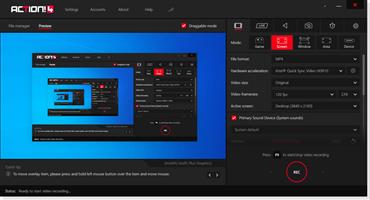
The most user friendly and stylish interface of all screen recorders!
Action! is compact, stylish and user friendly. Built-in screen and gameplay recording manager allows to browse, delete selected items and export recordings to popular formats and devices. Action! screen recorder defines new standard of user experience for games benchmarking, gameplay and Windows desktop real-time recording software.

Greenscreen Mode
Action! gives you Greenscreen Mode. Now you can cut out the background, while recording with your webcam, from your video recording. You don't need to have special camera for that - all you need is Action! screen recorder and any solid color background, what is much cheaper solution and gives the same, if not better, results.

Record webcam or USB/HDMI Capture Devices
Select device recording mode to capture video from gaming consoles, other PC, TV broadcasts, webcams or camcorders. Add your own logo, webcam, microphone commentary and record video to your local disk or live stream to popular services.

Try screen recording with Selected Application recording option.
This brand new recording mode allows you to record your Windows desktop screen in complete privacy! Record only the application you want to show to others on your screen recording, while the rest of your desktop screen will be blackened-out and not recorded on your video.

Record gameplay in HD. Benchmark games performance.
Outstanding screen and gameplay recording performance and GPU utilization allows the smoothest real-time HD gameplay recording ever! Display current and average game framerate (FPS) during gameplay and save your benchmark results.

The outstanding screen recording performance!
Action! defines a new standard of performance for gameplay and desktop recording software. It uses Mirillis ultra-fast, multicore optimized, proprietary video codec (FICV - Fast Intra Compression Video standard) which together with highly optimized application engine provides the ultimate performance of real-time HD video recording. Action! screen recorder also captures video directly to MP4 format utilizing NVIDIA NVENC, AMD APP or Intel® Quick Sync Video hardware acceleration.

Live stream gameplay and desktop activity to popular services!
Action! LIVE Streaming service allows to stream all your gameplays, videos or desktop activity to popular streaming services like Twitch.tv, YouTube, Smashcast (hitbox), Ustream, Livestream, Facebook, Aliez and more! With Action! screen recorder live streaming is easy and fun!

Never miss a gaming moment with Time-Shift option
Save your best gameplay actions instantly to a file with just a single hotkey! With Time-Shift recording you will not lose any spectacular video game action!

Screen and gameplay recording in outstanding 4K!
Action! screen recorder supports a wide variety of high resolutions video recording, starting from 2K, 3K, 4K screen recording for single displays (supported for both AVI and MP4 file formats) up to more than 8K (supported for AVI file format) for AMD Eyefinity or NVIDIA 3D Vision setups.

Screen recording with automatic webcam background removal using Intel® RealSense™ technology!
Download and install Action! screen recorder with Intel® RealSense™ technology support and add webcams to your screen and gameplay recordings using automatic background removal option!

Upload Windows desktop and gameplay recordings to YouTube™ or Facebook.
Export and upload your screen recordings to popular services and social networks like YouTube™ and Facebook. Action! provides predefined exporting profiles for YouTube™ and Facebook, just push a button to export and automatically upload your screen or gameplay recordings to your favorite service fast and easy.

Smooth HD Windows desktop recording, screen recording and easy tutorial creation!
Action! defines a new standard of performance and user experience for real-time screen recording software. Record smooth high framerate HD videos of your Window desktop and applications activity, add microphone audio commentary and create great tutorials with ease!

Continuous Windows desktop screen and gameplay recording!
With Action! Active screen recording mode you can record your videos continuously, no matter how many times you switch from Windows desktop to fullscreen gameplay and back. All your Windows desktop actions and gameplay will be recorded to a single video file. This makes Action! perfect PC screen recorder!

Export screen and gameplay recordings to popular formats and devices!
Select one of many predefined profiles and push a button to export your screen recordings to popular formats, devices, Facebook or YouTube™. Use fast, hardware accelerated video exporting with NVIDIA® NVENC, AMD APP or Intel® Quick Sync Video technologies.

Add webcam to your screen or gameplay recordings
With Action! you can add picture from webcams to all your real-time gameplay and desktop recordings! Share more than only your gameplay or Windows screen video! With Action! webcam recording is easy, just select your webcam, set webcam video position and size and start recording!

Release Name: Mirillis Action! 4.48.1
Size: 108.2 MB
Links: HOMEPAGE – NFO – Torrent Search

Download: RAPiDGATOR

5 Comments
Apr 24

UsbToolbox Pro 1.2

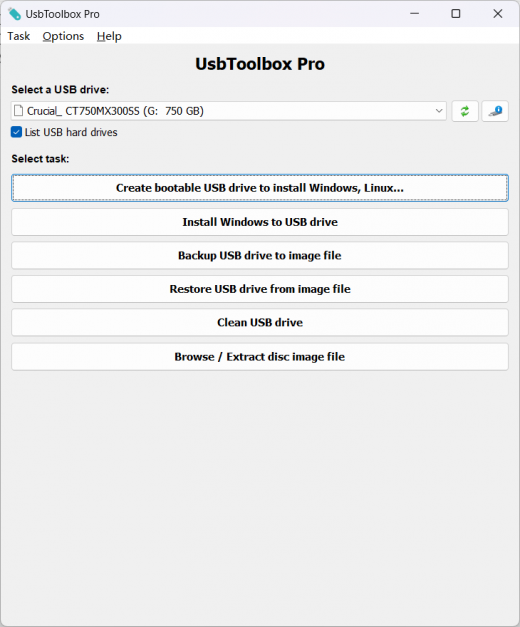
Description: UsbToolbox is a bootable USB drive creation tool, which supports ISO files of Windows, Linux, and other popular operating systems. It also includes some useful functions, such as installing Windows to USB drive, cleaning USB drive data, creating USB drive image file, and extracting disc image file.

Main features:
Create bootable USB drive from ISO file
Support ISO files of Windows, Linux, and other popular operating systems
Install Windows to USB drive (Windows to Go)
Clean USB drive data
Backup USB drive to image file
Restore image file to USB drive
Browse and extract image file

Create bootable USB drive
UsbToolbox can create bootable USB drive from ISO files. You can then install Windows, Linux, or other systems from the USB drive.

free software Install Windows to USB drive
UsbToolbox can install Windows to USB drive, which is also called Windows To Go. With this feature, you can run Windows from the USB drive.

free software Backup or restore USB drive
UsbToolbox can backup USB drive to image file or restore USB drive from the image file. On intelligent mode, only used sectors will be copied.

best software Clean USB drive data
UsbToolbox can securely erase all data in the USB drive, and if the USB drive become unusable or the capacity is not reported correctly, it can help you to recover the USB drive to regular status.

best software Browse and extract disc image file
You can browse or extract files within the image file without writing the image file to USB drive really. UsbToolbox supports most of all popular disc image file formats.

Release Name: UsbToolbox Pro 1.2
Size: 8.2 MB
Links: HOMEPAGE – NFO – Torrent Search

Download: RAPiDGATOR

5 Comments
Apr 24

AJC Sync Professional 4.21.0.1

Description: AJC Sync allows you to compare or synchronize large numbers of files and folders between multiple pairs of locations. These locations may be on the same computer, another computer or device over a network, an attached drive or memory stick, FTP server, cloud service etc. AJC Sync is an ideal backup solution for your PC, laptop or server.

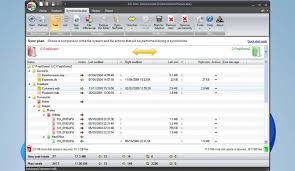
Files can be synchronised by transferring in one direction or both directions according to a set of comparison rules. A user friendly sync plan shows you exactly what is going to happen to your files, giving you complete confidence and control. The built in diff can show you exactly what has changed in your files.

The sync process can be run with full visual control, via the command line or on a regular basis via the scheduler. Full logging, reporting and emailing is provided to notify you about what happened. An archiving facility is provided to store multiple versions of files allowing undo to recover from mistakes.

Home tab
Your synchronize or backup jobs are organised in sync projects. Each project can have one or more pairs of locations to keep in sync. Each location may be on any Windows accessible drive, network, USB stick etc or FTP server. The home tab gives you an overview of these pairs, showing a summary of the sync direction and last backup time. Different images can be selected to help you visuallise the sync locations. Throughout the application color coding is used so you can tell if files exist only on one side of the sync pair or both. Starting an interactive sync will then take you to the sync plan tab so you can see what will happen to your files

Explorer tab
The explorer allows you to browse and work with files and folders for the selected sync pair. It looks rather like Windows explorer with the folder tree down the left hand side and the items in the current folder on the right hand side. The two file structures from the sync pair are overlaid on top of each other into a combined view with color coding. You don’t use the explorer to synchronize or compare the file structures (you create a sync plan for this). The explorer is intended as a means of browsing all of your files and allowing you to work with them in a dual manner. E.g. Opening a file from both sides or one side, renaming a file on one or both sides etc.

Sync plan tab
The sync plan shows a comparison between the two file system locations on each side of the specified sync pairs and decides the actions that will be taken to bring the two sides into sync. You can use this plan just to view the comparison of the file systems if you like but normally you check and modify and actions if required and then proceed to start the synchronize process which will carry out all listed actions. A one click sync button is also availble from the Home tab to use if you are happy with your sync plans and just want to do it.

History tab
The history tab shows what happened in previous sync runs. You can see when each sync run started and stopped, how long it took, what sync pairs were involved and what happened to each file/folder. An archiving system is provided to store old versions of files that were overwritten or deleted during the sync and if you are using this you can access file archives from here to retrieve or compare against older versions of the files and undo sync actions.

Report tab
The report shows what happened during a sync plan creation or a sync run. During a sync run the report is shown as the task progresses and you can see a progress bar at the bottom of the screen.

File compare diff
The built in diff file compare facility can show you what has changed inside a file.

Release Name: AJC Sync Professional 4.21.0.1
Size: 65 MB
Links: HOMEPAGE – NFO – Torrent Search

Download: RAPiDGATOR

6 Comments