Please REGISTER or RENEW your account on RAPiDGATOR.net and support us by doing through all RAPiDGATOR working download links on main posts...
Apr 24

F-Rename Professional 3.000
Description: With F-Rename, you can quickly and individually rename files, optimize your file structure and thus save a lot of time. Numbering and dating files. Renaming based on tags. Individual renaming incl. preview and log function.
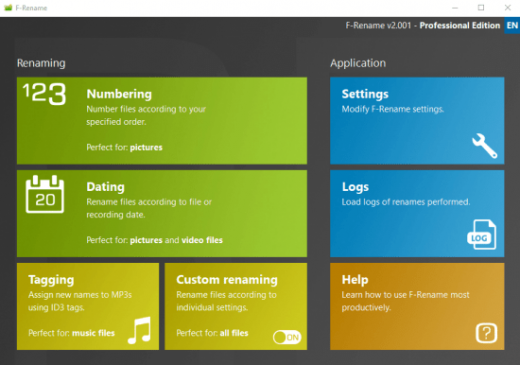
Fast and precise renaming of files for more order and overview!
F-Rename: Rename files quickly, easily and flexibly
DSC813913091.JPG, 20110920.AVI, DL_MUSICFILE.MP3 – every computer user knows the issue: cryptic and uninformative file names, automatically generated by digital cameras, smartphones, or download managers. The chaos on the hard drive grows, and finding the right file becomes a time-consuming and frustrating task.

With F-Rename, you can bring order to your files and create structure by renaming any number of files at once based on customizable patterns. The software offers a variety of preconfigured renaming patterns that are easy to apply, and you can also define custom rules to suit your specific needs.

Intuitive renaming process
Whether you want to number entire collections of files, add dates, or rename MP3 files based on ID3 tags, F-Rename lets you complete these tasks quickly and effortlessly. The intuitive user interface guides you through the renaming process step by step, making it easy for even beginners to restructure their files. A standout feature is the individual renaming function. This offers maximum flexibility by allowing you to use numerous tags such as creation date, file type, or custom values. You can convert, shorten, or specifically replace parts of existing file names. This makes F-Rename an essential tool for managing large file collections.

Integrated protocol function
To ensure you always have full control over the renaming process, F-Rename includes a preview function that shows the planned changes before they are applied. Additionally, the log function lets you track all changes, ensuring no data is lost and your valuable files remain well-organized.

Perfect solution for file management
Discover how easy and efficient renaming files can be. With F-Rename, you create order, improve clarity, and save valuable time. Whether for personal use or professional applications, F-Rename is the ideal tool for structured file management.

Release Name: F-Rename Professional 3.000
Size: 13.5 MB
Links: HOMEPAGE – NFO – Torrent Search

Download: RAPiDGATOR

4 Comments
Apr 24

Secure Delete Professional 2026 v219

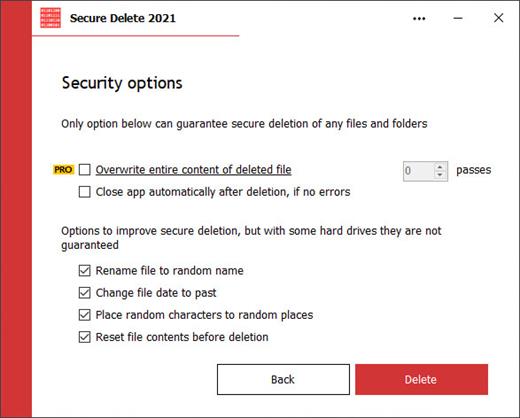
Description: Securely erases files, makes them unrecoverable. This software is an effective tool for securely erasing existing files and folders permanently, if they were not yet deleted. Once this software has been used, the selected files and folders do not go to the Recycle Bin and will be unrecoverable. Users have several security options to allow you to choose the level of security that you need, which will be reflective of the speed of processing.

This application can be used in three ways. (1) Drag and drop the files or folders which you want to be securely deleted to the main window. (2) Select the necessary files by clicking Add Files on the main screen. Or (3) select any file or folder on Windows Explorer and choose the Send To option, then click Secure Deleter.

Just because our interface is simple doesn't mean that it lacks quality. It's quite the opposite in our case. The simple interface was designed to be that way to make it easier for newer users. Within the software, there are many powerful algorithms in play for data destruction. So, even if you are a new user, you can be sure that you'll understand how to get the maximum security possible.

Release Name: Secure Delete Professional 2026 v219
Size: 4.2 MB
Links: HOMEPAGE – NFO – Torrent Search

Download: RAPiDGATOR
5 Comments
Apr 24

Digimizer 6.5.1

Description: Digimizer is an easy-to-use and flexible image analysis software package that allows precise manual measurements as well as automatic object detection with measurements of object characteristics.

Pictures may be X-rays, micrographs, etc. Supported file formats are JPG, GIF, TIFF, BMP, PNG, WMF, EMF and DICOM files.

Images can be rotated, flipped or straightened. Image brightness and contrast can be adjusted. Several filters for noise reduction, smoothing, or sharpening can be applied.

Image file operations
Open, save and print image files
Acquire image from scanner
Grab image from live video stream
Supported file formats: DGZ (native Digimizer file format), JPG, GIF, TIFF, BMP, PNG, WMF, EMF, and DICOM files.

Image manipulation
Resize
Crop
Rotate, flip
Zoom
Adjust contrast & brightness
Contrast auto fix
Stretch histogram
Background correction
Despeckle
Convert to grayscale
Convert to color
Invert
Negative
Selective Color Brightness
Sharpen
Filters: Canny Edge Detector, Emboss Filter, Arithmetic Mean Filter, Geometric Mean Filter, Harmonic Mean Filter, Contraharmonic Mean Filter, Median Filter, Maximum Filter, Minimum Filter, Midpoint Filter, Range Filter, Yp Mean Filter,

Manual measurements
Digimizer allows to:
define unit of measurement
measure distances and lengths of line segments or paths
measure perimeters and areas
measure angles
locate middle of line segment
find center and calculate characteristics of circular objects
measurements on perpendicular lines
measure circles, ellipses, and rectangles
measure average intensity of objects
mark and count objects
fit line
detect and decode bar codes and QR codes
Units of measurements: kilometer (km), hectometer (hm), decameter (dam), meter (m), centimeter (cm), millimeter (mm), micrometer (µm), nanometer (nm), picometer (pm), femtometer (fm), attometer (am), inch (in), foot (ft), yard (yd), mile (mi), degrees (°) or pixels.

Image analysis
Binarization
Options: Overlay binary image, Hide Binary Layer
Morphological operations: Dilate, Erode, Open, Close
Noise reduction
Analyze objects: object detection with measurement of perimeter and area

Measurements list
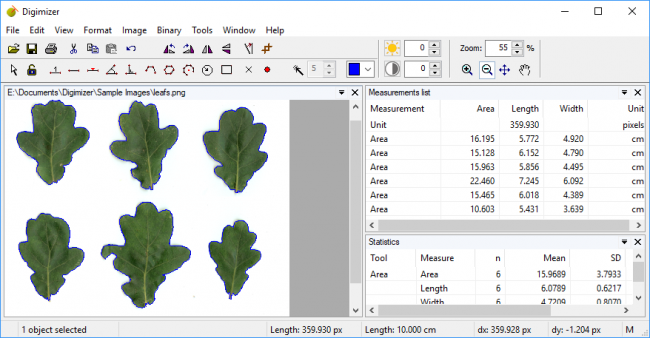
The measurements list displays the measurements in the current image, but can also include measurements of several images.
Open & save Measurements list
Print Measurements list
Export as Excel spreadsheet file, or MedCalc file for statistical analysis

Statistics
The integrated statistics table displays statistics (n, mean, median, SD, minimum and maximum) of the measurements in the Measurements list.
The program can generate a more detailed statistical report that includes summary statistics, percentiles, and a histogram with Box-and-Whisker plot.
Print statistics
Detailed statistics

Miscellaneous
User-defined scripts allow automation of repetitive tasks
System requirements
To use Digimizer, you need a PC with

Release Name: Digimizer 6.5.1
Size: 18.5 MB
Links: HOMEPAGE – NFO – Torrent Search

Download: RAPiDGATOR

3 Comments
Apr 24

SmartFTP Enterprise 10.0.3320

Description: SmartFTP is an FTP (File Transfer Protocol), FTPS, SFTP, WebDAV, Amazon S3, Backblaze B2, Google Drive, OneDrive, SSH, Terminal client. It allows you to transfer files between your local computer and a server on the Internet. With its many basic and advanced Features SmartFTP also offers secure, reliable and efficient transfers that make it a powerful tool.

SmartFTP can be used for:
Web site publishing and maintenance
Upload and download of images, documents, movie and music files
Managed file transfers. Automate file transfer processes.
Backup and synchronize local and remote files

Features
Protocols:
- FTP and FTPS (Secure FTP)
- SFTP over SSH
- WebDAV
- Amazon S3 (Enterprise Edition)
- Google Drive (Ultimate Edition)
- Microsoft OneDrive (Ultimate Edition)
- Google Cloud Storage (Enterprise Edition)
- Backblaze B2 Cloud Storage (Enterprise Edition)
- Box (Enterprise Edition)
- Terminal Emulator (Ultimate Edition)
Integrated Editor
HIPAA 5010 compliant
FIPS 140-3, 140-2, 186-4 compliant
Modern Graphical User Interface (GUI):
- High DPI support
File/Folder Synchronization
Multilingual (more than 20 languages)
Thumbnails View and Preview
Source File Preview
Visual Compare
Advanced Schedule
IPv6
On-the-fly Compression (MODE Z)
UTF-8 Support
Support for KeePass, LastPass, Bitwarden and 1Password password manager
Multiple Connections
Auto reconnect and resume of broken transfers
Transfer Integrity
Verified Transfers (XCRC, XMD5, XSHA)
FXP (Server-To-Server Transfer) support
Remote Edit of files
Search for files and folders on the server
Local Browser
Bulk Rename
Enhanced NAT/UPnP Support
UPnP (Universal Plug and Play), ICS, ICF
Transfer Queue:
- Scheduling (Enterprise Edition)
- Uploads/Downloads/FXP
- Unlimited simultaneous threads
International Domain Names (IDN)
Proxy / Firewall support:
- SOCKS5, SOCKS4, SOCKS4A, HTTP Proxy
URL Watcher
FTP command line
Custom Commands
CHMOD (Properties)
Section 508 compliant
and much more …

Release Name: SmartFTP Enterprise 10.0.3320
Size: 12.7 MB
Links: HOMEPAGE – NFO – Torrent Search

Download: RAPiDGATOR
5 Comments
Apr 24

PVsyst 8.1.1.48459

Description: PVsyst 8 brings major enhancements to our software features, demonstrating our ongoing commitment to the development and simulation of photovoltaic projects.

Define your project
System design: Rapidly design grid-connected, standalone, or pumping photovoltaic systems. The program guides you in selecting components for sizing your project.
System sizing: Visualize sizing constraints for modules and inverters, including I/V curves and power distribution, focusing on optimal inverter sizing and comprehensive loss analysis.
New orientations: Benefit from flexibility in project customization by defining unlimited orientations and explore the possibility of combining trackers and fixed plans in a single simulation.
Sub-hourly simulation: Import meteorological data at sub-hourly intervals from Meteonorm 9 or through PVsyst import tools, and then simulate your systems with greater accuracy.
Simulation and results: Calculate annual energy distribution, analyze key metrics such as total energy, yield, and specific energy, through detailed reports on gains and losses.

Setup shadings
Near shadings: Model your 3D scene directly or import it from another CAD tool. Fast design tools, orientation identification, scene validation, and advanced multithreading calculations will allow you to define your system as close to reality as possible.
Horizon: Simply define distant shadows by determining the sun positions to which your system will be directly exposed. The tool allows you to import horizon data directly via Meteonorm and PVGIS.
Layout: Precisely calculate electrical shading losses (mismatch) by calculating the I/V characteristics of the photovoltaic array, by adding the voltage of each module in a string, and aggregating the string currents.

Many different tools
Grid storage and self-consumption: Choose your storage and self-consumption strategy. Grid storage involves storing excess energy from the photovoltaic array for future use, improving energy management and reliability. Self-consumption involves the direct use of photovoltaic energy on the production site, minimising grid dependence and optimizing the use of solar energy.
Bifacial systems and trackers: Simulate bifacial installations and photovoltaic systems on single or dual-axis trackers, with safety and backtracking options.
Meteorological databases: Use on-board mapping (Bing or OpenStreetMaps) to locate your project and automatically import meteorological data from one of these databases: Meteonorm 8.2, NASA-SSE, PVGIS-TMY (5.1 & 5.2), NREL/NSRDB TMY, Solcast TMY, Solar Anywhere TGY, and Solargis. Many other formats can also be imported manually.
Ageing, optimization, and batch processing: Explore our suite of advanced tools providing detailed results for advanced design decisions. Combine multi-year batch simulation for serialised simulations, including row spacing and bifacial height adjustments, and photovoltaic module ageing.
Economic assessment: Evaluate the costs of your systems (CAPEX, OPEX, custom costs), establish detailed pricing strategies. The result of this assessment will calculate NPV, LCOE, ROI, and various profitability metrics.
Components: Access a verified and regularly updated database including photovoltaic panels, inverters, batteries, pumps, and optimizers (AMPT, Huawei, Maxim, Sungrow, SolarEdge, TIGO) for realistic simulations.

Off-grid systems
Pumping systems: Simulate your sun-tracking pumping systems by integrating hydraulic properties and characteristics, water storage, and water requirements through the selection of various components.
Standalone systems: Evaluate the efficiency of your off-grid installations with energy storage, focusing on defining user electrical needs for an accurate assessment of stand-alone systems.

Minimum required configuration:
At least 2 GB of RAM
At least 2 GB of free space on the hard drive
Minimum screen resolution of 1280 × 720 pixels
Graphics card supporting OpenGL 2.0 or higher
.NET 4.8 framework (for Meteonorm)
PVsyst workspace does not support shared or remotely-synced drives / folders (including OneDrive, Google Drive, Dropbox, etc.). Files and workspaces can be synced as a separate task, once PVsyst has been closed

Release Name: PVsyst 8.1.1.48459
Size: 813.1 MB
Links: HOMEPAGE – NFO – Torrent Search

Download: RAPiDGATOR
5 Comments
Apr 24

ButterScroll 1.5.0

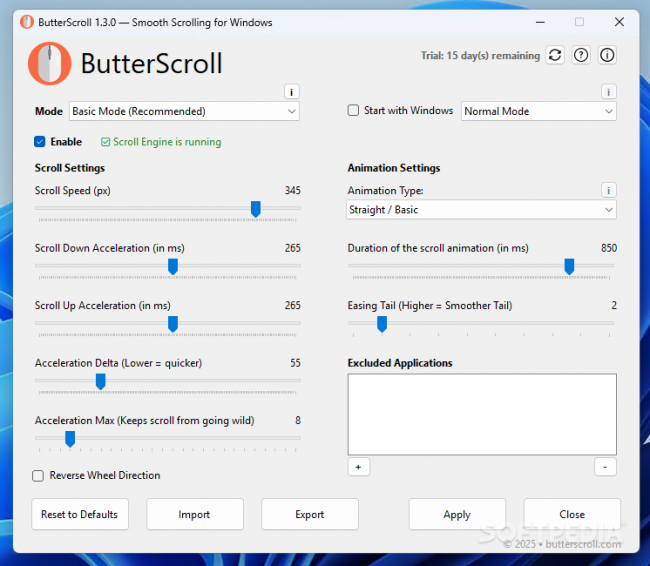
Description: Smooth scrolling on Windows just got better. Smooth scrolling for Windows is what ButterScroll is all about. It enhances how your mouse scrolls using custom speed and easing settings.

Looking for smooth scrolling windows experience? ButterScroll delivers exactly that.

Smooth scrolling functionality to all mice.
ButterScroll enhances your everyday scrolling experience with buttery-smooth scrolling precision, customizable control, and a satisfying feel across all your Windows apps — from browsers to spreadsheets.

Easy to setup and use
Smooth, fluid scroll animations for all apps.
Works with any mouse – no extra hardware needed.
Adjustable speed, acceleration, and easing.
Lightweight and optimized.
No tracking, no ads, full privacy control.

Release Name: ButterScroll 1.5.0
Size: 15.2 MB
Links: HOMEPAGE – NFO – Torrent Search

Download: RAPiDGATOR

4 Comments
Apr 24

Firetrust MailWasher Pro 8.0.109

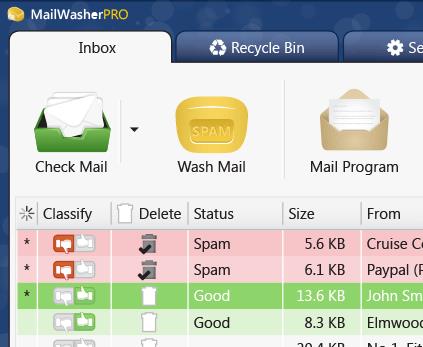
Description: Receiving spam is like those telemarketers who call at dinner time, completely annoying and you didn't ask for it. Luckily you can stop this now! Now with free Android, iPhone and iPad version! Install MailWasher today to screen all your email accounts in one place and allow only the email you want in your inbox.

Install MailWasher today to screen all your email accounts in one place and allow only the email you want in your inbox. MailWasher lets you preview all your email before it gets to your computer or mobile device, enabling you to read all your email securely, and instantly delete any unwanted or suspicious email. Your remaining good email is downloaded to your PC or mobile device, so you avoid any spam or email viruses in your PC.

When you use mailwasher, the benefits become obvious.
Zero spam in your computer or mobile device.
Inspect any email before it gets to your computer or mobile device.
Never lose an email because you can’t afford to.
Intelligent spam tools ensure spam is caught and good email is not.

With over 8 million users, 22 languages and featured on both BBC World and CNN you can be confident that using MailWasher is one of the easiest ways to get rid of spam.

Receive only the email you want.
Check your email with MailWasher first. You’ll be safer knowing what’s waiting for you on the server, allowing you to quickly inspect and read your email and remove any unwanted messages quickly and easily.

Inspect all email before it gets to your computer.
View everything about your messages before they get to your computer so you can determine if they’re really spams, scams or good email. This means you can delete unwanted messages at the server so you only get the email you want.
MailWasher lets you view the email safely in plain text, but you can also inspect who it’s really from, who owns the company who sent it (WHOIS report) and all the hidden links.
Given that you can’t afford to lose any legitimate email, MailWasher lets you have the final say on it before letting you ‘Wash’ the spam away.

Intelligent spam tools.
Advanced spam detection technology and tools do all the hard work for you by automatically marking spam emails.
From simple friend's list, blacklists and learning filters to advanced custom filters, MailWasher has you covered.

Release Name: Firetrust MailWasher Pro 8.0.109
Size: 29.2 MB
Links: HOMEPAGE – NFO – Torrent Search

Download: RAPiDGATOR

3 Comments
Apr 24

Directory Opus 13.22.8 Beta

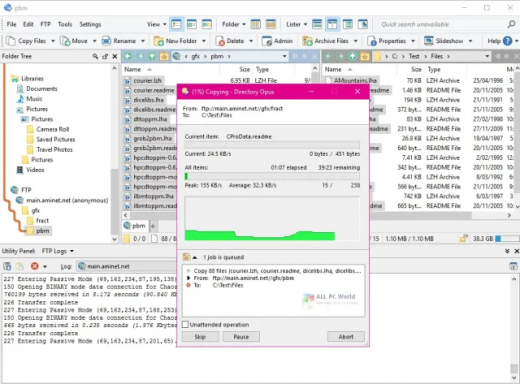
Description: Are you frustrated by the limitations of Windows Explorer? Directory Opus is a complete replacement for Explorer, with far more functionality than any other file manager available today.

You're in control.
Not just a simple file manager; Directory Opus lets you make your computer yours.
With a flexible user interface and unbelievable configurability, you can tailor Opus to streamline your workflow.
Dual panes, dual trees, multiple tabs.
Filter, sort, group your folders. Label and rate your files.
Queued file copies. Powerful batch renaming. Full archive support.
Find your files. Locate duplicates. Synchronize backups.
Assign tags and descriptions. Convert images. Edit metadata.
Fully multi-threaded, native 64 bit high performance code.
Whatever you want to do - Opus can probably do it. And if it's not built-in, you can take advantage of the unrivalled configurability to extend Opus using external tools.

What makes Opus unique?

Built for speed
Opus is written in native C++ multi-threaded code; compiled for the latest 64 bit CPUs, with high performance our number one design principle.

Fully configurable
Change the colors. Change the fonts. Change the toolbars and menus. Set up hotkeys. Opus adapts to how you want to use it.

Makes file management a breeze
Powerful searching, sorting, grouping, labelling and tagging features let you take control of your files like never before.

Endlessly extensible
Work with third-party tools as easily as with the built-in features. A full scripting interface, including scriptable dialogs, means your imagination is really the only limit.

Replace Windows Explorer and don't look back
Our unique Explorer Replacement mode provides a full replacement for Windows Explorer.
Single or dual pane file display and folder trees
Tabbed interface let you keep multiple folders open and switch quickly between them
Integrated viewer, metadata editor and utility panel
Built-in tools including synchronize and duplicate file finder
Leverage indexed search engines like Windows Search and Everything

High performance file management features
Copy, move, rename, duplicate, archive, view, backup and delete your files with ease
Queue multiple file copies for improved performance
Batch renaming including easy-to-use keyboard macros
Support for FTP and archive formats like Zip, 7Zip and RAR
Quickly filter, sort, group and search your folders
Color-code your files, assign status icons, star ratings, tags and descriptions
View images, documents and more. Image marking lets you sort your photos quickly and easily
Calculate folder sizes and print or export folder listings

Unrivalled configurability
Why let the programmers decide for you? You can tailor Opus to look how you want it to look, and to work how you want it to work.
Choose from light mode, dark mode, or design your own theme
Over 600 configurable colors and fonts
All toolbars and menus can be edited, plus you can add your own
Floating toolbars can act as program launchers
Configure your own hotkeys that work everywhere or just in Opus
Full scripting interface lets you design your own dialogs and add your own commands

Release Name: Directory Opus 13.22.8 Beta
Size: 29.4 MB
Links: HOMEPAGE – NFO – Torrent Search

Download: RAPiDGATOR
3 Comments
Apr 24

Markdown Monster 4.2.9.4

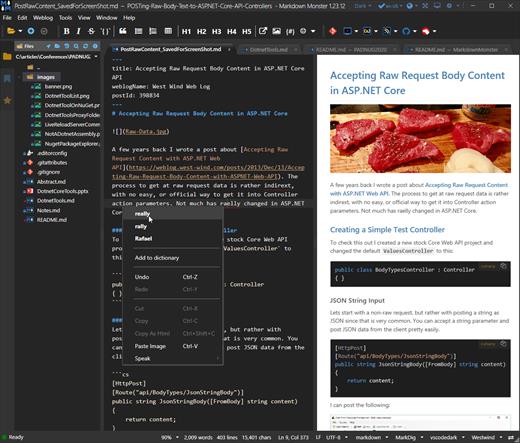
Description: Markdown Monster is a powerful, yet easy to use, dedicated Markdown editor with syntax highlighting and sophisticated and fast edit features. A collapsible, synced, live preview lets you see your output as you type and scroll. Easily embed or paste images, links, tables and code using raw markup or our smart UI helpers to simplify many operations with a few keystrokes or a click or two. Paste images from the clipboard or drag and drop from Explorer or our built-in file browser. Inline spell-checking and word counts keep your content streamlined.

You can export Markdown to PDF or HTML on disk or copy Markdown selections as HTML to the clipboard. The HTML preview can display syntax colored code snippets for most coding languages.

Choose from light or dark app themes and individually selectable and customizable preview and editor themes. Use the built-in folder browser to open, manage and drag files into content, the document outline to quickly jump through your open document, or the shell integration to shell out to Explorer, Terminal, Image Editor, Diff tool or your favorite Git client. Git support is also built-in to see local Git status and to commit to and update your repositories.

Everything is at your finger tips, but out of your way until you need it. .

Weblog Publishing
Markdown Monster can also publish your Markdown directly to your Weblog Service. If your blog supports WordPress, MetaWeblog, Jekyll or Medium, you can publish your documents with one click. You can also edit and republish, or download existing posts and even convert existing posts from HTML to Markdown.

Extensible via .NET
We also wanted to make sure the editor is highly extensible, so you can add custom features of your own. Markdown Monster includes an addin model that makes it easy to build extensions that let you hook into the UI, the editor behavior, markdown rendering and the publishing process. We also provide useful Scripting and Text Templating addins that let you automate many tasks without creating an addin. Find out more about creating an addin with .NET.

Features:
Easy and fast Markdown editing
Syntax colored Markdown text
Live Preview while you type
Inline spell checking
Easy image and link embedding
Paste images from Clipboard
Gentle toolbar support
File and Folder Browser
Favorites Manager
Document Outline
Git Integration
Built in screen capture
Two-way Table Editor
Import Html to Markdown
Export Markdown to Html
Dark and Light UI Themes
Customizable Preview Themes
High DPI Support
Weblog Publishing and Editing
Yaml Meta Data Support
Snippet Expansion Templates
Swappable Markdown Parsers
Extensible with .NET Add-ins

System Requirements:
Microsoft Windows 10 or later
.NET 7.0 (pre-installed)
WebView2 Runtime (pre-installed)

Release Name: Markdown Monster 4.2.9.4
Size: 19.8 MB
Links: HOMEPAGE – NFO – Torrent Search

Download: RAPiDGATOR

3 Comments
Apr 24

WiFi Explorer Pro 3.9.6

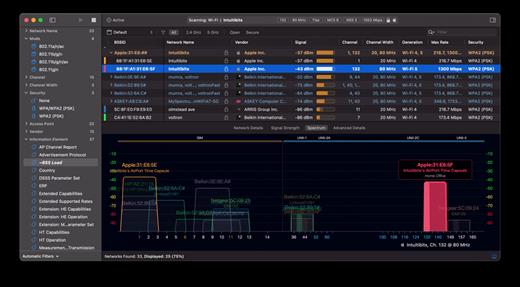
WiFi Explorer Pro takes the code base of WiFi Explorer, and adds a set of features that makes it the right tool for WLAN and IT professionals. You can use WiFi Explorer Pro for preliminary assessments, to help design and validate wireless networks installations, as well as to identify channel conflicts, overlapping, poor signal quality and other issues that may be affecting the connectivity or performance of your home, office or enterprise wireless network.

Features:


  • Passive and directed scan modes
  • Spectrum analysis integration
  • Custom filters
  • Support for remote sensors
  • Support for networks with hidden SSIDs
  • Additional columns with advanced information
  • Additional organization options for scan results
  • Dark and light themes
What’s New

Version 3.9.6:


  • Release notes were unavailable when this listing was updated.
Compatibility

macOS 10.13.0 or later


Release Name: WiFi Explorer Pro 3.9.6
Size: 16.4 MB
Links: HOMEPAGE – NFO – Torrent Search

Download: RAPiDGATOR
3 Comments