Please REGISTER or RENEW your account on RAPiDGATOR.net and support us by doing through all RAPiDGATOR working download links on main posts...
Apr 22

Microsoft Office Pro Plus 2021-2024 v2603 Build 19822.20182 (x64) Incl. Activator

Description: Microsoft has officially announced the availability of the final version of its Office 2024 release for Windows and Mac users. Following the release of the preview version in the first half of this year, the product has been refined and is now available to users. Office 2024 includes updated versions of apps from the suite, Word, Excel, PowerPoint, Outlook, Access, and Publisher.
Office 2024 includes virtually every change that has been added to the suite of programs in Office 365 over the past 3 years, although some features remain exclusive to subscribers. In addition to the main programs Word, Excel, PowerPoint, and Outlook, which are available for both Windows and macOS, the Access and Publisher versions are only available for Windows and are included, as usual, only in premiums. Visio and Project for Windows are also available, although they are not part of the ongoing release of Office.

Microsoft Office 2021-2024 includes
Microsoft Office 2021-2024 Professional Plus
Microsoft Access 2021-2024
Microsoft Excel 2021-2024
Microsoft Lync 2021-2024
Microsoft OneNote 2021-2024
Microsoft Outlook 2021-2024
Microsoft PowerPoint 2021-2024
Microsoft Publisher 2021-2024
Microsoft Visio Viewer 2021-2024
Microsoft Word 2021-2024
Microsoft Visio pro 2021-2024
Microsoft Project 2021-2024
Skype for business 2021-2024
OneDrive for Business 2021-2024
Office Shared Features
Profing Tools Only 2021-2024
And many more

Release Name: Microsoft Office Pro Plus 2021-2024 v2603 Build 19822.20182 (x64) Incl. Activator
Size: 5.9 GB
Links: HOMEPAGE – NFO – Torrent Search

Download: RAPiDGATOR

2 Comments
Apr 22

Pano2VR Pro 7.1.12

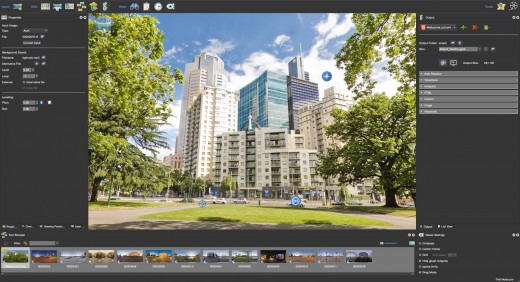
Description: Pano2VR is a powerful virtual tour software that converts your panoramic or 360° photos and videos into interactive experiences.

Whether you’re working on a single gigapixel panorama or a virtual tour with thousands of scenes, Pano2VR can help you create an immersive experience for any modern browser. Finished projects can be seamlessly integrated with existing websites and viewed on desktops and mobile or VR devices.

Build a Virtual Tour
From homes and real estate to museums and landmarks, virtual tours allow users to explore real places from around the world. In Pano2VR, link panoramic photo scenes, or nodes, using your choice of transitions and let the user navigate from scene to scene with just a click or tap. Provide greater location context to the scene by using our built-in Tour Map or by easily integrating floor plans or Google Maps.

Improve Your Images
Remove tripods and other image imperfections using Pano2VR’s Patch mode. With this invaluable tool, you can extract a defined patch area from the panorama without distortion, making it easier to retouch. Define and extract the image patch in Pano2VR. Then, edit it in your favorite editor. Once it’s saved, the modified patch will be automatically applied non-destructively to the panorama. Or never leave Pano2VR and instead use AI to correct the image for you.

Enhance the Experience
Add interactive elements like informational popups, photo hotspots, directional sound, and video to your panoramas. Use the included user interface overlays, called skins, or dive into the powerful Skin Editor to design custom buttons and controllers in your own unique interface design – all of which can be made responsive so that the design fits any screen. Create your skins or connect with the third-party designers here to help you achieve your goals.

Reveal the Highlights
Highlight significant scenes in your tours by creating animation paths that automatically navigate through each tour node. At any time, the viewer can choose to pause the animation to interact and explore further. You can even export this walk-through as a video file.

Zoom In
Pano2VR supports gigapixel images and multi-resolution so viewers can zoom deep in to the image to see amazing details. Load in the largest panorama you can find! Pano2VR can not only handle it but processing the panoramas is fast and the output is pixel perfect.

Show Your Work
Export panoramas in HTML5 format and upload to your web server. We even offer a handy plugin that lets you post your finished projects directly to your WordPress site.

Want to share your work in virtual reality? The program supports WebXR, which allows you to create a fully immersive VR experience directly from a web page so you can view projects on Apple Vision Pro and Meta Quest. Alternatively, use the  VRTourviewer  app integration for offline VR tours.

Google Street View
Pano2VR is a Street View ready application that gives you the ability to edit and publish tours to Google Street View.

Projections
Easily change projections during viewing or fly in from little planet view.

Directional Sound
Use Pano2VR's Sound Mode to add directional sound to your projects.

Droplets
If you need to create many projects on a regular basis, droplets let you do this with minimal effort.

Integrated Web Server
Pano2VR has a built-in web server so that once you create your tour, you can immediately see the results of an HTML5 output.

Video Panoramas
In addition to flat, cylindrical, and spherical panoramic images, Pano2VR also supports 360° videos.

Live Update
When Live Update is active, every change to the project is updated live in the browser after saving.

WordPress Plugin
Embed panoramas, VR tours, and object VRs in your WordPress site.

Release Name: Pano2VR Pro 7.1.12
Size: 186.5 MB
Links: HOMEPAGE – NFO – Torrent Search

Download: RAPiDGATOR
5 Comments
Apr 22

Total Commander 11.57 RC5

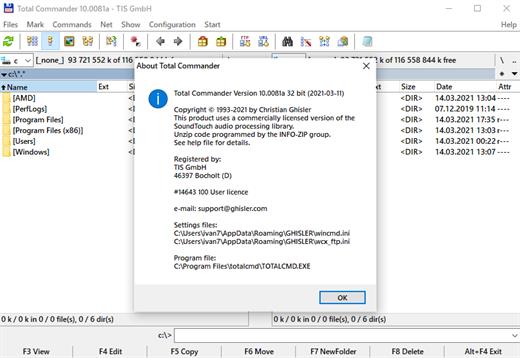
Description: Total Commander (former Wincmd) is a file manager for Windows similar to the Windows Explorer. But Total Commander uses a different approach: it has two fixed windows side by side like a well-known file manager for DOS.

Features
Two file windows side by side
Multiple language and Unicode support
Enhanced search function
Compare files (now with editor) / synchronize directories
Quick View panel with image and video display
ZIP, 7ZIP, ARJ, LZH, RAR, UC2, TAR, GZ, CAB, ACE archive handling + plugins
Built-in FTP client with FTPS (encrypted FTP) and HTTP proxy support
Multi-rename tool
Tabbed interface, regular expressions, history+favorites buttons
Thumbnails view, custom columns
Compare editor, cursor in lister, separate trees, logging, enhanced overwrite dialog etc.
Unicode names almost everywhere, long names (>259 characters), password manager for ftp and plugins, synchronize empty dirs, 64 bit context menu, quick file filter (Ctrl+S)
USB port connection via special direct transfer cable, partial branch view (Ctrl+Shift+B), and many improvements to ftp, synchronizing and other functions
And many more!

Release Name: Total Commander 11.57 RC5
Size: 11.2 MB
Links: HOMEPAGE – NFO – Torrent Search

Download: RAPiDGATOR

4 Comments
Apr 22

MediaMonkey Gold 2024.2.2.3220 RC3

Description: The media manager for serious collectors. MediaMonkey is the award-winning media organizer and player for serious collectors. It cleans the mess in your music and video libraries, and lets you share and enjoy them across all your devices.

High Performance
Manage thousands of music tracks and videos without missing a beat.

Manage All Your Media
Create collections for Rock, Classical, Audiobooks, Podcasts, or Movies. Classify using standard tags, custom fields, and multiple attributes per field.

Quality Hi-Fi
Fine-tune audio via a 10-band equalizer, DSP effect addons, volume leveling, and use WASAPI drivers to interface with your high-end digital audio equipment.

Auto-tag
Automatically identify tracks and look up missing metadata, artwork, and lyrics. Or use the manual editor for fine-grained control.

Remove Duplicates
Quickly find and eliminate duplicate tracks to clean up your collection.

Organize
Reorganize and rename media files into logical folders and filenames based on artist, album, title, year, etc.

Record and Convert
Record CDs to your library** and convert audio/video files while preserving tag information***.

Online services
Listen to online radio, find related content on YouTube, or sync Spotify playlists.

Podcasts
Automatically download and manage your favorite podcasts.

Device Sync
Sync audio/video and playlists with iPhone, iPod, iPad, Android and other devices, including artwork, ratings, play history. Auto-convert formats to play on any device.

Wi-Fi Sync
Wirelessly sync with [MediaMonkey for Android] and manage your library from your phone or PC.

Cloud Storage
Sync, store or back up your library content to cloud services such as Dropbox, Google Drive, or OneDrive.

Share
Share your library with TVs and consoles via UPnP / DLNA; or access content from another DLNA server.

Cast
Stream audio/video to Google Cast or DLNA devices (includes Media Controller and Media Renderer functions).

Enjoy!
Listen to your media* with leveled volume (via ReplayGain and MP3Gain), as they’re shared over Last.fm, with beautiful visualizations.

Playlists
Drag and drop files to create the perfect audio/video playlist. Or create AutoPlaylists based on complex search criteria.

Party
Use jukebox mode to let users make requests while preventing your library from being modified.

Auto-DJ
When your chosen tracks run out, let the Auto-DJ automatically play tracks based on criteria that you define.

Extend
Use custom add-ons, skins, and Winamp plugins† to add new functionality. Download add-ons or write your own.

Create Reports
Generate statistics and other reports of your music collection.

Work With Other Apps
Save metadata using standardized tags readable by other apps. Update the library in response to changes by other apps to media folders.

Release Name: MediaMonkey Gold 2024.2.2.3220 RC3
Size: 121.5 MB
Links: HOMEPAGE – NFO – Torrent Search

Download: RAPiDGATOR
7 Comments
Apr 22

AOMEI Backupper Technician Plus 8.3.0 + WinPE

Description: Complete Windows PC Data Protection and Clone Software. Automatically backup system, disk, files with different methods and schemes. Clone system and disk to another disk of different size without reinstalling. Keep files in two or more locations same via mirror, two-way or real-time sync.

Intelligent Backup
Backup system, disks, partitions, files, folders and all emails
Backup to internal/external storage, CD/DVD, NAS/network share, cloud as you want
Offer full, incremental and differential backup strategies to set customized backup plans
Backup to cloud storage with 3-2-1 backup strategy to save local space

Quick Restore
Restore system, disks, partitions, emails, files and folders to an earlier state
Restore the Windows system image to another computer and ensure it’s bootable
Create a bootable rescue media to restore the system easily when OS is unable to boot
Mount image files as virtual partitions to browse the contents and selectively restore certain contents as per your needs

Flexible Clone
Migrate an active OS from HDD to SSD without re-installation
Clone a hard drive to another disk, supporting conversion between MBR and GPT
Clone from a large disk to a small one, and vice versa

Diverse Sync
Sync files to local folders as well as other external storage devices
Provide different sync modes (“Basic Sync”, “Mirror Sync”, “Real-Time Sync”, “Two-Way Sync”) to personalize sync needs
Perform sync tasks automatically to keep a copy of frequently changed data

Cloud Backup is Ready
A local backup is the minimum requirement for data protection. However, adding online backup enables you to implement the 3-2-1 backup strategy. Cloud backup is an easy, secure, efficient method to add extra layer of protection for your data, reliably storing it off-site against hardware damage, ransomware, natural disaster, and other data loss risks. Meanwhile, economic cloud storage allows you to save expensive local drive costs.
1TB reliable and secure cloud storage
256-bit AES encryption
GDPR Compliance

Release Name: AOMEI Backupper Technician Plus 8.3.0 + WinPE
Size: 1.2 GB
Links: HOMEPAGE – NFO – Torrent Search

Download: RAPiDGATOR

5 Comments
Apr 22

Numbers 15.2 fix

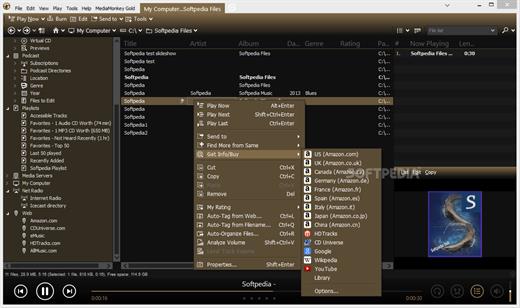
Create gorgeous spreadsheets with Numbers on iPhone, iPad and Mac. Get started with Apple-designed templates for everything from a home budget to an invoice. Add tables, charts, text, and images anywhere on the flexible canvas. Animate your data with interactive charts, find patterns with pivot tables, and use hundreds of powerful functions.

Get Started Quickly


  • Work from iPhone, iPad, Mac, or even a PC with iCloud.com
  • Select from a wide variety of Apple-designed templates
  • Add from a library of shapes, tables, and charts with pre-defined styles
  • Import and edit Microsoft Excel and CSV files
Create Beautiful Spreadsheets

  • Place tables, charts, text, and images anywhere on the flexible canvas
  • Create a form on iPhone or iPad to quickly enter data on the go
  • Draw or write with Apple Pencil on iPad
Formulas for Everyone

  • Choose from hundreds of powerful functions, including XLOOKUP and RegEx
  • Search the integrated function browser for built-in help and sample formulas
  • Easily add stock information to spreadsheets
  • See results from a single formula across multiple cells using spilling arrays
Everything Adds Up Beautifully

  • Use pivot tables and categories to see your data in a whole new way
  • Quickly organize and summarize tables to gain new insights
  • Insert gorgeous 2D and 3D charts, including bar, column, line, area, pie, donut, and radar charts
  • Animate data with interactive column, bar, scatter, and bubble charts
  • Easily filter through large tables for specific values, text, or duplicate entries
  • Change values in cells using sliders, steppers, checkboxes, pop-ups, and star ratings
Share with Anyone

  • Share your spreadsheet publicly or collaborate with specific people using iCloud or Box
  • Make changes from any device and see a list of changes from others in real-time
  • Export your spreadsheet in CSV, TSV, PDF, and Microsoft Excel
Apple Intelligence

  • Use Writing Tools to proofread, rewrite, summarize, and compose text
  • Create your own fun images with Image Playground based on a description
What’s New

Version 15.2:


  • Release notes were unavailable when this listing was updated.
Compatibility

macOS 15.6 or later.


Release Name: Numbers 15.2 fix
Size: 243.1 MB
Links: HOMEPAGE – NFO – Torrent Search

Download: RAPiDGATOR
5 Comments
Apr 22

Valentina Studio Pro 17.3.0

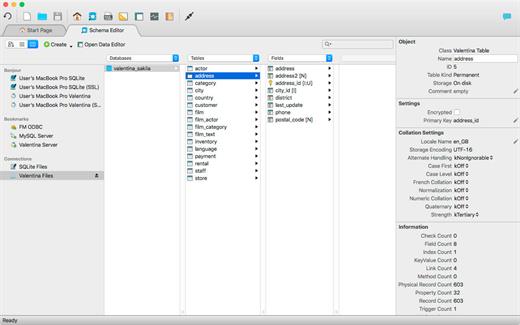
Valentina Studio is the ultimate data management tool for database administrators. Valentina Studio includes a wealth of database administration tools. Valentina Studio PRO to unlock advanced data modeling tools, report design and editing and more.

Valentina Studio brings you powerful, visual editors for your data including:


  • Schema Editor (tree view and column view) – create and modify all schema objects of supported databases: Tables, Views, Fields, Enums, Links, Constraints, Triggers, Indexes, Stored Procedures, …
  • Diagram Editor – design new diagrams or do reverse engineering, e.i explore existing databases visually.
  • Data Editor – easily browse table records in the grid, modify records, an inline edit of values, sort, filter records and save favorite filters, preview images, hex editors for binary values, …
  • Related Data Editor – easily learn and manage linked records of two tables, link/unlink records by a mouse click, do set operations over linked records, …
  • SQL Editor – with color syntax, auto-completion, recent and saved favorite queries, templates, console with error/warning reporting, …
  • Query Editor – build SQL queries visually using just a few mouse clicks
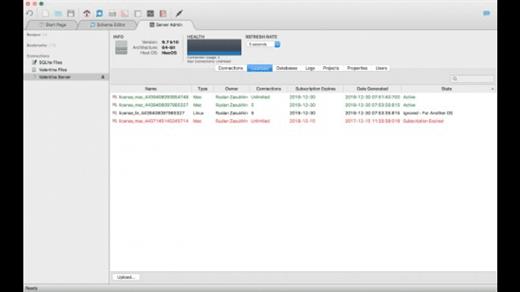
  • Server Admin – where you can manage users, learn logs and other parameters of servers.
Open as many editors as you like at the same time for different databases/servers opened in tab-panels. You also get different DB related utilities, including: Import/Export, Dumps, Diagnose, Clone, Reindex, …

MAS version of Valentina Studio uses iCloud to share bookmarks between your devices!

Valentina Studio Pro as an in-app purchase to get additional advanced pro-features such as:


  • Report Editor – visual editor of Valentina Reports that can be saved into Valentina Project file (.vsp). Reports can use as datasource MS SQL, MySQL, PostgreSQL, SQLite, Valentina DB, ODBC.
  • Form Editor – visual editor of Valentina Forms that can be saved into Valentina Project file (.vsp). Forms can use all supported databases as the datasource.
  • Data Editor – enables go to parent record function.
  • Data Editor Layouts – save columns and their order as a named layout
  • Data Editor Multiple Update – update few records at once.
  • Data Transfer – copy data between different databases
  • Diagram Editor – enables forward engineering – i.e. generation of SQL scripts for new/changed database objects.
  • Dump Wizard – enables filter for tables to select them for a dump.
  • Error Lookup – search for error description by its code.
  • Keyboard Shortcuts – enables the ability to redefine the shortcuts and create own shortcut sets.
  • Object Colors – enables marking objects with specific colors.
  • Query Editor – enables the ability to copy the generated query.
  • Schema Cache – save and reuse the schema cache.
  • Schema Editor – copy one or few schema objects using drag&drop mechanism.
  • Schema Editor – expanding and collapsing the tree items with subitems using OPTION + click
  • Schema Snapshot – save and load schema in structured format.
  • Source Control – develop database using any VCS.
  • SQLDiff – find differences between two states of a databases and generate SQL script to move between these states.
  • SQL Search – search of schema objects.
  • SQL Editor – enables autocompletion for table aliases.
  • SQL Editor – format SQL queries.
  • SQL Editor – edit the result of SQL queries.
What’s New

Version 17.3.0:


  • Release notes were unavailable when this listing was updated.
Compatibility

macOS 10.12 or later, 64-bit processor


Release Name: Valentina Studio Pro 17.3.0
Size: 205 MB
Links: HOMEPAGE – NFO – Torrent Search

Download: RAPiDGATOR

5 Comments
Apr 22

ChatGPT for macOS 1.2026.104

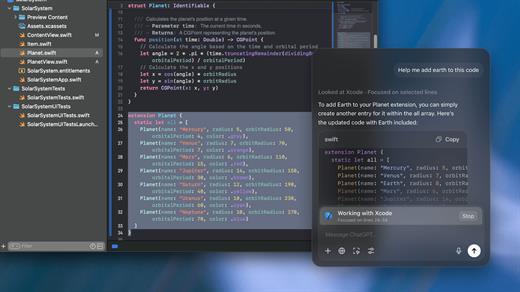
This is the official OpenAI ChatGPT app for macOS.

Whether you’re writing emails, exploring ideas, learning something new, or just curious about the world, ChatGPT is here to help. Designed with a clean, native experience for Mac users, the app makes it easier than ever to start a conversation with advanced AI.

Get answers. Find inspiration. Be more productive.

Free to use. Easy to try. Just ask and ChatGPT can assist with writing, learning, brainstorming, coding, and more. It’s like having an intelligent assistant, tutor, or creative partner always within reach—right from your menu bar.

Includes access to GPT-5 (for pro users), memory features, and voice input. Works seamlessly on macOS, optimized for speed and simplicity.

Key Features:

  • Instant AI-powered responses on your desktop
  • Natural language understanding and generation
  • Voice conversations with the built-in Whisper model
  • Synced across devices with your OpenAI account
  • Support for both GPT-5 (free) and GPT-5.4 (with Plus subscription)

Get started in seconds—no complex setup required. Just launch the app, l

What’s New

Version 1.2026.104:


  • Release notes were unavailable when this listing was updated.
Compatibility

macOS 14.0 and Apple Silicon (M1 or better)


Release Name: ChatGPT for macOS 1.2026.104
Size: 60.3 MB
Links: HOMEPAGE – NFO – Torrent Search

Download: RAPiDGATOR

5 Comments
Apr 22

Valentina Server 17.3.0

Serve reports from all major databases or with its own advanced, object-relational database system.

Valentina Client ADK for iOS

Build iOS apps with an embedded VCLIENT to Valentina Server

Valentina Forms Server

Register Valentina Forms to Valentina Server to share them with colleagues and clients.

Fast Web Applications

Build high performance server-side web applications with PHP, Python or Ruby on Rails.

Valentina Reports Objects

Build your report visually with drag-and-drop, scriptable report objects in Valentina Studio Pro.

REST & JSON Access Anywhere

Build web applications accessible anywhere using these lightweight protocols.

Notifications

Valentina Server can push notifications through a notification channel which in turn can spread among subscribing applications asynchronously.

Hot Back Up Your Data

Automatically back up your databases to any directory on your network without having to shut down your server.

Valentina SQLite Server

Valentina SQLite Server is a full featured, standards compliant multi-user access SQLite based database server.

Event Scheduler

Automate business and data management processes with Valentina Server support for triggers and event scheduling.

Valentina Reports Server

Server-side business applications with a data-rich reports, charts, graphs, barcodes, export to PDF, HTML and more with all major databases and servers.

Auto Discover on Network

Optionally make Valentina Server automatically and securely discoverable on your network using Bonjour, a form of zero-config.

Valentina DB Server

Blazingly fast object-relational database server based on the Valentina DB core model.

What’s New

Version 17.3.0:


  • Release notes were unavailable when this listing was updated.
Compatibility

macOS 10.15 or later


Release Name: Valentina Server 17.3.0
Size: 82.1 MB
Links: HOMEPAGE – NFO – Torrent Search

Download: RAPiDGATOR

6 Comments
Apr 22

Pages 15.2 fix

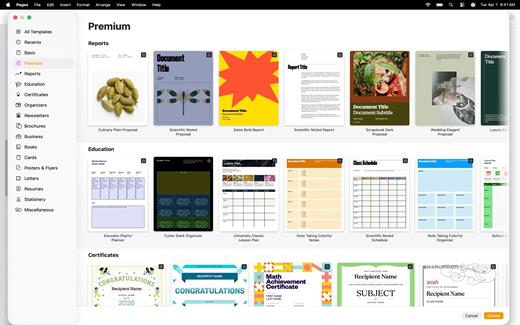
Create beautiful documents with Pages on iPhone, iPad and Mac. Start with an Apple-designed template for a report, resume, poster, or digital book. Easily add images, movies, audio, tables, charts, and shapes. Use comments, change tracking, and highlights to review your work. On iPhone and iPad, Screen View optimizes content for your screen, making it easier to edit.

Get Started Quickly


  • Work from iPhone, iPad, Mac, or even a PC with iCloud.com
  • Select from a wide variety of Apple-designed templates
  • Add from a library of shapes, tables, and charts with pre-defined styles
  • Import and edit Microsoft Word and text files
Create Beautiful Documents

  • Format your document with gorgeous styles, fonts, and textures
  • Make your content more engaging with recorded audio, video, and image galleries
  • Create page templates to keep the design consistent across your page layout document
  • Use powerful graphics tools including image background removal and masking
  • Design interactive EPUB books that can be shared with others or published to Apple Books
  • Draw, write or annotate with Apple Pencil on iPad
Advanced Tools

  • Use the table of contents view to easily navigate your document or book
  • Add comments and join threaded conversations
  • Turn on change tracking to mark up a document as you edit it
  • Create footnotes and endnotes and view character, word, and paragraph counts
  • Add elegant mathematical equations using LaTeX or MathML notation
  • Use presenter mode on iPhone and iPad to auto scroll text while giving a speech
  • Seamless integration with EndNote for inserting citations on Mac*
Share with Anyone

  • Share your document publicly or collaborate with specific people using iCloud or Box
  • Make changes from any device and see a list of changes from others in real-time
  • Export your document in EPUB, Microsoft Word, RTF, TXT, and PDF format
Apple Intelligence

  • Use Writing Tools to proofread, rewrite, summarize, and compose text
  • Create your own fun images with Image Playground based on a description
  • EndNote sold separately. EndNote integration requires a plug-in available from Apple Support.
What’s New

Version 15.2:


  • Release notes were unavailable when this listing was updated.
Compatibility

macOS 15.6 or later.


Release Name: Pages 15.2 fix
Size: 312 MB
Links: HOMEPAGE – NFO – Torrent Search

Download: RAPiDGATOR
5 Comments