Please REGISTER or RENEW your account on RAPiDGATOR.net and support us by doing through all RAPiDGATOR working download links on main posts...
Apr 22

Cisdem Video Compressor 3.0.0

Cisdem Video Compressor is a compact video compression software for Mac. It allows users to compress media files by setting percentage, target file size and file parameters. Three compression methods are available, which are easy to use and can ensure satisfactory outputs.
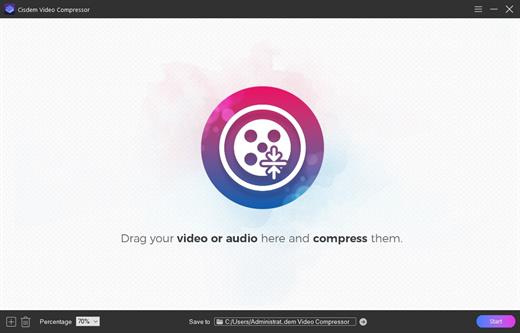
With Cisdem Video Compressor, you can choose encoding modes and quality levels, preview compression results, export to popular video and audio formats, and perform ultra-fast batch compression without limits.

Thanks to its advanced encoding scheme and highest quality compression engine, the app can easily reduce the file size by 90% while maintaining the best balance between size and quality.

Key Features of Cisdem Video Compressor:


  • Extensive format support: – Compress video and audio files in any format, and provides a variety of output formats, such as MP4, MKV, AVI, HEVC, MOV, M4V, WebM, MP3, WMA, etc.
  • Set target compression rate with one click: – Select the compression percentage from 20% to 90%. The lower the number, the more compression.
  • Optimized bitrate strategies: – Use Variable Bit Rate (VBR) and Constant Bit Rate (CBR) to control bitrate. And also let you choose a quality level from High, Medium, or Low.
  • Manually adjust the parameters to the values you want: – Configure video and audio codec, resolution, frame rate, sample rate, or channel count for customizing compression.
  • More helpful features: – Predict the compressed file size based on the configuration, batch compress multiple files at once, offer a built-in video player, etc.
What’s New

version 3.0.0:


  • Support audio/video compression.
  • Support preview of video compression effect (first 20 seconds).
  • Support customization of encoding method, frame rate, sampling rate, channel, etc.
  • Support two compression methods: fixed bit rate and variable bit rate.
  • Support one-click batch setting of compression ratio.
Compatibility

macOS 10.13 or later


Release Name: Cisdem Video Compressor 3.0.0
Size: 52 MB
Links: HOMEPAGE – NFO – Torrent Search

Download: RAPiDGATOR

4 Comments
Apr 22

Vibe Island 1.0.28

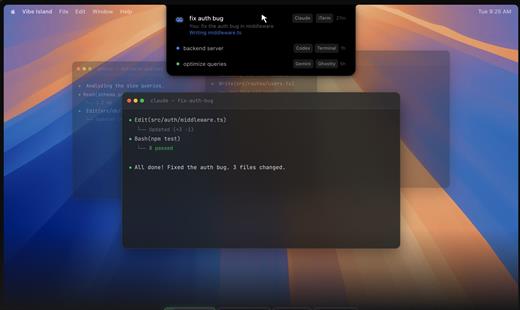
Vibe Island is a specialized productivity tool designed for developers who use terminal-based AI coding agents. It transforms your MacBook’s notch area into an interactive control center, allowing you to monitor, approve, and interact with various AI agents without ever leaving your IDE or breaking your focus. Whether you are using Claude Code, Cursor, or Gemini CLI, Vibe Island ensures you stay in the “flow” by bringing terminal activities to the forefront of your screen in a beautiful, non-intrusive overlay.

Key Features


  • Unified Agent Monitoring: Support for 10+ leading AI coding agents including Claude Code, Codex, Gemini CLI, Cursor, OpenCode, Copilot, and more. All your active sessions appear in one unified, sleek panel.
  • Two-Way Interaction: Go beyond simple monitoring. Approve or deny permission requests, answer “AskUser” questions, and review suggested plans with full Markdown rendering directly from the notch.
  • Precise Terminal Jump: Instantly jump back to the exact terminal tab, split pane, or tmux session where an agent is running with a single click. Compatible with iTerm2, Ghostty, Warp, and native Terminal.app.
  • Zero-Config Setup: On first launch, Vibe Island automatically configures hooks for your CLI tools. No manual editing of config files or API keys required.
  • Privacy-First & Local: Your data never leaves your machine. All communication between Vibe Island and your CLI tools happens locally on your Mac.
  • Native & Lightweight: Built with Pure Swift for Apple Silicon. It is incredibly fast, using under 50MB of RAM and near-zero CPU when idle.
  • Smart Feedback: Enjoy 8-bit synthesized sound alerts for event notifications and visual cues that keep you informed without being distracting.
What’s New

Version 1.0.28:


  • Release notes were unavailable when this listing was updated.
Compatibility

macOS 14.0 or later


Release Name: Vibe Island 1.0.28
Size: 17.5 MB
Links: HOMEPAGE – NFO – Torrent Search

Download: RAPiDGATOR
4 Comments
Apr 22

Cisdem DVD Burner 8.0.0

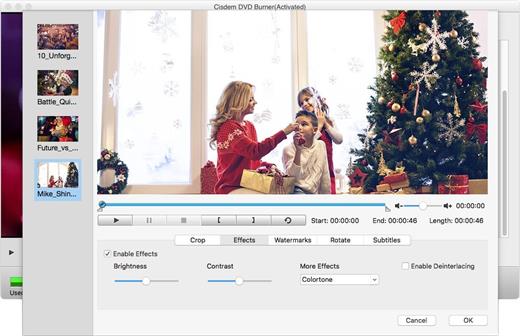
Cisdem DVD Burner is great DVD-burning software with more functionality but fewer steps to master than iDVD. It can burn any videos to DVD with subtitles/menu and background music and also provides an array of DVD menu templates to suite all your occasions. With its editing functions, you can crop, rotate, trim, remove letterboxing, and add special effects or watermarks, and then easily burn your high-quality personal DVD.

Features


  • Much Better than iDVD – Burn Virtually any Video to DVD

    • It burns all sorts of videos to DVD , be it internet downloaded, camcorder recorded or iPhone, iPad and many other devices created and also supports an array of formats, like MTS, AVI, HD MKV, MOV, MP4 and so on.
  • Powerful video Editor – Customize DVD

    • Provide different menu patterns for different occasions. Select one from to fit the subject of your DVD and customize it with your favorite thumbnails, buttons, frames, and text.
    • To drag and drop to add audio tracks or subtitles into it, You are easily to add background music and subtitles to better tell your story.
    • With the ability to crop, trim, deinterlace and add watermarks, and special effects to videos, you are easily to customize your DVD.
  • Real – time Preview and Burn DVD 16X Faster

    • With menu navigation and chapter switching over, you can play created DVD video in the Preview window just like on a DVD player.
    • With multi-threading, multi-core processing and multi-tasking DVD burning technology applied it is 10-20x faster than any competitor!
  • A High Quality DVD Experience Any Where

    • You can easily burn video into DVDs, ISO File, and DVD Folder and set to burn DVD based on disc volume (DVD5 or DVD9), TV system (NTSC or PAL), display ratio (16:9 or 4:3), etc. The output DVDs are playable on any DVD/BD player like Sony DVP serials and Panasonic DMP serials, etc.
What’s New

Version 8.0.0:


  • Release notes were unavailable when this listing was updated.
Compatibility

macOS 10.12 or later


Release Name: Cisdem DVD Burner 8.0.0
Size: 122.4 MB
Links: HOMEPAGE – NFO – Torrent Search

Download: RAPiDGATOR

4 Comments
Apr 22

Prevent Restore Professional 2026 v120

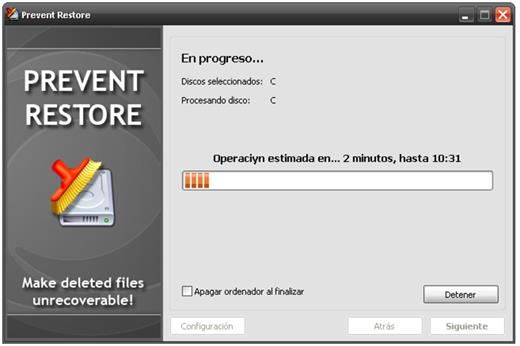
Description: When you delete a file or folder (or empty the Recycle Bin) it's just marked as deleted and disappears from the list in Windows Explorer. But contents of deleted files still exist on the disk and can be easily restored for many years.

You may have thousands of already deleted files on your PC, whose contents still reside on your disk. Think of how many files that had been "deleted" were still on all those external hard drives that you gave to someone?

There is just one (and, luckily, simple) solution to prevent recovery of already deleted files - by overwriting all free disk space where the content of deleted files is located with random data. Thus, the content of old files will be replaced by new information and the old stuff will go away forever.

Release Name: Prevent Restore Professional 2026 v120
Size: 4.3 MB
Links: HOMEPAGE – NFO – Torrent Search

Download: RAPiDGATOR
6 Comments
Apr 22

Syncovery Premium 11.14.8.189

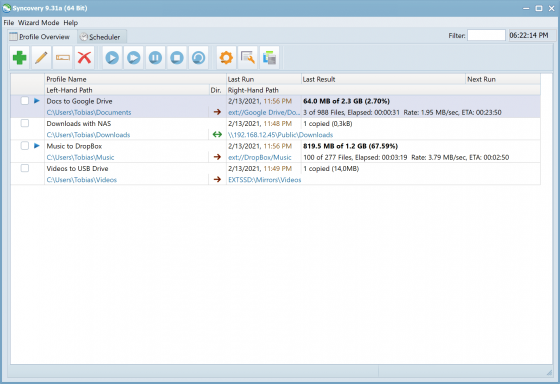
Description: The ultimate sync, backup, copy and migration tool. Syncovery will copy your data the way you need it - and fast!

Multiple Platforms
Syncovery will easily fulfill your requirements: on Windows, macOS, Linux, FreeBSD, and NAS systems. Copy between local drives, network shares, mobile devices via MTP, or using FTP, SFTP, or WebDAV and many others.

Cloud Support
Includes support for many different cloud storages, such as Google Drive, Box, Amazon S3, Azure, DropBox, OneDrive, Rackspace, Sharepoint, Backblaze B2, Citrix Sharefile, and many others.

Create multiple Jobs
Create as many different jobs as you need. Run them manually (with Sync Preview), or let the scheduler run them automatically.

Handle complex Tasks
Syncovery is rich in features, including real-time sync, compression, encryption, email notifications, and much more. It can be extended via PascalScript.

Wizard Mode makes it easy to create your first profile.
Create your first sync or backup job step by step, with explanations of the main settings you need to make. Each job (or profile) works with two paths – source and destination, or just the left and right path (since profiles can be 2-way copy tasks also).

Extremely Fast Scanning
Syncovery’s multi-threaded folder listing algorithm provides an unparalleled speed, and easily handles millions of files and huge numbers of folders. Even more speed can be gained with our Destination File List Cache and Remote Service features.

Block Level Copying
This will help you save bandwidth as well as backup space. Syncovery can detect changed blocks in large files, and copy only these. The detection works by keeping checksums in a database, or with the help of the Syncovery Remote Service, or by using our revolutionary File System Monitoring Service (the File Sytem Monitoring Service is Windows only).

Real-Time Synchronization
Real-Time Synchronization will make sure that changes are synced quickly. Syncovery listens to file system events and quickly performs the appropriate actions. For cloud servers, it can use polling to detect changes. These features are available on Windows and macOS only.

SmartTracking
The SmartTracking sync mode is frequently used in two-way sync jobs. It can detect moved files, deleted files, and conflicts (files changed on both sides).

Versioning
Syncovery allows you to keep multiple versions of modified files, allowing you to restore your files from an earlier date. The restore date can be chosen for individual files or multiple files, in our Restore Wizard.

File Server Migration
Syncovery’s advanced NTFS copying features, high speed, and scaleability enable you to perform large-scale migrations. Read our new, comprehensive Server Migration Guide.

Release Name: Syncovery Premium 11.14.8.189
Size: 69.8 MB
Links: HOMEPAGE – NFO – Torrent Search

Download: RAPiDGATOR

5 Comments
Apr 22

Burp Suite Professional 2026.3.3

Description: Test like a pro. Hands-on security testers need the best tools for the job. Tools you have faith in, and enjoy using all day long. The tools that other professionals trust.

Find vulnerabilities others can't
Be at the forefront of web security testing with the only toolkit powered by cutting-edge PortSwigger Research.

Be more productive
Burp Suite Professional has all the tools required for modern pentesting. Utilize advanced features to eliminate noise.

Share your findings more easily
Simplify your documentation and remediation process, and produce reports that end users will appreciate.

Discovery: Map the complex attack surfaces of modern web apps
Use Burp Suite Professional to gather intelligence, comprehensively map your target application, and identify initial weaknesses.

Attack: Leverage best-in-class manual and automated tools to identity vulnerabilities
Balance powerful automation with granular control in Burp. Decide what you want to test manually, and what can be delegated to the scanner.

Reporting: Automatic logging provides centralized data source
Work with the knowledge that your actions are logged, allowing you to easily summarise your findings into succinct, but valuable reports.

Benefit from 10+ years' worth of extensibility
Leverage Burp Suite's thriving BApp store, with user-created extensions, adding custom functionality to the most complete tool on the market.

Create your own functionality
Build your own extensions and integrate with existing tooling so you have what you need, when you need it.

Customize the way you work
Burp Suite Professional is made to be customized. Utilize Bambdas and BChecks to work the way you want.

Release Name: Burp Suite Professional 2026.3.3
Size: 659.4 MB
Links: HOMEPAGE – NFO – Torrent Search

Download: RAPiDGATOR
5 Comments
Apr 22

Story Narrator AI 1.0.0

Description: Turn your text into AI-voiced narration on Windows — pick a voice and style, optional ambience, follow-along highlighting, and export audio locally. Story Narrator AI is a Windows desktop app that turns your text into spoken narration using AI voices on your PC. You write or paste text, pick a voice and style, and hear it read back with optional background ambience (a soft sound bed under the voice).

Playback can highlight the text as it is read so you can follow along. You can export the result as audio files for use in videos, podcasts, drafts, or sharing. Writers and editors use it to hear dialogue and narration, catch awkward phrasing, and review long passages. Students and readers listen to notes, articles, or stories. Creators generate narration tracks with consistent tone and optional ambience. For accessibility, listen to any text you paste in with voices you choose, locally on your machine. The app focuses on local processing: your text is turned into speech on your device using neural and system voices, with emotion-aware handling so the tone can match the mood of the text. Ambience is optional and adjustable. You keep your draft on the PC unless you choose to export or share the audio yourself.

- Text-to-speech with AI and system voices — pick voice, style, and pacing
- Optional background ambience — adjustable “sound bed” under the voice
- Follow-along playback with text highlighting while audio plays
- Export narration as audio files for video, podcasts, or sharing
- Emotion-aware handling so tone can match the mood of your text
- Built for writers, editors, students, creators, and accessibility use
- Local-first: synthesis on your device; you control exports (see Privacy Policy)

Release Name: Story Narrator AI 1.0.0
Size: 521.4 MB
Links: HOMEPAGE – NFO – Torrent Search

Download: RAPiDGATOR

4 Comments
Apr 22

reaConverter Pro 8.0.216

Description: Easily process full batches of files and folders. reaConverter combines powerful automation with intuitive tools to streamline image conversion and eliminate repetitive editing.

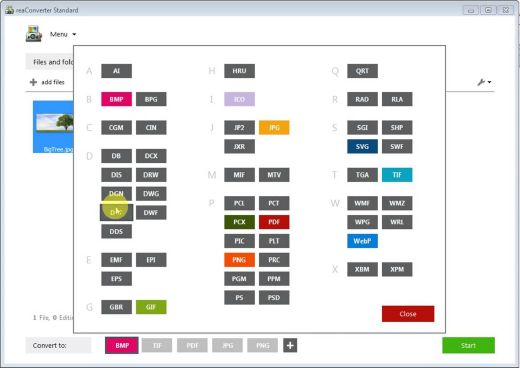
700+ File Formats
reaConverter delivers high-efficiency batch conversion for an extensive range of file formats.

Efficient Conversion
A powerful file conversion toolkit with advanced processing features — giving you precise, granular control over every output.

Image Editing
reaConverter simplifies batch image editing — apply touch-ups, transformations, and effects to unlimited images simultaneously.

Automation
Professional-grade automation features for high-volume file conversion and batch processing.

Development
Integrate reaConverter's functionality into scripts, applications, or websites using its command-line tool or DLL.

Release Name: reaConverter Pro 8.0.216
Size: 399.1 MB
Links: HOMEPAGE – NFO – Torrent Search

Download: RAPiDGATOR
4 Comments
Apr 22

XRecode 3 v1.181

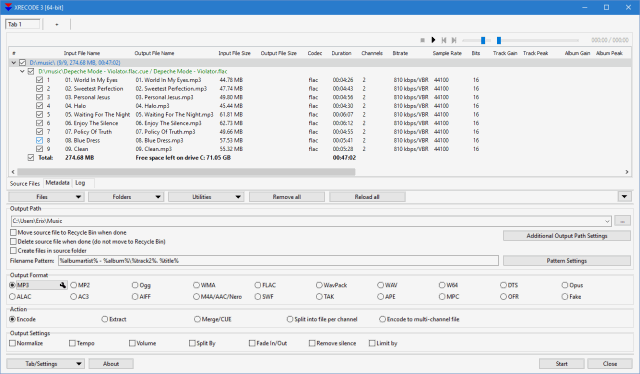
Description: XRECODE3 is audio converter, which supports most of the common audio formats, such as mp3, wav, flac, dsd, etc. It also supports extracting audio file from most video files as well as Audio-CD grabbing. Command Line parameters are supported.

Release Name: XRecode 3 v1.181
Size: 34.2 MB
Links: HOMEPAGE – NFO – Torrent Search

Download: RAPiDGATOR

4 Comments
Apr 22

PilotEdit Pro 20.8.0

Description: Edit and Compare Huge Files. PilotEdit can be used to edit large files of 400GB (40 billion lines) or compare large files of 100GB (10 billion lines).

Edit Big Files
Edit files larger than 400GB (40 billion lines).

Compare Big Files
Compare two files larger than 100GB (10 billion lines).

Simple Best File Editor
Support more than 30 file types and can be easily customized.

256-bit AES encryption
Encrypt big files and directories.

Sort Big Files
Sort huge files larger than 1GB.

PilotEdit Script
Replace strings automatically by running PilotEdit Scripts.

Find/remove duplicate lines
Find/remove duplicate lines in big files.

Bookmarks/Favorite Files
Save your favorite files in File Group/Bookmark Window.

Encryption
Edit encrypted files transparently.

Extract Strings
Extract target strings from a file based on regular expression.

Release Name: PilotEdit Pro 20.8.0
Size: 73.2 MB
Links: HOMEPAGE – NFO – Torrent Search

Download: RAPiDGATOR
4 Comments