Please REGISTER or RENEW your account on RAPiDGATOR.net and support us by doing through all RAPiDGATOR working download links on main posts...
May 1

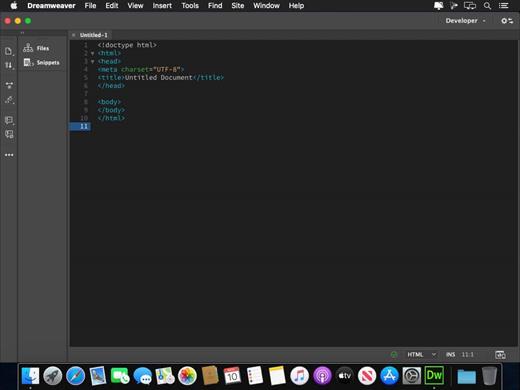
Adobe Dreamweaver 2021 v21.8.0

Fast, flexible coding.
Create, code, and manage dynamic websites easily with a smart, simplified coding engine. Access code hints to quickly learn and edit HTML, CSS, and other web standards. And use visual aids to reduce errors and speed up site development.

Setup to site up in fewer steps.
Get your sites up and running faster with starter templates that you can customize to build HTML emails, About pages, blogs, e-commerce pages, newsletters, and portfolios. Code coloring and visual hints help you read code more easily for quick edits and updates.

Dynamic display on every device.
Build responsive websites that adapt to fit any screen size. Preview your sites and edits in real time to make sure your pages look and work the way you want before you publish.

See what new can do.
Dreamweaver is always getting better, with new features rolling out regularly. And with your Creative Cloud membership, you get them as soon as we release them. Here are some of the latest updates.

Multi-monitor support for Windows
Now you can expand your workspace by displaying your pages on multiple monitors.

CEF integration
Dreamweaver now integrates with the latest version of Chromium Embedded Framework, so you can build modern HTML5 website and display elements, CSS grids, and much more.

Redesigned, modern UI
A streamlined and clutter-free interface lets you customize your workspace to only show the tools you need to code.

Git support
Collaboration is easy with Git support. Manage all your source code within Dreamweaver and perform all common operations right from the Git panel.

Release Name: Adobe Dreamweaver 2021 v21.8.0
Size: 2 GB
Links: HOMEPAGE – NFO – Torrent Search

Download: RAPiDGATOR

3 Comments
May 1

Atlantis Word Processor 5.0.3.0


Description:
 Atlantis is an innovative, no-nonsense word processor carefully designed with the end-user in mind. Compact, fast-loading, but still powerful and efficient, Atlantis will be the perfect companion for a wide range of your word processing tasks, – from simple to most complex. It does not matter if you are a novice or a power user, Atlantis has the tools you will ever need to compose highly professional documents. Using a most original and practical Control Board, you will create and manage all components of complex documents with unparalleled ease: sections, fields, headers & footers, newspaper columns, bulleted & numbered lists, styles, bookmarks, footnotes & endnotes, etc, all are a breeze with Atlantis.
Both the Safeguard and Backup Files features make sure that you work under extremely safe conditions. Private documents can also be encoded and secured: you can save them to a proprietary COD file format using powerful 256-bit encryption technology.

The Atlantis AutoCorrect and Spellcheck-As-You-Type features combine with a unique typing assist, the Atlantis Power Type, to dramatically simplify your word processing life. The Overused Words feature will help creative writers avoid repetitions and clichйs.

The Atlantis interface is entirely customizable: menus, toolbars, hot keys, colors and sounds can all be adjusted to suit your own requirements. What's more, Atlantis is a fully portable word processor. You can install Atlantis to a memory flash drive, and Atlantis will travel with you wherever you go.

THE WORD PROCESSING FUNCTIONS:
Document creation and formatting is easy, using a customizable and expandable collection of document templates and sample letters.

Comprehensive Style Sheet support is available for advanced users.
A customizable and expandable Clip Library is stocked with text and graphic items ready to be inserted in larger documents whenever suitable. The Atlantis original collections of clips include everyday phrases, letter writing elements, clip art, etc.
Of course, all the traditional font and paragraph formatting commands are present:

choice of typeface, font size, font color. A state of the art typeface preview.
bold, italic, underline, strikeout, double strikeout, superscript, subscript, small caps, all caps, shadow, outline, emboss, engrave.

choice of 17 underline styles; choice of underline color.
character spacing, scaling, kerning, vertical offset.
fully customizable tab stops.
left/right paragraph indent, first line indent and outdent.
spacing before/after paragraph, 6 types of interline spacing.
keep with next paragraph, keep intact, page break before, widow/orphan control.
and plenty more, only a key press or mouse click away...

More than 20 fields are supported. The corresponding items are quickly inserted and automatically updated by Atlantis. Fields make document and template creation very flexible. What's more, we have made sure that fields are not restricted to advanced users: using fields in Atlantis is child's play!

Words can be hyphenated across lines automatically or manually.
You can create newspaper-type columns, divide documents into sections, each section with its own page settings.
You have two graphic-type formatting modes to change font color and highlight text. You will use specific mouse pointers to format text in the same way as you would with a paint brush.

Atlantis introduces a revolutionary approach to document formatting with a Format Palette and Brush. Even the most complex formatting jobs can be done exclusively with a brush-like mouse cursor and a palette loaded with formatting templates. You can use the Atlantis default palette or customize your own format palettes in any way you like.

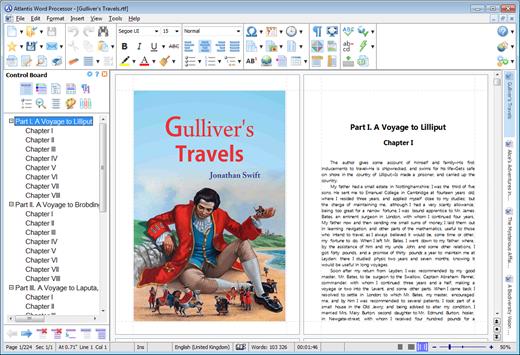
The Format Palette is only one of the instruments present on the Atlantis Control Board. The Atlantis Control Board brings together all the tools and commands that are required to create both simple and complex documents with the greatest of ease. Each panel of the Atlantis Control Board is dedicated to one specific characteristic of the active document. You have separate overviews of the document Headings, Bookmarks, Sections, Styles, or Lists, with all the related commands directly available from each specific panel of the Control Board. Tools and commands to manage Headings are on hand on the "Headings" panel, tools and commands to manage Bookmarks are on hand on the "Bookmarks" panel. Etc. This gives you unequaled power and flexibility.

The AutoCorrect feature of Atlantis has fully customizable multilingual options, and will dramatically simplify your word processing life. It combines flexibility with power for unparalleled control over the typing and formatting of documents. Some of the Atlantis AutoCorrect functions are still unheard-of in today's top-end word processors. Texts are proofread in the background "As-You-Type", or, optionally, when typing is complete.

A multilingual spellchecker will help you create documents with perfect language. Spelling is checked "As-You-Type", or, again, optionally, when typing is complete. Original Atlantis Spellcheckers are available for 16 languages or dialects. And of course, you can create and augment as many custom dictionaries as you wish.

Power Type is a typing assist adding unique functionality to Atlantis. Working in close cooperation with our proprietary spellchecker engine, Power Type collects statistical information about the texts that you type, creating a smart database of the words that you use most, and also of their usual environment. When you start typing the same words again, Atlantis gives a warning sound, pops a small window up, and displays a list of words beginning with the same characters. But this is not all. The Atlantis Power Type has learning abilities. As time goes by, the Power Type database gets smarter, and you will notice that the typing suggestions are more and more appropriate. Of course, the Atlantis Power Type is invaluable for people with disabilities. But also for slow "one-finger" typists.

The Overused Words feature will help creative writers avoid repetitions and clichйs if they want their texts to be read with any interest or pleasure. The Overused Words feature will show detailed statistics about repetitions and word frequency. This will tell you where words need to be replaced with synonyms, or whole paragraphs reworked.

To improve the reading and understanding of the documents you create in Atlantis, you can add bookmarks, hyperlinks, table of contents to them. Atlantis can build table of contents automatically at the press of a few keys.
All documents created in Atlantis can be "Saved As Web Page", i.e. saved as HTML. This will help owners of personal Web sites, and also e-book creators tremendously. Atlantis also has a command to convert any document to an eBook with just a few mouse clicks.

You will find comprehensive support for all types of lists, bulleted and numbered, whether simple (one level) or outline (multilevel). Where numbered lists are concerned, we have placed the highest emphasis on reliability. You will design foolproof numbering schemes from simplest to most complex with the greatest of ease. And, uniquely, you will be able to fix the wrong numbering of lists created in other not so smart word processors.

Headers and footers are fully supported. And so are footnotes and endnotes. You can insert footnotes and/or endnotes, choosing from a wide range of different reference marks. What's more, and quite uncommonly, you can configure footnotes and endnotes differently from one document section to the other.

DOCUMENT SUPPORT IS COMPREHENSIVE:

Document size is literally unlimited.
Multiple document formats are supported, insuring maximum portability on all systems: RTF, MS Word DOC 6.0/95/97/2000/XP/2003,Vista, Seven DOCX, etc.
Support for document projects.

Multiple graphic formats can be used to complement text: BMP, EMF, WMF, JPG, GIF, PNG, PCX, TGA, TIF, PCD, ICO, etc.
You have an option to save documents in a supercompact lightweight RTF format. Combined with the Atlantis internal Zip compression, this option is ideal for files traveling on the Internet.

Release Name: Atlantis Word Processor 5.0.3.0
Size: 1.9 MB
Links: HOMEPAGE – NFO – Torrent Search

Download: RAPiDGATOR

4 Comments
May 1

Lightjams 1.0.0.748

Description: Lightjams is a software for interactive DMX lighting. It’s all about giving you the power to generate unique effects based on many types of live signals - MIDI, OSC, DMX, music, video, time, etc.

Why you need it? Create one-of-a-kind lighting effects. Add interactivity. Give control to the performers. Automate as much as you want.

How it works? Powerful generative effect engine with easy scripting for deep customization. Compatible with any DMX lighting fixtures and LED controllers. Send and receive MIDI/OSC/DMX. Run on all Windows™ computers.

Hundreds of people are using it right now in nightly events and permanent installations. All its great features and unique abilities make it a ridiculously good deal for any lighting professionals and enthusiasts!

System Requirements:
OS: Windows 7/8/10/11 64-bit
CPU: Quad core 2 GHz
RAM: 4 GB
1400x900 screen resolution

Release Name: Lightjams 1.0.0.748
Size: 45 MB
Links: HOMEPAGE – NFO – Torrent Search

Download: RAPiDGATOR

5 Comments
May 1

TechSmith SnagIt 26.2.1.10855

Description: Screen capture loved by over 40 million people. Snagit is the ultimate screen capture and recording software for anyone who wants to look good, work smarter, and communicate clearly.

Easy to use, but full of advanced features
Don't let clumsy built-in tools hold you back. Snagit's comprehensive feature set makes it the top screen capture software for professionals.

Scrolling capture
Quickly capture images of anything and everything on your computer screen, even scrolling areas.

Simplify UI
Transform screenshots into simplified user interface (SUI) graphics in a single click.

Library
Say goodbye to the chaos and let Snagit keep your content effortlessly organized and synced across devices.
Filter and sort by date, file type, and application
Sync to Google Drive, OneDrive, and more
Tag images and videos

Smart move
Snagit automatically recognizes elements in your screenshot, granting you the magical ability to rearrange or remove UI elements.

Text recognition
Magically edit the text within an image, screenshot, or scanned document. You can even adjust the font, text size, and color.

Capture anything, exactly how you want it
This is the capture window where you can effortlessly customize and save your capture settings.

Image capture
Capture your full screen, a specific region, fixed image size, or scrolling area.

Video recording
Record video of all or part of your screen, plus your camera.

Audio recording
Record microphone and system audio.

Custom presets
Create custom presets and keyboard shortcuts for your go-to captures.

Unleash your creativity with the ultimate built-in editor
Effortlessly transform your captures into polished, professional-quality images with easy-to-use templates and mark-up tools.

Release Name: TechSmith SnagIt 26.2.1.10855
Size: 409.1 MB
Links: HOMEPAGE – NFO – Torrent Search

Download: RAPiDGATOR

6 Comments
May 1

Nuclear Coffee Recover Keys 12.0.6.313 Enterprise

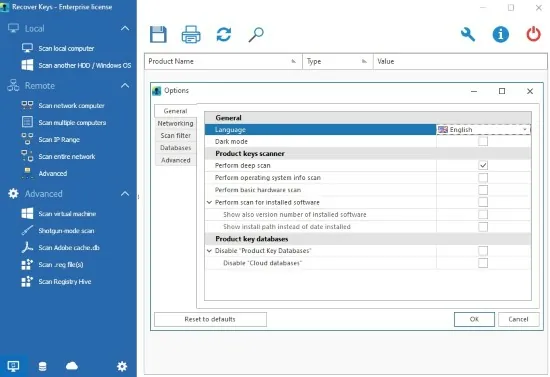
Description: Recover Keys is a simple yet comprehensive Windows application designed to safeguard activation keys for software products installed on your local or remote network computers in the event of a system or hard disk crash.

Losing activation keys is a time consuming and expensive experience. In such case you would have to contact the developers of each program or even purchase entirely new versions of all software.

Now you can protect yourself and backup your keys! Recover Keys quickly analyzes your system for over 11,000+ software programs and produces a list of software activation keys. Then you can save, backup, print, or export (Word, Excel, PDF, HTML, CSV, XML) the license information. Due to friendly interface and solid amounts of options, Recover Keys can used both by professionals and inexperienced users.

Product Key Finder
Recover product keys for Windows, Office, Adobe products, Acronis products, Electronic Arts games, WinZip, Nero and more than 11,000+ other programs.

Backup activation keys
Losing product keys can be very expensive for your both time and money. You can save your product keys into Text file, Word, Excel, PDF, HTML, CSV, XML or simply send it to printer.

Scan another Windows or HDD
Recover Keys can also scan another Windows operating system or another hard disc drive (HDD) for product keys, bootable or not

Scan remote network computers
Besides scanning your local PC for product keys, Recover Keys can scan for product keys on remote network computers.

Cloud and local databases
Store and access your product keys securely from anywhere. Upload your product keys with Recover Keys software and access it from anywhere via browser or mobile.

System requirements
Works on Windows NT / 2000 / XP / Vista / 7 / 8 / 8.1 / 10 / 11. 32 bit or 64 bit system. No specific requirements.

Release Name: Nuclear Coffee Recover Keys 12.0.6.313 Enterprise
Size: 46.8 MB
Links: HOMEPAGE – NFO – Torrent Search

Download: RAPiDGATOR
6 Comments
May 1

Scale Photo Up 2.0.15

Description: Scale Photo Up – Transform Blurry into Brilliant with AI-Powered Upscaling! Tired of pixelated, low-res footage holding back your creativity? Say goodbye to grainy memories and hello to Scale Photo Up – the game-changing AI software that doubles resolution, enhances details, and smooths out imperfections in images and videos with stunning clarity!

Upscale by 2X – Without Losing Quality!
Turn blurry, low-resolution photos and videos into sharp, high-definition masterpieces. Perfect for breathing new life into old family albums, vintage films, or social media clips.

Unlock Forgotten Content
Discover a treasure trove of previously "unusable" footage—classic movies, archived vlogs, or nostalgic home videos—now crystal clear and ready for modern storytelling.

AI That Reads Between the Pixels
Our advanced neural networks don’t just stretch pixels—they intelligently reconstruct missing details, reduce noise, and smooth edges for a natural, ultra-clean finish.

Future-Proof Your Content
In a world where 4K and 8K dominate, don’t let low-res hold you back. Remaster old footage to meet today’s standards and keep your audience engaged.

Endless Possibilities for Creators
- Remaster Old Films & TV Clips – Give classic scenes a modern HD upgrade for reaction videos, supercuts, or tributes.
- Restore Family Memories – Turn faded, pixelated photos and home videos into vibrant keepsakes.
- Enhance Social Media Gold – Upscale viral but low-quality clips for reposting, memes, or remixes.
- Improve Thumbnails & B-Roll – Make every frame look professional, even if the source wasn’t.

"Scale Photo Up" isn’t just an enhancer—it’s a time machine for your content. Whether you're a filmmaker, YouTuber, TikToker, or just someone who cherishes memories, stop letting low resolution limit what you can create.

System Requirements
Windows 10 version 17763.0 or higher

* NOTE: Software offers standalone operation with no cloud dependency. For optimal performance, an NVIDIA GPU is strongly recommended—enabling significantly faster processing, especially for video processing. While the software remains fully functional on CPU-only systems, processing speeds may vary based on hardware capabilities

Microsoft Store - Full Version

Release Name: Scale Photo Up 2.0.15
Size: 1.8 GB
Links: HOMEPAGE – NFO – Torrent Search

Download: RAPiDGATOR

4 Comments
May 1

XYplorer 28.30.0500

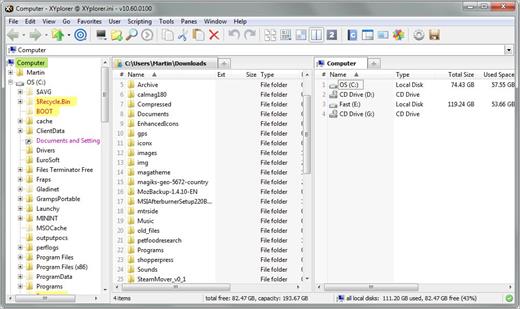
Description: XYplorer is a file manager for Windows. It features tabbed browsing, a powerful file search, a versatile preview, a highly customizable interface, optional dual pane, and a large array of unique ways to efficiently automate frequently recurring tasks.

It's Tabbed
Tabs let you switch between folders most easily. Drag them around, hide them, lock them, name them, or drop files onto them. The tabs remember their configuration individually and across sessions. On top of this you get tabsets and dual pane.

t's Functional
XYplorer has been designed to make you faster. Numerous usability enhancements in an attractive interface help to streamline your workflow and increase your efficiency. You will definitely save a lot of time.

It's Scriptable
Yes, you can program this app. Individual solutions for individual tasks. No plugins needed, scripts run out-of-the-box. Even beginners can benefit from this feature since many ready-to-use scripts are available in the forum.

It's Fast
Speed has always been a major design goal with XYplorer. The code is constantly optimized for performance, zero tolerance for slowness. On top of that the app uses very little RAM, the executable is light (7 MB), and it loads almost instantly.

It's Reliable and Robust
You can trust XYplorer. It works as intended and expected, and is very hard to destroy. Any issues are immediately attended and usually fixed within hours. A large community is closely watching the development and permanently testing the frequent beta versions.

It's Customizable
You can fine-tune the app to look and behave exactly as you want it. This ranges from fonts and colors to custom toolbar buttons and even file icons and program associations. And every bit of it is fully portable. Even the dark mode.

It's Responsive
Your customer voice is listened to and taken seriously, most of the time you get instant feedback, and your wish might actually get implemented sooner than you'd think.

Operating System:
Windows 11, Windows 10, Server 2019, Server 2016, 8.1, 8, Server 2012, 7, Server 2008, Vista, XP, Server 2003; 32-bit and 64-bit versions.

Release Name: XYplorer 28.30.0500
Size: 11.4 MB
Links: HOMEPAGE – NFO – Torrent Search

Download: RAPiDGATOR

7 Comments
May 1

Master Packager Pro 26.2.9601

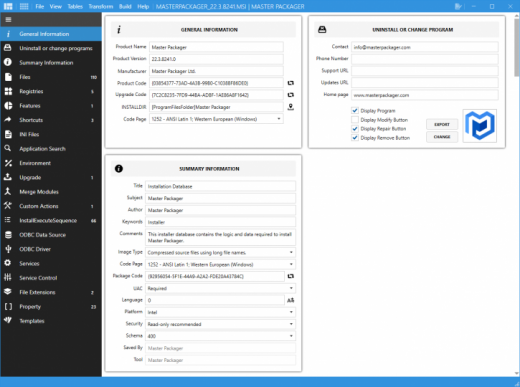
Description: Master Packager create and edit Microsoft Windows Installer (MSI) files. Design that is created to be as friendly as possible. Self-explanatory user interface.

Fast
Work with MSIs having over 100 000 files or registries and experience impressive load time and UI responsiveness.

User interface
Don’t miss anything. The interface that lets you use your display’s full potential - all menus in one or focus view.

Advanced Editor
View, edit, and create MSI files like a Master Packager. The editor enables beginners and pro packagers to do more with fewer clicks and no struggles.

Table Editor
See and modify every cell of the MSI file. Do it using table editor beyond your expectations.

Templates
Automate the boring parts of the packaging. Store properties, registries, summary information, or custom actions and apply them instantly with predefined templates.

Everything you need
To work with Win32 apps all in one Master Packager suite:
Master Packager
Master Repacakager
Master Wrapper

Release Name: Master Packager Pro 26.2.9601
Size: 129.8 MB
Links: HOMEPAGE – NFO – Torrent Search

Download: RAPiDGATOR

7 Comments
May 1

Revive Faces 2.0.15

Description: Revive Faces – Bring Lost Moments Back to Life with AI Magic. Ever looked at an old photo or video and wished you could see those faces clearly again? Time, blur, and pixels shouldn’t steal the smiles, the glances, or the stories of the people you love. With Revive Faces, our groundbreaking AI-powered restoration software, those faded, blurry, and pixelated faces can now shine with stunning clarity—like they were captured yesterday.

See the Unseen Again
Our advanced AI doesn’t just sharpen images—it reconstructs lost facial details in photos and videos, even when the faces are blurred, scratched, or barely visible.

Rescue Precious Memories
Restore old family photos, wedding videos, or childhood moments where time has washed away the details. Let grandparents see their youth again, let parents relive their happiest days, and let children
discover faces they’ve never seen clearly.

Hollywood-Grade Restoration
Whether it’s a decades-old home movie, a historical clip, or a viral video ruined by motion blur, Revive Faces brings back natural expressions, lifelike skin tones, and crisp features—without looking artificial.

No Face Left Behind
Even heavily obscured or low-light faces get a second chance. Perfect for investigators, journalists, or creators working with archival footage.

This Isn’t Just Software—It’s a Time Machine.
- Restore old portraits so your ancestors’ faces can be remembered as they truly were.
- Fix blurry social media clips and give forgotten moments the spotlight they deserve.
- Remaster vintage films and rediscover the emotions in every frame.
- Save damaged evidence or footage when clarity is the difference between mystery and truth.

Some moments are too precious to fade away. With Revive Faces, you’re not just sharpening pixels—you’re reuniting people with their past, one face at a time. Don’t let blur steal another memory. Revive Faces today—and see them smile again.

System Requirements
Windows 10 version 17763.0 or higher (64-bit)

* NOTE: Software offers standalone operation with no cloud dependency. For optimal performance, an NVIDIA GPU is strongly recommended—enabling significantly faster processing, especially for video processing. While the software remains fully functional on CPU-only systems, processing speeds may vary based on hardware capabilities.

Microsoft Store - Full Version

Release Name: Revive Faces 2.0.15
Size: 2.2 GB
Links: HOMEPAGE – NFO – Torrent Search

Download: RAPiDGATOR
4 Comments
May 1

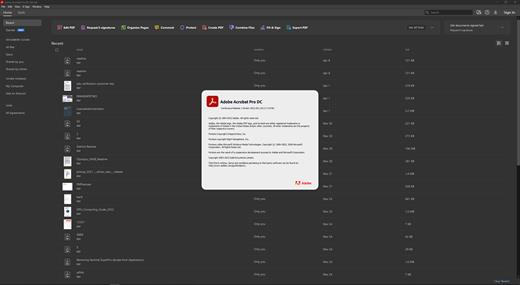
Adobe Acrobat Pro DC 2026.001.21529

Incl. REPACK by monkrus

Description: Adobe Acrobat Pro DC is the leading PDF converter and much more. Adobe Acrobat Pro DC software lets you deliver professional PDF communications. It's packed with smart tools that give you even more power to communicate. Create and edit PDF files with rich media included, share information more securely, and gather feedback more efficiently.

Adobe Acrobat Pro DC software is the advanced way for business professionals to create, combine, control, and deliver more secure, high-quality Adobe PDF documents for easy, more secure distribution, collaboration, and data collection.

Assemble electronic or paper files into reliable PDF documents that are easy to share with others using free Adobe Reader. You can assemble even Web sites, engineering drawings, and e-mail.

With Adobe Acrobat Pro DC you can manage document reviews, synthesizing feedback from multiple reviewers while preserving document format and integrity. Extend commenting capabilities to anyone using Adobe Reader. Windows users can design intelligent Adobe PDF forms that include business logic, such as calculations and data validations, to help increase the accuracy of data collection while reducing the costs of manual data entry.

Use Adobe Acrobat Pro DC to create high-impact PDF communications, collaborate more easily, and streamline reviews. Adobe Acrobat Dynamic PDF helps you get more done - easier, faster, better.

Edit PDF files
With Adobe Acrobat Pro DC, you can make minor edits to text and images right in your PDF file without requiring the original document or graphic. Edit text in a PDF. Fix a typo, change a font, or add a paragraph to your PDF as easily as you do in other applications using a new point-and-click interface. Edit images in a PDF. Resize, replace, and adjust images in your PDF with no need to track down the original file or graphic.

Export from PDF files
Reduce the time you spend retyping information stuck in PDF files. Convert PDF files to editable Microsoft Office documents. And save fonts, formatting, and effort.
Convert PDF files to Word. Save your PDF as a Microsoft Word document and take your fonts, formatting, and layouts with you. Convert PDF files to Excel. Turn your PDF or just part of it into an editable Excel spreadsheet you can use for data analysis right away. Convert PDF files to PowerPoint. Get a head start on new projects by saving a PDF file as a fully editable PowerPoint presentation.

Create PDF files
Stop worrying about whether the files you send will look right on other people's screens. Turn documents into PDF files anyone can reliably view with free Adobe Reader.
Convert Word, Excel, or PowerPoint to PDF. Right from your Office application in Windows, you can create PDFs, start a shared review, restrict PDF edits, and more. Print to PDF. Convert files to PDF from virtually any application that prints simply by selecting Adobe PDF as your printer. Scan to PDF. When you need to turn a paper document or form into a digital file, just scan it to create a searchable PDF file you can edit. Convert HTML pages to PDF. Save web pages as PDF files to archive web content, review the pages offline, or print them more reliably.

Create and analyze forms
Cut the time you spend creating forms, rekeying data, and correcting errors. Distribute forms online, and then collect responses and analyze results in real time.
Create new PDF and web forms. Customize professional templates or design from scratch with the Adobe FormsCentral desktop app included in Adobe Acrobat Pro DC. Collect form responses with FormsCentral. Easily collect responses by moving your PDF or web forms online with the Adobe FormsCentral online service. Convert existing forms to fillable PDFs. Type less, gather more. Quickly convert your paper, Word, or Excel forms to fillable PDF forms. Collect form responses using Adobe Acrobat tools. Compile returned forms into one PDF, or host forms using a network folder or Microsoft SharePoint server.

System Requirements:
Intel® or AMD processor; 1.5GHz or faster processor
Windows 11 (64 bit), Windows 10 (64 bit) version 1809 or later, Windows Server 2016 (64 bit), or Windows Server 2019 (64 bit)
2GB of RAM
4.5GB of available hard-disk space.
1024x768 screen resolution
Video hardware acceleration (optional)

Release Name: Adobe Acrobat Pro DC 2026.001.21529
Size: 4.6 GB
Links: HOMEPAGE – NFO – Torrent Search

Download: RAPiDGATOR

4 Comments