Please REGISTER or RENEW your account on RAPiDGATOR.net and support us by doing through all RAPiDGATOR working download links on main posts...
June 6

Directory Opus 13.23.7 Beta

Description: Are you frustrated by the limitations of Windows Explorer? Directory Opus is a complete replacement for Explorer, with far more functionality than any other file manager available today.

You're in control.
Not just a simple file manager; Directory Opus lets you make your computer yours.
With a flexible user interface and unbelievable configurability, you can tailor Opus to streamline your workflow.
Dual panes, dual trees, multiple tabs.
Filter, sort, group your folders. Label and rate your files.
Queued file copies. Powerful batch renaming. Full archive support.
Find your files. Locate duplicates. Synchronize backups.
Assign tags and descriptions. Convert images. Edit metadata.
Fully multi-threaded, native 64 bit high performance code.
Whatever you want to do - Opus can probably do it. And if it's not built-in, you can take advantage of the unrivalled configurability to extend Opus using external tools.

What makes Opus unique?

Built for speed
Opus is written in native C++ multi-threaded code; compiled for the latest 64 bit CPUs, with high performance our number one design principle.

Fully configurable
Change the colors. Change the fonts. Change the toolbars and menus. Set up hotkeys. Opus adapts to how you want to use it.

Makes file management a breeze
Powerful searching, sorting, grouping, labelling and tagging features let you take control of your files like never before.

Endlessly extensible
Work with third-party tools as easily as with the built-in features. A full scripting interface, including scriptable dialogs, means your imagination is really the only limit.

Replace Windows Explorer and don't look back
Our unique Explorer Replacement mode provides a full replacement for Windows Explorer.
Single or dual pane file display and folder trees
Tabbed interface let you keep multiple folders open and switch quickly between them
Integrated viewer, metadata editor and utility panel
Built-in tools including synchronize and duplicate file finder
Leverage indexed search engines like Windows Search and Everything

High performance file management features
Copy, move, rename, duplicate, archive, view, backup and delete your files with ease
Queue multiple file copies for improved performance
Batch renaming including easy-to-use keyboard macros
Support for FTP and archive formats like Zip, 7Zip and RAR
Quickly filter, sort, group and search your folders
Color-code your files, assign status icons, star ratings, tags and descriptions
View images, documents and more. Image marking lets you sort your photos quickly and easily
Calculate folder sizes and print or export folder listings

Unrivalled configurability
Why let the programmers decide for you? You can tailor Opus to look how you want it to look, and to work how you want it to work.
Choose from light mode, dark mode, or design your own theme
Over 600 configurable colors and fonts
All toolbars and menus can be edited, plus you can add your own
Floating toolbars can act as program launchers
Configure your own hotkeys that work everywhere or just in Opus
Full scripting interface lets you design your own dialogs and add your own commands

Release Name: Directory Opus 13.23.7 Beta
Size: 29.6 MB
Links: HOMEPAGE – NFO – Torrent Search

Download: RAPiDGATOR
8 Comments
June 6

Coolutils Total PDF Converter 6.5.0.159

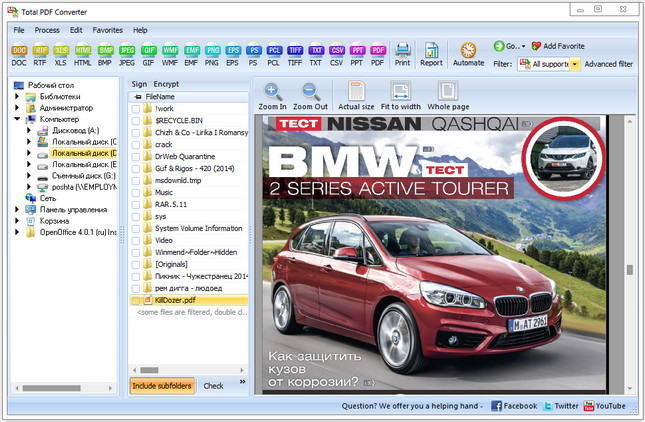
Description: Total PDF Converter Software changes PDF files to DOC, RTF, TIFF, XLS, HTML, EPS, PS, TXT, CSV, PDF/A and images in batch. Unlike other batch PDF converters, the Total PDF Converter is extremely user-friendly thanks to a well-planned interface. Additionally, registered users gain direct access to command line support for quiet automatic functioning on the back end.

Download the full desktop version that does not require Internet connection or sharing your files online.
Convert PDF files in batches, whole folders in one go.
Add page numbers to your output files.
Convert several PDF files into one Doc or DocX. More unique options.

With support for over 25 different formats Total PDF Converter is neither complex nor difficult to use. If you need a server version without any GUI or interrupting messages check out the Total PDF Converter X with ActiveX. Buy your license today and convert PDF files with the full registered version in 5 minutes.

Why download our PDF Converter Software
pdfTotal PDF Converter supports PDF, PCL, PS, EPS, PRN, XPS, OXPS files. It's not a simple PRN converter, it's the all-in-one solution. New formats are constantly being added.
javaTell Total PDF Converter if you want to omit images from the source files. You can also get the new file with images only without text if you like.
javaConvert PDF to PDF/A in batch. Update thousands of multiple files in one process.
split pdfTotal PDF Converter can act as a PDF splitting utility and extract selected pages from a multi-page PDF. It can also split PDF by bookmarks or by blank pages.
time stampsTotal PDF Converter will change the date of the file or keep the original time stamps. Just check the appropriate checkbox.
sign pdfSign PDF documents with your digital signature during the file conversion process.
combine pdfCombine several PDF files into one multi-page document with out powerful batch PDF converter.
rotateTotal PDF Converter can automatically rotate your documents.
pdf to wordPDF to Word converter supports both Doc and DOCX for your convenience.
pdf to jpegConvert PDF to JPG? Customize the final image to your needs. Set the desired quality of the JPEG image to compromize the file size. The app also extracts selected pages and converts them to JPEG.
interfaceConvert PDF/PS/EPS/PRN files via our clear interface with lots of hints for beginners.
formatsThe widest list of output file types: DOC, DOCX, RTF, XLS, HTML, BMP, JPEG, GIF, WMF, EMF, PNG, EPS, PS, TIFF, TXT, CSV, PDF/A and PDF!
pdf converterTotal PDF Converter can combine several PDF files into one TIFF image. Or place every page of a multi-page PDF into a new TIFF files.
javaTune the output: set new margins in inches to your standards (ready for printing).
previewEach PDF file is displayed in Preview panel. You can zoom it in/out or view the document full-sized. Preview option makes it easy to find the necessary PDF file.
pdf watermarkAdd text or image watermarks to the header or the footer of the output file. It's perfect for stamping bates too!
pageWant more order? Add pagination (sequential numbering of folders is available).
pdf load imagesTotal PDF Converter can extract odd or even pages for you.
pdf converterUnlike free PDF converter software, our app processes thousands of documents keeping the folder structure.
pdf to docNo matter what MS Office you have, our app can convert PDF to DOC and DocX.
serverWe also offer PDF Converter SDK for Web\SQL server\ASP\.NET\C#. With ActiveX you can easily implement our PDF converter into your application and redistribute it to the end users.
cmdTotal PDF Converter has full command line support (get the ready-to-use command line from GUI).

Release Name: Coolutils Total PDF Converter 6.5.0.159
Size: 206 MB
Links: HOMEPAGE – NFO – Torrent Search

Download: RAPiDGATOR
7 Comments
June 6

Syncovery Premium 12.0.0.24

Description: The ultimate sync, backup, copy and migration tool. Syncovery will copy your data the way you need it - and fast!

Multiple Platforms
Syncovery will easily fulfill your requirements: on Windows, macOS, Linux, FreeBSD, and NAS systems. Copy between local drives, network shares, mobile devices via MTP, or using FTP, SFTP, or WebDAV and many others.

Cloud Support
Includes support for many different cloud storages, such as Google Drive, Box, Amazon S3, Azure, DropBox, OneDrive, Rackspace, Sharepoint, Backblaze B2, Citrix Sharefile, and many others.

Create multiple Jobs
Create as many different jobs as you need. Run them manually (with Sync Preview), or let the scheduler run them automatically.

Handle complex Tasks
Syncovery is rich in features, including real-time sync, compression, encryption, email notifications, and much more. It can be extended via PascalScript.

Wizard Mode makes it easy to create your first profile.
Create your first sync or backup job step by step, with explanations of the main settings you need to make. Each job (or profile) works with two paths – source and destination, or just the left and right path (since profiles can be 2-way copy tasks also).

Extremely Fast Scanning
Syncovery’s multi-threaded folder listing algorithm provides an unparalleled speed, and easily handles millions of files and huge numbers of folders. Even more speed can be gained with our Destination File List Cache and Remote Service features.

Block Level Copying
This will help you save bandwidth as well as backup space. Syncovery can detect changed blocks in large files, and copy only these. The detection works by keeping checksums in a database, or with the help of the Syncovery Remote Service, or by using our revolutionary File System Monitoring Service (the File Sytem Monitoring Service is Windows only).

Real-Time Synchronization
Real-Time Synchronization will make sure that changes are synced quickly. Syncovery listens to file system events and quickly performs the appropriate actions. For cloud servers, it can use polling to detect changes. These features are available on Windows and macOS only.

SmartTracking
The SmartTracking sync mode is frequently used in two-way sync jobs. It can detect moved files, deleted files, and conflicts (files changed on both sides).

Versioning
Syncovery allows you to keep multiple versions of modified files, allowing you to restore your files from an earlier date. The restore date can be chosen for individual files or multiple files, in our Restore Wizard.

File Server Migration
Syncovery’s advanced NTFS copying features, high speed, and scaleability enable you to perform large-scale migrations. Read our new, comprehensive Server Migration Guide.

Release Name: Syncovery Premium 12.0.0.24
Size: 100.1 MB
Links: HOMEPAGE – NFO – Torrent Search

Download: RAPiDGATOR

6 Comments
June 6

UPDF 2.5.4

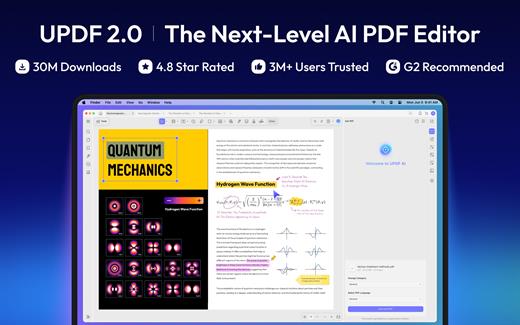
Description: An all-in-one AI PDF editor on Windows that allows you to efficiently and easily edit, annotate, summarize, translate, and convert PDFs.

Editing PDF on PC is as Easy as in Word
UPDF for Windows is an easy-to-use Windows PDF software! Enjoy powerful editing tools for text, images, links, and more in your PDF. Customize backgrounds, watermarks, and page sizes with simplicity like in Word.

Analyze PDFs with 10X Efficiency
Upload a PDF with 100+ pages to get lightning-fast summaries, precise translations, in-depth explanations, and engaging conversations from your documents. Experience a new era of efficiency and accuracy with AI in this PDF editor software for Windows!

Read and Annotate, All in UPDF on Windows
UPDF for Windows offers diverse page display modes and scaling options for an optimal reading experience. Utilize its practical annotation toolkit, including sticky notes, stickers, stamps, highlighters, underlines, and more, to enhance your PDF review.

PDF Conversion. So Fast, So Accurate, So Easy
UPDF PDF editor for Windows offers a complete solution for transforming documents across formats. It provides 7 methods to create PDFs and supports converting PDF to 14 formats.

Digitize Paperwork for Better Collaboration
This PDF editor for PC can help you create fillable forms, share for collaborative filling, embed signatures, and enhance your PDF capabilities. Experience a seamless and customizable PDF journey that boosts versatility for improved collaboration.

Release Name: UPDF 2.5.4
Size: 228.8 MB
Links: HOMEPAGE – NFO – Torrent Search

Download: RAPiDGATOR

6 Comments
June 6

MediaHuman YouTube To MP3 Converter 3.9.20 (0306)

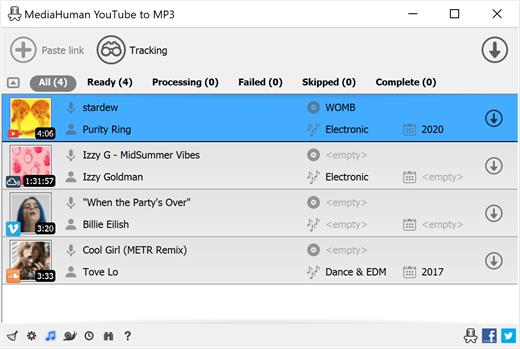
Description: You like to listen to music on YouTube, SoundCloud or Bandcamp and want to save it for offline playing. Or you want to download the soundtrack of a new movie. Then we recommend you to try out this software developed specifically for this purpose.

Downloads all music from a playlist or channel
Tracks playlist/channel updates and downloads only new videos
Downloads highest available quality up to 320 kbps
Supports YouTube, Vimeo, SoundCloud, Mixcloud, etc.
Downloads simultaneously several tracks
Includes simple tag editor with cover art image support
Works on all modern platforms (macOS, Windows, Ubuntu)
Exports downloaded files to iTunes/Music.app

Main Features:
Playlists and channels
The software supports downloading all videos in a playlist or channel. There is also an option to subscribe and download only newly uploaded tracks.

iTunes/Music.app support
In the app preferences, you can select the option to automatically add the downloaded tracks to your iTunes/Music.app library. You can also specify the playlist to which the converted tracks will be added.

Saves your time & traffic
The app detects audio track in YouTube video clip and downloads it, skipping the video part. As a result download speed increases dramatically, especially on HD-quality content and higher.

Simple tag editor
Application automatically detects artist name and track title of the video and saves it in the downloaded file. But at the same time, you can easily change tags to whatever you want. You can even change a cover art image.

Original format, no conversions
You can save audio tracks in original quality without any conversion. It means that there will be no loss of quality and it greatly reduces the downloading time.

Free music
There is a great amount of music on YouTube. And our app will help you to convert YouTube videos to MP3 or save it on your computer in original M4A/AAC format. Just find the track you like and download it in the quality you need.

Not only YouTube
Vevo.com, Vimeo, DailyMotion, Soundcloud, Bandcamp, HypeMachine, MixCloud, MixUpload, Audiomack, UOL, Hearthis.at, Play.fm, Naver, BitChute, Brandnewtube, Brighteon, Rumble and many other sites are also supported. So you can download music just as easily as you can from YouTube.

Clipboard tracking
The program tracks the content of the system clipboard. It means that you can easily add a video clip to the download list without switching from your favorite browser. Just copy an URL into the clipboard and it will be added to the download queue.

Multilingual interface
Localized to: Arabic, Armenian, Azerbaijani, Bulgarian, Catalan, Chinese (Hong Kong SAR China), Chinese (Simplified), Chinese (Taiwan), Croatian, Czech, Danish, Dutch, English, Esperanto, French, German, Greek, Hebrew (Israel), Hungarian, Indonesian, Italian, Japanese, Korean, Latvian, Lithuanian, Malay, Norwegian Bokmål, Polish, Portuguese, Portuguese (Brazil), Romanian, Russian, Serbian, Slovenian, Spanish, Swedish, Turkish, Vietnamese

Release Name: MediaHuman YouTube To MP3 Converter 3.9.20 (0306)
Size: 81.2 MB
Links: HOMEPAGE – NFO – Torrent Search

Download: RAPiDGATOR

6 Comments
June 6

Final Draft 13.3.2.114

The first-choice tool of professional screenwriters everywhere. Plan, create, collaborate. Write your screenplay with the most creator-centered, best-selling screenwriting software in the world.

The Industry Standard for Seamless Script Writing
Final Draft is the industry standard for professional screenwriters, studios and production companies around the world. Get the only tool that lets you fully customize your writing environment, streamlines your process, maximizes your productivity, and correctly formats your work. All so you can focus on what matters most—writing.

Just Add Words
No more fussing with formatting because Final Draft does it all automatically. Get the words down, let Final Draft do the rest.

Write It Your Way
Create your ideal writing environment, from dozens of professional templates to customizable workflows and modes.

Unleash Productivity
Use powerful story planning tools to help brainstorm and outline your script, whether by yourself or collaborating with partners in real time.

Deliver Professionalism
Generate production-ready scripts with the screenwriting platform trusted by 95% of the entertainment industry.

From Idea to Rough Draft to Finished Script

1. Set the Beat
Reimagine the index card with the Beat BoardTM. Build your story beat-by-beat with customizable, moveable, and manageable visual building blocks.

2. Build an Outline
Transfer your story beats to the Outline EditorTM for high-level structure planning on an easy-to-manage timeline. Then send the outline straight to the script, so you start with organized thoughts instead of a blank page.

3. Start Your Script
Choose from over 40 templates for screenplays, teleplays, comics, graphic novels and stage plays—or just start typing.

4. Write Your Heart Out
From productivity tools to easy editing, Final Draft’s fully customizable environment makes writing a joy.

5. Export a Professional Project
Professional tools like Navigator makes casting, diversity initiatives, production scheduling, and more a snap. Then, easily export your script in the format production professionals expect.

Release Name: Final Draft 13.3.2.114
Size: 132.3 MB
Links: HOMEPAGE – NFO – Torrent Search

Download: RAPiDGATOR
6 Comments
June 6

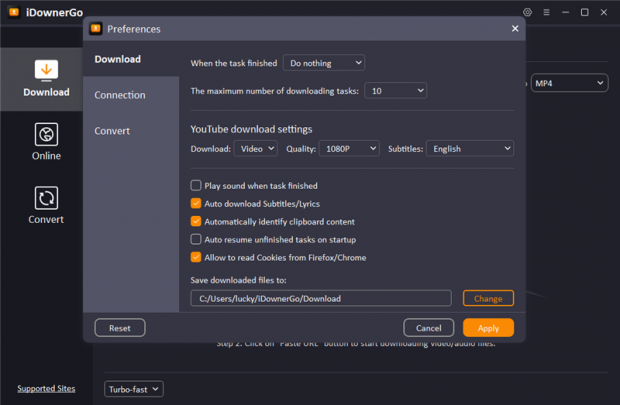
iDownerGo Pro 11.0.0

Description: All-in-one Video Downloader to Save Any Video and Music from 10,000+ Sites. Download Any Videos Up to 8K Resolutions. Download 1080p videos online from 10,000+ pupular streaming sites easily. Save any videos in various resolutions, like 720p HD, 1080p FHD, and even 4K/8K UHD. Download private videos from Facebook, Instagram, Vimeo, YouTube, etc.

Unlock Your Music Freedom with This Music Converter
Supports music downloading from multiple streaming music platforms, including Spotify, Apple Music, Tidal, Deezer, SoundCloud, etc.
Download songs, albums, playlists, podcasts, audiobooks, radio up to 320kbps.
Retain ID3 tags information, including title, artists, Track ID, and album artwork.

Enjoy More Visual and Audio Experience
Support downloading playlists from YouTube, Bilibili, Dailymotion, etc.
Download playlists, channels, albums, artists and more to your computer, save you lots of time.
Bulk download multiple videos at the same time with one click.

Enjoy Video and Music on Multiple Devices
Convert videos to any desired video format, like MP4, MOV, AVI, MKV, etc.
Save your favorite music in MP3, AAC, M4A and more, so you can play the songs on any devices.
Supports getting audio from Facebook, Dailymotion, YouTube, Vimeo, Bilibili, TikTok, or any other video website you like.

Download Live Stream Videos in Real Time
Download livestream videos from Twitch, Vimeo, YouTube, Facebook, TikTok, Stripchat and other well-known websites..
Save live streams in real time so you can play them offline at any time you want without lags or buffering issues.

Download Any Video From Any Website
iDownerGo Video Downloader is a cross-platform app that lets you save high-quality videos from Facebook, Instagram, Dailymotion, TikTok, Bandcamp, and other websites in seconds. It works faster than any free online video downloader — just a click, and you can enjoy content anytime, anywhere.

Release Name: iDownerGo Pro 11.0.0
Size: 392.6 MB
Links: HOMEPAGE – NFO – Torrent Search

Download: RAPiDGATOR

6 Comments
June 6

Topaz Video 1.6.1

Description: Ultra smooth. Ultra sharp. Ultra steady. Topaz Video is a professional, AI-powered video enhancement software that lets you denoise low-light footage, recover and upscale old archival videos to 4K, restore focus, and adjust frame rate by creating new frames out of thin air. Available on Mac and Windows.

Trusted by major film studios and creative pros everywhere.
Denoise with cinema-level detail. Create new frames with frame interpolation. And stabilize the camera after the moment has already passed.

Filmmakers & Editors
Restore, upscale, and refine footage for professional post-production workflows.

Archivists & Historians
Preserve and modernize archival film, VHS, and historical footage with clarity.

Creators & Influencers
Enhance social media videos with sharper detail, higher resolution, and smoother motion.

Hobbyists & Enthusiasts
Improve old family videos and personal projects to look like they were shot today.

System Requirements:
Windows Operating System: 11 (most updated version recommended)
CPU: Intel OR AMD with AVX2 instructions
System Memory (RAM): 16 GB (32 GB or more recommended)
Graphics Card (NVIDIA): NVIDIA GTX 900 series or higher, 6GB VRAM
Graphics Card (AMD): AMD Radeon 500 series or higher, 6GB VRAM
Graphics Card (Intel): Intel ARC A750
CPU Release Year: 2016 or newer

Release Name: Topaz Video 1.6.1
Size: 318 MB
Links: HOMEPAGE – NFO – Torrent Search

Download: RAPiDGATOR
7 Comments
June 6

Ashampoo WinOptimizer Pro 29.0.2

Description: Over time, Windows slows down, accumulates junk files, and shares more data than you might be comfortable with. Ashampoo WinOptimizer Pro 29 thoroughly cleans your system, boosts performance, and restores speed–instantly and noticeably. Unnecessary files are removed, processes optimized, and your privacy safeguarded. Your PC will feel fast, stable, and clean again–almost like a fresh installation.

Your benefits
Speeds up your PC instantly
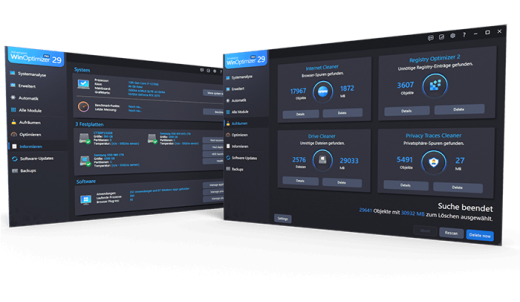
Four powerful cleaners with One-Click Optimizer
Find and remove sensitive data with Privacy Traces Cleaner
Analyze crashes and error reports with Crash Analyzer
Advanced system analysis to optimize key areas
Customize Windows with Tuning Assistant
Thorough deep cleaning of junk files

All essential maintenance tasks handled automatically
Once engaged, One Click Optimizer takes care of the most important maintenance tasks fully automatically. It combines features from Drive Cleaner, Internet Cleaner, and Registry Optimizer, removes junk files, cleans up the Registry, and deletes web browsing traces–without the need to run these modules individually. Your system is optimized quickly, easily, and reliably. You get maximum results with minimal effort.

Thorough cleaning for more space and performance
Removes junk files, application traces, and unnecessary system leftovers
Over time, unnecessary files, logs, and browsing traces build up, taking up space and slowing down Windows. WinOptimizer removes these leftovers reliably and ensures your system runs clean and efficiently again. Drive Cleaner deletes unnecessary files from your drives, while Internet Cleaner removes web browsing data and traces. The integrated Registry Optimizer fixes invalid and orphaned entries in Windows Registry, and Privacy Traces Cleaner removes sensitive user-related data that may affect your privacy. Even hidden leftovers accumulated over time are detected and removed. This frees up valuable disk space, reduces system load, and lays the foundation for a faster, more stable system.

More speed for your daily PC needs
Optimizes startup, processes, and system resources
Your system starts faster, runs more smoothly, and programs respond without noticeable lag. Live-Tuner prioritizes active applications, while Startup Manager keeps unnecessary programs from launching during boot, reducing startup times. With Service Manager, you stay in control of background services, while Profile Booster fine-tunes system settings to further improve performance. This allows your PC utilize resources more efficiently and remain responsive even under heavy load.

Protect your privacy and stay in control
Eliminates data traces and protects personal information
Web browsing traces, usage data, and sensitive information created during everyday use are reliably removed. Privacy Manager helps you adjust Windows privacy settings, while specialized tools like Internet Cleaner and Privacy Traces Cleaner ensure that personal data is always removed from your system. This reduces tracking, protects your activity, and keeps your system secure.

Keep an eye on your system at all times
Identifies issues and highlights optimization potential
The comprehensive analysis shows exactly where optimization is needed. Tools like DiskSpace Explorer identify space hogs, while Crash Analyzer evaluates system errors and presents them clearly. This helps you detect issues early and take action before they become noticeable.

Customize Windows to your needs
More control through targeted system adjustments
With the integrated tuning modules, you gain direct access to hidden settings and can optimize your system precisely to your needs. The tweaking section offers a wide range of customization options, while tools like Context Menu Manager, File Associator, and User-Rights Manager provide additional control. This allows you to tailor Windows exactly to your needs.

Practical tools for everyday use
Additional features for file and system management
A wide range of additional tools support you in file and system management. With File Wiper, you can securely delete data, while tools like File Splitter, Encrypter, and Undeleter help you split, encrypt, or recover files. The package is rounded out by useful utilities such as the Link Checker, giving you greater control and flexibility in your daily workflow.

Maintenance that runs automatically
Automatic optimization in the background
If desired, regular cleaning and optimization tasks are performed automatically and in the background. This keeps your system consistently clean, fast, and stable, no manual effort required.

Release Name: Ashampoo WinOptimizer Pro 29.0.2
Size: 35.2 MB
Links: HOMEPAGE – NFO – Torrent Search

Download: RAPiDGATOR

7 Comments
June 6

Danil Pristupov Fork 2.20

Description: Fork is getting better and better day after day and we are happy to share our results with you. Commit List - Working Directory Changes - Side by Side Diff - Repository Manager Summary and Statistics.

Merge Conflicts
Resolve your merge-conflicts easily using the merge-conflict helper and built-in merge-conflict resolver.

Interactive Rebase
Edit, reorder and squash your commits using visual interactive rebase.

Image Diffs
Fork allows you to see diffs for the common image formats.

History
With history view you can find all commits where a particular file or directory was changed.


Blame
With blame view you can find the last commit which changed a particular file line.

Basic features
Fetch, pull, push
Commit, amend
Create and delete branches and tags
Create and delete remote repos
Checkout branch or revision
Cherry-pick
Revert
Merge
Rebase
Stashes
Submodules

Work with repository
Open recent repository quickly

Commit view
Stage / unstage changes line-by-line
Access to recent commit messages

More features
Interactive rebase
Blame
Browse the repository file tree at any commit
Intuitive merge conflict resolving
Restore lost commits with Reflog
See your stashes right in the commit list
Git-flow
Git LFS

Operating Systems: Windows 7+

Release Name: Danil Pristupov Fork 2.20
Size: 72.4 MB
Links: HOMEPAGE – NFO – Torrent Search

Download: RAPiDGATOR

7 Comments