Please REGISTER or RENEW your account on RAPiDGATOR.net and support us by doing through all RAPiDGATOR working download links on main posts...
Apr 22

COAA PlanePlotter 6.7.4.4

Description: PlanePlotter receives and decodes live digital position reports from aircraft and plots them on a chart. Using PlanePlotter, you can see a radar-like display of all those aircraft around you that are transmitting the appropriate digital messages including ACARS, ADS-B and HFDL.

PlanePlotter - Features
The animated screen grab from PlanePlotter (left) was kindly provided by John Locker.

Message display
PlanePlotter shows a table display of messages received and decoded from live aircraft transmissions.

Data saving
PlanePlotter archives all the digital data that it receives and decodes to a log file.

Chart display
PlanePlotter plots aircraft positions, altitudes and times decoded from the message traffic that it receives. These include embedded position reports, AMDAR reports and ADS reports contained in ACARS messages, ADS-B position reports received by the Kinetic SBS1(tm) or AirNav System RadarBox(tm) Mode-S receivers, and position reports on HF using Charles Brain's PC-HFDL software. The plot can be superimposed on a suitable aeronatical chart that you have prepared, or PlanePlotter can download satellite imagery and plot the aircraft symbols on that. Where altitude information is available (eg Mode-S messages), you can select the data by altitude band to distinguish low level and high level traffic.

Google Earth server
If you are receiving Mode-S ADS-B position reports, PlanePlotter can interface to Google Earth to display aircraft positions over the Google Earth base map. It can even give you a dynamic real-time view from the flight deck of an aircraft that you designate.

Direction finding
PlanePlotter can determine and display the direction of any transmission using a simple passive antenna switch. This allows aircraft to be located even if they are not equipped with ACARS or Mode-S/ADS-B.

Input signals
PlanePlotter can decode ACARS messages, display the message content and plot any positions on a chart.
PlanePlotter can process and display Mode-S/ADS-B position reports captured by the Kinetic SBS1(tm), the AirNav Systems RadarBox(tm), the RxControl Mode-S receiver, the PlaneGadget Radar, the miniADSB, the microADBS and the FPGA Beast.
PlanePlotter can also work in conjunction with Charles Brain's PC-HFDL software (http://www.chbrain.dircon.co.uk/pchfdl.html) by automatically extracting position reports from the log file and plotting them in real time on the same chart display. PlanePlotter adds value by calculating course and heading from successive reports from the same aircraft and plotting the predicted position between reports (right).
PlanePlotter can drive a passive antenna switch and display the direction (QDM) of any aircraft voice transmission.

GPX overlays
PlanePlotter can display waypoints, tracks or routes over the current chart using data from a user-defined GPX format file.

Alerts
PlanePlotter can generate visible and audible alerts on detection of a specified registration, flight number or ADS identifier, on detection of any new aircraft, or on detection of an aircraft whose position is inside a user-defined Alert zone polygon.

Memory-Map Navigator support
PlanePlotter can direct the Memory-Map Navigator program (www.memory-map.com) to display dynamic aircraft position symbols over its proprietary maps using data from either ACARS or Mode-S ADS-B (in conjunction with the SBS1 receiver).

OLE/COM interface
You can access the position and other data for each aircraft known to PlanePlotter using a simple VB script or other OLE/COM capable program. You can use the same interface to update data held by PlanePlotter and to control the user interface.

Release Name: COAA PlanePlotter 6.7.4.4
Size: 7.7 MB
Links: HOMEPAGE – NFO – Torrent Search

Download: RAPiDGATOR

7 Comments
Apr 22

TubeDownload Pro 7.3.6

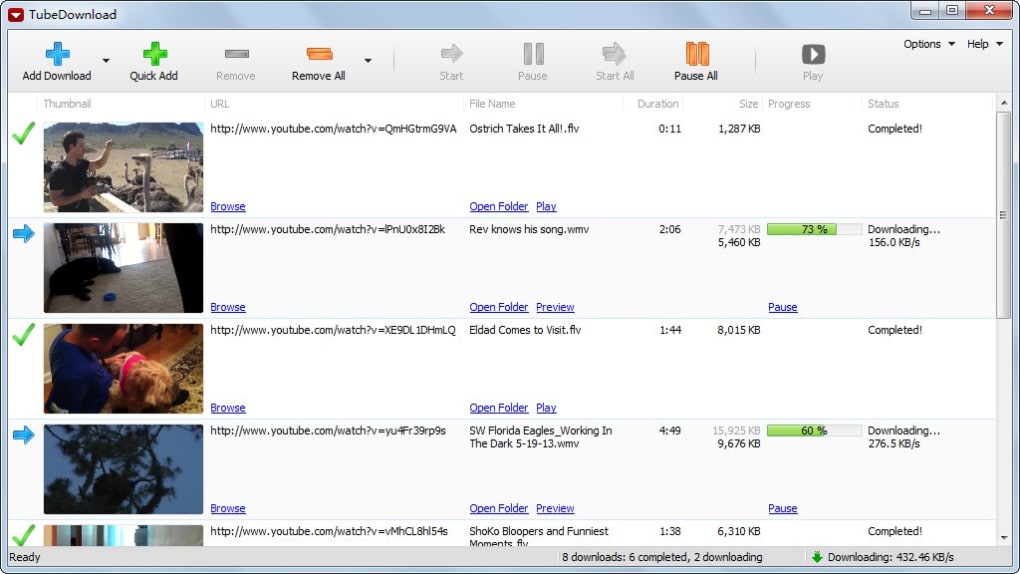
Description: TubeDownload Pro is a professional Windows application for downloading your favorite videos from YouTube and hundreds of other video sites. TubeDownload Pro can increase download speeds by up to 500%, or even more.

Features:
Download your favorite videos from YouTube and hundreds of other video sites.
Increase download speeds by up to 500%, or even more.
Download 720p, 1080p, 2K, 4K, and 8K HD videos from YouTube.
Download an entire playlist with just a few clicks.
Download multiple videos at the same time.
Pause and resume downloads at any time.
Convert video and audio files between MP4, FLV, WebM, WMV, MP3, AAC, OGG, and other video/audio formats.

Release Name: TubeDownload Pro 7.3.6
Size: 148 MB
Links: HOMEPAGE – NFO – Torrent Search

Download: RAPiDGATOR
6 Comments
Apr 22

Steinberg Nuendo 15.0.21

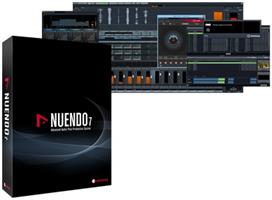
Description: As the most advanced audio post-production solution available, Nuendo is the choice of film, TV, game audio and immersive sound industry professionals worldwide. Ever since its initial release, Nuendo has been a vital tool in creating the soundtrack to many high-profile productions, products and installations.

Upgrade to the future
Nuendo 14 is the new standard in audio post-production and game audio. New features include AI-powered speech-to-text technology, a powerful mixing assistant, enhanced event volume curves and range tool editing. Game audio designers can now preview sound effects from Audiokinetic’s Wwise before exporting them, and the list goes on with over 30 additional new features, plug-ins and other improvements. Upgrade your experience. Upgrade your workflow. Upgrade your business. Upgrade to the future!

Adaptive Background Attenuation (ABA) Mixing
The intelligibility of speech in film and television has long been a source of discussion. With Nuendo 14 you can easily automate the balance of your mix to ensure the dialogue is always intelligible. Using the dialogue stem as a reference, ABA will attenuate loud background sounds automatically by a selected dB value, ensuring the foreground sound is always clear. Once the process has been applied, you will still have full control over the overall mix, being able to review the changes and adjust levels as needed.

Dialogue Transcription ADR
Nuendo 14’s new AI-powered speech to text feature enables dialogue tracks to be transcribed into ADR cycle markers. Using a machine learning model for speech recognition and transcription, this will save hours of work by writing the transcription of the original soundtrack into existing markers or to create new markers with the transcribed dialogue inside, for example in a dubbing project.

Game Audio Connect 3
Game sound designers can now preview sound effects directly from Audiokinetic Wwise, without having to export the audio assets out of Nuendo first. Triggering a segment from the game itself will play back the audio from within Nuendo, letting adjustments be made before rendering the assets and transferring them into Wwise. Different sounds can also be tried out while playing the game, simply by changing the event selection in Nuendo.

Modulators Sound Design
A sound designers dream! The new modulators deliver the creative freedom of parameter-based automated sound variations, but with complete control over the results. With dynamic parameter control, which is based on material within the project, the modulators can create movement, add tension and much more to your sound effects and game sound design.

Event Volume Curves
Gain staging is now easier in Nuendo 14, using fast and flexible Event Volume Curves to adjust levels within audio events, without having to switch tools. Valuable for both dialogue clips and sound effects, this feature offers streamlined options to optimize your editing workflow.

Range Tool Improvements
The Range Selection tool has been improved to speed up the audio editing process, with flexible visualization and specific editing functions to selected regions while it is enabled, either with key commands or by modifier keys.

Release Name: Steinberg Nuendo 15.0.21
Size: 1.4 GB
Links: HOMEPAGE – NFO – Torrent Search

Download: RAPiDGATOR
4 Comments
Apr 22

TubeMate Downloader 6.3.7

Description: Windows TubeMate is a smart application that lets you snag any clip you want from the main video hosting sites and convert them while downloading or after that. If you need a simple and efficient video downloading tool, you can give it a try.

Online video downloader
TubeMate can download videos from YouTube, Facebook, Instagram, Dailymotion, and thousands of other video sites.

HD video downloader
TubeMate can download UHD 8K, 5K, 4K, QHD 2K, HD 1080p and 720p videos from YouTube.

YouTube to MP3 converter
TubeMate allows you to download only audio stream from YouTube, and save it as MP3. You don't need to download the entire video file.

Playlist downloader
TubeMate enables you to download entire or part of a playlist with just a few clicks.

Download accelerator
TubeMate features a multi-thread download acceleration engine that increases your download speeds by up to 500% or even more.

Download multiple videos at a time
TubeMate supports simultaneous downloads. It allows you to download more than one video at the same time.

Pause and resume downloads
You can pause and resume your downloads at any time.

Support drag-and-drop
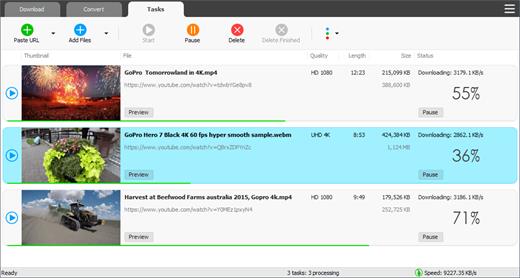
You may directly drag and drop video link from your browser to the drop box or app window to start a download. You don't even need to copy and paste video URL.

Preview video/audio while downloading
While downloading, you can click the 'Preview' button to view incomplete file and make sure the content is you want.

Video and audio converter
TubeMate can convert your disk video/audio files between MP4, FLV, AVI, WMV, MOV, MP3, AAC, and any other formats for any device.

Video optimizer
TubeMate automatically optimizes downloaded videos for popular mobile devices, so you can watch downloaded videos smoothly on your iPhone, iPad, Android phone, and other devices.

Video to MP3 converter
TubeMate allows you to extract audio stream from video and save it as MP3, WAV, AC3, or other audio format.

Ready-made presets
TubeMate provides ready-made presets for all video and audio formats. You can also customize your own video/audio formats.

iTunes compatible
Optionally, TubeMate can add downloaded video/music to your iTunes library automatically, so you can easily synchronize your videos and music to your iPhone, iPad, iPod.

Media player
TubeMate contains an easy-to-use media player for playing files that Windows Media Player cannot play.

Release Name: TubeMate Downloader 6.3.7
Size: 147.6 MB
Links: HOMEPAGE – NFO – Torrent Search

Download: RAPiDGATOR

6 Comments
Apr 22

WinZip Driver Updater 5.44.0.8

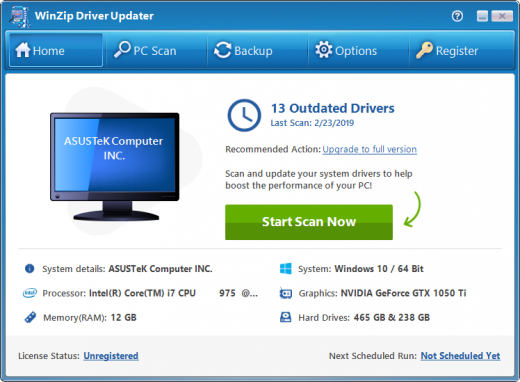
Description: Maximize performance and improve stability of your PC with routine driver updates. Quickly identify and replace outdated, incorrect and corrupt drivers. Safely update all outdated drivers with the latest versions from original manufacturers. Maximize functionality and boost performance of your PC and devices with WinZip Driver Updater.

WinZip Driver Updater will scan, identify and recommend driver updates. It can quickly and easily update drivers to boost performance and improve reliability to your PC.

Safeguard your hardware and gain maximum performance with WinZip Driver Updater
Regular scheduled driver updates ensure your system is receiving the most up-to-date bug fixes, power improvements and new features from the original manufacturer's driver updates.

Protect your system from faulty and unreliable aftermarket drivers with driver updates
Installation of erroneous or outdated drivers could seize up your PC and place your system at risk. WinZip Driver Updater will accurately identify and consistently deliver only the correct drivers for your system.

WinZip Driver Updater Saves you time
It can take numerous hours to track down each driver for all the hardware connected to your PC. WinZip Driver Updater achieves this in minutes through a quick scan and driver update process.

A Driver Updater that is Safe and Easy to Use
WinZip Driver Updater includes safety features like automatic backups, restore wizard, exclusions and scheduler to keep your hardware performing worry-free.

A Trusted and Recommended Driver Updater
WinZip Driver Updater is recommended as a trusted solution by industry experts.

Release Name: WinZip Driver Updater 5.44.0.8
Size: 47 MB
Links: HOMEPAGE – NFO – Torrent Search

Download: RAPiDGATOR
6 Comments
Apr 22

JP Software Take Command 36.00.34

Description: Replace Your Windows Console and CMD Command Prompt Windows. The Windows Command Prompt shortcut is a Windows console (command line, or character mode) session that runs the default Windows command shell CMD.EXE.

The command line is essential for developers, systems administrators and advanced users. Unfortunately, CMD Windows commands and the Windows console UI have always been woefully lacking in ability compared to what is available in most other operating systems. Because of the limitations in CMD and the Windows console, users have been forced to use the GUI for inappropriate tasks, or even to write custom programs to perform simple tasks that CMD should have been able to handle.

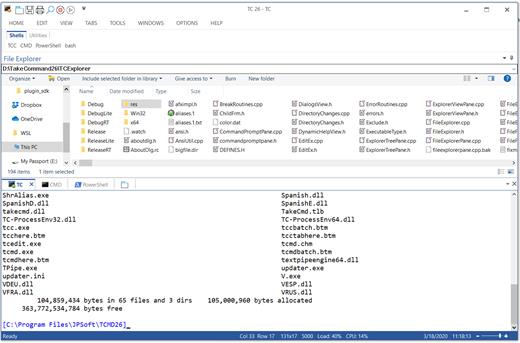
Take Command is a comprehensive interactive GUI and Windows command line toolkit that makes your command prompt windows easier to use and far more powerful. Take Command includes optional Windows Explorer integration, tabbed console windows, and major enhancements to standard Windows CMD commands such as COPY, DEL, DIR, FOR, MOVE, REN, SET, and START And it and adds more than 235 new commands, command dialogs, command line syntax coloring, vastly improved command line editing, programmable filename and directory tab completion, and thousands of other features.

Take Command is also a powerful batch file programming tool, including an integrated IDE with a sophisticated editor and batch debugger. Take Command offers extensions such as DO loops, SWITCH statements, error and exception handling, system monitoring and event triggers, and more than 780 built-in variables and functions. And you can extend that with 3rd-party plugins and user-defined functions.

12 Reasons Why You Should Replace Your Windows Console
The Windows console is responsible for running character-mode applications, including CMD, PowerShell, WSL bash, etc. It was introduced in Windows NT 3.1 in 1993, and some major internal architectural improvements were made in Windows 10 and 11.

Unfortunately, the improvements to the user interface were relatively minor, and though some efforts were made to improve the CMD console UI in Windows Terminal, they fall far short of what Take Command has been providing for years.

So why replace it with Take Command?

The Windows console is slow, and even slower when using Windows Terminal. Take Command's tab windows typically display output between 20% and 300% faster.
Take Command (like Windows Terminal) offers tabbed windows to run your character-mode applications. But Take Command takes it to another level by including vertical or horizontal tab groups and splitter windows.
Tabbed windows can be reordered, detached, or torn off, and existing console windows can be attached as new Take Command tab windows.
Take Command provides an optional embedded Windows File Explorer window that displays a tree view of the folders on your system and the contents of the selected folder (List View) on the right. You can drag folders and files from the Explorer window and drop them in a command prompt window.
Take Command can be easily configured for your preferences with its configuration dialogs.
Take Command has an optional tabbed tool bar that you can use to execute internal or external commands, aliases, or batch files with the click of a mouse (or an accelerator key). You can define up to 20 tabs, each with up to 50 toolbar buttons.
Take Command provides a configurable Status Bar that can display quick help for the current command, tooltips, and system information, including tab window size, CPU usage, memory usage, date & time, character values at the cursor location, and a slider control for window transparency.
Cut and Paste options are limited in the default CMD console or Windows Terminal. Take Command adds both line and column selection, double-click or triple-click selections, overwriting or appending to the Windows clipboard, and a variety of paste options.
Take Command windows can be styled with a choice of 18 themes.
Take Command and TCC offer a wide variety of colorization options, not just foreground and background colors.
Take Command includes invaluable tools, including a batch file debugging IDE, a regular expression creator / analyzer, search and replace in files, and a macro recorder / playback.
Extensive help (quick help, context sensitive help, and general help) is available in English, French, German, and Spanish at the touch of a button.

Release Name: JP Software Take Command 36.00.34
Size: 57.3 MB
Links: HOMEPAGE – NFO – Torrent Search

Download: RAPiDGATOR

7 Comments
Apr 21

Typora 1.13.4

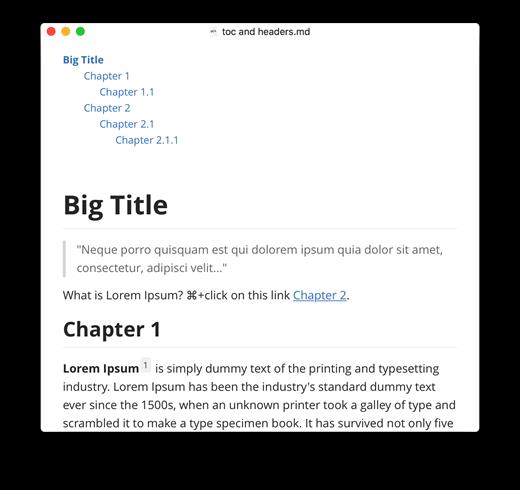
Description: Typora gives you a seamless experience as both a reader and a writer. It removes the preview window, mode switcher, syntax symbols of markdown source code, and all other unnecessary distractions, replacing them with a real-time preview to help you concentrate on the content itself.

Features
Markdown support including tables, code fences with syntax highlight, LaTeX, table of contents
Cross-platform
The real-time preview and WYSIWYG features
Beautiful interface and custom CSS theme support
Easy export

Release Name: Typora 1.13.4
Size: 94.5 MB
Links: HOMEPAGE – NFO – Torrent Search

Download: RAPiDGATOR
4 Comments
Apr 21

Tenorshare 4DDiG 10.8.1.15

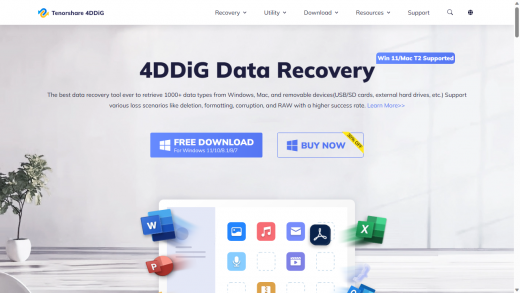
Description: Professional 4DDiG Windows Data Recovery Software. Recover data from hard drive,memory cards, sd card, USB drive, Recycle Bin and more. Easily retrieve any deleted or lost documents, photos, videos and more. Restore data from deleted or lost partition, formatted, corrupted, or crashed PC, etc. AI recover & repair videos from Canon, Sony, DJI, GoPro and phones, etc. Restore data to OneDrive & Google Drive.

Accidental Deletion
Accidental deletion can happen to anyone, for a variety of reasons. Whether you accidentally pressed Shift+Del, emptied the recycle bin without backup, or formatted the wrong drive, 4DDiG Windows Data Recovery can help you recover your lost data.

Empty Recycle Bin
You exclaim as you realize you’ve accidentally emptied the Recycle Bin. You’d been working on that important presentation for hours, and now it’s gone.But don’t despair! With 4DDiG, you can still get your files back.

Deleted by Shift + Del
When you accidentally press Shift+Del. All of your hard work is gone. In just a few simple steps, you can recover your lost files and avoid a disaster via 4DDiG.

Formatted Drive
You accidentally format your hard drive, and all of your photos from your recent vacation are gone. You're devastated,but then you remember 4DDiG.You download the software and run a scan. Within minutes, you see your photos listed in the results.

Restore Data to Cloud Storage
Save your recovered data to cloud storage, such as Google Drive, OneDrive, etc. And you don't have to worry about data loss anymore.

SD Card Recovery
SD cards are a popular way to store photos, videos, and other files. However, they can be prone to data loss due to accidental deletion, formatting, or corruption.If you have lost data from your SD card, 4DDiG is a tool you can try.

Enhanced Video RecoveryAI-Powered
Enhanced video recovery is specifically designed to recover deleted, formatted, or corrupted videos. This type of recovery can be used to recover videos from a variety of devices, including hard drives, memory cards, and digital cameras.A professional data recovery, such as 4DDiG Windows Data Recovery is needed for you to scan for file fragments.

Urgent Data Recovery from System Failure
One of the most common causes of data loss is system failure. When your system fails, it can erase or corrupt your data. 4DDiG Windows Data Recovery can help you recover your lost data from a system failure quickly and easily.

Empower Your Recovery More Than Recover
4DDiG is the ultimate video recovery software that uses AI to recover lost or damaged videos from any storage device.

Preview before Recover
You can get a sneak peek before committing to recovery. This feature lets you preview various file types, including documents, photos, music, and videos, to ensure you're retrieving the exact data you need.

Recover while Scanning
No need to wait for the entire scan to finish! It allows you to recover files that have already been identified during the ongoing scan. In this way, you can prioritize critical files and get them back quickly.

Load Last Scan
Imagine forgetting to save your scan results. This function allows you to reload the findings from your previous scan, saving you the time and effort of rescanning the entire drive.

Release Name: Tenorshare 4DDiG 10.8.1.15
Size: 110.7 MB
Links: HOMEPAGE – NFO – Torrent Search

Download: RAPiDGATOR

6 Comments
Apr 21

Agisoft Metashape Professional 2.3.1 Build 22398

Description: Agisoft Metashape (formerly PhotoScan) is a stand-alone software product that performs photogrammetric processing of digital images and generates 3D spatial data to be used in GIS applications, cultural heritage documentation, and visual effects production as well as for indirect measurements of objects of various scales.

Wisely implemented digital photogrammetry technique enforced with computer vision methods results in smart automated processing system that, on the one hand, can be managed by a new-comer in the field of photogrammetry, yet, on the other hand, has a lot to offer to a specialist who can adjust the workflow to numerous specific tasks and different types of data. Throughout various case studies Metashape proves to produce quality and accurate results.

Features
Photogrammetric triangulation
Processing of various types of imagery: aerial (nadir, oblique) & close-range.
Auto calibration: frame (incl. fisheye), spherical & cylindrical cameras.
Multi camera projects support.

Dense point cloud: editing and classification
Elaborate model editing for accurate results.
Points classification to customize geometry reconstruction.
.LAS export to benefit from classical point data processing workflow.

Digital elevation model: DSM/DTM export
Digital Surface and/or Digital Terrain Model - depending on the project.
Georeferncing based on EXIF meta data/flight log: GPS/GCPs data.
EPSG registry coordinate systems support: WGS84, UTM, etc.

Georeferenced orthomosaic export
Georeferenced orthomosaic: most-GIS-compatible GeoTIFF format; .KML file to be located on Google Earth.
Export in blocks for huge projects.
Color correction for homogeneous texture.

Measurements: distances, areas, volumes
Inbuilt tools to measure distances, areas and volumes.
To perform more sophisticated metric analysis Metashape products can be smoothly transferred to external tools thanks to a variety of export formats.

Release Name: Agisoft Metashape Professional 2.3.1 Build 22398
Size: 205.1 MB
Links: HOMEPAGE – NFO – Torrent Search

Download: RAPiDGATOR
6 Comments
Apr 21

iDownerGo Pro 10.15.0

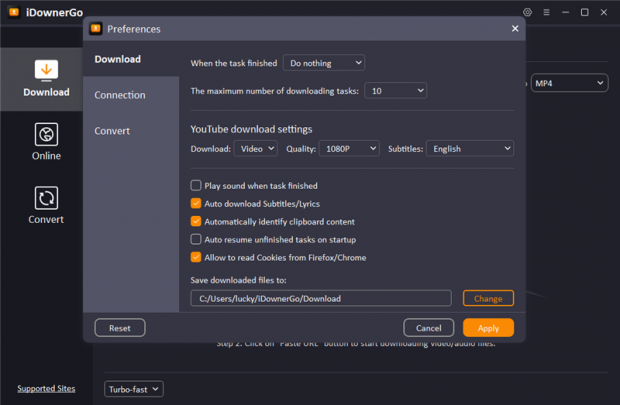
Description: All-in-one Video Downloader to Save Any Video and Music from 10,000+ Sites. Download Any Videos Up to 8K Resolutions. Download 1080p videos online from 10,000+ pupular streaming sites easily. Save any videos in various resolutions, like 720p HD, 1080p FHD, and even 4K/8K UHD. Download private videos from Facebook, Instagram, Vimeo, YouTube, etc.

Unlock Your Music Freedom with This Music Converter
Supports music downloading from multiple streaming music platforms, including Spotify, Apple Music, Tidal, Deezer, SoundCloud, etc.
Download songs, albums, playlists, podcasts, audiobooks, radio up to 320kbps.
Retain ID3 tags information, including title, artists, Track ID, and album artwork.

Enjoy More Visual and Audio Experience
Support downloading playlists from YouTube, Bilibili, Dailymotion, etc.
Download playlists, channels, albums, artists and more to your computer, save you lots of time.
Bulk download multiple videos at the same time with one click.

Enjoy Video and Music on Multiple Devices
Convert videos to any desired video format, like MP4, MOV, AVI, MKV, etc.
Save your favorite music in MP3, AAC, M4A and more, so you can play the songs on any devices.
Supports getting audio from Facebook, Dailymotion, YouTube, Vimeo, Bilibili, TikTok, or any other video website you like.

Download Live Stream Videos in Real Time
Download livestream videos from Twitch, Vimeo, YouTube, Facebook, TikTok, Stripchat and other well-known websites..
Save live streams in real time so you can play them offline at any time you want without lags or buffering issues.

Download Any Video From Any Website
iDownerGo Video Downloader is a cross-platform app that lets you save high-quality videos from Facebook, Instagram, Dailymotion, TikTok, Bandcamp, and other websites in seconds. It works faster than any free online video downloader — just a click, and you can enjoy content anytime, anywhere.

Release Name: iDownerGo Pro 10.15.0
Size: 387.7 MB
Links: HOMEPAGE – NFO – Torrent Search

Download: RAPiDGATOR

5 Comments