Please REGISTER or RENEW your account on RAPiDGATOR.net and support us by doing through all RAPiDGATOR working download links on main posts...
Apr 21

PPTube Pro 10.15.0

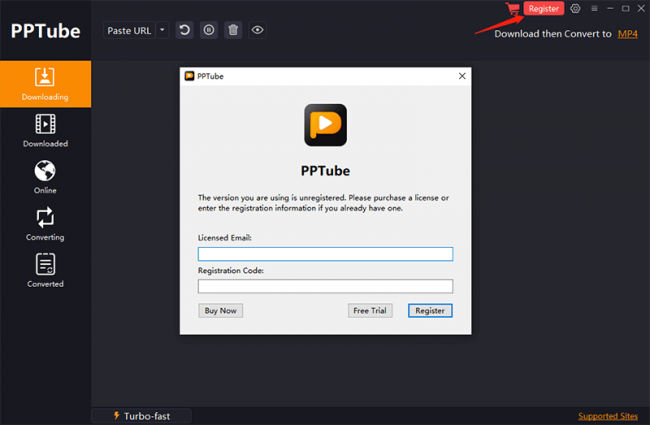
Description: PPTube Video Downloader. Unlimited Download 1080p/4K Videos from 10,000+ Video/Music Streaming Websites.
Download HD Videos Effortlessly
PPTube Video Downloader allows you to download HD videos with ease, ranging from 720p, 1080p, 2K, 4K and 8K.

Support 10000+ Sites
Up to 8K Video Download
10X Faster Download Speed
Bulk Download Multiple Videos
Protect Video Privacy

Save Videos in Bulk
You can save multiple videos in one go. Just copy multiple video URLs from various sites, and paste them to PPTube Downloader, then you can download multiple videos in few seconds.

Support 10,000+ Sites
You can download HD videos from Instagram, TikTok, Facebook, Apple Music, Vimeo, etc. and convert them into MP4, MP3, MOV, AAC, and other 20+ output formats.

Keep the Video Private
PPTube provides a private video mode so you can save your downloaded videos in a password-protected folder. Your videos are hidden with a private lock to keep safe from any prying eyes or miswatching by children.

Built-in Website Browser
Browse various video sites and free download hd videos directly within the website

Support 20+ Output Formats
Download hd video to MP4, MP3, MOV, 3GP, FLV and iPhone/iPod, Android Phone/Tablets, etc.

No Watermark and ADs-free
You can download any videos without any watermark, and no ads annoy.

Release Name: PPTube Pro 10.15.0
Size: 387.6 MB
Links: HOMEPAGE – NFO – Torrent Search

Download: RAPiDGATOR

6 Comments
Apr 21

IDimager Photo Supreme 2026.2.3.8974

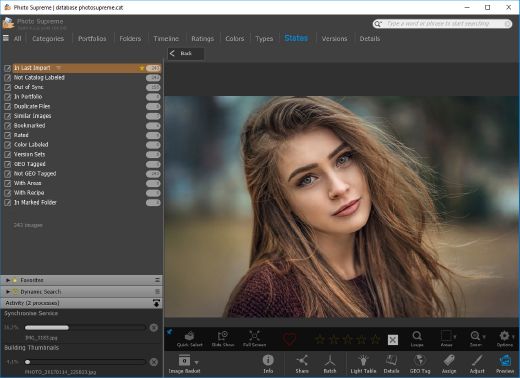
Description: Photo Supreme v2026 is a thoughtful and forward-looking release. This update has focused on smarter discovery, faster performance, and modern workflow expectations, especially around large catalogs, mobile integration, searches, and team environments.

Import and Select
One of the standout additions in Photo Supreme v2026 is the new multi-pass Import and Select workflow. This allows users to review and refine image selections in multiple stages instead of making all decisions in one pass. It’s especially useful for large shoots, letting photographers cull images more deliberately and with less pressure. In addition, the Import and Select feature now loads images faster than ever. Mac users will also appreciate direct iOS device importing, which makes it possible to bring photos straight from an iPhone or iPad into the catalog without relying on intermediary software. This significantly streamlines mobile-first workflows.

Powerful Searches
Photo Supreme now supports natural language searching, allowing users to find images using plain, conversational phrases rather than rigid metadata queries. This feature is powered by AI services such as OpenAI, Google Gemini, or local models with Ollama. This gives users flexibility in how advanced features are enabled. In addition, a new classification system enhances search accuracy by grouping images into meaningful categories upon import, making it easier to surface relevant results in large or complex catalogs.

Video & Media Handling
For users working with video, Photo Supreme v2026 introduces hover-based video previews. Simply hovering over a video thumbnail now reveals a short animated preview, making it much faster to identify clips without opening them individually. Support for modern formats has also been expanded, ensuring the software keeps pace with current media standards.

Sharing with ZIP
Exporting images is more flexible in v2026 thanks to ZIP output support in transfer profiles. This makes it easy to bundle images into a single archive for delivery, backup, or client sharing, all directly from within Photo Supreme. These enhancements simplify distribution workflows and reduce the need for external tools.

GEO Maps
GEOgraphic-Mapping features can now generate maps using not only Google Maps, but also OpenFreeMap with OpenStreetMaps. This removes the need for API keys while still delivering rich, interactive map displays. This update makes location-based browsing easier to configure and more accessible for all users.

Performance and Refinements
Photo Supreme v2026 delivers notable performance enhancements, resulting in faster browsing and a more responsive overall experience. Response times are improved by up to 10%, with especially noticeable gains for large libraries containing many catalog labels.
Catalogs with numerous stacks also see significant performance improvements, particularly when displayed in stacked views.
v2026 includes a wide range of refinements, such as: "Visually similar" stack detection, numerous stability fixes and workflow enhancements, polished UI behavior in collections, searches, and metadata handling

Wait, there's more, a lot more…
New "RAW Files" and "Video Files" catalog states
Added support for Google Gemini as an AI service
Added support for OpenAI GPT-5.2 as an AI Service
Added support for Ministral3 model with Ollama
Added file management support for ACR sidecar files
Update HTTP Server with Photo Supreme Online (Server Edition)
Faster face recognition
Added "AI-Estimated GEO Location" to the AI Panel
Faster result display in the Collection Viewer
"Cascade Metadata" from image to Stack or Version Set is now a background process
A highlighted stroke has been added to the active tabs, improving navigation
Now you can display metadata charts and graphs across multiple tabs
Added support for Ctrl/Cmd+Z functionality in text and memo fields
Defined the new Affinity v3 .AF and .AVIF file format as a supported "other file format"
Switching the collection viewer's view style is faster (eg from Basic to Grid to Clean to Custom Thumb Info)
Advanced Search now has an option to search by "File Size" and "File Size MB"
Finetuned the check for "need to compact" on PostgreSQL (Server Edition)
Bookmark keyboard shortcuts are now a "toggle", similar to ratings and color labels
Expanding nodes in the Catalog Tree is ~25% faster
When using the "Dump Full to Catalog File" feature, there's now the option to create either a "catalog dump" file, or a "catalog with thumbs" dump files
Added a XMP Storage Location for "original file AND non-standard sidecar file"
In "Stacked View", you can now select a specific item from the stack to show
Support for PostgreSQL 18.
And more…

Highlights for v2026
Multi-Pass "Import and Select": Seamlessly transition through passes with a fast-culling system that optimizes your workflow.
Direct iOS Image Import on macOS: Import images directly from your iOS devices with ease.
Video Thumbnail Preview: Hover over a video thumbnail or open the Quick View to view a live video preview.
Natural Language Search Powered by AI: Search your content using plain language, with smart integration through OpenAI, Google Gemini, or Ollama models.
Transfer Profiles can now create ZIP output files: Copy or send sets of images as a single ZIP file for easier sharing.
Maps with OpenFreeMap: Display images on interactive maps using OpenFreeMap/OpenStreetMaps with no API key needed.
Server Edition Thumbnail Caching: Enjoy faster performance with local thumbnail caching, automatic cleanup, and customizable settings for retention and cache size.
Classifications: Enhance search accuracy with an automatic image classification mechanism on import.

Release Name: IDimager Photo Supreme 2026.2.3.8974
Size: 163.1 MB
Links: HOMEPAGE – NFO – Torrent Search

Download: RAPiDGATOR
6 Comments
Apr 21

YT Saver Pro 10.15.0

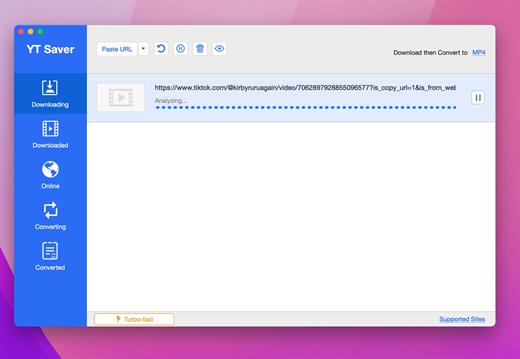
Description: Download Video, Audio, Playlists from 10,000+ websites, Convert Video to MP4, MOV, AAC, WAV and more. Download Videos with Built-in Browser. YT Saver comes with a built-in web browser, which allows you to browse video/audio sharing sites easily and download videos direclty within the websites.

Unlimited Download with YT Saver Downloader
With YT Saver PRO you can download unlimited videos and playlists from streaming sites and access your videos when offline, and you can download multiple videos in bulk at the same time.

Download Videos at Ultra Fast Speed
YT Saver Video Downloader gives you 10X faster video download speed, which allows you to downlaod videos at ultra fast speed and get the fastest conversion speed.

Protect Your Downloaded Videos Privacy
To protect your video and audio from prying eyes and miswatching by children, YT Saver provides a Private Mode to keep your downloaded contents in a password-protected folder.

Supported Input Formats
Video: MP4, M4V, 3GP, MPEG, DAT, AVI, ASF, WMV, VOB, MKV, FLV, 3GS, 3G2, F4V, WEBM, TS, RMVB, MOV
Audio: AAC, AC3, FLAC, M4A, WAV, WMA, AMR, MKA, MP2, AIF, AU, AIFF, CAF, OGG, RAM, RA, M4B, M4R, APE, OPUS, WEBM

Supported Output Formats
Video: MP4, MOV, WMV, AVI, FLV, MKV, HEVC MP4, HEVC MKV, 3GP, iPhone/iPod, iPad, Android Phone, Android Tablets
Audio: M4A, MKA, WAV, AAC, FLAC, AIFF, OGG

Release Name: YT Saver Pro 10.15.0
Size: 386.3 MB
Links: HOMEPAGE – NFO – Torrent Search

Download: RAPiDGATOR

6 Comments
Apr 21

MusConv Lifetime 4.10.466

Description: More than 125+ music services supported. MusConv - the easiest way to transfer your music data! MusConv transfers playlists, albums, followed artists and liked songs across various services – Spotify, Apple Music, Amazon Music, YouTube, YouTube Music, iTunes, Deezer, Tidal, SoundCloud, Pandora and 125+ music services! Continuously working to bring you new updates and features.

MusConv Features
MusConv transfers playlists, albums, followed artists and liked songs across various services – Spotify, Apple Music, Amazon Music, YouTube, YouTube Music, iTunes, Deezer, Tidal, SoundCloud, Pandora and 125+ music services!
Manage playlists, albums, and artists across more than 125 popular music services
See your most-played songs, artists and albums on Spotify, Apple Music, YouTube Music and other
Browse the most popular songs, artists, and albums on your favorite services
Automatically synchronize playlists and albums between your platforms
Rematch incorrect and failed song matches
Syncing song order

Release Name: MusConv Lifetime 4.10.466
Size: 97.3 MB
Links: HOMEPAGE – NFO – Torrent Search

Download: RAPiDGATOR
5 Comments
Apr 21

Net Monitor for Employees Pro 6.6.4

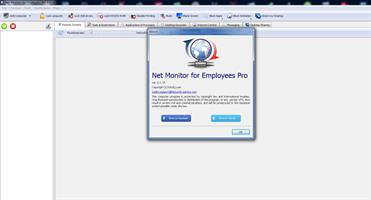
Description: Employee Monitoring Software for your Office. Stop employees wasting work time on illegal activity and keep records of such attempts.

Employee Monitoring Benefits
Employee monitoring is an established method used by many companies to help prevent and detect data breaches that can cost their business a fortune. It is an effective way to boost workers engagement and optimize working processes. Computer monitoring gives companies an overall picture of how work is done in and out of the office.

Employee Activity Tracking Will Help You
Workers may become disengaged when working remotely. By using computer surveillance software an organization can lower risk and become more profitable. Gathered data can be used for analyzing bottelnecks, unusual patterns, and other potential issues. All this can help managers to improve the business process to gain productivity.

Computer Monitoring, Staff Activity Tracking, Desktop Recording, Reporting...
Tracking your staff, preventing insider threats or just helping your workers can be difficult without proper computer monitoring and tracking software.

Employee Activity Tracking
Supervise staff activity by watching and recording live computer screens, web browsing history, applications use, keystrokes pressed... Use stealth mode if needed to hide your presence.

Computer Screen Recording
Record your staff live computer screens even when you are away and you are not monitoring. You can watch recordings later at any time.

Activity Logging and Reporting
Log detailed worker behavior. Logging can be done in the background even when you are not present. Create reports that contain data for visited web sites, application usage, keylogger...

Applications and Internet Blockings
Prevent worker to access certain web sites or start forbidden applications. Forbidden web browsing attempts are logged and will appear in reports.

Monitor Live Computer Screens
The application allows you to see what is currently displayed on an employee computer monitor. This way you can quickly discover if your employees are doing the tasks they are paid for. All employee computer screens can be displayed at once since they can be displayed as thumbnails with configurable size. You can simply zoom in to any employee computer screen by double clicking the thumbnail.

Release Name: Net Monitor for Employees Pro 6.6.4
Size: 113.1 MB
Links: HOMEPAGE – NFO – Torrent Search

Download: RAPiDGATOR

7 Comments
Apr 21

Art Explosion 500,000 v1.0.3.4

Description: The Art Explosion brand of clip art is renowned for unparalleled variety and the highest quality graphics available. The new Art Explosion® 500,000 continues this tradition, and the brand’s commitment to the clip art category, with a stunning new collection of vector illustrations, photographs and professionally-designed graphics.

Art Explosion 500,000 - #1 Selling Brand of Clip Art
- 500,000+ Royalty-Free Images All Inside the Box
- 124,000+ Color Photos in Every Category Imaginable
- More than 200,000 Scalable Vector Graphics
- On-Screen Image Browser with Full Color Preview
- Photorealistic Scrapbooking Graphics & Embellishments

Best of all, everything you need is inside the box. Unlike other clip art collections, no downloading or subscription memberships are required. It’s all right there, right when you need it.

Each image is easy to locate and compatible with virtually every desktop publishing and graphics program. It’s no wonder Art Explosion is the brand computer users and designers everywhere return to again and again.

We’ve Got Style
With so much variety, you’re sure to find the perfect image for every project type. Art Explosion makes it easy to add flair to flyers, greeting cards, newsletters, banners, brochures and more.

Vector Images
More than 200,000 of the finest scalable clip art images are all inside the box. Shrink or grow your chosen image to any size with perfect quality.

Raster Images
Only Art Explosion gives you more than 24,000 spectacular graphics, incorporating many unique designs.

Photographs
Choose from a library of 124,000+ color photographs in categories ranging from Architecture to Water Sports.

Backgrounds & Textures
More than 12,000 marbles, textures, fabrics, beads and woods provide the perfect backdrop for all your projects.

Scrapbooking Graphics
Art Explosion’s photorealistic embellishments, lettering options and more help make projects spectacular!

Clip Art
Art Explosion 500,000 provides you with a large number of premium-quality images, in one easy-to-use package. Here are a handful of examples of the vibrant clip art you get with Art Explosion 500,000. Perfect for Advertisements, Brochures, Business Cards, Certificates, Greeting Cards, Invitations, Newsletters, Posters, Scrapbooks, T-Shirts, Web Pages and more!

750+ Sensational Fonts
Create personal or business projects, like scrapbooks, brochures and more with 750 high-quality fonts. Each font is fully-scalable to any point size and easily integrates with your favorite word processing, desktop publishing and graphics programs. And, each font is compatible with all popular inkjet and laser printers-making print jobs a breeze!

System Requirements
- Windows® XP, Vista® , 7, 8, 10 or 11
- Compatible with all word processing, desktop publishing and graphic programs

Release Name: Art Explosion 500,000 v1.0.3.4
Size: 3.4 GB
Links: HOMEPAGE – NFO – Torrent Search

Download: RAPiDGATOR

3 Comments
Apr 21

Runtime RAID Reconstructor 5.19

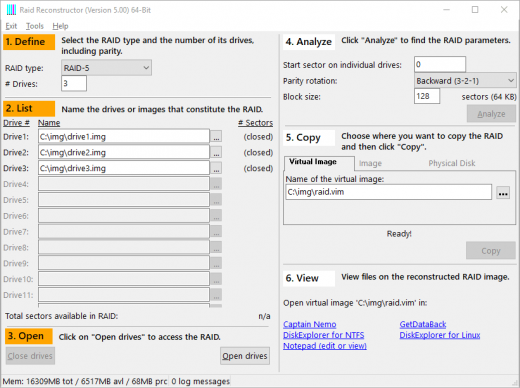
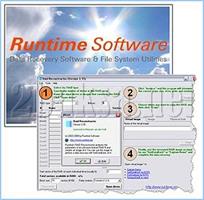
Description: Recover data from a broken RAID Level 5 or RAID Level 0 Array. Even if you do not know the RAID parameters, such as drive order and block size, RAID Reconstructor will analyze your drives and determine the correct values. You will then be able to create a copy of the reconstructed RAID in a virtual image, an image file, or a physical drive. This image can be mounted with Captain Nemo or GetDataBack Pro.

Highlights
Recover data from a broken RAID Array
Recovers both, hardware and software RAIDs
Automatically finds RAID parameters
Recover RAID-5 consisting of 3 to 16 drives
Recover RAID-0 (striping) consisting of 2 to 16 drives
Support for GetDataBack and Captain Nemo
Virtual images allows try-and-error cycles of few seconds
RaidProbe support
De-striper and analyzer
Safe, read-only design
Run from the Runtime Live CD or a WinPE Boot Medium
Free lifetime updates with purchase
Native 64-bit application under 64-bit Windows
Graphical representations of XOR status and drive entropies
Report of on-disk file system structures

Recovery of Broken RAIDs
RAID Reconstructor de-stripes broken RAID-0 and RAID-5 arrays, consisting of 2 to 16, or 3 to 16 drives, respectively. RAID-5 arrays are allowed to have one drive missing.

Even if you do not know the RAID parameters, such as start sector, drive order, block size, and direction of rotation, RAID Reconstructor will analyze your drives and determine the correct values. You will then be able to create a copy of the reconstructed RAID in a virtual image (.vim), an image file (.img), or a physical drive.

Unlike other products that require knowledge of the RAID parameters, RAID Reconstructor is not only a "de-striper" but an "analyzer" as well. It finds the unknown parameters for you.

Once you created an image, you can either mount it with Captain Nemo or use it for further data recovery processing with GetDataBack Pro. If you create the image on another physical drive, you might even be able to boot from it.

Release Name: Runtime RAID Reconstructor 5.19
Size: 20.9 MB
Links: HOMEPAGE – NFO – Torrent Search

Download: RAPiDGATOR
5 Comments
Apr 21

Directory Opus 13.22.7 Beta

Description: Are you frustrated by the limitations of Windows Explorer? Directory Opus is a complete replacement for Explorer, with far more functionality than any other file manager available today.

You're in control.
Not just a simple file manager; Directory Opus lets you make your computer yours.
With a flexible user interface and unbelievable configurability, you can tailor Opus to streamline your workflow.
Dual panes, dual trees, multiple tabs.
Filter, sort, group your folders. Label and rate your files.
Queued file copies. Powerful batch renaming. Full archive support.
Find your files. Locate duplicates. Synchronize backups.
Assign tags and descriptions. Convert images. Edit metadata.
Fully multi-threaded, native 64 bit high performance code.
Whatever you want to do - Opus can probably do it. And if it's not built-in, you can take advantage of the unrivalled configurability to extend Opus using external tools.

What makes Opus unique?

Built for speed
Opus is written in native C++ multi-threaded code; compiled for the latest 64 bit CPUs, with high performance our number one design principle.

Fully configurable
Change the colors. Change the fonts. Change the toolbars and menus. Set up hotkeys. Opus adapts to how you want to use it.

Makes file management a breeze
Powerful searching, sorting, grouping, labelling and tagging features let you take control of your files like never before.

Endlessly extensible
Work with third-party tools as easily as with the built-in features. A full scripting interface, including scriptable dialogs, means your imagination is really the only limit.

Replace Windows Explorer and don't look back
Our unique Explorer Replacement mode provides a full replacement for Windows Explorer.
Single or dual pane file display and folder trees
Tabbed interface let you keep multiple folders open and switch quickly between them
Integrated viewer, metadata editor and utility panel
Built-in tools including synchronize and duplicate file finder
Leverage indexed search engines like Windows Search and Everything

High performance file management features
Copy, move, rename, duplicate, archive, view, backup and delete your files with ease
Queue multiple file copies for improved performance
Batch renaming including easy-to-use keyboard macros
Support for FTP and archive formats like Zip, 7Zip and RAR
Quickly filter, sort, group and search your folders
Color-code your files, assign status icons, star ratings, tags and descriptions
View images, documents and more. Image marking lets you sort your photos quickly and easily
Calculate folder sizes and print or export folder listings

Unrivalled configurability
Why let the programmers decide for you? You can tailor Opus to look how you want it to look, and to work how you want it to work.
Choose from light mode, dark mode, or design your own theme
Over 600 configurable colors and fonts
All toolbars and menus can be edited, plus you can add your own
Floating toolbars can act as program launchers
Configure your own hotkeys that work everywhere or just in Opus
Full scripting interface lets you design your own dialogs and add your own commands

Release Name: Directory Opus 13.22.7 Beta
Size: 29.4 MB
Links: HOMEPAGE – NFO – Torrent Search

Download: RAPiDGATOR

5 Comments
Apr 21

Opencartis Spatial Manager Desktop 10.5.1.17951

Description: Spatial Manager Desktop is a Windows desktop application designed to manage spatial data in a simple, fast and inexpensive way.

Developed by a group of professionals working in the areas of GIS, Planning, Infrastructure and Civil Engineering, it provides the user with powerful tools to address the most common tasks of management and operation in the world of spatial information.

Key features

Read and write
Read and write spatial data using a wide range of file formats and spatial servers

Coordinates transformation Updated V9
Calculate geometric transformations of the features in the import and export processes

Background maps
Choose from among a lot of dynamic Backgrounds Maps from providers such as Google Maps, OpenStreetMap, Bing, MapBox, Ordnance Survey, etc., or configure your own maps from TMS, WMS or WMTS servers

Google Earth publication
Export all or part of the elements in the visible Layers of the map and their data to a KML or KMZ file

Layer Management
Arrange your maps in Layers that can be fully managed by the application

Data management
Manage the alphanumeric data attached to the elements, design and edit the structure which will be used to store the data

Fields calculator
Calculate simple or complex expressions using operators and functions that can be applied to field values in a table and/or to constant values

Spatial analysis
Perform spatial analysis operations over the objects in the drawing or map generating new objects from such analysis

Location tools
Location and geo-coding tools help to add reference elements and enhanced data to existing objects

Task & processes
Spatial Manager Desktop™ includes the ability to save Tasks that make it easy to run repetitive import and export processes

multi language
Available in English, German, Spanish, French, Russian and Portuguese

Release Name: Opencartis Spatial Manager Desktop 10.5.1.17951
Size: 269.7 MB
Links: HOMEPAGE – NFO – Torrent Search

Download: RAPiDGATOR

6 Comments
Apr 21

ExtraMAME 26.4

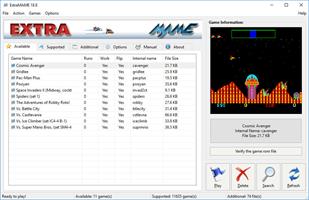
Description: Introducing ExtraMAME, a compact and user-friendly MS Windows GUI wrapper for MAME, the Multiple Arcade Machine Emulator authored by Nicola Salmoria and the MAME team. ExtraMAME allows you to play thousands of classic arcade games on your PC without the need for complex configurations. It’s compatible with all MAME games and supports well-known gaming platforms such as 3DO, Atari, MSX, Namco, Naomi, Neo-Geo, Nintendo, Sega, Taito, and more.

Q. What is ExtraMAME?
A. ExtraMAME is a compact MS Windows compatible GUI wrapper for M.A.M.E., the Multiple Arcade Machine Emulator. It allows you to play thousands of classic arcade games on your computer.

Q. What makes ExtraMAME better than other GUI wrappers for M.A.M.E.?
A. ExtraMAME is compact, easy to use, and doesn’t require you to deal with complex configurations. It’s compatible with all M.A.M.E games.

Release Name: ExtraMAME 26.4
Size: 168.4 MB
Links: HOMEPAGE – NFO – Torrent Search

Download: RAPiDGATOR
4 Comments