Please REGISTER or RENEW your account on RAPiDGATOR.net and support us by doing through all RAPiDGATOR working download links on main posts...
Apr 21

MassTube 2026 v21.6.0.206 Ultra

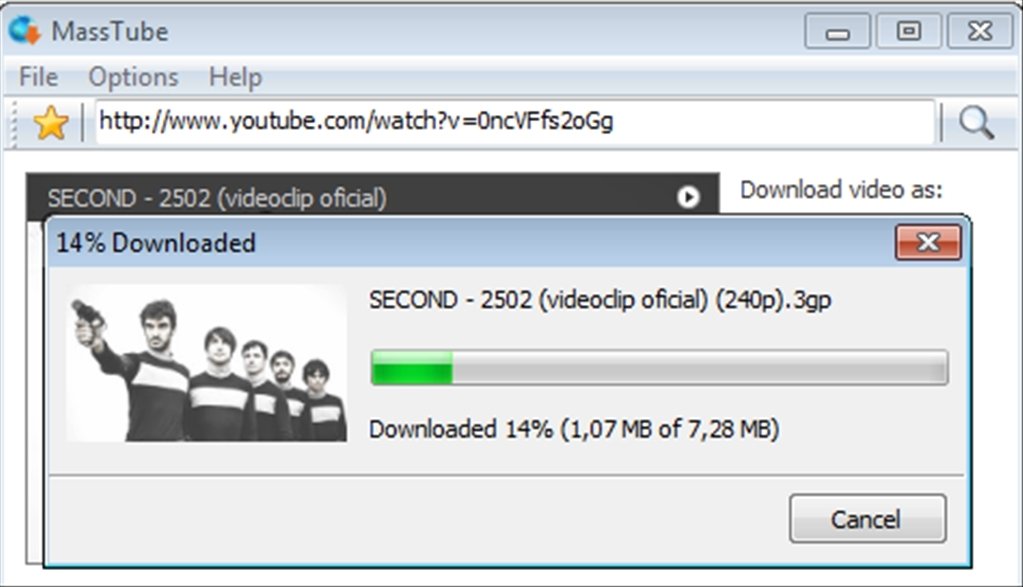
Description: MassTube is a simple, but powerful application to quicky download videos from YouTube.

Key features:
- download VEVO and others.
- download in Ultra HD 4K 2160p, Full HD 1080p, HD 720p and in other popular video resolutions.
- download in MP3, FLAC, OGG and in other popular audio formats.
- compatible with Windows 11, 10, 8.1, 8 and 7.
- much more! :)

Release Name: MassTube 2026 v21.6.0.206 Ultra
Size: 85.5 MB
Links: HOMEPAGE – NFO – Torrent Search

Download: RAPiDGATOR

6 Comments
Apr 21

O&O DiskImage Premium 22.6.1231

Description: O&O DiskImage 22 lets you back up an entire computer or single files whenever you want – even while the computer is being used. In the event you should lose your personal data it can be quickly restored with just a few mouse clicks – even when Windows is no longer able to start.
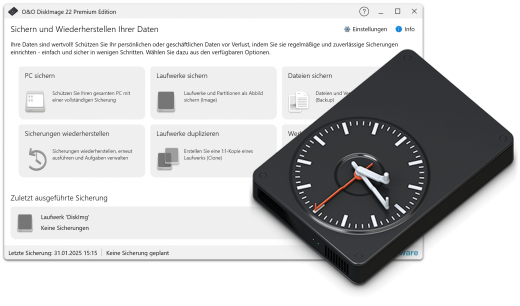
It also supports SSD drives and the latest UEFI System. O&O DiskImage lets you carry out a system restore and to duplicate or clone an entire PC or hard drive. You can even restore this backup onto a computer whose hardware is different from the original machine, for instance, where you have changed a motherboard on the target machine or have bought a brand new PC and want to restore an old backup onto it.

A regular backup is still something that many users prefer to avoid. At least that is until they suffer their first loss of important files as a result of software, hardware or user error: that’s when it becomes crystal clear just how valuable a reliable and up-to-date backup really is!

Comprehensive VHD / VHDX functionality
With the new version 21 it’s possible to convert image files made with O&O DiskImage into Microsoft Virtual Hard Disc (VHDX as well as VHD) image files. This can be especially useful if someone wants to first “rehearse” migrating from Windows 10 to Windows 11 because it can be done using a virtual machine created on the current system.

The new O&O DiskImage 21 can also create incremental and differential images of virtual drives. Combining or mounting these images is also possible. Whenever there’s a backup available, it only takes a few seconds to access any files that are needed. Work on the computer can then be continued without any loss of time or important data.

O&O DiskImage 21 with its own recovery partition
Normally with a backup or imaging program you need to create a boot medium (USB) to boot up your system if something goes awry. This you have to either carry around or store somewhere safe in case disaster strikes.

Thanks to the integration into the system, the O&O DiskImage RecoveryPartition can be accessed immediately so that the last system image can be restored directly. If the Windows operating system does not start or if faulty drivers have to be uninstalled – with the integrated recovery environment, all O&O tools are available to make the system operational again as easily as possible. Not only is this much more comfortable and quicker for the user, it also provides them with an extra level of security as this medium cannot get lost or damaged as easily as a “portable”, external one.

O&O DiskImage To Go
Previously, in addition to regularly backing up your machine, you also had to separately create an O&O DiskImage boot media to restore that backup. Everything is easier now! The new O&O DiskImage To Go function automatically turns an external hard drive (or USB flash drive with enough storage space) into an O&O DiskImage boot medium and marks this disk as the preferred storage medium for future system backups. As soon as you then connect this external USB hard disk to your computer, O&O DiskImage 21 automatically creates a backup. This makes it easy to create a recent backup. And if something really happens to your computer or you want to transfer your system and all your data to a new computer, then with the O&O DiskImage boot medium you can restore the backup stored on it with just one touch of a button. Without the hassle of searching for the boot medium and the external hard drive with the backup.

It has never been so easy to ensure the security of your data!

Further functions of O&O DiskImage

All default and advanced features are combined in one single product
This backup software is the safest and easiest way to avoid losing important personal files! Options are available for both auto backup and manual settings. Thanks to a unique recovery system that includes additional system recovery tools combined with O&O DiskImage you’ll quickly be able to restore all your important data – even if the backup you’re using was created with an older O&O DiskImage version.

Backup entire PCs, hard drives or files with the push of a button
When you back up a PC, O&O DiskImage saves all personal files as well as hard drive information and individual settings. This not only protects irreplaceable files but, in a worst case scenario, also saves you the trouble of having to carry out a time-consuming new setup of programs and the Windows operating system. O&O DiskImage lets you back up an entire computer, system and hard drives or just individual files and folders. To make sure your backups are always up to date, we recommend creating them at short intervals from one another.

Quick and easy system restore – even onto different hardware
Restoring a backup with O&O DiskImage is as easy as pie: all you have to do is start the program, select the backup you want to restore, and you’re off. Included with the software is our machine independent restoration which means your old backup can be transferred 1:1 onto a new machine. Hardware of a different make will be automatically recognized and Windows settings will be carried out by themselves.

Plug-and-play function
Anyone wanting to save data on an external hard disk has it even easier with the new O&O DiskImage 21. Thanks to the integrated plug-and -play option, selected files and folders can be backed up automatically as soon as, for example, an external hard disk is connected to the computer. This is ideal for users who forget to carry out regular backups or who don’t want to go through the trouble. Once configured, the auto backup function runs by itself.

Create a boot medium directly from within the program
O&O DiskImage can bring a system back to life immediately and with no installation required. It does so by way of a Boot Medium (USB Stick) which is based on the currently installed Windows system and which contains all the standard drivers required.

Made in Germany. Made in Berlin.
All O&O products are developed and serviced in Berlin. We at O&O are proud of our German heritage, and proud to represent the quality, security and satisfaction long associated with products “Made in Germany”. We take the concerns of our customers very seriously because we know just how important their data is for them.

Product features
- Backup an entire computer with the push of a button
- Backup system and hard drives, clone drives and entire disks
- Brand new file-based backup: now twice as fast as ever before – backup and restore individual files and/or folders
- Direct creation of VHD/VHDX
- Monitoring and warning of security risks
- Incremental/differential backup: back up only the changes
- Easily restore files, folders, drives and disks
- System restore onto different hardware (M.I.R.)
- Create a Windows Boot system directly from within the program with driver integration
- Plug-and-play: Selected files and folders are automatically backed up and synchronized
- Variable pixel density settings: adjusts to the selected DPI setting of the connected monitor
- New and enhanced functions Control via Command Lines
- Supports Windows 11 and Windows 10

* Backups that were created on older Windows versions 8.1, 8 and 7 with earlier versions of O&O DiskImage can still be restored.

System Requirements
The O&O DiskImage Premium is compatible with 11 and 10 (64-bit)

Release Name: O&O DiskImage Premium 22.6.1231
Size: 87.4 MB
Links: HOMEPAGE – NFO – Torrent Search

Download: RAPiDGATOR

7 Comments
Apr 21

YT Geek YTDL 12.3.3

Description: YTDL is a little program for downloading videos from YouTube and other video sites.

Key Features
- Download videos from YouTube and other video sites.
- Increase download speeds by up to 400%.
- Download multiple videos at the same time.
- Pause and resume downloads at any time.
- Preview video content while downloading.

Release Name: YT Geek YTDL 12.3.3
Size: 73.8 MB
Links: HOMEPAGE – NFO – Torrent Search

Download: RAPiDGATOR

5 Comments
Apr 21

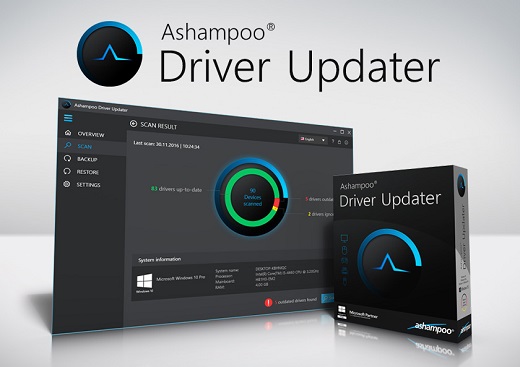
Ashampoo Driver Updater 2.6.0

Description: Now your computer can do more! Wrong or old drivers are the enemy of every computer system. Often, drivers are missing or hopelessly outdated. Ashampoo Driver Updater not only finds the best drivers but also installs them for you.

Optimal performance through up-to-date drivers!
More than 400,000 drivers available
Over 150,000 devices supported
Maximum system stability
Scan - install - done

There's no need for menu acrobatics with Ashampoo Driver Updater. The well-designed program performs its job of keeping your computer up to date quickly and with a high degree of usability. It analyzes your hardware components and drivers, compares the results against a gigantic database - and then replaces outdated drivers with their latest versions.

Always there for you
You decide when Ashampoo Driver Updater will spring into action. The built-in scheduler gives you reliable control over when the program will scan your system for updates. Once set up, you don't have to waste another thought on it and your system will stay up-to-date, always!

Problems? There's a solution!
Crashes, sound problems, graphics issues or bad performance frequently stem from wrong, corrupt or outdated drivers. After the transition to Windows 10, many system are now running "somehow" but not optimally. Let Ashampoo Driver Updater fix what Windows itself can't fix for you!

Maximum gaming performance
Drivers are constantly being developed and updated to avoid crashes and make the most out of installed hardware components. Especially games immensely benefit from a high system performance. Current graphics drivers can give you that extra boost when you need it.

Safety to the max
You won't take any risk with Ashampoo Driver Updater. Its built-in backup feature allows you to save and restore any driver if needed. Keep only what really benefits you!

The good feeling when everything just works
Even without noticeable crashes, your system components might not be working optimally. WLAN dropouts, hissing sound or disconnected printers are frequent issues. Often, it's Windows default drivers to provide less than ideal functionality. Leave no more room for subpar drivers!

The perfect Windows system
The transition to Windows 10 meant a lot of trouble for many users. Will installed hardware components still be supported, what are they called and where can suitable drivers be obtained? Ashampoo Driver Updater does the hard work and instantly finds all available Windows 10 drivers for you.

Release Name: Ashampoo Driver Updater 2.6.0
Size: 16.3 MB
Links: HOMEPAGE – NFO – Torrent Search

Download: RAPiDGATOR

3 Comments
Apr 21

Drive SnapShot 1.51.0.121 WinPE

Description: Drive Snapshot creates an exact Disk Image of your system into a file, including the operating system, installed programs, your data and all security attributes - while windows is running and you continue to work.

Create Disk Image Backups, While Running Windows
The Backup process will back up all your data into a single file, containing all data, including system data and registry, for total security, should your computer ever crash. There is no restart (to DOS) necessary. Ever.

Continue your work, while the Backup is in progress
The new Snapshot technology ensures that all data are consistent, and reflect the PC's data at the start of backup.
There are no difficulties with opened files. Ever. This enables a very fast and easy way to back up servers and other computers, that must run 24 hours a day.

Easy Use and Restore of single Files or directories
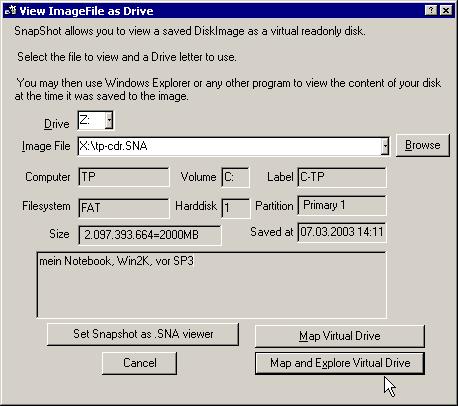
Drive Snapshot creates a virtual drive, containing all your drive's data.
You may use, compare, or restore these files directly from the Disk Image file.
This works with any program of your choice, including (of course) the Windows Explorer

Complete Restore of a disk in case of Disaster
If a disk is restored to its original state, it will be exactly the same as at the time of Backup - byte for byte.
Restoring a system partition will require DOS; other drives can be restored using Windows

Compatible with all Windows file systems (FAT16, FAT32, NTFS,ReFS)
Supports Linux EXT2/3/4/Reiser/XFS

Compatible with all Windows RAID Methods

Very easy and comprehensive command line interface
This makes automation of regular tasks a breeze.

System requirements:
Windows 2000,  XP,  Vista, 7, 8, 8.1, 10, 11, 2003 Server, 2008, 2008 R2, 2012, 2016, 2019,  2022, PE, Windows-X64
3 MB disk space + space to save the disk images.
32MB RAM if active, 0 MB if not active.
You need administrative rights to execute Drive Snapshot

Release Name: Drive SnapShot 1.51.0.121 WinPE
Size: 368.2 MB
Links: HOMEPAGE – NFO – Torrent Search

Download: RAPiDGATOR
5 Comments
Apr 21

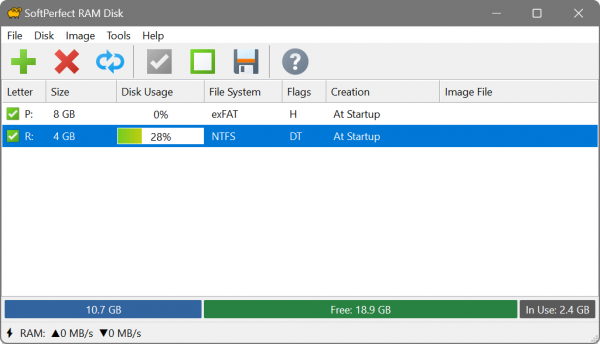
SoftPerfect RAM Disk 26.4

Description: SoftPerfect RAM Disk is a high-performance RAM disk application that lets you have a disk on your computer stored entirely in its memory. As the memory is much faster than physical hard disks, storing temporary data on a fast in-memory disk achieves a higher performance. Whatever your job is, read on to find out what a RAM disk can offer you.

SoftPerfect RAM Disk creates a virtual disk residing in the computer RAM accessible in Windows Explorer and other applications, allowing you to store any temporary information on this disk. Furthermore, Windows can be configured to use the RAM disk for temp files, so that the system and most other applications would use the fast in-memory disk for their temporary data. As Windows and other third-party applications often create a large number of temporary files for a short time only, using a RAM disk will extend the lifespan of your hard disk by sparing it from excessive reading and writing. This is particularly valuable for solid-state drives (SSD), which have a limited number of writes.

Modern computers are equipped with many gigabytes of RAM, and most of the time there is a lot of unused memory that could be used as a high-performance alternative to the slower HDD storage. This product lets you create any number of virtual RAM disks limited only by the available memory. You can also work with on-disk images and RAM disks associated with on-disk files to preserve your data between sessions.

While regular users will benefit from moving web-browser cache and Windows temporary files to a RAM disk, IT professionals may find even more advantages. For example, programmers can speed-up the development process by redirecting intermediate compiler output to a RAM disk, database administrators can improve performance by using a RAM drive for things like tempdb, and so on.

Key features
Any number of RAM disks. In practice, up to 26 disks due to the number of drive letters available.
Any RAM disk size on 64-bit systems with Intel, AMD and ARM64 processors.
Persistent RAM disks with associated on-disk images and smart sync.
Volatile RAM disks whose content disappears on shutdown.
Built-in disk image manipulation tools.

Five very good reasons to use the RAM Disk
Higher computer performance. Provided you have a sufficient amount of RAM, using a fast in-memory disk for temporary data will boost the computer performance.
Reduced wear-and-tear of the physical disk. Because temporarily files are not written to the hard disk, there will be fewer read/write cycles, which is especially important for prolonging the life of solid-state drives (SSD) commonly installed in laptops.
Less junk on the hard disk. Many software applications create temporary files that remain undeleted although no longer needed. The contents of RAM disks is cleared every time the computer is restarted or switched off, so the unneeded files won’t clutter your hard drive.
Reduced file system fragmentation. The file system on your HDD/SSD will be far less fragmented as the temporary files will never be written to the hard disk.
Enhanced security. Temporary sensitive data can be stored on a RAM disk, which is completely erased when the computer is turned off or restarted.

Release Name: SoftPerfect RAM Disk 26.4
Size: 10.5 MB
Links: HOMEPAGE – NFO – Torrent Search

Download: RAPiDGATOR

7 Comments
Apr 21

Syncovery Premium 11.14.7.188

Description: The ultimate sync, backup, copy and migration tool. Syncovery will copy your data the way you need it - and fast!

Multiple Platforms
Syncovery will easily fulfill your requirements: on Windows, macOS, Linux, FreeBSD, and NAS systems. Copy between local drives, network shares, mobile devices via MTP, or using FTP, SFTP, or WebDAV and many others.

Cloud Support
Includes support for many different cloud storages, such as Google Drive, Box, Amazon S3, Azure, DropBox, OneDrive, Rackspace, Sharepoint, Backblaze B2, Citrix Sharefile, and many others.

Create multiple Jobs
Create as many different jobs as you need. Run them manually (with Sync Preview), or let the scheduler run them automatically.

Handle complex Tasks
Syncovery is rich in features, including real-time sync, compression, encryption, email notifications, and much more. It can be extended via PascalScript.

Wizard Mode makes it easy to create your first profile.
Create your first sync or backup job step by step, with explanations of the main settings you need to make. Each job (or profile) works with two paths – source and destination, or just the left and right path (since profiles can be 2-way copy tasks also).

Extremely Fast Scanning
Syncovery’s multi-threaded folder listing algorithm provides an unparalleled speed, and easily handles millions of files and huge numbers of folders. Even more speed can be gained with our Destination File List Cache and Remote Service features.

Block Level Copying
This will help you save bandwidth as well as backup space. Syncovery can detect changed blocks in large files, and copy only these. The detection works by keeping checksums in a database, or with the help of the Syncovery Remote Service, or by using our revolutionary File System Monitoring Service (the File Sytem Monitoring Service is Windows only).

Real-Time Synchronization
Real-Time Synchronization will make sure that changes are synced quickly. Syncovery listens to file system events and quickly performs the appropriate actions. For cloud servers, it can use polling to detect changes. These features are available on Windows and macOS only.

SmartTracking
The SmartTracking sync mode is frequently used in two-way sync jobs. It can detect moved files, deleted files, and conflicts (files changed on both sides).

Versioning
Syncovery allows you to keep multiple versions of modified files, allowing you to restore your files from an earlier date. The restore date can be chosen for individual files or multiple files, in our Restore Wizard.

File Server Migration
Syncovery’s advanced NTFS copying features, high speed, and scaleability enable you to perform large-scale migrations. Read our new, comprehensive Server Migration Guide.

Release Name: Syncovery Premium 11.14.7.188
Size: 69.9 MB
Links: HOMEPAGE – NFO – Torrent Search

Download: RAPiDGATOR
5 Comments
Apr 21

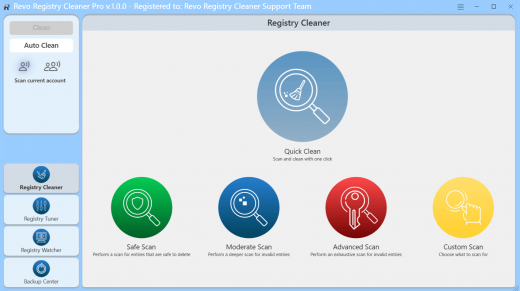
Revo Registry Cleaner Pro 2.1.2

Description: Revo Registry Cleaner Pro - clean, tune and optimize your Registry. Safely. Discover a powerful Registry Cleaner with 15+ scanning categories to find and eliminate invalid and unnecessary Registry Items. Tailor your cleaning process with custom key inclusions/exclusions and 4 different depth scan modes.

Registry Tuner
Customize your Windows experience using the 50 Registry tweaks. Optimize, fine-tune, and resolve issues effortlessly, and achieve a smoother system performance.

Registry Watcher
Stay in control with real-time tracking of Registry keys and values changes. Review, save, and export registry modifications, and apply filters based on operation type or data content. The Registry Watcher monitors specified Registry keys in real-time, instantly identifying processes responsible for system modifications.

Backup Solutions
Create personalized backups for specific keys, perform full Registry backups, or automate scheduled backups to ensure additional safety of your critical data. The scheduled Auto Backup feature adds an extra layer of convenience, allowing you to automate the backup process for both custom Registry keys and full backups.

Automation and Updates
Experience uninterrupted operations with our scheduled Auto Clean feature, by setting up your daily, weekly, or monthly cleanup with your preferred scan mode. The Auto Backup feature automatically backs up your data according to your preferred schedule. Our product also ensures that you're always up to date with automatic background updates.

Release Name: Revo Registry Cleaner Pro 2.1.2
Size: 99.5 MB
Links: HOMEPAGE – NFO – Torrent Search

Download: RAPiDGATOR
5 Comments
Apr 21

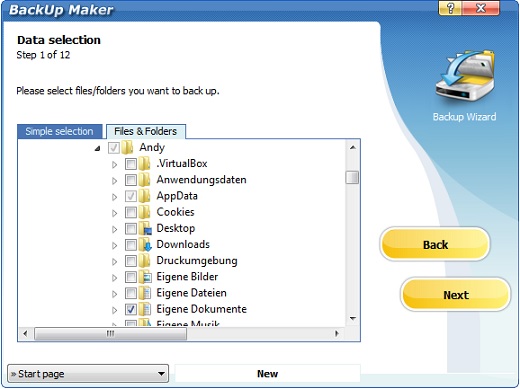
BackUp Maker Professional 8.405

Description: Protect What's Important. Create Data-Backups! BackUp Maker allows you to reliably back up your important files and documents and protect them from data loss. Automatic backups that you can schedule and customize individually. Secure storage on local media, external drives, web servers, on the local network, or in the cloud. Fast zip compression and highly secure AES encryption with up to 256 bits.

Protect data. Create reliable backups!
With ASCOMP BackUp Maker, you can securely back up files, folders, and entire drives – automatically, reliably, and always restorable.

Where BackUp Maker can store your data
For a reliable backup of your data, BackUp Maker allows storage on the following media:
Local disks and local networks
External storage media (e.g. CD/DVD and USB memory)
Upload to the cloud via cloud apps, via WebDAV or to web servers (sFTP or FTP/FTPS)

BackUp Maker: Simple and Intuitive Backup Software for Windows
Malware, user errors, or hardware failures often spell the end for important files. Therefore, it is essential to create regular backups to have a safety copy to fall back on in case of an emergency. Discover how BackUp Maker simplifies the process of data backup.

With BackUp Maker, you simply select the data you want to secure, configure automation if desired, choose the destination, and your documents are reliably backed up - either scheduled or based on specific events. Your data lands safely and compactly in zip format on hard drives, USB sticks, or in the cloud.

To protect sensitive information from unauthorized access, BackUp Maker offers high-security encryption of up to 256-bit (AES). Additionally, the program allows for the secure offloading of your encrypted backups via SFTP or FTP/FTPS to a web server.

BackUp Maker supports a comprehensive backup concept without restrictions. Secure only new and changed files, create multiple backup generations, distribute backups across various storage media, and perform custom actions before and after the backup.

Easily back up pictures, videos and documents from your smartphone: With BackUp Maker and the Windows 11 Smartphone Link app, pictures, videos, and documents can be easily backed up from your smartphone.

Why is a Data Backup Important?
Both software errors and hardware defects can cause files you've saved to be lost and become unusable. The resulting damage can be enormous, especially if the files are documents and content relevant to businesses. To protect yourself from data loss, you should perform regular backups. A backup refers to data protection. The backup copies of the files can be stored on external storage media or in the cloud, making them independent of the general hardware and software of the devices. This ensures that you can restore files that were thought to be lost with just a few clicks.

How Can a Data Backup Be Created?
Regardless of whether data protection is relevant to you for Windows or another operating system, various approaches are available. The most convenient way is to choose modern backup software. It ensures that data protection is carried out automatically within a specified time frame. However, you can also opt for a manual backup. Here, you can specifically select the files relevant for data protection.

Convenience
By choosing automatic data protection for Windows, you relieve yourself or your employees and save time. Additionally, you minimize the risk of important files being lost because you forgot to perform the backup. If you are looking for software to assist you in creating backups, you are in the right place. Discover the advantages of our BackUp Maker now and entrust your data protection to reliable software.

Create Backups Effortlessly with BackUp Maker
Start now with the free Standard Edition for private use and experience the full scope of our award-winning backup solution. The Isidor Award winner, BackUp Maker, stands for easy, intuitive, and secure data backup.

Release Name: BackUp Maker Professional 8.405
Size: 13.1 MB
Links: HOMEPAGE – NFO – Torrent Search

Download: RAPiDGATOR
5 Comments
Apr 21

ezAccounting 3.16.12

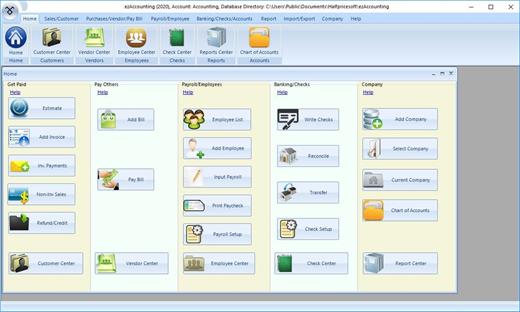
Description: ezAccounting Software is designed with small businesses in mind: simple, reliable, and affordable. ezAccounting is the right in-house accounting solution for small businesses needing to document and report on incoming and outgoing cash flow, including sales, receipts, payments, and purchases. It also supports payroll processing and tax form reporting.

Get Paid
Generate Estimate, Invoice, Receipt and Packing Slip
Receive Payments
Track Sales
Refund and Credit

Pay Others
Add Bills
Pay Bills
Write Checks
Track Expense

Payroll Center
Calculate Payroll taxes
Print Paychecks with Stubs
Print Tax Forms W2, W3, 940, 941 and 943

See how your company is doing
Report Center
Balance Sheet
Profit and Loss

Release Name: ezAccounting 3.16.12
Size: 12.8 MB
Links: HOMEPAGE – NFO – Torrent Search

Download: RAPiDGATOR
6 Comments