Please REGISTER or RENEW your account on RAPiDGATOR.net and support us by doing through all RAPiDGATOR working download links on main posts...
June 4

Directory Opus 13.23.6 Beta

Description: Are you frustrated by the limitations of Windows Explorer? Directory Opus is a complete replacement for Explorer, with far more functionality than any other file manager available today.

You're in control.
Not just a simple file manager; Directory Opus lets you make your computer yours.
With a flexible user interface and unbelievable configurability, you can tailor Opus to streamline your workflow.
Dual panes, dual trees, multiple tabs.
Filter, sort, group your folders. Label and rate your files.
Queued file copies. Powerful batch renaming. Full archive support.
Find your files. Locate duplicates. Synchronize backups.
Assign tags and descriptions. Convert images. Edit metadata.
Fully multi-threaded, native 64 bit high performance code.
Whatever you want to do - Opus can probably do it. And if it's not built-in, you can take advantage of the unrivalled configurability to extend Opus using external tools.

What makes Opus unique?

Built for speed
Opus is written in native C++ multi-threaded code; compiled for the latest 64 bit CPUs, with high performance our number one design principle.

Fully configurable
Change the colors. Change the fonts. Change the toolbars and menus. Set up hotkeys. Opus adapts to how you want to use it.

Makes file management a breeze
Powerful searching, sorting, grouping, labelling and tagging features let you take control of your files like never before.

Endlessly extensible
Work with third-party tools as easily as with the built-in features. A full scripting interface, including scriptable dialogs, means your imagination is really the only limit.

Replace Windows Explorer and don't look back
Our unique Explorer Replacement mode provides a full replacement for Windows Explorer.
Single or dual pane file display and folder trees
Tabbed interface let you keep multiple folders open and switch quickly between them
Integrated viewer, metadata editor and utility panel
Built-in tools including synchronize and duplicate file finder
Leverage indexed search engines like Windows Search and Everything

High performance file management features
Copy, move, rename, duplicate, archive, view, backup and delete your files with ease
Queue multiple file copies for improved performance
Batch renaming including easy-to-use keyboard macros
Support for FTP and archive formats like Zip, 7Zip and RAR
Quickly filter, sort, group and search your folders
Color-code your files, assign status icons, star ratings, tags and descriptions
View images, documents and more. Image marking lets you sort your photos quickly and easily
Calculate folder sizes and print or export folder listings

Unrivalled configurability
Why let the programmers decide for you? You can tailor Opus to look how you want it to look, and to work how you want it to work.
Choose from light mode, dark mode, or design your own theme
Over 600 configurable colors and fonts
All toolbars and menus can be edited, plus you can add your own
Floating toolbars can act as program launchers
Configure your own hotkeys that work everywhere or just in Opus
Full scripting interface lets you design your own dialogs and add your own commands

Release Name: Directory Opus 13.23.6 Beta
Size: 29.6 MB
Links: HOMEPAGE – NFO – Torrent Search

Download: RAPiDGATOR

4 Comments
June 4

Smart File Renamer 1.6.9

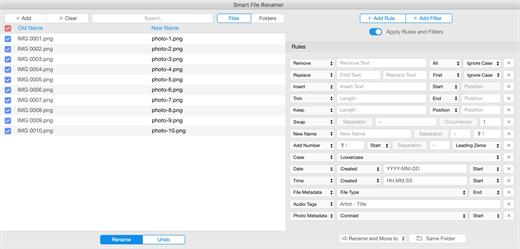
Description: Smart File Renamer - Rename multiple files easily! Supports hundreds of renaming scenarios! Loved by happy users from 14 to 80 years old. Renaming 1000 files takes less than a second!

Extremely Flexible
Supports hundreds of renaming scenarios!

Easy to Use
Loved by happy users from 14 to 80 years old.

Blazingly Fast
Renaming 1000 files takes less than a second!

Batch Renaming
Rename multiple files in one click!

Photos Renaming
Rename photos by country, date or EXIF tags!

Audio Renaming
Rename audio files by music tags easily!

Content Renaming
Rename your documents by content!

Folders Renaming
Rename not only files but folders as well!

RegEx Rename
Create flexible rename patterns with RegEx

File Tags Renaming
Rename files by file tags in a click!

Metadata Renaming
Rename files by its metadata.

Custom Rules
Easily rename groups of files with custom rules!

Smart Filters
Rename preselected categories of files in a click.

Dark Mode
Supports Dark and Light themes!

Live Preview
Review your files before and after renaming.

Rename Logs
Be aware of how you renamed.

External Drives
Rename files on external USB drives easily!

System Requirements
Windows 11, 10, 8.1, 7

Release Name: Smart File Renamer 1.6.9
Size: 86.7 MB
Links: HOMEPAGE – NFO – Torrent Search

Download: RAPiDGATOR
6 Comments
June 4

Filmographer 1.2.6

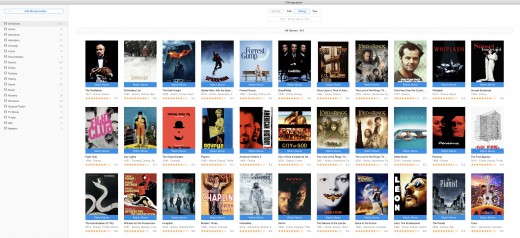
Description: Watch all of your movies in a simple click! Watch all of your movies with a simple click! Keep your movie collection under control! Get info about actors, directors, taglines, plots, ratings and more.

Watch Movies
Watch all of your movies with a simple click!

Organize Movies
Keep your movie collection under control!

Movies Info
Get info about actors, directors, taglines, plots, ratings and more.

Blazingly Fast
1000 movies analyzing takes less than a minute

Intuitively Simple
- It is so simple as 1 2 3.
- For all ages and for all users.

Watch Movies
Watch all of your movies with a simple click!

Organize Movies
Keep your movie collection under control!

Movies Info
Get info about actors, directors, taglines, plots, ratings and more.

Smart Search
Search and import new movies in a click!

Powerful Filters
Filter movies easily by genres, ratings, titles or years.

Multi-Language
Get movie info on your native language.

Simple Categories
Categories movies by genres, ratings and years.

Smart Notifications
Get notified when your favorite actor or director appears in new movie.

System Requirements
Windows 11, 10, 8.1, 7

Release Name: Filmographer 1.2.6
Size: 72.5 MB
Links: HOMEPAGE – NFO – Torrent Search

Download: RAPiDGATOR

5 Comments
June 4

Easy File Organizer 3.5.0

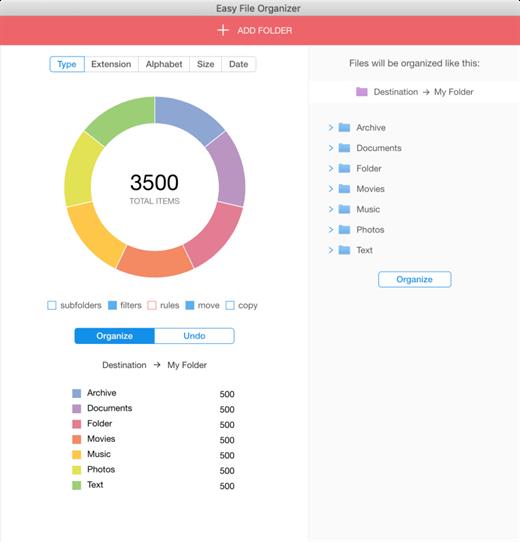
Description: Easy File Organizer - organize files and folders in one click. Supports hundreds of organizing scenarios! Loved by happy users from 14 to 80 years old. Organizing 1000 files takes less than a second!

Extremely Flexible
Supports hundreds of organizing scenarios!

Easy to Use
Loved by happy users from 14 to 80 years old.

Blazingly Fast
Organizing 1000 files takes less than a second!

Files Organizing
Organize any of your files in one click!

Photos Organizing
Organize photos by country or date taken!

Auto Organizing
Organize files automatically easily!

Music Organizing
Organize files by music tags.

Content Organizing
Organize your documents by content!

Subfolders Organizing
Organize files from all subfolders with a simple click!

Custom Rules
Easily organize groups of files with custom rules!

Flexible Templates
Organize files into folders generated from file names.

Dark Mode
Supports Dark and Light themes!

Smart Filters
Organize preselected categories of files in a click.

Live Preview
Review your files before and after organizing.

External Drives
Organize files on external USB drives easily!

Tags Support
Organize files by tags!

Multi Level Subfolders
Auto-create multi-level subfolders with type, extension or date!

Batch Organizing
Organize thousands of files to smaller chunks.

Metadata Organizing
Organize files by EXIF metadata.

Organizing History
Be aware of how you organized all files in the past.

Always Reversible
You can undo your organized files to previous state anytime!

Easy to Use
Loved by happy users from 14 to 80 years old!

System Requirements
Windows 11, 10, 8.1, 7

Release Name: Easy File Organizer 3.5.0
Size: 84.4 MB
Links: HOMEPAGE – NFO – Torrent Search

Download: RAPiDGATOR
6 Comments
June 4

Speedy Duplicate Finder 1.5.9

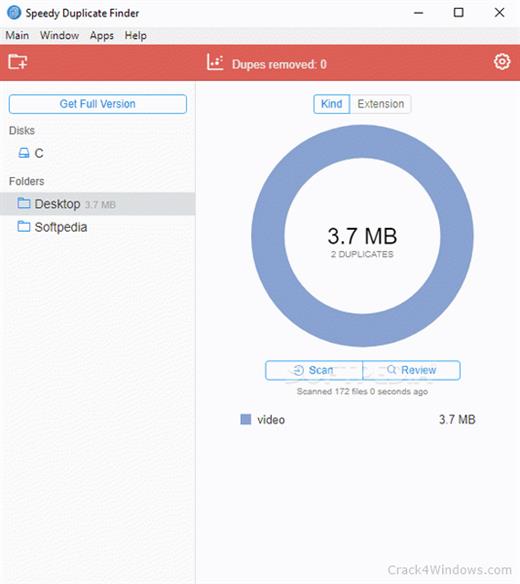
Description: Extremely fast duplicate file finder! Scanning 1000 files takes less than a second! Loved by happy users from 14 to 80 years old. Easily filter group of duplicates by Kind, by Extension or by Size.

Blazingly Fast
Scanning 1000 files takes less than a second!

Easy & Flexible
Loved by happy users from 14 to 80 years old.

Smart Filters
Easily filter group of duplicates by Kind, by Extension or by Size.

Blazingly Fast
Scanning 1000 files takes less than a second!

Disk Support
You can search for duplicates not only in folders but on entire disk!

Intuitively Simple
It is so simple as 1 2 3. For all ages and for all users!

Multiple Folders
You can find duplicates in many folders at the same time!

Smart Filters
Easily filter group of duplicates by Kind, by Extension or by Size.

Easy Review
Review your duplicates easily.

Smart Search
Search for duplicates faster!

System Requirements
Windows 11, 10, 8.1, 7

Release Name: Speedy Duplicate Finder 1.5.9
Size: 71.1 MB
Links: HOMEPAGE – NFO – Torrent Search

Download: RAPiDGATOR

6 Comments
June 4

MediaHuman YouTube Downloader 3.9.20 (0106)

Description: There are so many interesting things to be found on YouTube, but you can't download the videos or save them as audio files by default. That's why we developed YouTube Video Downloader. This app will help you to accomplish video downloads quickly and without hangups. With our program you can simply download the whole playlist or YouTube channel at once and watch it whenever and wherever you want.

The application has many other convenient and practical functions for you to explore and enjoy.

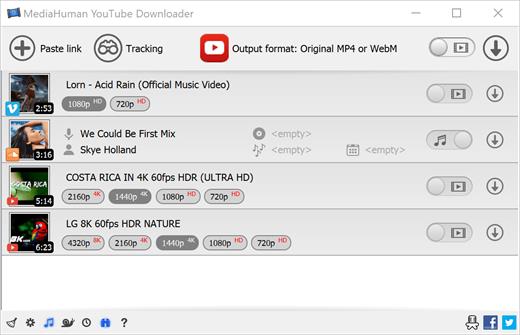
Downloads entire playlists and channels
Supports Ultra High resolutions including 4K & 8K (with audio)
Downloads several videos simultaneously
YouTube, Facebook, Vimeo, Dailymotion, and many others
Extracts audio track and saves it as MP3
Supports exporting to iTunes/Music.app

Main Features:
Playlists and channels
The program supports downloading all the videos in a playlist or channel. In addition, you can monitor the selected channel or playlist and download new clips as they are uploaded.

Adds directly to iTunes/Music.app
You can configure the program to automatically add downloaded movies to your iTunes library. You can also pick a playlist where the downloaded video should be added.

HQ, HD, 4K or 8K
The program supports all available resolutions, be that 720p, 1080p, 4K or 8K, 30 or 60 fps. The choice is up to you. Unlike online video downloaders, the app downloads any resolution with sound.

Quality of the original
You can choose to save the video in its original quality and format, such as MP4 or WebM, without any modifications. In this case, the clip you get will be exactly the same as the one uploaded by its author.

Monitors the clipboard
The program keeps an eye on the clipboard and as soon as it spots a supported link there, it automatically adds this video into the download queue.

Simple tag editor
For audio downloads, the app automatically detects the artist and song name, which will be written in ID3 tags. These can be easily changed before the video is downloaded.

Not just YouTube
The program supports Twitch, Vevo.com, Vimeo, Dailymotion, Facebook, UOL, VKontakte, SoundCloud, TikTok, Likee, Brandnewtube, Odysee, Brighteon, Rumble and a lot of other sites. So you can download video from these websites as easy as you do from YouTube.

Drag & Drop
The app features a 100% drag&drop support. Just drag the link to a video with your mouse and drop it to the main window of the program, or to its dock icon on Mac.

Multi-language interface
The app is translated into: Arabic, Armenian, Azerbaijani, Bulgarian, Catalan, Chinese (Hong Kong SAR China), Chinese (Simplified), Chinese (Taiwan), Croatian, Czech, Danish, Dutch, English, Esperanto, French, German, Greek, Hebrew (Israel), Hungarian, Indonesian, Italian, Japanese, Korean, Latvian, Lithuanian, Malay, Norwegian Bokmål, Polish, Portuguese, Portuguese (Brazil), Romanian, Russian, Serbian, Slovenian, Spanish, Swedish, Turkish, Vietnamese.

Release Name: MediaHuman YouTube Downloader 3.9.20 (0106)
Size: 92.4 MB
Links: HOMEPAGE – NFO – Torrent Search

Download: RAPiDGATOR
5 Comments
June 3

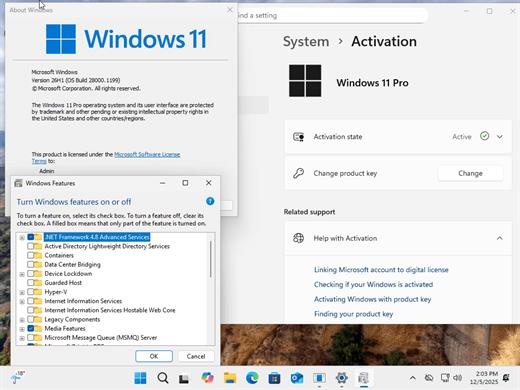
Windows 11 Pro 25H2 Build 26200.8524 TPM Bypassed & Pre-Activated June 2026

Description: On August 29, 2025, Microsoft released the first official preview of Windows 11 version 25H2 (2025 Update) in the Release Preview Channel of the Windows Insider Program. The update is rolling out as an enablement package for devices already running version 24H2.
Windows 11 versions 24H2 and 25H2 use the same underlying system files and architecture. That means there’s no need to reinstall or replace the core operating system to move between them. Instead of delivering a large, full-featured update, the software giant simply “flips the switch” with a small enablement package that activates the 25H2 features already present in 24H2. This makes the update faster, less risky, and easier to roll back.

What’s New


  • Some of the features that you can expect to find on Windows 11 25H2 include
  • Start menu redesign: Wider layout, more pinned apps, a new “All” apps section, and optional removal of “Recommended.”
  • File Explorer dark mode: More dialogs now match the theme, including copy and delete prompts.
  • Notification Center: Now shows full clock (with seconds) on secondary monitors.
  • Android app resume: Continue mobile app activity directly from the Taskbar.
  • Start menu sidebar: Expanded access to messages, calls, and photos from your phone with a new interface.
  • Click to Do: New “Describe Image” action, selection modes (Freeform, Rectangle, Ctrl + Click), and touch gestures.
  • Admin Protection: Prompts for elevation on untrusted apps—adds a visual warning layer.
  • Passkeys with 1Password: Native support for plugin-based passkey managers.
  • Text & image AI activity log: Track recent AI usage from third-party apps.
Release Name: Windows 11 Pro 25H2 Build 26200.8524 TPM Bypassed & Pre-Activated June 2026
Size: 6.7 GB
Links: HOMEPAGE – NFO – Torrent Search

Download: RAPiDGATOR

5 Comments
June 3

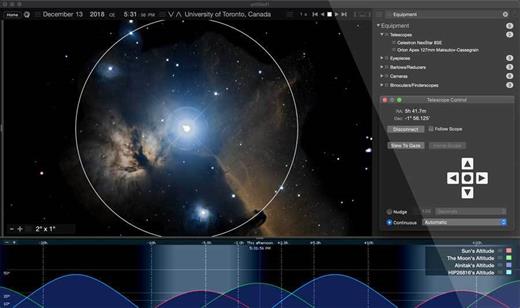
Starry Night Pro Plus v8.1.1.2104 + Fix

Description: Starry Night 8 - professional Astronomy Telescope Control Software for PC. Starry Night Pro Plus 8 is our fully featured flagship program, tailored for the astronomer who wants the very best in-class astronomy software and telescope control experience.

Key features include
- Apollo 11 Mission Data
- Data Backup and Cloud Sync
- Improved DeepSky Database
- Improved Telescope Control
- New Dark Theme
- New Audio Descriptions
- Stars and Exoplanets in 3D
- Simple, fast, user-optimized interface
- All-Sky CCD Mosaic
- 5 multi-wavelength full sky surveys
- Fully featured with a complete object database
- Redesigned Live SkyGuide
- Maxim DL Plugin

What's New in Starry Night 8

Improved DeepSky Database
Explore a new, up-to-date, 36,000 object, cross-referenced database, built from various source catalogs.

Improved Telescope Control
Telescope control has been redesigned to offer a modern, sleek looking, user experience,

Open Astronomy Log
With the international standard for astronomical logging now export your data to Open Astronomy Log (OAL) format.

Sky Calendar
Explore a hand picked list of the most interesting celestial objects to observe each evening.

Audio Descriptions
Hours of descriptive audio for over 400 of the most interesting night sky objects. Click and listen!

Maps & Location Services
Auto-detect your home location and choose additional observing sites quickly and accurately.

Interactive Live SkyGuide
Web-delivered multimedia reveals the science of the solar system, stars, galaxies, and the known universe.

Binary Star Systems
3D models of eight beautiful and accurately rendered binary stars!

Features
We put the rocket in space science software

Universal Search
New dynamic user-optimized interface, with "Universal Search" for objects, Starry Night files, SkyGuide references, options, events, and more.

High Performance Graphics
The incredibly rich and detailed Starry Night software OpenGL graphics that have set the industry standard for excellence in astronomy software.

Extragalactic 3D Database
New & Exclusive - The Starry Night Extragalactic 3D Database includes over 200,000 galaxies encompassing over 1 billion lights years of space.

Space Missions
New and updating space missions with 30 detailed and accurate 3D models of spacecraft & trajectories for a real flight time experiences.

3D Suns
Every star is now accurately rendered as a 3D body with classification-appropriate color, texture and relative radii.

Updated Messier Catalog
An updated Messier catalog with new breathtaking high resolution images of your favourite star clusters, nebulae, and galaxies.

Analemma Simulations
The Sun's analemma can now be drawn accurately on any planet's surface.

3D Exoplanets
Exoplanets as 3D bodies with proper location, size, orbit and planetary texture. Land on the surface, see a sunset from the surface of Kepler-62e!

Scientific Precision
The most precise planetary positions available (using JPL ephemerides) plus an expanded asteroid catalog with highlighted families and groups.

H-R Diagrams
Hertzsprung-Russell diagrams tell about star age and mass, plotting star luminosity on a vertical axis vs. star temperature on a horizontal axis.

Horizon Panoramas
54 streamable photorealistic horizon panoramas, from Antarctica, to Stonehenge to the Egyptian Pyramids, and much more!

Ephemeris Generator
Ephemeris values are handy for knowing where an object will be in the sky at a particular time. You can export and print it out.

Graph Tool
The Graph offers a way of examining changes in an object’s qualities over time. It is possible to plot more than one object on the Graph at one time.

Updated Surface Maps
We've got new maps of many planets and moons including Vesta, Ceres, and, of course, our favorite dwarf planet Pluto!

System Requirements
- 32-bit or 64-bit operating system
- Windows 10
- 1 GHz or higher processor
- 1 GB RAM
- 12 GB of hard disk space
- Minimum recommended monitor resolution of 1024 x 768 pixels.

* 128 MB OpenGL 1.4 capable graphics card required.

Release Name: Starry Night Pro Plus v8.1.1.2104 + Fix
Size: 2.4 GB
Links: HOMEPAGE – NFO – Torrent Search

Download: RAPiDGATOR
2 Comments
June 3

WinToHDD v7.0.2.2 (All Editions) + Fix

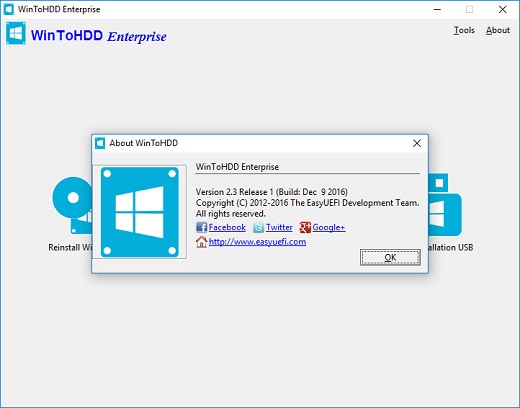
Description: WinToHDD is a handy and useful software which allows you to install or reinstall Windows (Vista/2008 or later) without using a CD/DVD/USB drive. With this All-in-One Microsoft Windows deployment tool, you can easily reinstall Windows, install Windows onto disks other than the one where your Windows is installed, or clone existing Windows installation to other disk. Furthermore, you can use it to create a Windows installation USB containing all your Windows installation ISO files, then you can install Windows (Vista/2008 or later) from the same USB drive on both BIOS and UEFI computers.

Install/reinstall Windows from ISO, WIM, ESD without using CD/DVD/USB.
Clone Windows to another disk without reinstalling Windows, apps.
Easily bypass Windows 11 system requirements (TPM 2.0, RAM, internet connection, etc).
Encrypt Windows partition with BitLocker when installing or cloning.
Install any version of Windows 11/10/8/7/Vista, Server 2008 or later (64 & 32 bits) from same USB drive on both BIOS and UEFI computers.
Fully compatible with GPT/UEFI and Windows UEFI CA 2023.

Reinstall Windows Without Using CD/DVD/USB Drive
The reinstall Windows feature allows you to reinstall Windows 11/10/8.1/8/7/Vista & Windows Server 2008 or later directly from an ISO, WIM, ESD, SWM, VHD or VHDX file without using a CD/DVD or USB drive. With this feature, even if you don't know anything about computer technology, you can easily reinstall Windows with just a few clicks, and it can help you bypass Windows 11 system requirements such as TPM 2.0 requirement, RAM requirement, internet connection requirement, etc.

Install Windows Without Using CD/DVD/USB Drive
With this feature, you can easily install Windows 11/10/8.1/8/7/Vista & Windows Server 2008 or later onto disks other than the one where your Microsoft Windows operating system is installed, using an ISO, WIM, ESD, SWM, VHD, VHDX image file or a CD/DVD drive as the source of installation. This feature can help you bypass Windows 11 system requirements such as TPM 2.0 requirement, RAM requirement, internet connection requirement, etc.

Migrate Windows to SSD or New Hard Disk
The system clone feature allows you to clone existing Windows OS installation (Windows 11/10/8.1/8/7/Vista & Windows Server 2008 or later) from the old disk to a new disk (HDD/SSD), with this feature you can generat an exact copy of the existing Windows system to another disk.

Create Multi-Installation USB to Install or Clone Windows
You can create a Windows installation USB flash drive to install any version of Windows (Vista/2008 or later, both 64 & 32 bits) from the same USB drive on both BIOS and UEFI computers. The bootable USB flash drive also contains the system clone feature, so you can use it to clone Windows OS installation from one disk to another.

Release Name: WinToHDD v7.0.2.2 (All Editions) + Fix
Size: 36 MB
Links: HOMEPAGE – NFO – Torrent Search

Download: RAPiDGATOR

3 Comments
June 3

QR-Code Creator 7.6.3

Description: Create QR codes in no time on your PC. The best part is that the codes are generated without an internet connection. The software calculates the codes directly on your local computer, so you don't have to worry about your data being read by third parties.

You can easily paste the generated QR codes into almost any application using the clipboard.

The software is constantly being developed and now includes a built-in prompt generator in addition to numerous canvases for visual enhancement.

Release Name: QR-Code Creator 7.6.3
Size: 34.3 MB
Links: HOMEPAGE – NFO – Torrent Search

Download: RAPiDGATOR
6 Comments