Please REGISTER or RENEW your account on RAPiDGATOR.net and support us by doing through all RAPiDGATOR working download links on main posts...
Apr 15

Print Artist Platinum 25.1.0.1

Description: Print Artist® Platinum 25 is unlike any print software you’ve ever used - its unparalleled quality combined with unprecedented ease of use lets you produce amazing print projects for your home, school or business. Impress friends, family and clients with the creative edge that only Print Artist Platinum can offer – 28,000+ professionally-designed templates, 377,000+ sensational graphics, 1,000+ premium fonts and more!

With its powerful, yet easy-to-use design, text and drawing customization tools, advanced photo editor, special text effects gallery and more, you’ll be creating expert, eye-popping print projects with a professional, custom look that truly raises the bar!

The Fast, Easy and Fun Way to Create Spectacular Print Projects
- 28,000+ Professionally-Designed Templates
- 377,000+ Sensational Graphics
- 1,000+ Premium Fonts
- NEW User Interface! Now Even Easier to Use
- Easily Upload Projects to Facebook & YouTube
- Photo Card Projects & Photo Clip Art
- Digital Photo Editor Makes Your Pictures Shine
- Bonus! Create CD Slideshows You Can Watch on TV

Dream It. Create It. Print It!
Print Artist is ideal for creating sensational print projects for virtually any occasion. You’ll love the unique selection of professionally-designed templates and limitless creative tools from the #1 publisher of home graphics software.

System Requirements
- Windows XP, Vista, 7, 8, 10, or 11
- 512 MB RAM
- 1024 x 768 display or higher
- Internet connection required
- Recordable or rewriteable CD drive required to burn CD slideshows

Release Name: Print Artist Platinum 25.1.0.1
Size: 291.5 MB
Links: HOMEPAGE – NFO – Torrent Search

Download: RAPiDGATOR

7 Comments
Apr 15

QueueExplorer Professional 5.0.79

Description: Explorer-like management for queues. Works with multiple queuing systems. QueueExplorer supports multiple systems from the same installation, without need for additional licensing: MSMQ, Azure Service Bus, RabbitMQ, and ActiveMQ. With QueueExplorer you can do much more than with built-in management console - copy, move or delete messages, save and load, stress test, view and edit full message bodies (with support for XML, JSON, .Net objects...), and much more. QueueExplorer is a fast, native Windows application.

The indispensable tool for working with queues and messages:
understand and manage your system
figure out what went wrong
fix it

Find out all about your messages
With QueueExplorer you can dig into your queues and see which message went where, whether they were correctly formatted, with correct headers and settings, etc. Multiple viewers are at your disposal: JSON, XML, WCF, Hex, text with different encodings...

Develop and test producers and consumers separately
With QueueExplorer you can test individual pieces of your solution, or even simulate third party messages going in or out. You can create and edit test messages, send one by one or bunch of them together.

Test performance and load handling of your app
Send thousands of messages for performance testing to see how system handles that load.

Troubleshoot, fix, and resend problematic messages
If something is wrong, QueueExplorer is the fastest and easiest way to investigate and fix incorrect, poison, or failed/deadletter messages.

See status of your system at glance
Check if some of queues are growing too large, if there are messages in deadletter queues, etc. With autorefresh functionality see how entire system works in near real time.

Filter and sort messages to quickly find important data
QueueExplorer allows you to quickly find messages you're interested in. Professional edition allows you to even extract your business data from within messages using XPath, JSON, or Regex, and to immediately see e.g. invoice totals, etc.

Backup and restore messages
Backup messages to files, or move/copy them to another queue.

Copy, compare and sync queues, topics and other schema (metadata) objects
This can be used to migrate queues (and other objects) to another server, e.g. to propagate from development to production. Or just to compare and see which changes were made. Or to backup schema before changes are made. You can also duplicate queues with all their settings on the same server (Professional).

Release Name: QueueExplorer Professional 5.0.79
Size: 35.8 MB
Links: HOMEPAGE – NFO – Torrent Search

Download: RAPiDGATOR

5 Comments
Apr 15

JP Software TCC 36.00.27

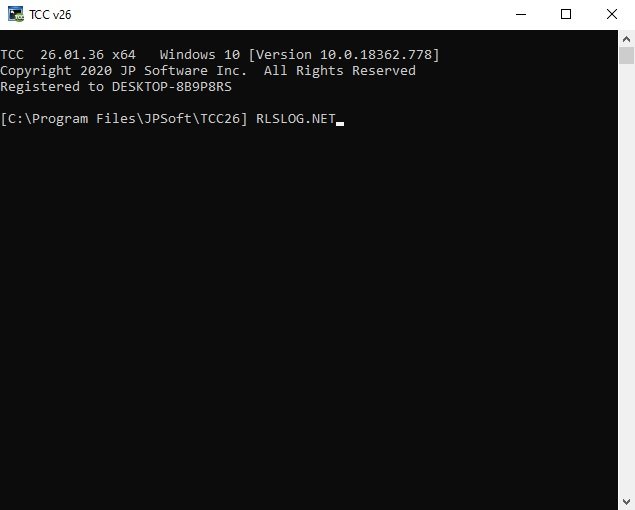
Description: TCC: Upgrading the Windows CMD Command Line Prompt. The command line is essential for developers, systems administrators and advanced users, offering many advantages to anyone wanting to save time, expand their control and/or to automate their tasks.

TCC is our console mode Windows command processor (formerly known as 4NT). TCC is a replacement for CMD.EXE, the default Windows command processor. TCC is compatible with your existing Windows console applications and batch files, but offers major improvements to the CMD prompt in command line editing, interactive file and system management, batch file programming and debugging.

TCC is a superset of CMD, with 275+ internal commands (CMD has about 42), 800+ internal variables and functions (CMD has 6), hundreds of additional options for existing CMD commands, and thousands of additional features.

Whether you're a seasoned CMD prompt user or just getting started, TCC is the tool that will take your command line prompt experience to the next level.

Why Switch From the CMD Shell to TCC?

Familiarity
TCC is a CMD replacement Windows command processor that is compatible with your existing CMD commands and batch files while adding hundreds of new commands, variables, and variable functions.

Productivity
TCC provides vastly improved line editing and tab file completion, and adds thousands of new features. You're immediately more productive, and you can learn TCC's new features at your own pace.

Batch Files
Create and debug your batch scripts in a fraction of the time with TCC's integrated editor and batch file debugger.

Comprehensive Help
The extensive help (including context-sensitive popup help for command and variable syntax) speeds your development time and reduces errors.

Syntax
TCC's internal commands share a consistent syntax, reducing your learning and development time.

Multilingual
The user interface is available in English, French, German, Italian, Russian, and Spanish. (Online help is available in English, French, German, and Spanish.)

Release Name: JP Software TCC 36.00.27
Size: 54.9 MB
Links: HOMEPAGE – NFO – Torrent Search

Download: RAPiDGATOR

5 Comments
Apr 15

JP Software Take Command 36.00.27

Description: Replace Your Windows Console and CMD Command Prompt Windows. The Windows Command Prompt shortcut is a Windows console (command line, or character mode) session that runs the default Windows command shell CMD.EXE.
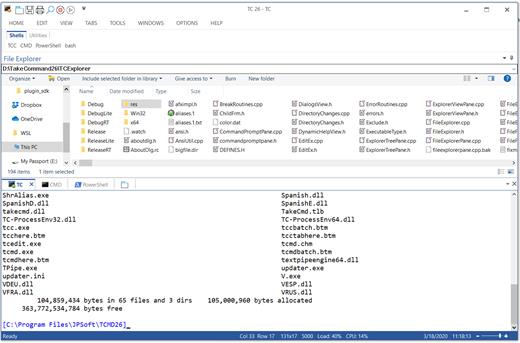
The command line is essential for developers, systems administrators and advanced users. Unfortunately, CMD Windows commands and the Windows console UI have always been woefully lacking in ability compared to what is available in most other operating systems. Because of the limitations in CMD and the Windows console, users have been forced to use the GUI for inappropriate tasks, or even to write custom programs to perform simple tasks that CMD should have been able to handle.

Take Command is a comprehensive interactive GUI and Windows command line toolkit that makes your command prompt windows easier to use and far more powerful. Take Command includes optional Windows Explorer integration, tabbed console windows, and major enhancements to standard Windows CMD commands such as COPY, DEL, DIR, FOR, MOVE, REN, SET, and START And it and adds more than 235 new commands, command dialogs, command line syntax coloring, vastly improved command line editing, programmable filename and directory tab completion, and thousands of other features.

Take Command is also a powerful batch file programming tool, including an integrated IDE with a sophisticated editor and batch debugger. Take Command offers extensions such as DO loops, SWITCH statements, error and exception handling, system monitoring and event triggers, and more than 780 built-in variables and functions. And you can extend that with 3rd-party plugins and user-defined functions.

12 Reasons Why You Should Replace Your Windows Console
The Windows console is responsible for running character-mode applications, including CMD, PowerShell, WSL bash, etc. It was introduced in Windows NT 3.1 in 1993, and some major internal architectural improvements were made in Windows 10 and 11.

Unfortunately, the improvements to the user interface were relatively minor, and though some efforts were made to improve the CMD console UI in Windows Terminal, they fall far short of what Take Command has been providing for years.

So why replace it with Take Command?

The Windows console is slow, and even slower when using Windows Terminal. Take Command's tab windows typically display output between 20% and 300% faster.
Take Command (like Windows Terminal) offers tabbed windows to run your character-mode applications. But Take Command takes it to another level by including vertical or horizontal tab groups and splitter windows.
Tabbed windows can be reordered, detached, or torn off, and existing console windows can be attached as new Take Command tab windows.
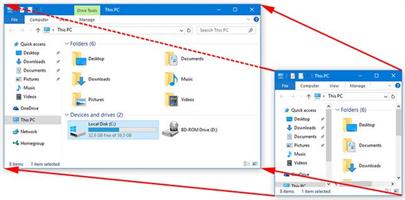
Take Command provides an optional embedded Windows File Explorer window that displays a tree view of the folders on your system and the contents of the selected folder (List View) on the right. You can drag folders and files from the Explorer window and drop them in a command prompt window.
Take Command can be easily configured for your preferences with its configuration dialogs.
Take Command has an optional tabbed tool bar that you can use to execute internal or external commands, aliases, or batch files with the click of a mouse (or an accelerator key). You can define up to 20 tabs, each with up to 50 toolbar buttons.
Take Command provides a configurable Status Bar that can display quick help for the current command, tooltips, and system information, including tab window size, CPU usage, memory usage, date & time, character values at the cursor location, and a slider control for window transparency.
Cut and Paste options are limited in the default CMD console or Windows Terminal. Take Command adds both line and column selection, double-click or triple-click selections, overwriting or appending to the Windows clipboard, and a variety of paste options.
Take Command windows can be styled with a choice of 18 themes.
Take Command and TCC offer a wide variety of colorization options, not just foreground and background colors.
Take Command includes invaluable tools, including a batch file debugging IDE, a regular expression creator / analyzer, search and replace in files, and a macro recorder / playback.
Extensive help (quick help, context sensitive help, and general help) is available in English, French, German, and Spanish at the touch of a button.

Release Name: JP Software Take Command 36.00.27
Size: 57.1 MB
Links: HOMEPAGE – NFO – Torrent Search

Download: RAPiDGATOR

5 Comments
Apr 15

Pixologic Zbrush 2026.2.0

Description: The latest updates to ZBrush for iPad and the desktop version enhance workflows for artists, whether they are starting a project from the comfort of their couch or adding final touches to a sculpt on their desktop: The Anchor Brush in ZBrush for Desktop receives a new Bend mode, allowing users to bend models with two anchor points and give a different deformation to the model than the rotate mode.

Features: Thanks to an improved integration of Redshift, users enjoy even better rendering of their sculpts and the addition of AOVs provides greater control in compositing. Various speed enhancements will boost workflows with much faster feedback when adjusting lighting or material attributes of a model. With the addition of Redshift Denoiser, you can get to a final render much faster without the need to raise the quality slider. Additionally, GoZ has been updated to simplify the process of sending sculpts from ZBrush for Desktop to the current versions of 3Ds Max and Maya, as well as exchanging files from ZBrush for iPad with Cinema 4D. This makes it easy to pose and animate your model, add simulations and particle effects or take full advantage of Redshift in Cinema 4D. Additionally, we’re introducing Pro Projects inside of ZBrush and ZBrush for iPad, featuring a set of holiday cookies.

Born in Clay
ZBrush sets the industry standard for digital sculpting and painting. Its features enable you to use customizable brushes to shape, texture and paint virtual clay in a real-time environment that provides instant feedback. When you use ZBrush you'll be empowered by the same tools employed by film studios, game developers, toy/collectible makers, jewelry designers, automotive/aviation designers, illustrators, advertisers, scientists and other artists the world over. In fact, we have even received an Academy Award for the technology that powers ZBrush. In short, ZBrush is an art tool created by artists, for artists. It allows you to create models and illustrations limited only by your imagination, at a speed that allows you to stand out in today's fast paced industry.

Digital Sculpting
Get empowered by the world’s leading digital sculpting solution. The powerful systems inside of ZBrush are designed to eliminate the constraints of traditional modeling and allow you to create freely, just as you would with clay. When you’re ready to move your 3D sculpt into a pipeline for animation, rendering or 3D printing, the tools to do so are at hand.

Painting & Texturing
Because ZBrush works with tens of millions of polygons in real-time, you can paint directly on the surface of the model without first assigning a texture map or UV’s. This offers significant advantages compared to a standard workflow. The resolution of the texture map does not need to be decided in advance. You have the freedom to visualize, explore and create textures in 3D, and in real time.

Ready, Set, Render
Whether you are using ZBrush by itself as an illustration tool or as part of a production pipeline for animation, you will at some point want to show your work to others. ZBrush makes this possible using Redshift, as well as a powerful rendering system called BPR (Best Preview Render).

Tools Pipeline
The intuitive approach of ZBrush doesn’t end with sculpting and painting. Interoperability is at your fingertips, with support for key file formats and real time integration with a number of popular software packages.

ZBrushCore
ZBrushCore 2021.6.7 helps you develop your sculpting skills by providing new ways to interact with your digital clay and share your creations with the world.

ZBrushCoreMini
Enjoy a true ZBrush experience as you take your first steps into the exciting world of digital sculpting with ZBrushCoreMini… completely free!

Release Name: Pixologic Zbrush 2026.2.0
Size: 2.5 GB
Links: HOMEPAGE – NFO – Torrent Search

Download: RAPiDGATOR

4 Comments
Apr 15

CSoftLab Advanced Diary 9.0

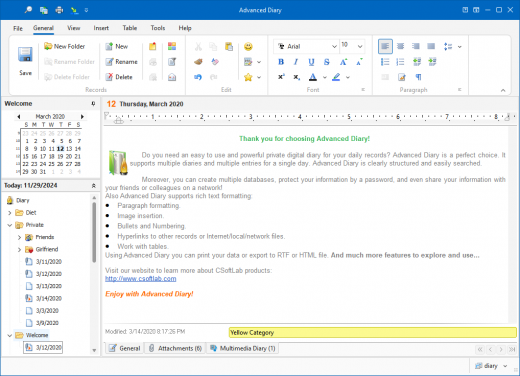
Description: Easy to use, yet feature-packed digital diary for your daily records. All necessary features. Multiple diaries and multiple entries for a single day in one file! Flexible navigation by date or by entries tree, powerful searching, categories support.

Reliable security
Password protection and strong encryption prevents non-authorized access to your information in Advanced Diary.

Friendly interface
Advanced Diary has a clean and extremely intuitive interface. You won't spend your time trying to understand how it works.

Professional text editor
The program supports rich text formatting, backgrounds, diary templates, hyperlinks, images and tables insertion, - and more.

Audio and video diaries
Full multimedia support: You can enter not only a diary text, you can create and play audio and video diaries as well!

Multi-user access
Share all your data in real time over a network enabling your friends and colleagues to access information at the same time.

Multiple languages
English not your native language? No problem, Advanced Diary is available in most popular languages.

Flexible printing
Print your data in multiple layouts using predefined print templates or create your own template!

Release Name: CSoftLab Advanced Diary 9.0
Size: 55.9 MB
Links: HOMEPAGE – NFO – Torrent Search

Download: RAPiDGATOR

6 Comments
Apr 15

Chris-PC RAM Booster 7.26.0414

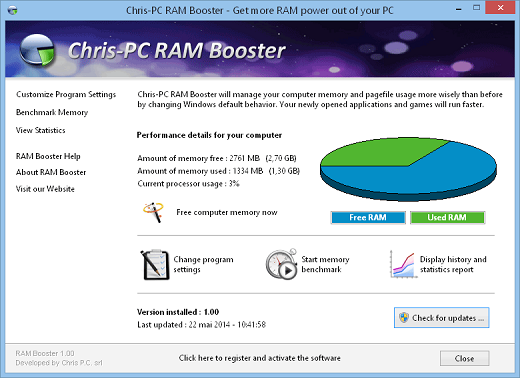
Description: Manages your computer memory and pagefile usage more wisely than before by changing Windows default behavior. Your newly opened games and applications will run better and faster. Optimizes and frees RAM. Memory benchmark test. Runs in background as a service. Easy to use & flexible interface.

Got the feeling that your Windows computer is running slow? Too many applications open?
Yep we know that feeling. Your computer's physical RAM memory is full and even if Windows uses a virtual memory, stored in a swap file on the hard drive, so that your computer would not get out of memory. You still get the sensation that your PC is crawling instead of running smooth as it should, after a clean re-boot and with only few applications open.

Chris-PC RAM Booster will definitely improve things! Your computer will get a boost, since RAM Booster will monitor the RAM (Random Access Memory) usage and when that gets to a certain low memory threshold, it will trigger the process of freeing up memory for newly opened programs while at the same time move the old programs from the RAM memory to the virtual memory on the disk.

Lets see what actually happens under the hood: when your PC's physical RAM gets full of opened applications, typically Windows starts opening any new applications using the hidden buffer file on the disk called pagefile.
Certainly this is a slower process since accessing the info bits on the hard drive is a more time-consuming mechanical process (the heads of the hard-drive move towards the right platter, cylinder and section of the disk surface where the bits are stored) than accessing the memory RAM chips. This means that your newly opened application is now stored in the virtual memory on the hard-drive. Therefore your computer will act very poor in terms of performance.

What to do? Install Chris-PC RAM Booster to manage RAM memory and pagefile usage more wisely than before. RAM Booster will change the behavior of Windows and your newly opened applications and games will run better and faster.

Chris-PC RAM Booster is monitoring memory and the CPU making sure that high-demand applications, processing large amounts of data on your computer, or applications running in full-screen are detected and not affected by the RAM freeing process, to avoid lags in screen display and/or slowdowns. Therefore applications and games will run smoother, benefiting of the full power of your computer's RAM memory.

The software gives the option of setting the optimum custom low memory threshold that if met, will activate the process of freeing up memory. Another helpful feature is the capability of disabling the RAM freeing process when you have your laptop running on battery and then being automatically activated when it's plugged in.

Most important features of Chris-PC RAM Booster:


  • Faster running applications and games by smartly optimizing the usage of the physical RAM memory of your computer against the virtual memory from the page file of your Windows operating system.
  • Wide set of options and settings for personal customization of RAM memory usage: including low memory threshold to start the freeing up process, setting for full-screen applications, CPU usage for which memory should be freed etc.
  • Background running: once installed, started and configured, RAM Booster will run quietly without user interaction and will free-up RAM memory.
  • Is useful also on server machines (idle or in use), with no user logged in, giving access to more RAM to server programs.
  • Includes a memory benchmark test to get an evaluation on the stability of your computer and RAM memory.
  • Provides statistics for a complete overview on your computer performance with RAM Booster active.
  • Provides dynamic systray icon which displays computer realtime memory usage.
  • Simple and intuitive interface.
Release Name: Chris-PC RAM Booster 7.26.0414
Size: 3.6 MB
Links: HOMEPAGE – NFO – Torrent Search

Download: RAPiDGATOR

7 Comments
Apr 15

WindowManager 10.26.1

Description: WindowManager helps you to improve your work flow by remembering and restoring the position and size of your programs and windows. Many programs don't remember their position and size between sessions and even Windows Explorer does not restore windows to their last position under Windows 7 or higher.

This is where WindowManager steps in and makes sure your windows are placed exactly where you want them every time you open them. WindowManager even allows you to lock the position and size of any window, so that it will always open at the same spot no matter where you move it. The window handling is fully customizable and you can set up special rules for your favorite or most frequently used windows. You can also make WindowManager send keystrokes or mouse-clicks to a program when its window is opened, run additional programs and other advanced actions. With WindowManager, you can also minimize most windows to the system tray. Furthermore, WindowManager supports and enhances the virtual desktop functions of Windows 10 and 11 (switching desktops with Hot-Keys, individual desktop icons, etc.)

Key Features


  • Remembers and restores the position and size of your programs and windows
  • Supports explorer windows, programs, dialogs, etc.
  • Configurable rules for moving or sizing only, activating, closing windows, etc.
  • Advanced actions for typing text into windows, pressing keys, clicking mouse buttons, etc.
  • Can be configured to work like "Save Workspace" for Excel users
  • Multi-monitor support
  • Multiple profiles
  • Powerful trigger system for profile switching
  • Hot-key support
  • Minimize windows to the system tray area
  • Virtual desktop support & enhancements (hot-keys, individual desktop icons, etc.) for Windows 10 and 11
  • Fully customizable
  • Silent installation and uninstallation for mass deployment
  • Especially designed for Windows 10 and 11

System requirements

Supported operating systems (32 and 64 bit):

  • Windows Vista
  • Windows 7
  • Windows 8
  • Windows 10
  • Windows 11
  • Windows Server
Release Name: WindowManager 10.26.1
Size: 1.4 MB
Links: HOMEPAGE – NFO – Torrent Search

Download: RAPiDGATOR

5 Comments
Apr 15

Pepakura Designer 6.1.8

Description: Pepakura Designer is a Windows application which makes unfolded patterns from 3D data. Pepakura Designer features to automatically unfold 3D polygon-mesh models, and allow you to edit them. Pepakura Designer allows you to create real paper craft models from digital data!

You can try Pepakura Designer with no charge. (The data exporting feature is activated with purchase of the license keycode.) Note that Pepakura Designer does not have 3D data design features. You require 3D data before starting to use Pepakura Designer. Pepakura Designer supports common 3DCG file formats. Recommended 3DCG software is Metasequoia. You can use it for 3D model design at no charge. Pepakura Designer reads Metasequoia files with high compatibility.

One Button Unfolding
An unfolded 3D model pattern will be generated once you press the button.

Useful Toolset for Layout Editing
Pepakura Designer provides a simple and useful toolset for layout editing.
The Move, Rotate, and Join/Disjoin Parts editing tools, and the Adding Flaps support to arrange the layout.

Assemble Assistance
Pepakura Designer assists in the assembly process.
For example, ID numbers are assigned to edges, so you can understand the pairs of edges to be glued together. The positions of the pairs to be glued together are indicated by an arrow.

Exporting
Pepakura Designer supports the export in several file formats, including BMP, PNG, GIF, JPG, EPS, DXF, and PDF.

Texture Setting
By switching the textures on and off, you can assemble the color model or the white model, whichever you prefer.
You can also change the texture images on Pepakura Designer.

Operating System: Windows 8/10/11 (64bit)

Release Name: Pepakura Designer 6.1.8
Size: 17.5 MB
Links: HOMEPAGE – NFO – Torrent Search

Download: RAPiDGATOR
5 Comments
Apr 15

The Foundry Nuke Studio 16.1v2

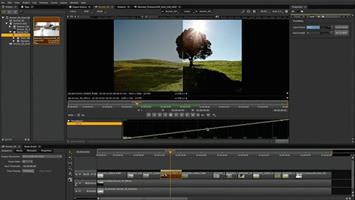
Description: Next-level workflows. Step into the future of compositing and review workflows with Nuke 16.0. Speed up your workflows, so you can focus on the final picture. Work across multiple shots at once, experience large-scale roto performance, faster shot review, approval and delivery, and more.

Variable-enabled multishot workflows
Create more, iterate less — by compositing multiple shots, or an entire sequence at once. Nuke now includes a native, variable-enabled workflow for efficient, reliable, and scalable multishot compositing. This makes applying the same changes to similar shots simple and intuitive, giving you more time for the creative comp work you enjoy.

Graph Scope Variables
As a core element of multishot workflows, Graph Scope Variables provide the option to create a ‘context’ that applies to multiple shots. Apply single scripts to multiple shots or entire sequences within a variable.

VariableSwitch node
With the VariableSwitch node you can create "split and join" workflows based on the variables set for your multishot workflow. Giving you the control you need when comping multiple shots at once.

Link nodes
Nuke 16.0’s Node Graph gives you more freedom to work your way. Now you can create Linked Nodes, for the option to change nodes simultaneously or make use of per-knob overrides, giving you the control you need without clones.

Group Node internal view
See and edit the contents of Groups and LiveGroups within the same Node Graph. This update supports smooth multishot workflows. providing a way to organize and manage multiple scopes.

Faster large-scale roto
We’ve refined the roto node to speed up scripts when working with large, or lots of shapes. Including improvements to caching, playback, interactivity when editing and moving shapes in the Viewer, and motion blur performance.

Contact Sheet in HieroPlayer
Keep your eye on the final sequence with the Contact Sheet in HieroPlayer — free with Nuke and NukeX licenses. View all of your shots at once, or compare with shots from other artists, to ensure full consistency.

BlinkScript updates
Want to create the kind of unique, stylized effects and brushes that define entire universes? Now you can make incredible custom effects more easily than ever, whether you’re already an experienced BlinkScript user, or just starting to experiment with writing your own BlinkScripts, with updates that make it easier to read, write, learn, and troubleshoot your code.

Improved editor
Create custom effects and innovative new looks with updates to the BlinkScript Editor that make it more intuitive. With formatting changes, error handling updates, new keyboard shortcuts, and more.

Library files
The BlinkScript Kernels are now more extensible. Now you can write your own functions for common operations and read them into multiple BlinkScripts. Reducing the code needed for each effect.

Safety Rails
New Safety Rails options catch and report operations that could cause problems when run directly on the underlying processor. So it’s easier to troubleshoot and fix the causes of these issues in your Kernel code.

Release Name: The Foundry Nuke Studio 16.1v2
Size: 3 GB
Links: HOMEPAGE – NFO – Torrent Search

Download: RAPiDGATOR
4 Comments