Please REGISTER or RENEW your account on RAPiDGATOR.net and support us by doing through all RAPiDGATOR working download links on main posts...
Apr 15

IDimager Photo Supreme 2026.2.1.8959

Description: Photo Supreme v2026 is a thoughtful and forward-looking release. This update has focused on smarter discovery, faster performance, and modern workflow expectations, especially around large catalogs, mobile integration, searches, and team environments.
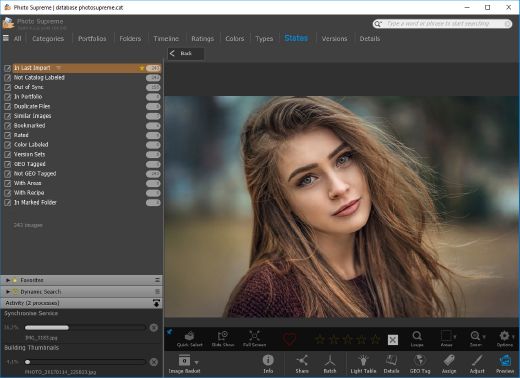
Import and Select
One of the standout additions in Photo Supreme v2026 is the new multi-pass Import and Select workflow. This allows users to review and refine image selections in multiple stages instead of making all decisions in one pass. It’s especially useful for large shoots, letting photographers cull images more deliberately and with less pressure. In addition, the Import and Select feature now loads images faster than ever. Mac users will also appreciate direct iOS device importing, which makes it possible to bring photos straight from an iPhone or iPad into the catalog without relying on intermediary software. This significantly streamlines mobile-first workflows.

Powerful Searches
Photo Supreme now supports natural language searching, allowing users to find images using plain, conversational phrases rather than rigid metadata queries. This feature is powered by AI services such as OpenAI, Google Gemini, or local models with Ollama. This gives users flexibility in how advanced features are enabled. In addition, a new classification system enhances search accuracy by grouping images into meaningful categories upon import, making it easier to surface relevant results in large or complex catalogs.

Video & Media Handling
For users working with video, Photo Supreme v2026 introduces hover-based video previews. Simply hovering over a video thumbnail now reveals a short animated preview, making it much faster to identify clips without opening them individually. Support for modern formats has also been expanded, ensuring the software keeps pace with current media standards.

Sharing with ZIP
Exporting images is more flexible in v2026 thanks to ZIP output support in transfer profiles. This makes it easy to bundle images into a single archive for delivery, backup, or client sharing, all directly from within Photo Supreme. These enhancements simplify distribution workflows and reduce the need for external tools.

GEO Maps
GEOgraphic-Mapping features can now generate maps using not only Google Maps, but also OpenFreeMap with OpenStreetMaps. This removes the need for API keys while still delivering rich, interactive map displays. This update makes location-based browsing easier to configure and more accessible for all users.

Performance and Refinements
Photo Supreme v2026 delivers notable performance enhancements, resulting in faster browsing and a more responsive overall experience. Response times are improved by up to 10%, with especially noticeable gains for large libraries containing many catalog labels.
Catalogs with numerous stacks also see significant performance improvements, particularly when displayed in stacked views.
v2026 includes a wide range of refinements, such as: "Visually similar" stack detection, numerous stability fixes and workflow enhancements, polished UI behavior in collections, searches, and metadata handling

Wait, there's more, a lot more…
New "RAW Files" and "Video Files" catalog states
Added support for Google Gemini as an AI service
Added support for OpenAI GPT-5.2 as an AI Service
Added support for Ministral3 model with Ollama
Added file management support for ACR sidecar files
Update HTTP Server with Photo Supreme Online (Server Edition)
Faster face recognition
Added "AI-Estimated GEO Location" to the AI Panel
Faster result display in the Collection Viewer
"Cascade Metadata" from image to Stack or Version Set is now a background process
A highlighted stroke has been added to the active tabs, improving navigation
Now you can display metadata charts and graphs across multiple tabs
Added support for Ctrl/Cmd+Z functionality in text and memo fields
Defined the new Affinity v3 .AF and .AVIF file format as a supported "other file format"
Switching the collection viewer's view style is faster (eg from Basic to Grid to Clean to Custom Thumb Info)
Advanced Search now has an option to search by "File Size" and "File Size MB"
Finetuned the check for "need to compact" on PostgreSQL (Server Edition)
Bookmark keyboard shortcuts are now a "toggle", similar to ratings and color labels
Expanding nodes in the Catalog Tree is ~25% faster
When using the "Dump Full to Catalog File" feature, there's now the option to create either a "catalog dump" file, or a "catalog with thumbs" dump files
Added a XMP Storage Location for "original file AND non-standard sidecar file"
In "Stacked View", you can now select a specific item from the stack to show
Support for PostgreSQL 18.
And more…

Highlights for v2026
Multi-Pass "Import and Select": Seamlessly transition through passes with a fast-culling system that optimizes your workflow.
Direct iOS Image Import on macOS: Import images directly from your iOS devices with ease.
Video Thumbnail Preview: Hover over a video thumbnail or open the Quick View to view a live video preview.
Natural Language Search Powered by AI: Search your content using plain language, with smart integration through OpenAI, Google Gemini, or Ollama models.
Transfer Profiles can now create ZIP output files: Copy or send sets of images as a single ZIP file for easier sharing.
Maps with OpenFreeMap: Display images on interactive maps using OpenFreeMap/OpenStreetMaps with no API key needed.
Server Edition Thumbnail Caching: Enjoy faster performance with local thumbnail caching, automatic cleanup, and customizable settings for retention and cache size.
Classifications: Enhance search accuracy with an automatic image classification mechanism on import.

Release Name: IDimager Photo Supreme 2026.2.1.8959
Size: 163.1 MB
Links: HOMEPAGE – NFO – Torrent Search

Download: RAPiDGATOR

8 Comments
Apr 15

Stardock Fences 6.44

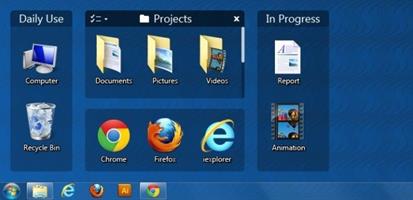
Description: The Best Way to Organize Your Workflow. Keep your desktop effortlessly organized. Organize your PC by intelligently placing your desktop content into shaded areas called fences.

Customized to your workflow
Automatically have files sorted into fences on your desktop with our extensive automation rules or manually add your own files and folders.

Personalized to your preferences
Easily change the size, colors, transparency, sorting, and more.

Enhance your productivity with unique features.
Powerful features like Peek and Folder Portals will enhance your productivity.

Folder Portals are essential
Folder Portals allow you to mirror any folder to your desktop for quick access to your most important content.

Your content is a Peek away
Instantly access your files, folders, and applications with Peek by pressing Winkey + Space to bring your fences on top of all your windows.

Create a workspace with no distractions.
Advanced Fences functionality makes it easy to quickly clean up your desktop.

Chameleon™
Desktop icons fade into the background but remain easily accessible to create a distraction-free desktop.

Desktop Quick-hide
Double-click any blank space on your desktop and your icons will fade away.

How Fences 5 is Used

Gaming
Steam, Epic, and more — every major publisher has its own platform and with some games even having multiple icons, your desktop can become a cluttered mess of gaming content. With Fences you can:
Organize all of your games into a single fence for quick access.
Keep all your game launchers in one location or roll-up the fence to keep them out of sight until needed.
Put all of your engagement apps into a single fence and when using Peek, easily access crucial apps while streaming.

School
Keeping your schoolwork organized can be a challenge but Fences makes the process easy. And with customization controls built into Fences, you can make it effortless to separate your content by topic.
Sort all of your schoolwork by class or topic so that you never misplace a document again.
Add a splash of color to a fence to make it easier to organize fences by topic.
Use quick-hide to create a distraction free desktop while working on a project.

Productivity
Keeping your desktop organized is at the heart of Fences. With the powerful built-in automation tools, you can create rules that will automatically organize your desktop by file type, name, time, and the target location.
Create a fence that automatically puts all screenshots into a single folder on your desktop.
Categorize icons into separate fences based on usage, such as research, assignments, or invoices.
Use a Folder Portal with your favorite cloud storage service to create a fence that syncs content across all of your desktops.

Accessibility
Fences not only makes it easy to keep your desktop organized but it can also improve the accessibility of Windows. By using Folder Portals, you can bring content buried in File Explorer neatly to the desktop.
Create a Folder Portal to bring the downloads folder directly to the desktop.
Change the size of icons and how they are displayed in a Folder Portal for easier viewing.
Use colored fences for easier organization and navigation of content on the desktop.

Release Name: Stardock Fences 6.44
Size: 23.4 MB
Links: HOMEPAGE – NFO – Torrent Search

Download: RAPiDGATOR
5 Comments
Apr 15

SeekFast 6.8 Build 1

Description: SeekFast is a software tool, allowing you to quickly and easily search text in files on your computer.

It supports all common document file types:
Microsoft Word Documents Microsoft Word Documents (.doc, .docx)
PDF files PDF files (.pdf)
Microsoft Excel Spreadsheets Microsoft Excel Spreadsheets (.xlsx, .xlsm, .xls)
Microsoft PowerPoint files Microsoft PowerPoint files (.ppt, .pptx)
OpenOffice Document Text OpenOffice Documents (.odt, .ods)
LibreOffice Writer documents LibreOffice Writer documents (.odt)
WordPerfect documents WordPerfect documents (.wpd)
Ebook files Ebook files (.epub)
Audio files - advanced properties Audio files - advanced properties (.mp3, .wav, .m4a, .ogg, .flac, .aac, and others)
Video files - advanced properties Video files - advanced properties (.mp4, .avi, mkv, .ogv, .wmv, and others)
Email files Email files (.eml, .msg, .mbox)
Subtitles files Subtitles files (.srt, .sub, .vtt, .dfxp)
LaTeX documents LaTeX documents (.tex)
Rich Text Format Rich Text Format (.rtf)
Many types of text files Text files (.txt)
Many types of text files Programming languages files (.html, .css, .cs, .cpp, .java, .py, .php, and others)

A Powerful Text Search Engine
SeekFast saves you time with its powerful text-based search capabilities, helping you find the files you are looking for in seconds.
Its unique logic shows you the most relevant results first, similar to that of a Google search. SeekFast technology has no equivalent in the world of file searching!
SeekFast is compatible with all modern Windows versions (Windows 7, Windows 8, Windows 10, Windows 11)

Release Name: SeekFast 6.8 Build 1
Size: 25.9 MB
Links: HOMEPAGE – NFO – Torrent Search

Download: RAPiDGATOR

6 Comments
Apr 15

Office Tool Plus 11.2.19

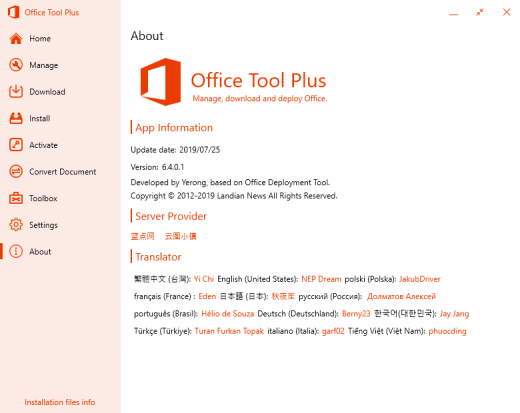
Description: Office Tool Plus based on Office Deployment Tool (ODT), you can deploy Office very easily.

Powerful Customization
Office Tool Plus support all features of Office Deployment Tool. You can deploy Office easily.

Rich Features
Office Tool Plus includes tools, you can fix, manage and configure Office very easily.

Generate Config
You can create XML profile with Office Tool Plus and use it to deploy Office on other computers.

Always up to date
Office Tool Plus get Office from Microsoft, make sure you can deploy the latest version of Office.

Fast & Easy, deploy Office in just two steps.

1. Config and Deploy Office
Office Tool Plus support multiple edition of Office, Visio and Project, you can configure more options for deploy.

2. Activate your Office
If you can't activate Office normally, you can use Office Tool Plus to install keys, get IID or set KMS to activate Office.

Release Name: Office Tool Plus 11.2.19
Size: 42.2 MB
Links: HOMEPAGE – NFO – Torrent Search

Download: RAPiDGATOR

6 Comments
Apr 15

Bandizip Professional / Enterprise 7.42

Description: Bandizip is a powerful archiver that provides an ultrafast processing speed and convenient features. It is available for free, and the paid editions offers a variety of advanced features.

Compression
Multi-volume & high-capacity compression
High-speed compression using a multi-core processor
Compress files in the 10+formats (ZIP, 7Z, EXE, ISO, etc.)

Decompression
Quick and easy file extraction
Show the list of files inside an archive
Decompress files in the 40+formats (ZIP, 7Z, RAR, etc.)

User Convenience
Smart file extraction
Right-click menus for fast access
Editing of files inside an archive
Multi-language support

Safety & Security
Test integrity of an archive
Antimalware scan on an archive
AES-256 encryption algorithm

Exclusive features provided by Professional Edition

Password Manager
Help to manage and enter frequently used passwords for handling archives

Repair Archive
Analyze a corrupted ZIP archive and collect uncorrupted data as much as possible

Password Recovery
Recover an archive’s password with ultrafast speed by optimized brute-force search

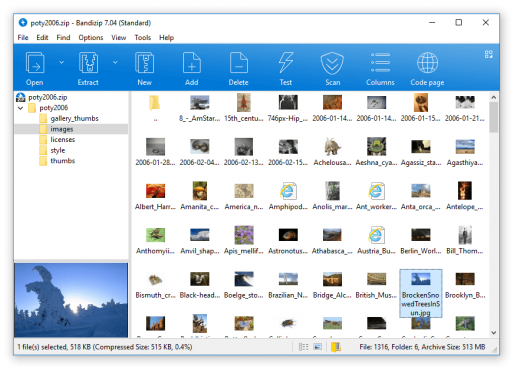
Image Preview in Archive
View thumbnails of images in an archive without decompression

Antimalware Scan on Archive
Detect malware in an archive by safe and accurate antimalware scan

Basic features for all users
Supported formats
ZIP, 7Z(lzma2), ZIPX(xz), EXE(sfx), TAR, TGZ, LZH(lh7), ISO(joliet), GZ, XZ
Multi-volume compression (for email attachments)
High-capacity compression (larger than 4GB)
Faster compression using a multi-core processor (6 times max)
Password settings for your archive
AES256 encryption algorithm

Supported formats
7Z, ACE, AES, ALZ, ARJ, BH, BIN, BR, BZ, BZ2, CAB, Compound(MSI), DAA(1.0), DEB, EGG, GZ, IMG, ISO, ISZ, LHA, LZ, LZH, LZMA, PMA, RAR, RAR5, SFX(EXE), TAR, TBZ/TBZ2, TGZ, TLZ, TXZ, UDF, WIM, XPI, XZ, Z, ZIP, ZIPX, ZPAQ, PEA, UU, UUE, XXE, ASAR, ZSTD, NSIS, LZ4
Show the list of files inside an archive
Use drag & drop to extract the selected files from an archive
View file comments of ZIP & RAR archives
One-step file extraction from TGZ & TBZ archives

Others
Modify an archive without decompression
Test integrity of an archive
Codepage settings & auto-detection
Right-click menus on File Explorer

Release Name: Bandizip Professional / Enterprise 7.42
Size: 27.3 MB
Links: HOMEPAGE – NFO – Torrent Search

Download: RAPiDGATOR

5 Comments
Apr 15

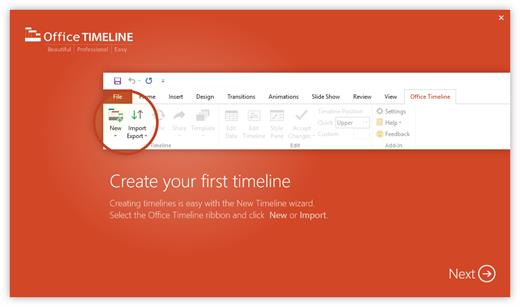
Office Timeline 14.05.00.00

Description: Effortless project reviews. Happy executives. Quickly summarize your project plan into visuals that executives and clients actually understand. With Office Timeline, you can communicate effectively with clear, convincing timelines.

Build in PowerPoint. Present in PowerPoint.
Seamlessly import data from top project management platforms into your project review presentation. Easily produce accurate timelines, Gantt charts, program roadmaps, and portfolio slides that no other application can match.

Organize easily. Summarize well.
Take the complexity out of your project reviews with our PowerPoint add-in for Windows®. Make a timeline that clearly represents dependencies and highlights different workstreams or phases by grouping tasks into swimlanes.

Change dates with ease.
Be ready for project changes and shifts with an adaptable timeline creator. You can move your entire Gantt chart back when delays happen or update tasks and milestones in real time with our easy-to-use, drag-and-drop editor.

Keep your existing workflow. Integrate easily.
Office Timeline integrates with tools like Jira, Project®, Excel®, and Smartsheet to instantly generate beautiful visuals that you can update on the fly. A timeline maker intelligently designed to build from the plan you already have.

PowerPoint timeline generator
Use the feature-rich PowerPoint add-in to build striking timelines, Gantt charts and Swimlanes on your desktop PC. Easily customize every detail of your graphic to present your project in a crisp, distinctive way that impresses stakeholders.

Release Name: Office Timeline 14.05.00.00
Size: 128.8 MB
Links: HOMEPAGE – NFO – Torrent Search

Download: RAPiDGATOR
6 Comments
Apr 15

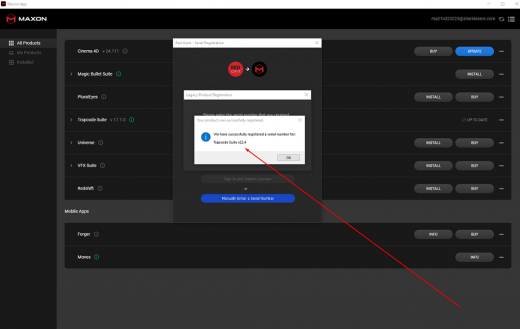
Maxon Red Giant 2026.4.0

Description: Red Giant 2026 injects fresh energy into workflows with a set of helpful new features, including new capabilities in After Effects with Geo, UI improvements to Particular Designer, and Parametric Curve, a new tool for handling color and HDR video that allows artists to manipulate their footage with an HDR curve. Geo, Red Giant’s new tool for texturing and repeating 3D geometry in After Effects, packs even more creative potential with added support for rigged animation and built-in depth of field, and more.

Particular Designer features optimized preset search and navigation along with other quality of life improvements. Additionally, Maxon Studio, our new template engine for After Effects, now allows saving of motion graphic template parameters as reusable presets.

Release Name: Maxon Red Giant 2026.4.0
Size: 3.2 GB
Links: HOMEPAGE – NFO – Torrent Search

Download: RAPiDGATOR

4 Comments
Apr 14

Maxon ZBrush 2026.1.2.1

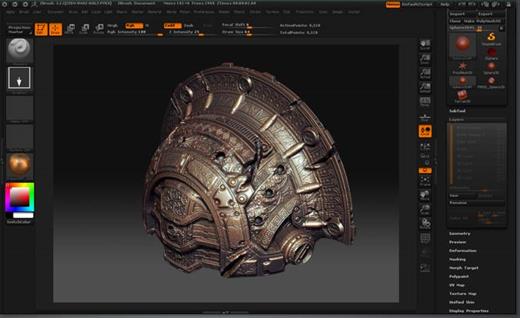
Description: Pixologic ZBrush Download Crack sets the industry standards for digital sculpture and painting. Its features allow you to use brushes that can be adjusted to shape, texture, and paint virtual clay in a real-time environment that provides instant feedback. When using Pixologic ZBrush Crack Free download, you will benefit from the same tools as those used by movie studios, game developers, toy/collection manufacturers, jewelry designers, automotive/aeronautical designers, illustrators, advertisers, scientists, and other artists from around the world.

In fact, we even received an Academy Award for the technology that supports ZBrush.In short, Pixologic ZBrush Free Download is an artistic tool created by artists, for artists. This allows you to create models and illustrations that are only limited by your imagination, with a speed that allows you to stand out in today’s rapidly changing industry. You May also Like CorelDRAW Graphics Suite + Content Free Download

Pixologic ZBrush offers artists more sculpting flexibility through powerful additions to the award-winning brush system. We have expanded the sculpting brush library with the new tractor, HistoryRecall, and DecoCurve brushes. In addition, you can now limit brush strokes to continue only the movement with the new No Back & Forth modifier.

Beyond the new brush, we have expanded the capabilities of the MorphUV function, which lets you see the open UV layout of models in Pixologic ZBrush. Sculpting & Painting in UV Morph allows you to sculpt and paint in 2D by unfolding the model, applying all updates to the 3D model.

Pixologic ZBrush Free Download Crack Features:


  • Capable for sculpting
  • Painting, texturing editing
  • Draw sketch from mind to screen
  • Provide a group of the polygon
  • Give elasticity for curves
  • Best application for artist and creative users
  • Re-edit the existing object
  • Transform different changes for perfection
  • Support the universal cameras
  • Create 3D efficient designs
  • Provide powerful features for creativity
  • Complete all the needs for polygon
  • Provide combination for colors and paints
  • Edit resolution from Low to high
What’s New iN Pixologic ZBrush 2022 Latest Version?

  • Modified: Gizmo icons now 50% larger.
  • Modified: Strength of smoothing that takes place after alt-drag when cleaning topology curves is now dependent on the Stroke/CurveFunctions/Curve Smoothness slider.
  • Modified: ZCameras will now store up to 256 cameras.
  • Modified: Separate TransPose falloff controls for Gizmo and Action Lines.
  •  Modified: Improved BevelPro bevel results with additional control options.
  • Modified: Smoothness option was added in the Bevel Pro Advance options
  • Modified: BevelPro now supports chamfering
  • Modified: BevelPro: Beveling supports inner boolean parts to fill holes.
  • Modified: Bevel Pro: Bevel/Chamfer operands feature polygroup separation.
  • Modified: BevelPro: Edge fixing is more aggressive.
  • Modified: BevelPro: When Auto Apply is enabled, edges are fixed in result as well.
  • Modified: BevelPro: Flipped meshes are respected.
  • Modified: BevelPro: Polish by groups respects masking.
  • Modified: BevelPro: Improved mesh rendering inside BevelPro.
  • Fixed: issue related to XMD hotkey.
  • Fixed: MultiMapExporter Layers Option.
  • Fixed: ZBrush to Photoshop 3D Layers issue.
  • Fixed: Knife brush with Brush radius option generating odd geometry
  • Fixed: KnifeCurve does not produce the expected results with BRadius and sharp angle cuts.
  • Fixed: Crash when Space Mouse is used to zoom in too far.
  • Fixed: Crash related to BevelPro when ZBrush is set to certain languages.
  • Fixed: DLL error preventing ZBrush from running on Windows 7.
Download Free Pixologic ZBrush System Requirements:

  • OS: 64-bit editions of Windows Vista or newer.
  • CPU: Intel i5/i7/Xeon technology or AMD equivalent.
  • RAM: 8 GB required for working with multi-million poly models. (16+ GB preferred.)
  • HDD: 100 GB of free hard drive space for ZBrush and its scratch disk. (SSD drive highly recommended.)
  • Pen Tablet: Wacom or Wacom compatible. (WinTab API.)
  • Monitor: 1920×1080 monitor resolution or higher with 32-bit color.
  • Video card: Most cards manufactured 2008 or newer. Must support OpenGL 3.3 or higher.
Release Name: Maxon ZBrush 2026.1.2.1
Size: 2.62 GB
Links: HOMEPAGE – NFO – Torrent Search

Download: RAPiDGATOR
6 Comments
Apr 14

MediaHuman YouTube Downloader 3.9.19 (1304)

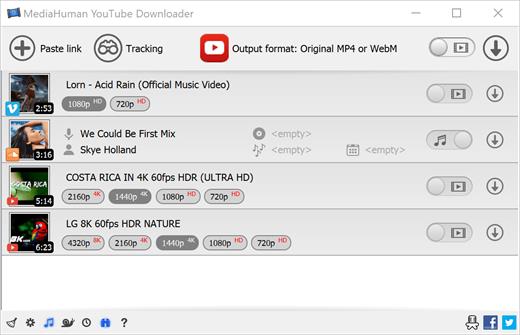
Description: There are so many interesting things to be found on YouTube, but you can't download the videos or save them as audio files by default. That's why we developed YouTube Video Downloader. This app will help you to accomplish video downloads quickly and without hangups. With our program you can simply download the whole playlist or YouTube channel at once and watch it whenever and wherever you want.

The application has many other convenient and practical functions for you to explore and enjoy.

Downloads entire playlists and channels
Supports Ultra High resolutions including 4K & 8K (with audio)
Downloads several videos simultaneously
YouTube, Facebook, Vimeo, Dailymotion, and many others
Extracts audio track and saves it as MP3
Supports exporting to iTunes/Music.app

Main Features:
Playlists and channels
The program supports downloading all the videos in a playlist or channel. In addition, you can monitor the selected channel or playlist and download new clips as they are uploaded.

Adds directly to iTunes/Music.app
You can configure the program to automatically add downloaded movies to your iTunes library. You can also pick a playlist where the downloaded video should be added.

HQ, HD, 4K or 8K
The program supports all available resolutions, be that 720p, 1080p, 4K or 8K, 30 or 60 fps. The choice is up to you. Unlike online video downloaders, the app downloads any resolution with sound.

Quality of the original
You can choose to save the video in its original quality and format, such as MP4 or WebM, without any modifications. In this case, the clip you get will be exactly the same as the one uploaded by its author.

Monitors the clipboard
The program keeps an eye on the clipboard and as soon as it spots a supported link there, it automatically adds this video into the download queue.

Simple tag editor
For audio downloads, the app automatically detects the artist and song name, which will be written in ID3 tags. These can be easily changed before the video is downloaded.

Not just YouTube
The program supports Twitch, Vevo.com, Vimeo, Dailymotion, Facebook, UOL, VKontakte, SoundCloud, TikTok, Likee, Brandnewtube, Odysee, Brighteon, Rumble and a lot of other sites. So you can download video from these websites as easy as you do from YouTube.

Drag & Drop
The app features a 100% drag&drop support. Just drag the link to a video with your mouse and drop it to the main window of the program, or to its dock icon on Mac.

Multi-language interface
The app is translated into: Arabic, Armenian, Azerbaijani, Bulgarian, Catalan, Chinese (Hong Kong SAR China), Chinese (Simplified), Chinese (Taiwan), Croatian, Czech, Danish, Dutch, English, Esperanto, French, German, Greek, Hebrew (Israel), Hungarian, Indonesian, Italian, Japanese, Korean, Latvian, Lithuanian, Malay, Norwegian Bokmål, Polish, Portuguese, Portuguese (Brazil), Romanian, Russian, Serbian, Slovenian, Spanish, Swedish, Turkish, Vietnamese.

Release Name: MediaHuman YouTube Downloader 3.9.19 (1304)
Size: 85.6 MB
Links: HOMEPAGE – NFO – Torrent Search

Download: RAPiDGATOR

9 Comments
Apr 14

RazorSQL 10.6.8

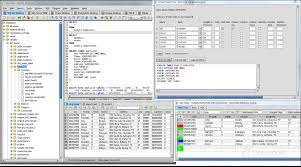
Description: RazorSQL is an SQL query tool, database browser, SQL editor, and database administration tool for Windows, macOS, Mac OS X, Linux, and Solaris. RazorSQL has been tested on over 40 databases, can connect to databases via either JDBC or ODBC.

Database Browser
Browse database objects such as schemas, tables, columns, primary and foreign keys, views, indexes, procedures, functions, and more.

SQL Editor
Edit SQL scripts. Run SQL queries. Auto column and auto table lookup. Uses the powerful EditRocket code editor that supports over 20 programming languages including SQL, PL/SQL, TransactSQL, SQL PL, HTML, Java, XML, and more.

Database Tools
Visual tools to create, alter, describe, execute, and drop database objects such as tables, views, indexes, stored procedures, functions, triggers, and more.

Database Query Tool
Includes multi-tabular display of queries with options for filtering, sorting, searching, and much more.

Import Data
Import data from various formats such as delimited files, Excel spreadsheets, and fixed-width files.

Export Data
Export data in various formats such as delimited files, XML, HTML, Excel spreadsheets, JSON, and SQL insert statements.

SQL Query Builder
Create select, insert, update, and delete SQL statements. Create multi-table joins.

Built-in Database
Includes a robust relational database (HSQLDB) that is up and running with no manual configuration out of the box.

Edit Table Tool
Insert, update, and delete table data in a spreadsheet like format. Find and replace data, preview generated SQL, and more.

Data Compare
Compare table data across databases, or compare the results of queries.

Features:
A Database Navigator for browsing database objects.
An SQL Editor for creating SQL queries.
Visual tools for creating, editing, dropping, describing, altering, and viewing tables, views, indexes, and sequences
Database Management Tools
Visual Tools for creating, editing, dropping, and executing stored procedures, functions, and triggers
A robust programming editor that embeds the powerful EditRocket code editor that supports 20 programming languages including SQL, PL/SQL, TransactSQL, SQL PL, HTML, XML, and more.
Export Tool - Export data in various formats
Import Tool - Import data from delimited files, Excel files, or fixed width files into tables
Ships with a built-in relational database engine (HSQLDB) that is up and running out of the box and requires no end-user administration
A Generate DDL Tool for generating table, view, and index DDL.
Table / SQL Query Compare tool for comparing tables or queries across multiple connections
Database Data Search tool for searching single or multiple database table and view data.
Database Object Search tool for searching for database objects.
Backup tools such as the Database Backup Tool and Table Backup Tool
Database conversion tools for many popular databases such as MySQL, Oracle, DB2, PostgreSQL, SQLite, MS SQL Server, and MS Access.
Auto column and auto table lookup
SQL Formatter
SQL Query builder tool
SQL Query Scheduler tool
Command Line Interface
PHP Bridges for connecting to MySQL, PostgreSQL, and SQL Server databases remotely via PHP enabled web servers
An ASP bridge for connecting to MS SQL Server databases remotely via ASP enabled web servers
SQL GUI Tools for generating SQL for various operations
Edit, delete, and insert database data with the Database Editor
Works with all major operating systems including Windows, macOS, Mac OS X, Linux, Solaris, and any other Java enabled OS
Tested with Apache Cassandra, Apache Derby / JavaDB, Apache Hive, Daffodil DB, DB2, DBASE, Druid, DynamoDB, Firebird, FrontBase, H2, HSQLDB / HyperSQL, Informix, Ingres, Interbase, Mckoi, Microsoft Access, Microsoft SQL Server, Mimer SQL, MongoDB, MySQL, Netezza, OpenBase, Oracle, Pervasive, Pointbase, PostgreSQL, Redshift, Salesforce, SimpleDB, Solid, SQLite, Sybase Adaptive Server Enterprise, Sybase SQL Anywhere, Teradata, and VoltDB

Release Name: RazorSQL 10.6.8
Size: 191.8 MB
Links: HOMEPAGE – NFO – Torrent Search

Download: RAPiDGATOR
9 Comments