Please REGISTER or RENEW your account on RAPiDGATOR.net and support us by doing through all RAPiDGATOR working download links on main posts...
Apr 7

Helium Music Manager 18.0.714 Premium

Description: A music cataloger, tag editor, cd ripper, audio converter, mp3 and flac analyzer, duplicate finder, player and music scrobbler - all in one. Get more from your music collection.
Has everything you need
Why mess with a lot of different tool for cataloging, tagging, playing or renaming files when you only need one?
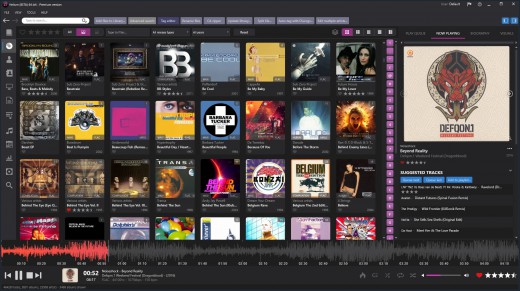
Getting started with Helium is very easy - simply install it and then import your digital audio files. After the initial import is done you can start to browse your collection using all various browse mode and work with all powerful tools that are included. Quickly use the powerful search capabilities to locate specific artists, albums or tracks. Adjust and correct data of your files and manage your album and artist pictures in a batch.
Helium offers many quick and simple operations to handle your music collection, but it does not stop there. You can also interact with Helium via its scripting API. The scripting API allows you to execute specific operations via C# scripts to tracks, artists and albums in your collection.

Big collections - no problems!
We have designed Helium to be useful with collections ranging from small collections to large collections with several hundred thousand tracks. Due to its scalable design, you can easily migrate from the default database engine to more powerful engines like SQL Server, MySQL, or PostgreSQL, stored either locally on the same machine as Helium or on a remote machine for optimal multi-user support.

Helium is designed to work with Windows 10 and Windows 11

Cataloging
Support for multiple database types for the ultimate scaling for small and large collections.

Tagging
Different tag editors with multiple capabilities. Support for quick editing whilst viewing.

Manage
Download pictures and information, convert files, automatically rename files and much more.

Modern user interface
Browse your collection in various ways to quick and easily find what you are looking for. Dark or light themes available.

Play
Play music through playlists and use visualization for the optimal experience.

Automate
Automate multiple tasks with Helium's script engine. Create your own tasks and run in batches.

Premium version
Unlimited separate user accounts
Advanced searches
Multiple database type support
Remote control app
Advanced dynamic statistics
Client/server multi user features

Release Name: Helium Music Manager 18.0.714 Premium
Size: 66.9 MB
Links: HOMEPAGE – NFO – Torrent Search

Download: RAPiDGATOR
9 Comments
Apr 7

PassFab 4EasyPartition 4.0.1

Description: The most secure and professional system migration and all-in-one partition management tool. Quickly and safely migrate your Windows system to other hard disk or PC. 1-click to move to a new high-speed SSD, make your Windows boot faster.

Convert MBR to GPT to update Windows 11 without losing data.
Upgrade to a larger hard drive, free up your disk space.
Easily clone disks/partitions to create full backups, saving your time and efforts.
Quickly resize, create, delete, split, and format partitions, simplifying your PC disk management.

Smart Disk & Partition Cloning
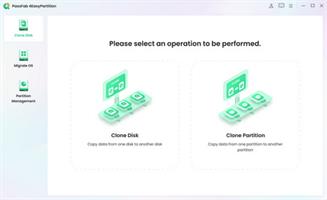
PassFab 4EasyPartition helps to clone one disk/partition data to another disk/partition intact without losing any data on all Windows-supported PCs.

Clone Disk
Want to recover data? Want to upgrade your drive? PassFab 4EasyPartition helps you to clone HDD, SSD, USB flash drive and other types of hard drive and transfer all the saved data & applications to the new drive.

Clone Partition
Running out of disk space? PassFab 4EasyPartition enables you easily upgrade/replace/backup hard drives and transfer large amounts of data from one partition to another.

One-Click System Migration
Hunting for an easy-to-use tool to migrate your data, operating system and applications to other hard drives? PassFab 4EasyPartition is the best choice for you with just one-click, without requiring you to reinstall your operating system or applications!

Migrate OS to SSD/HDD
Safely and easily migrate your data, OS and applications to another hard drive without data loss.

Upgrade to a New High-speed SSD
Replace HDD with SSD, providing you with the easiest and fastest way to boot.

Safely Transfer Everything
Ensure no business interruption when user migrate system to a more efficient OS. no need to install applications, system configuration file and other files as well.

No Need to Reinstall the System
Transfer data directly without reinstalling the app. Improve efficiency and save your time.

Seamless MBR and GPT Disk Conversion
Realize seamless conversion between MBR and GPT disks, and instantly unlock new flexibility. Switch between the two formats quickly and easily, whether for compatibility adjustments or system upgrades, without losing data.

Seamless Windows 11 Upgrade
PassFab 4EasyPartition offers a hassle-free solution. Easily switch from MBR to GPT, smoothly upgrading from Windows 7, 8, or 10 to the sleek Windows 11 interface.

Preserve Data, Skip Reinstallation Worries
PassFab 4EasyPartition makes MBR to GPT transition a breeze, removing concerns about data loss or complicated reinstallation processes.

Unlock Storage Capacity
Stuck with MBR's four partition limit and 2TB cap? No more worries! Use PassFab 4EasyPartition to convert your drive to GPT, unlock the potential to create up to 128 partitions, and maximize your storage space.

Broaden Device Compatibility
Ensure seamless compatibility across various devices, including older computers. Convert your disk from GPT to MBR to unlock broader support and accessibility.

Revive Legacy Systems
Bring life to vintage operating systems like Windows 95/98/ME, Windows NT4, Windows 2000, Windows 2003, or the 32-bit version of Windows XP. Converting GPT to MBR guarantees smooth startup and operation for your cherished legacy system.

The Safest Way to Recover Partitions
PassFab 4EasyPartition is a reliable partition recovery software, which can help you recover deleted partitions, restore formatted partitions and repair unformatted partitions easily and safely.

Release Name: PassFab 4EasyPartition 4.0.1
Size: 84.9 MB
Links: HOMEPAGE – NFO – Torrent Search

Download: RAPiDGATOR
8 Comments
Apr 7

PVS-Studio 7.42.105102.2190

Description: PVS-Studio is a static analyzer on guard of code quality, security (SAST), and code safety. PVS-Studio detects various errors – typos, dead code, and potential vulnerabilities (Static Application Security Testing, SAST). The analyzer matches warnings to the Common Weakness Enumeration, SEI CERT Coding Standards, and supports the MISRA standard.

When it is time to use the PVS-Studio analyzer

For a developer
You make occasional mistakes during development
Debugging when searching for errors is time consuming
Errors get into the version control system
Once an error is found by QA specialists, it’s difficult to debug that code

For a manager
Frequent returns to old tasks due to bugs
Users report errors in your products
You hire more developers but notice a code quality decline
With the increasing amount of code, it is difficult to assess its quality and reliability

For a security professional
Difficulties with external code audit
Potential customers require the use of such tools
Clients require to use security and safety standards in development

For a security professional
Difficulties with external code audit
Potential customers require the use of such tools
Clients require to use security and safety standards in development

Supported languages and compilers

Windows
Visual Studio, C, C++, C++/CLI, C++/CX (WinRT)
MinGW C, C++
Texas Instruments Code Composer Studio, C6000-CGT, C, C++

Windows/Linux
IAR Embedded Workbench, C/C++ Compiler for ARM C, C++
QNX Momentics, QCC C, C++
Keil µVision, DS-MDK, ARM Compiler 5/6 C, C++
Texas Instruments Code Composer Studio, ARM Code
Generation Tools C, C++
MPLAB XC8 C

Windows/Linux/macOS
GNU Arm Embedded Toolchain, Arm Embedded
GCC compiler, C, C++
GNU toolchain for RISC-V, C, C++
CLion, Qt Creator, Eclipse, GCC, Clang, C, C++
IntelliJ IDEA, Android Studio, Java
Visual Studio, JetBrains Rider, C#, .NET Framework, .NET

Release Name: PVS-Studio 7.42.105102.2190
Size: 189 MB
Links: HOMEPAGE – NFO – Torrent Search

Download: RAPiDGATOR

10 Comments
Apr 7

Muni Animation MotionMuse 1.1.9

Description: An easy to use toolset for 3D Character Animation. The goal of MotionMuse is to unclutter the Animation process, to bring in new artists to 3D animation without requiring a steep learning curve. To this end we employ powerful tools with an easy to use interface. Anyone, without any knowledge of 3D character animation can pick up MotionMuse and start animating complex characters.

Character Rigging
MotionMuse provides simple and easy to use rigging/skinning tools to quickly bind character to existing or generated skeletons. Simply select the mesh and the skeleton to automatically assign weights for each joint for each vertex. Auto rigging supports rigging of multiple meshes to quickly skin multiple parts of the character. Joint creation tools along with weight painting and bind matrix adjustments further allows our rigging system to quickly set up the character as per your precise requirements.

Retargeting – Animation Transfer
Retargeting in MotionMuse is a simple way to transfer animation across to another character within a few clicks. The character skeletons do not need to be of the same size or even of the same topology for retargeting to work. Simply select the source and target skeletons and MotionMuse will automatically compute a mapping between them. The user can also modify the mapping manually if required. Once satisfied, simply start the animation transfer. The targeted skeleton can then be exported to a new FBX file to be used in the desired workflow.

Full Body Motion Editing System
Motion Editing in MotionMuse is the easiest way to edit existing Character animations. By simply displaying a trajectory of a Joint and modifying either the trajectory or its control points and/or tangents, one can quickly alter character animations. Existing keys of all participating joints will be adjusted automatically by the Motion Editing system. Our Motion Editing system makes use of parallel hardware by utilizing GPUs and multicore CPUs for interactive updates.

Full Body Inverse Kinematics
MotionMuse gives you full control of the character by implementing the state of the art Inverse Kinematics solver. No further rigging of the character is required as the bone hierarchy itself is used to articulate complex character movements. The user can quickly move the entire or part of the body, with on the fly control of which body parts to affect. Multi-Character IK enables artists to articulate a large number of characters on the fly for easy inter-character interactions.

Spline Based Sketching for Posing
Spline based Sketching is an easy way to pose a chain of joints quickly by simply drawing on top of them. The Sketch can be adjusted on the fly to precisely pose the underlying joints and bones. Tangents and control points can be adjusted for exact positioning. Our Sketching supports stylus and tablet devices to get the most out of your vision.

Curve Editor for Motion Control
A fully featured Curve Editor allows the user to accurately control the interpolation between multiple key frames. With support for multiple types of interpolation curves and different types of tangents, you can be assured to get the exact repeatability and reliability needed for precise motion control. Easy copy / pasting of keys and free control of each independent key makes this one of the easiest curve editor to use.

Media Overlays
Diminishing the gap between 2D and 3D animation is inline with our vision of uncluttering the Animation process. We achieve this by implementing a Media Overlay system. The artist can create image overlays at multiple time frames and draw on top of them using mouse / pen tablet devices, or can load existing images or videos. By matching the underlying character to multiple image overlays or video overlays the artist can quickly achieve his / her animated vision.

Recommended Specs
Windows 10 / 11, requires 64-bit OS
16 GB RAM (minimum 8 GB)
4 Core Processor (minimum 2 Cores)
OpenGL 4.3 or above
OpenCL 1.2 or above
500 MB of disk space

Release Name: Muni Animation MotionMuse 1.1.9
Size: 71.8 MB
Links: HOMEPAGE – NFO – Torrent Search

Download: RAPiDGATOR

8 Comments
Apr 7

FastNeuron BackupChain 4.1.5506

Description: BackupChain is an affordable, reliable, and customizable PC and Windows Server backup software for Windows Server 2025 - 2003, Windows 11 - XP, and Azure Stack HCI, made specifically for IT professionals. You can fine-tune backups and use open standard backup file formats to back up your physical and virtual servers exactly the way you want, at a significantly lower price than other backup solutions.

As a fully automatic and configurable backup solution, BackupChain offers Hyper-V backup, file backup, disk backup, version backup, deduplication, and delta compression. BackupChain Backup Software also includes database, live virtual machine backup, and a powerful multi-threaded engine for parallel processing. Files, databases, and virtual machines can be easily backed up to network servers, USB, SAN, iSCSI, local drives, and FTP. Access your data with ease: BackupChain can be configured to use open standard backup formats (ZIP, 7Z, virtual disks, etc.) or the file's native format, whether you are backing up a file server, a VMware, or Hyper-V server. Backup tasks can be configured to allow you to access files directly from the backup folder, and much more. Our notable customers include: Boeing, Siemens, Kyoto University, the State of Maryland, Lockheed Martin, the Canadian Federal Government, Mitsubishi, Supreme Court of Albania, BNP Paribas, Wyoming Community Bank, Oman Arab Bank, Scobag (Swiss Bank), HP (Hewlett-Packard) and the United States Bankruptcy Court.

Cost-Effective, Enterprise-Grade Backup Solution – All-in-One
A complete, yet lightweight, all-in-one backup software package, offered as a "buy-once-and-use-forever" license.
100% U.S. based, qualified, responsive, and reliable technical support is always available when needed
Own your backup software: Software licenses are perpetual "forever" licenses, not yearly subscriptions
Centralized management console: manage all your backups from a single screen, no matter how many computers and servers you have
Open standard file formats and the most advanced version backup system in the market
Image backup, full system disk backup, hard drive cloning and disk copy features, including bare-metal recovery, requiring no reboots or interruptions
V2V, V2P converter, and P2V converter: Convert physical server to virtual machines and vice versa, as well as between virtual machine platforms (V2V). Convert physical servers to Hyper-V to VMware or VirtualBox in all combinations.
Hyper-V Backup (See Step-by-Step Example), VMware Backup, VirtualBox Backup: Extensive, Reliable Virtual Machine Backup Features
Granular Backup & Granular Restore Features
File History Backup
Configurable data backup processing, filtering, file versioning (version backup, and parallelization options
Deduplication and a built-in FTPS Server (FTP encrypted over TLS/SSL), also available in all editions
Cloud Backup and Remote Backup (See our cloud backup plans);
Set Up Private DIY Cloud Server Storage and Access via Mapped Drive, using BackupChain and DriveMaker. Benefit from our unique incremental FTP backup technology, as it only uploads file content changes.
Azure Stack HCI backup: Back up virtual machines and other services running on Azure Stack HCI
Check out our notable customer list and reviews.
IT administrators and consultants: Get credit for your backup and recovery skills with our unique Backup Engineering Certification.

Release Name: FastNeuron BackupChain 4.1.5506
Size: 24.3 MB
Links: HOMEPAGE – NFO – Torrent Search

Download: RAPiDGATOR

8 Comments
Apr 7

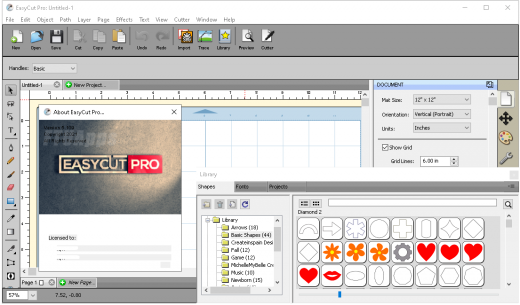
EasyCut Pro 5.123

Description: The complete solution for designing, printing, cutting and print+cut. It gives you the ability to cut any TrueType font, OpenType font, graphics, SVG, PDF, as well as your own original designs with your cutting plotter. This awesome vinyl cutting software even supports vectorize your images and built-in shape library includes hundreds of vectorial designs ready for cutting. With the intuitive user interface, Now anyone can cut designs like a pro! Professional sign cutting software for your vinyl cutter.

Image Tracing & Vectorizing
Unmatched image vectorization, Simply use the powerful tracing tool to create cuttable outlines from any imported raster graphics (including PNG, JPG, GIF, PSD, PDF, BMP, TGA, TIFF, etc.) or scanned images. Easily create accurate vector paths ready for cutting or make further editing.

Draw your own designs
Drawing and Designing couldn’t get any easier! This powerful vinyl cutting software comes with a suite of various shape drawing and editing tools to draw and edit any shape directly on the mat. Easily draw unique shapes, modify signs, create logos, edit images, customize text with fonts on your computer plus special effects. Easy Cut Studio will make your design and cut your shapes easier than with any other sign-making software in the market today. It is a little design powerhouse for vinyl cutting.

Import/Export most file formats
Import various file formats, including PNG, SVG, EPS, PDF, AI, GSD, SCUT, WPC and other popular vector formats as editable objects. giving you the power to cut any shape and custom artworks. You can also export your design to SVG, PDF, PNG, FCM, TIFF, JPG, and BMP format.

Print and Cut (Contour Cut)
Print to Cut made easy, fast and accurate. Automatic creation of registration marks for print and cut applications. Easily print your artwork and then cut out around the printed image using your cutting plotter, which is perfect to create decals and stickers. User control over registration size, thickness and offset will help the cutter find the contour cut marks easily.

Working With Layers
Easily create complex designs using multiple layers, grouping to organize the display order of objects. Using Layers can help you more control over how you organize, edit and cut objects with Easy Cut Studio. The Shadow Layer option will create cuttable shadows from any shape.

Weld Text and Shapes Together
Welding is an advanced option allows you to make overlapping text and shapes to become a single shape, by joining shapes together wherever an overlap occurs. There are two ways to combine shapes/letters together: welding and joining.

Design and Cut Rhinestone Templates
Easily convert designs into rhinestone templates and make your own custom rhinestone designs with typeable rhinestone ready fonts. Specify stone size and spacing to make a rhinestone template and lattice shapes. Just select an object on the screen mat, and then choose "Rhinestones" from under the "Effects" menu to bring up the Rhinestone window shown below.

Features
- Works with your installed TrueType and OpenType fonts on your computer
- Works with Black Cat Cougar/Lynx™ , Bosskut Gazelle™, Craftwell eCraft™, CraftROBO/Graphtec™,
- GCC™, Foison™, Liyu™, Pazzles Inspiration/Pro™, Ramtin™, Roland™, Seki™, Silhouette
- SD/CAMEO/Portrait™, Silver Bullet™, USCutter™, Vinyl Express™, Wishblade™, & more
- Works with thousands of free TrueType, OpenType and Dingbat/Wingding fonts
- Import various file formats, including SVG, PDF, EPS, WPC
- Drawing tools to draw and edit shapes
- Auto tracing feature to automatically convert images (including jpg, bmp, gif, png) for cutting
- Create rhinestone templates and lattice shapes
- Weld overlapping letters and shapes together
- Select styles, including Shadow and Blackout, to change the look of your letters and shapes
- WYSIWYG Interface - What you see is what you cut
- Text on arch tool and text on path tool.
- Place text or objects on bezier paths.
- Convert text to outlines/paths.
- Creating multiple copies of the same object.
- Node editing tool.
- Creating the registration marks.
- Layout and special effects for your text and shapes.
- Cut font files already installed on your Mac or Windows.
- Create shadowed mat effects.
- Stencil function for bridging interior shapes.
- Unlimited undo/redo

Release Name: EasyCut Pro 5.123
Size: 14.7 MB
Links: HOMEPAGE – NFO – Torrent Search

Download: RAPiDGATOR
9 Comments
Apr 7

SmartFTP Enterprise 10.0.3319

Description: SmartFTP is an FTP (File Transfer Protocol), FTPS, SFTP, WebDAV, Amazon S3, Backblaze B2, Google Drive, OneDrive, SSH, Terminal client. It allows you to transfer files between your local computer and a server on the Internet. With its many basic and advanced Features SmartFTP also offers secure, reliable and efficient transfers that make it a powerful tool.

SmartFTP can be used for:
Web site publishing and maintenance
Upload and download of images, documents, movie and music files
Managed file transfers. Automate file transfer processes.
Backup and synchronize local and remote files

Features
Protocols:
- FTP and FTPS (Secure FTP)
- SFTP over SSH
- WebDAV
- Amazon S3 (Enterprise Edition)
- Google Drive (Ultimate Edition)
- Microsoft OneDrive (Ultimate Edition)
- Google Cloud Storage (Enterprise Edition)
- Backblaze B2 Cloud Storage (Enterprise Edition)
- Box (Enterprise Edition)
- Terminal Emulator (Ultimate Edition)
Integrated Editor
HIPAA 5010 compliant
FIPS 140-3, 140-2, 186-4 compliant
Modern Graphical User Interface (GUI):
- High DPI support
File/Folder Synchronization
Multilingual (more than 20 languages)
Thumbnails View and Preview
Source File Preview
Visual Compare
Advanced Schedule
IPv6
On-the-fly Compression (MODE Z)
UTF-8 Support
Support for KeePass, LastPass, Bitwarden and 1Password password manager
Multiple Connections
Auto reconnect and resume of broken transfers
Transfer Integrity
Verified Transfers (XCRC, XMD5, XSHA)
FXP (Server-To-Server Transfer) support
Remote Edit of files
Search for files and folders on the server
Local Browser
Bulk Rename
Enhanced NAT/UPnP Support
UPnP (Universal Plug and Play), ICS, ICF
Transfer Queue:
- Scheduling (Enterprise Edition)
- Uploads/Downloads/FXP
- Unlimited simultaneous threads
International Domain Names (IDN)
Proxy / Firewall support:
- SOCKS5, SOCKS4, SOCKS4A, HTTP Proxy
URL Watcher
FTP command line
Custom Commands
CHMOD (Properties)
Section 508 compliant
and much more …

Release Name: SmartFTP Enterprise 10.0.3319
Size: 10.7 MB
Links: HOMEPAGE – NFO – Torrent Search

Download: RAPiDGATOR
8 Comments
Apr 7

EmTec PyroBatchFTP 3.37

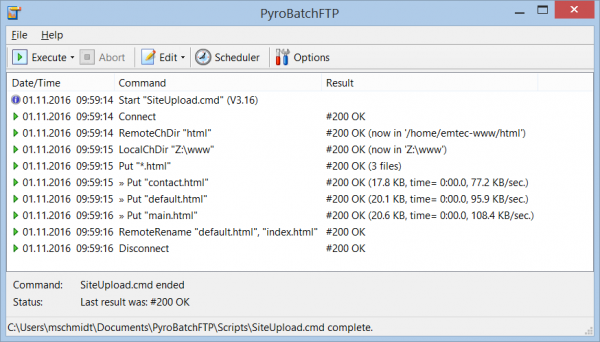
Description: PyroBatchFTP is a Windows software that lets you exchange files with FTP, FTPS or SFTP servers in an automatic and unattended way, using a simple yet powerful batch/script language.

PyroBatchFTP is a Windows software that lets you exchange files with FTP, FTPS or SFTP servers in an automatic and unattended way, using a simple yet powerful batch/script language.
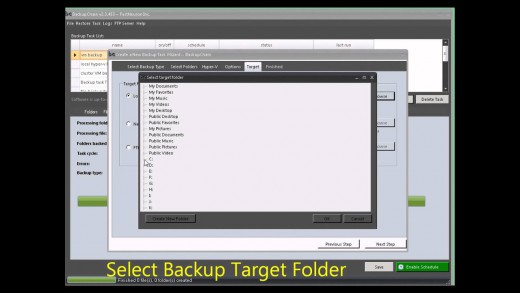
The package is intended for users who need to run FTP, FTPS or SFTP file transfers in an automated way (scheduled or manual), e.g. to update web servers or upload data files to backup servers.

Key benefits of this automated file transfer program:
Easy to learn scripting language
Regular FTP via one of two built-in FTP engines
Secure file transfer via SSH/FTPS/SFTP
Synchronizes whole directory trees using a single command
Over 50 powerful script commands
Built in scheduler (cron-like)
Can run as a service (Server Edition)

Release Name: EmTec PyroBatchFTP 3.37
Size: 8.4 MB
Links: HOMEPAGE – NFO – Torrent Search

Download: RAPiDGATOR
8 Comments
Apr 7

eDocPrinter PDF Pro 11.10 Build 11108

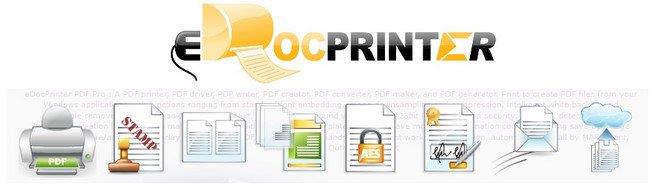
Description: eDocPrinter PDF Pro is working as a printer driver supporting multiple printer instances with different profile settings. Users can print to the PDF printers to create PDF files from applications. It creates PDF files with image compression and downsampling, Opentype/Truetype font embeddding, as well as optional functions like encyrption, watermark, email or upload by FTP/SFTP after print, and etc. to simplify the enterprise paperless workflow.

PDF Stamp watermarks
Print to create PDF files with stamping text, image, or compound watermarks. Administrators can define global watermarks or enforce a mandatory watermark on all PDF files created for all users.

PDF N-up or booklet
As a PDF printer, users can define custom paper size as well as print in N-up or booklet form by a simple selection. Multiple copies, collating, and fixed paper source are provided for emulating physical printing effects.

PDF Overlay PDF Merge
Print to create PDF files with merging to existing PDF files by Append, Insert before, or Overlay. In addition, users can overlay with existing template PDF files with flexible options like repeating in user defined interval (e.g. even-odd templates), optional trailer or header pages, foreground/background overlay, and etc. When creating PDF files, users can turn on the option to automatically remove opaque white background rectangle before overlaying.

PDF Encrypt (AES)
Applying PDF security permission on PDF files created with standard 40/128bit encryption or optional 256 bit AES encryption.

PDF Digital Signature
Digitally signing PDF files with your certificates by PDFSealer (Ent. pack feature). PDFSealer supports signing in PPKMS, PPKMS with SHA-256, SHA-384, or SHA-512. Integrated within the PDF creation flow by embedded commands automation.

PDF Email(Outlook/SMTP)
Send PDF files by defautl email client, Extended MAPI, Outlook automation, SMTP, or optional Ent. pack feature SMTP TLS/SMTP SSL. Capture the email addresses, subject, or content fields by the embedded commands automatically.

PDF Upload(FTP/SFTP)
Archive or share your PDF documents by uploading (Ent. pack feature: FTP/SFTP) to the cloud. Users can also call custom actions for postprocessing PDF files after creation.

Release Name: eDocPrinter PDF Pro 11.10 Build 11108
Size: 18.5 MB
Links: HOMEPAGE – NFO – Torrent Search

Download: RAPiDGATOR

10 Comments
Apr 7

DbVisualizer Pro 26.1.1

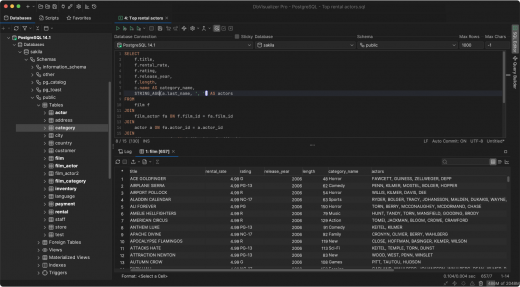
Description: The database client with the highest user satisfaction. DbVisualizer has a long history of being the preferred database tool for the world’s leading data professionals. Built for navigating complexity. DbVisualizer has everything you need to build, manage and maintain state-of-the-art database technologies. Each feature has been thoughtfully crafted to solve real world problems.

It connects to all popular databases.
DbVisualizer is the only database tool you’ll need. Everything you need to gather data from all your data sources is bundled right in - including support for database-specific object types and more.

Leading the way in user satisfaction.
DbVisualizer is continuously developed in close collaboration with our users. We pride ourselves in engineering software of the highest quality and deliver support to our users directly from our developers.
Because that’s the kind of support we like.

Advanced SQL editor.
DbVisualizer includes an advanced SQL editor that will help make your coding life easier.

Write beautiful queries.
Copy-pasted queries can be easily formatted to your liking and auto-suggestions will help you write efficiently.

Simplify the re-use of queries.
DbVisualizer variables make it easy for users to modify specific values inside a query as it is being initiated.

Access. Explore. Optimize.
DbVisualizer is a universal database client that will help you access, explore and optimize most popular databases.

Explore and visualize
Easily viewed, managed and control your stored data.

Driver management via Maven
JDBC driver management is built in with version handling.

Custom object types and actions
We support unique object types across a huge range of databases.

Taking control of your data.
The data stored in your database can be easily managed and controlled with DbVisualizer.

Results visualization
As you get the result from a query, you can decide how it should be presented. You can choose from a simple table to various graphs with custom design.

Inline editing
You can edit data directly in the DbVisualizer viewer. Each edit will be highlighted and saved locally until you decide to commit your updates to the database.

Exporting
You can export a result set into almost any file format, with specific formatting. There are also quick-export options for when you just want to open the result set as a spreadsheet.

Release Name: DbVisualizer Pro 26.1.1
Size: 208.9 MB
Links: HOMEPAGE – NFO – Torrent Search

Download: RAPiDGATOR
8 Comments