Please REGISTER or RENEW your account on RAPiDGATOR.net and support us by doing through all RAPiDGATOR working download links on main posts...
Apr 7

Free YouTube To MP3 Converter 4.5.11.406 Premium

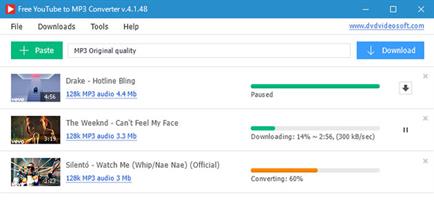
Description: Free YouTube to MP3 Converter Premium - Convert YouTube to MP3, extract audio from YouTube playlists, show lists, charts, video responses, channels, user favorites… The number of available options and formats is infinite, despite the fact that most of them are available in free version. You may download and convert playlists, channels, original streams, TV series and get them to iTunes at once.

Features:
Convert YouTube to MP3 and get Insane and Extreme 320kbps MP3 hi-fi files!
Also convert to AAC, OGG, M4A, FLAC and WAV lossless audio.
Get original audio files without conversion.
Enjoy entire YouTube playlists and channels.
Convert any YouTube playlist to MP3.
Download and convert audio files in bulk.
No limits for batch downloads per day!
Merge several audio files into one.
Transfer music directly to iTunes.

Release Name: Free YouTube To MP3 Converter 4.5.11.406 Premium
Size: 135.3 MB
Links: HOMEPAGE – NFO – Torrent Search

Download: RAPiDGATOR

18 Comments
Apr 7

My Music Collection 3.4.16.169

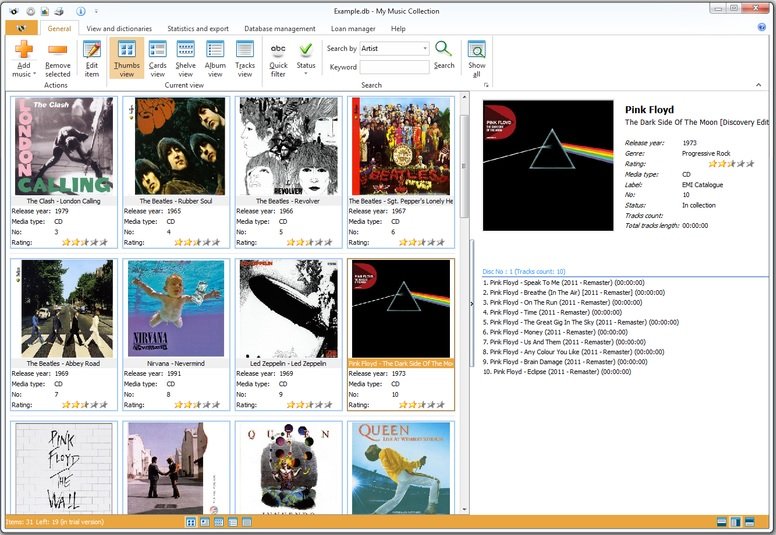
Description: My Music Collection is the most comprehensive music catalog software designed for organizing and managing music collections of any kind, including CD discs, MP3 files or vinyl records. This music organizer allows you to create an ordered CD database and view its contents, even if the disk is lying on a shelf or is being borrowed by a friend of yours. Now you can forget about creating music database on a paper, in Excel or text files.

Simply insert a disc, scan barcode or type the title and My Music Collection will fetch all album information from the Internet, including artist, title, release year, country, track titles and cover image, etc.

Furthermore, this music organizer does not only allow you to create comprehensive music collection with a great amount of options, but it is also a great loan manager allowing you to keep track of albums borrowed to your friends.

Familiar and intuitive interface allows you to easily and quickly search and browse your music collection. You can sort albums by artist, release year or even by media type. Checking statistics is also easy - My Music Collection allows you to view statistics in a table view or use a variety of diagrams. With music database software you can export your list into almost all popular file formats, including HTML, Excel, PDF, Text file or XML.

Release Name: My Music Collection 3.4.16.169
Size: 77.1 MB
Links: HOMEPAGE – NFO – Torrent Search

Download: RAPiDGATOR

8 Comments
Apr 7

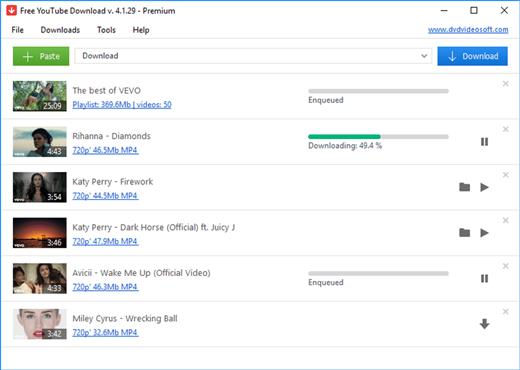
Free YouTube Download 4.5.11.406 Premium

Description: Free YouTube Download is the most popular YouTube downloader application now, released in 2006 and updated on a regular basis. It lets you download and convert YouTube videos, so you can watch them whenever you want.

Features:
Download YouTube at high speed without conversion.
Convert video files to MP4, AVI or MOV.
Get videos in Full HD, 4K, or even 8K resolution!
Search for most liked YouTube Shorts, save them in bulk!
Convert YouTube to MP3 and get 320kbps MP3 hi-fi files.
Enjoy entire YouTube playlists and channels.
Merge several files into one.
Save videos with subtitles.
Transfer downloaded files directly to iTunes.

Release Name: Free YouTube Download 4.5.11.406 Premium
Size: 131 MB
Links: HOMEPAGE – NFO – Torrent Search

Download: RAPiDGATOR

8 Comments
Apr 7

LizardSystems Terminal Services Manager 26.04.3

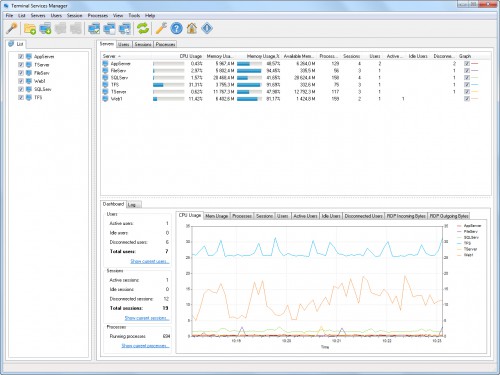
Description: Terminal Services Manager connects to one or more RDS servers and shows all sessions, users, and processes in one place. You get CPU, memory, and 11 additional server metrics on interactive charts with zoom, pan, and measurement. The legend shows min, max, average, and current values in real time.

Per-user columns display round-trip time, bandwidth, frame rate, and frame quality for each active session. A 4-bar icon shows connection health for each session, and server-level columns show the average and worst quality across all users. Diagnostic counters (packet loss, retransmission, frames skipped, encoding time) help you spot troubled sessions quickly.

You can audit user activity, monitor failed logon attempts, manage user profiles remotely, and enable or disable Remote Desktop on remote computers. Log off or disconnect idle users in bulk, send messages, and shadow user sessions.

The interface has Dark Mode with automatic switching based on your Windows theme, high-DPI support, and works on Windows 11.

Key features
View users, sessions, and processes across multiple RDS servers with live CPU, memory, and resource usage
Per-user RDP connection quality: round-trip time, bandwidth, frame rate, frame quality, and diagnostic counters
11 server performance metrics (available memory, pagefile, disk I/O, disk free space, network throughput, uptime) with interactive charts
Multi-condition filtering with AND/OR logic, text and numeric comparisons, quick search, and 19 built-in presets on all tabs
130+ administrative commands in 12 categories (Network Diagnostics, PowerShell Remote, Sysinternals Suite, and more). You can add your own commands and categories
User activity audit: track logon, logoff, disconnect, and reconnect events per user
Failed logon attempts monitoring with details on who, when, and from which address
Manage user profiles on remote computers: view, delete, and free up disk space
Enable or disable Remote Desktop on remote computers
Log off or disconnect idle and disconnected users in bulk
Shadow (remote control) user sessions
Send messages to selected users with message presets and variables (%computer_name%, %user_name%)
Discover computers from 7 sources: Network, Active Directory, IP Range, Hyper-V, RDS Connection Broker, SCCM/MECM, WSUS
Bulk operations: remove inactive or duplicate computers, normalize names, group by subnet or domain
RDS Licensing dialog with license server info, grace period, and pack details
Dark Mode with automatic Windows theme switching, high-DPI support, Windows 11 compatible
Available in 16 languages

Release Name: LizardSystems Terminal Services Manager 26.04.3
Size: 19.1 MB
Links: HOMEPAGE – NFO – Torrent Search

Download: RAPiDGATOR

8 Comments
Apr 7

Office Timeline 14.04.00.00

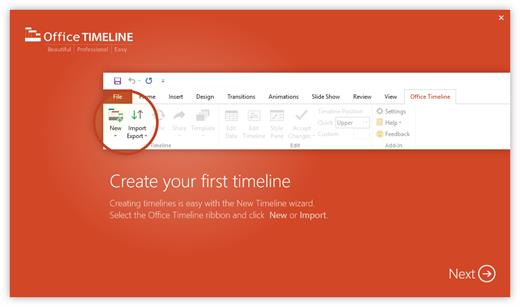
Description: Effortless project reviews. Happy executives. Quickly summarize your project plan into visuals that executives and clients actually understand. With Office Timeline, you can communicate effectively with clear, convincing timelines.

Build in PowerPoint. Present in PowerPoint.
Seamlessly import data from top project management platforms into your project review presentation. Easily produce accurate timelines, Gantt charts, program roadmaps, and portfolio slides that no other application can match.

Organize easily. Summarize well.
Take the complexity out of your project reviews with our PowerPoint add-in for Windows®. Make a timeline that clearly represents dependencies and highlights different workstreams or phases by grouping tasks into swimlanes.

Change dates with ease.
Be ready for project changes and shifts with an adaptable timeline creator. You can move your entire Gantt chart back when delays happen or update tasks and milestones in real time with our easy-to-use, drag-and-drop editor.

Keep your existing workflow. Integrate easily.
Office Timeline integrates with tools like Jira, Project®, Excel®, and Smartsheet to instantly generate beautiful visuals that you can update on the fly. A timeline maker intelligently designed to build from the plan you already have.

PowerPoint timeline generator
Use the feature-rich PowerPoint add-in to build striking timelines, Gantt charts and Swimlanes on your desktop PC. Easily customize every detail of your graphic to present your project in a crisp, distinctive way that impresses stakeholders.

Release Name: Office Timeline 14.04.00.00
Size: 128.8 MB
Links: HOMEPAGE – NFO – Torrent Search

Download: RAPiDGATOR

10 Comments
Apr 7

AI Text to Speech 1.0.10

Description: AI TTS is an offline Windows desktop AI text-to-speech app for fast local voice generation. Paste your script, choose a model and voice, generate speech, preview the result, and export WAV files. AI TTS is built for creators, students, and professionals who want a fast, repeatable desktop TTS workflow.

Choose the model that fits your workflow
- Kokoro-82M (Balanced): better voice quality for final narration
- KittenTTS (Fast): quicker drafts and iterations

Core workflow
1) Paste text
2) Pick model + voice
3) Generate
4) Preview
5) Export

Key Capabilities
- Local AI synthesis workflow (no cloud API key required)
- Up to 10,000 characters per generation
- Automatic chunking for long scripts to keep generation stable
- Speed control from 0.50x to 1.50x
- Preview player with play/pause, seek, and preview history navigation
- Manual export mode: choose save location when exporting
- Auto export mode: save directly to your configured output folder
- Inference hardware preference in settings (Auto / CPU / GPU)
- Dark and light themes
- In-app logs, notices, and license references
- Built-in settings for defaults and export behavior

AI TTS is built for creators, students, and professionals who want a fast, repeatable desktop TTS workflow.

System Requirements
- OS: Windows 10 version 17763.0 or higher
- Memory: 4 GB (Minimum), 8 GB (Recommended)
- Processor: 64-bit dual-core 2.0 GHz (Minimum), 64-bit quad-core 3.0 GHz (Recommended)

Release Name: AI Text to Speech 1.0.10
Size: 631.3 MB
Links: HOMEPAGE – NFO – Torrent Search

Download: RAPiDGATOR

9 Comments
Apr 7

All About PDF 3.2041

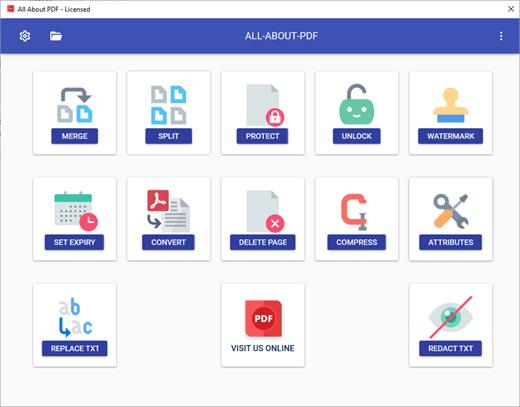
Description: All About PDF is a fast and powerful Windows application that is built to take advantage of your computer's multiple processing cores for blazingly fast PDF processing.

Features:
Choice Of Lifetine Or Subscription Licensing
PDF Files Processed Locally (not on 3rd-party servers)
Secure PDF files with strong DRM Technology
PDF Reader
PDF To Word Converter
PDF To Excel Converter
PDF To Image (JPG + PNG) Converter
PDF To HTML Converter
Automated Watch Folder For PDF Conversion
PDF Editor AND Annotator
Redact Text in multiple PDF files
Merge PDF Files
Split PDF Files
Add Expiry Dates To PDF Files
Compress PDF Files
Add Image and Text Watermarks to PDF Files
Password Protect PDF Files
Add or Edit PDF Permissions
Add or Edit PDF Attributes
Search and Highlight Text In PDF
Bulk PDF Processing Using Wildcards
Find and Replace Keywords in PDF
Delete Blank Pages from PDF Files

Release Name: All About PDF 3.2041
Size: 238.8 MB
Links: HOMEPAGE – NFO – Torrent Search

Download: RAPiDGATOR
9 Comments
Apr 6

Bitsum Process Lasso Pro v18.0.0.68

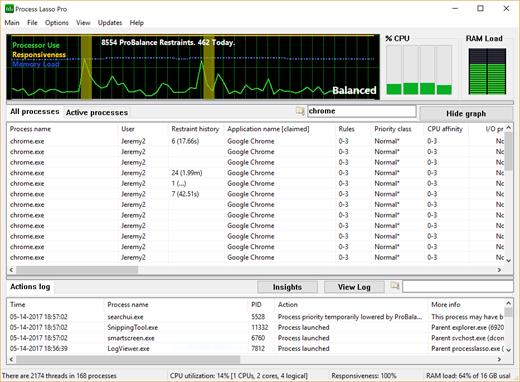
Description: Process Lasso is Windows process automation and optimization software. From tuning algorithms like ProBalance to user-created rules and persistent settings such as CPU affinities and priority classes, Process Lasso gives you complete control over running applications!

Our novel ProBalance algorithm helps maintain system responsiveness during high CPU loads by dynamically adjusting the priorities of running programs to keep problematic background processes in check. With ProBalance, no longer will single, or multiple, processes be able to bring your system to a virtual stall. Process Lasso will let you keep interacting with your computer, even when it is under a heavy CPU load. Try our CPUEater Demo to experience ProBalance for yourself.

Process Lasso also allows users to automate and tweak how applications are run through a number of unique and helpful functions. These include persistent priority classes, persistent CPU affinities, disallowed processes, per-process power profiles, a process watchdog for advanced rules, process instance count limits, multiple instance balancing and much more!

Process Lasso is the ultimate Windows CPU affinity changer. The CPU affinity specifies the set of CPU cores an application is able to execute on. With Process Lasso, you can control this with a persistent setting that applies every time the application is run, or change it dynamically while the application is running once a threshold is met. The CPU affinity is commonly changed to limit CPU use or improve performance.

Many additional functions such as power plan automation, a system responsiveness metric and process activity logging are also available.

These features give you the ability to control how programs utilize your computer’s resources based on automatically applied settings. With Process Lasso, you can decide exactly how you want your processes to run.

For minimal resource use, all algorithms and process rules are enforced by a stand-alone background service called the Process Governor. The GUI is entirely optional.

Features
ProBalance
ProBalance is our famously efficacious algorithm to maintain PC responsiveness during high CPU loads.
CPU Affinities
Set permanent CPU affinities so that processes run on the desired set of CPUs every time they launch.
CPU Sets
A ‘softer’ form of CPU Affinities that are more like preferred cores.
Priorities
Set permanent priorities so that processes run with them every time.
Efficiency Mode
Control and persist Windows 11’s Efficiency Mode, which designates processes as not performance critical to help keep them out of the way.
Disallowed Processes
Immediately terminate any matched process, by your criteria.
Limit Instances
Limit the number of instances a process may have in a user session.
Instance Balancer
Spread CPU cores among running instances of application(s).
CPU Limiter
Dynamically, temporarily limit CPU utilization of a process when it reaches a threshold.
Group Extender
Enable processor group unaware applications to make full use of the CPU.
Power Profile Automation
Switch power plans while idle (IdleSaver), or when specified process(es) are found running, or by a manual timer (Keep Awake), etc…
Prevent Sleep (Keep Awake)
Process Lasso can prevent your PC from sleeping for a specified amount of time, or when select processes are running.
Disable Hyper-Threading or SMT
Dynamically disable Hyper-Threading or SMT on a per-process basis.
Advanced Watchdog Rules
Create advanced rules to perform a specified action when matched process(es) reach a certain threshold of resource consumption or other criteria.
Multi-select Operations
Perform an operation like terminate on multiple processes at once!
Configuration Profiles
Profiles allows for creation and use of multiple rule configurations.

Release Name: Bitsum Process Lasso Pro v18.0.0.68
Size: 5.3 MB
Links: HOMEPAGE – NFO – Torrent Search

Download: RAPiDGATOR
5 Comments
Apr 6

Reclaim Time FocusMe 7.6.9.7

Description: Take Back Control of Your Time. Conquer digital distractions with the world’s most powerful focus software. FocusMe blocks distractions, reveals your online habits and helps you build the routines that make deep work possible.

How FocusMe Works
In a world of highly addictive websites and apps, FocusMe studies your digital patterns and reveals your online behavior. Where your attention drifts, when you work best and what needs stronger boundaries. Your AI Coach is an optional feature which then turns those insights into practical recommendations for blocking plans and focus routines, which you can immediately apply using the tools built directly into FocusMe.

The app runs in the background limiting exposure to distractions, setting screen time limits and scheduling focused work sessions. These are fully customizable to your daily schedule. If you want extra accountability, you can lock your set-up using Force Mode. With built-in Pomodoro timers, break reminders and real-time progress tracking, FocusMe becomes your digital productivity coach.

Release Name: Reclaim Time FocusMe 7.6.9.7
Size: 50.7 MB
Links: HOMEPAGE – NFO – Torrent Search

Download: RAPiDGATOR
7 Comments
Apr 6

Markdown Monster 4.2.6.1

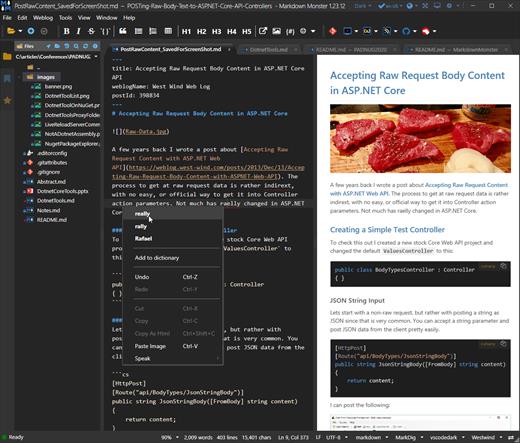
Description: Markdown Monster is a powerful, yet easy to use, dedicated Markdown editor with syntax highlighting and sophisticated and fast edit features. A collapsible, synced, live preview lets you see your output as you type and scroll. Easily embed or paste images, links, tables and code using raw markup or our smart UI helpers to simplify many operations with a few keystrokes or a click or two. Paste images from the clipboard or drag and drop from Explorer or our built-in file browser. Inline spell-checking and word counts keep your content streamlined.

You can export Markdown to PDF or HTML on disk or copy Markdown selections as HTML to the clipboard. The HTML preview can display syntax colored code snippets for most coding languages.

Choose from light or dark app themes and individually selectable and customizable preview and editor themes. Use the built-in folder browser to open, manage and drag files into content, the document outline to quickly jump through your open document, or the shell integration to shell out to Explorer, Terminal, Image Editor, Diff tool or your favorite Git client. Git support is also built-in to see local Git status and to commit to and update your repositories.

Everything is at your finger tips, but out of your way until you need it. .

Weblog Publishing
Markdown Monster can also publish your Markdown directly to your Weblog Service. If your blog supports WordPress, MetaWeblog, Jekyll or Medium, you can publish your documents with one click. You can also edit and republish, or download existing posts and even convert existing posts from HTML to Markdown.

Extensible via .NET
We also wanted to make sure the editor is highly extensible, so you can add custom features of your own. Markdown Monster includes an addin model that makes it easy to build extensions that let you hook into the UI, the editor behavior, markdown rendering and the publishing process. We also provide useful Scripting and Text Templating addins that let you automate many tasks without creating an addin. Find out more about creating an addin with .NET.

Features:
Easy and fast Markdown editing
Syntax colored Markdown text
Live Preview while you type
Inline spell checking
Easy image and link embedding
Paste images from Clipboard
Gentle toolbar support
File and Folder Browser
Favorites Manager
Document Outline
Git Integration
Built in screen capture
Two-way Table Editor
Import Html to Markdown
Export Markdown to Html
Dark and Light UI Themes
Customizable Preview Themes
High DPI Support
Weblog Publishing and Editing
Yaml Meta Data Support
Snippet Expansion Templates
Swappable Markdown Parsers
Extensible with .NET Add-ins

System Requirements:
Microsoft Windows 10 or later
.NET 7.0 (pre-installed)
WebView2 Runtime (pre-installed)

Release Name: Markdown Monster 4.2.6.1
Size: 19.8 MB
Links: HOMEPAGE – NFO – Torrent Search

Download: RAPiDGATOR

9 Comments