Please REGISTER or RENEW your account on RAPiDGATOR.net and support us by doing through all RAPiDGATOR working download links on main posts...
May 26

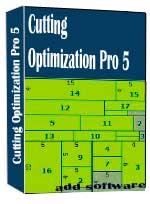
Cutting Optimization Pro 5.18.25

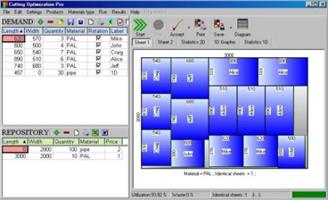
Description: Cutting Optimization Pro is a software application used to obtain optimal cutting layouts for one (1D) and two (2D) dimensional pieces. The software also lets you to define and handle complex products, such as table, desk, cupboard, locker, book shelf ... Cutting Optimization Pro can be used for cutting rectangular sheets made of glass, wood, woodworking, metal, furniture, or any other material used by industrial applications.
Features of Cutting Optimization pro ...
1D and 2D optimization in the same cutting program - you may use the program for both 2D and 1D optimization.
Guillotine optimization - The cuts are performed from one side to the other of the material. This feature is very useful for glass, wood, thermopan, ...
Non-guillotine (nested) optimization - The cutting machine can follow the shape of the material. In this case you need to have a complex machine based on laser or flame blade.
Multi-stage guillotine - all cuts in a stage are perpendicular to the cuts on the previous stage. The user may specify the number of stages and the direction of cuts for the first stage.
Any number of pieces in the INVENTORY and DEMAND - virtually no limit for the number of pieces that you want to optimize.
Any measurement metric- The way in which you introduce the data is a general one. You don't have to specify a metric. Just choose a metric in your mind and enter all data using that metric only.
Fractional input. Pieces can be introduced either as 100.5 or 100 1/2. More info about fractional input can be read here.
Adjustable cutting blade thickness- For glass cutting with diamond the cutting blade thickness is 0, but for wood, metal handling you need a saw with a greater thickness.
Adjustable optimization level- One may specify how many layouts to be generated before the solution is outputted. If you don't have too much time and you don't have a good computer you may set the Optimization Level to a low level. This feature helps you to run your program on any kind of computer (from 486 to the best processors available today).
Maximal cut length limit - You may specify how long a cut can be. This is useful when you perform the cuttings manually.
Adjustable useful waste - all wastes smaller than this size are garbage (will not be added to repository).
Adjustable limit for breakable parts - No waste will have a size lower than this parameter and no 2 parallel cuts will be closer than this. It is used in order to avoid the breaking of too small material. Useful in glass industry.
Reduces panel waste and costs - By using the latest achievements in the field of Artificial Intelligence you may obtain reduce the waste by 15%.
Grain direction control - useful for wood cutting optimisation. A parameter let the user to specify if the piece can be rotated or it should be kept fixed.
Automatic offcuts handling - the useful waste is automatically added to the Inventory of materials.
Vertical printing of the labels and edge bands - this will optimise and simplify your layout.
Graphical display black-white or colourful images and text mode of the obtained results - the results are displayed as images (black and white or colourful) or as text-tables.
Save images automatically - all the obtained 2D sheets can be saved as bmp images with 1 click. The programs automatically appends a number to an image.
Copy-paste from Excel. Just select some columns from Excel and paste them in Demand or Inventory grids.
Grouping similar layouts - this will reduce the number of printed sheets of paper. The number of repetitions for each sheet will be displayed.
Magnifying a sheet. This is useful if you have a long roll which you can visualize it by magnifying it.
Printing the obtained layouts - on any printer.
Printing multiple layouts on the same page - You may print 1, 2, 4 or 6 layouts on the same sheet of paper.
Printing the REPOSITORY and the DEMAND of the customer - you may print the pieces that you want to optimize.
The cuts are shown in text format in order to use them with a CNC machine.
Edge banding handling - the quantity and the type of material attached to the edges of the wood sheets is manipulated by the program.
Computes / Prints the total cutting length.
Displays diagrams - a table which contain the pieces cut for each sheet.
Possibility to define complex products such as table, desk, cupboard, locker, book shelf ...
Possibility to define types of materials (glass, wood, band) - for each material the user has a special table where it can introduce more information about the material.
Automatic tool for computing the size of the pieces based on the external sizes of the product.
Statistics related to the current cut / layout- At the end of the optimisation process you will have access to the: number of cuts, cuts definition (starting and ending point), number of waste rectangles, the waste rectangles (the coordinates of the top-left and bottom-right corners), number of utilized pieces, the placement of the utilized pieces, used surface, ...
Saves/loads results - All results can saved in txt files and loaded later.
Generates and prints adhesive labels -
Load data from xml, *.dbt (specific files), *.2d (Real Cut 2D files), *.xls (Excel files), *.csv (comma separated) and *.1d (Real Cut 1D files).
Automatically computing of the order price -
The REPOSITORY and the DEMAND can be sorted - by using various criteria: Length, Width, Quantity, Type, Rotation, Labels
Maximises productivity, saves time and money ....
Data can be exported into very popular formats: Word, Excel, HTML, CSV (comma separated) and XML files.
All panels and table's columns are resizable - You may customize the workspace. The new positions are automatically stored.
Very fast running time - Solutions are obtained within seconds.
Optimization engines provided by Optimal Programs Cut 2D X and Cut 1D X components.
Interface in multiple languages: Dutch, English, French, German, Italian, Portuguese, Romanian, Spanish and Swedish.

Release Name: Cutting Optimization Pro 5.18.25
Size: 2.3 MB
Links: HOMEPAGE – NFO – Torrent Search

Download: RAPiDGATOR

5 Comments
May 26

QueueExplorer Professional 5.0.81

Description: Explorer-like management for queues. Works with multiple queuing systems. QueueExplorer supports multiple systems from the same installation, without need for additional licensing: MSMQ, Azure Service Bus, RabbitMQ, and ActiveMQ. With QueueExplorer you can do much more than with built-in management console - copy, move or delete messages, save and load, stress test, view and edit full message bodies (with support for XML, JSON, .Net objects...), and much more. QueueExplorer is a fast, native Windows application.

The indispensable tool for working with queues and messages:
understand and manage your system
figure out what went wrong
fix it

Find out all about your messages
With QueueExplorer you can dig into your queues and see which message went where, whether they were correctly formatted, with correct headers and settings, etc. Multiple viewers are at your disposal: JSON, XML, WCF, Hex, text with different encodings...

Develop and test producers and consumers separately
With QueueExplorer you can test individual pieces of your solution, or even simulate third party messages going in or out. You can create and edit test messages, send one by one or bunch of them together.

Test performance and load handling of your app
Send thousands of messages for performance testing to see how system handles that load.

Troubleshoot, fix, and resend problematic messages
If something is wrong, QueueExplorer is the fastest and easiest way to investigate and fix incorrect, poison, or failed/deadletter messages.

See status of your system at glance
Check if some of queues are growing too large, if there are messages in deadletter queues, etc. With autorefresh functionality see how entire system works in near real time.

Filter and sort messages to quickly find important data
QueueExplorer allows you to quickly find messages you're interested in. Professional edition allows you to even extract your business data from within messages using XPath, JSON, or Regex, and to immediately see e.g. invoice totals, etc.

Backup and restore messages
Backup messages to files, or move/copy them to another queue.

Copy, compare and sync queues, topics and other schema (metadata) objects
This can be used to migrate queues (and other objects) to another server, e.g. to propagate from development to production. Or just to compare and see which changes were made. Or to backup schema before changes are made. You can also duplicate queues with all their settings on the same server (Professional).

Release Name: QueueExplorer Professional 5.0.81
Size: 36 MB
Links: HOMEPAGE – NFO – Torrent Search

Download: RAPiDGATOR

6 Comments
May 26

TablePlus 7.1.0

Description: Database management made easy. Modern, native, and friendly GUI tool for relational databases: MySQL, PostgreSQL, SQLite & more. Supports a whole set of relational databases and more. Modern native designs that match your beloved OS. With native build, simple design and powerful features, TablePlus makes database management easier, faster & more efficient for you.

Inline edit
Edit data rows, table structure, or query results directly with just a click.

Advanced filters
Quickly see the records you need using multiple advanced filters.

Code review
Always stay in control of what you have changed on your database.

Safe mode
Prevent any mistakes from being made on your production database.

Export & import database
Need to migrate a database to another server? Export and Import SQL Dump will get it done in no time.

Open anything
A quick jump to a table, schema, database, view, function, literally anything from your connection.

Multiple tabs & windows
Working with multiple databases or connections at the same time? Not a problem.

Metrics Board
With TablePlus, you can build internal dashboards fast and simply.

Customizable appearance
You can customize the appearance & configurations that best match your personal taste.

A smart query editor
We've built the best practices for SQL Editor into default to help you boost your productivity.

Release Name: TablePlus 7.1.0
Size: 94.1 MB
Links: HOMEPAGE – NFO – Torrent Search

Download: RAPiDGATOR
7 Comments
May 26

Perfectly Clear WorkBench 5.1.1.3216

Description: Perfectly Clear is the program's latest version, which also comes as a plugin for Photoshop & Lightroom. The essence of this development is simple; you have a picture, you do not like it, the skin is dull, pimples, in short, there are defects, now you can not bother with editing; a couple of clicks and here is a corrected photo, perfect, as it should be, not ashamed of social networks to pour. You can use the pens to adjust all correction parameters; many use automatic mode.

The program has 20 indicators for them that reconciliation and adjustment take place, and as a result, the picture is beautiful without any difficulties. The cameras have limitations; they can add noise to the picture, light a photo, make the skin tone terrible, etc. This plugin knows all these restrictions and will detect, eliminate, and provide; you only have to save the result.

The application will find and eliminate irregularities and other skin defects, work with dark circles under the eyes, remove excess shine in the picture, add shine, enlarge the eyes, whiten teeth, and tonify the skin. In short, now you can safely wake up and be immediately photographed; the program will process everything and be like candy, do not spend a couple of hours standing in front of a mirror.

What's New in Perfectly Clear WorkBench
Beautiful new interface
New image correction tools:
Preprocessing section for Input Looks and "Image Ambulance" for manual exposure corrections
"Face Aware" exposure for more accurate auto-exposure corrections in portraits and group photos
Black Point tool to deepen blacks
New Color Vibrancy tool to complement our previous "Vibrancy" control (now renamed to Color Restoration)
Sky and Foliage enhancements
Existing tools have been improved:
Added strength sliders to Light Diffusion and Vibrancy for better control
Better 'color pickers' for Skin Tone and Blush adjustments
Manually identify faces that are not detected automatically
One-click to zoom into individual faces
Modify facial regions to provide the best corrections
Histogram
Much improved preset management

Release Name: Perfectly Clear WorkBench 5.1.1.3216
Size: 260.9 MB
Links: HOMEPAGE – NFO – Torrent Search

Download: RAPiDGATOR

8 Comments
May 26

Sante PACS Server PG 4.5

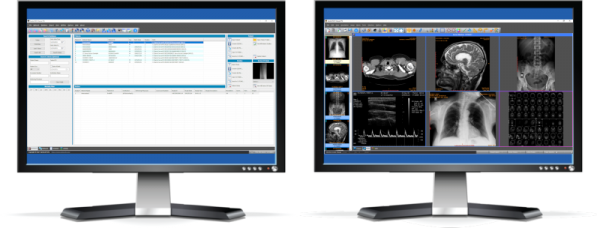
Description: Sante PACS Server PG is a DICOM 3.0 compliant PACS server, a Modality Worklist server, an HTTP (web) server for DICOM files and a CD/DVD Burning and Printing server that offers high performance and reliability at an affordable price.

It provides connectivity to all DICOM modalities (CT, MR, US, CR, NM, XA, MG, DX etc.). Reviewing the DICOM images can be done using the Sante PACS Viewer (the Built-in full-featured DICOM viewer of the system). The built-in web server can be used as a free cloud server for DICOM files!

A perfect cloud solution companion
If you have selected a cloud solution for DICOM file archiving, Sante PACS Server PG can be a perfect companion of this solution, not only because it can be used as a local backup server for the whole archive, accessible from the web as well, but furthermore because it can keep locally the older part of the archive that there is no need to be on the cloud. This way Sante PACS Server PG can reduce drastically the monthly cost of the cloud solution.

Features and benefits
Full-featured PACS Server that uses as database engine the Postgres or MySQL database server
It supports all the modalities and all the transfer syntaxes
Full-featured, user configurable, Worklist Server
Built-in Web Server that allows remote access of the studies to physicians and patients
Unlimited number of patients/studies/series, the only limitation is the storage size
Unlimited number of connected medical scanners
Unlimited number of connected users, locally or remotely, physicians or patients
Patients can access their studies with tokens instead of user accounts
Available to remote users two built-in, world class, free DICOM viewers, Sante DICOM Web Viewer and OHIF viewer
The built-in OHIF DICOM Viewer works in client side without installation in any device (desktop, mobile, tablet) and in any OS (Windows, Linux, MacOS, iOS, Android, etc.).
Migration tool that allows easy transfer of data to the new system
Automatic CD/DVD disk burning and label printing in EPSON and PRIMERA robot producers
It works "out of the box", after installation
It works on Windows Server 2022/2019/2016/2012/2008 or Windows 11/10/8.1/8/7/Vista 64-bit

Release Name: Sante PACS Server PG 4.5
Size: 535.2 MB
Links: HOMEPAGE – NFO – Torrent Search

Download: RAPiDGATOR

8 Comments
May 26

MediaHuman YouTube Downloader 3.9.20 (2405)

Description: There are so many interesting things to be found on YouTube, but you can't download the videos or save them as audio files by default. That's why we developed YouTube Video Downloader. This app will help you to accomplish video downloads quickly and without hangups. With our program you can simply download the whole playlist or YouTube channel at once and watch it whenever and wherever you want.

The application has many other convenient and practical functions for you to explore and enjoy.

Downloads entire playlists and channels
Supports Ultra High resolutions including 4K & 8K (with audio)
Downloads several videos simultaneously
YouTube, Facebook, Vimeo, Dailymotion, and many others
Extracts audio track and saves it as MP3
Supports exporting to iTunes/Music.app

Main Features:
Playlists and channels
The program supports downloading all the videos in a playlist or channel. In addition, you can monitor the selected channel or playlist and download new clips as they are uploaded.

Adds directly to iTunes/Music.app
You can configure the program to automatically add downloaded movies to your iTunes library. You can also pick a playlist where the downloaded video should be added.

HQ, HD, 4K or 8K
The program supports all available resolutions, be that 720p, 1080p, 4K or 8K, 30 or 60 fps. The choice is up to you. Unlike online video downloaders, the app downloads any resolution with sound.

Quality of the original
You can choose to save the video in its original quality and format, such as MP4 or WebM, without any modifications. In this case, the clip you get will be exactly the same as the one uploaded by its author.

Monitors the clipboard
The program keeps an eye on the clipboard and as soon as it spots a supported link there, it automatically adds this video into the download queue.

Simple tag editor
For audio downloads, the app automatically detects the artist and song name, which will be written in ID3 tags. These can be easily changed before the video is downloaded.

Not just YouTube
The program supports Twitch, Vevo.com, Vimeo, Dailymotion, Facebook, UOL, VKontakte, SoundCloud, TikTok, Likee, Brandnewtube, Odysee, Brighteon, Rumble and a lot of other sites. So you can download video from these websites as easy as you do from YouTube.

Drag & Drop
The app features a 100% drag&drop support. Just drag the link to a video with your mouse and drop it to the main window of the program, or to its dock icon on Mac.

Multi-language interface
The app is translated into: Arabic, Armenian, Azerbaijani, Bulgarian, Catalan, Chinese (Hong Kong SAR China), Chinese (Simplified), Chinese (Taiwan), Croatian, Czech, Danish, Dutch, English, Esperanto, French, German, Greek, Hebrew (Israel), Hungarian, Indonesian, Italian, Japanese, Korean, Latvian, Lithuanian, Malay, Norwegian Bokmål, Polish, Portuguese, Portuguese (Brazil), Romanian, Russian, Serbian, Slovenian, Spanish, Swedish, Turkish, Vietnamese.

Release Name: MediaHuman YouTube Downloader 3.9.20 (2405)
Size: 87 MB
Links: HOMEPAGE – NFO – Torrent Search

Download: RAPiDGATOR
6 Comments
May 26

ExamDiff 17.0.1

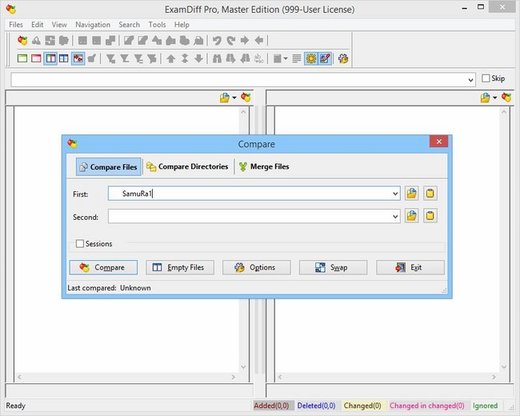
Description: ExamDiff Pro is a powerful yet intuitive and easy to use visual file and directory comparison tool for Windows. It features unique functionality that distinguishes ExamDiff Pro from other comparison programs. If you’ve been frustrated with other comparison utilities, you will find that ExamDiff Pro offers a much more efficient and user-friendly way to compare files and folders.

Features: 


  • Compares text files, binary files, and directories.
  • Performs two-way and three-way diff and merge.
  • Highlights differences down to the level of lines, words or characters.
  • Highlights document syntax.
  • Fuzzy line matching.
  • Ability to recognize moved text blocks.
  • Automated directory synchronization.
  • Line Inspector panel for easy recognition of differences within lines.
  • Can perform full file comparison in a background task in directory comparison.
  • Ability to add manual synchronization points to text file comparison.
  • Compares directly from Windows Explorer.
  • Allows file editing within file comparison panes.
  • Allows copying, renaming, and deleting files or directories.
  • Saves the file differences in a standard UNIX DIFF file or to a dynamic HTML web page.
  • Prints and print previews diff reports.
  • Easy navigation through the differences.
  • Advanced Search features.
  • Drag and drop support.
  • Advanced Ignore options, for ignoring capitalization, white space, programming-language comments, and more.
  • Word wrapping.
  • Plug-in support.
  • Drag and drop support.
  • Can create directory snapshots for later comparison.
  • Includes full Unicode support.
  • Fully customizable.
Release Name: ExamDiff 17.0.1
Size: 46.6 MB
Links: HOMEPAGE – NFO – Torrent Search

Download: RAPiDGATOR
5 Comments
May 26

Ahnenblatt 4.48

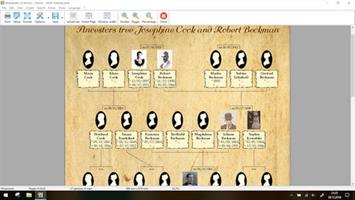
Description: Organize your genealogy with Ahnenblatt. Ahnenblatt is an easy to use full featured genealogy software suitable for beginners and even experienced genealogist to organize your genealogy research. Use plausibility check to find inaccuracies in your family and generate impressive charts with only a few mouse clicks.

Welcome
Ahnenblatt welcomes you! The most useful functions for an immediate start are shown at the start of the program.

Input
Enter your data in simple and clear dialogs. If available, you can add pictures, sources and notes to persons or single events.

GEDCOM
Load and save family data in GEDCOM format. If you already use other software, you can easily transfer your data to Ahnenblatt.

Charts
Create ancestors, decendants or hourglass charts with start person of your choice. There are a lot of options to adjust the graphic design.

Lists
Create ancestors, decendants or family lists. Or create person’s sheets for persons of your choice.

Export
Charts and lists can be saved in various file formats (e.g. pdf). This is useful for further processing like external printing.

Release Name: Ahnenblatt 4.48
Size: 35.3 MB
Links: HOMEPAGE – NFO – Torrent Search

Download: RAPiDGATOR

5 Comments
May 26

GlassWire Elite 3.8.1061

Description: Detect hidden threats with GlassWire's Traffic Monitor and Firewall. Instantly see your current & past network activity. Detect malware, & block badly behaving apps.

Privacy & Security Features
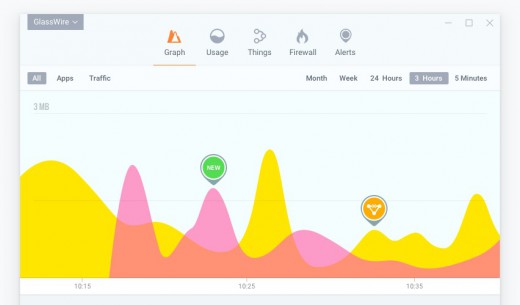
Instantly see who or what your PC is talking to on GlassWire's network monitoring graph, plus see what your PC may have connected to in the past.
Detect spyware, malware, badly behaving apps, and bandwidth hogs, then block their connections.
Monitor other PCs on your network and get alerted when new unknown devices join your WiFi.
GlassWire warns you of network related changes to your PC, or unusual changes to your apps that could indicate malware.

Network Data Usage Monitoring
Keep track of your data usage on your PC or mobile phone and get alerted before going over data limits.
Go back in time with GlassWire's network time machine to see what your PC was doing while you were away.
Get alerted every time a new app accesses the network, and block it if necessary.
See detailed network usage statistics broken down by IP/Host, app, network traffic types, and more.

Release Name: GlassWire Elite 3.8.1061
Size: 129 MB
Links: HOMEPAGE – NFO – Torrent Search

Download: RAPiDGATOR
7 Comments
May 26

Valentin Software GeoTSOL 2026 R4 v2026.4.4

Description: Are you looking for a user-friendly special tool for the planning and design of heat pump systems? Then our GeoT*SOL program is the perfect project partner for your design work.

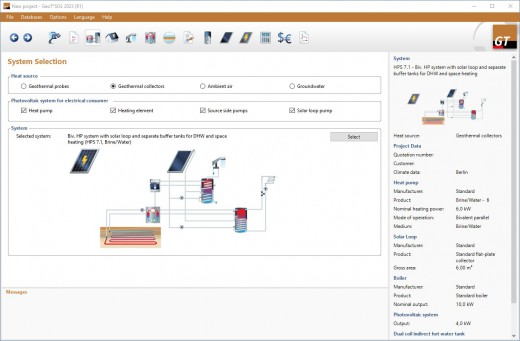
You can choose between different heat sources (soil, air and groundwater) and modes of operation (monovalent, monoenergetic and bivalent) for your location. The integration of solar thermal systems and bivalent systems with boiler as heat generators should be emphasized. Requirements, losses and consumption are determined as a result of a dynamic minute simulation. Based on this, electricity consumption, seasonal heat performance factor and costs are calculated taking into account off-periods and tariffs. With these parameters, GeoT*SOL evaluates the economic efficiency of the system. The heat price and return are shown for the heat pump system and a comparison system.

Simulation of the contribution margin of the heat pump and other heat generators
With GeoT*SOL you can simulate the heat pump system to the minute in order to determine annual performance figures (COP) and contribution margins. The systems can have other heat generators such as gas condensing boilers and solar systems. Movovalent, monoenergetic and bivalent modes of operation can be selected for operation.
Determination of the annual performance factor according to VDI 4650

The annual performance factor according to VDI 4650 is an important factor for comparing plants according to their efficiency. It forms the basis for many funding measures and approval procedures.
Databases with heat pumps, collectors, boilers and storage tanks

GeoT*SOL is delivered with an extensive database. This contains more than
-4,000 collectors (flat plate collectors, tube collectors, air collectors)
-5,000 boilers (condensing boilers, wood boilers, pellet boilers, etc.)
-4,000 heat pumps (brine/water, air/water, water/water)
-600 storage tanks (combination and buffer storage, monovalent, bivalent, etc.)

In addition, manufacturers can have additional storage tanks, boilers, collectors and heat pumps added free of charge

Tariffs and blocking periods
Up to three blocking times can be set using the usual rules (intervals and limited duration) in order to be able to precisely depict the supply situation. Furthermore, the electricity price for the heat pump can be divided into high tariff (HT) and low tariff (NT).
Global climate data available

GeoT*SOL provides you with the latest TMY data of the DWD (current state 2017, averaging period 1995-2012) for Germany and more than 8,000 further climate locations for the whole world based on Meteonorm 7.3. You can use the interactive map to conveniently select the climate data. Locations not included are interpolated using satellite data and neighboring ground measuring stations. The import of your own measurement data takes place via files in DWD, Meteonorm or WBV format.
Configurable project report

The content can range from a short report with the annual performance figures to a detailed project report with diagrams and system components.

Profitability analysis
GeoT*SOL calculates the profitability according to the recommendation of the Federal Association of the Solar Industry (BSW) taking into account the funding: comparison of the costs of the heat pump system with a comparison system; capital value and production costs (heat price); modified internal rate of return (MIRR), profit taking into account the reinvestment.

Release Name: Valentin Software GeoTSOL 2026 R4 v2026.4.4
Size: 849.3 MB
Links: HOMEPAGE – NFO – Torrent Search

Download: RAPiDGATOR
7 Comments