Please REGISTER or RENEW your account on RAPiDGATOR.net and support us by doing through all RAPiDGATOR working download links on main posts...
May 26

Lightjams 1.0.0.756

Description: Lightjams is a software for interactive DMX lighting. It’s all about giving you the power to generate unique effects based on many types of live signals - MIDI, OSC, DMX, music, video, time, etc.

Why you need it? Create one-of-a-kind lighting effects. Add interactivity. Give control to the performers. Automate as much as you want.

How it works? Powerful generative effect engine with easy scripting for deep customization. Compatible with any DMX lighting fixtures and LED controllers. Send and receive MIDI/OSC/DMX. Run on all Windows™ computers.

Hundreds of people are using it right now in nightly events and permanent installations. All its great features and unique abilities make it a ridiculously good deal for any lighting professionals and enthusiasts!

System Requirements:
OS: Windows 7/8/10/11 64-bit
CPU: Quad core 2 GHz
RAM: 4 GB
1400x900 screen resolution

Release Name: Lightjams 1.0.0.756
Size: 45.1 MB
Links: HOMEPAGE – NFO – Torrent Search

Download: RAPiDGATOR
6 Comments
May 26

Revo Uninstaller Pro 5.5.0

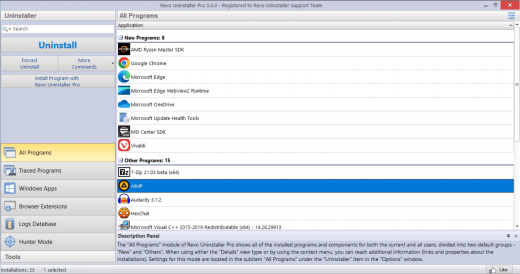
Description: Revo Uninstaller Pro is innovative uninstaller program which helps you to uninstall unnecessary software and remove easily unwanted programs installed on your personal computer. Revo Uninstaller gives you the convenience to optimize your device, as well as to get rid of all the program files you do not need and slow down your computer processes.

You might be surprised to learn that the "Add/Remove Programs" option in the Windows Control Panel does not always completely remove all software data from your system. Traces like registry items or program files and folders may still remain. Traces like registry items or program files and folders may still remain. Now with Revo Uninstaller you can be sure that you can clean your system from all these remnants and provide more comfort and optimization to your device.

Also, most programs come with their own uninstallers, but in most cases, these don't do complete and thorough job, leaving behind temporary files, leftovers, unused registry entries, and other unnecessary program files. These remnants take up space and slow down your Windows PC, and can cause conflicts if you want to install a newer version of the same software in the future. That's where Revo Uninstaller Pro comes in.

The secure and powerful uninstall of a program, sometimes becomes a difficult process. Windows inbuilt Add/Remove Program tool isn't always the perfect solution. As we mentioned earlier it is slower and usually doesn't remove all the traces of the application in your PC (like registry entries, files, folders of the program).

Revo Uninstaller is a great replacement for Add/Remove programs in Windows and offers lots of functions to remove guaranteed any program, faster and completely from your computer. It can effectively remove unnecessary files, folders and registry keys and values related to the program.

Revo Uninstaller also includes a number of cleanup tools such as Junk Files Cleaner, Browsers Cleaner, MS Office Cleaner, Windows Cleaner and Autorun Manager which can be used to take control of the programs that start automatically with Windows.

WHY USE REVO UNINSTALLER PRO?
Complete powerful software uninstall
Quick Uninstall of one or few programs in a row
The best Windows application to uninstall stubborn programs easily
Remove junk files and unnecessary program files
Compatible with all 32-bit and 64-bit versions of Windows
Portable version for all your personal Windows devices
Customizable and flexible easy to use user interface
Free professional technical support

Release Name: Revo Uninstaller Pro 5.5.0
Size: 17.5 MB
Links: HOMEPAGE – NFO – Torrent Search

Download: RAPiDGATOR
5 Comments
May 25

Windows 11 26H1 Build 28000.2176 AIO 16in1 (Insider Preview) TPM Bypassed & Pre-Activated

Description: This update for version 26H1 does not contain new features or something specific, and instead, focuses on "a small set of general improvements.

As a reminder, Windows 11 26H1 is the only H1 release in four years of Windows 11's existence. Shortly after releasing Windows 11 version 25H2 to all users, Microsoft started testing version 26H1 in the Canary Channel. The update is intended to work as a "platform update" for certain processors. Microsoft does not say what processors it has in mind, but rumors say that Windows 11 version 26H1 will be an exclusive release for Snapdragon X2 Elite processors, and its launch is scheduled for the first half of 2026, as the name suggests.

For Users
Accessibility
The Narrator now includes a Braille Viewer, allowing users to see the braille equivalent of on-screen text on a refreshable braille display.

Passkeys
Users can now utilize plug-in credential managers for setting up and using passkeys, offering improved security and management.

Time & Language
Ported settings from the Control Panel to the Settings app, including configuring additional clocks and changing the NTP time server.

Mobile Experience
The mobile device companion has a new, more accessible layout to view calls, messages, photos, and more from your phone.

Click-to-Do
New AI features for Click-to-Do are included, such as a new "Convert to Table" capability for converting text to an Excel table and more flexible selection methods.

For IT Administrators
Quick Machine Recovery
This new feature in the recovery system aims to reduce downtime and simplifies the process for recovering a system, according to PCMag.

Removable Apps
IT admins can now remove certain pre-installed Microsoft Store apps via Group Policy or MDM CSP on Enterprise/EDU devices.

Feature Removals
removes older components like PowerShell 2.0 and WMIC for greater security and efficiency.

Release Name: Windows 11 26H1 Build 28000.2176 AIO 16in1 (Insider Preview) TPM Bypassed & Pre-Activated
Size: 6 GB
Links: HOMEPAGE – NFO – Torrent Search

Download: RAPiDGATOR
2 Comments
May 25

Directory Opus 13.23.3 Beta

Description: Are you frustrated by the limitations of Windows Explorer? Directory Opus is a complete replacement for Explorer, with far more functionality than any other file manager available today.

You're in control.
Not just a simple file manager; Directory Opus lets you make your computer yours.
With a flexible user interface and unbelievable configurability, you can tailor Opus to streamline your workflow.
Dual panes, dual trees, multiple tabs.
Filter, sort, group your folders. Label and rate your files.
Queued file copies. Powerful batch renaming. Full archive support.
Find your files. Locate duplicates. Synchronize backups.
Assign tags and descriptions. Convert images. Edit metadata.
Fully multi-threaded, native 64 bit high performance code.
Whatever you want to do - Opus can probably do it. And if it's not built-in, you can take advantage of the unrivalled configurability to extend Opus using external tools.

What makes Opus unique?

Built for speed
Opus is written in native C++ multi-threaded code; compiled for the latest 64 bit CPUs, with high performance our number one design principle.

Fully configurable
Change the colors. Change the fonts. Change the toolbars and menus. Set up hotkeys. Opus adapts to how you want to use it.

Makes file management a breeze
Powerful searching, sorting, grouping, labelling and tagging features let you take control of your files like never before.

Endlessly extensible
Work with third-party tools as easily as with the built-in features. A full scripting interface, including scriptable dialogs, means your imagination is really the only limit.

Replace Windows Explorer and don't look back
Our unique Explorer Replacement mode provides a full replacement for Windows Explorer.
Single or dual pane file display and folder trees
Tabbed interface let you keep multiple folders open and switch quickly between them
Integrated viewer, metadata editor and utility panel
Built-in tools including synchronize and duplicate file finder
Leverage indexed search engines like Windows Search and Everything

High performance file management features
Copy, move, rename, duplicate, archive, view, backup and delete your files with ease
Queue multiple file copies for improved performance
Batch renaming including easy-to-use keyboard macros
Support for FTP and archive formats like Zip, 7Zip and RAR
Quickly filter, sort, group and search your folders
Color-code your files, assign status icons, star ratings, tags and descriptions
View images, documents and more. Image marking lets you sort your photos quickly and easily
Calculate folder sizes and print or export folder listings

Unrivalled configurability
Why let the programmers decide for you? You can tailor Opus to look how you want it to look, and to work how you want it to work.
Choose from light mode, dark mode, or design your own theme
Over 600 configurable colors and fonts
All toolbars and menus can be edited, plus you can add your own
Floating toolbars can act as program launchers
Configure your own hotkeys that work everywhere or just in Opus
Full scripting interface lets you design your own dialogs and add your own commands

Release Name: Directory Opus 13.23.3 Beta
Size: 29.6 MB
Links: HOMEPAGE – NFO – Torrent Search

Download: RAPiDGATOR
5 Comments
May 25

LuBan 3D 11.05.2026

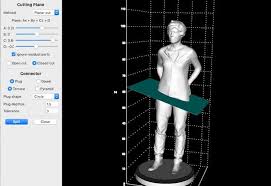
Description: LuBan is generative design software that helps designers and makers in rapid production of their creations. LuBan automatically generates 3D models in various forms, such as lithophane, stack, hash, plate, relief, module, and wireframe. The generated model can be fabricated by 3D printing, laser cutting, and CNC milling.

LuBan is actively developed by a highly focused software team, led by Lujie Chen in Singapore and Larry Sass in USA.

Eyeglasses
Design eyeglasses frames based on a template image.

Lithophane
Turn any 2D photo into a 3D printed photo.

Photo Magic
Generate 3D models from a 2D photo.

Mesh Processing
Generate 3D models from a 3D model.

Release Name: LuBan 3D 11.05.2026
Size: 68 MB
Links: HOMEPAGE – NFO – Torrent Search

Download: RAPiDGATOR

7 Comments
May 25

Wondershare Recoverit 14.0.27.8

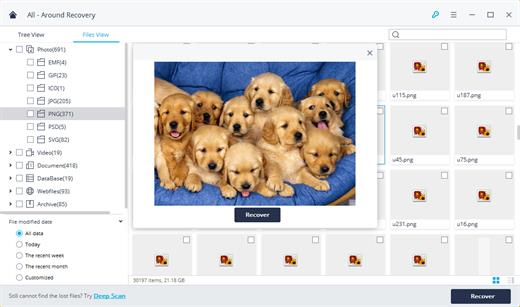
Description: Recover Files in Minutes, No Tech Skills Needed. 2000+ storage devices supported. Recover 1000+ file types. Success recovery rate of 99.5%. 3 simple steps to recover unlimited data.

2000+ Storage Devices Supported
The high-tech data recovery tool can easily recover lost data from almost any devices or storage media.

Laptops, PCs & NAS
Recyle bin, internal drives, partitions; NAS (Network Attached Storage)

Memory Cards
SD/CF card, microSD, miniSD, Sandisk, memory card/stick, TF memory card…

Internal Hard Drive
Hard Drive (Basic & Dynamic), SSD (Solid State Drive)

External Hard Drive
We Support Nearly All External Hard Drive That You Use

Flash Drives
USB Drives, Jump Drives, Pen Drives, Thumb Drives…

Other Storage Media
Camera (Canon, Sony, Nikon, Fuji), Music/Video Player, Camera Drones (GoPro, DJI)

Recoverit Support 1000+ File Types and Formats
We support recovery of all types of files and file systems, e.g. NTFS, FAT, HFS+, APF.

Document
DOC, DOCX, RTF, XLS, XLSX, XLSB, PPT, PPTX, PPS, PDF, DOT, DOTX, XLSB, XLT, XLTX, POT, PPSX, etc.

Photo
CRW, JPEG, JPG, PNG, PSD, RAW, RGB, 3DM, 3DMF, 3FR, ABM, AFX, ANI, ART, ARW, BIZ, BLD, etc.

Video
AVI, FLA, FLV, M4V, MOV, MP4, WMV, 3G2, 3GP, 3GP2, 3GPP, AMV, ANM, ASF, ASX, etc.

Audio
AAC, AIFF, ALAC, FLAC, MP3, OGG, PCM, WAV, WMA, A52, AA, AA3, AAC, AC3, ACC,AFC, AIF, etc.

Archive
7Z, WAR, ZIP, exe, 7zip, etc.

Other Files
MSG, PST, OST, EML, EMLX, MBOX, EPUB, JIS, KEY, LOG, MPS, 3DA, 3DS, 3TF, 3WS, ABD, etc.

Release Name: Wondershare Recoverit 14.0.27.8
Size: 214.9 MB
Links: HOMEPAGE – NFO – Torrent Search

Download: RAPiDGATOR

5 Comments
May 25

Scan2CAD 10.6.13

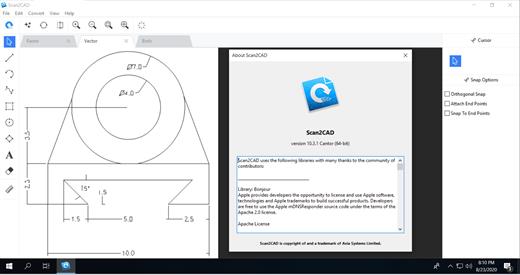
Description: Professional-Grade Conversion Software. Convert your files for CAD & CNC. Convert images and PDFs to DXF or DWG. Supported in all common CAD software. With layers, text and objects converted.

Cut-friendly conversions
Convert your images and PDFs to DXF and G-code for all common CNC machines.
Logos
CNC Artwork
Gaskets & Tools
Outlines
Pocketing
All CNC imagery

Batch conversion
With Scan2CAD’s simple Batch conversion feature you can intuitively convert multiple files within a defined folder in a single click. Or Batch Convert multiple pages of a PDF in a single run. Batch conversion saves countless man hours of repetitive conversion tasks.

Automation API
Scan2CAD Automate offers a powerful Python API which can be used to automate any feature of Scan2CAD, enabling you to integrate powerful conversion features with your processes.

Release Name: Scan2CAD 10.6.13
Size: 128.5 MB
Links: HOMEPAGE – NFO – Torrent Search

Download: RAPiDGATOR

6 Comments
May 25

MediaHuman YouTube To MP3 Converter 3.9.20 (2405)

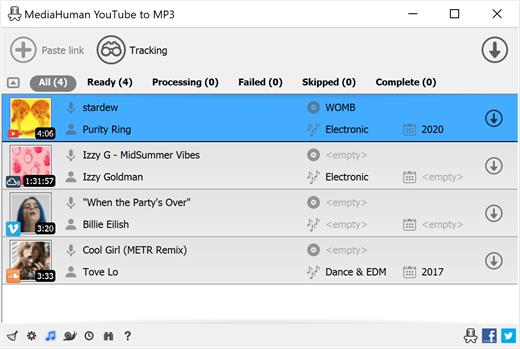
Description: You like to listen to music on YouTube, SoundCloud or Bandcamp and want to save it for offline playing. Or you want to download the soundtrack of a new movie. Then we recommend you to try out this software developed specifically for this purpose.

Downloads all music from a playlist or channel
Tracks playlist/channel updates and downloads only new videos
Downloads highest available quality up to 320 kbps
Supports YouTube, Vimeo, SoundCloud, Mixcloud, etc.
Downloads simultaneously several tracks
Includes simple tag editor with cover art image support
Works on all modern platforms (macOS, Windows, Ubuntu)
Exports downloaded files to iTunes/Music.app

Main Features:
Playlists and channels
The software supports downloading all videos in a playlist or channel. There is also an option to subscribe and download only newly uploaded tracks.

iTunes/Music.app support
In the app preferences, you can select the option to automatically add the downloaded tracks to your iTunes/Music.app library. You can also specify the playlist to which the converted tracks will be added.

Saves your time & traffic
The app detects audio track in YouTube video clip and downloads it, skipping the video part. As a result download speed increases dramatically, especially on HD-quality content and higher.

Simple tag editor
Application automatically detects artist name and track title of the video and saves it in the downloaded file. But at the same time, you can easily change tags to whatever you want. You can even change a cover art image.

Original format, no conversions
You can save audio tracks in original quality without any conversion. It means that there will be no loss of quality and it greatly reduces the downloading time.

Free music
There is a great amount of music on YouTube. And our app will help you to convert YouTube videos to MP3 or save it on your computer in original M4A/AAC format. Just find the track you like and download it in the quality you need.

Not only YouTube
Vevo.com, Vimeo, DailyMotion, Soundcloud, Bandcamp, HypeMachine, MixCloud, MixUpload, Audiomack, UOL, Hearthis.at, Play.fm, Naver, BitChute, Brandnewtube, Brighteon, Rumble and many other sites are also supported. So you can download music just as easily as you can from YouTube.

Clipboard tracking
The program tracks the content of the system clipboard. It means that you can easily add a video clip to the download list without switching from your favorite browser. Just copy an URL into the clipboard and it will be added to the download queue.

Multilingual interface
Localized to: Arabic, Armenian, Azerbaijani, Bulgarian, Catalan, Chinese (Hong Kong SAR China), Chinese (Simplified), Chinese (Taiwan), Croatian, Czech, Danish, Dutch, English, Esperanto, French, German, Greek, Hebrew (Israel), Hungarian, Indonesian, Italian, Japanese, Korean, Latvian, Lithuanian, Malay, Norwegian Bokmål, Polish, Portuguese, Portuguese (Brazil), Romanian, Russian, Serbian, Slovenian, Spanish, Swedish, Turkish, Vietnamese

Release Name: MediaHuman YouTube To MP3 Converter 3.9.20 (2405)
Size: 81 MB
Links: HOMEPAGE – NFO – Torrent Search

Download: RAPiDGATOR
4 Comments
May 25

Hasleo BitLocker Anywhere 9.9.0.2

Description: BitLocker Drive Encryption is a full disk encryption feature released by Microsoft as a native application in some versions of Windows. Unfortunately, this feature is not available in Windows 11/10/8.1/8/7 Home, Windows 8.1/8 Core and Windows 7 Professional. Hasleo BitLocker Anywhere For Windows is the world's first BitLocker solution for Windows Home and Windows 7 Professional, with it you can enjoy almost all the features of BitLocker in these editions of Windows.

Backing up your data is just as important as encrypting it, so we recommend that you use our free Windows backup software Hasleo Backup Suite to back up your data to prevent data loss.

Features:
Encrypt Windows C: drive & data partitions with BitLocker.
Decrypt BitLocker-encrypted Windows C: drive & data partitions.
Change password, Export BitLocker recovery key & startup key.
Easily lock and unlock BitLocker encrypted drives.
Turn on or off auto-unlock for BitLocker encrypted drives.
Encrypt and start Windows 11/10/8/7 with password or startup key USB drive
Command line interface (CLI) support.
Compatible with Windows 7/2008 R2 or later.

Release Name: Hasleo BitLocker Anywhere 9.9.0.2
Size: 44.5 MB
Links: HOMEPAGE – NFO – Torrent Search

Download: RAPiDGATOR

6 Comments
May 25

HyperSnap 9.8.1

Description: HyperSnap 9 is the fastest and easiest way to take screenshots from Windows. HyperSnap combines the power of a first-class screen capture application with an advanced image editing utility, and editable text capture through OCR - wrapped into one easy-to-use tool. Windows 10 and 11 only.

HyperSnap is perfect for capturing images and texts that you want to include in your Help system, online tutorials, manuals, training handouts, presentations, marketing materials, Web pages, emails and more. Use HyperSnap to quickly share a picture-perfect representation of anything on your screen.

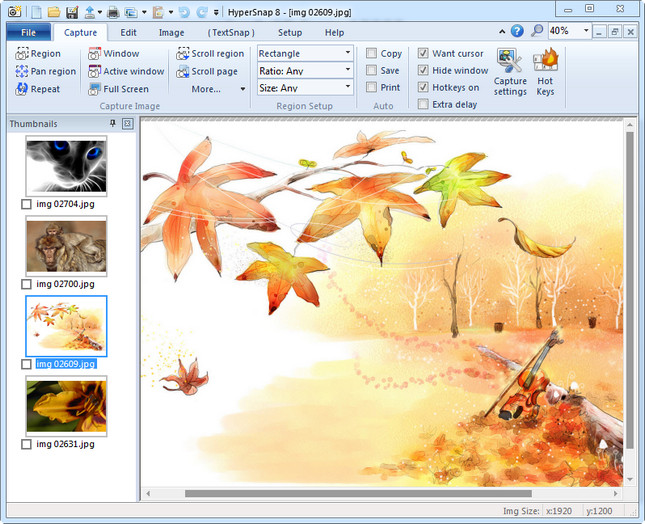
HyperSnap is versatile and extremely easy-to-use. You can switch between modern "ribbon" interface shown on the image above, or tranditional menu and toolbars.

Top Features
Image captures from any where on the screen or multiple monitors, in any shape or size.
New & powerful image capture, editing, annotation and  manipulation tools. Objects drawn over images can now be selected, edited, shown and hidden, moved, deleted any time. A new native file format saves the objects drawn for further editing later, or save a standard image and have the object "imprinted" permanently on them.
Unlimited undo/redo.
Capture dropdown menus and lists with hotkey feature or delayed capture.
Image stamps, frames, drop shadow, free-hand capture, FTP server uploads, more.
Automatic color substitution.
Non-rectangular window capture.
Button Capture  - perfect for professional technical writers who need to snap and document dozens of buttons!
Auto-scrolls and concurrently captures long web pages and other. documents, enabling it to grab more than is visible on the screen.
Tightly integrates with the MS Windows clipboard to automate repetitive tasks - will even automatically PASTE capture images where needed!
Automatically saves your captures to graphics files.
Doubles as effective image viewer, format converter (over 20 image formats supported).
Fully customizable user interface. Rearrange menus and toolbars any way you want, assign any keyboard shortcuts you like, tear off menus to create instant toolbars, even control HyperSnap with voice commands!

Release Name: HyperSnap 9.8.1
Size: 33 MB
Links: HOMEPAGE – NFO – Torrent Search

Download: RAPiDGATOR
6 Comments