Please REGISTER or RENEW your account on RAPiDGATOR.net and support us by doing through all RAPiDGATOR working download links on main posts...
May 11

Vdigger GetFLV 32.2605.08

Description: GetFLV – The best web video downloader for Windows.

Grab Web Video URL flawlessly
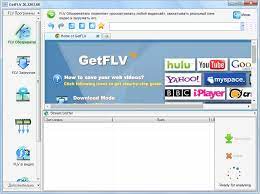
Simply launch the FLV browser, and visit your favorite video site. Select and play a video, and click "download" to save it to your local disk.

Download Web Video flawlessly
GetFLV dramatically reduces the download time of Web Videos. The program splits the file into sections, and downloads multiple sections simultaneously, efficiently.

Convert Any Web Videos
GetFLV can repair damaged Flash movies. The built-in FLV Fixer and MetaData Injector will analyze and repair Flash files that won't play properly.

Convert other videos to Flash
GetFLV can convert any of these popular video formats into Flash files. It supports almost all types of video formats such as AVI, WMV, MOV, ASF, MP4, 3GP and etc.

Release Name: Vdigger GetFLV 32.2605.08
Size: 259.5 MB
Links: HOMEPAGE – NFO – Torrent Search

Download: RAPiDGATOR

7 Comments
May 11

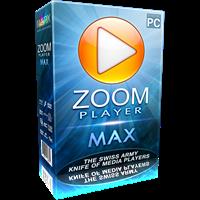
Zoom Player MAX 22.5 Beta 2

Description: Zoom Player, the most Flexible & Sophisticated Media Player for Windows PCs / Tablets. Based on our specially crafted 'Smart Play' technology, more media files and formats play with less hassle, improved stability and greater performance.
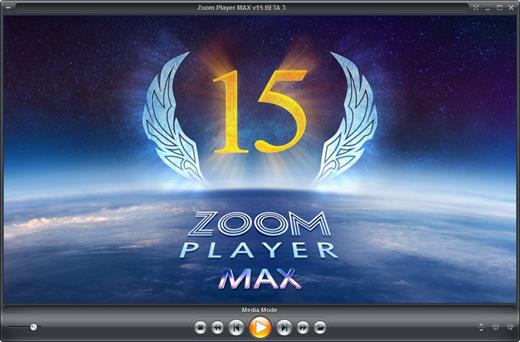
Zoom Player's customizable and polished full-screen navigation system makes browsing your content as easily accessible when using a Mouse, a Keyboard, a Remote Control or using a Touch input device such as a Tablet or Phone. Our powerful media library JukeBox features take your Movie & TV collections to a new level by enriching them with posters, backdrops and meta-data information (overview, cast, genre and more).

Zoom Player's fullscreen navigation system includes intuitive interfaces such as the Media Library, File Browser, Playlist, Color Control, Audio Equalizer, Bookmarks, Play History, Subtitle & Audio Stream Selection and many more. Zoom Player's media center simplicity makes it ideal for users with little previous computer experience.

In fact, with Zoom Player, you can instantly Convert any PC into a Home Entertainment Center (HTPC) with no specialized hardware or operating system requirement. Zoom Player runs on every version of Windows and every type of modern PC hardware, including Touch screens and Tablets.

Utilizing Zoom Player's modular design and flexibility, you can easily design a safe viewing environment, limiting or extending functionality, making it ideal for both newbies and professionals.

Supported Video Formats
DVD, BluRay (decrypted main-movie playback), Matroska (MKV), MPEG2 Transport (TS/TP/TSP/TRP/M2T/M2TS/MTS/PVA/TOD), AOMedia Video 1 (AV1), H.264 & AVCHD (MPEG4 AVC), H.265 & HEVC, WebM, XVID, DIVX, AVI, Flash Video (FLV), Windows Media (WMV/ASF), QuickTime (MOV/HDMOV), Ogg Movie (OGM), Theora (OGV), Real Media (RM/RMVB), VideoCD (VCD), Super VideoCD (SVCD), MPEG (MPG), MPEG2 Program (M2V/VOB/MOD), MPEG4 (SP/ASP), MPEG4 ISO (MP4), General Exchange Format (GXF), Material Exchange Format (MXF), Media Center DVR (DVR-MS), CamCorder (MOD/TOD), Digital Video (DV), DVCPRO, VP3, VP6, VP7, VP8, VP9, Motion JPEG (MJPEG), Motion JPEG 2000 (MJPEG2000), Flash (SWF), Cellphone 3GPP (3GP/3G2), FLIC (FLI/FLC) and more . . .

Supported Audio Formats
MP3, Free Lossless Audio CODEC (FLAC), Advanced Audio Coding (AAC), Windows Media (WMA), OGG Vorbis (OGG), OPUS (OPUS), CD-Audio (CDA), Dolby Digital (AC3), Digital Theatre Surround (DTS), Matroska (MKA), Wave Audio (WAV), SHOUTcast (Streaming), Cell Phone (AMR), Monkey Audio (APE), Real Media (RA), MusePack (MPC), OptimFROG (OFR), Shorten (SHN), True Audio (TTA), WavPack (WV), Apple Lossless Audio Coding (ALAC), LPCM, MIDI, AIFF, MO3, IT, XM, S3M, MTM, UMX and more . . .

Supported Interactive Formats
DVD, Hypertext Markup Language (HTML), Flash (SWF).

Supported Image Formats
JPEG (JPG), PNG, GIF, BMP, ICO, WMF, EMF, JFIF, RLE, WIN, VST, VDA, TGA, ICB, TIFF, FAX, EPS, PCX, PCC, SCR, RPF, RLA, SGI, BW, PSD, PDD, PPM, PGM, PBM, CEL, PIC, PCD, CUT, PSP, PN and more . . .

Zoom Player Versions
There are multiple versions of Zoom Player available for download, this table outlines the feature-set of each version.

Release Name: Zoom Player MAX 22.5 Beta 2
Size: 95.7 MB
Links: HOMEPAGE – NFO – Torrent Search

Download: RAPiDGATOR

5 Comments
May 11

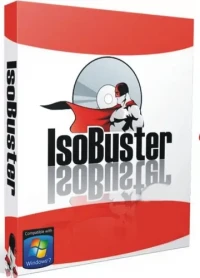
IsoBuster Pro 5.8 (Build 5.8.0.0)

Description: The Ultimate data recovery software! IsoBuster for Windows. Supporting ALL types of media, including CD/DVD, BD/HD DVD, Hard Drives, SSD, USB flash drives, Zip drives, Jaz drives, floppies etc.

Rescue lost files from a bad or trashed CD, DVD or a Blu Ray disc. Recover deleted files from a Hard Drive, Memory card or of from flash media that Windows says needs to be formatted ! Save important documents, precious pictures or video from the family, your only system backup.

Features:
Data recovery from all possible CD, DVD and Blu Ray (BD & HD DVD) formats:
CD-i, VCD, SVCD, SACD, CD-ROM, CD-ROM XA, CD-R, CD-RW, CD-MRW, DVD-ROM, DVCD, DVD-RAM, DVD-R, DVD-RW, DVD+R, DVD+RW, DVD+MRW, DVD+R Dual Layer, DVD-R Dual Layer, DVD+RW Dual Layer, DVD+VR, DVD+VRW, DVD-VR, DVD-VRW, DVD-VM, DVD-VFR, BD-ROM, BD-R, BD-R DL, BD-RE, BD-RE DL, BD-R SRM, BD-R RRM, BD-R SRM+POW, BD-R SRM-POW, BD-XL, BDXL-R, BDXL-RE, BDXL-R TL, BDXL-R QL, BDXL-RE TL, UHD, M-Disc, BDAV, BDMV HD DVD-ROM, HD DVD-R, HD DVD-R DL, HD DVD-RW, HD DVD-RW DL, HD DVD-RAM, HD DVD-Video, GD-ROM, UDO, ARRI Codex, … And the list continues.
Data Recovery from Hard Drives, HDD, SSD, ODD, USB flash / thumb sticks, Memory stick, compact media cards, MMC media cards, SD, Micro SD, Mini SD, xD, GSM, CF, SDHC, SDSC, SDXC, SDIO, mobile phone memory card, memory cards that are used in digital cameras, camcorders, cell phones, MP3 players and any other type media cards, Floppy, Zip, Clik, Jaz, MiniDisc, Hi-MD drives etc.
Support for many Toshiba HDD Video recorders
Support for many Pioneer HDD Video recorders
Support for many Sony HDD Video recorders
Support for many Panasonic HDD Video recorders
Support for many Philips HDD Video recorders
Support for many Magnavox HDD Video recorders
Support for many ReplayTV HDD Video recorders
Support for many ShowStopper HDD Video recorders
Support for many Thomson HDD Video recorders
Support for RCA, LiteOn, Medion, Funai, .. HDD Video recorders
All device access, media access, data gathering and interpretation is done exclusively by the software. It does not rely on Windows to provide or interpret the data and so can work completely independent from Windows' limitations.
Better error handling and several retry-mechanisms to aid you in getting the data anyway.
The use of both generic and alternative ways to get to the data, get the best out of your CD/DVD-ROM drive.
The use of primary and secondary file systems to get to the data and/or make use of file system data that might be ignored or 'forgotten' by popular OS. Explore the alternatives.
CDs stay 'readable' after problems (such as Buffer Under-run,…).
Read / Extraction from open sessions.
All sessions, including older ones, are accessible and can be recovered.
Supports mounting several virtual sessions inside a single DVD+RW or DVD-RW track.
Read and Extraction of files, CD/DVD images, tracks and sessions from all optical media.
Scanning for lost UDF files and folders. More on UDF recovery.
Scanning for lost ISO9660 / Joliet sessions.
Scanning for files based on their file-signature.
Scanning for IFO / BUP / VOB file systems on VIDEO and AUDIO DVDs.
Scanning for lost, deleted and orphaned FAT files and folders.
Scanning for lost or deleted NTFS files and folders
and more…

Release Name: IsoBuster Pro 5.8 (Build 5.8.0.0)
Size: 22.9 MB
Links: HOMEPAGE – NFO – Torrent Search

Download: RAPiDGATOR

5 Comments
May 11

PVsyst 8.1.2.48544

Description: PVsyst 8 brings major enhancements to our software features, demonstrating our ongoing commitment to the development and simulation of photovoltaic projects.

Define your project
System design: Rapidly design grid-connected, standalone, or pumping photovoltaic systems. The program guides you in selecting components for sizing your project.
System sizing: Visualize sizing constraints for modules and inverters, including I/V curves and power distribution, focusing on optimal inverter sizing and comprehensive loss analysis.
New orientations: Benefit from flexibility in project customization by defining unlimited orientations and explore the possibility of combining trackers and fixed plans in a single simulation.
Sub-hourly simulation: Import meteorological data at sub-hourly intervals from Meteonorm 9 or through PVsyst import tools, and then simulate your systems with greater accuracy.
Simulation and results: Calculate annual energy distribution, analyze key metrics such as total energy, yield, and specific energy, through detailed reports on gains and losses.

Setup shadings
Near shadings: Model your 3D scene directly or import it from another CAD tool. Fast design tools, orientation identification, scene validation, and advanced multithreading calculations will allow you to define your system as close to reality as possible.
Horizon: Simply define distant shadows by determining the sun positions to which your system will be directly exposed. The tool allows you to import horizon data directly via Meteonorm and PVGIS.
Layout: Precisely calculate electrical shading losses (mismatch) by calculating the I/V characteristics of the photovoltaic array, by adding the voltage of each module in a string, and aggregating the string currents.

Many different tools
Grid storage and self-consumption: Choose your storage and self-consumption strategy. Grid storage involves storing excess energy from the photovoltaic array for future use, improving energy management and reliability. Self-consumption involves the direct use of photovoltaic energy on the production site, minimising grid dependence and optimizing the use of solar energy.
Bifacial systems and trackers: Simulate bifacial installations and photovoltaic systems on single or dual-axis trackers, with safety and backtracking options.
Meteorological databases: Use on-board mapping (Bing or OpenStreetMaps) to locate your project and automatically import meteorological data from one of these databases: Meteonorm 8.2, NASA-SSE, PVGIS-TMY (5.1 & 5.2), NREL/NSRDB TMY, Solcast TMY, Solar Anywhere TGY, and Solargis. Many other formats can also be imported manually.
Ageing, optimization, and batch processing: Explore our suite of advanced tools providing detailed results for advanced design decisions. Combine multi-year batch simulation for serialised simulations, including row spacing and bifacial height adjustments, and photovoltaic module ageing.
Economic assessment: Evaluate the costs of your systems (CAPEX, OPEX, custom costs), establish detailed pricing strategies. The result of this assessment will calculate NPV, LCOE, ROI, and various profitability metrics.
Components: Access a verified and regularly updated database including photovoltaic panels, inverters, batteries, pumps, and optimizers (AMPT, Huawei, Maxim, Sungrow, SolarEdge, TIGO) for realistic simulations.

Off-grid systems
Pumping systems: Simulate your sun-tracking pumping systems by integrating hydraulic properties and characteristics, water storage, and water requirements through the selection of various components.
Standalone systems: Evaluate the efficiency of your off-grid installations with energy storage, focusing on defining user electrical needs for an accurate assessment of stand-alone systems.

Minimum required configuration:
At least 2 GB of RAM
At least 2 GB of free space on the hard drive
Minimum screen resolution of 1280 × 720 pixels
Graphics card supporting OpenGL 2.0 or higher
.NET 4.8 framework (for Meteonorm)
PVsyst workspace does not support shared or remotely-synced drives / folders (including OneDrive, Google Drive, Dropbox, etc.). Files and workspaces can be synced as a separate task, once PVsyst has been closed

Release Name: PVsyst 8.1.2.48544
Size: 812.9 MB
Links: HOMEPAGE – NFO – Torrent Search

Download: RAPiDGATOR
6 Comments
May 11

reaConverter Pro 8.0.220

Description: Easily process full batches of files and folders. reaConverter combines powerful automation with intuitive tools to streamline image conversion and eliminate repetitive editing.

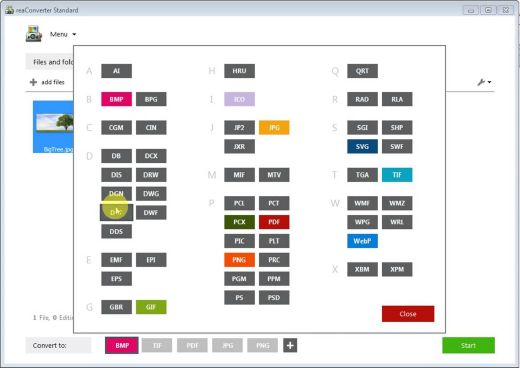
700+ File Formats
reaConverter delivers high-efficiency batch conversion for an extensive range of file formats.

Efficient Conversion
A powerful file conversion toolkit with advanced processing features — giving you precise, granular control over every output.

Image Editing
reaConverter simplifies batch image editing — apply touch-ups, transformations, and effects to unlimited images simultaneously.

Automation
Professional-grade automation features for high-volume file conversion and batch processing.

Development
Integrate reaConverter's functionality into scripts, applications, or websites using its command-line tool or DLL.

Release Name: reaConverter Pro 8.0.220
Size: 399.2 MB
Links: HOMEPAGE – NFO – Torrent Search

Download: RAPiDGATOR

4 Comments
May 11

Modbus Poll 13.2.1.2558

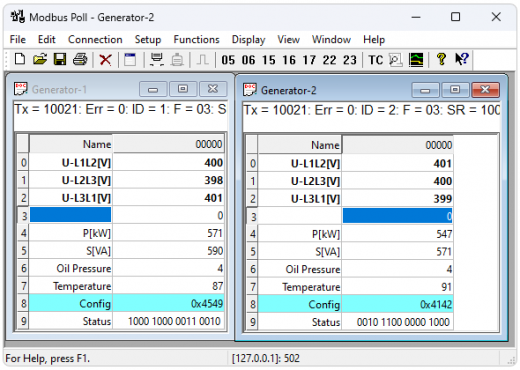
Description: Modbus Poll is a Modbus master simulator designed primarily to help developers of Modbus slave devices or others that want to test and simulate the Modbus protocol. With the multiple document interface you can monitor several Modbus slaves and/or data areas at the same time.

You can read and write registers and coils from any window. If you want to change a single register, simply double click the value. Or you can change multiple registers/coils. Multiple data formats such as float, double and long with word order swapping are available.

Exception errors are shown on the status line.

If you are a slave developer you can compose and send your own test strings in the "test center" and check the result from the slave in hex numbers.

OLE Automation for interfacing with Excel. To interpret and show the Modbus data according to your specific requirements. E.g. edit data in Excel and then transmit the data to your slave device! Try the Excel example.xlsm installed with the program.

Release Name: Modbus Poll 13.2.1.2558
Size: 6.7 MB
Links: HOMEPAGE – NFO – Torrent Search

Download: RAPiDGATOR
5 Comments
May 11

Symless Synergy Business 3.6.1

Description: Control other computers on your local network with a single mouse and keyboard. Use the keyboard and mouse of one computer to control nearby computers. Copy and paste between all of your computers with shared clipboard.

Used by millions of hobbyists, freelancers, and more
However you use multiple computers, Synergy lets you focus on doing what you do best.

Stay in your creative flow
Many artists use a Mac for creative work and a Windows PC for specific tools or older software. Synergy lets one keyboard and mouse control both computers as if they were one, so you stay focused on creating instead of switching devices.

For serious home labs
If you run several computers at once, Synergy lets one keyboard and mouse move between them instantly. No extra keyboards on the desk, no KVM switches, no remote desktop windows. Just slide across and keep working.

Coding across multiple systems
Tinkerers and freelance developers often juggle projects across Linux, Windows, and macOS. With Synergy, one keyboard and mouse control every machine, making it easy to test, learn, and ship without the hassle of switching setups. More coding, less clutter.

No more desk chaos
Running two PCs for gaming or streaming? Synergy lets one keyboard and mouse control both, so you can control your streaming PC and get back in seconds, without breaking gameplay or dealing with clunky KVM switches or desk clutter.

Breathe new life into old devices
Have an old laptop or desktop sitting unused? Synergy turns it into a second computer for chat, music, or research, controlled from your main keyboard and mouse. No new hardware. Just better use of the machines you already have.

Release Name: Symless Synergy Business 3.6.1
Size: 169.1 MB
Links: HOMEPAGE – NFO – Torrent Search

Download: RAPiDGATOR
5 Comments
May 11

RdpGuard 10.2.1

Description: RdpGuard is a host-based intrusion prevention system (HIPS) that protects your Windows Server from brute-force attacks on various protocols and services (RDP, FTP, IMAP, POP3, SMTP, MySQL, MS-SQL, IIS Web Login, ASP.NET Web Forms, MS Exchange, RD Web Access, VoIP/SIP, etc). It monitors the logs on your server and detects failed logon attempts. If the number of failed logon attempts from a single IP address reaches a set limit, the attacker's IP address will be blocked for a specified period of time.

Why do you need it?
Many Windows Server machines are under constant attack. Network scanners and RDP brute-force tools work 24/7. Eventually they may find a password to access your server! Moreover, RDP brute-force attacks abuse server resources (CPU, RAM, Disk Space and Network Bandwidth).
Take a look at your server's Security EventLog. How many failed login attempts do you see? The log may note thousands of failed login attempts from a single IP address. This means that someone is trying to find a password to access your server.

How can you protect your server from brute-force password-guessing attacks on RDP? The answer is RdpGuard - powerful tool that allows you to protect your Remote Desktop from brute-force attacks.
RdpGuard works as a Windows Service. Your Windows Server will be protected even if nobody is logged in.

Release Name: RdpGuard 10.2.1
Size: 5.9 MB
Links: HOMEPAGE – NFO – Torrent Search

Download: RAPiDGATOR
5 Comments
May 11

Windows Password Recovery Tool Ultimate 8.5.1

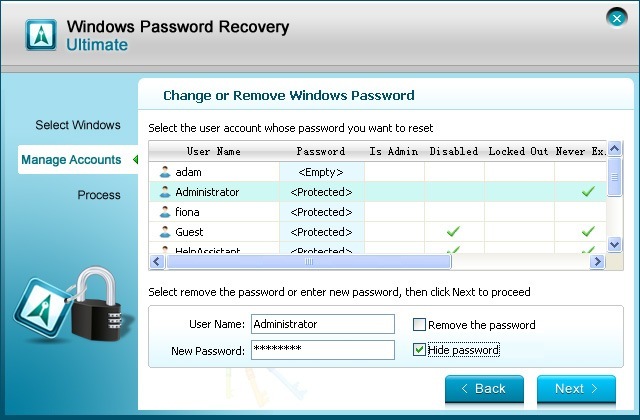
Description: Windows Password Recovery Tool Ultimate can help you to reset Microsoft Account lost password, Windows local or domain account password, create a new administrator account in a speedy way without any data loss or leaking of private information.

3 Steps to Reset Your Password
1. Download and install the application.
2. Create Bootable Disk with ISO Image.
3. Reset/Remove Windows Password.

How It Works
Windows Password Recovery Tool can reset or remove Windows password, remove admin account and create new account for all computer users.

Reset Local User's Password
- Administrator Account: Reset or remove Windows administrator password for your local account.
- Microsoft Account: Change your Microsoft account (Windows Live) password offline with Windows Password Recovery Tool Ultimate.
- Guest Account: Remove or reset Windows local guest password for your user account.

Remove Domain User's Password
- Administrator Account: Remove or change domain administrator (Active Directory) and other user passwords.
- Create Account: Create a new domain admin account if someone hacked your previous one.

4 Professional Password Recovery Solutions
Windows Password Recovery Tool will automatically display all Windows systems that you have installed in your PC.
- Remove Password: You will login computer without password.
- Reset/Change Password: Your will login Windows 7/8/10 with new password.
- Create New Local/Admin account: You will enter your computer with new administrator/local account.
- Manage All Login Accounts: You can deleted all the login accounts, keep you computer only your account.

Release Name: Windows Password Recovery Tool Ultimate 8.5.1
Size: 50.3 MB
Links: HOMEPAGE – NFO – Torrent Search

Download: RAPiDGATOR
5 Comments
May 11

Resolume Arena 7.26.1 rev 7833

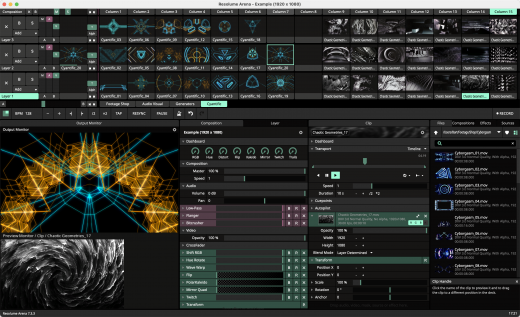
Description: Resolume Arena has everything Avenue has, plus advanced options for projection mapping and blending projectors. Control it from a lighting desk and sync to the DJ via SMPTE timecode.

Live HD Video Mixing
Resolume puts you in charge. You can play your videos when you want, how you want. Forwards, backwards, scratch and adjust tempo to the beat. Mix and match your visuals quickly and easily and play Resolume like an instrument.

Intuitive Interface
Whatever your style is, Resolume offers you an easy interface to rock it. Use as little or as many videos and effects as you like. The only limit is your computer's raw power and your imagination.

From Your Local Club to Main Stage
You can play on any amount of screens. From a simple screen behind the DJ in your local club to main stage at Ultra. As long as your computer can recognise it as an output, Resolume will let you use it.

Projection Mapping with Arena
Project video on any type of surface. Complex geometrical structures or whole buildings. Resolume does all the hard work, so you can concentrate on the important part: being creative.

Blend Projectors with Arena
With edge blending you can seamlessly project one beautiful widescreen image with two or more projectors. It can even wrap around for a full 360 degree experience.

Project on Cars, Buildings or Pumpkins
With Arena you can take on any size mapping project. From projecting on DJ booths to cars, buildings and LED mappings on giant stages like Ultra.

Led There Be Light
Think outside the screen and colour the lights too! With Arena 5 you can send out colours to DMX fixtures and the lights will be in sync with your visuals.

Live Composite & Effects

Adjust the scale and position of your clips to suit your needs. Apply effects to drastically change the look of your video. Everything runs on the video card so you get the fastest performance and best image quality possible.

Audio Visual Playback
Resolume plays both audio and video files. Juggle pixels and composite beats, combine any video file with any audio file.

All Hands on Deck
Liberate yourself from the mouse. Use your favourite MIDI controller or get physical with your iPhone via OSC.

Release Name: Resolume Arena 7.26.1 rev 7833
Size: 1005.2 MB
Links: HOMEPAGE – NFO – Torrent Search

Download: RAPiDGATOR
6 Comments