Please REGISTER or RENEW your account on RAPiDGATOR.net and support us by doing through all RAPiDGATOR working download links on main posts...
May 11

Windows 11 AIO 16in1 25H2 Build 26200.8328 TPM Bypassed & Pre-Activated May 2026

Description: On August 29, 2025, Microsoft released the first official preview of Windows 11 version 25H2 (2025 Update) in the Release Preview Channel of the Windows Insider Program. The update is rolling out as an enablement package for devices already running version 24H2.
Windows 11 versions 24H2 and 25H2 use the same underlying system files and architecture.

Editions Includes –


  1. “Windows 11 Home”
  2. “Windows 11 Home N”
  3. “Windows 11 Pro”
  4. “Windows 11 Pro N”
  5. “Windows 11 Home Single Language”
  6. “Windows 11 Enterprise”
  7. “Windows 11 IoT Enterprise”
  8. “Windows 11 IoT Enterprise Subscription”
  9. “Windows 11 Enterprise multi-session”
  10. “Windows 11 Education”
  11. “Windows 11 Pro Education”
  12. “Windows 11 Pro for Workstations”
  13. “Windows 11 Enterprise N”
  14. “Windows 11 Education N”
  15. “Windows 11 Pro Education N”
  16. “Windows 11 Pro N for Workstations”

Release Name: Windows 11 AIO 16in1 25H2 Build 26200.8328 TPM Bypassed & Pre-Activated May 2026
Size: 7.5 GB
Links: HOMEPAGE – NFO – Torrent Search

Download: RAPiDGATOR

3 Comments
May 11

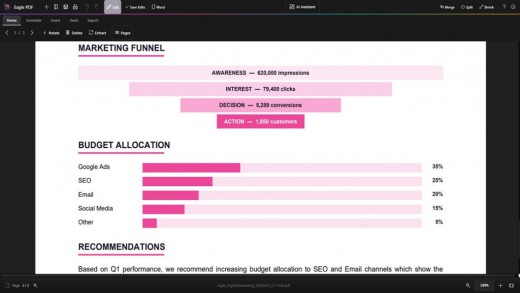
Eagle PDF Editor v1.0.0

Description: The complete PDF toolkit. View, annotate, merge, split, encrypt, sign, and create PDFs with 20+ templates. Built-in AI assistant and OCR text recognition. Fill forms, add watermarks, convert to images, and more — all in a sleek dark interface.

Key Features


  • PDF Viewer
    Fast, high-quality PDF rendering with smooth scrolling, zoom controls, page navigation, and a modern dark-themed interface.
  • Annotations & Markup
    Highlight text, add sticky notes, draw freehand, insert text boxes, and use shapes like rectangles, circles, arrows, and lines.
  • Merge PDFs
    Combine multiple PDF files into a single document. Drag and drop files to merge contracts, reports, and presentations effortlessly.
  • Split PDFs
    Extract specific pages or split a large PDF into smaller files. Select page ranges or split by every N pages for easy sharing.
  • Encrypt & Protect
    Password-protect your PDFs with AES encryption. Set document permissions to control printing, editing, and copying of sensitive content.
  • Digital Signatures
    Draw, type, or upload your signature and place it anywhere on the document. Sign contracts, forms, and agreements instantly.
  • Create PDFs
    Create new blank PDF documents in A4, Letter, Legal, or custom sizes with portrait and landscape orientation. Start from scratch or from templates.
  • 20+ Templates
    Choose from over 20 professionally designed templates including invoices, contracts, reports, letters, resumes, and business forms.
  • AI Assistant
    Built-in AI assistant to summarize documents, extract key information, answer questions about your PDF content, and generate text.
  • OCR Text Recognition
    Extract text from scanned documents and images using optical character recognition. Convert image-based PDFs into searchable, selectable text.
  • Page Management
    Thumbnail sidebar for quick navigation. Reorder, insert, delete, and rotate pages. Extract single pages or ranges with full control.
  • Images & Stamps
    Insert images, logos, and custom stamps onto any page. Add watermarks and overlay content for professional document branding.
  • Convert & Export
    Export PDF pages as high-quality images (PNG, JPEG). Convert documents between formats for compatibility with any workflow.
  • Form Filling
    Fill out interactive PDF forms with text fields, checkboxes, and dropdowns. Complete tax forms, applications, and surveys digitally.
  • Search & Find
    Instantly search for text across your entire document. Find and navigate to specific words, phrases, or content with keyboard shortcuts.
  • Print & Batch Print
    Print PDFs with full control over page range, scaling, orientation, and paper size. Batch print multiple documents in one go.
  • Bookmarks & Links
    Add, edit, and navigate bookmarks for quick access to sections. Insert hyperlinks to URLs or internal pages within your document.
  • Side-by-Side Compare
    Open and compare two PDF documents side by side. Review changes, verify revisions, and cross-reference content simultaneously.
  • Dark Mode Interface
    Modern dark-themed UI designed to reduce eye strain during long editing sessions. Clean, distraction-free workspace for maximum productivity.
Release Name: Eagle PDF Editor v1.0.0
Size: 460 MB
Links: HOMEPAGE – NFO – Torrent Search

Download: RAPiDGATOR

5 Comments
May 11

Topaz Video v1.5 (x64) + Fix

Description: Ultra smooth. Ultra sharp. Ultra steady. Topaz Video is a professional, AI-powered video enhancement software that lets you denoise low-light footage, recover and upscale old archival videos to 4K, restore focus, and adjust frame rate by creating new frames out of thin air. Available on Mac and Windows.

Trusted by major film studios and creative pros everywhere.
Denoise with cinema-level detail. Create new frames with frame interpolation. And stabilize the camera after the moment has already passed.

Filmmakers & Editors
Restore, upscale, and refine footage for professional post-production workflows.

Archivists & Historians
Preserve and modernize archival film, VHS, and historical footage with clarity.

Creators & Influencers
Enhance social media videos with sharper detail, higher resolution, and smoother motion.

Hobbyists & Enthusiasts
Improve old family videos and personal projects to look like they were shot today.

System Requirements:
Windows Operating System: 11 (most updated version recommended)
CPU: Intel OR AMD with AVX2 instructions
System Memory (RAM): 16 GB (32 GB or more recommended)
Graphics Card (NVIDIA): NVIDIA GTX 900 series or higher, 6GB VRAM
Graphics Card (AMD): AMD Radeon 500 series or higher, 6GB VRAM
Graphics Card (Intel): Intel ARC A750
CPU Release Year: 2016 or newer

Release Name: Topaz Video v1.5 (x64) + Fix
Size: 297 MB
Links: HOMEPAGE – NFO – Torrent Search

Download: RAPiDGATOR

3 Comments
May 11

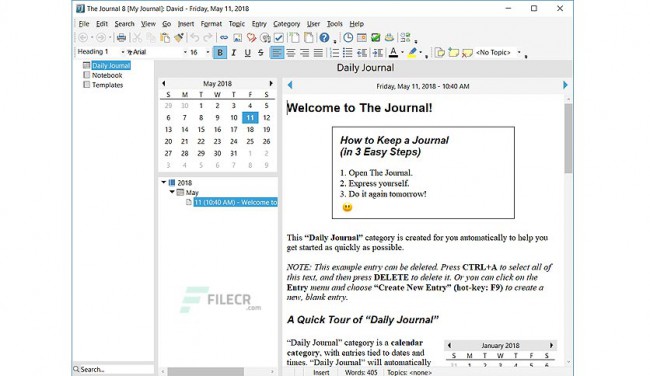
The Journal 8.0.0.1347

Description: You want to keep a diary. You want to write every day. With The Journal, you can! Whatever your journaling or writing needs, The Journal gives you unmatched convenience, flexibility, security, and reliability. The Journal is always available when you need it, and lets you make entries with text, photos, images, and just about anything else. Plus, The Journal’s optional password-protection and encryption ensure that your secrets remain secret.

The Journal is Perfect for…
Professionals! Use The Journal to track your daily progress on all your projects! Build a text database! Compile a knowledge base to make your job easier! Keep your professional secrets secret.
Students! Take The Journal with you to class. Never misplace notes or struggle with deciphering your handwriting ever again.
Writers! Whether you are a professional writer or an aspiring author, The Journal can help you organize your manuscripts and ideas. The Journal even provides writing exercises to help you hone your skills.
Self Improvement! Journaling is a powerful tool of self analysis. With The Journal, you can quickly and easily record your thoughts and feelings throughout the day.
Daily Devotionals! Record your spiritual insights and know that you can always find them again.
Family Historians! Combined with the Memorygrabber add-on, The Journal makes it easy to write your own memoirs. You can also help your parents, grandparents, or even great-grandparents record the exciting story of their life.
Dream Journaling! Let The Journal help you remember and analyze your dreams.

Release Name: The Journal 8.0.0.1347
Size: 27.7 MB
Links: HOMEPAGE – NFO – Torrent Search

Download: RAPiDGATOR

5 Comments
May 11

VX Search 18.1.16

Description: VX Search is an automated, rule-based file search solution allowing one to search files by the file type, category, file name, size, location, extension, regular expressions, text and binary patterns, creation, modification and last access dates, EXIF tags, etc. Users are provided with the ability to categorize and filter results, copy, move or delete files, save reports and export results to an SQL database.
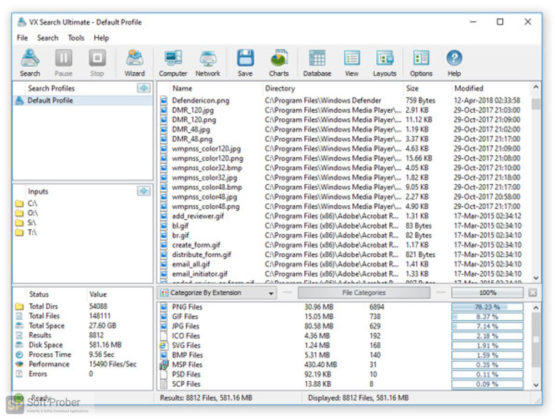
VX Search is an automated, rule-based file search solution allowing one to search files by the file type, category, extension, file name, file size, location, creation, modification and last access dates, regular expressions, user name, file attributes, binary and text patterns, JPEG EXIF tags, etc.

The user is provided with the ability to categorize and filter file search results, perform file management operations, generate various types of pie and bars charts, save reports to a number of standard formats such as HTML, PDF, Excel, text, CSV, XML and export search results to an SQL database.

IT administrators are provided with advanced file search capabilities including the ability to search files in multiple servers and/or NAS storage devices simultaneously, periodic file search operations, automatic report generation, conditional file search actions allowing one to send E-Mail notifications and/or execute custom commands when a file search operation finds a user-specified number of files.

Searching Files in Network Servers and NAS Storage Devices
VX Search allows one to scan the network, discover network servers and NAS storage devices, automatically detect all accessible network shares and search files in hundreds of network servers and NAS storage devices. In addition, the user is provided with the ability to export the list of detected servers and NAS storage devices (including lists of network shares for each server) into HTML, PDF, Excel, text, XML and CSV reports.

In order to search files in one or more servers or NAS storage devices, press the 'Network' button located on the main toolbar and wait while VX Search will scan the network and show a list of detected network servers and NAS storage devices. On the network servers and NAS storage devices dialog, select the required servers and press the 'Search' button.

VX Search will show all network shares hosted on the selected servers and NAS storage devices allowing one to search files and save various types of file search reports and charts. In addition, VX Search provides a large number of advanced file search options allowing one to tune and customize file search operations for user specific needs and hardware configurations.

VX Search Command Line Utility
In addition to the VX Search GUI application, the user is provided with a command line utility, which can be used to execute pre-configured file search operations and integrated into user-custom shell scripts and batch files. The VX Search command line utility may be used to execute file search operations locally or control file search operations in one or more VX Search Servers via the network.

VX Search Server
IT and storage administrators are provided with the server product version, which runs in the background as a service and provides the ability to perform fully-automated, periodic file search operations, generate various types of file search reports, analyze file search results and execute conditional actions based on user-defined rules and policies.

VX Search Server may be controlled using a full-scale client GUI application and the command line utility, which provides the ability to perform file search operations, review results and save reports locally and through the network. Finally, enterprise customers are provided with VX Search Enterprise - a server-based product version allowing one to perform search operations, review results and save reports using a regular web browser locally or through the network.

Batch File Search Operations
VX Search Server and VX Search Enterprise provide the ability to scan the network, detect all network servers and NAS storage devices, execute one or more pre-configured file search commands on hundreds of network servers and NAS storage devices and generate an individual file search report for each network server, NAS storage device or network share.

Depending on the selected configuration, VX Search Server will save in the built-in reports database an individual file search report for each network server, NAS storage device or network share. Once the batch file search operation is completed, the user will be provided with the ability to open saved file search reports, review file search results, generate various types of pie charts and export reports to a number of standard formats including HTML, PDF, text, Excel CSV and XML

Release Name: VX Search 18.1.16
Size: 84.5 MB
Links: HOMEPAGE – NFO – Torrent Search

Download: RAPiDGATOR

5 Comments
May 11

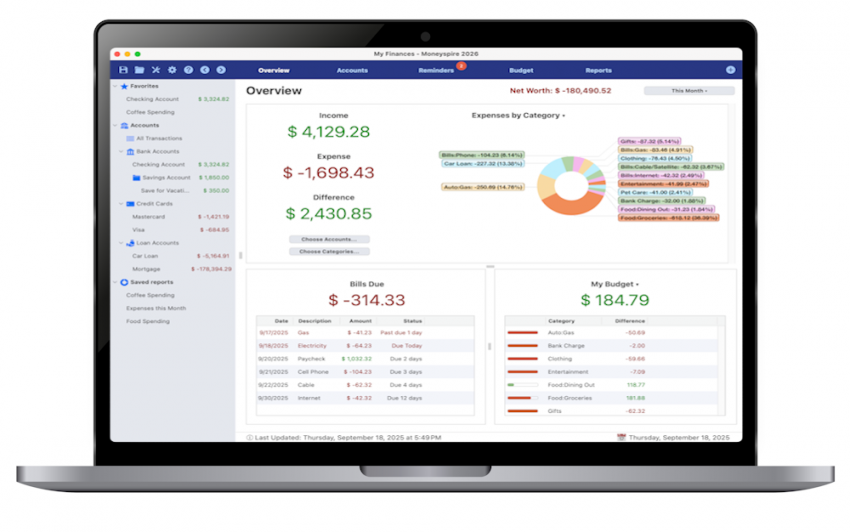
Moneyspire 2026 v26.0.13

Description: Personal finance software, made personal. Keep track of your bank accounts, credit cards, loans, cash and investment accounts. Categorize your spending and income with customizable categories. Keep track of your bills so you never forget to make a payment again and avoid late fees.

Set a budget to keep track of your spending so you don't overspend on specified categories like Dining Out. Forecast your account balance to prevent overdrafts and insufficient funds. Balance your checkbook and reconcile with bank statements to catch errors and bank fraud.

Generate detailed reports to see exactly where your money is going and to make tax time easier. Optionally sync to your financial institutions (if you would like) via the Moneyspire Connect feature and automatically download your transactions. Optionally sync to the cloud (if you would like) via the Moneyspire Cloud feature so you can share your finances between multiple computers and mobile devices.

Moneyspire can also import data from Quicken, Microsoft Money (MS Money) and other personal finance software, so you can easily make the change to Moneyspire.

Release Name: Moneyspire 2026 v26.0.13
Size: 119 MB
Links: HOMEPAGE – NFO – Torrent Search

Download: RAPiDGATOR

5 Comments
May 11

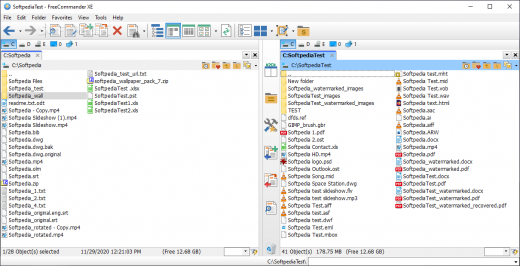
FreeCommander XE 2026 Build 948

Description: FreeCommander is an easy-to-use alternative to the standard windows file manager. The program helps you with daily work in Windows. Here you can find all the necessary functions to manage your data stock. You can take FreeCommander anywhere – just copy the installation directory on a CD or USB-Stick – and you can evenwork with this program on a foreign computer.

Main features in FreeCommander
Dual-panel technology – horizontal and vertical (one panel possible too)
Tabbed interface
Full access to desktop
Optional tree view for each panel
Built-in file viewer to view files in hex, binary, text or image format
File viewer and thumbnail view inside archives too
Built-in archive handling: ZIP (read, write)
Nested archive handling
Plugins for other archive (RAR, 7z, …)
Plain view – structureless view for files and folders
Linked browsing
Easy access to system folders, control panel, desktop and start menu
Copy, move, delete, rename files and folders (alternatively as Windows or FreeCommander operation)
Drag&drop
File searching (inside archive too)
Searching duplicates
Create and verify MD5 and SHA checksums
Wipe files
Multi rename tool
Paths longer than 255 characters can be opened, copied, moved and renamed
File properties and context menu
Calculation of folder size
Folder comparison
Folder synchronization
Modification of file date and attributes
Folder / program favorites
File filters (regexp possible too) for display and file operations
User defined columns for detailed views
Automatic views
Simple FTP/SFTP client (SFTP only 64 bit)
Access to mobile devices (e.g. smartphones, tablets)
DOS command line
Quick viewer
Quick search
Quick filter
Quick starter
Desktop snapshots
All keyboard shortcuts are definable
Flexible configuration of almost all features
Color schemes
Multiple language support

Release Name: FreeCommander XE 2026 Build 948
Size: 21 MB
Links: HOMEPAGE – NFO – Torrent Search

Download: RAPiDGATOR
6 Comments
May 11

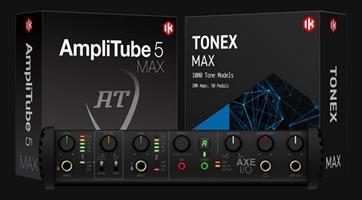
IK Multimedia TONEX MAX 1.12.0

Description: Experience hyper-realistic Tone Models. A revolutionary concept in rig modeling, and the core of the TONEX ecosystem, TONEX software uses breakthrough AI Machine Modeling™ technology to let you model the sound of any amp, cabinet, combo or pedal, and turn it into a plug-in, all with a sonic accuracy that’s virtually indistinguishable from the real thing.

You can instantly play up to 1,100+ Premium Tone Models already available plus browse, demo and download over 20 K Tone Models available on ToneNET in TONEX. Easily add more Premium tones to your library with Tone Partner and signature collections.

From rare one-of-a-kind vintage amps to modern rigs, TONEX makes it possible and affordable to own the most sought-after gear in the world.

TONEX Tone Modeling features
Model amps, cabinets, combos and pedals (like distortion, overdrive, fuzz, EQ or boost) in any combination, from single element to complex rig
Built-in assistant guides you through each step from hardware connection to complete modeling
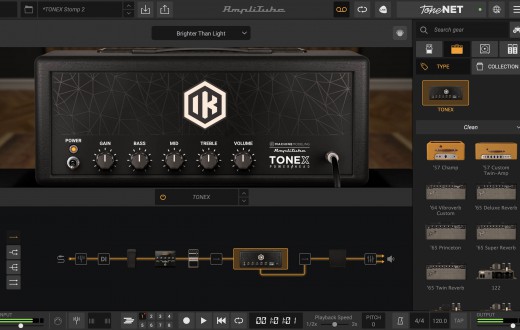
Assign custom skins to your modeled gear and open them as a plug-in or standalone inside the TONEX software and app, or AmpliTube 5 for Mac/PC
Create Tone Models in minutes (as fast as 5 minutes on modern computers*) using AI Machine Modeling technology with selectable levels of accuracy
Ultra-precise reproduction of high-frequency content
Works also as an IR creator or you can use the built-in VIR™ cabinets with multiple IRs per cabinet

Player
TONEX offers an intuitive, easy-to-use workflow to keep you in the creative zone. Play, practice and record the best guitar and bass tones using TONEX as a standalone application or plug-in inside your favorite DAW. Edit and organize your entire library of tones, and always have the right tone at your fingertips.
With powerful editing tools, it’s easy to take control. Add and adjust every parameter, including effects like modulation, delay, reverb, compression, noise gate and EQ, all from the home screen.
Customize your cab block with Tone Models, VIR™ and Custom IRs for unmatched flexibility. Easily create and manage custom presets, keeping your favorite sounds organized and ready to play within a single user-friendly interface.

Modeler
Harness the power of IK’s advanced AI Machine Modeling technology to turn your rig into virtual models of amps, cabs and pedals (distortion, overdrive, fuzz, EQ and boost) or entire rigs, in any combination.
TONEX uses a specially prepared audio file of actual guitar and bass signals, not just test tones, to capture your rig in true-to-life detail. Then TONEX’s neural network computes the machine modeled tone in minutes. The result is a virtual model that sounds indistinguishable from the real rig, to be used in TONEX software and app.
Add your custom skin and keywords to your Tone Models, then upload and share them with other TONEX users in ToneNET with just one click.

TONEX Editor
TONEX Editor is a FREE standalone application that lets you make real-time adjustments with a connected TONEX Pedal or TONEX ONE. It allows you to access and edit any onboard Tone Model or preset and hear your changes instantly through the pedal. You can also access your entire TONEX library within the Librarian tab, including Tone Models, presets and ToneNET, and quickly load favorites to audition and save to a designated hardware slot on your pedal.

Release Name: IK Multimedia TONEX MAX 1.12.0
Size: 2.9 GB
Links: HOMEPAGE – NFO – Torrent Search

Download: RAPiDGATOR
3 Comments
May 11

DbVisualizer Pro 26.1.2

Description: The database client with the highest user satisfaction. DbVisualizer has a long history of being the preferred database tool for the world’s leading data professionals. Built for navigating complexity. DbVisualizer has everything you need to build, manage and maintain state-of-the-art database technologies. Each feature has been thoughtfully crafted to solve real world problems.

It connects to all popular databases.
DbVisualizer is the only database tool you’ll need. Everything you need to gather data from all your data sources is bundled right in - including support for database-specific object types and more.

Leading the way in user satisfaction.
DbVisualizer is continuously developed in close collaboration with our users. We pride ourselves in engineering software of the highest quality and deliver support to our users directly from our developers.
Because that’s the kind of support we like.

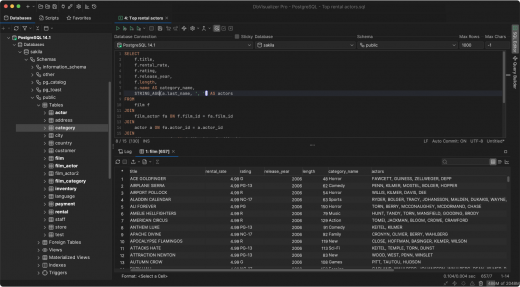
Advanced SQL editor.
DbVisualizer includes an advanced SQL editor that will help make your coding life easier.

Write beautiful queries.
Copy-pasted queries can be easily formatted to your liking and auto-suggestions will help you write efficiently.

Simplify the re-use of queries.
DbVisualizer variables make it easy for users to modify specific values inside a query as it is being initiated.

Access. Explore. Optimize.
DbVisualizer is a universal database client that will help you access, explore and optimize most popular databases.

Explore and visualize
Easily viewed, managed and control your stored data.

Driver management via Maven
JDBC driver management is built in with version handling.

Custom object types and actions
We support unique object types across a huge range of databases.

Taking control of your data.
The data stored in your database can be easily managed and controlled with DbVisualizer.

Results visualization
As you get the result from a query, you can decide how it should be presented. You can choose from a simple table to various graphs with custom design.

Inline editing
You can edit data directly in the DbVisualizer viewer. Each edit will be highlighted and saved locally until you decide to commit your updates to the database.

Exporting
You can export a result set into almost any file format, with specific formatting. There are also quick-export options for when you just want to open the result set as a spreadsheet.

Release Name: DbVisualizer Pro 26.1.2
Size: 209.7 MB
Links: HOMEPAGE – NFO – Torrent Search

Download: RAPiDGATOR

5 Comments
May 11

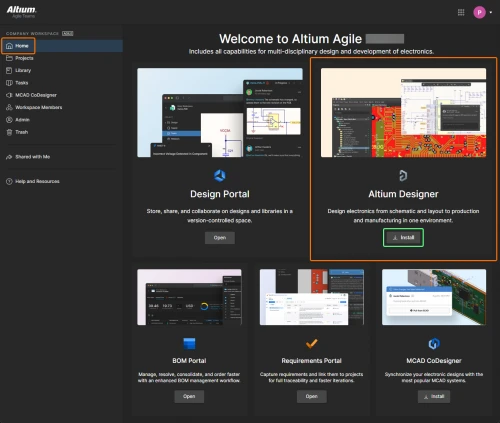
Altium Designer Agile 26.5.1 Build 30

Description: Control Without Complexity. A platform-based solution for electronics product and systems development.

Fast Time-to-Impact
Scales with your needs for control, connectivity and compliance, without sacrificing speed and agility.

Enterprise Power, Without the Weight
Delivers the capabilities of traditional enterprise systems, without the complexity.

Adapts to Existing Environments
Integrates seamlessly with existing tools, systems and processes.

Users
Discover how Altium Agile empowers development organizations by seamlessly connecting users and engineering systems with integrations to Jira, PLM (Enterprise), and access to SiliconExpert and Z2Data components and supply chain data.
Supply chain intelligence improves decision making and reduces the risk of production disruptions
Seamless multidisciplinary engineering integration within a unified project environment, eliminates need for file exports/imports
Robust connectivity with enterprise systems, including but not limited to PLM, Jira, and requirements management

Data
Explore how Altium Agile manages and secures critical engineering data while streamlining access, traceability, and validation. From isolated environments to real-time supply chain checks, data is accurate, protected, and actionable.
Single-tenant and on-premise environment for enhanced data isolation and security
Track project and process data—including guest access, workflows, and milestones—for full visibility and auditability
Real-time supply chain intelligence helps verify component data against standards and requirements, reducing risk and improving design reliability

Processes
Explore how Altium Agile supports efficient and secure electronics development processes through configurable, structured workflows and external contributor management.
Maintain process integrity with separate production and pre-production environments, allowing teams to safely test updates without disrupting active workflows
Collaborate with external contractors while managing access through granular data sharing that align with defined process boundaries and security protocols
Design and manage workflows that reflect your organization’s best practices, enabling consistent, repeatable processes that drive quality and efficiency across projects

Release Name: Altium Designer Agile 26.5.1 Build 30
Size: 3.1 GB
Links: HOMEPAGE – NFO – Torrent Search

Download: RAPiDGATOR
2 Comments