Please REGISTER or RENEW your account on RAPiDGATOR.net and support us by doing through all RAPiDGATOR working download links on main posts...
May 4

AnyTime Organizer Deluxe 16.2.4

Description: AnyTime Organizer has all the powerful tools you need to organize your personal and professional life! The friendly and simple interface makes it easy to access the Calendars, To-Do lists, Contacts, Notebooks, Passwords, Expenses, and hundreds of design combinations for printable calendars.
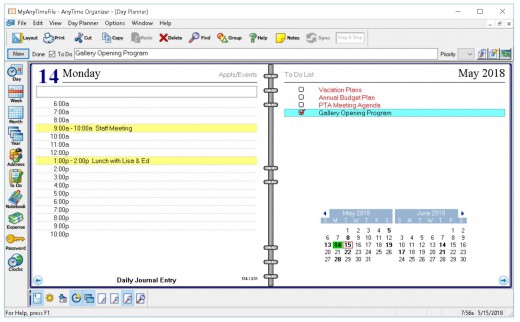
AnyTime Organizer help you organize your life and you will see why more people choose AnyTime over any other brand of organizer software.

AnyTime Organizer Deluxe 16 Features

The Only Organizer that Organizes Your Calendar, To-Do’s and Contacts!
Organize your calendar for work, personal, or other groups. Schedule events, calls, tasks and appointments. Increase your productivity and prioritize and manage your To-Do lists. Keep a detailed record of every contact. Remember important events–even prepare a holiday card mailing!

New! Get AnyTime Organizer Info with Your iPhone & Android Apps!
Access your calendar, To-Do list and contacts from your home or office 24/7 from your mobile device or Web apps. Sync your calendar, contacts, and To Do’s using AnySync. Sync for free through your Google or iCloud accounts and access data from any connected device on AnyTime.

Calendars
- Organize and switch between multiple calendars: work or personal, and create categories
- Schedule events, calls, tasks and appointments, and avoid conflicts
- View schedule by day, week, month or year
- Add recurring and repeating events
- Drag-and-drop to reschedule
- Print or e-mail a PDF of schedule

Layout Designer–Choose from 100+ Layouts & 15 Base Themes for Customization!
Take advantage of exclusive layouts like Weekend Planner, 3-Day Travel Planner, and Tri-Fold Address Book. Create a PDF of any layout and e-mail your schedule to others.

Downloadable Calendars
Add-in your favorite NFL®, NBA®, NHL®, MLBTM, PGATM, and NASCAR® season schedule to your daily planner. Have fun with the Lunar Calendar, Famous Birthdays, International Holidays, and Word-of-the-Day.

Design Layout Share and Print
- More than 3,000 layout design combinations
- Choose from 15 base themes or create your own design
- Exclusive layouts include Weekend Planner, 3-Day Travel Planner, and Tri-Fold Address Book. Print to popular day planner sizes including 8.5″ x 11″, 5.5″ x 8.5″, 3.75″ x 6.75′, and 3.5″ x 6″
- Print or send as PDF

Address Book & Contacts
- Keep a detailed record of every contact
- Remember birthdays and anniversaries – even prepare a holiday card mailing
- Keep a history of meetings, tasks and notes
- Simply drag-and-drop to schedule calls
- Date and time stamps are added automatically
- Add photos for each person as a quick visual

To-Do Lists
- Keeps record of accomplished tasks
- Set deadlines, track, prioritize, sub-prioritize, and add alarms and important notes for to-do’s
- Assign tasks to categories
- View completed versus non-completed to-do’s
- Add alarms

Electronic Sticky Notes
- Add colorful reminders to desktop with one-click
- Visible while working in other applications
- Display in front of or behind open applications
- Choose note sizes, colors and fonts

Special Event Reminders
- Keep track of special events tied to each contact (e.g. birthdays, anniversaries)
- Set event alarms

Alarms & Reminders
- Use MP3 music as alarm ringtones
- Snooze alarms by hours, days or weeks
- Send text message and e-mail reminders

Driving Directions
- Get maps and driving directions for any entry in address book

Import & Export
- Import data seamlessly from Microsoft® Outlook, Sidekick®, Lotus Organizer®, Day-Timer Organizer®, previous versions of AnyTime, and other organizers
- Import addresses, phone numbers, and contacts

AnyTime Clocks™
- Unlimited number of simultaneous clocks and timers
- Add to desktop
- World Clock to track date and time in any time zone
- Countdown Timer
- Elapsed Timer to monitor events and tasks, or capture billable time

System Requirements
Windows PC: Microsoft® Windows 11, Windows 10, and Windows 8 • 45 MB Hard Disk Space • 800 x 600 higher display • Speakers or Headphones recommended • Sound Card recommended

Release Name: AnyTime Organizer Deluxe 16.2.4
Size: 387.9 MB
Links: HOMEPAGE – NFO – Torrent Search

Download: RAPiDGATOR

8 Comments
May 4

Ableton Live Suite 12.4.0

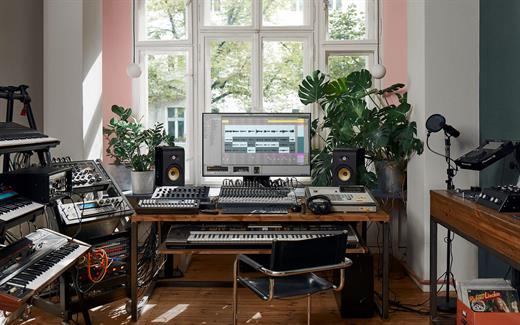
Description: Live is fast, fluid and flexible software for music creation and performance. It comes with effects, instruments, sounds and all kinds of creative features—everything you need to make any kind of music.

Create in a traditional linear arrangement, or improvise without the constraints of a timeline in Live’s Session View. Move freely between musical elements and play with ideas, without stopping the music and without breaking your flow.

New features and updates in Live 12
Play freely with ideas
MIDI Transformations
Create a variety of simple or complex variations to your MIDI clips: add ornaments and articulations, draw acceleration and deceleration curves, connect successive notes and chords, or simulate the strum of a guitar.

MIDI Generators
Conjure up melodies, chords and rhythms with new MIDI Generators. Give your chosen Generator custom constraints, watch it create playful and original patterns, and then turn the ideas it produces into your own.

Max for Live MIDI Tools
Max now facilitates even greater experimentation, letting you create new MIDI Transformations and Generators – either based on existing ones, or your own creations.

MIDI Editing Improvements
Arrange the order of a selection of notes by pitch, velocity or duration. Stretch, split, chop or join notes in new ways; shape the velocity of notes; transpose them into a scale; or add intervals chromatically or in key.

Keys and Scales
Set the selected clip’s scale in Live’s Control Bar to see its notes in any clip you create. Then edit the clip using scale highlighting as a guide, use the clip scale to transform and generate musical ideas, or sync the scale of MIDI devices and instruments to the clip being played. Any changes in Live will be reflected in Push, and vice versa.

Expanded probability
Assign a single probability rule to a group of notes so that the entire group of notes is played whenever the trigger is fired. Or select a chord and tell Live to randomly play one note from it whenever the probability trigger is fired.

Embrace and explore tunings
Follow your preferred tuning systems or try different ones more easily. Work outside the 12-tone equal temperament system, and access tunings with Live’s devices as well as any MPE-capable plugin.

Surprise yourself with the sounds you create
Meld
A bi-timbral, MPE-capable instrument designed for deep sound shaping that lets you create a wide array of textural and experimental tones with its two easy-to-use macro oscillators.

Granulator III
The latest iteration of Robert Henke’s granular instrument now has MPE capability, giving you expressive control over parameters like note bend, vibrato and glissando. Plus, you can now capture audio in real time and start manipulating it immediately.

Roar
Create everything from subtle and precise mastering-grade warmth to wild and unpredictable sound degradation with Live’s new coloring and saturation effect. Roar’s three saturation stages can be used in series, parallel, or even in mid/side and multiband configurations – and it comes equipped with a feedback generator and an extensive modulation matrix.

New Modulation Behavior
Modulation destinations are no longer taken over by the modulation source. This means you can still adjust the parameter being modulated, even after assigning an LFO or other modulation source to it, opening up faster workflows, more possibilities for performance and continuous real-time control of parameters.

New Packs
Lost and Found – A collection of sounds fashioned from unusual materials, percussive trinkets, unique foley recordings and expressive objects to infuse your productions with character and authenticity. Dig deep and create layers of decorative, expressive instruments, playful Drum Racks and rich sound effects.

Performance Pack – A set of innovative devices from Iftah that push the boundaries of performing with Live. Capture snapshots of your sets and deploy them later, control multiple parameters with layered macros and curves, extend performances with looping in Arrangement View and pre-arrange the structure of a performance before you have even recorded it.

Work more intuitively
Stacked Detail Views
View your devices and the Clip Editor, or automation and device parameters, at the same time – so you can work without the distraction of switching between views.

View styling
Live 12’s cleaner, more minimal look removes visual complexity and keeps the focus on your music.

Mixer in Arrangement
Live’s Mixer, previously available only in Session View, can now be used in Arrangement View. Toggle it on or off with Mixer View Control located in the bottom right corner or via the View menu, and configure it independently of the Arrangement Mixer.

Mixer improvements
Live’s Mixer also comes with visual improvements that make it more accurate for detailed mixing decisions, and easier to read and control.

Browser Tagging and Filtered Searches
Search for your sounds in the Browser without the constraints of Live's built-in categorization. That means when you search for bass sounds, you'll see all the bass sounds in your Ableton library, whether they're samples or instrument presets.

Live 12's sound content is also tagged using a new system that acts as a more flexible alternative or addition to Collections in the sidebar. Sounds now come with sensible labels to make them easier to find – but if you need more detail, or just want to use your own method of labeling, you can also add your own.

Aside from Live 12's built-in tags, you can create your own custom categories in the sidebar for easy access to all your favorite sounds and devices in the way that makes the most sense to your workflow.

Sound Similarity Search
Start with a sample and tell Live’s browser to find comparable sounds and instrument presets, with the help of a neural network.

Or swap all the samples in your Drum Rack for similar ones to quickly try out new percussive textures – like a drum machine with seemingly-infinite kits.

Browser History
Retrace your steps, and see and hear the sounds or categories you've previously searched for: Live's Browser now lets you backtrack through your search history as you would with a web browser.

Accessibility and navigation improvements
Control core workflows in Live 12 using assistive technologies like screen readers, and use new keyboard shortcuts to navigate to nearly every part of Live.

New Themes
Choose new themes and adjust them with cool, neutral or warm tones and even a high contrast mode.

Release Name: Ableton Live Suite 12.4.0
Size: 4.1 GB
Links: HOMEPAGE – NFO – Torrent Search

Download: RAPiDGATOR
3 Comments
May 4

ResumeMaker Professional Deluxe 20.4.1.7055

Description: Build a Professional Resume Fast! ResumeMaker’s step-by-step guide will help you create a professional resume that showcases your experience, skills and capabilities to apply for positions and share on social media networks to get a better job.

5 Easy Ways to Create a Professional Resume

Step-by-Step Resume Guide
Your answers to easy questions are transformed into the perfect resume. Add, change, or delete at any time.

Start with a Professional Sample Resume
Select a professionally-written resume from 1,250 samples for nearly every career. Customize it with your own information to create a quality resume!

Quick & Easy Resumes
Create a resume by selecting phrases from 14,000+ job types. Customize by selecting the resume phrases that describe your experience. It’s that easy!

Resumes Created in ResumeMaker
Open a previously saved resume in ResumeMaker and use a copy to quickly edit. Then choose from powerful phrases, words, and expert advice to enhance your resume.

Import Your Resume from Word
Import a resume from Word and edit and update the content using the Resume Editor. Choose from powerful phrases, words, and expert advice to enhance your resume. Then apply the resume style that reflects your unique qualifications and experience.

What's New

New! Modern Resume Styles
Select the perfect style for your resume. Choose from 60 styles and customize the font, graphic, and colors to reflect your unique skills and experience. You can customize any style with choice of header, colors, and add graphics or a photograph.

New! Video Resume Samples & Scripts
Get sample scripts and expert advice on creating a Video Resume. Find out if a Video Resume is right for the job you are seeking. View sample Video Resumes for ideas and inspiration.

Publish & Save Your Resumes Online With ResumeMaker Cloud™—Free!
Publish your resume at your own private web address in the cloud—a free service managed by ResumeMaker. Send a URL of your resume to hiring managers, recruiters, and network contacts.

Email & Share Your Resume
Share your resume in multiple formats including PDF, Word Doc, or a URL HTML Link.

Use Social Media to Network & Enhance Your Job Search
ResumeMaker allows you to post your resume on popular social media sites like LinkedIn®, Facebook®, Twitter®, and Google+™. Make it easy for colleagues, friends, and hiring managers to access your posted resume.

3 Easy & Powerful Ways to Search for Jobs!
Whether at home or on-the-go, ResumeMaker makes it easy to search jobs fast. Be the first to find new jobs and never miss a new opportunity!

Job Finder — Search on Your Computer
Search all major job sites including Indeed, Career Jet, Dice, and Zip Recruiter to locate millions of job openings in your search area. Filter criteria for keywords, job title, type of company, geographic area, salary requirements and more! See the job search results by job site and view the specific job openings of interest.

Job Feeder™ — Receive Job Listing Push Notifications
This advanced search tool sits on the desktop of your PC or tablet and continuously notifies you of new jobs based on your personal search criteria. You will receive push notifications as they are posted.

ResumeMaker On-the-Go App — Search, Edit & Send Anytime, Anywhere
Search for jobs 24/7/365 from your mobile device. Be the first to find new job openings, then view and edit your resume for the job and send to the hiring manager directly from your mobile device.

Prepare for Interviews and Salary Negotiations!
ResumeMaker has every financial tool you need to be “Interview-Ready!” Practice your responses to challenging questions hiring managers may ask. Get up-to-date salary information about the jobs you apply for by title and region and land the job!

System Requirements
Microsoft® Windows® 11, Windows® 10, Windows 8, Windows 7 • 350 MB Hard Disk Space • 1024 x 768 or higher display • Sound Card and Speakers • E-Mail and Internet Access • Windows Tablet: Windows 8 • 350 MB Hard Disk Space • Keyboard recommended.

Release Name: ResumeMaker Professional Deluxe 20.4.1.7055
Size: 507 MB
Links: HOMEPAGE – NFO – Torrent Search

Download: RAPiDGATOR

7 Comments
May 4

ButterScroll 1.5.2

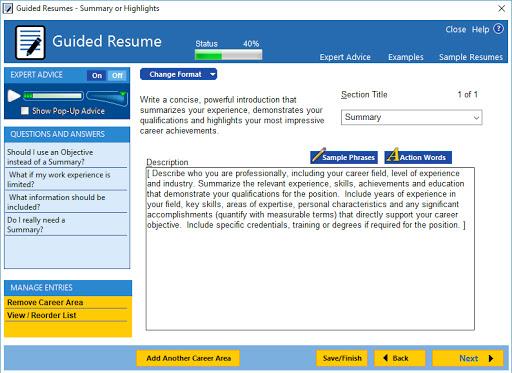
Description: Smooth scrolling on Windows just got better. Smooth scrolling for Windows is what ButterScroll is all about. It enhances how your mouse scrolls using custom speed and easing settings.

Looking for smooth scrolling windows experience? ButterScroll delivers exactly that.

Smooth scrolling functionality to all mice.
ButterScroll enhances your everyday scrolling experience with buttery-smooth scrolling precision, customizable control, and a satisfying feel across all your Windows apps — from browsers to spreadsheets.

Easy to setup and use
Smooth, fluid scroll animations for all apps.
Works with any mouse – no extra hardware needed.
Adjustable speed, acceleration, and easing.
Lightweight and optimized.
No tracking, no ads, full privacy control.

Release Name: ButterScroll 1.5.2
Size: 8.6 MB
Links: HOMEPAGE – NFO – Torrent Search

Download: RAPiDGATOR
7 Comments
May 4

SystemTools Hyena 17.0.0

Description: Using the built-in Windows administration tools to manage a medium to large Windows network or Active Directory environment can be a challenge. Add multiple domains, hundreds or thousands of servers, workstations, and users, and before you know it, things can get out of hand.

Hyena is designed to both simplify and centralize nearly all of the day-to-day management tasks, while providing new capabilities for system administration. This functionality is provided in a single, centralized, easy to use product. Used today by tens of thousands of system administrators worldwide, Hyena is the one tool that every administrator cannot afford to be without.

Hyena uses an Explorer-style interface for all operations, including right mouse click pop-up context menus for all objects. Management of users, groups (both local and global), shares, domains, computers, services, devices, events, files, printers and print jobs, sessions, open files, disk space, user rights, messaging, exporting, job scheduling, processes, and printing are all supported.

Hyena includes Active Directory tools for Windows 10. In fact, Hyena can be used on any Windows client to manage any Windows NT, Windows 2000, Windows XP/Vista, Windows 7, Windows 8, Windows 8.1, Windows 10, Windows 11 or Windows Server 2003/2008/2012/2016/2019/2022 installation.

In addition to supporting standard Windows system management functions, Hyena also includes extensive Active Directory support and management tools.

The key new feature in Hyena is the 'Active Task'. Hyena's new 'Active Task' will provide the functionality for mass importing and updating of most Active Directory attributes from a delimited text input file.

All task settings are saved in a 'task file', allowing for easy repetitive task executions, including command line and scheduling support. For Active Directory user tasks, home directory creation can be automated using Hyena's existing user home directory templates.

Click here for more information on the new 'Active Task' feature.

Hyena also includes:
Full exporting capabilities with both Microsoft Access and Excel reporting and exporting options.
Terminal Server user properties and session administration.
Exchange 2000/2003/2007*/2010/2013/2016/2019 Server mailbox integration and properties management.
WMI integration.

Release Name: SystemTools Hyena 17.0.0
Size: 46 MB
Links: HOMEPAGE – NFO – Torrent Search

Download: RAPiDGATOR

7 Comments
May 4

Directory Monitor Pro 2.17.0

Description: Directory Monitor can be used for the surveillance of directories and/or network shares and will notify you of file changes, access, deletions, modifications, new files and inactivity in real-time. Users and processes making the changes can also be detected. Directory Monitor also provides text logs, automation via script/application execution, emailing, writing to a database, sound notifications, printing and more.

Real-time notifications
Get notified within milliseconds of file modifications, deletions, renames, new files, file access and inactivity on your file system or network shares.
Monitor local directories or network shares including hidden/private shares.
Options to detect all files in subdirectories and changes to file attributes.
Balloon notifications whenever an event is detected.
Include and exclude filter patterns per directory.
Available as a console application (PRO).
Able to capture and process over 400 change events per second.

Accurately detect the user making changes (PRO)
Find out which users are making changes to directories or files in near real-time.
Report on the application process as well for local changes.
Users can be detected locally or network shares in your network.
Automatic configuration of the machine and directories to enable auditing.
Enforce the system audit policy to remain even if malicious users try to disable it.

Ultimate reliability with snapshots (PRO)
Enable snapshots to ensure changes can be detected while the network is down and even during power outages.
Fast snapshots of directory and file statistics.
Ensure you never miss any changes as well as user and process detection.

Windows background service monitoring (PRO)
Directory Monitor can be installed as a Windows service with multiple user configurations.
No need to be logged into the machine to continue monitoring changes.
Simple configuration and installation through the user interface.
Extremely low memory and CPU footprint when running in the background.

Keep your monitoring logs automatically
Use text logs to store your file system change events for later inspection.
Output contextual information based based on the event using macros.
Customize the output format (CSV for example) with only data you require.
Manage log file with built-in renaming to split the log into daily of monthly copies.
All monitoring configurations can log to the same file.

Release Name: Directory Monitor Pro 2.17.0
Size: 6.7 MB
Links: HOMEPAGE – NFO – Torrent Search

Download: RAPiDGATOR
7 Comments
May 4

PhotoScape X Pro 4.3.0

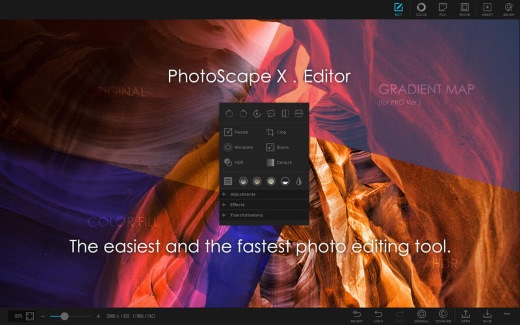
Description: Fun and Easy Photo Editor. All-in-One: Photo Editor, Cut Out, Batch Editor, Viewer, Collage, Animated GIF, Film Effect, Light Leak, Miniature Effect, Filter, Brush, Sticker, Pattern, Frame, Shape, Border, RAW images and More.

Features

Viewer
Photo | Video | Audio Browser, Loupe View, Full Screen, Flag, Star Rating, Lossless Rotate, Share, Metadata (Exif,IPTC,GPS) Viewer.

Editor
1,000+ Filters & Effects, Frames, Objects, Brushes & Tools, Rotate, Straighten, Flip, Resize, Crop, Circular Crop, Perspective Crop, Mask (Local Adjustments).

Cut Out
Remove the background from an image. (Magic Eraser, Lasso tool, Brush tool)

Collage
Merge multiple photos on the collage frame to create one final photo.

Combine
Attach multiple photos vertically or horizontally to create one final photo.

GIF Creator
Create Animated GIF.

Print
Print photos.

Screen Capture
Capture your screenshot and save it.

Color Picker
Zoom in on images, search and pick a color.

Split
Slice a photo into several pieces.

Batch Format Change
Convert multiple images to another format at once.

Batch Resize
Resize multiple images at the same time.

Batch Rename
Change photo file names in batch mode.

Photo Merge
Focus Stacking, Merge to HDR.

Macro
Record multiple actions and then play them back all at once.

Filters & Effects
Magic Color, Miniature, Bloom, HDR, Dehaze, Shadows/Highlights, Point Color, White Balance, Vignette, 80+ Films, 100+ Light Leaks, 120+ Overlays, 20+ Lens Flares, and more.

Frames
290+ Frames, 240+ Shapes, Borders.

Objects
1,000+ Stickers, 240+ Figures, Image, Text, Text Warp, Magnifier, Arrow, Line, Rectangle, Rounded Rectangle, Circle, Object Transform, Object Mask.

Brushes & Tools
Draw | Scatter | Paint Brush, Paint Bucket, Mosaic Brush, Fix Red Eye, Mixer Brush, Spot Healing Brush, Liquify, Clone Stamp.

System Requirements
- OS: Windows 10 version 16299.0 or higher
- Architecture: x64

Supported Languages
English, Español, Português, Deutsch, Français, Italiano, Nederlands, Polski, 한국어, 日本語, 简体中文, 繁體中文

Microsoft Store - Pro Version

Release Name: PhotoScape X Pro 4.3.0
Size: 360.9 MB
Links: HOMEPAGE – NFO – Torrent Search

Download: RAPiDGATOR

7 Comments
May 4

VectorStyler 1.3.016

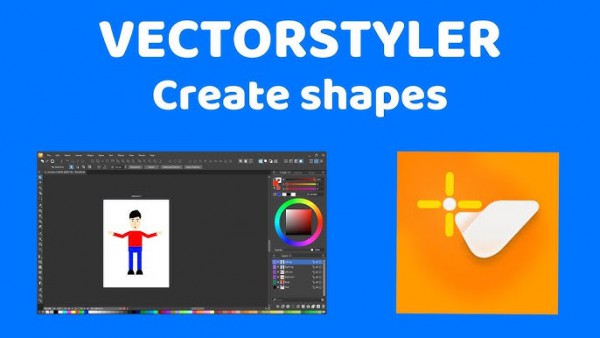
Description: VectorStyler brings every advanced vector and illustration tool together — in one complete, independent package, with no subscriptions and no compromises. Packed with powerful, unique tools you won’t find anywhere else — VectorStyler redefines what’s possible in vector illustration.

Customizable User Experience
Customize all aspects of the user interface and workflow, including shortcuts, menus, toolboxes and toolbars. Create and save your own workspace profiles.

Native Illustrator Import
Open, import or paste artwork from Adobe Illustrator using the native Illustrator file format support, retaining all high-level editable attributes.

Extended Compatibility
Import artwork and export to various common file formats like AI, PDF, SVG, DWG, DXF, PSD, PNG and TIFF. Import and export PSD files while retaining layer hierarchy and keeping editable vectors.

Powerful Snapping Options
Use advanced snapping options for precision, including rotated grids and guidelines, collision and tangent to shape snapping. Turn any object shape into a guideline.

Real Vector Brushes
Paint with and use real vector brushes on any shape or outline. Brushes can be of artistic, pattern, scatter or bristle type. Create new brush styles or presets from any group or layer.

Select Objects by Attribute
Select objects by style or other attributes. Select objects with a similar style or attribute as the selected objects.

Magic Wand Tool
Use the magic wand selection mode and the Magic Wand panel to select objects similar to the pointed object. Select similar shapes by area or length.

Color Palettes
Work with document and global color palettes easily. Open multiple color palettes from external formats. Manage palettes seamlessly.

Advanced Halftones
Create complex vector halftones on layers or images. Work multiple halftones on one object using the Appearance panel

Align Object on Path
Create non-destructive object alignment on path. Align and distribute multiple objects on a path

Vector Drop Shadow
Create vector drop shadow effects on objects or groups. Adjust the drop shadow options using the Drop Shadow panel.

Parametric Shapes
Draw with a large collection of parametric shapes. Adjust shape properties using the Shape panel. Use the Node tool to edit parametric shapes.

System Requirements
- VectorStyler is (also) a native Windows (Intel) application, and requires a PC with Windows 10 installed to run. A minimum of 8GB of system memory is recommended. More memory helps when creating complex designs or illustrations.
- Only Windows 10 or newer versions are supported. An Intel Core i5 or i7 processor with 4 cores and hyper-threading is recommended as VectorStyler makes extensive use of multiple threads. GPU acceleration can be enabled in the Settings / Performance by selecting OpenCL (any GPU supported by Windows), or the NVIDIA mode for Nvidia GPUs.

Release Name: VectorStyler 1.3.016
Size: 79.7 MB
Links: HOMEPAGE – NFO – Torrent Search

Download: RAPiDGATOR
6 Comments
May 4

Tenorshare 4DDiG 10.8.2.2

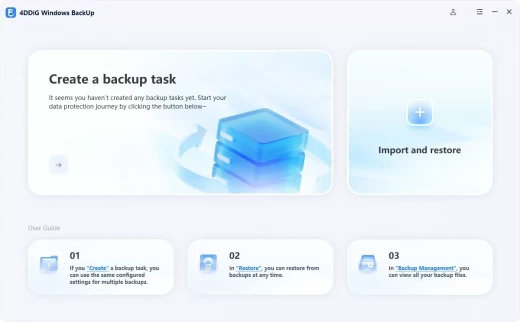
Description: Reliable Windows Backup Tool. Backup file, partition or computer to computer or external device. Full system backup to keep your system safe. Restore a specific partition from a full backup to save time. Task management dashboard to backup effortlessly.

One-click Backup Your Data
PC Backup - Simple Like That
Deletion, overwrite, corruption or sudden crash can cause data loss. To keep data safe, easily create a backup of your files, partition, disk or system with 4DDiG Windows Backup. Create a backup task, select what you want to backup and where you store the backup. Complete the backup process, and you can restore it at anytime.

File Backup
Backup important files for data safety. Restore files to original version whether it is lost, overwritten or corrupted.

Partition/Disk Backup
Keep a backup of partition or the whole disk to prevent data loss.

System Backup
Backup system so that you can restore to previous version when your computer crash or in bad performance.

System Supported
Operating System: Windows 11/10/8.1/8/7
Files System: NTFS, exFAT, and FAT16/FAT32

Release Name: Tenorshare 4DDiG 10.8.2.2
Size: 115.5 MB
Links: HOMEPAGE – NFO – Torrent Search

Download: RAPiDGATOR

7 Comments
May 4

reaConverter Pro 8.0.219

Description: Easily process full batches of files and folders. reaConverter combines powerful automation with intuitive tools to streamline image conversion and eliminate repetitive editing.

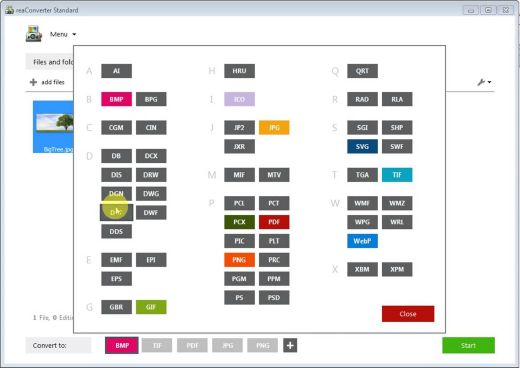
700+ File Formats
reaConverter delivers high-efficiency batch conversion for an extensive range of file formats.

Efficient Conversion
A powerful file conversion toolkit with advanced processing features — giving you precise, granular control over every output.

Image Editing
reaConverter simplifies batch image editing — apply touch-ups, transformations, and effects to unlimited images simultaneously.

Automation
Professional-grade automation features for high-volume file conversion and batch processing.

Development
Integrate reaConverter's functionality into scripts, applications, or websites using its command-line tool or DLL.

Release Name: reaConverter Pro 8.0.219
Size: 399.2 MB
Links: HOMEPAGE – NFO – Torrent Search

Download: RAPiDGATOR

6 Comments