Please REGISTER or RENEW your account on RAPiDGATOR.net and support us by doing through all RAPiDGATOR working download links on main posts...
May 4

UltFone Windows Data Recovery 10.8.2.2

Description: Employing a structured data backup scheme is a good approach for ensuring your digital information’s safety in the long run. However, when things do become eventful and accidents and mishaps that involve data loss do occur, users find themselves lacking access to their favorite files, and in need of a solution.
UltFone Windows Data Recovery is here to address such issues, by offering users a scanner that will automatically detect lost data, offer multiple recovery options and filtering.

Select entire drives, or, if required, any particular locations for the scanning process and you’re good to go
The application will allow users an easy selection for the drives where the scanning is about to be performed, but only single drives are supported for each process, and the same is valid for when selecting other locations.

Speaking about locations, in case users already know the location of the files in question, the app allows for individual selection of directories, as well as common locations, such as one’s desktop area or, the recycle bin, which are offered as pre-defined choices.

Support for multiple file types, combined with filtering and search features, make for an easier job
Continuing the streak of flexibility on offer, UltFone Windows Data Recovery also allows one to select the actual file types that are to be accounted for in the search process, with some of the most commonly used formats as pre-defined options.

Prior to the scanning process, one will be able to apply a wide range of filters, as well as perform searches using the built-in features, which can help narrow-down results and make the entire process more efficient.

Straightforward recovery software, which has its emphasis revolving around flexibility in terms of scanning location and file types. This application addresses those who require a simple tool for scanning for lost files and recovering them in just a few simple steps.

Release Name: UltFone Windows Data Recovery 10.8.2.2
Size: 115.2 MB
Links: HOMEPAGE – NFO – Torrent Search

Download: RAPiDGATOR

7 Comments
May 4

Sweet Home 3D 7.6.6.1587

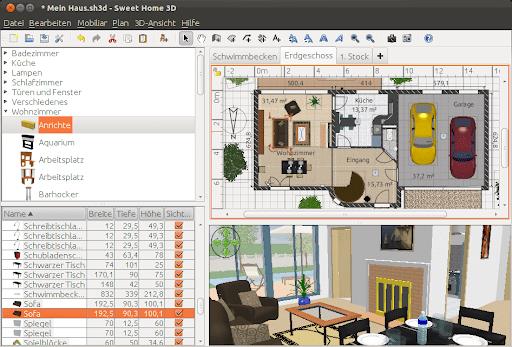
Description: Sweet Home 3D is an easy to learn interior design application that helps you draw the plan of your house in 2D, arrange furniture on it and visit the results in 3D. An interior design application that helps you draw the plan of your house, arrange furniture on it and visit the results in 3D.

Key Features

Draw
Draw walls and rooms of your home from scratch or upon the image of an existing plan, on one or more levels.

Change the color
Change the color or the texture of the walls, the floors and the ceilings, importing images of your own patterns if needed.

Drag and drop
Drag and drop doors, windows and furniture onto the plan from a catalog of 1400 objects organized by categories, in which you can import 3D models created by yourself or downloaded from the web.

Customize
Customize the size, the orientation, the elevation, the colors and the textures of each piece of furniture.

View
View the changes in the plan simultaneously in a 3D view, in which you can navigate either from an aerial view point, or from a virtual visitor view point.

Create
Create a photorealistic image of your arrangement depending on the time of the day and the light sources placed in the plan.

Create a video
Create a video from a virtual path in the 3D view.

Print
Print the home plan and the 3D view or export them in files at PDF, PNG, JPEG, SVG, OBJ standard formats, to reuse designed homes in other software.

System Requirements
Windows 7, 8.1, 10, 11

Microsoft Store Version - All inclusive texture and furniture libraries.

Release Name: Sweet Home 3D 7.6.6.1587
Size: 368.3 MB
Links: HOMEPAGE – NFO – Torrent Search

Download: RAPiDGATOR
8 Comments
May 4

Obsidian Ebook Reader Premium 1.1.4

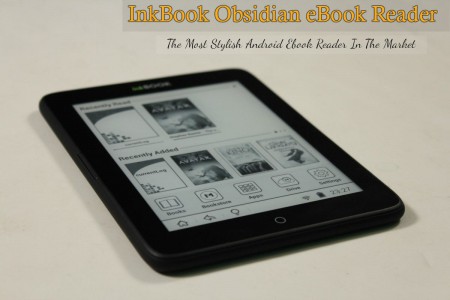
Description: Your books, beautifully organized. Obsidian Reader allows you to read EPUBs and PDFs with no ads, no online connection, and complete privacy. Manage your library with folder synchronization, editable metadata, and enjoy a modern, customizable interface for the best reading experience.

Everything you need for a great read.
Designed with simplicity and speed in mind, allowing you to focus purely on your content.

Private & Offline
Fully private and 100% offline. Read your EPUB and PDF books locally with absolutely no ads to distract you.

Manage Your Library
View all your books in an organized grid or list. Sync your book folders and edit titles, authors, and cover images.

Highly Customizable
Change font, text size, padding, line space, and word spacing. Choose from themes including true black mode.

Sleek Interface
A sleek, modern interface free from distractions, giving you the best environment to focus purely on reading.

Save Bookmarks
Easily save bookmarks in your books so you can always pick right back up exactly where you left off.

Blazing Fast
Built to be lightweight and fast. Massive EPUBs and PDFs load instantly so you never have to wait.

Release Name: Obsidian Ebook Reader Premium 1.1.4
Size: 98.8 MB
Links: HOMEPAGE – NFO – Torrent Search

Download: RAPiDGATOR
7 Comments
May 4

Lumenzia 11.9.5

Description: Lumenzia or (Luminosity Masking Panel) is a software integrated into the photoshop as Extension. It helps you to edit the landscape image with the strengthening or reduction of the color saturation, from which to make your photo more beautiful.

With Lumenzia, you will get a preview of the entire screen of the mask before applying. The interaction click on the image to choose (or opt out) tones the color/color at the level you want. There is no need for an interview with the channel plus and minus. Isolate the mask with the specific sections of the image with a simple selection. And you can combine the team mask to easily see the overall mask impact.

Lumenzia offers a compact panel with just the buttons you need and completely remove the need for the channel pallet. Just draw the selection area around the target area to create the texture size, sharpness, or any location in the image. The texture can be easily modified, reversed (to light the central area) or in combination with an increased brightness (to avoid too much darkness).

The features of Lumenzia


  • The work process is fully streamlined and the mask is fully customized
  • BlendIf mask and Vector mask (to save the considerable file capacity and avoid the mask update)
  • Add, except or cut any mask or select area for advanced control
  • Color mask (select in color and/or brightness, visually)
  • Increased the intensity of local contrast (easily and automatically made more details)
  • Direct mask (see as a result of mixing and testing different masks)
  • Area mask for correctable precision
  • Area selection The scope and scope (select a mask that fits visually)
  • The area map to visualize the image in the 0-10 areas.
  • The mask is "brighter/darker" (selecting pixels compared to the surrounding pixels)
  • Custom mask for locations or colors in the image
  • Custom Painting
  • Blurred and writable
  • Storm mask (which controls a particular color saturation)
  • Apply or replace the mask on existing layers with only one click
  • Light and dust imaging tools to easily find and correct. Perspective
  • Advanced method of toning for the portrait (to blur the surface) and landscape (overpass)
  • The actions can be recorded to include light masks and dark/choice in your own actions.
  • The training and support video, as well as the comprehensive usage guide
Release Name: Lumenzia 11.9.5
Size: 122.5 MB
Links: HOMEPAGE – NFO – Torrent Search

Download: RAPiDGATOR

7 Comments
May 4

Transcribe! 9.51.3

Description: The Transcribe! application is an assistant for people who want to work out a piece of music from a recording, in order to write it out, or play it themselves, or both. It doesn't do the transcribing for you, but it is essentially a specialised player program which is optimised for the purpose of transcription. It has many transcription-specific features not found on conventional music players.

It is also used by many people for play-along practice. It can change pitch and speed instantly, and you can store and recall any number of named loops. So you can practice in all keys, and you can speed up as well as slow down. There is some advice about play-along practice in Transcribe!'s help, under the heading "Various Topics".

And it is also used for speech transcription. With its support for foot pedals and its superior slowed-down sound quality, it is an excellent choice for this purpose. There is some advice about speech transcription in Transcribe!'s help, under the heading "Various Topics".

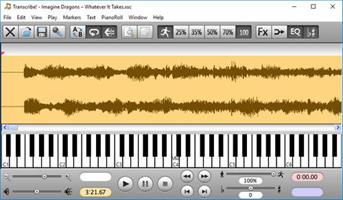
Conventional music players are really designed for people who want to listen to whole tracks. They are very inconvenient for transcribing music as they are not designed for this purpose. If you copy the recording to your computer's hard disk as a sound file then you can use Transcribe! instead. Transcribe! offers many features aimed at making the transcription job smoother and easier, including the ability to slow down music without changing its pitch, to analyse chords and show you what notes are present, and the capability of adding markers and textual annotations so you can easily navigate around the track. Transcribe! also has a piano keyboard displayed on screen which you can click to play reference notes.

Release Name: Transcribe! 9.51.3
Size: 59 MB
Links: HOMEPAGE – NFO – Torrent Search

Download: RAPiDGATOR

5 Comments
May 4

TweakNow WinSecret Plus 9.3.2

Description: A number-one all-in-one utility for optimizing and maintaining Windows 11 and 10. It includes more than 20 tools to make your everyday life easier.

Safely Unlock Windows 11 and 10 Hidden Settings
Effortlessly personalize hidden settings in Windows 11 and 10 to customize your taskbar, desktop, privacy preferences, and more.

Powerful and Comprehensive System Information at Your Fingertips
System Information module is designed to quickly and lightweightly provide all the detailed information you need about your PC's performance and components.

Looking to Supercharge Your Apps or Games Performance?
You can increase the priority level of apps or games to allocate more system resources, such as CPU time and RAM, to them.

Effortlessly Connect to Wi-Fi With QRr Codes
Using a QR code to share your Wi-Fi is super convenient and easy. Instead of typing out a long password, your friends can just scan the code with their phone and connect instantly.

View and Extract Icons From Windows Library (imageres.dll, shell32.dll, Etc.)
Windows 11 has a lot of attractive icons that make both the system look good and fun to use. Have you ever wondered where Windows may bury them in the system?

Keep Your PC Awake While You Are Leaving!
There are times when you might need to keep your PC running and prevent it from going into sleep mode or hibernation.

Effortlessly Convert PDF Into Images
At times, you may need to transform PDF documents into image files.

Quickly Convert HEIC to JPG on Windows
HEIC (High Efficiency Image Format) is a file format for images introduced by Apple with the release of iOS 11 in 2017.

Highlighted Modules
Create a shortcut to launch CPU-intensive app or game at above normal or high priority to improve performance
Running an application or game at high priority can give it more system resources, potentially improving its performance.
With the apps and games launcher module, you can easily create shortcuts to run your favorite apps and games at any priority level (low priority, below normal priority, normal priority, above normal priority, or high priority).

Combine multiple photos to create beautiful photo collages
Photo collages are a fun and creative way to display your photos and tell a story. You can use them for personal or professional purposes, such as making gifts, decorating your home, or promoting your brand.
With the Photo Collage Maker module, you can combine up to ten (10) photos many different layouts to choose to create a unique and beautiful photo collage.

Create and share beautiful QR Codes
A QR code is a type of barcode that can store information such as a URL, a Wi-Fi password, or a contact card. You can scan a QR code with your smartphone camera and access the information easily.

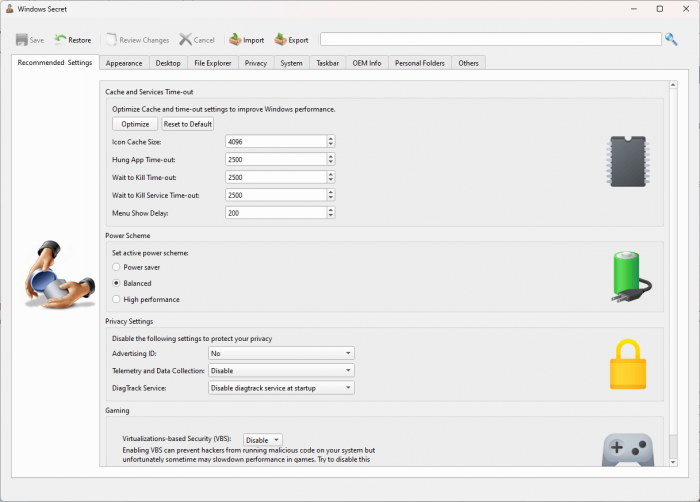
Safely change hidden Windows registry settings to improve your Windows experience
Windows registry is a database that stores settings and options for the Windows operating system. Unfortunately, most settings are not accessible from the Windows Settings or Control Panel. With the Windows Secret module, you can safely access more than one hundred (100) registry tweaks.

Quickly find out what’s taking up your disk space
The Folder Usage Analyzer module is useful for identifying which files and folders are taking up the most space on your hard drive. This can help you free up space by deleting unnecessary files or moving them to an external drive.

Remove duplicate images and freeing up valuable storage space
The Find Duplicate image module is useful for identifying and removing duplicate images from your computer, freeing up valuable storage space. These apps can help you find and delete multiple identical photos, saving you time, space, and money.

Release Name: TweakNow WinSecret Plus 9.3.2
Size: 34.4 MB
Links: HOMEPAGE – NFO – Torrent Search

Download: RAPiDGATOR
4 Comments
May 4

Remo Recover Windows 6.0.0.255

Description: Data Recovery Made Simple. All new Remo Recover 6 for Windows helps you recover deleted or lost data under any severe data loss scenarios from hard drives, SSD, USB, SD card or any storage devices without any hassle. Built to make your data recovery experience effortless and engaging, recover more than any usual data recovery software - make Remo Recover your data recovery software now.

Remo Recover - Where the World Recovers Data
An expert choice to recover any type of file under simple to complex data loss scenarios on any storage devices. Remo Recover Windows is your go to data recovery software. Recover more with Remo Recover now!

Recover from Where You Lost it with Preferred Location Recovery Support
Specify from where you want to recover your data, be it from an external storage device or from any specific location like Recycle Bin or any folder of your choice, with Remo Recover you can recover data from anywhere. With Preferred location recovery support you will be able to easily restore the data you are looking for without having to search everywhere. Whether you are novice user or a tech geek, data recovery experience with Remo Recover remains simple and engaging.

Recover as you Scan with Dynamic Data Recovery
No more waiting hours for the scanning process to complete! With Dynamic data recovery, you can start recovering your files as soon as you start the scanning process. With the help of Dynamic data recovery view you can look for the files you want to recover while the scan is in progress and even save it without interrupting the process. Be it formatted partiton recovery or simple deleted file recovery, data recovery process is quick and engaging as the user can actively recover data without waiting for the scan to complete.

Accurately Locate Files with Smart A-I
Built with smart AI filters, you can find the file you are looking for quickly and smartly. Either you can simply use the search bar and type the file you are looking for and right click and locate the file which is buried deep inside or you can smartly use the folders created according to file type or property to find your way to the file. For example, You can locate an MP3 file not only from its name but also with the help of its other file properties like name, genre, singer, etc. and this applies to any file type.

Release Name: Remo Recover Windows 6.0.0.255
Size: 58.4 MB
Links: HOMEPAGE – NFO – Torrent Search

Download: RAPiDGATOR

6 Comments
May 4

Directory Opus 13.22.12 Beta

Description: Are you frustrated by the limitations of Windows Explorer? Directory Opus is a complete replacement for Explorer, with far more functionality than any other file manager available today.

You're in control.
Not just a simple file manager; Directory Opus lets you make your computer yours.
With a flexible user interface and unbelievable configurability, you can tailor Opus to streamline your workflow.
Dual panes, dual trees, multiple tabs.
Filter, sort, group your folders. Label and rate your files.
Queued file copies. Powerful batch renaming. Full archive support.
Find your files. Locate duplicates. Synchronize backups.
Assign tags and descriptions. Convert images. Edit metadata.
Fully multi-threaded, native 64 bit high performance code.
Whatever you want to do - Opus can probably do it. And if it's not built-in, you can take advantage of the unrivalled configurability to extend Opus using external tools.

What makes Opus unique?

Built for speed
Opus is written in native C++ multi-threaded code; compiled for the latest 64 bit CPUs, with high performance our number one design principle.

Fully configurable
Change the colors. Change the fonts. Change the toolbars and menus. Set up hotkeys. Opus adapts to how you want to use it.

Makes file management a breeze
Powerful searching, sorting, grouping, labelling and tagging features let you take control of your files like never before.

Endlessly extensible
Work with third-party tools as easily as with the built-in features. A full scripting interface, including scriptable dialogs, means your imagination is really the only limit.

Replace Windows Explorer and don't look back
Our unique Explorer Replacement mode provides a full replacement for Windows Explorer.
Single or dual pane file display and folder trees
Tabbed interface let you keep multiple folders open and switch quickly between them
Integrated viewer, metadata editor and utility panel
Built-in tools including synchronize and duplicate file finder
Leverage indexed search engines like Windows Search and Everything

High performance file management features
Copy, move, rename, duplicate, archive, view, backup and delete your files with ease
Queue multiple file copies for improved performance
Batch renaming including easy-to-use keyboard macros
Support for FTP and archive formats like Zip, 7Zip and RAR
Quickly filter, sort, group and search your folders
Color-code your files, assign status icons, star ratings, tags and descriptions
View images, documents and more. Image marking lets you sort your photos quickly and easily
Calculate folder sizes and print or export folder listings

Unrivalled configurability
Why let the programmers decide for you? You can tailor Opus to look how you want it to look, and to work how you want it to work.
Choose from light mode, dark mode, or design your own theme
Over 600 configurable colors and fonts
All toolbars and menus can be edited, plus you can add your own
Floating toolbars can act as program launchers
Configure your own hotkeys that work everywhere or just in Opus
Full scripting interface lets you design your own dialogs and add your own commands

Release Name: Directory Opus 13.22.12 Beta
Size: 29.4 MB
Links: HOMEPAGE – NFO – Torrent Search

Download: RAPiDGATOR
7 Comments
May 4

IDimager Photo Supreme 2026.2.3.9020

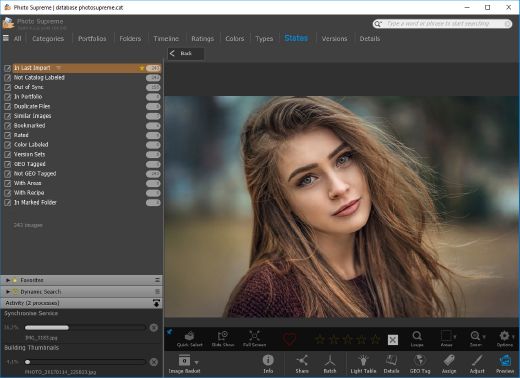
Description: Photo Supreme v2026 is a thoughtful and forward-looking release. This update has focused on smarter discovery, faster performance, and modern workflow expectations, especially around large catalogs, mobile integration, searches, and team environments.

Import and Select
One of the standout additions in Photo Supreme v2026 is the new multi-pass Import and Select workflow. This allows users to review and refine image selections in multiple stages instead of making all decisions in one pass. It’s especially useful for large shoots, letting photographers cull images more deliberately and with less pressure. In addition, the Import and Select feature now loads images faster than ever. Mac users will also appreciate direct iOS device importing, which makes it possible to bring photos straight from an iPhone or iPad into the catalog without relying on intermediary software. This significantly streamlines mobile-first workflows.

Powerful Searches
Photo Supreme now supports natural language searching, allowing users to find images using plain, conversational phrases rather than rigid metadata queries. This feature is powered by AI services such as OpenAI, Google Gemini, or local models with Ollama. This gives users flexibility in how advanced features are enabled. In addition, a new classification system enhances search accuracy by grouping images into meaningful categories upon import, making it easier to surface relevant results in large or complex catalogs.

Video & Media Handling
For users working with video, Photo Supreme v2026 introduces hover-based video previews. Simply hovering over a video thumbnail now reveals a short animated preview, making it much faster to identify clips without opening them individually. Support for modern formats has also been expanded, ensuring the software keeps pace with current media standards.

Sharing with ZIP
Exporting images is more flexible in v2026 thanks to ZIP output support in transfer profiles. This makes it easy to bundle images into a single archive for delivery, backup, or client sharing, all directly from within Photo Supreme. These enhancements simplify distribution workflows and reduce the need for external tools.

GEO Maps
GEOgraphic-Mapping features can now generate maps using not only Google Maps, but also OpenFreeMap with OpenStreetMaps. This removes the need for API keys while still delivering rich, interactive map displays. This update makes location-based browsing easier to configure and more accessible for all users.

Performance and Refinements
Photo Supreme v2026 delivers notable performance enhancements, resulting in faster browsing and a more responsive overall experience. Response times are improved by up to 10%, with especially noticeable gains for large libraries containing many catalog labels.
Catalogs with numerous stacks also see significant performance improvements, particularly when displayed in stacked views.
v2026 includes a wide range of refinements, such as: "Visually similar" stack detection, numerous stability fixes and workflow enhancements, polished UI behavior in collections, searches, and metadata handling

Wait, there's more, a lot more…
New "RAW Files" and "Video Files" catalog states
Added support for Google Gemini as an AI service
Added support for OpenAI GPT-5.2 as an AI Service
Added support for Ministral3 model with Ollama
Added file management support for ACR sidecar files
Update HTTP Server with Photo Supreme Online (Server Edition)
Faster face recognition
Added "AI-Estimated GEO Location" to the AI Panel
Faster result display in the Collection Viewer
"Cascade Metadata" from image to Stack or Version Set is now a background process
A highlighted stroke has been added to the active tabs, improving navigation
Now you can display metadata charts and graphs across multiple tabs
Added support for Ctrl/Cmd+Z functionality in text and memo fields
Defined the new Affinity v3 .AF and .AVIF file format as a supported "other file format"
Switching the collection viewer's view style is faster (eg from Basic to Grid to Clean to Custom Thumb Info)
Advanced Search now has an option to search by "File Size" and "File Size MB"
Finetuned the check for "need to compact" on PostgreSQL (Server Edition)
Bookmark keyboard shortcuts are now a "toggle", similar to ratings and color labels
Expanding nodes in the Catalog Tree is ~25% faster
When using the "Dump Full to Catalog File" feature, there's now the option to create either a "catalog dump" file, or a "catalog with thumbs" dump files
Added a XMP Storage Location for "original file AND non-standard sidecar file"
In "Stacked View", you can now select a specific item from the stack to show
Support for PostgreSQL 18.
And more…

Highlights for v2026
Multi-Pass "Import and Select": Seamlessly transition through passes with a fast-culling system that optimizes your workflow.
Direct iOS Image Import on macOS: Import images directly from your iOS devices with ease.
Video Thumbnail Preview: Hover over a video thumbnail or open the Quick View to view a live video preview.
Natural Language Search Powered by AI: Search your content using plain language, with smart integration through OpenAI, Google Gemini, or Ollama models.
Transfer Profiles can now create ZIP output files: Copy or send sets of images as a single ZIP file for easier sharing.
Maps with OpenFreeMap: Display images on interactive maps using OpenFreeMap/OpenStreetMaps with no API key needed.
Server Edition Thumbnail Caching: Enjoy faster performance with local thumbnail caching, automatic cleanup, and customizable settings for retention and cache size.
Classifications: Enhance search accuracy with an automatic image classification mechanism on import.

Release Name: IDimager Photo Supreme 2026.2.3.9020
Size: 163.3 MB
Links: HOMEPAGE – NFO – Torrent Search

Download: RAPiDGATOR
10 Comments
May 4

MedCalc 23.5.3

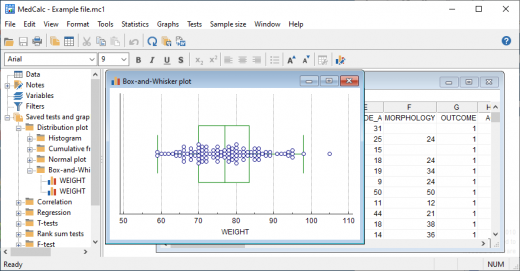
Description: MedCalc is a statistical software package for biomedical research. Includes more than 220 statistical tests, procedures and graphs. ROC curve analysis, method comparison and quality control tools. Minimal learning curve. Developed since 1993.

Easy to learn, fast and reliable
MedCalc includes more than 220 statistical tests, procedures and graphs
save graphs in SVG, PNG, JPG, high resolution TIF, or other file formats, or as PowerPoint slides (*.pptx).
free updates
available with an English, Chinese (simplified and traditional), French, German, Italian, Japanese, Korean, Polish, Portuguese (Brazilian), Russian and Spanish user-interface (help file and documentation in English)
one edition includes all features (do not pay extra for the functions you really need).
compatible with all contemporary Windows desktop editions

Data management
Integrated spreadsheet with 1 048 576 rows and 16 384 columns.
Correct handling of missing data.
Outliers can easily be excluded.
Built-in WYSIWYG text editor.
Imports Excel, Excel 2007, SPSS, DBase and Lotus files, and files in SYLK, DIF or plain text format.
Easy selection of subgroups for statistical analysis.

MedCalc Documentation
Complete HTML manual on MedCalc web site.
Comprehensive context-sensitive help.
Context help in dialog boxes.

ROC curve analysis
MedCalc is the reference software for ROC curve analysis. Our ROC curve analysis module includes:
Area Under the Curve (AUC) with standard error, 95% confidence interval, P-value. Offers choice between methodology of DeLong et al. (1988) and Hanley & McNeil (1982, 1983).
List of sensitivity, specificity, likelihood ratios, and positive and negative predictive values for all possible threshold values.
ROC curve graph with 95% Confidence Bounds.
Threshold values can be selected in an interactive dot diagram with automatic calculation of corresponding sensitivity and specificity.
Plot of sensitivity and specificity, or cost, versus criterion values.
Plot of predictive values versus prevalence.
Interval likelihood ratios.
Comparison of up to 6 ROC curves: difference between the areas under the ROC curves, with standard error, 95% confidence interval and P-value.
Sample size calculation for area under ROC curve and comparison of ROC curves.
Go to the ROC curve analysis section of the MedCalc manual for more information on ROC curve analysis in MedCalc.

Graphs
Lots of graphs, see Graph gallery.
Data point identification in graphs.
Draw text boxes, lines, arrows and connectors.
Name, save and recall graphs and statistics.
Statistical info in graph windows.
Save graphs as SVG, PNG, JPG, GIF, BMP, PCX, or high resolution TIF files, or as PowerPoint slides (*.pptx).

Release Name: MedCalc 23.5.3
Size: 171 MB
Links: HOMEPAGE – NFO – Torrent Search

Download: RAPiDGATOR

7 Comments