

Myary 2.4.0

Myary is a simple diary application.
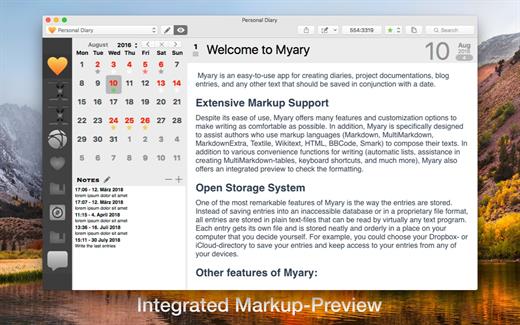
- Saving your entries. Every single entry will be stored in a separate file and you can freely choose where your entries should be saved to. Myary automatically creates a covenant folder hierarchy where you can find your entries fast, even outside of Myary. Additionally all entries will be saved in the open txt-file-format so you can open your entries in many text-editors. You keep full control over your entries.
- Creating multiple diaries. Myary allows you to create multiple diaries, so you can diverse your entries by topics and projects.
- Special editor and fullscreen-modes. The editor of Myary offers a lot of features to make writing more efficient and spare you using the mouse, like automatic list-creation (* and – signs) or moving of text-passages with keyboard-shortcuts. Additionally you can set the look of the editor to your preferences: colors of text and background, font-size and -type, text-margins and more. Also, Myary offers the well known fullscreen-mode (OS X 10.7 Lion and higher) and a distraction-free mode where you can concentrate on your text wholly.
- Collecting external files You can add to each entry files which will be stored in a separate folder. Myary offers options to view these files in Myary itself or to open the files with an external application. Please Note: Files can’t be added directly within the text.
- Markup-Support. Myary supports following markup-languages: Markdown, Textile, BBCode, Wikitext, HTML und Smark. Next to shortcuts for bold- and inverse-type and headlines. Further you can use markup while exporting your entries.
- Notice-Collecting. Quickly writing a notice without starting a new entry, Myary offers an integrated notice-feature. To write notices, Myary offers diverse option. Next to writing a notice within the application itself, you can also use the status-bar feature to write a notice or use the Myary-bookmarklet from most Web browsers to send notices to Myary.
- Exporting entries. Myary offers it’s own export-manager to export your entries to different text-formats. As formats available are plain text, RTF, RTFD, HTML, DOC, and PDF. Choosing these formats, you can also choose to export your entries into single files or to one file, which collects all selected entries. Additionally there is the option to export your selected entries as an ePub-eBook-file, so you can read your diary on an eBook-reader.
Version 2.4.0:
- All-new Distraction-Free Mode with extensive settings that can be adjusted directly in the active Distraction-Free Mode
- Improvements when adding assets via drag’n drop
- When selecting a directory for a diary, a directory within a package file can now also be selected
- Animated start and end of the distraction free mode. If you don’t want animations, you can switch them off in the Myary preferences under „Reduce user interface animations".
- Internal Textile parser: attributes can now be added to caption-, head- and foot-elements for tables
- Improves the behavior switching between text area and preview, so that the text area no longer has to be explicitly reselected when switching back to text area from the preview **Bug fixes:**
- Internal Textile parser: fixes a bug that could cause Myary to crash
- Internal Textile parser: fixes a bug that prevented headings from being written across multiple lines
- Internal Textile parser: fixes an error that under certain circumstances adds br-tags in table structures
- Internal Textile parser: fixes an error when converting tables that could cause an abortion of the conversion
- Internal Markup Parser: fixes a bug for Markdown, MultiMarkdown and MarkdownExtra for numbered lists when using the tab character that could cause Myary to hang or to display no formatted output at all
- Internal Smark parser: fixes an issue with anchor links
- Fixes a bug that could cause Myary to crash when deleting assets
- Fixes a bug where the selection of the Markup-Language Textile would result in displaying an error message
macOS 10.10 or later.
Apple Silicon or Intel Core processor
Release Name: Myary 2.4.0
Size: 7.5 MB
Links: HOMEPAGE – NFO – Torrent Search
Download: UPLOADGiG – NiTROFLARE – RAPiDGATOR



