Please REGISTER or RENEW your account on RAPiDGATOR.net and support us by doing through all RAPiDGATOR working download links on main posts...
June 15

Sequence Generator Pro 4.5.0.1649

Description: Sequence Generator Pro is best in class automation software for astrophotography. With it, you can sequence and coordinate all of your gear in order to make the most of your time under dark skies. Those nights are rare enough as it is.
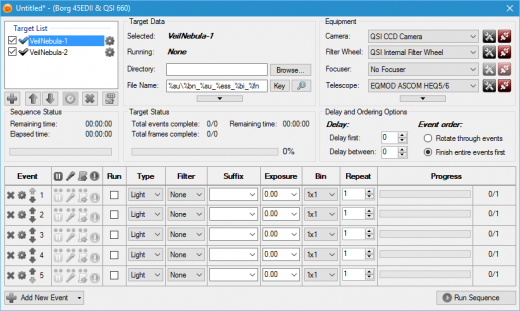
No need to waste precious time fighting with gear. SGPro will control your camera (CCD, CMOS, Canon, Nikon), filter wheel, focuser, mount, camera rotator, flatbox, dome or roll-off roof observatory, weather stations and more. It is perfect for beginners and it has enough power to suit even the most demanding photographers. If you are just starting out, don’t be intimidated by that list of gear! All you need to start using SGPro is a camera.

For the rest of it, SGPro will grow right alongside your new gear and skill level over time. You can be rest assured that you won’t need to purchase new software once you become an intermediate or expert level photographer. Even better, if you decide to just dabble in astrophotography, the free version of Sequence Generator (Lite) will likely meet all of your needs.

Sequence Generator Lite, despite being free, is still more powerful than even some other paid versions of software. Over the years it has become increasingly difficult to effectively convey what SGPro does for you, but here is a list of the highlights. Take your night back! Look at the stars, watch TV, even sleep… let SGPro take care of your rig and relax.

Complex Mosaic Sequences in Just Minutes
With this tool you can plan complex mosaics in mere minutes and get to imaging quickly. Simply download the image that has your intended target (via the provided interface), rotate to find your camera angle, draw a square around the area of interest and start imaging (the tool will create a sequence for you). It’s really that easy… You can also use this tool for single frame images just to ensure that your camera angle is in the ideal position.

Powerful Sequencing Engine
Take advantage of Sequence Generator Pro’s powerful sequencing engine. With it, you can coordinate a wide variety of equipment including cameras (CCD and Canon DSLRs), color filters, focus controllers and telescopes. If it’s made for astronomy, we can probably control it.  String together any combination of targets and events you can imagine in order to capture “light”, “dark”, “bias” or “flat” frames.

Auto Focus
Stay in focus even when the temperature and gear are working against you! Fast temperature drops, different filters, and gravity are now an afterthought.  Our powerful focus routines will be able to determine proper focus for almost any deep space target. No need to slew off target to find suitable focus stars… No need to wake up and pull out a focus mask… Simply start your sequence near good focus and auto focus will take care of the rest!

Equipment & User Profiles
Use our profile manager to make your life easier. Have multiple mounts or scopes? Have multiple sets of filters? Multiple locations you like to use? Do they require different settings when you create sequences? The profile manager can record these settings and allow you create new sequences from existing profiles. This can be a huge time saver and will get you imaging faster every time!  Even better, profiles are portable files and can be backed up or easily transferred between machines.

Know When Something Goes Wrong
Night sky imaging can be hard.  When you combine a complex rig with unpredictable weather you create an environment where things can go wrong.  Clouds cause auto guider gone off the rails?  Normal, user requested, sequence pauses?  Equipment malfunction? While SGPro can automatically recover from many issues, it will also make sure you know when something needs your attention and get the sequence back on  track as soon as possible.

Automatic Target Centering & Meridian Flips
Use our powerful auto centering routines to find your target fast and start imaging! Ideal for multi-night imaging or even after meridian flips, we can get you back on track fast. As long as your sequence targets have a location defined, SGPro will automate the process of getting you where you need to be to start capturing data. When one target is done for the night and the next starts, automatic centering will move you to the next target automatically and continue with the sequence. In addition, this feature also supports automatic meridian flips. This, of course, means that you don’t need to set an alarm clock and walk out to your rig in a daze to perform a manual flip.

Center Using an Existing Image
Using any image that has an obtainable location, simply point the mouse at the area of the image on which you want to center and click. That’s it! This process will use the same cenerting process outlined above and get you within pixels of the chosen location. No more continually nudging and checking to get where you want to be.

Release Name: Sequence Generator Pro 4.5.0.1649
Size: 132.9 MB
Links: HOMEPAGE – NFO – Torrent Search

Download: RAPiDGATOR
4 Comments
June 15

Gilisoft SnapID 8.8.0

Description: Gilisoft SnapID offers a wide range of features to help you enhance and transform your images. With Gilisoft SnapID, you can easily crop, resize, and rotate images to get the perfect composition. The software also allows you to adjust colors, brightness, contrast, and saturation to bring out the best in your photos.

One of the standout features of Gilisoft SnapID is its ability to add filters and effects. You can choose from a variety of presets or customize your own to create unique and artistic looks. Whether you want to give your image a vintage feel, add a dramatic glow, or create a surreal effect, this software has you covered.

In addition to basic editing functions, Gilisoft SnapID also provides advanced tools for more complex tasks. You can remove unwanted objects from images, retouch portraits, and even create collages. The intuitive interface makes it easy for both beginners and experienced users to navigate and use the software effectively.

Whether you are a professional photographer or just someone who loves to edit images for fun, Gilisoft SnapID is a great choice. It offers a comprehensive set of tools and features to help you unleash your creativity and transform your images into masterpieces.

Exclusive Features of Gilisoft SnapID

Advanced cropping tool
Allows you to precisely cut out specific areas of an image, enabling you to focus on the most important elements and remove unwanted parts. You can choose from various preset aspect ratios or customize the crop dimensions to suit your specific needs.

Resizing with precision
Easily adjust the size of your images without sacrificing quality. Whether you need to make an image smaller for web use or enlarge it for printing, this feature provides smooth and accurate resizing options.

Rotation and flipping
Rotate images to the desired angle or flip them horizontally or vertically for creative effects or to correct orientation issues. This gives you full control over the positioning of your images.

Color correction and enhancement
Fine-tune the colors in your images with a comprehensive set of tools. Adjust hue, saturation, and brightness to bring out the true beauty of your photos. Correct color casts and enhance contrast for more vivid and impactful images.

Brightness and contrast adjustment
Converting images to PDF format can integrate multiple images into one file, which is convenient for saving, sharing, and printing. This makes it easier to manage and view images, while also retaining the original quality of the images.

Saturation control
Boost or reduce the saturation of colors to create different moods and atmospheres. High saturation can make colors pop and appear more vibrant, while low saturation can give a more subdued and elegant look.

Filters and effects galore
Choose from a wide range of filters and effects to add a creative touch to your images. From vintage looks to modern artistic styles, there are options for every taste. Experiment with different combinations to achieve unique results.

Object removal made easy
Remove unwanted objects from your images with a seamless object removal tool. Whether it's a stray object in the background or a blemish on a subject, this feature allows you to clean up your images effortlessly.

Portrait retouching for perfection
Enhance portraits with tools specifically designed for retouching. Smooth skin, whiten teeth, and brighten eyes to create flawless portraits. Adjust facial features and remove imperfections for professional-looking results.

Collage creation wizard
Combine multiple images into a single collage with ease. Select from various layouts and templates, and customize the arrangement and size of each image. Add borders, shadows, and other effects to make your collages truly unique.

Batch processing for efficiency
Process multiple images at once with batch processing capabilities. Apply the same edits to a group of images, saving you time and effort. This is especially useful for photographers and designers who need to edit large numbers of images quickly.

Text addition and customization
Add text to your images for captions, labels, or artistic purposes. Choose from a variety of fonts, sizes, and colors, and customize the text's opacity, shadow, and outline. Position the text anywhere on the image for maximum impact.

Layers and blending modes
Work with layers to create complex compositions. Use blending modes to combine layers in different ways, adding depth and creativity to your images. Adjust the opacity of layers for seamless integration.

Histogram display for accurate analysis
View the histogram of an image to analyze its tonal distribution. This helps you identify areas that may need adjustment and make informed decisions about color and brightness corrections.

Zoom and pan for detailed work
Zoom in on specific areas of an image for detailed editing. Pan around the image to easily access different parts. This allows you to work with precision and ensure every detail is perfect.

Undo and redo functionality
Don't worry about making mistakes. The software offers unlimited undo and redo options, so you can easily go back and forth in your editing process until you achieve the desired result.

Save in multiple formats
Save your edited images in a variety of formats, including JPEG, PNG, TIFF, and more. Choose the format that best suits your needs, whether it's for web use, printing, or sharing on social media.

User-friendly interface
The intuitive and user-friendly interface makes it easy for both beginners and experienced users to navigate and use the software. With clear menus and tooltips, you can quickly find the features you need and start editing your images right away.

Release Name: Gilisoft SnapID 8.8.0
Size: 592.9 MB
Links: HOMEPAGE – NFO – Torrent Search

Download: RAPiDGATOR

4 Comments
June 15

COAA PlanePlotter 6.7.5.9

Description: PlanePlotter receives and decodes live digital position reports from aircraft and plots them on a chart. Using PlanePlotter, you can see a radar-like display of all those aircraft around you that are transmitting the appropriate digital messages including ACARS, ADS-B and HFDL.

PlanePlotter - Features
The animated screen grab from PlanePlotter (left) was kindly provided by John Locker.

Message display
PlanePlotter shows a table display of messages received and decoded from live aircraft transmissions.

Data saving
PlanePlotter archives all the digital data that it receives and decodes to a log file.

Chart display
PlanePlotter plots aircraft positions, altitudes and times decoded from the message traffic that it receives. These include embedded position reports, AMDAR reports and ADS reports contained in ACARS messages, ADS-B position reports received by the Kinetic SBS1(tm) or AirNav System RadarBox(tm) Mode-S receivers, and position reports on HF using Charles Brain's PC-HFDL software. The plot can be superimposed on a suitable aeronatical chart that you have prepared, or PlanePlotter can download satellite imagery and plot the aircraft symbols on that. Where altitude information is available (eg Mode-S messages), you can select the data by altitude band to distinguish low level and high level traffic.

Google Earth server
If you are receiving Mode-S ADS-B position reports, PlanePlotter can interface to Google Earth to display aircraft positions over the Google Earth base map. It can even give you a dynamic real-time view from the flight deck of an aircraft that you designate.

Direction finding
PlanePlotter can determine and display the direction of any transmission using a simple passive antenna switch. This allows aircraft to be located even if they are not equipped with ACARS or Mode-S/ADS-B.

Input signals
PlanePlotter can decode ACARS messages, display the message content and plot any positions on a chart.
PlanePlotter can process and display Mode-S/ADS-B position reports captured by the Kinetic SBS1(tm), the AirNav Systems RadarBox(tm), the RxControl Mode-S receiver, the PlaneGadget Radar, the miniADSB, the microADBS and the FPGA Beast.
PlanePlotter can also work in conjunction with Charles Brain's PC-HFDL software (http://www.chbrain.dircon.co.uk/pchfdl.html) by automatically extracting position reports from the log file and plotting them in real time on the same chart display. PlanePlotter adds value by calculating course and heading from successive reports from the same aircraft and plotting the predicted position between reports (right).
PlanePlotter can drive a passive antenna switch and display the direction (QDM) of any aircraft voice transmission.

GPX overlays
PlanePlotter can display waypoints, tracks or routes over the current chart using data from a user-defined GPX format file.

Alerts
PlanePlotter can generate visible and audible alerts on detection of a specified registration, flight number or ADS identifier, on detection of any new aircraft, or on detection of an aircraft whose position is inside a user-defined Alert zone polygon.

Memory-Map Navigator support
PlanePlotter can direct the Memory-Map Navigator program (www.memory-map.com) to display dynamic aircraft position symbols over its proprietary maps using data from either ACARS or Mode-S ADS-B (in conjunction with the SBS1 receiver).

OLE/COM interface
You can access the position and other data for each aircraft known to PlanePlotter using a simple VB script or other OLE/COM capable program. You can use the same interface to update data held by PlanePlotter and to control the user interface.

Release Name: COAA PlanePlotter 6.7.5.9
Size: 7.7 MB
Links: HOMEPAGE – NFO – Torrent Search

Download: RAPiDGATOR

4 Comments
June 15

Zortam Mp3 Media Studio Pro 33.95

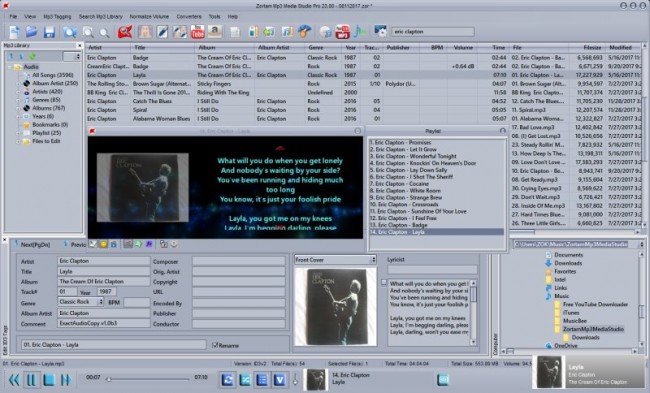
Description: Zortam Mp3 Media Studio is an all-in-one music application suite that is designed to edit the tags of music files. It has several modules such us AutoTagger, Music Organizer, Music Tag Editor, Integrated Music Player, Mp3 Volume Normalizer,BPM (Beats Per Minute) Analyzer, CD Ripper, YouTube To MP3 converter, MP3 to Wav converter, Auto rename file editor.

The application supports MP3, FLAC, WMA, MP4, WAV tags and music formats.

With Zortam Mp3 Media Studio you can batch auto-tag your music files, rename files, search for duplicate files using the tag information or filename checksum, write tags using information from the filename, and much more.

The batch auto tagger process identifies your music and automatically downloads album art, lyrics, and other metadata such as artist, title, year, genre, and track info to your music files.

The software recognizes over 35 million music tracks. Album covers, lyrics, and other metadata are saved to tags and can be viewed in iTunes, iPhone, iPod, and Android mobile or tablet devices.

The program is designed to run on the Microsoft Windows operating system and supports Windows 2000,Windows XP, Windows 7, Windows Vista, Windows 8 and Windows 10, Windows 11.

The program is translated into English, German, Italian, French, Spanish and Portuguese. There is also an Android version of the program which you can download from Google Play.

Program features:
Automatically identify and organize your digital music collection
Auto Tag MP3, FLAC, WMA, M4A and WAV music files
Free Tag Editor
Integrated music player
Mp3 Volume Normalizer
Automatically add cover art
Automatically add lyrics
Rename Mp3 files automatically using tag information
Auto-tag files and clean-up tags automatically
Write tags from filenames using custom formats
Tag and rename music files automatically
Automatically import songs from the iTunes library
Fix broken tags
YouTube Mp3 Converter
Organize a huge music library with ease
BPM song analyzer
Find duplicate MP3 files using MP3 tags or file information
CD Ripper automatically adds cover art, lyrics, and other tags
Export whole or part of the Mp3 library to CSV, Excel, HTML
Identify music tracks using an advanced fingerprint algorithm

Release Name: Zortam Mp3 Media Studio Pro 33.95
Size: 75.1 MB
Links: HOMEPAGE – NFO – Torrent Search

Download: RAPiDGATOR

4 Comments
June 15

HyperSnap 10.0.3

Description: HyperSnap 10 is the fastest and easiest way to take screenshots from Windows. HyperSnap combines the power of a first-class screen capture application with an advanced image editing utility, and editable text capture through OCR - wrapped into one easy-to-use tool. Windows 10 and 11 only.

HyperSnap is perfect for capturing images and texts that you want to include in your Help system, online tutorials, manuals, training handouts, presentations, marketing materials, Web pages, emails and more. Use HyperSnap to quickly share a picture-perfect representation of anything on your screen.

HyperSnap is versatile and extremely easy-to-use. You can switch between modern "ribbon" interface shown on the image above, or tranditional menu and toolbars.

Top Features
Image captures from any where on the screen or multiple monitors, in any shape or size.
New & powerful image capture, editing, annotation and  manipulation tools. Objects drawn over images can now be selected, edited, shown and hidden, moved, deleted any time. A new native file format saves the objects drawn for further editing later, or save a standard image and have the object "imprinted" permanently on them.
Unlimited undo/redo.
Capture dropdown menus and lists with hotkey feature or delayed capture.
Image stamps, frames, drop shadow, free-hand capture, FTP server uploads, more.
Automatic color substitution.
Non-rectangular window capture.
Button Capture  - perfect for professional technical writers who need to snap and document dozens of buttons!
Auto-scrolls and concurrently captures long web pages and other. documents, enabling it to grab more than is visible on the screen.
Tightly integrates with the MS Windows clipboard to automate repetitive tasks - will even automatically PASTE capture images where needed!
Automatically saves your captures to graphics files.
Doubles as effective image viewer, format converter (over 20 image formats supported).
Fully customizable user interface. Rearrange menus and toolbars any way you want, assign any keyboard shortcuts you like, tear off menus to create instant toolbars, even control HyperSnap with voice commands!

Release Name: HyperSnap 10.0.3
Size: 17 MB
Links: HOMEPAGE – NFO – Torrent Search

Download: RAPiDGATOR
4 Comments
June 15

Wondershare UniConverter 17.4.1.603

Description: UniConverter - Best Video Converter Ultimate. Convert, Download, Compress, Edit, Burn Videos in 1000 formats and do more.

Full Quality, High Speed
Video Conversion To Any Format
Wondershare UniConverter (originally Wondershare Video Converter Ultimate) accomplishes your conversion tasks with handy features.

Easy-to-Use Video Editor, Makes Your Video Stand Out
You can customize home movies through advanced editing features and get professional-looking works in minutes.

Save Videos From Over 10,000 Sites With One Click
Download or record your favorite 4K/HD videos from popular video sharing sites for enjoyment without Internet connection; Or convert them to compatible formats for playback on TV, smartphone, or other devices.

A Flawless DVD & Blu-ray Experience Anywhere
Powerful DVD toolkit of UniConverter (originally Wondershare Video Converter Ultimate) helps you to create and edit DVD files in an easy way.

Burn Videos to DVD and Blu-ray discs
Convert Any Format to DVD
Provide Free DVD Templates
Edit DVD Files with Built-in Editor

Download Videos from Hot Online UGC Sites.
Download Online Video to MP3 in One Click.
Download online video playlist in batch
Download Entire Online Video Playlist at One Go.
Record Videos from Streaming Sites.
Note: You're only entilted to download the videos with authorized copyrights.

Transfer Videos to Devices & External Hard Drives
Transfer media files to Apple devices, Android devices, USB flash drives or external hard drivers easily. More importantly, all unsupported formats will be intelligently converted to compatible ones during the transfer.

All-Purpose Video Toolbox
Wondershare UniConverter (originally Wondershare Video Converter Ultimate) also offers a full set of optimized video tools which will come in handy sometime.

Compress Video to Smaller Size
Video Compressor
Compress video without quality loss.

Fix Video Metadata
Fix metadata info for videos.
VR Converter (Only for Windows)
Convert any video to VR format.
GIF Maker
Convert a video or photos to a GIF picture.
Screen Recorder
Record all desktop activities with voice.

Release Name: Wondershare UniConverter 17.4.1.603
Size: 356.3 MB
Links: HOMEPAGE – NFO – Torrent Search

Download: RAPiDGATOR
4 Comments
June 15

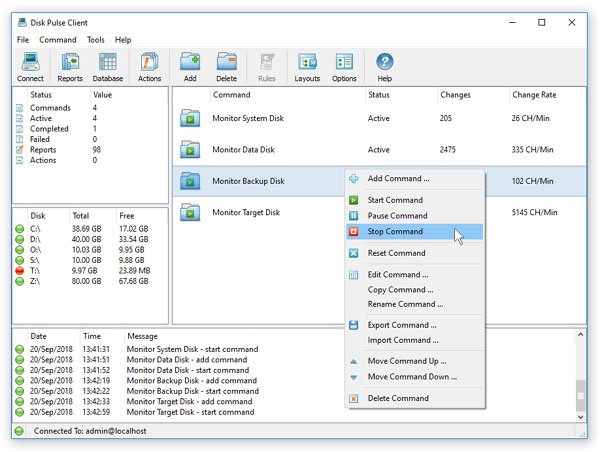
Disk Pulse 18.2.34

Description: DiskPulse is a real-time disk change monitoring solution allowing one to monitor one or more disks or directories, save reports and disk change monitoring statistics, export detected changes to a centralized SQL database, execute custom commands and send E-Mail notifications when unauthorized changes are detected in critical system files.

Features:
• Real-Time Disk Change Monitor
• Analyze Detected File Changes
• Filter Detected File Changes
• Save Disk Monitoring Reports
• SQL Database Integration
• Monitor Specific File Types
• Send E-Mail Notifications
• Execute Custom Actions
• Command Line Utility
• DiskPulse Server

Release Name: Disk Pulse 18.2.34
Size: 74.7 MB
Links: HOMEPAGE – NFO – Torrent Search

Download: RAPiDGATOR
6 Comments
June 15

Helium Music Manager 18.1.773 Premium

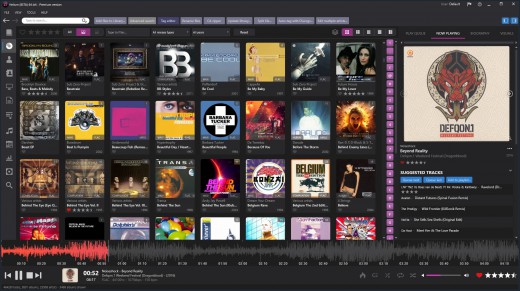
Description: A music cataloger, tag editor, cd ripper, audio converter, mp3 and flac analyzer, duplicate finder, player and music scrobbler - all in one. Get more from your music collection.

Has everything you need
Why mess with a lot of different tool for cataloging, tagging, playing or renaming files when you only need one?
Getting started with Helium is very easy - simply install it and then import your digital audio files. After the initial import is done you can start to browse your collection using all various browse mode and work with all powerful tools that are included. Quickly use the powerful search capabilities to locate specific artists, albums or tracks. Adjust and correct data of your files and manage your album and artist pictures in a batch.
Helium offers many quick and simple operations to handle your music collection, but it does not stop there. You can also interact with Helium via its scripting API. The scripting API allows you to execute specific operations via C# scripts to tracks, artists and albums in your collection.

Big collections - no problems!
We have designed Helium to be useful with collections ranging from small collections to large collections with several hundred thousand tracks. Due to its scalable design, you can easily migrate from the default database engine to more powerful engines like SQL Server, MySQL, or PostgreSQL, stored either locally on the same machine as Helium or on a remote machine for optimal multi-user support.

Helium is designed to work with Windows 10 and Windows 11

Cataloging
Support for multiple database types for the ultimate scaling for small and large collections.

Tagging
Different tag editors with multiple capabilities. Support for quick editing whilst viewing.

Manage
Download pictures and information, convert files, automatically rename files and much more.

Modern user interface
Browse your collection in various ways to quick and easily find what you are looking for. Dark or light themes available.

Play
Play music through playlists and use visualization for the optimal experience.

Automate
Automate multiple tasks with Helium's script engine. Create your own tasks and run in batches.

Premium version
Unlimited separate user accounts
Advanced searches
Multiple database type support
Remote control app
Advanced dynamic statistics
Client/server multi user features

Release Name: Helium Music Manager 18.1.773 Premium
Size: 67.4 MB
Links: HOMEPAGE – NFO – Torrent Search

Download: RAPiDGATOR
5 Comments
June 15

MediaHuman YouTube Downloader 3.9.21 (1206)

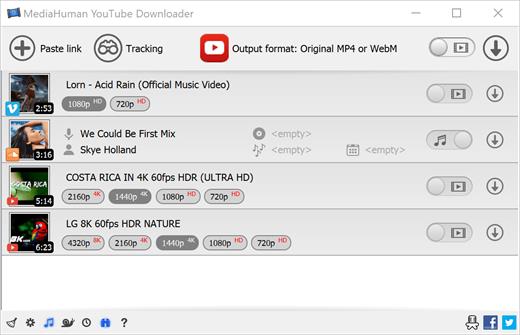
Description: There are so many interesting things to be found on YouTube, but you can't download the videos or save them as audio files by default. That's why we developed YouTube Video Downloader. This app will help you to accomplish video downloads quickly and without hangups. With our program you can simply download the whole playlist or YouTube channel at once and watch it whenever and wherever you want.

The application has many other convenient and practical functions for you to explore and enjoy.

Downloads entire playlists and channels
Supports Ultra High resolutions including 4K & 8K (with audio)
Downloads several videos simultaneously
YouTube, Facebook, Vimeo, Dailymotion, and many others
Extracts audio track and saves it as MP3
Supports exporting to iTunes/Music.app

Main Features:
Playlists and channels
The program supports downloading all the videos in a playlist or channel. In addition, you can monitor the selected channel or playlist and download new clips as they are uploaded.

Adds directly to iTunes/Music.app
You can configure the program to automatically add downloaded movies to your iTunes library. You can also pick a playlist where the downloaded video should be added.

HQ, HD, 4K or 8K
The program supports all available resolutions, be that 720p, 1080p, 4K or 8K, 30 or 60 fps. The choice is up to you. Unlike online video downloaders, the app downloads any resolution with sound.

Quality of the original
You can choose to save the video in its original quality and format, such as MP4 or WebM, without any modifications. In this case, the clip you get will be exactly the same as the one uploaded by its author.

Monitors the clipboard
The program keeps an eye on the clipboard and as soon as it spots a supported link there, it automatically adds this video into the download queue.

Simple tag editor
For audio downloads, the app automatically detects the artist and song name, which will be written in ID3 tags. These can be easily changed before the video is downloaded.

Not just YouTube
The program supports Twitch, Vevo.com, Vimeo, Dailymotion, Facebook, UOL, VKontakte, SoundCloud, TikTok, Likee, Brandnewtube, Odysee, Brighteon, Rumble and a lot of other sites. So you can download video from these websites as easy as you do from YouTube.

Drag & Drop
The app features a 100% drag&drop support. Just drag the link to a video with your mouse and drop it to the main window of the program, or to its dock icon on Mac.

Multi-language interface
The app is translated into: Arabic, Armenian, Azerbaijani, Bulgarian, Catalan, Chinese (Hong Kong SAR China), Chinese (Simplified), Chinese (Taiwan), Croatian, Czech, Danish, Dutch, English, Esperanto, French, German, Greek, Hebrew (Israel), Hungarian, Indonesian, Italian, Japanese, Korean, Latvian, Lithuanian, Malay, Norwegian Bokmål, Polish, Portuguese, Portuguese (Brazil), Romanian, Russian, Serbian, Slovenian, Spanish, Swedish, Turkish, Vietnamese.

Release Name: MediaHuman YouTube Downloader 3.9.21 (1206)
Size: 89.2 MB
Links: HOMEPAGE – NFO – Torrent Search

Download: RAPiDGATOR
5 Comments
June 15

Syncovery Premium 12.0.8.32

Description: The ultimate sync, backup, copy and migration tool. Syncovery will copy your data the way you need it - and fast!

Multiple Platforms
Syncovery will easily fulfill your requirements: on Windows, macOS, Linux, FreeBSD, and NAS systems. Copy between local drives, network shares, mobile devices via MTP, or using FTP, SFTP, or WebDAV and many others.

Cloud Support
Includes support for many different cloud storages, such as Google Drive, Box, Amazon S3, Azure, DropBox, OneDrive, Rackspace, Sharepoint, Backblaze B2, Citrix Sharefile, and many others.

Create multiple Jobs
Create as many different jobs as you need. Run them manually (with Sync Preview), or let the scheduler run them automatically.

Handle complex Tasks
Syncovery is rich in features, including real-time sync, compression, encryption, email notifications, and much more. It can be extended via PascalScript.

Wizard Mode makes it easy to create your first profile.
Create your first sync or backup job step by step, with explanations of the main settings you need to make. Each job (or profile) works with two paths – source and destination, or just the left and right path (since profiles can be 2-way copy tasks also).

Extremely Fast Scanning
Syncovery’s multi-threaded folder listing algorithm provides an unparalleled speed, and easily handles millions of files and huge numbers of folders. Even more speed can be gained with our Destination File List Cache and Remote Service features.

Block Level Copying
This will help you save bandwidth as well as backup space. Syncovery can detect changed blocks in large files, and copy only these. The detection works by keeping checksums in a database, or with the help of the Syncovery Remote Service, or by using our revolutionary File System Monitoring Service (the File Sytem Monitoring Service is Windows only).

Real-Time Synchronization
Real-Time Synchronization will make sure that changes are synced quickly. Syncovery listens to file system events and quickly performs the appropriate actions. For cloud servers, it can use polling to detect changes. These features are available on Windows and macOS only.

SmartTracking
The SmartTracking sync mode is frequently used in two-way sync jobs. It can detect moved files, deleted files, and conflicts (files changed on both sides).

Versioning
Syncovery allows you to keep multiple versions of modified files, allowing you to restore your files from an earlier date. The restore date can be chosen for individual files or multiple files, in our Restore Wizard.

File Server Migration
Syncovery’s advanced NTFS copying features, high speed, and scaleability enable you to perform large-scale migrations. Read our new, comprehensive Server Migration Guide.

Release Name: Syncovery Premium 12.0.8.32
Size: 101.2 MB
Links: HOMEPAGE – NFO – Torrent Search

Download: RAPiDGATOR
5 Comments