Please REGISTER or RENEW your account on RAPiDGATOR.net and support us by doing through all RAPiDGATOR working download links on main posts...
June 15

Witch Hat Atelier S01E12 1080p WEB H264-SKYANiME


Note: In Japanese With English Selectable Subtitles or (HERE).

Season 1, Episode 12 – “The Shadow of Romonon”

Links: HOMEPAGETVDB

Witch.Hat.Atelier.S01E12.720p.WEB.H264-SKYANiME
MKV | AAC | 714MB
NFOSubtitlesTorrentNiTROFLARERAPiDGATOR
Single File RAR: RAPiDGATOR Backup

Witch.Hat.Atelier.S01E12.720p.WEB.Japanese.H264-JFF
MKV | AAC | 743MB
NFOSubtitlesTorrentNiTROFLARERAPiDGATOR
Single File RAR: RAPiDGATOR Backup

Witch.Hat.Atelier.S01E12.720p.WEB.DUAL.H264-JFF
MKV | AAC | 775MB
NFO - SubtitlesTorrentNiTROFLARERAPiDGATOR
Single File RAR: RAPiDGATOR Backup
Witch.Hat.Atelier.S01E12.1080p.WEB.H264-SKYANiME
MKV | AAC | 1.36GB
NFOSubtitlesTorrentNiTROFLARERAPiDGATOR
Single File RAR: RAPiDGATOR Backup

Witch.Hat.Atelier.S01E12.1080p.CR.WEB-DL.DUAL.DUAL.AAC2.0.H.264.MSubs-ToonsHub
MKV | AAC | 1.39GB
NFOSubtitlesTorrentNiTROFLARERAPiDGATOR
Single File RAR: RAPiDGATOR Backup

Witch.Hat.Atelier.S01E12.WEB.Japanese.H264-RBB [P2P]
MP4 | AAC | 202MB
NFOSubtitlesScreenshotTorrentNiTROFLARERAPiDGATOR
Single File RAR: RAPiDGATOR Backup

Witch.Hat.Atelier.S01E12.WEB.DUBBED.H264-RBB [P2P]
MP4 | AAC | 202MB
NFOSubtitlesScreenshotTorrentNiTROFLARERAPiDGATOR
Single File RAR: RAPiDGATOR Backup
15 Comments
June 15

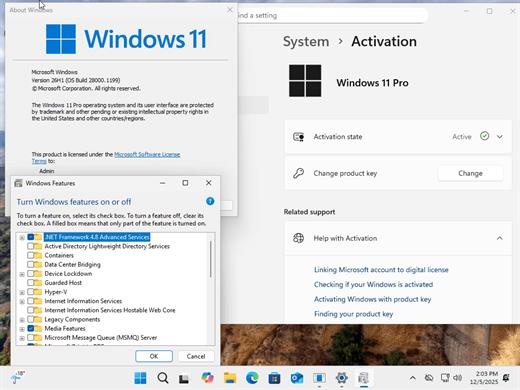
Windows 11 Pro 25H2 Build 26200.8655 TPM Bypassed & Pre-Activated June 2026

Description: On August 29, 2025, Microsoft released the first official preview of Windows 11 version 25H2 (2025 Update) in the Release Preview Channel of the Windows Insider Program. The update is rolling out as an enablement package for devices already running version 24H2.
Windows 11 versions 24H2 and 25H2 use the same underlying system files and architecture. That means there’s no need to reinstall or replace the core operating system to move between them. Instead of delivering a large, full-featured update, the software giant simply “flips the switch” with a small enablement package that activates the 25H2 features already present in 24H2. This makes the update faster, less risky, and easier to roll back.

What’s New


  • Some of the features that you can expect to find on Windows 11 25H2 include
  • Start menu redesign: Wider layout, more pinned apps, a new “All” apps section, and optional removal of “Recommended.”
  • File Explorer dark mode: More dialogs now match the theme, including copy and delete prompts.
  • Notification Center: Now shows full clock (with seconds) on secondary monitors.
  • Android app resume: Continue mobile app activity directly from the Taskbar.
  • Start menu sidebar: Expanded access to messages, calls, and photos from your phone with a new interface.
  • Click to Do: New “Describe Image” action, selection modes (Freeform, Rectangle, Ctrl + Click), and touch gestures.
  • Admin Protection: Prompts for elevation on untrusted apps—adds a visual warning layer.
  • Passkeys with 1Password: Native support for plugin-based passkey managers.
  • Text & image AI activity log: Track recent AI usage from third-party apps.
Release Name: Windows 11 Pro 25H2 Build 26200.8655 TPM Bypassed & Pre-Activated June 2026
Size: 6.1 GB
Links: HOMEPAGE – NFO – Torrent Search

Download: RAPiDGATOR

2 Comments
June 15

FocusFlight 2.0.265 fix

FocusFlight is a travel-inspired focus timer and app blocker designed to turn your study or work sessions into a virtual flight journey. It helps you stay away from distractions, build deep focus habits, and track your daily productivity.

Key Features


  • Immersive Flight Experience: Set up your boarding pass, choose a task, and start your focus journey. Your “flight” safely lands when the timer ends.
  • Airplane Mode (App Blocker): Powered by Apple’s Screen Time integration, this feature blocks distracting apps and websites to keep you locked into your work.
  • 3D Map Window & Routes: Watch your flight move across a 3D world map in real time, turning your completed focus sessions into visual flight paths.
  • FlightLog & Mileage: Automatically tracks your departure, destination, focus duration, and miles flown. As you gain miles, you can unlock premium membership cards.
  • Ambient Sounds: Includes built-in white noise and airplane cabin ambience to create a calm environment for studying or reading.
What’s New

Version 2.0.265:


  • Release notes were unavailable when this listing was updated.
Compatibility

macOS 14.0 or later


Release Name: FocusFlight 2.0.265 fix
Size: 123.2 MB
Links: HOMEPAGE – NFO – Torrent Search

Download: RAPiDGATOR

4 Comments
June 15

Macxvideo AI 3.15.0

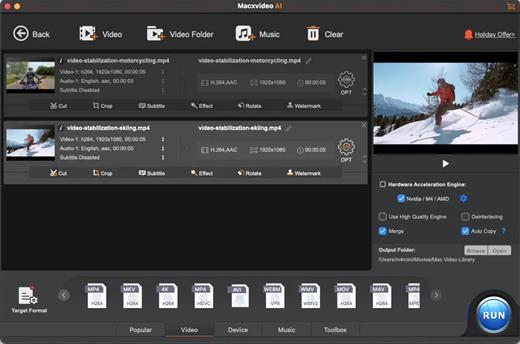
Macxvideo AI is an ultimate AI-powered video suite for Mac, combining next-gen video/image enhancement with advanced tools for conversion, compression, screen recording, and editing. With full GPU acceleration, it offers a smooth, efficient workflow for both casual creators and professionals.

AI Super Resolution technology significantly enhances video quality by intelligently upscaling footage up to 4X its original size, with support for resolutions as high as 4K. Its advanced AI models preserve fine details while eliminating noise and blur, resulting in clearer, sharper visuals for a truly immersive viewing experience.

Supporting 370+ inputs & 420+ outputs, Macxvideo AI converts MP4, HEVC, AV1, MOV, multi-track MKV, or AAC, making it playable on any device. It utilizes full GPU-acceleration to swiftly convert 4K/8K/3D videos in bulk, delivering 47X faster speed and keeping CPU ussage under 2%. You can adjust codec, resolution, VBR, etc.

From iPhone, GoPro, DJI, Cannon, and DVD/blu-ray rips, Macxvideo AI adeptly converts videos like 4K MOV, MP4 with ease. It downscales 4K/8k, transcodes legacy or modern codecs, and preps your footage for smooth playback across all devices and players.

What’s New

Version 3.15.0:


  • Release notes were unavailable when this listing was updated.
Compatibility

macOS 10.15 or later


Release Name: Macxvideo AI 3.15.0
Size: 247.9 MB
Links: HOMEPAGE – NFO – Torrent Search

Download: RAPiDGATOR

4 Comments
June 15

Dropshare 6.13

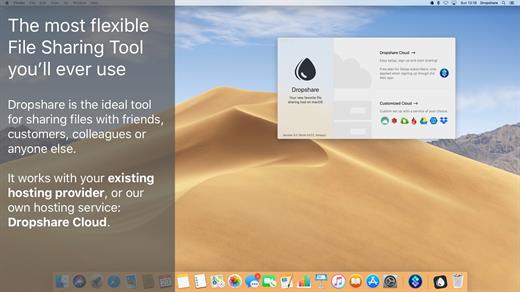
Dropshare is a menu bar application for drag & drop upload files, screenshots and even directories to your own server, Amazon S3, Backblaze B2 Cloud Files, Rackspace Cloud Files, Microsoft Azure Blob Storage, Google Drive or Dropbox. Additionally, Dropshare offers a file sharing provider called Dropshare Cloud, which is perfectly suitable to start uploading in just minutes. Sharing files with friends, customers, colleagues or anyone else has never been so easy an professional! Dropshare supports Multiple Connections: You can set up different upload destinations at the same time and switch between them using user-defined keyboard shortcuts, or by holding ⌘ while dragging & dropping a file No matter if files, folders, text or screenshots – Dropshare uploads every file and data to your selected destination – also from clipboard or other applications like Safari. Share Extension included Set up your own keyboard shortcuts for fullscreen or selection-based screenshots that’ll be uploaded automatically with Dropshare. Set up a custom keyboard shortcut for taking a screenshot and annotating it afterwards with Dropshare itself, or an app you already like: Preview.app, Skitch.app, Napkin.app or Annotate.app Take & upload Screen Recordings directly with Dropshare, both fullscreen and selection-based recordings are available, as well as GIF conversion Choose from a number of free designs or craft an individual design on your own using HTML, CSS and JavaScript, including upload previews Synchronize your upload history across all your devices, supports both iOS and macOS. Your upload history will automatically be synchronized across all your Apple devices with iCloud Dropshare supports URL shorteners as well, e.g. dsh.re or Rebrandly, or configure your very own URL shortener service like bit.ly or YOURLS.

Technical requirements:


  • A working SSH user account is required on the server. A password or SSH key pair is also required. To have the uploaded file displayed in a web browser, a web server needs to be installed and configured on the server
  • Dropshare supports services like OpenStack Swift. Check User Guide for more information
  • A regular Google account is required in order to use Google Drive
  • A regular Dropbox account is required in order to use Dropbox
  • Microsoft Azure Blob Storage, Backblaze B2 Cloud Files, Amazon Simple Storage Service (S3), Rackspace Cloud Files. A subscription may be neccessary in order to use Dropshare with one of these providers. Please check out the terms of use and payment information at the website of the selected provider
What’s New

Version 6.13:


  • Release notes were unavailable when this listing was updated.
Compatibility

macOS 12.3 or newer
Apple Silicon or Intel Core processor


Release Name: Dropshare 6.13
Size: 46.3 MB
Links: HOMEPAGE – NFO – Torrent Search

Download: RAPiDGATOR

4 Comments
June 15

CHM Viewer Star 6.3.6

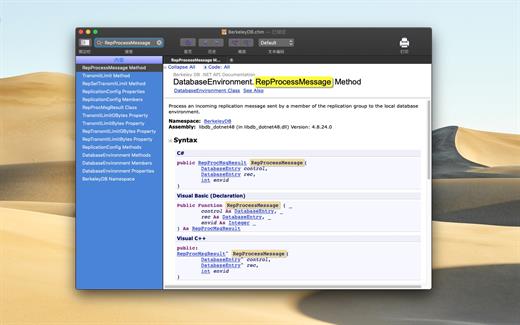
CHM to PDF & CHM Reader. CHM Viewer Star is a specialized app which aims at CHM files reader. You can use it to read CHM files conveniently, fast and safely.

Features


  • Read CHM files conveniently.
  • Zoom text.
  • Back and forward.
  • Add bookmarks.
  • FullScreen for OS 10.9 and later.
  • Modify the text encoding.
  • Print currently viewing topic.
  • Search in file and use Command+F to find in current viewing page.
What’s New

Version 6.3.6:


  • Release notes were unavailable when this listing was updated.
Compatibility

macOS 10.10 or later


Release Name: CHM Viewer Star 6.3.6
Size: 6.9 MB
Links: HOMEPAGE – NFO – Torrent Search

Download: RAPiDGATOR

4 Comments
June 15

RAR Unarchiver – Unzip RAR ZIP 3.5.2

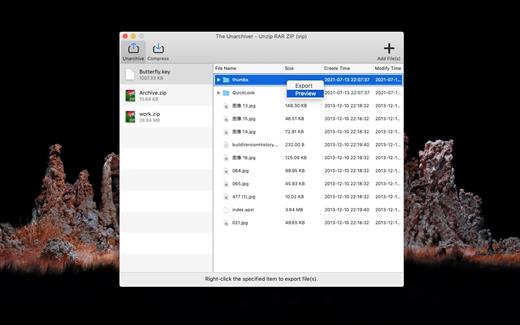
The Unarchiver – Unzip RAR ZIP is a very easy-to-use app that allows you to decompress dozens of archive formats. such as: Rar, Zip, 7z, Tar, Xz, Iso, Lha, bz2, Lzh, cab, cpio, jar, exe, pkg, dms, tbz, swf, Gzip, Bzip2… and it can also compress and encrypt any files to make private files more secure.

Key Features


  • Support preview and decompress dozens of archive formats.
  • archive files quickly.
  • Encrypt the archive file.
What’s New

Version 3.5.2:


  • Release notes were unavailable when this listing was updated.
Compatibility

macOS 10.12 or later


Release Name: RAR Unarchiver – Unzip RAR ZIP 3.5.2
Size: 12.2 MB
Links: HOMEPAGE – NFO – Torrent Search

Download: RAPiDGATOR

4 Comments
June 15

Easy New File 6.0

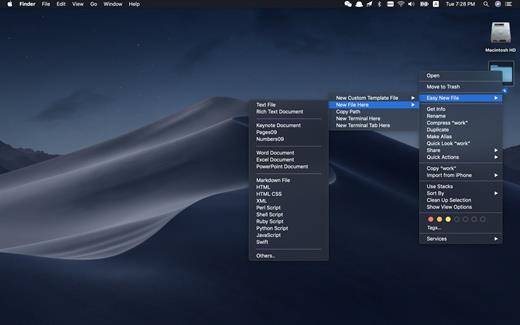
Easy New File is a Finder extension which adds some functions to the right-click menu in the Finder.

Features


  • Quick new file
  • Copy file path
  • Support all common file extension, such as text file, Word document, Excel, Keynote, Rich Text document, shell, Python script, Swift…
  • New Terminal here
What’s New

Version 6.0:


  • Release notes were unavailable when this listing was updated.
Compatibility

macOS 10.10 or later.


Release Name: Easy New File 6.0
Size: 7 MB
Links: HOMEPAGE – NFO – Torrent Search

Download: RAPiDGATOR

4 Comments
June 15

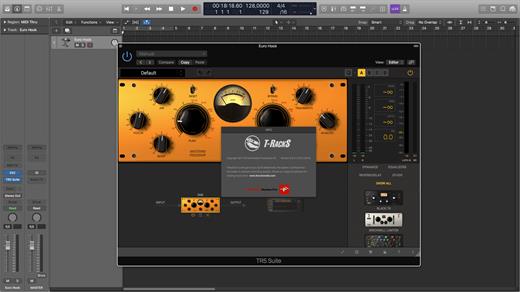
IK Multimedia T-RackS 6 MAX 6.3.2

Close your eyes and imagine a store full of great teams and powerful processing including compressors, limiters, reverbs, de-essers, multiband processors and a shelf full of legendary vintage emulations gears. In short, a shop dream to record musicians, engineers and producers.

Features:


  • Free version of T-RackS including Custom Shop, Classic EQ and basic measurement functionality
  • standalone workstation, set of accessories and unique accessories for audio units, VST2 formats, VST3 and AAX
  • Functionality Custom Shop will It allows purchase additional modules from within the program
  • the T-RackS shell allows chaining up to 16 processors
  • autonomous integration with processing ARC System 2.5
  • All processors available as individual accessories
  • Native 64 – bit support
  • Oversampling high – fidelity audio processing high quality throughout the signal path
  • The SCC technology ™ together with exclusive DSM ™ technology provides IK emulation software more realistic vintage gear to date
  • Extremely easy to use, with presets based on style, full chain visualization, individual module with a single click or bypass chain function “comparison” and more.
What’s New

Version 6.3.2:


  • Release notes were unavailable when this listing was updated.
Compatibility

macOS 10.15.0 or later


Release Name: IK Multimedia T-RackS 6 MAX 6.3.2
Size: 2.3 GB
Links: HOMEPAGE – NFO – Torrent Search

Download: RAPiDGATOR

2 Comments
June 15

PullTube 1.8.6.30

Sharing videos via online hosting services, such as YouTube or Vimeo is a common practice, yet streaming the content might not work as expected if you have a slow internet connection.

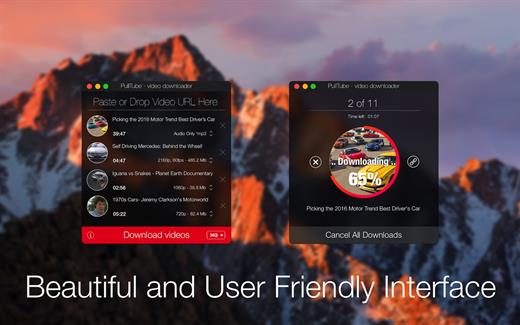
PullTube offers you the possibility to download videos from both sources (YouTube and Vimeo), while other platforms might be added at a later time. The app can handle playlists, allows you to select the output quality, and can even extract only the audio.

Video downloader that can import links with drag and drop and can detect playlists

The PullTube user interface is represented by a small window where you get to quickly paste the video URL. Note that you can also add a video by dropping the link on top of the PullTube window.

Worth mentioning is that, if PullTube detects that the video is part of a playlist, will offer to download the entire collection: will fetch the data for each entry and handle the downloads consecutively.

Download videos hosted on YouTube or Vimeo to different output sizes and formats

PullTube will start fetching the video data right away so you can see the video name, duration, and a small thumbnail. When configuring a download, you get to select the output quality (highest, 4K, HD or regular with different resolutions) or choose to export only the audio to an M4A or MP3 file.

Via the PullTube Settings panel, you can change the default download location and the default MP3 bitrate (320Kbps, 256Kbps, 128Kbps, 64Kbps). You can also add the quality info to the video’s name and choose to quit the app when all downloads are completed.

Get offline access to videos hosted online in just a few steps

PullTube proposes a streamlined workflow for quickly downloading videos from YouTube or Vimeo, provides control over the output quality, and enables you to extract the audio to MP3 or M4A files.

However, during our tests, we have noticed that PullTube has trouble completing the download when handling videos that are longer that 2 minutes. The process stops without any explanation, and you can eventually complete the task, but you need to add the link to download tool multiple times.

What’s New

Version 1.8.6.30:


  • Release notes were unavailable when this listing was updated.
Compatibility

macOS 10.12 or later


Release Name: PullTube 1.8.6.30
Size: 250.7 MB
Links: HOMEPAGE – NFO – Torrent Search

Download: RAPiDGATOR

4 Comments