Please REGISTER or RENEW your account on RAPiDGATOR.net and support us by doing through all RAPiDGATOR working download links on main posts...
Dec 21

Blackmagic Fusion Studio 20.3.1

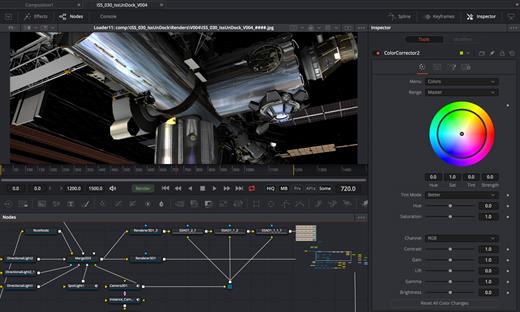
Fusion is the world’s most advanced compositing software for visual effects artists, broadcast and motion graphic designers, and 3D animators. Over the last 30 years, Fusion has been used on thousands of Hollywood blockbuster movies and television shows. Fusion features a powerful node based interface that lets you quickly and easily create sophisticated effects by connecting different types of image processing tools together! You get a massive range of tools, incredible VR and 3D support, GPU accelerated performance, unlimited network rendering and more! Fusion gives you everything you need to create exciting broadcast graphics, dramatic titles, and even major feature film visual effects!
Hollywood’s Biggest Blockbusters

Thousands of Hollywood’s biggest blockbusters and hit television shows use Fusion to create their groundbreaking visual effects. Fusion has been used on feature films like The Hunger Games, Dr Strange and Guardians of the Galaxy, as well as hit television shows like Empire, NCIS and American Horror Story. Fusion also plays a major role in the development of cinematics for major video games such as Dawn of War III, Halo 5 and more!

Nodes are a Much Faster Way to Work!

Nodes are incredibly easy to use, especially as scenes become more complex. Fusion’s nodes are small icons that represent effects, filters and other image processing operations. Nodes can be easily connected together to build larger and more complex visual effects. Tools, images, and objects can be combined in any order to create unlimited visual effects. Simply click on a node to quickly adjust any single part of your project. That’s much faster than a timeline based tool because you don’t need to hunt through nested stacks of confusing layers and filters!

Get the most Powerful VFX Software Available!

Whether you need to pull a key, track objects, retouch images, animate titles, or create amazing particle effects, Fusion has a massive toolset that lets you tackle the most demanding jobs. You get a true 3D workspace along with tools for compositing, keying, painting, animation, virtual reality, stereoscopic 3D and more. Fusion combines effects and motion graphics, along with 3D modeling and rendering into a single toolset. That means you can import and render 3D models and scenes with the rest of your composite in Fusion. You don’t have to pre‑render assets or transfer between multiple applications!

GPU Accelerated Workflow

Fusion is extremely fast and responsive enough to be used in high pressure, client driven sessions. With its Metal, CUDA and OpenCL GPU acceleration, you get instant feedback while you work so you can see exactly what you’re doing. Fusion 16 features more GPU optimisation than ever so whether you’re working alone or with a client, you get the real time control you need. That means you’ll be able to spend more time being creative and less time waiting! Fusion is so fast that you can even work in VR while wearing a headset and still get over 90 frames per second of interactivity!

Unlimited Render Power

Fusion has the world’s fastest production quality render engine! You can even distribute your render jobs across an unlimited number of networked computers for incredible performance, at no additional cost! There’s no “per node” render license fees. Simply install it on as many render nodes as you need! That means you can render complex scenes incredibly fast to meet the intense deadlines of production, without having to sacrifice creativity or quality.

Collaborate with Large Teams

When you’re working with a large creative team, Fusion Studio also includes the new Studio Player application. Studio Player features a single layer timeline with basic shot trimming, storyboard tools, versioning and annotation notes. Fusion Studio also features a bin server to let everyone share and see common assets that are needed for the job. That means you don’t have to copy and track multiple elements on different computers.

What’s New

Version 20.3.1:


  • Release notes were unavailable when this listing was updated.
Compatibility

macOS 11.0 or later.
Apple Silicon or Intel Core processor


Release Name: Blackmagic Fusion Studio 20.3.1
Size: 2.5 GB
Links: HOMEPAGE – NFO – Torrent Search

Download: RAPiDGATOR
11 Comments
Dec 21

Swinsian 3.0.4

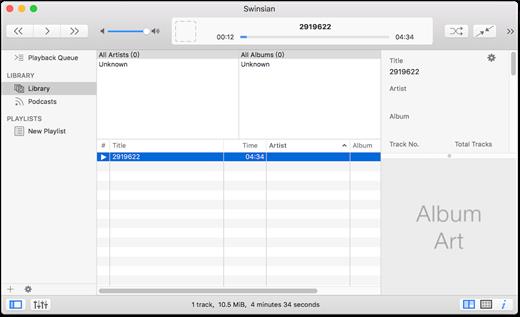
Swinsian is a music manager and player for macOS.

Features


  • Supports FLAC/Ogg Vorbis as well as MP3, AAC, WAV, APE, AC3, WavPack, WMA, and cue files
  • Copies tracks from iPods and iPhones
  • Watches folders for new files
  • Fetches album art
  • Quick control window
  • Imports iTunes libraries
  • Playback over AirTunes
  • Duplicate finding
  • Bulk tag editing with regex support
What’s New

Version 3.0.4:


  • Release notes were unavailable when this listing was updated.
Compatibility

macOS 10.11 or later


Release Name: Swinsian 3.0.4
Size: 24.2 MB
Links: HOMEPAGE – NFO – Torrent Search

Download: RAPiDGATOR
9 Comments
Dec 21

Screenflick 3.3.1

Screenflick features high-performance screen capturing for smooth, fluid motion up to 60 fps. Screenflick can record any portion of the screen, simultaneously recording audio from internal or external microphones and the system audio.
An excellent utility for software screencasters and software trainers, Screenflick offers the ability to display keyboard commands, and highlights mouse clicks to better communicate which actions are being performed during screen recording.

Unlike other solutions, Screenflick allows you to record a movie once and compress it as many times as you want at different resolutions, qualities, and with or without audio, offering you the maximum amount of flexibility when choosing which presentation options to offer to movie viewers.

What’s New

Version 3.3.1:


  • Release notes were unavailable when this listing was updated.
Compatibility

macOS 10.14 or later


Release Name: Screenflick 3.3.1
Size: 30.1 MB
Links: HOMEPAGE – NFO – Torrent Search

Download: RAPiDGATOR

11 Comments
Dec 21

QLab Pro 5.5.9

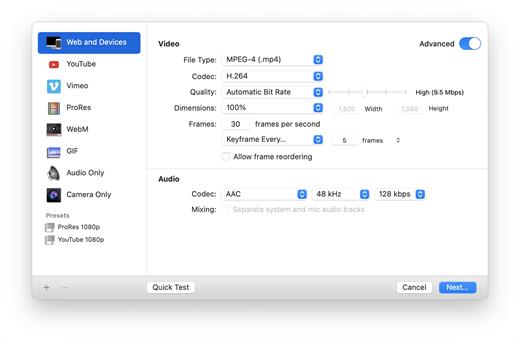
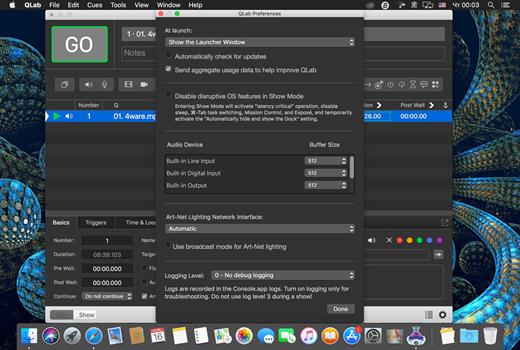
QLab is a streamlined and intuitive Mac OS X application that provides the required tools and features to create complex designs that can bring your audio and video content to life.

Versatile and user-oriented show control

QLab’s user-oriented interface helps you design and handle your multimedia content from within a smooth-running and personalizeable workspace that allows you to manage audio, video, MIDI, OCS and more.

QLab comes with numerous building blocks, also known as “cues”, that can help you design your stunning multimedia performance with just a few mouse clicks. Once you dragged and dropped your files you can start adding commands to fade in and fade out the volume, animate videoclips and apply various video and audio effects.

User-definable scripts and numerous video and audio effects

After getting familiar with the basics, you can step up your game and become a power user by using complex features like scripting, multi-projector edge blending, video corner pinning and audio localization. What is more, you can build multi-computer designs and send commands to multiple QLab systems connected to the same local network.

When you are happy with your Cue List, you can give it a try and hit the “Go” button to preview your show. Thanks to the Warnings panel you can check your list and view all encountered issues.

Support for Blackmagic device input, as well as various types of video surfaces and a host of other similarly powerful tools

QLab comes with support for 48 output and 24 input audio channels, intuitive audio waveform editing, customizable playback rate with pitch adjustment, video and audio faders, animation tools, Matrix mixer, audio and video effects, Syphon integration, keystone correction and corner pinning.

You can also overlay titles, use live video input from various devices, including Blackmagic devices, handle multiple video surfaces, apply fade curves, slice files, use markers and use external video effects.

What’s New

Version 5.5.9:


  • Release notes were unavailable when this listing was updated.
Compatibility

macOS 11.0 or later


Release Name: QLab Pro 5.5.9
Size: 33.7 MB
Links: HOMEPAGE – NFO – Torrent Search

Download: RAPiDGATOR
10 Comments
Dec 21

MacMagic 1.4.0

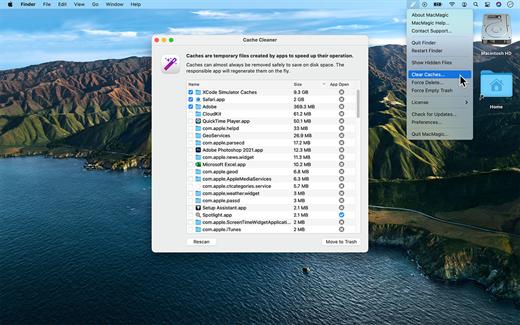
MacMagic can help clear up gigabytes of lost storage space crowded up by the caches of poorly optimized apps, hide and show hidden files in the Finder, help force-delete the contents of the Trash or stubborn files, and perform various other tasks to help automate or simplify your daily workflow!

What’s New

Version 1.4.0:


  • Release notes were unavailable when this listing was updated.
Compatibility

macOS 10.14 or later.


Release Name: MacMagic 1.4.0
Size: 57.1 MB
Links: HOMEPAGE – NFO – Torrent Search

Download: RAPiDGATOR

9 Comments
Dec 21

106 Editor 2.8

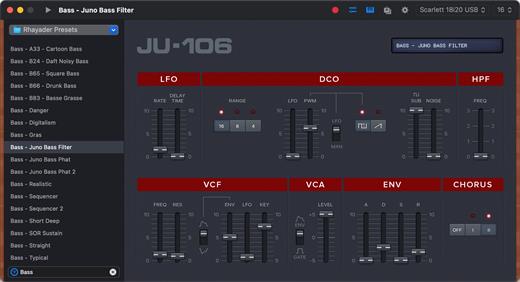
106 Editor is a preset editor and library for the Roland Juno 106 and MKS7 Synthesizers. Save, organize and edit presets via a simple MIDI connection.

Presets can be created from scratch or received from the synthesizer’s inner memory, and are stored as .jep documents or .syx files (sysex) on your hard drive.

Features:


  • Presets as Files: Perfect for sharing or backup !
  • Keyboard Playback
  • Undo Support
  • Quick Search
  • Retina Display Ready Interface
  • MIDI Out and Channel are directly customizable in the main window
  • Compatible with the Roland MKS7
What’s New

Version 2.8:


  • Release notes were unavailable when this listing was updated.
Compatibility

macOS 10.14 or later


Release Name: 106 Editor 2.8
Size: 9.5 MB
Links: HOMEPAGE – NFO – Torrent Search

Download: RAPiDGATOR
8 Comments
Dec 21

Davinci Resolve Studio 20.3.1

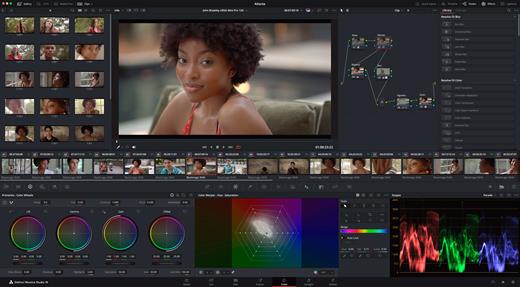
DaVinci Resolve Studio is the world’s only solution that combines professional 8K editing, color correction, visual effects and audio post production all in one software tool! You can instantly move between editing, color, effects, and audio with a single click. DaVinci Resolve Studio is also the only solution designed for multi user collaboration so editors, assistants, colorists, VFX artists and sound designers can all work live on the same project at the same time! Whether you’re an individual artist, or part of a large collaborative team, it’s easy to see why DaVinci Resolve is the standard for high end post production and finishing on more Hollywood feature films, television shows and commercials than any other software.

DaVinci Resolve 20 features powerful new DaVinci Neural Engine AI tools and over 100 feature upgrades! New AI tools include text based timeline editing, music remixing, dialogue separation and UltraNR noise reduction. IntelliTrack AI lets you use video to track the Fairlight audio panner. ColorSlice vector grading and film look creator offer richer grading vibrance and color density. Plus there are new features for live TV production and broadcast. DaVinci Resolve now supports realtime selection of live camera recordings for instant replay to air with slow motion and stingers. Multi Source is the fastest way to see your cameras and edit to the timeline while the cameras are still recording!

What’s New

Version 20.3.1:


  • Release notes were unavailable when this listing was updated.
Compatibility

macOS 10.15 or later,
Apple Silicon or Intel Core processor


Release Name: Davinci Resolve Studio 20.3.1
Size: 7 GB
Links: HOMEPAGE – NFO – Torrent Search

Download: RAPiDGATOR

3 Comments
Dec 21

OmniReader Pro 3.3.7

Read EPUB,CHM,MOBI… use it.. OmniReader is a fully functional book Reader with a simple and beautiful interface and a good reading experience.

Features


  • Supports reading EPUB, CHM and Kindle files.
  • Support single page search and full text search, and highlight search results.
  • Support the forward and backward browsing history.
  • Supports page turning, zooming, and sidebar shrinking.
  • Support page printing.
  • Support to view the basic information of the file.
  • Supports file export to EPUB, PDF.
  • Support to extract all images in the file.
  • Support file coding, deal with the problem of garbled code.
  • Support image adaptive, automatically adjust the size of the picture.
Bookrack

  • All the files you have read will be saved in the bookshelf for quick review next time.
  • Supports file drag and drop addition.
What’s New

Version 3.3.7:


  • Release notes were unavailable when this listing was updated.
Compatibility

macOS 10.13 or later


Release Name: OmniReader Pro 3.3.7
Size: 34.5 MB
Links: HOMEPAGE – NFO – Torrent Search

Download: RAPiDGATOR
9 Comments
Dec 15

Windows 11 Aio 16in1 25H2 Build 26200.7462 (No TPM Required) Preactivated Multilingual December 2025

Edition includes
1. “Windows 11 Home”
2. “Windows 11 Home N”
3. “Windows 11 Pro”
4. “Windows 11 Pro N”
5. “Windows 11 Home Single Language”
6. “Windows 11 Enterprise”
7. “Windows 11 IoT Enterprise”
8. “Windows 11 IoT Enterprise Subscription”
9. “Windows 11 Enterprise multi-session”
10. “Windows 11 Education”
11. “Windows 11 Pro Education”
12. “Windows 11 Pro for Workstations”
13. “Windows 11 Enterprise N”
14. “Windows 11 Education N”
15. “Windows 11 Pro Education N”
16. “Windows 11 Pro N for Workstations”

Languages: Arabic,English,German,Greek,French,Spanish,Italian,Portuguese-Portuguese,Portuguese-Brazil,Turkish,Dutch,Czech,Norwegian |

What’s New

Version 26200.7462:


  • Release notes were unavailable when this listing was updated.
Compatibility

PC * 1 gigahertz (GHz) dual-core 64-bit processor


Release Name: Windows 11 Aio 16in1 25H2 Build 26200.7462 (No TPM Required) Preactivated Multilingual December 2025
Size: 7.2 GB
Links: HOMEPAGE – NFO – Torrent Search

Download: RAPiDGATOR

4 Comments