Please REGISTER or RENEW your account on RAPiDGATOR.net and support us by doing through all RAPiDGATOR working download links on main posts...
Nov 12

Microsoft Office 2024 v16.103

Office LTSC 2024 offers a locked-in-time version of familiar productivity tools, updated with a subset of the features that have been added to Microsoft 365 Apps for enterprise over the last three years. New features for this release include Dynamic Charts and more than a dozen new text and array functions in Excel, enhanced search and meeting creation options in Outlook, and improvements to performance, security, and accessibility.
That same Office, especially for Mac

The new, modern versions of Word, Excel, PowerPoint, Outlook, OneNote, and OneDrive for Mac feature a familiar interface and the unique, beloved features of a Mac, so you can get started quickly.

Microsoft Word

Word is a robust application that lets you create, edit, view, and share text documents (even email attachments). It’s ideal for anyone who works with documents: bloggers, writers, journalists, reviewers, students, or project managers.

Microsoft Excel

The powerful Excel application makes it quick and easy to create, view, edit, and share spreadsheet files. New charts and Ideas provide visualization of data and trends. No matter where you are, you can confidently use this application to collaborate in accounting, auditing, or finance.

Microsoft PowerPoint

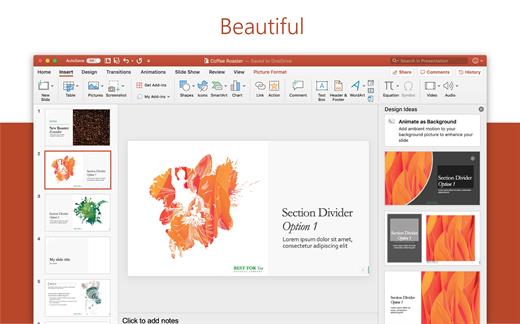
PowerPoint is the smart app you know and love that helps you communicate your ideas vividly and visually with beautiful layouts, animations, moving camera effects, 3D models, and icons. Save time and create engaging presentations that are up-to-date with the latest trends.

Microsoft Outlook

With Outlook, you have all your email accounts and calendars at your fingertips. Manage your messages and plan in detail—it has everything you need to organize your workflow efficiently.

Microsoft OneNote

Whether you need to streamline the tedious planning process or quickly jot down a brilliant idea, OneNote, your digital notebook, is your go-to. It’s indispensable when you need to prepare for a big event or when you need to make sure you don’t miss any important tasks that you can’t trust to someone else.

Microsoft OneDrive

OneDrive keeps all your Microsoft 365 files at your fingertips. Share and collaborate in real time across Word, Excel, and PowerPoint on your desktop, web, and mobile — all conveniently and securely

Note: If it doesn’t work, uninstall the old version of Office completely and reinstall it. For uninstallation method, please use Google search.

What’s New

Version 16.103:


  • Release notes were unavailable when this listing was updated.
Compatibility

macOS 12.0 or later


Release Name: Microsoft Office 2024 v16.103
Size: 2.6 GB
Links: HOMEPAGE – NFO – Torrent Search

Download: RAPiDGATOR

9 Comments
Nov 12

Bloom 1.5.8

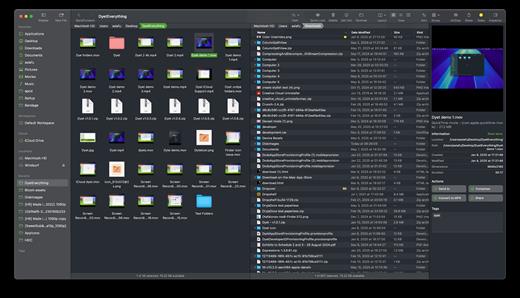
Bloom is a refined file management tool designed to enhance your search and navigation experience on macOS, offering a more intuitive and feature-rich alternative to Finder. With Bloom, you can instantly navigate to any location system-wide using the shortcut ⌘⇧⏎, making file access seamless and efficient .

Key Features


  • Enhanced Search Capabilities: Bloom allows you to search files by keyword within predefined locations, scanning tens of thousands of files in seconds for lightning-fast results. You can also search directly in any folder with ⌘F and refresh results with ⌘R .
  • Portal Mode: A compact window without sidebar or preview, Portal retains core functionalities and can be pinned on top of other windows or collapsed into the screen edge for convenience .
  • Archive Viewing: Browse contents of compressed files without extraction and preview text, images, or PDFs under 10MB by pressing Space or double-clicking .
  • Advanced File Management: Features like auto-resizing columns, advanced rename with regex support, workspace customization, iCloud Drive integration, and tag management elevate your file-browsing experience .
  • Media and Productivity Tools: Convert and optimize images, create various file types easily, paste images from the web, and organize files by kind or date. Additionally, Bloom records every operation for easy reversion and supports starting a terminal directly from a folder .
  • Disk Analysis and Task Management: Use Folder Scan to visualize disk usage through a treemap and manage file operations with a Task Scheduler to track progress .
What’s New

Version 1.5.8:


  • Release notes were unavailable when this listing was updated.
Compatibility

macOS 14.0 or later
Apple Silicon or Intel Core processor


Release Name: Bloom 1.5.8
Size: 16.4 MB
Links: HOMEPAGE – NFO – Torrent Search

Download: RAPiDGATOR
7 Comments
Nov 12

iBarcoder 3.17.2

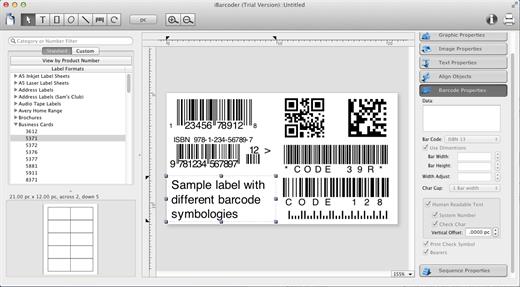
iBarcoder allows you to design and print your own barcoded labels, stickers, and tags. Create barcode graphics for retail packages, books, stickers, and more. Mac QR code and Datamatrix generator. Add text boxes, image boxes, rectangles, ovals and lines to your labels. Type in the necessary text, insert the desired images, to create the professional barcode labels for commercial use. Create sequential barcodes for catalogs and retail operations. Specify the sequence in which barcodes are printed or exported.

Smart, Intuitive Barcode Software


  • Create professional barcoded labels with a few mouse clicks
  • Live preview feature
  • Modify your Mac barcodes by changing types, sizes, and other attributes intrinsic to a certain barcode type. Advanced tools make customizing your barcode easy
  • Print barcodes directly to your printer using standard Avery formats provided
  • Create and save your own custom label formats
  • Export barcodes as a high-resolution image files, or vector graphics:

    • PDF (vector)
    • EPS (vector)
    • BMP
    • TIFF
    • JPEG
    • PNG
    • PNTG
    • Photoshop
    • …and more…!
  • Make the desired font and color settings
  • Copy, then paste finished graphics right to Adobe Illustrator, InDesign, Photoshop, or other software from Mac clipboard
Supports the following barcode types:

  • Postnet
  • Japanpost customer barcode
  • FIM Codes
  • Horizontal bars
  • UPC A
  • UPCE
  • EAN 13
  • EAN 8
  • ISBN
  • ISSN
  • Code 128
  • Codabar
  • ITF14
  • Code 39
  • Code 11
  • Code 93
  • MSI
  • Interleaved 2 of 5
  • Datamatrix
  • Intelligent Mail Barcode
  • Pharmacode
  • QR Code
What’s New

Version 3.17.2:


  • Release notes were unavailable when this listing was updated.
Compatibility

macOS 10.10 or later


Release Name: iBarcoder 3.17.2
Size: 16.6 MB
Links: HOMEPAGE – NFO – Torrent Search

Download: RAPiDGATOR

7 Comments
Nov 12

Aspect Ratio Pro 2.25

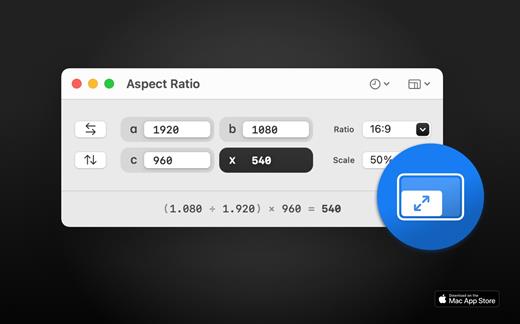
Aspect Ratio X is a rule-of-three calculator.

Features:

• Calculate aspect ratios (rule of three)
• Swap values horizontally and vertically
• Select scales and ratios
• Browse common resolutions
• Browse recent ratios
• Formula preview
• Uses imperial or metric system automatically based on your system settings
• Multi-window support
• Optimized for macOS 11+
• Optimized for Mac with M1 (Apple Silicon)

What’s New

Version 2.25:


  • Release notes were unavailable when this listing was updated.
Compatibility

macOS 11.0 or later


Release Name: Aspect Ratio Pro 2.25
Size: 9.1 MB
Links: HOMEPAGE – NFO – Torrent Search

Download: RAPiDGATOR
7 Comments
Nov 12

ForkLift 4.4.4

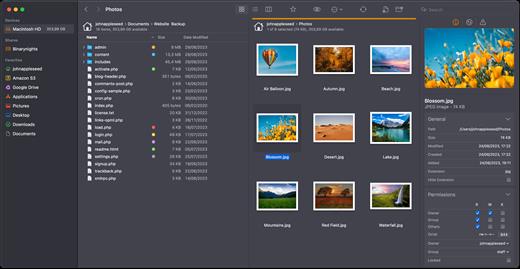
ForkLift is a powerful file manager and ferociously fast FTP client clothed in a clean and versatile UI that offers the combination of absolute simplicity and raw power expected from a well-executed Mac software.

ForkLift will connect to any remote server SFTP, FTP, WebDAV, Amazon S3, Backblaze B2, Google Drive, Rackspace CloudFiles, SMB, AFP and NFS shares on your local network,- pretty much anything you can plug into or hook up to a Mac. ForkLift also carries a complete toolbox for managing your files, including Folder Synchronization, Multi-Rename, Archive handling, Application deleter, editing files over remote connections and many more. All these power features are packaged into a Finder-like, dual-pane interface that delivers superior workflow while remaining absolutely familiar to use, along with Quick Look, Spotlight search and all.

Features


  • Completely rewritten entirely in Swift
  • ForkLift Mini
  • Two-way Sync
  • Preview
  • Quick Open
  • Multi Rename
  • Dark Mode
  • Dual Pane split vertically or horizontally
  • Favorite Sync via Dropbox
  • Dropbox Support
  • Transfer bandwidth throttling
  • Tags Support
  • Disklet
  • Sync Browsing
  • Tabs
  • Search by name, extention, kind, tags, or content
  • Quick Select
  • App Deleter
  • Remote Editing
  • Archive Management
  • Keyboard Control
  • Workspaces
  • FXP Copy
  • Tools
  • Git Support
  • Open in Terminal, iTerm, or Hyper
  • Hidden Files
  • Share
  • Possible to set as default file viewer
  • File Compare with FileMerge, Kaleidoscope, Beyond Compare, and Araxis Merge support
  • Multilingual: English, Chinese Simplified, Czech, French, German, Hungarian, Italian, Polish, Russian, Spanish and Ukrainian
What’s New

Version 4.4.4:


  • Release notes were unavailable when this listing was updated.
Compatibility

macOS 14.6 or later


Release Name: ForkLift 4.4.4
Size: 20.4 MB
Links: HOMEPAGE – NFO – Torrent Search

Download: RAPiDGATOR

5 Comments
Nov 12

DropDMG 3.7.1

DropDMG is the easiest way to create macOS disk images, which pack entire folders or disks into a single compressed file, either for transport across the Internet or simply for backup. They are Apple’s preferred format for distributing Mac software. Disk images are also the only archive format whose contents you can directly access in the Finder. Just drag-and-drop a folder or file, and you’re done. Or, you can drag an existing disk image or archive onto DropDMG to convert it to any of the other supported formats or to burn it to CD or DVD.

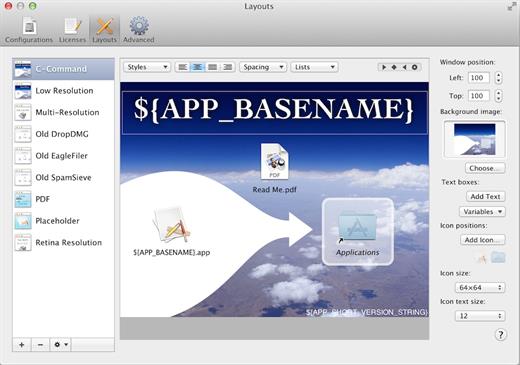
DropDMG supports advanced options such as signed, encrypted, and segmented disk images; WYSIWYG layout with background pictures and custom volume icons; and rich-text license agreements in multiple languages. There are many time-saving features, and it can also be automated via AppleScript, the command-line, and Automator.

What’s New

Version 3.7.1:


  • Release notes were unavailable when this listing was updated.
Compatibility

macOS 10.13 or later


Release Name: DropDMG 3.7.1
Size: 27.3 MB
Links: HOMEPAGE – NFO – Torrent Search

Download: RAPiDGATOR
5 Comments
Nov 12

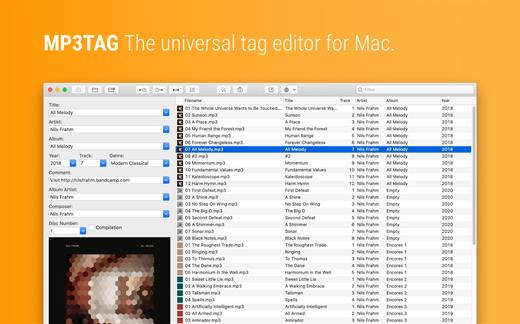
Mp3tag 1.9.13

Mp3tag is a powerful and easy-to-use tool to edit metadata of audio files. Musicians, DJs, podcasters, and audio-enthusiasts use it for many different aspects of handling audio files.

It supports batch tag-editing for multiple files at once, covering many audio formats from MP3, over MP4, and M4V (yes, that’s video!) to FLAC, OGG, OPUS, AIF, DSF, MPC, and WAV.

Furthermore, it supports online database lookups from Discogs and MusicBrainz, allowing to gather proper tags and download cover art for music libraries.

It offers renaming files based on the tag information, replacing characters or words in tags and filenames, importing tag information, and adjusting the size and image format of embedded cover art.

Since some of the tasks in managing a digital library are repetitive, Mp3tag allows for combining tasks into action groups, which serve as workflows for keeping consistency and order. Examples are formatting tag fields, performing case conversion, removing unwanted fields, or adjusting embedded cover art to match required sizes.

Key Features


  • Bulk-Editing of Tags for multiple files at once.
  • Editing of cover-art.
  • Renaming files based on tags.
  • Importing metadata from filenames.
  • Assign track and disc numbers via the auto-numbering wizard.
  • Importing metadata from online Tag Sources.
  • Support for Flexible Tagging, allowing for user-defined tag fields in a standardized way.
  • Applying action groups with many tasks combined into reusable workflows.
  • Support for many file types under a universal user interface.
Supported File Formats

  • MP3 (ID3v1, ID3v2.3, ID3v2.4 with UTF-8)
  • MP4/M4A/M4B/M4V (iTunes and Nero)
  • FLAC (Vorbis Comments)
  • OGG (Vorbis Comments)
  • OPUS (Vorbis Comments)
  • AIF (RIFF INFO and RIFF ID3)
  • DSF (ID3v2)
  • MPC (APEv2)
  • WAV (RIFF INFO and RIFF ID3
What’s New

Version 1.9.13:


  • Release notes were unavailable when this listing was updated.
Compatibility

macOS 10.14 or later.


Release Name: Mp3tag 1.9.13
Size: 12.4 MB
Links: HOMEPAGE – NFO – Torrent Search

Download: RAPiDGATOR
8 Comments
Nov 9

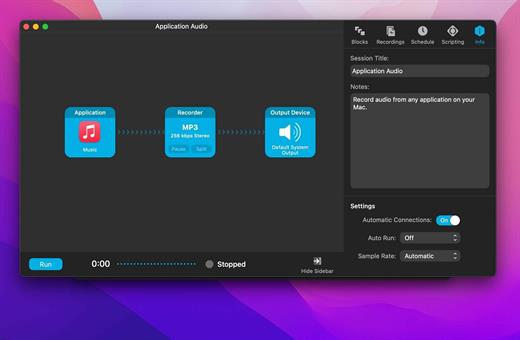
Audio Hijack 4.5.5

Audio Hijack (was Audio Hijack Pro) drastically changes the way you use audio on your computer, giving you the freedom to listen to audio when you want and how you want. Record and enhance any audio with Audio Hijack – it’s the cornerstone of your digital audio experience.

Audio Hijack will allow you to record any application’s audio, from Internet streams to DVD audio and everywhere in between. If your machine can play it, Audio Hijack can record it. And that’s not all – Audio Hijack will also enhance any audio, unsing industry-standard VST and AudioUnit audio effects to make your music sound incredible. Record. Enhance. Enjoy!

More Great Features

Record to All Major Formats
Record to the world’s most popular audio formats, including MP3 and AAC, or save in perfect-fidelity AIFF, WAV, ALAC or FLAC.

Reusable Sessions
Once you’ve configured a Session to your liking, you can re-use it over and over. With one click, you’ll be recording exactly as desired.

Easy File Organization
Find all of your recordings sorted by Session in the Recordings tab, where you can quickly pass files to an audio editor, add them to iTunes, or share them.

Timed Recordings
Use the Schedule tab to set up timed recordings for when you’re not around. Your audio will be waiting for you when you return.

Silence Monitoring
When silence is detected, Audio Hijack can automatically stop recording, split to a new file, or remove audio.

Bulletproof Recording
Bulletproof recording means that even if the power goes out or your computer crashes, you’ll never lose a recording.

A Thoughtful Interface
Audio Hijack’s intuitive audio grid provides a terrific pipeline-style view of exactly how your audio flows, so you can easily understand it.

Gorgeous Audio Effects
The included audio effects are easy to use and easy on the eyes. Their functionality is now accessible to all.

Time Shift Your Audio
Now you can pause, delay, and rewind live audio on your Mac. It’s perfect for transcribing audio and more!

What’s New

Version 4.5.5:


  • Release notes were unavailable when this listing was updated.
Compatibility

macOS 14.6 or later.


Release Name: Audio Hijack 4.5.5
Size: 26 MB
Links: HOMEPAGE – NFO – Torrent Search

Download: RAPiDGATOR
9 Comments
Nov 9

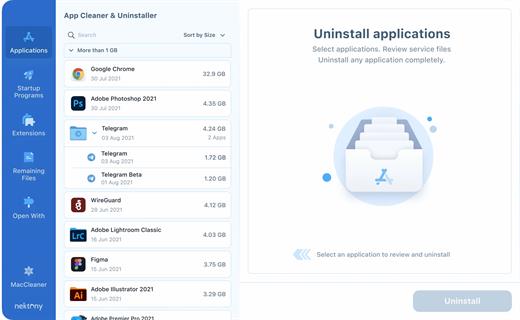
App Cleaner & Uninstaller Pro 9.0.1

App Cleaner & Uninstaller (was App Cleaner) can remove applications and their service files on macOS. Make sure they aren’t eating up precious space on your drive with this helpful app that does the legwork for you.

Features


  • Scan the system and preview installed applications
  • Remove all types of service files
  • Remove remains of previously uninstalled apps
  • Reset application to a first-launch state
  • Easy-to-use shortcuts
  • Any file or app quick preview
  • Specific app-associated file formats preview
  • In-app help assistance
  • Show unused applications
  • Skip list option
What’s New

Version 9.0.1:


  • Release notes were unavailable when this listing was updated.
Compatibility

macOS 10.13 or later


Release Name: App Cleaner & Uninstaller Pro 9.0.1
Size: 41.5 MB
Links: HOMEPAGE – NFO – Torrent Search

Download: RAPiDGATOR
7 Comments
Nov 9

Mp3tag 1.9.12

Mp3tag is a powerful and easy-to-use tool to edit metadata of audio files. Musicians, DJs, podcasters, and audio-enthusiasts use it for many different aspects of handling audio files.

It supports batch tag-editing for multiple files at once, covering many audio formats from MP3, over MP4, and M4V (yes, that’s video!) to FLAC, OGG, OPUS, AIF, DSF, MPC, and WAV.

Furthermore, it supports online database lookups from Discogs and MusicBrainz, allowing to gather proper tags and download cover art for music libraries.

It offers renaming files based on the tag information, replacing characters or words in tags and filenames, importing tag information, and adjusting the size and image format of embedded cover art.

Since some of the tasks in managing a digital library are repetitive, Mp3tag allows for combining tasks into action groups, which serve as workflows for keeping consistency and order. Examples are formatting tag fields, performing case conversion, removing unwanted fields, or adjusting embedded cover art to match required sizes.

Key Features


  • Bulk-Editing of Tags for multiple files at once.
  • Editing of cover-art.
  • Renaming files based on tags.
  • Importing metadata from filenames.
  • Assign track and disc numbers via the auto-numbering wizard.
  • Importing metadata from online Tag Sources.
  • Support for Flexible Tagging, allowing for user-defined tag fields in a standardized way.
  • Applying action groups with many tasks combined into reusable workflows.
  • Support for many file types under a universal user interface.
Supported File Formats

  • MP3 (ID3v1, ID3v2.3, ID3v2.4 with UTF-8)
  • MP4/M4A/M4B/M4V (iTunes and Nero)
  • FLAC (Vorbis Comments)
  • OGG (Vorbis Comments)
  • OPUS (Vorbis Comments)
  • AIF (RIFF INFO and RIFF ID3)
  • DSF (ID3v2)
  • MPC (APEv2)
  • WAV (RIFF INFO and RIFF ID3
What’s New

Version 1.9.12:


  • Release notes were unavailable when this listing was updated.
Compatibility

macOS 10.14 or later.


Release Name: Mp3tag 1.9.12
Size: 12.4 MB
Links: HOMEPAGE – NFO – Torrent Search

Download: RAPiDGATOR
8 Comments