Please REGISTER or RENEW your account on RAPiDGATOR.net and support us by doing through all RAPiDGATOR working download links on main posts...
Oct 8

Alfred 5 Powerpack 5.7.1

Alfred is a productivity app for macOS that helps you get things done faster. It can be used to launch apps, find files, and control your Mac with hotkeys. Alfred also has a powerful workflow engine that can be used to automate tasks.

Features:


  • App Launcher: Alfred can be used to launch apps quickly and easily. You can type the name of the app you want to launch, or you can use a hotkey.
  • File Search: Alfred can be used to find files quickly and easily. You can type the name of the file you want to find, or you can use a hotkey.
  • System Control: Alfred can be used to control your Mac with hotkeys. You can use hotkeys to adjust the volume, put your Mac to sleep, and more.
  • Workflows: Alfred has a powerful workflow engine that can be used to automate tasks. You can use workflows to do things like send emails, create notes, and more.
What’s New

Version 5.7.1:


  • Release notes were unavailable when this listing was updated.
Compatibility

macOS 10.14 or later
Apple Silicon or Intel Core processor


Release Name: Alfred 5 Powerpack 5.7.1
Size: 8.5 MB
Links: HOMEPAGE – NFO – Torrent Search

Download: RAPiDGATOR

5 Comments
Oct 8

macOS Tahoe 26.0.1 (25A362)

macOS Tahoe 26 is the next major version of the macOS operating system, unveiled by Apple on June 9, 2025 at WWDC.

Named after Lake Tahoe, located on the California-Nevada border, it continues the tradition of naming macOS after iconic California locations.

The focus of macOS Tahoe is on a new design, improved integration with other Apple devices, and enhanced Apple Intelligence capabilities.

Key features of macOS Tahoe:

Liquid Glass design:


  • A completely redesigned interface using the new Liquid Glass visual language inspired by visionOS (Apple’s Vision Pro operating system). Interface elements such as menus, toolbars, and the dock have become translucent, creating the effect of glass reflecting and refracting light.
  • Fully transparent menu bar that visually expands the workspace.
  • Updated app icons unified with iOS and iPadOS, with support for light, dark, and color options, as well as a new transparent style.
Apple Intelligence:

  • Advanced artificial intelligence features, including Live Translation to automatically translate messages and subtitles in FaceTime.
  • Genmoji and Image Playground updates: Users can create new emoji by combining existing ones, and generate images in styles such as oil painting or vector graphics.
  • Improved reminders: Apple Intelligence analyzes emails, notes, and web pages, automatically categorizing tasks.
Improved Continuity integration:

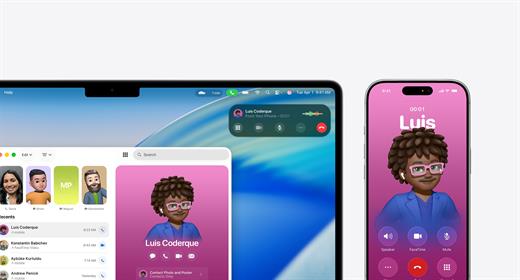
  • The Phone app is now available on Mac, allowing you to take calls, view contacts, view voicemail, and use features like Call Screening and Hold Assist.
  • Live Activities support with iPhone: notifications such as shipping or travel status are displayed in the Mac menu bar.
    iPhone Mirroring lets you launch iPhone apps directly on your Mac via Spotlight.
Updated Spotlight:

  • Significantly improved search engine that now not only searches for files and apps, but also performs actions such as creating events, starting podcasts, or sending messages.
  • Support for customizable quick commands (like “sm” to send a message or “ar” to add a reminder).
    Integration with cloud services and the ability to search PDFs and other documents.
New apps and features:

  • Games app with a catalog of installed games, support for chat, invitations, and an overlay for settings while playing.
  • The Journal app is now available on Mac.
  • Safari improvements: updated tab design and song lyrics translation in Apple Music.
  • Removal of Launchpad, replaced by an “Apps” feature integrated into Spotlight, similar to App Library in iOS.
Accessibility:

  • New features such as Magnifier (using the iPhone camera to zoom in), Braille support, and Vehicle Motion Cues to reduce motion sickness.
  • Accessibility Nutrition Labels in the App Store that display information about supported accessibility features.
New numbering:

  • Apple switched to a unified numbering system where all operating systems (iOS, iPadOS, macOS, etc.) got version 26, which corresponds to the year after the announcement (2025-2026). macOS still retains its unique name, Tahoe.
What’s New

Version 26.0.1:


  • Release notes were unavailable when this listing was updated.
Compatibility

macOS 14.0 or later


Release Name: macOS Tahoe 26.0.1 (25A362)
Size: 15.8 GB
Links: HOMEPAGE – NFO – Torrent Search

Download: RAPiDGATOR

4 Comments
Oct 8

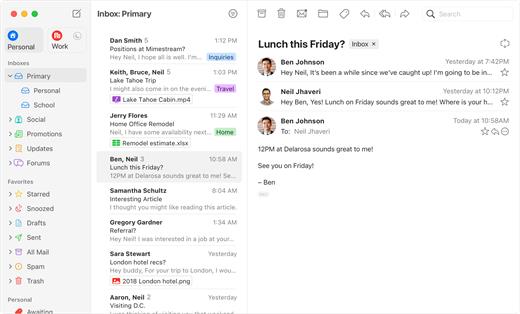
Mimestream 1.8.3

Mimestream combines your favorite Gmail features with the power of a native macOS app so you can move through your email effortlessly

Made for Mac, optimized for Gmail

As a native app written in Swift, Mimestream leverages the full power of macOS to deliver a lightning-fast and instantly familiar experience. Instead of using the IMAP protocol, Mimestream utilizes the Gmail API to enable an enhanced set of features that let you work with ease.

Work smarter, email faster


  • Rise above the noise and focus on the work that matters most. Mimestream makes it easy to keep your inbox organized with confidence.

  • Categorized Inbox – with support for Gmail’s categories, focus on what matters most and triage the rest at your leisure.
  • Multiple Accounts
  • Label Management
Committed to Privacy

Your data and credentials are stored only on your device, and the app only makes direct connections to Gmail. There are no intermediary servers, and Mimestream does not collect or sell your email.

Key Features


  • Lightweight and Fast – Mimestream is built for speed, and only uses a minimal amount of disk space to cache recent messages
  • Offline Access – Fully functional when offline and on the slowest connections-perfect for business travelers and whenever you’re on the go
  • System Notifications – Receive macOS system notifications when you receive new messages, so you never fall behind on important threads
  • Aliases – Your email aliases are automatically synced from Gmail without any setup and are used for replies when appropriate
  • Signatures – Signatures set up in Gmail are automatically synced with Mimestream
  • Robust Search – Enter any Gmail search query into Mimestream and get consistent results. Search while offline, too
  • Swipe Gestures – Use familiar macOS swipe gestures to quickly triage and archive your email
  • Tracking Prevention – Read your email privately – Mimestream blocks tracking pixels from 50+ of the most common tracking services
  • Keyboard Shortcuts – Triage your email quickly using keyboard shortcuts, including the option to use familiar Gmail or Apple Mail shortcut sets
Note:

If an error is reported, you can enter it in the terminal

What’s New

Version 1.8.3:
? New


  • (macOS 26) New Liquid Glass app icon with support for the dark, clear, and tinted themes on macOS 26 Tahoe.
? Fixed

  • (macOS 26) Delete buttons in several confirmation dialogs are hard to read
Compatibility

macOS 10.15.0 or later


Release Name: Mimestream 1.8.3
Size: 8.8 MB
Links: HOMEPAGE – NFO – Torrent Search

Download: RAPiDGATOR
7 Comments
Oct 8

Jump Desktop (RDP, VNC, Fluid) 9.1.21

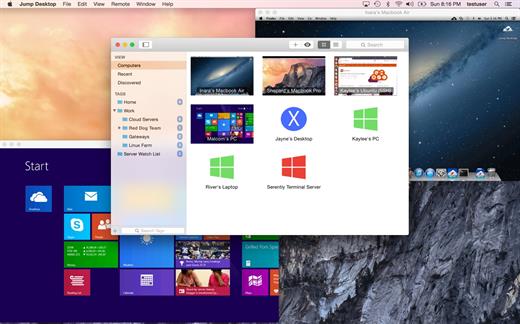
Jump Desktop is an extremely simple to use OS X remote desktop application designed to enable its users to safely and securely connect to other computers over their local area network or the internet.

Moreover, the Jump Desktop app is compatible with both VNC and RDP desktop sharing protocols, a fact that makes it a swiss army knife for people that need to access remote machines on a daily basis.

Jump Desktop also automatically encrypts all traffic between the remote and the host computer using SSL/TLS, as well as NLA and SSH tunneling for RDP and VNC, respectively.

Furthermore, because it comes with integration with OS X’s Spotlight, Jump Desktop makes it possible to rapidly and effortlessly find remote desktops and connect to them with a simple mouse click.

Besides having support for the most used desktop sharing protocols, Jump Desktop is also developed using open standards, therefore you always know that you’re data is secure, and the technology behind the app audited and verified not to contain backdoors and other similar bugs.

What’s New

Version 9.1.21:


  • Video stutter fixes when sending microphone output to the host machine
  • Audio stability
Compatibility

macOS 10.13 or later.


Release Name: Jump Desktop (RDP, VNC, Fluid) 9.1.21
Size: 62.2 MB
Links: HOMEPAGE – NFO – Torrent Search

Download: RAPiDGATOR

7 Comments
Oct 8

Tidy Up 6.0.9

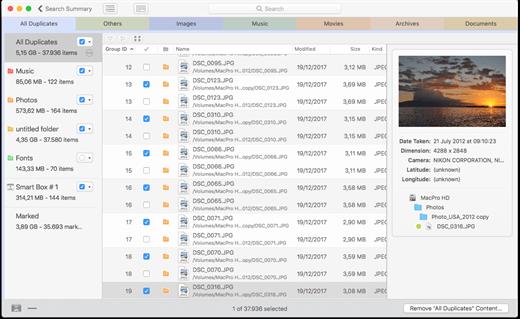
Tidy Up is a full-featured duplicate finder and disk-tidiness utility.

Features


  • Supports Lightroom: it is now possible to search and collect duplicates directly in the Lightroom library.
  • Multiple libraries support: capability to search in the supported apps (Lightroom, Photos, iTunes, Mail, Aperture, and iPhoto) by comparing multiple libraries of the same app with multiple libraries of different apps of the same kind (for example 2 Photos libraries and 3 Lightroom libraries)
  • Added the support to hard links: search for hard links or exclude them from the search and replace the found items with hard links.
  • Search for unique items gains strength: it’s now possible to use multiple criteria to search for unique items (items that have no duplicates).
  • Possibility to handle the found items at the administrator level: just allow the installation of the privileged tool and do the cleaning job. This is particularly useful to clean up old Time Machine backups.
  • New, completely redesigned interface, easy to use, and powerful
  • Tidy Up 5 organizes the result separating the found items by file kinds, (music, images, PDFs, folders, etc.). It’s completely customizable and allows you to add more file kinds at your choice. The new organization is based on the tab separation and each tab has its settings, such as smart boxes, separation by searched sources, view by grid or list, etc.
What’s New

Version 6.0.9:


  • Bug fixes.
Compatibility

macOS 10.12 or later, 64-bit processor


Release Name: Tidy Up 6.0.9
Size: 11.7 MB
Links: HOMEPAGE – NFO – Torrent Search

Download: RAPiDGATOR
7 Comments
Oct 8

Chronicle Pro 14.9.1

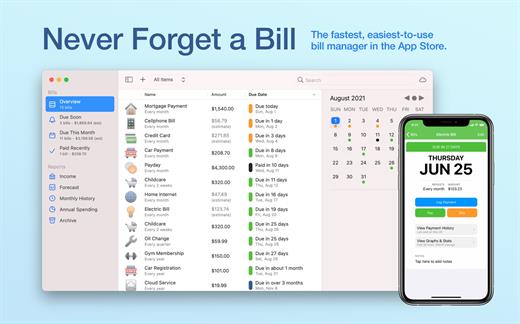
You need Chronicle if you pay bills. It gives you the peace of mind of never having to worry about whether you paid a bill again.

Even if you use another finance application for general finance, you need Chronicle. One late payment can wreak havoc on your credit score, leading to higher interest rates and denied loans– in short, completely affecting your financial life.

That’s why you need Chronicle. Chronicle will remind you when your bills are due, even when it isn’t running. And in just a few minutes a month, you can handle everything related to paying your bills.


  • Never forget a bill — get reminded when your bills are due with alerts that can be synced to your iPhone and across all your Macs, even when Chronicle isn’t running.
  • Easily pay your bills online using Chronicle’s integrated browser, or your default browser.
  • Keep proof of all your payments — store confirmation numbers and receipts right in Chronicle, so you always have proof of your payments.
  • Get reminders in your notification center and put bills on your calendar. Chronicle can remind you via notification center on Mountain Lion, and on all Macs, can add your bills to your calendar so you can visually see when they are due.
What’s New

Version 14.9.1:


  • Minor behind-the-scenes changes to prepare for syncing the balance with the iOS update coming later this month.
Compatibility

macOS 11.0 or later.


Release Name: Chronicle Pro 14.9.1
Size: 10.6 MB
Links: HOMEPAGE – NFO – Torrent Search

Download: RAPiDGATOR

5 Comments
Oct 8

Dropzone 4 Pro 4.80.72

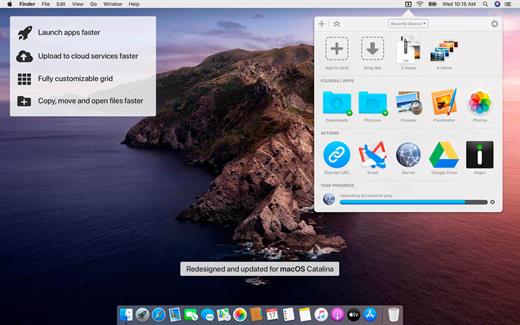
Dropzone makes it faster and easier to copy and move files, open applications and share files with many different services. Dropzone is a unique and amazing app that’s like nothing you’ve ever used before. We’ve paid fanatical attention to every detail and built an app that looks and feels like an integral part of macOS.

Dropzone ships with a powerful scripting API and with a little programming knowledge you can modify any of your actions or even create entirely new ones. This gives Dropzone unlimited extendability and utility. We’re always thinking up new actions so Dropzone will become even more useful over time.

Dropzone also includes Drop Bar – Drop Bar makes it easy to stash files you know you’ll need later. Just drop files on the Drop Bar icon in the grid and they will stick there until you’re ready to use them.

Features


  • Open applications, move and copy files faster than ever before.
  • Shorten URLs quickly using Tinyurl shortener. Just select a URL to shorten and press Ctrl+Option+Cmd+S and the shortened URL is automatically copied to the clipboard.
  • AirDrop integration lets you drop files or folders from any app and share them with your other Macs over the network.
  • Imgur integration lets you share images fast and get a link for pasting.
  • Upload files to Amazon S3 (Dropzone Pro feature).
  • Upload files to your FTP server (Dropzone Pro feature).
  • Upload files to your Google Drive (Dropzone Pro feature).
  • Download and install add-on actions that let you upload to services like Google Drive, YouTube and many others (Dropzone Pro feature).
  • Powerful multi-tasking engine allows you to run multiple tasks at once and track the progress of each one through the in-grid task status area.
  • See how tasks are progressing at a glance in the animated menu item.
  • Launch Dropzone actions with the newly added keyboard shortcuts feature (Dropzone Pro feature).
  • Add applications, folders or actions to your grid easily by dragging and dropping them on the Add to Grid area.
  • Develop your own actions using the updated and massively improved Ruby or Python API (Dropzone Pro feature).
What’s New

Version 4.80.72:


  • Release notes were unavailable when this listing was updated.
Compatibility

macOS 10.15.0 or later
Apple Silicon or Intel Core processor


Release Name: Dropzone 4 Pro 4.80.72
Size: 64.4 MB
Links: HOMEPAGE – NFO – Torrent Search

Download: RAPiDGATOR
6 Comments
Sept 28

OmniZip – Universal Extractor Pro 2.3.0

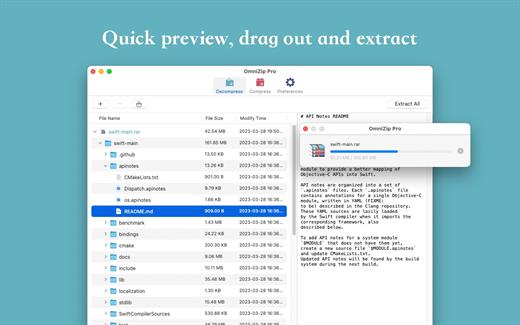
A super decompression tool, supports the decompression of RAR, 7Z, ZIP, TAR, GZIP and other more than 100 formats of files, as long as the compressed package, there is nothing OmniZip can not decompress.

Features


  • Double-click the compressed file to preview it or decompress it. You can customize the configuration.
  • Compressed package Select a file and then compress it.
  • Supports drag and unzip files directly.
  • Supports batch decompression.
  • Supports decompression of the decompressed volume package, ensuring that the compressed file of the volume is in the same directory.
  • Supports compression formats zip and 7z.
  • Supports encryption compression and volume separation compression.
  • Supports user-defined compression and decompression of filter files.
  • Supports recording previewed compressed files for next operation.
What’s New

Version 2.3.0:


  • Release notes were unavailable when this listing was updated.
Compatibility

macOS 10.13 or later


Release Name: OmniZip – Universal Extractor Pro 2.3.0
Size: 20.3 MB
Links: HOMEPAGE – NFO – Torrent Search

Download: RAPiDGATOR
9 Comments
Sept 28

TinkerTool System 9.83

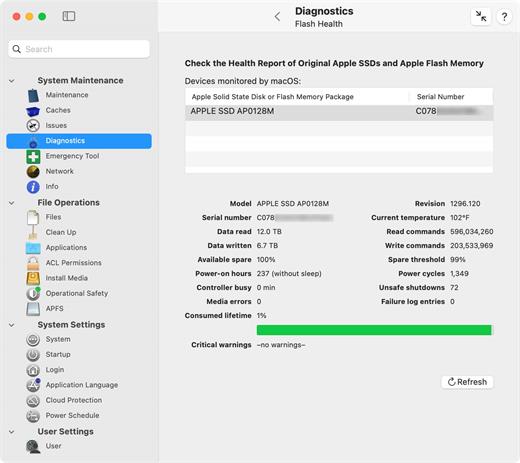
TinkerTool System is a collection of system utility features helping you in performing advanced administration tasks on Apple Macintosh computers. The application makes use of a self-adapting user interface which automatically adjusts to the computer model and to the version of macOS you are running. All options available in the current situation are accessible via “panes”, very similar to the techniques you already know from the System Preferences application. The features are controlled via a single window which allows you to use the application as a general toolbox and First Aid assistant. This includes:


  • Built-in maintenance features of macOS, usually not visible on the graphical user interface;
  • Extended file operations, not available in the macOS Finder;
  • The possibility to access advanced system settings which are not visible in System Preferences;
  • Genuine and unique features of TinkerTool System, designed to resolve typical real-world problems of administrators and to fix the effects of certain defects (“bugs”) in the operating system;
  • An emergency tool to troubleshoot and repair macOS in cases where the graphical user interface is no longer starting correctly or the user account of the system administrator has been damaged;
  • Features to protect your privacy, e.g., by reviewing and editing the list of Internet cookies stored for your user account;
  • Functions to collect advanced information about the hardware, operating system, and applications.
What’s New

Version 9.83:


  • Release notes were unavailable when this listing was updated.
Compatibility

macOS 15.0 or later


Release Name: TinkerTool System 9.83
Size: 28.4 MB
Links: HOMEPAGE – NFO – Torrent Search

Download: RAPiDGATOR
9 Comments
Sept 28

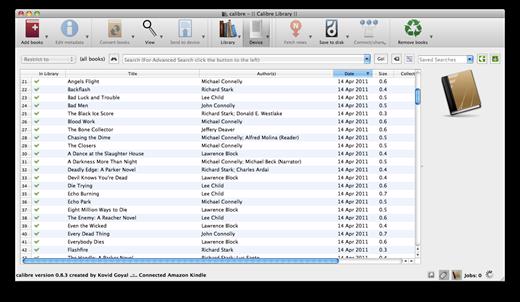
calibre 8.11.1

Calibre is a complete e-book library manager. Organize your collection, convert your books to multiple formats, and sync with all of your devices. Let Calibre be your multi-tasking digital librarian.

Manage, convert, sync, and more


  • Library management. Calibre keeps things orderly by creating single entries for books that contains multiple formats. Add tags and comments for better searchability.
  • Format conversion. Calibre’s robust conversion options support
What’s New

Version 8.11.1:


  • Release notes were unavailable when this listing was updated.
Compatibility

macOS 10.14 or later


Release Name: calibre 8.11.1
Size: 305.8 MB
Links: HOMEPAGE – NFO – Torrent Search

Download: RAPiDGATOR

11 Comments