Please REGISTER or RENEW your account on RAPiDGATOR.net and support us by doing through all RAPiDGATOR working download links on main posts...
Sept 28

Pearcleaner 5.1.0

Pearcleaner is an open-source app cleaner inspired by Freemacsoft’s AppCleaner and Sun Knudsen’s Privacy Guides post on his app-cleaner script.

Features


  • 100% Swift
  • Super small app size (1.6MB)
  • Quick file search
  • Optional Sentinel monitor helper that can be enabled to watch Trash folder for deleted apps
  • Sentinel monitor is extremely small (210KB) and uses <=5mb of ram to run in the background and file watch. Communicates to app via custom url scheme instead of xpc to keep things even lighter
  • Requires Full Disk permission to search for files and also Accessibility to delete/restore files
What’s New

Version 5.1.0:


  • Release notes were unavailable when this listing was updated.
Compatibility

macOS 13 or later


Release Name: Pearcleaner 5.1.0
Size: 6.9 MB
Links: HOMEPAGE – NFO – Torrent Search

Download: RAPiDGATOR

8 Comments
Sept 28

The Clock 4.9.9

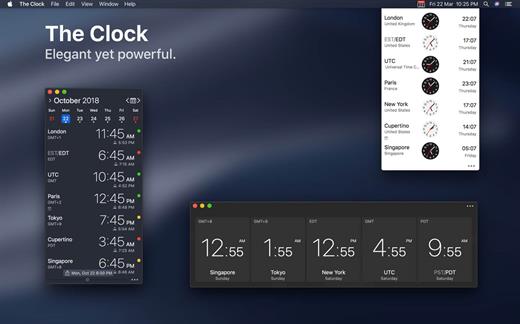
The Clock is a premium world clock with the following features:


  • Keep track, easily and efficiently of your contacts in different time zones.
  • Have a quick view on a Calendar, which can be integrated with the system Calendar.app
  • Easily setup meetings with the Meeting Planner.
  • Have a highlight on the Business Hours and Holidays of your subcontractors, customers, …
  • Highly customizable.
  • Be reminded when to Take a Break and relax.
  • Full Trackpad integration, swipe to travel trough time. The World Clocks
  • AM/PM or 24Hours.
  • Analog or Digital Clock view.
  • Choose among a wide range of complications
  • Business Hours.
  • Time offset.
  • Sunrise/Sunset.
  • Country.
  • Time Zone offset (PDT, CDT, UTC…).
  • Yesterday, Today, Tomorrow.
  • Drag-and-drop the world clocks to order them.
  • Beautiful clock face displaying day and night.
  • Personalize the world clock time format per cities.
  • Change the city name.
  • PDT, CDT, MDT, GMT… and more automatically adapting during daylight saving period. Meeting Planner
  • Meeting Planner Slider to travel through time.
  • Business Hours led to check if your contact is in the working hours time frame.
  • Select a date in the calendar for an accurate Daylight Saving adjustment.
  • With the Calendar.app integration into The Clock have a quick look on your schedule
  • With the Calendar Complication, automatically know if you are busy while planning a meeting.
  • Export easily your schedule information by a simple copy/paste.
  • Slider automatically round the time to 15/30 min. Calendar
  • Navigate the months with buttons, keyboard shortcuts, trackpad.
  • Show/Hide the Calendar.
  • Show/Hide the weeks number.
  • Select your referenced calendar for the week number. (System, or ISO 8601).
  • Select a day in Meeting Planner for an accurate Daylight Saving adjustment.
  • Highlight days off per city.
  • Follow the system setting for Calendar first day of the week…
  • Choose to integrate or not with the system calendar, Calendar.app
  • Have a quick view on your calendar events.
  • Calendar complication to immediately see what is coming next on your schedule. Other
  • Choose between 2 beautiful themes (Light/Dark) with transparency or not.
  • Have the theme follow automatically the color of your menu bar.
  • Rearrange The Clock menu bar items by (shift) drag and drop.
  • Keyboard Shortcuts for most common actions.
  • Display the moon phase, and get all the moon phase informations.
  • Backup/Restore your settings easily (Local, Dropbox).
  • Keep or not The Clock window floating above your desktop.
  • Choose to access The Clock from the menu bar or from the Dock.
  • Enjoy the Take a Break feature, and relax.
  • Amazing Take a Break screen saver, displaying quotes among ~100 quotes in 8 genres.
  • Or the Take a Break screen saver, with your own text.
  • And more …
  • And with a real user manual to go deeper in the discovery of all the features.
What’s New

Version 4.9.9:


  • Release notes were unavailable when this listing was updated.
Compatibility

macOS 10.12 or later, 64-bit processor


Release Name: The Clock 4.9.9
Size: 10.8 MB
Links: HOMEPAGE – NFO – Torrent Search

Download: RAPiDGATOR

8 Comments
Sept 28

Boxy SVG 4.83.0

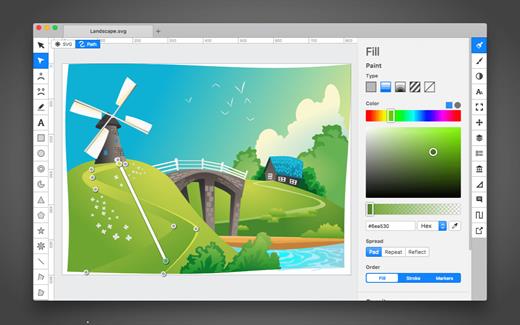
SVG is the standard format for storing vector graphics such as icons, banners, charts and illustrations.

Boxy SVG project goal is to create the best SVG editor for non-technical users as well as for professional designers and developers.

CORE FEATURES

• Clean and intuitive UI heavily inspired by Inkscape, Sketch and Adobe Illustrator
• Extensive support for on-canvas editing of object geometry, transform, paint and other properties
• Save to SVG and SVGZ formats, export to PNG, JPG, WebP, PDF and HTML5
• Open Clip Art Library integration with thousands of free stock vector arts
• Google Fonts integration with hundreds of free fonts
• Configurable keyboard shortcuts for over 100 commands
• Manual guides, smart guides and grid
• Path operations (unite, intersect, subtract, exclude, close, reverse, etc.)
• Arrangement operations (align to, rotate, flip, order, group, etc.)

FOR WEB DEVELOPERS

• Chromium-based rendering engine
• SVG and CSS code inspector similar to Chrome Dev Tools
• Clean SVG output that preserves IDs, classes, titles and other metadata
• SVG sprites editing support

What’s New

Version 4.83.0:


  • Release notes were unavailable when this listing was updated.
Compatibility

macOS 10.15 or later


Release Name: Boxy SVG 4.83.0
Size: 207 MB
Links: HOMEPAGE – NFO – Torrent Search

Download: RAPiDGATOR

9 Comments
Sept 28

EPUB Reader Pro 2.9.1

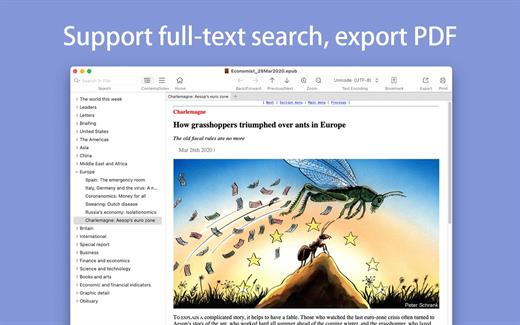
The GM EPUB Reader is a full-featured ebook reader with a simple and beautiful interface and a good reading experience.

※ EPUB Reader
– Support for reading EPUB and Mobi files.
– Support single page search and full text search, and highlight search results.
– Support the forward and backward browsing history.
– Support page turning, zooming, and sidebar shrinking.
– Support page printing.
– Support to view basic information of files.
– Support page number display and quick page switching.
– Support EPUB to PDF, Mobi to EPUB, Mobi to PDF.
– Support extracting images from EPUB and Mobi.

※ EPUB Bookshelf
– All the files you have read will be saved in the bookshelf for quick review next time.
– Support file(s) drag and drop addition.

※ Reading Experience
– It can remember the location of the last reading, so that it can continue reading next time.
– Photo adaptation, better layout.
– Support for page zooming using command+ or command- key combinations.
– Support for quick page turns and quick view of history pages using a combination of command and up and down left and right arrows.
– In the process of page reading, you can use the buttons J and K to quickly slide up and down the page.

What’s New

Version 2.9.1:


  • Release notes were unavailable when this listing was updated.
Compatibility

macOS 10.13 or later


Release Name: EPUB Reader Pro 2.9.1
Size: 19.9 MB
Links: HOMEPAGE – NFO – Torrent Search

Download: RAPiDGATOR

8 Comments
Sept 28

GarageSale 9.9.3

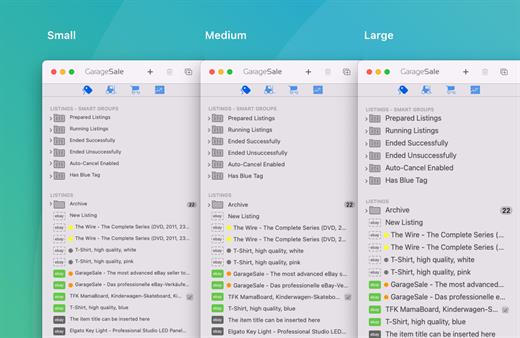
GarageSale is a slick, full-featured client application for the eBay online auction system.

Create and manage your auctions with ease. With GarageSale, you can create, edit, track, and manage multiple auctions in a single, intuitive application. GarageSale even integrates with several international eBay sites, as well as with PayPal and Twitter, to provide a complete, robust eBay client.

Develop professional, attractive listings. GarageSale features iPhoto integration, what-you-see-is-what-you-get (WYSIWYG) text editing, free image hosting, and over 130 free auction designs. And with these features, among many more, it’s never been easier to create professional, eye-catching eBay listings.

What’s New

Version 9.9.3:


  • Release notes were unavailable when this listing was updated.
Compatibility

macOS 10.12.0 or later
Apple Silicon or Intel Core processor


Release Name: GarageSale 9.9.3
Size: 67.2 MB
Links: HOMEPAGE – NFO – Torrent Search

Download: RAPiDGATOR

8 Comments
Sept 28

iZotope VEA 1.1.0

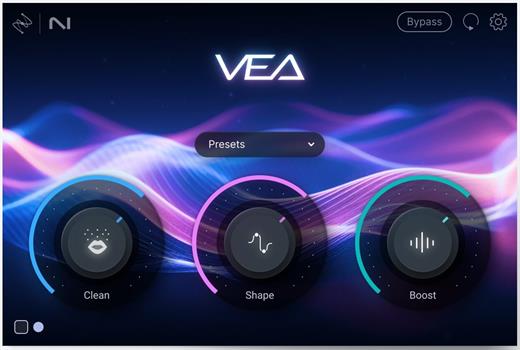
VEA is an AI audio enhancer that takes any voice recording and makes it more powerful, more polished, and more professional. This easy-to-use tool is perfect for podcasters and content creators of all skillsets, whether you’re a beginner or a seasoned pro.

→ VEA Features:

Built with industry-leading audio enhancement technology from RX, Ozone, and Nectar, VEA increases clarity, sets more consistent levels, and reduces background noise.

✓ Shape
VEA’s Shape control is tailored to your voice, instantly making you sound more polished and professional. No more playing with equalizers or surfing presets to improve your voice mixing. Whether you’re narrating a video or hosting an interview on your own podcast, VEA ensures your voice sounds audience-ready in seconds.

✓ Boost
Easily add presence and power to your voice with Boost. VEA takes the guesswork out of voice mixing. Don’t worry about understanding compression and limiting, just focus on sounding your best. For content producers, this means getting an even sound for your vlogs and tutorials to create a smoother and more engaging experience for your audience.

✓ Clean
VEA features essential noise reduction software that trims noise while leaving your voice sounding great. The Clean control helps de-noise your audio, taking background noise out of the spotlight so your voice can shine. Recording a vlog under the AC? Taking a virtual interview with signal interference? It’s no problem with VEA.

Audiolens
Match the sound of your favorite creator or podcast with intuitive Audiolens referencing as part of the Shape control. Just add your target audio from any source, and Audiolens will help you visualize, compare, and replicate.

What’s New

Version 1.1.0:


  • Release notes were unavailable when this listing was updated.
Compatibility

macOS 13.7 or later


Release Name: iZotope VEA 1.1.0
Size: 86.1 MB
Links: HOMEPAGE – NFO – Torrent Search

Download: RAPiDGATOR

9 Comments
Sept 28

KONTAKT 8.7.1

KONTAKT 8 The virtual instrument platform reinvented.
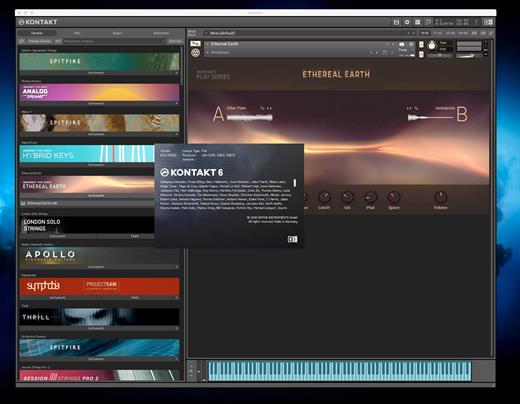
Imagine any sound – Kontakt lets you find it, create it, and transform it. The latest edition of our revolutionary sampling platform combines a brand-new set of intelligent tools with countless sound design options, redefining how you generate ideas and make music. A huge choice of sound. Kontakt hosts the world’s largest range of virtual instruments. With thousands of libraries, it’s the gateway to quality sound from Native Instruments, our official partners, and scores of indie developers. Plus, everything is completely tweakable, so you can make any sound your own.
A huge choice of sound

Kontakt hosts the world’s largest range of virtual instruments. With thousands of libraries, it’s the gateway to quality sound from Native Instruments, our official partners, and scores of indie developers. Plus, everything is completely tweakable, so you can make any sound your own.

What’s new in Kontakt 8?

Our most feature-packed release yet is here to transform the way you generate, modulate, and playback sound. Plus, it’s packed with performance updates so you can work faster than ever.

Smash writer’s block

Tools add a completely new layer of creative features to get the ideas flowing. And they work with any Kontakt instrument, old and new. For our first drop, we’re launching MIDI content and randomization features with Chords and Phrases, designed to spark new ideas and get you in the zone fast.

Fast and fun loop control

Leap is an ultra-fast and playful way to play and manipulate loops. Spark fresh ideas, sprinkle in expressive performance effects, or just jam. Breathe new life into your sample collection or try something totally fresh with our new Leap Expansions series, starting with 12 curated packs for specific genres and styles.

Get going with hundreds of included instruments

Kontakt’s Factory Library comes packed with over hundreds of meticulously sampled instruments. Get started with a huge playable and tweakable selection of acoustic and electronic options, including the renowned collection from Orchestral Tools, plus Hybrid Keys.

Dream it, build it

All your favorite Kontakt instruments are built right here. The powerful feature set makes Kontakt the first choice for instrument developers worldwide, and it just got even bigger with enhanced synth capabilities, including real-time wavetable, frequency modulation, and ring modulation oscillators.

What’s New

Version 8.7.1:


  • Release notes were unavailable when this listing was updated.
Compatibility

macOS 13.0 or later


Release Name: KONTAKT 8.7.1
Size: 1.6 GB
Links: HOMEPAGE – NFO – Torrent Search

Download: RAPiDGATOR

9 Comments
Sept 28

eMail Address Extractor 6.1.0

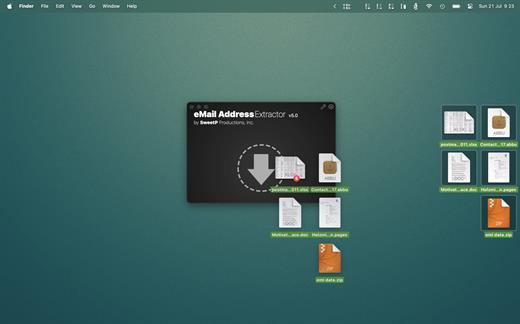
eMail Address Extractor allows you to extract valid email addresses from virtually any kind of text file. No configuration required, it just works!

Easily extract addresses from websites, your entire Apple Mail database, selected Mail.app folders, iWork projects (Pages, Keynote, Numbers), Microsoft Office (docx, xlsx). You can even scans within zip archives! so there’s no need to extract your archived databases and documents.

eMail Address Extractor is great for:


  • creating personal and business mailing lists
  • processing SQLite databases
  • scanning multiple documents at one time
  • removing duplicate adresses from mailing lists
  • merging lists
  • getting contact details from websites
Files can be processed:

  • via the menubar
  • drag and drop
Configuration to streamline your workflow:

  • less false positives
  • add flies types to an ignore list (speed up your workflow by not needing to manually sort through valid file types)
  • ignore email addresses containing strings (mailer-daemon, noreply addresses for example)
  • option to also scan the contents of emails (not just the headers)
  • output results to CSV or TXT file
  • notifications when tasks have been completed
What’s New

Version 6.1.0:


  • updated social media links
Compatibility

macOS 11.0 or later


Release Name: eMail Address Extractor 6.1.0
Size: 5.8 MB
Links: HOMEPAGE – NFO – Torrent Search

Download: RAPiDGATOR

8 Comments
Sept 24

DropDMG 3.7.0

DropDMG is the easiest way to create macOS disk images, which pack entire folders or disks into a single compressed file, either for transport across the Internet or simply for backup. They are Apple’s preferred format for distributing Mac software. Disk images are also the only archive format whose contents you can directly access in the Finder. Just drag-and-drop a folder or file, and you’re done. Or, you can drag an existing disk image or archive onto DropDMG to convert it to any of the other supported formats or to burn it to CD or DVD.

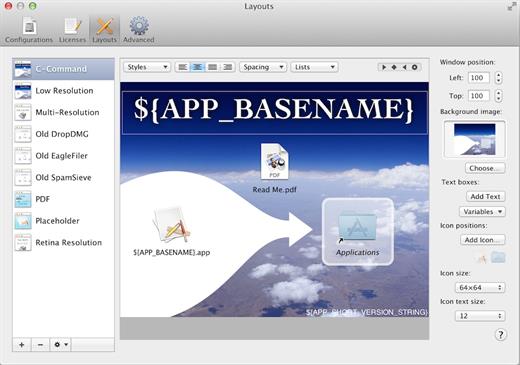
DropDMG supports advanced options such as signed, encrypted, and segmented disk images; WYSIWYG layout with background pictures and custom volume icons; and rich-text license agreements in multiple languages. There are many time-saving features, and it can also be automated via AppleScript, the command-line, and Automator.

What’s New

Version 3.7.0:


  • Release notes were unavailable when this listing was updated.
Compatibility

macOS 10.13 or later


Release Name: DropDMG 3.7.0
Size: 29.7 MB
Links: HOMEPAGE – NFO – Torrent Search

Download: RAPiDGATOR

26 Comments
Sept 24

AI Transcription 2.13

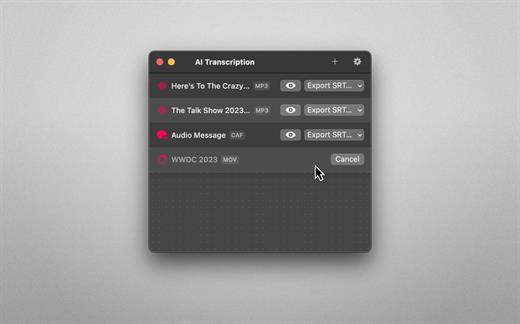
Audio-to-Text Converter. Turn audio into text! AI Transcription uses advanced Speech Recognition to transcribe your audio and video files in a blink, fully automatically, all offline, and with highly accurate results.

Features


  • AI-powered Audio-to-Text generator
  • Supercharged by Speech Recognition
  • User-friendly, lightweight yet powerful
  • Just drag and drop your files and transcription starts automatically
  • Privacy by Design: Computes offline, directly on your Mac
  • Export transcriptions as plain text, CSV, SRT and VTT files
  • Timing Segmentation Levels: Words, Sentences, Paragraphs
  • Looks brilliant in dark and light
  • Optimised for Macs with Apple silicon (M1, M2)
  • Works great on macOS 13 Ventura
Limitations

  • The apps’ supported languages depend on the Languages selected in macOS System Settings → Keyboard → Dictation.
  • Only selected languages with on-device support are available in AI Transcription. Some of them are: English, German, Italian, Spanish, Portuguese, Russian, Turkish, Simplified Chinese.
What’s New

Version 2.13:


  • Release notes were unavailable when this listing was updated.
Compatibility

macOS 13.1 or later.


Release Name: AI Transcription 2.13
Size: 5.1 GB
Links: HOMEPAGE – NFO – Torrent Search

Download: RAPiDGATOR
1 Comments