Please REGISTER or RENEW your account on RAPiDGATOR.net and support us by doing through all RAPiDGATOR working download links on main posts...
Sept 24

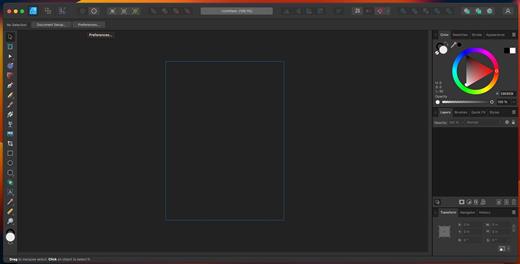
Affinity Photo 2.6.4

Affinity Photo–five years in the making–redefines the boundaries for professional photo editing software for the Mac. With a meticulous focus on workflow it offers sophisticated tools for enhancing, editing and retouching your images in an incredibly intuitive interface with all the power and performance you need.
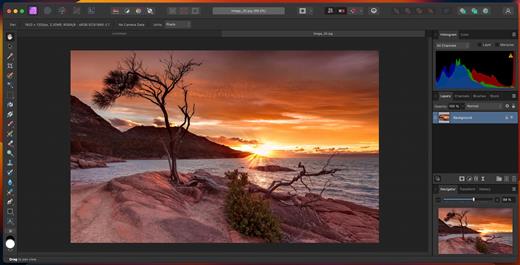
Engineered for Professionals


  • Open, edit and save Photoshop® PSD files
  • RGB, CMYK, Greyscale and LAB color spaces
  • End-to-end CMYK workflow with ICC color management
  • Full 16-bit per channel editing
  • Work with all standard formats like PNG, TIFF, JPG, GIF, SVG, EPS and PDF
  • Panning and zooming is always live at 60fps with live previews, live tools and real-time editing
  • Open and edit massive images without compromising performance or running out of memory
Unsurpassed Productivity

  • Full support for unlimited layers, layer groups, adjustment layers, filter layers and masks
  • Resize layers without any loss of quality. Lock, hide, duplicate and merge layers easily
  • Edit live filters, adjustments, effects, blend modes and masks non-destructively
  • Undo history can be saved with the document so you can always undo your changes
  • Task-focused workspaces for developing, post-processing, liquify and export
  • Work in windowed, full screen, or separated modes with fully customizable toolbars and drag and drop panels
  • Comprehensive vector drawing and text editing tools
  • Advanced snapping system with pixel perfect alignment when required
  • Export @1x, @2x, @3x from layers, slices or whole documents — continuously as you work!
Professional Image Processing

  • Open RAW and other images in a dedicated pre-processing workspace
  • Adjust exposure, blackpoint, clarity, vibrance, white balance, shadows, highlights and much more
  • Recover detail thought to be lost by editing in an unbounded linear color space
  • Advanced lens corrections including chromatic aberration, defringe, vignette and best-in-class noise reduction
  • Paint areas or use fully customizable gradients to mask adjustments
  • View histograms, blown highlights, shadows and tones as well as detailed EXIF information
Quality Retouching and Correction Tools

  • Intuitive selection brush and refinement makes selections simple, even down to strands of hair
  • Instantly remove unwanted objects with an incredibly advanced Inpainting brush
  • Dodge, burn, clone, patch, blemish and red eye tools
  • Smooth and retouch skin with built-in frequency separation
  • Apply high quality single-plane and dual-plane perspective correction as well as fully customizable mesh warps – all in real time
  • Dedicated Liquify persona gives freehand control over warps, twirls, pinch, punch and turbulence
Advanced Brush Engine

  • Huge library of painting, drawing, textures and professional DAUB brushes included
  • Create custom brushes and nozzles with full control over advanced dynamics
  • Full support for Wacom and other graphics tablets, including pressure, tilt and shortcut buttons
  • Real-time preview of your nozzle — see what you are about to paint or erase before you do it
Fast, Customizable Effects

  • Massive collection of effects available, including blurs, distortions, tilt-shift, shadows, glows, lighting and many more
  • Customize all aspects with precise controls, seeing a real-time preview of the end result before you apply
  • Swipe-able split or mirrored screen always available for before and after views
  • Choose to apply effects non-destructively with live effect layers, enabling you to erase away or mask effects after they have been applied
Built for Mac

  • Takes full advantage of the latest OS X technologies including OpenGL, Grand Central Dispatch and Core Graphics
  • Use the Force Touch trackpad to paint with pressure sensitivity
  • Fully optimized for 64-bit and multi-core processors
  • Supports regular, Retina, and multi-monitor setups — including the latest 5k iMac
  • iCloud Drive support
What’s New

Version 2.6.4:


  • Release notes were unavailable when this listing was updated.
Compatibility

macOS 10.15 or later


Release Name: Affinity Photo 2.6.4
Size: 784.9 MB
Links: HOMEPAGE – NFO – Torrent Search

Download: RAPiDGATOR

8 Comments
Sept 24

Blackmagic Fusion Studio 20.2.1

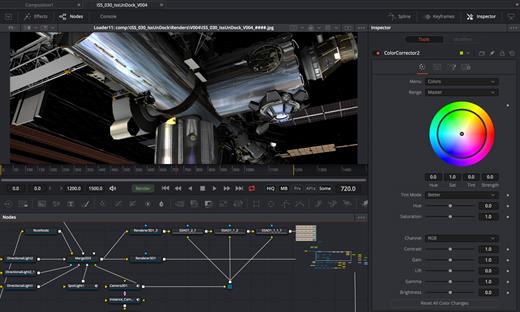
Fusion is the world’s most advanced compositing software for visual effects artists, broadcast and motion graphic designers, and 3D animators. Over the last 30 years, Fusion has been used on thousands of Hollywood blockbuster movies and television shows. Fusion features a powerful node based interface that lets you quickly and easily create sophisticated effects by connecting different types of image processing tools together! You get a massive range of tools, incredible VR and 3D support, GPU accelerated performance, unlimited network rendering and more! Fusion gives you everything you need to create exciting broadcast graphics, dramatic titles, and even major feature film visual effects!

Hollywood’s Biggest Blockbusters

Thousands of Hollywood’s biggest blockbusters and hit television shows use Fusion to create their groundbreaking visual effects. Fusion has been used on feature films like The Hunger Games, Dr Strange and Guardians of the Galaxy, as well as hit television shows like Empire, NCIS and American Horror Story. Fusion also plays a major role in the development of cinematics for major video games such as Dawn of War III, Halo 5 and more!

Nodes are a Much Faster Way to Work!

Nodes are incredibly easy to use, especially as scenes become more complex. Fusion’s nodes are small icons that represent effects, filters and other image processing operations. Nodes can be easily connected together to build larger and more complex visual effects. Tools, images, and objects can be combined in any order to create unlimited visual effects. Simply click on a node to quickly adjust any single part of your project. That’s much faster than a timeline based tool because you don’t need to hunt through nested stacks of confusing layers and filters!

Get the most Powerful VFX Software Available!

Whether you need to pull a key, track objects, retouch images, animate titles, or create amazing particle effects, Fusion has a massive toolset that lets you tackle the most demanding jobs. You get a true 3D workspace along with tools for compositing, keying, painting, animation, virtual reality, stereoscopic 3D and more. Fusion combines effects and motion graphics, along with 3D modeling and rendering into a single toolset. That means you can import and render 3D models and scenes with the rest of your composite in Fusion. You don’t have to pre‑render assets or transfer between multiple applications!

GPU Accelerated Workflow

Fusion is extremely fast and responsive enough to be used in high pressure, client driven sessions. With its Metal, CUDA and OpenCL GPU acceleration, you get instant feedback while you work so you can see exactly what you’re doing. Fusion 16 features more GPU optimisation than ever so whether you’re working alone or with a client, you get the real time control you need. That means you’ll be able to spend more time being creative and less time waiting! Fusion is so fast that you can even work in VR while wearing a headset and still get over 90 frames per second of interactivity!

Unlimited Render Power

Fusion has the world’s fastest production quality render engine! You can even distribute your render jobs across an unlimited number of networked computers for incredible performance, at no additional cost! There’s no “per node” render license fees. Simply install it on as many render nodes as you need! That means you can render complex scenes incredibly fast to meet the intense deadlines of production, without having to sacrifice creativity or quality.

Collaborate with Large Teams

When you’re working with a large creative team, Fusion Studio also includes the new Studio Player application. Studio Player features a single layer timeline with basic shot trimming, storyboard tools, versioning and annotation notes. Fusion Studio also features a bin server to let everyone share and see common assets that are needed for the job. That means you don’t have to copy and track multiple elements on different computers.

What’s New

Version 20.2.1:


  • Release notes were unavailable when this listing was updated.
Compatibility

macOS 11.0 or later.
Apple Silicon or Intel Core processor


Release Name: Blackmagic Fusion Studio 20.2.1
Size: 3.2 GB
Links: HOMEPAGE – NFO – Torrent Search

Download: RAPiDGATOR
7 Comments
Sept 24

EdgeView 5.2.0

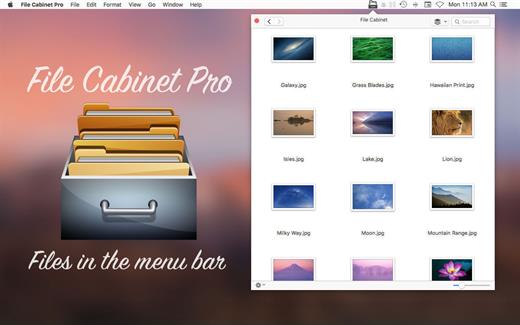
EdgeView 5 is fast image viewer has elegant user interface. EdgeView 5 is developed and designed for modern MacOS. It can open various image files such as JPEG, PNG, TIFF, BMP, and RAW file of DSLR, EPS and PDF, AI(Adobe Illustrator). Can open image files in archive directly without extraction.

User can open files, rename files, delete files from EdgeView’s file browser. Also can access to SMB/AFP/FTP network volume.

User can navigate images quickly by using keyboard shorcut, mouse wheel, trackpad gesture. EdgeVew show EXIF information, play animation GIF/PNG/WebP smoothly. Save last status to history, and restore when reopen file.

EdgeView 5 will be the best choice when viewing and managing image files.

What’s New

Version 5.2.0:


  • Release notes were unavailable when this listing was updated.
Compatibility

macOS 11.1 or later
Apple Silicon or Intel Core processor


Release Name: EdgeView 5.2.0
Size: 142.2 MB
Links: HOMEPAGE – NFO – Torrent Search

Download: RAPiDGATOR

7 Comments
Sept 24

File Cabinet Pro 8.6.0

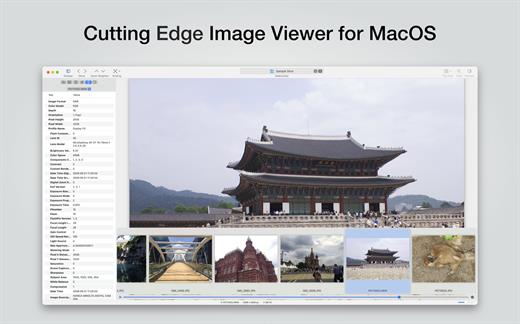
File Cabinet Pro is the file manager for the macOS menu bar. Quickly navigate to files without cluttering your desktop. Open, move, rename, compress, tag, trash, copy and paste files, all from the menu bar. You can open many file types natively in File Cabinet Pro or open files by launching other applications. It’s easy to click into directories in icon view, drill through directories in list view, or navigate the file tree in column view.

File Cabinet Pro is also a document-based application that ships with a built-in text editor, image viewer, pdf viewer, and media player. Some of the file types File Cabinet Pro can open for editing/viewing include::


  • Text documents: Plain text files (.txt), Rich Text Format (.rtf), Rich Text Format Directory (.rtfd), Portable Document Format (.pdf), Markdown (.md)
  • Image documents: Portable Network Graphics (.png), Joint Photographic Experts Group (.jpeg), Tagged Image File Format (.tiff, .tif), Bitmap image file (.bmp), Photoshop File Format (.psd) Import only., Scalable Vector Graphics (.svg) Import only
  • Video and audio documents: MOV, MP4, M4A, M4V, AVI, MP3, WAV, CAF, AIF
Features

  • Create subdirectories
  • Click into subdirectories and open documents
  • Set a “Primary” and “Secondary” directory button for the bottom bar to get an innovative drag and drop experience; drag files to these buttons in the bottom bar to bring up a popover window
  • Tag files easily. Select files in File Cabinet Pro, right click, and then simply add or remove file tags from the control in the context menu
  • Show selected files in Finder
  • Rename files
  • Copy and paste files
  • Compress files
  • Trash files
  • View items as icons, in a list, in columns, or in cover flow view
  • Launch the application at login. You can have File Cabinet Pro automatically launch when you login to your Mac (optional feature, disabled by default)
  • Create a list of all your favorite directories in the sidebar
  • Create and edit txt, rtf, and rtfd files using the built in lightweight text editor
  • Rotate images, crop images, and apply filters to images using the built in lightweight image editor
  • Watch video and play audio files using the built in media player
  • View PDF files using the built in PDF viewer
  • Revert document versions for supported editable document types
  • Set a Global Hotkey for showing and closing the File Cabinet Pro window (optional feature, disabled by default)
  • Preview selected files in Quicklook by pressing the spacebar
  • Share files in apps that support Sharing extensions like Mail and Messages
  • Create text documents from Finder using File Cabinet Pro’s Document Creator Finder extension (Note: To use this feature, you have to enable the Finder extension in System Preferences under the “Extensions” tab)
What’s New

Version 8.6.0:


  • Release notes were unavailable when this listing was updated.
Compatibility

macOS 10.13 or later


Release Name: File Cabinet Pro 8.6.0
Size: 23.2 MB
Links: HOMEPAGE – NFO – Torrent Search

Download: RAPiDGATOR
7 Comments
Sept 24

Affinity Designer 2.6.4

Affinity Designer is an incredibly accurate vector illustrator that feels fast and at home in the hands of creative professionals. It intuitively combines rock solid and crisp vector art with flexible layer management and an impressive range of high quality raster tools for finishing. With accuracy, quality and speed at the heart of every single design task, and the ability to finesse designs without switching apps, this fresh-faced multi-discipline illustrator lets creatives shine.

Vector tools


  • Node Tool
  • Pen Tool
  • Pencil Tool
  • Vector Brush
  • Gradient Fill Tool
  • Transparency Tool
  • Crop Tool
  • Targeted Insert
  • Text
  • Alignment Guides
Raster tools

  • Lasso Tool
  • Selection Brush
  • Pixel Brush
  • Paint Brush
  • Eraser
  • Dodge
  • Burn
  • Smudge
  • Blur
  • Sharpen
What’s New

Version 2.6.4:


  • Release notes were unavailable when this listing was updated.
Compatibility

macOS 10.15 or later


Release Name: Affinity Designer 2.6.4
Size: 779.4 MB
Links: HOMEPAGE – NFO – Torrent Search

Download: RAPiDGATOR

6 Comments
Sept 24

Swinsian 3.0.1

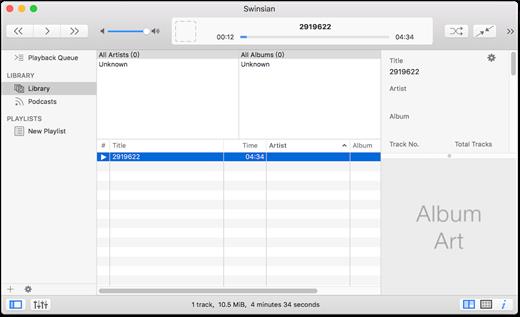
Swinsian is a music manager and player for macOS.

Features


  • Supports FLAC/Ogg Vorbis as well as MP3, AAC, WAV, APE, AC3, WavPack, WMA, and cue files
  • Copies tracks from iPods and iPhones
  • Watches folders for new files
  • Fetches album art
  • Quick control window
  • Imports iTunes libraries
  • Playback over AirTunes
  • Duplicate finding
  • Bulk tag editing with regex support
What’s New

Version 3.0.1:


  • Release notes were unavailable when this listing was updated.
Compatibility

macOS 10.11 or later


Release Name: Swinsian 3.0.1
Size: 24.2 MB
Links: HOMEPAGE – NFO – Torrent Search

Download: RAPiDGATOR
6 Comments
Sept 24

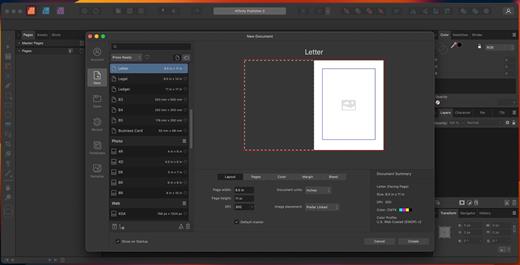
Affinity Publisher 2.6.4

Bring your vision to life with Affinity Publisher, the next generation of professional publishing software. From magazines, books, brochures, posters, reports and stationery to other creations, this incredibly smooth, intuitive app gives you the power to combine your images, graphics and text to make beautiful layouts ready for publication.

With essentials like master pages, facing page spreads, grids, tables, advanced typography, text flow, full professional print output and other amazing features, Affinity Publisher has everything you need to create the perfect layout – whatever your project.


  • Double page spreads
  • Live master pages, including nested master pages
  • Image frames with intelligent scaling options
  • Text wrapping with fine padding control
  • Custom shaped text frames
  • Link multiple text frames together across your document
  • Advanced guides, grids and snapping
  • Tables and custom table formats
What’s New

Version 2.6.4:


  • Release notes were unavailable when this listing was updated.
Compatibility

macOS 10.15 or later


Release Name: Affinity Publisher 2.6.4
Size: 778.8 MB
Links: HOMEPAGE – NFO – Torrent Search

Download: RAPiDGATOR

8 Comments
Sept 24

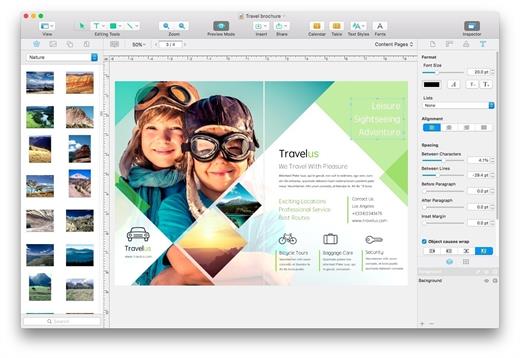
Swift Publisher 5.7.3

Swift Publisher takes the headache out of desktop publishing: print colorful flyers, newsletters, brochures, letterheads, and more.

Features


  • An easy-to-learn alternative. Ditch those massive, daunting design apps aimed at professional publishers — with its accommodating interface, Desktop Publisher is a digital drawing board for the rest of us.
  • Text toolkit. Customize text styles, link text boxes, and create visually pleasing wrap-around effects. With Swift Publisher, manipulating your content is never a chore.
  • Inspiring options. Spark your creativity. Swift Publisher includes images, designs, and unique masks, giving you the templates and resources you need to jump-start the design process.
  • Perfect personalization. When your publication has to be personalized, turn to Swift Publisher. Whether you need to tint, tile, group, rotate, or adjust the opacity of an object, you’ll find the tool you need.
What’s New

Version 5.7.3:


  • Release notes were unavailable when this listing was updated.
Compatibility

macOS 10.12.0 or later
Apple Silicon or Intel Core processor


Release Name: Swift Publisher 5.7.3
Size: 458.3 MB
Links: HOMEPAGE – NFO – Torrent Search

Download: RAPiDGATOR
8 Comments
Sept 24

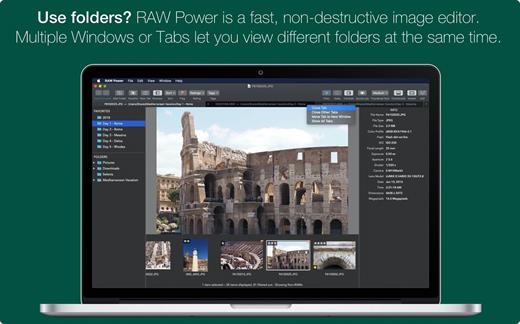
RAW Power 3.5.2

RAW Power unlocks the power of Apple’s RAW engine with simple, easy-to-use controls. Use it as an editing extension inside Apple Photos, or as a standalone, non-destructive RAW photo editor. If you loved Aperture’s advanced RAW processing adjustments, you’ll feel right at home with RAW Power. Using adjustments like Boost, previously only available in Aperture, you can improve your images in ways that simply can’t be done in any other application. RAW Power takes advantage of RAW processing improvements in macOS Sierra.

Features


  • Extends Apple’s Photos app for macOS Sierra
  • Control over Apple’s Boost filter to achieve unparalleled highlight recovery
  • Real-time control of all of Apple’s RAW engine, including noise reduction, and black point, RAW sharpen, and more
  • Hot-pixels overlay with clipping indicators
  • Advanced curves adjustment with auto curves, linear, and Lab modes
  • Recovery slider for targeted control over highlights
  • White-balance sampling
  • Luminance-oriented sharpen
  • All sliders are real-time and GPU accelerated
  • Highlights, shadows, vibrancy, and more
  • Support for hundreds of RAW cameras
  • Images are displayed the same way as in Photos, Aperture, or iPhoto
  • Also works with JPEGs, TIFFs, and other image formats
What’s New

Version 3.5.2:


  • Release notes were unavailable when this listing was updated.
Compatibility

macOS 10.14 or later, 64-bit processor


Release Name: RAW Power 3.5.2
Size: 63.3 MB
Links: HOMEPAGE – NFO – Torrent Search

Download: RAPiDGATOR

5 Comments
Sept 22

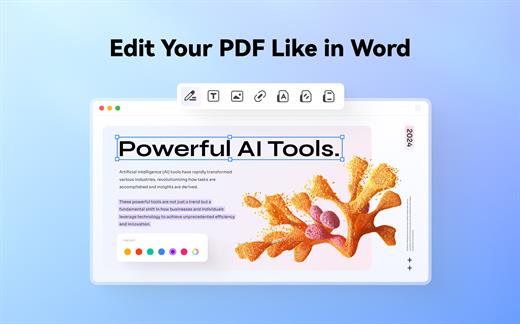
Wondershare PDFelement Pro 12.0.4 (OCR)

Wondershare PDFelement is a self-explanatory OS X application that makes it easier for your to preview, edit, join, split and convert PDF documents using a Mac.

The Wondershare PDFelement also features a simple, clean and intuitive interface that provide instantaneous access to all the tools and features you might need to complete your daily tasks.

Powerful and user-friendly PDF editor for everyday use

Moreover, with Wondershare PDFelement’s help, you can effortlessly edit PDF documents created using text files, web pages or scanned documents.

Consequently, you can add, remove or edit text, move and rearrange pages, insert or remove images and more.

Wondershare PDFelement’s top toolbar helps you hide, show and customize the sidebar in order to display the items and information you are interested in. In addition, you can browse through the loaded document, zoom in or out, print it or email it with just a couple of mouse clicks.

Advanced OCR capabilities make text editing a breeze

Furthermore, you can choose between the “Hand”, “Select” and “Edit” tool, use the advanced OCR feature and convert your source file into plain text or RTF document, ePUB, HTML, as well as file formats compatible with Microsoft Word, Excel, and PowerPoint.

The context menu also helps you switch between the “Move”, “Select” and “Touchup” tool, change the display mode and open the Inspector window to view detailed information about the loaded document.

As an added bonus, by accessing the Document menu, you have the option to add, update or remove an watermark, extract, insert and delete pages, split, merge or convert your document and crop or rotate a page with ease.

Full-featured tool designed to help you stamp, watermark, encrypt and decrypt PDF documents on a Mac

The complete list of all available editing tools, bookmark features, annotation tools and stamp options can be found under the Tools menu.

From here you can easily insert text boxes, add sticky notes, highlight, strike-through and underline text, insert various shapes and use the handy pencil or erase.

On the whole, Wondershare PDFelement comes with the right set of features to help you edit and annotate PDF documents using a Mac, as well as effortlessly add password protect and convert them other formats for easier sharing with your friends and colleagues.

What’s New

Version 12.0.4:


  • Release notes were unavailable when this listing was updated.
Compatibility

macOS 11.0 or later
Apple Silicon or Intel Core processor


Release Name: Wondershare PDFelement Pro 12.0.4 (OCR)
Size: 899.7 MB
Links: HOMEPAGE – NFO – Torrent Search

Download: RAPiDGATOR
7 Comments