Please REGISTER or RENEW your account on RAPiDGATOR.net and support us by doing through all RAPiDGATOR working download links on main posts...
Sept 22

Compressor 4.11.0

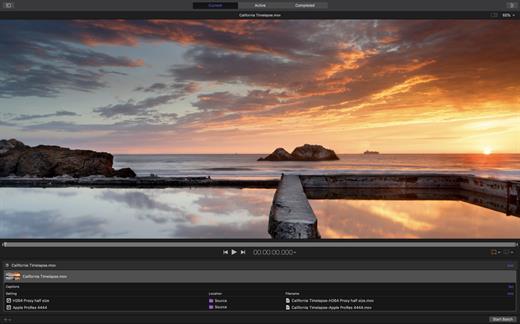
Compressor adds power and flexibility to Final Cut Pro X export. Customize output settings, work faster with distributed encoding, and tap into a comprehensive set of delivery features.
Powerful Encoding for Final Cut Pro


  • Use Compressor to customize encoding settings available in Final Cut Pro.
  • Choose from a wide array of codecs, sizes, frame rates, and other parameters.
  • Save your custom settings in Compressor; they automatically appear in Final Cut Pro.
  • Share settings with other editors, even if Compressor isn’t installed on their workstations.
Time-Saving Encoding Workflow

  • Experiment freely with encoding options, using real-time feedback in the Preview window.
  • Find exactly the setting you need in just a few clicks in the updated settings library.
  • Set up batch processes to streamline the encoding of large numbers of files.
  • Build batch templates to combine encoding with tasks such as moving or copying files.
  • Create self-contained Droplets to encode on the desktop with drag-and-drop ease.
Industry-Standard Encoding Support

  • Use one-step settings for Apple devices and websites such as Vimeo, YouTube, and Facebook.
  • Work with a choice of themed menus to encode and burn a DVD or Blu-ray disc.
  • Add chapter markers for discs or podcasts distributed on iPad, iPhone, iPod, or Apple TV.
  • Encode to a broad range of industry-standard formats, such as MPEG-2, H.264, and ProRes.
  • Generate files for HTTP live streaming in a single step.
  • Import Targa, DPX, TIFF, PSD, or PNG image sequences and encode them to any setting.
  • Tap into advanced encoding features for adding closed captioning, metadata, and more.
Pristine Format Conversions

  • Convert any file from its source format to another format, such as NTSC to PAL or SD to HD.
  • Clean up and customize your content using image filters, a timecode overlay, and watermarks.
  • Speed up video, slow it down, or adjust the frame rate to make the duration match a runtime.
Distributed Encoding

  • Save time by distributing encoding work among multiple cores and workstations.
  • Install Compressor on any Mac to activate it as a cluster node for distributed encoding.
  • Speed up encoding in Final Cut Pro by choosing a Compressor cluster for output processing.
  • Activate QuickCluster for dynamic configuration of nodes based on available resources.
What’s New

Version 4.11.0:


  • Take advantage of the flexibility and dynamic range of log-encoded video shot on iPhone 15 Pro.
  • Fixes an issue where the source/output comparison viewer would not reflect the camera log selection.
  • Addresses an issue where Reveal in Finder was not available for clips with modified audio settings.
  • Fixes an issue where luminance levels could be incorrect when Job inspector color space and Output color space were set to Rec. 709.
Compatibility

macOS 14.6 or later
Apple Silicon or Intel Core processor


Release Name: Compressor 4.11.0
Size: 106.5 MB
Links: HOMEPAGE – NFO – Torrent Search

Download: RAPiDGATOR

7 Comments
Sept 22

Final Cut Pro 11.2.0

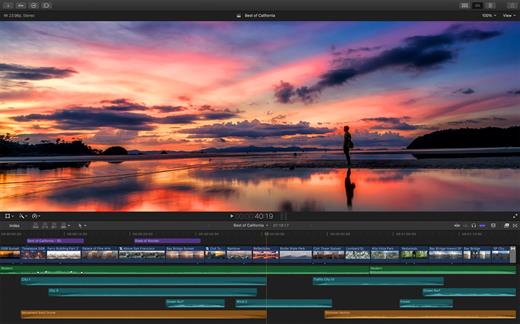
Final Cut Pro X is a professional video editing solution. Completely redesigned from the ground up, Final Cut Pro adds extraordinary speed, quality, and flexibility to every part of the post-production workflow.

Features


  • Revolutionary Video Editing

    • Assemble clips in the Magnetic Timeline without clip collisions or sync problems.
    • Use Clip Connections to attach B-roll, sound effects, and music to the timeline.
    • Reduce clutter by grouping clips into a Compound Clip. Easily expand it back to single clips.
    • Perfect your pacing right in the timeline with the Inline Precision Editor.
    • Cycle through different shots, graphics, or effects at one place in the timeline with Auditions.
  • Powerful Media Organization

    • Import a broad range of formats including native AVCHD, H.264 from DSLRs, and more.
    • Content Auto-Analysis captures camera metadata and analyzes shots in the background.
    • Choose analysis options for stabilization, rolling shutter correction, and audio enhancement.
    • Create and apply custom keywords on the fly as you select ranges in clips.
    • Smart Collections let you dynamically organize content and find any shot in a few clicks.
  • Incredible Performance

    • New 64-bit architecture uses all the RAM in your system for larger projects and richer effects.
    • The Cocoa foundation makes Final Cut Pro more responsive, interactive, and fun to use.
    • Final Cut Pro taps the GPU on the graphics card and all the cores in your Mac for speed.
    • Background processing lets you keep working without interruption.
    • A ColorSync-managed color pipeline produces accurate, consistent color across applications.
  • Compelling, Customizable Effects

    • Preview effects to see how they look with your footage before applying them.
    • Change the look of titles, transitions, and effects using intuitive controls.
    • Control effects with precision using a keyframe editor that appears directly in the timeline.
    • Adjust the Ken Burns effect with simple onscreen arrows for start and end points.
  • Integrated Audio Editing

    • Let Final Cut Pro repair significant audio problems such as hum, excessive noise, and more.
    • Sync DSLR video with separate audio in a single step, with instant audio waveform matching.
    • Enrich your soundtrack with a library of royalty-free sound effects and audio effect plug-ins.
    • Create immersive audio experiences in 5.1 surround.
  • Intuitive Color Grading

    • Improve the look of any clip with the single-click Balance Color feature.
    • Apply the Match Color feature to match the looks of two clips shot under different conditions.
    • Manipulate color, saturation, and exposure with the Color Board.
    • Fine tune color for a specific color range or area of the screen using keying and masks.
  • One-Step, Optimized Output

    • Export projects to Apple devices and websites such as Vimeo, YouTube, and Facebook.
    • Add your content to a set of themed menus, then burn a DVD or Blu-ray disc.
    • Output files for HTTP live streaming in a single step.
What’s New

Version 11.2.0:


  • Release notes were unavailable when this listing was updated.
Compatibility

macOS 15.6 or later


Release Name: Final Cut Pro 11.2.0
Size: 5.8 GB
Links: HOMEPAGE – NFO – Torrent Search

Download: RAPiDGATOR
2 Comments
Sept 22

Motion 5.11.0

Motion is designed for video editors, Motion 5 lets you customize Final Cut Pro titles, transitions, and effects. Or create your own dazzling animations in 2D or 3D space, with real-time feedback as you work.

Features:


  • Breakthrough Speed and Quality

    • New 64-bit architecture supports deeper, multilayered effects for use in Final Cut Pro.
    • ColorSync-managed color pipeline produces accurate, consistent color across applications.
    • Shared Render Engine provides consistent quality with Final Cut Pro and Compressor.
    • Rendering uses floating-point, linear-light color space for exceptionally realistic results.
    • Motion taps the GPU on the graphics card for high-speed rendering and exporting.
  • Editor-Friendly Design Tools

    • Work fast using a single-window interface with a familiar look and feel.
    • Customize Final Cut Pro titles, effects, and transitions by opening them in Motion.
    • Create Smart Motion Templates with simple controls for making changes as you edit.
    • Build stunning 2D and 3D compositions with more than 1900 Apple-designed elements.
    • Make adjustments to any parameter during playback and instantly see results.
  • Easy Animated Text and Titles

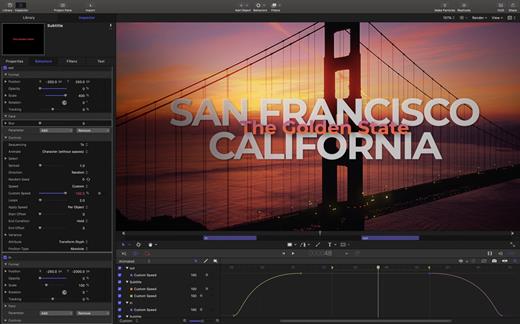
    • Design dramatic text effects with complete control over position, opacity, rotation, and more.
    • Animate text instantly by choosing from more than 200 text behaviors such as Type On.
    • Build a credit roll by importing a text file; the Scroll behavior optimizes the speed for you.
    • Move, scale, or rotate a single character with the Adjust Glyph tool.
    • Ripple text one character, word, or line at a time with the Sequence Text behavior.
  • Stunning Effects

    • Choose from more than 230 behaviors for natural-looking motion without programming.
    • Enhance your 2D or 3D animations with more than 130 filters using the FxPlug 2 standard.
    • Track a moving object in a video clip with the point tracking and match move feature.
    • Create an accurate chroma key in a single step with the new Keying filter.
    • Apply the Linking behavior to make parameters for one object animate related objects.
    • Use SmoothCam to eliminate camera jitters, and image stabilization to smooth bumpy shots.
  • Effortless 3D

    • Transition from 2D to 3D space by adding a camera or cameras to any 2D project.
    • Set up realistic shadows that animate dynamically with the movement of cameras and lights.
    • Turn any shape, video plane, or paint stroke into a reflective surface.
    • Highlight or de-emphasize various objects by defining a range of focus.
    • Track objects or groups of objects with the Camera Framing behavior.
  • Quick, High-Quality Output

    • Export projects to Apple devices and popular websites such as Vimeo and YouTube.
    • Choose to output the ProRes 4444 format for uncompressed quality at small file sizes.
What’s New

Version 5.11.0:


  • Release notes were unavailable when this listing was updated.
Compatibility

macOS 15.6 or later


Release Name: Motion 5.11.0
Size: 2.8 GB
Links: HOMEPAGE – NFO – Torrent Search

Download: RAPiDGATOR
8 Comments
Sept 22

Things 3.22.3

Things is a task management solution that helps to organize your tasks in an elegant and intuitive way. Things combines powerful features with simplicity through the use of tags and its intelligent filter bar.

Features:


  • Collect Your Thoughts – Get things off your mind quickly: no matter what app you’re in, a keyboard shortcut instantly reveals Quick Entry. Type your thoughts and save them to the Inbox. Or just talk to Siri on any device (“Remind me to…”) and import from Reminders.
  • Get Organized – Create a project for each of your goals, then add the steps to reach them. For clarity, add structure with headings. Then group your projects by areas of responsibility, such as “Family”, “Work”, or “Health”. Review these regularly to stay on top of things.
  • Plan Your Time – See your calendar events alongside your to-dos and plan your time effectively. Create repeating to-dos for things you do every few days, weeks, or months – Things will remind you on the right day.
  • Make the Most of Your Day – Every morning, grab a coffee and prepare your list for “Today”: review previously planned to-dos and make quick decisions on what to tackle. Pick some more steps from your projects and then get going. The Today list is the only place you’ll need to look for the rest of the day.
  • Customize Your Workflow – Use tags to categorize your to-dos or add context. For example, tag places like “Office” or “Home”, or tag all your “Errands”, or everything you’re working on with “Kate”. You can easily find everything you’ve tagged via filtering or search.
What’s New

Version 3.22.3:


  • Release notes were unavailable when this listing was updated.
Compatibility

macOS 10.15 or later
Apple Silicon or Intel Core processor


Release Name: Things 3.22.3
Size: 37.3 MB
Links: HOMEPAGE – NFO – Torrent Search

Download: RAPiDGATOR
7 Comments
Sept 22

EdgeView 5.1.9

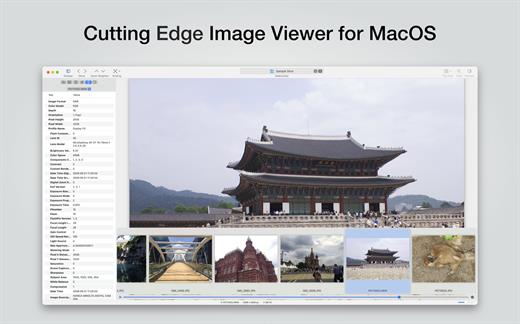
EdgeView 5 is fast image viewer has elegant user interface. EdgeView 5 is developed and designed for modern MacOS. It can open various image files such as JPEG, PNG, TIFF, BMP, and RAW file of DSLR, EPS and PDF, AI(Adobe Illustrator). Can open image files in archive directly without extraction.

User can open files, rename files, delete files from EdgeView’s file browser. Also can access to SMB/AFP/FTP network volume.

User can navigate images quickly by using keyboard shorcut, mouse wheel, trackpad gesture. EdgeVew show EXIF information, play animation GIF/PNG/WebP smoothly. Save last status to history, and restore when reopen file.

EdgeView 5 will be the best choice when viewing and managing image files.

What’s New

Version 5.1.9:


  • Release notes were unavailable when this listing was updated.
Compatibility

macOS 11.1 or later
Apple Silicon or Intel Core processor


Release Name: EdgeView 5.1.9
Size: 142 MB
Links: HOMEPAGE – NFO – Torrent Search

Download: RAPiDGATOR

7 Comments
Sept 22

DCommander 3.9.8 (3987)

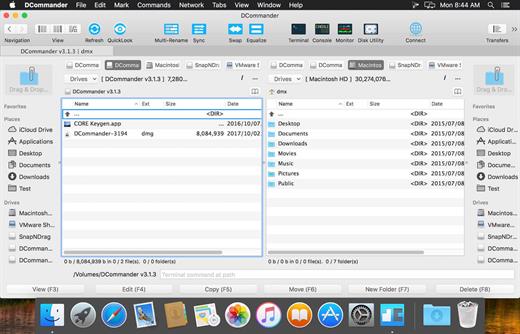
DCommander is a two-pane file manager that gives you full control over your computer’s filesystem. Optimized for quick access and user-friendliness, DCommander provides a perfect companion for new Mac users transitioning from other operating systems, as well as advanced power users that demand more control of their computer.

DCommander Features:


  • Two side by side file windows
  • Name, extension, size, kind, date, permissions sorting of files and folders
  • View hidden files and folders
  • Tabs support with full keyboard navigation
  • File search with sub-folder recursive searching and content searching
  • Full support for drag-and-drop operations
  • Fine-grained file selection
  • Lynx-like folder navigation (using arrow keys)
  • Quick access to native Terminal, Console, Activity Monitor, and Disk Utility applications
  • Customizable color schemes
  • Customizable font type, size, color, and style
  • Quick file viewer with text, hex, and media-viewing mode
  • Full keyboard navigation
  • Ability to browse ZIP, JAR, EAR, WAR, XPI, and ODT archives like normal folders
  • Seamless FTP, SFTP, and SCP support
  • Mount network drives
  • Folder compare and synchronization
  • Quick search files in the current folder
  • Quick look integration
  • Terminal integration and custom terminal support
  • Ability to create new folders and new empty files
  • Ability to copy full path of selected files
  • Support for external drives
  • Support for navigating cloud drives
  • Ability to compress files and folders
  • Ability to selectively unpack files and folders from archives
  • Ability to set custom terminal, file search, file synchronizer, file viewer, and file editor
  • Fast file copy and moving
  • Retina display support
  • Fullscreen support
  • Fast load time
  • Tutorials and tips
  • Support for OSX 10.7 and later
  • German, French, Polish and Czech translations
What’s New

Version 3.9.8:


  • Release notes were unavailable when this listing was updated.
Compatibility

macOS 10.10 or later


Release Name: DCommander 3.9.8 (3987)
Size: 10 MB
Links: HOMEPAGE – NFO – Torrent Search

Download: RAPiDGATOR

9 Comments
Sept 22

System Dashboard Pro 3.0.0

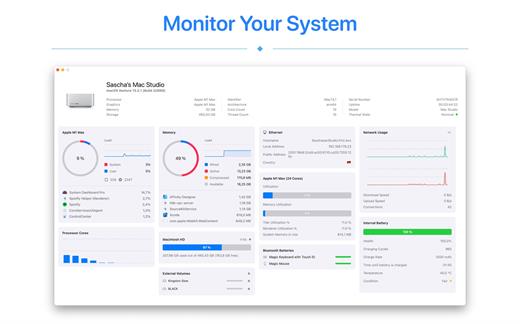
The System Dashboard Pro is a modern reinterpretation of the System Dashboard and offers more information than ever. The app has been completely redeveloped and optimized for the latest systems.

System Dashboard Pro offers the following features

• General System Information
Get an overview of the most important parameters of your system. This includes, for example, the macOS version used or details about your computer.

• Processor Usage
The processor panel shows important details about processor usage. The current load is displayed as well as that of the last few seconds. A list of processes that have the highest processor utilization is also displayed.

• Memory Usage
The Memory panel shows data related to memory. The current load is displayed as well as that of the last few seconds. A list of processes using the most memory is also displayed.

• Network Information
Basic network information such as the local and external IP address or the transfer rate of the WLAN connection is displayed on this panel.

• Network Usage
The network category shows the current download and upload speed and the number of open connections.

• Internal Battery
This panel is available if the app is running on a MacBook and displays basic battery parameters. Among others information, it displays the number of charging cycles and the health of the battery.

• Hard Disk
The computer’s hard drive can be kept under control with this panel. It shows how much space is used and how much is free. The current speed is also displayed.

• External Drives
SD cards and USB sticks are displayed here. The devices can also be ejected – either individually or all at once.

What’s New

Version 3.0.0:


  • Release notes were unavailable when this listing was updated.
Compatibility

macOS 13.0 or later


Release Name: System Dashboard Pro 3.0.0
Size: 8.4 MB
Links: HOMEPAGE – NFO – Torrent Search

Download: RAPiDGATOR

7 Comments
Sept 21

Living Earth – Weather & Clock 1.31

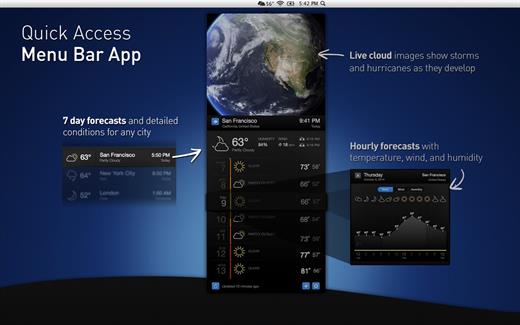
Living Earth is a beautiful world clock and weather app for your Mac. The award winning app for iPhone and iPad is now available with a single click from your Mac menubar offering easily accessible world times and weather for millions of cities around the world. Real-time global cloud cover, live wallpaper, and screensaver features turns your desktop into a window in space.

What’s New

Version 1.31:


  • Release notes were unavailable when this listing was updated.
Compatibility

macOS 13.5 or later


Release Name: Living Earth – Weather & Clock 1.31
Size: 94.2 MB
Links: HOMEPAGE – NFO – Torrent Search

Download: RAPiDGATOR
20 Comments
Sept 21

Cookie 7.9.6

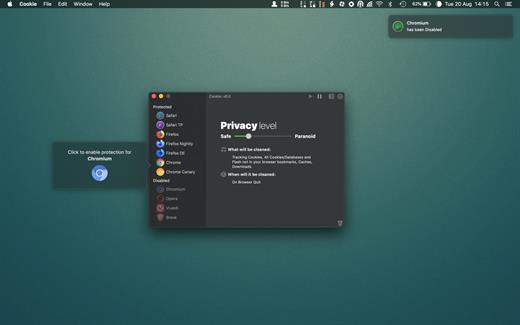
Cookie prevents third parties from hijacking your browsing experience. The sites you visit store “cookies” in your browser without your knowledge or consent. Some are helpful, but others are frustrating and invasive. Cookie can help.

Features:


  • Consolidate all your browser privacy settings
  • Simplified View that takes care of all the technical details for you
  • Advanced View which puts you in total control of all your privacy settings
  • Combined cookie view displaying all cookie/flash/localStorage data in one easy to manage view
  • Cookie’s can be favorited on a per domain, or per cookie basis. You decide
  • Individual Browser settings. It is possible to configure different automatic removal options for each browser. In the case of Chrome/Chromium/Canary/Brave you can even configure settings per user!
  • A number of removal schedules are possible: When quitting Cookie, when a Browser is Quit, on computer login, On computer waking from sleep, on a customizable time schedule, or entirely manually
  • Hotkey support, so you can remove all unwanted data quickly and easily
  • Customizable tracking cookie definitions
  • Whitelist individual tracking cookies
  • Clean, modern and Intuitive User Interface
  • Helpful setup window
  • Browser extension protection
  • Full Screen support
  • iCloud support
  • Dark/Regular theme
What’s New

Version 7.9.6:


  • Release notes were unavailable when this listing was updated.
Compatibility

macOS 10.14 or later, 64-bit processor


Release Name: Cookie 7.9.6
Size: 8.3 MB
Links: HOMEPAGE – NFO – Torrent Search

Download: RAPiDGATOR

6 Comments
Sept 21

Codepoint 1.21

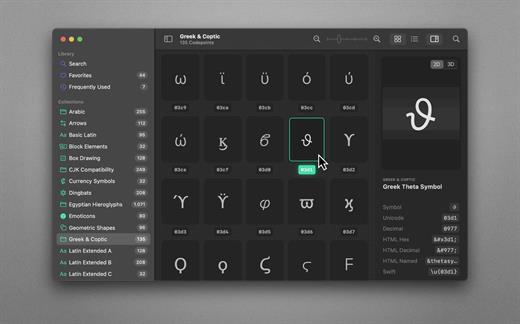
70,000+ Unicodes in your pocket. Search Unicodes, Glyphs, SF Symbols and Emojis in a blink. Codepoint helps you to find the exact characters you need and supports you in discovering new glyphs. Export them as Symbols, Strings, Hexadecimals, HTML entities or even Swift code. Save Favourites in iCloud. Remember your Frequently Used symbols. Codepoint is tailored for you—a creative, ambitious professional.

Features
• Explore, search and share Unicodes
• Search Engine: Lightning fast, surprisingly smart
• Find Unicodes, Hex, Decimals, HTML and Swift entities
• Favourites synced across all your devices
• Typography Advice for selected characters
• 3D Glyph Preview
• Supports SF Symbol names
• Works offline
• Looks brilliant in dark and light
• Optimised for Macs with Apple Silicon (M1, M2)
• Works great on macOS 13 Ventura

What’s New

Version 1.21:


  • Release notes were unavailable when this listing was updated.
Compatibility

macOS 13.1 or later
Apple Silicon or Intel Core processor


Release Name: Codepoint 1.21
Size: 66.2 MB
Links: HOMEPAGE – NFO – Torrent Search

Download: RAPiDGATOR
8 Comments