Please REGISTER or RENEW your account on RAPiDGATOR.net and support us by doing through all RAPiDGATOR working download links on main posts...
May 11

Prizmo 5.0.2

Prizmo 4 is a scanning application with optical character recognition (OCR) in over 40 languages with powerful editing capability, text-to-speech, and iCloud support.
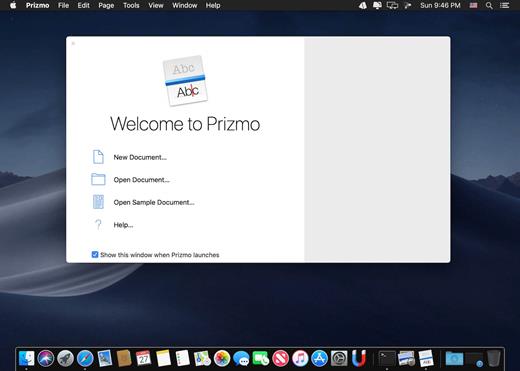
No matter what capture device is at hand, Prizmo is the key for scanning and performing OCR. It works with pictures taken with your iPhone, iPad, or digital camera; with documents coming from connected or Wi-Fi scanners; even with screenshots! It will help you easily scan any documents (invoices, receipts, boards, giant advertisements…) of any sizes (US Letter, US Legal, A4, and custom)…

Features


  • Specific processing for business cards, multipage texts and images
  • Input file formats: regular photo files including JPEG, RAW, TIFF, as well as PDF files (even multipage)
  • Input options: digital cameras (iPhone, iPad, DSLRs…), camera tethering, connected and Wi-fi scanners, screenshots, snap any text from your screen
  • State-of-the-art OCR technology in 40 Languages: Afrikaans, Albanian, Basque, Belarusian, Bulgarian, Catalan, Croatian, Czech, Danish, Dutch, English, Esperanto, Estonian, Finnish, French, Galician, German, Hebrew, Hungarian, Icelandic, Indonesian, Italian, Korean, Latvian, Lithuanian, Macedonian, Malay, Norwegian, Polish, Portuguese, Romanian, Russian, Serbian, Slovak, Slovenian, Spanish, Swahili, Swedish, Turkish, Ukrainian, and Vietnamese.
  • Detection of 3 types of regions: texts, images and numbers
  • OCR editing and correction: add, delete, merge and reorder regions on the one hand, edit text for correcting mistakes on the other hand
  • Automatic frame detection: lay the page, snap it, and let Prizmo handle the cropping
  • Automatic text orientation detection
  • Perspective correction to compensate camera point-of-view
  • Non-linear lens distortion correction
  • Page curvature correction for books and magazines
  • Real-time OCR results: moving/resizing region frames immediately updates text results
  • Resolution increase: image enhancement allows OCR results where OCR is generally not even thinkable
  • Output formats: image files (JPEG, PNG, TIFF), and text files (PDF with Spotlight-searchable text, RTF, TXT) – even multipage!
  • Export to the Evernote, Box, Dropbox, Google Drive and WebDAV online services
  • Online translation into 23 languages
  • Accessibility feedback for the OCR processing (blank, blurry image, etc.)
  • Text-to-Speech for reading scanned texts: over 70 high-quality voices in 26 languages with navigation settings and interactive reading progress display (available for free in OS X Preferences)
  • Enhanced for the Retina display.
What’s New

Version 5.0.2:


  • Release notes were unavailable when this listing was updated.
Compatibility

macOS 10.10 or later


Release Name: Prizmo 5.0.2
Size: 36.3 MB
Links: HOMEPAGE – NFO – Torrent Search

Download: RAPiDGATOR
5 Comments
May 11

ColorSnapper2 v1.7.1

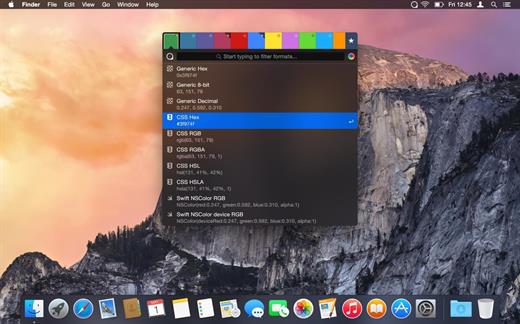
ColorSnapper2 is the OS X color picker app for designers and developers which makes it easy to collect, adjust, organize, and export colors of any pixel of the screen. It is activated via a system-wide hotkey, giving you a magnifying glass to easily pick any pixel you need, even from retina displays. The resulting color is copied to the clipboard in a format of your preference.

Features


  • New Magnifying Glass — the original ColorSnapper magnifying glass — introduced in 2010 and adopted by every modern color picker app since then — just got even better! It works perfectly with multiple displays, different resolutions and with different pixel density. You can switch between Spaces and Applications having the magnifying glass on the screen while controlling it with gestures and keyboard shortcuts.
  • New Hi-Precision Mode allows you to choose every physical pixel on a retina screen, but also works great on displays with normal pixel density by increasing mouse sensitivity and magnification level.
  • Export to Adobe® Photoshop® and Illustrator® — set foreground and background color in your favorite designer tool directly from ColorSnapper.
  • Capture loupe image — new magnifying glass can be used as a review tool. Pressing P will copy the zoomed image to clipboard.
  • Favorites and History — with ColorSnapper2 you can now organize, adjust and export colors without leaving the application. Add colors you regularly pick to the favorites or go back in time to hundreds of colors.
  • Adjust colors — new user interface seamlessly integrates with the Apple’s Color Panel so you can adjust colors before you export them.
  • Quick formats filter — just start typing to quickly search through more than 30 export formats.
  • Automatic color profile conversion — converts colors picked from native OS X applications, including Safari and Xcode from the monitor’s color profile to sRGB. This means you’ll get the same RGB values as those used in your code.
  • Code style — use flexible color values formatters to match your coding style. Along with all new supported formats, including CSS3, NSColor and UIColor, Swift, Android, Java, .NET and many more, this results in even faster developer workflow.
What’s New

Version 1.7.1:


  • Update for license activation on macOS Big Sur
  • Fixes crash when assigning new global shortcuts on macOS 10.15
Compatibility

macOS 14.6 or later


Release Name: ColorSnapper2 v1.7.1
Size: 7.3 MB
Links: HOMEPAGE – NFO – Torrent Search

Download: RAPiDGATOR
4 Comments
May 11

Unite Pro 1.4

Unite for macOS lets you turn any website into a fully native Mac app with deep customization, fast performance, and macOS integration. Instead of opening sites in a browser with many tabs, Unite creates standalone apps that live in your Dock, support native window controls, and behave like real macOS software.

With Unite you can create an app in seconds by entering a URL, choosing an icon, and tailoring appearance and behavior to your preferences. Each app runs in its own isolated, lightweight WebKit‑based environment that feels more integrated and efficient than browser web apps or Electron alternatives. 

Unite apps offer extensive customization. You can hide or show title bars, adjust colors to match site branding, control window appearance, manage multiple tabs with advanced options like pinning and locking, and choose how links open within or outside the app. Notifications and macOS Focus Modes work per app, helping reduce distractions. 

Unite also includes flexible app modes, such as standard Mac windows, sidebar views, floating windows, compact views, and menu bar utilities. A built‑in ad blocker and customizable keyboard shortcuts streamline everyday use and navigation. 

What’s New

Version 1.4:


  • Release notes were unavailable when this listing was updated.
Compatibility

macOS 15 or later


Release Name: Unite Pro 1.4
Size: 29.1 MB
Links: HOMEPAGE – NFO – Torrent Search

Download: RAPiDGATOR

6 Comments
May 10

Topaz Gigapixel 1.2

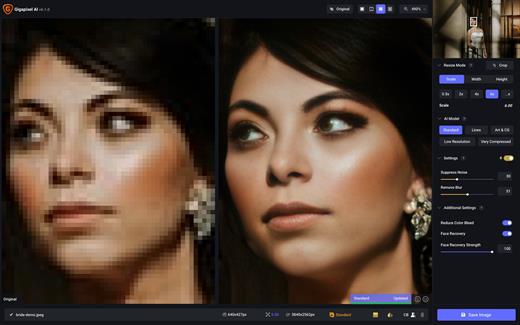
Topaz Gigapixel knocks traditional upscaling tools off their pedestals.

Enlarging your image without losing detail has always been impossible… until now. Upscale your photos by up to 600% while perfectly preserving image quality.

Breathtakingly sharp prints. High-resolution cropping in post-production. iPhone photos that look like they came out of a DSLR.

No matter why you’re enlarging your photos, you always want the best possible quality for your results. Gigapixel AI is currently the only photo enlargement product available that can actually add detail back to your upscaled photo.

What’s New

Version 1.2:


  • Release notes were unavailable when this listing was updated.
Compatibility

macOS 12 Monterrey,ARM only.


Release Name: Topaz Gigapixel 1.2
Size: 752.1 MB
Links: HOMEPAGE – NFO – Torrent Search

Download: RAPiDGATOR

6 Comments
May 10

iNet Network Scanner 3.2.5

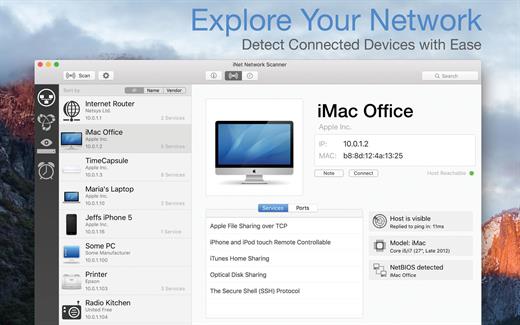
iNet Network Scanner provides you with information about networks your Mac is connected to. Its very easy and user friendly design allows even the unexperienced user to get a profound and understandable overview of a network and the running services. iNet is also available as iPhone and iPad app via the iTunes Store.

What’s New

Version 3.2.5:


  • [Improved] Icon copy handling and image checks
  • [Added] Display of SSID (WiFi name) in network info
  • [Updated] Vendor and Services Databases
  • [Fixed] Possible crash on startup
Compatibility

macOS 11.0 or later


Release Name: iNet Network Scanner 3.2.5
Size: 327.3 MB
Links: HOMEPAGE – NFO – Torrent Search

Download: RAPiDGATOR

6 Comments
May 10

Camo Studio 2.7.1

Great video. Made easy.
Camo enables the camera you already own to produce incredible video, whether you’re meeting, streaming, or recording. Start creating great video today.

Easy to start, quick to master
Camo makes professional video accessible to every user. You can choose to get amazing video quickly with its templates and image enhancements, or get granular and creative with its full array of tools.

Stand out video, for everyone
Camo brings the power of high-quality video to a wide variety of use-cases, from filming makeup tutorials, to making sales calls, even brain surgery.

Get amazing results with any camera
Camo supports and improves video from any camera connected to your computer: phones, built-in cameras, webcams, DSLRs, action cams, and even Continuity Camera. It’s simply the best video, using any device.

Meetings. Streams. Videos. Camo does it all
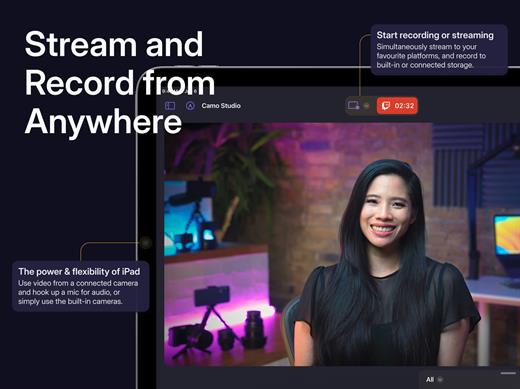
Camo Studio enables the camera that you already own to produce great video whether you’re on a call or you’re streaming or simply recording your next video.

Cover every angle with Camo Camera
Plug in or go wireless with your iOS or Android device for instant high-quality video. Top-down, overhead, side angles – flex your mounts and your imagination.

Shape Your Scene to Perfection
Enhance your scene with graphics, text and even images – from branding to dynamic elements, the editor has everything you need to make every scene unique.

Stand-Out Tools
Soften or replace your background, correct your lighting, add a LUT, and then dial in perfect framing that keeps up with you – AI-powered image analysis sees to it that your video has never looked so good.

Lights, Camera, Action
One click in profiles gives you the optimal resolution, framing and aspect ratio for your video. Amazing video couldn’t be simpler: select your scene, pick a profile and start recording.

Captivate your audience through your video
Shaping your video is about more than cameras and settings adjustments – improve user engagement and inform your viewers through visual elements like lower-thirds and overlays.

Set up a scene in seconds
Configure your Personalise settings and pick one of the default scenes to get started, or create your own to match what you need.

All your content in one place
Manage your scenes, backgrounds and filters using the Gallery, and browse our curated set of content using the Explore section.

Shape every detail with our in-app editor
Compose exactly what you need, or edit existing scenes to make them just right for your next call, recording or stream. Combine text, logos, pre-made overlay elements and more in the powerful built-in scene editor.

What’s New

Version 2.7.1:


  • Release notes were unavailable when this listing was updated.
Compatibility

macOS 12.3 or later.


Release Name: Camo Studio 2.7.1
Size: 96.3 MB
Links: HOMEPAGE – NFO – Torrent Search

Download: RAPiDGATOR
5 Comments
May 10

Maschine 3.5.0

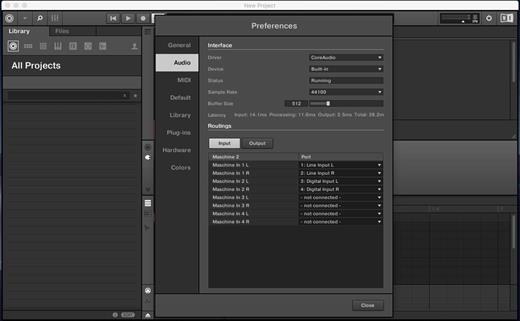
MASCHINE 3 is all about getting your musical ideas flowing. It’s there every step of the way from beat making and sampling to arranging and performing your tracks. Use it with virtual instruments or your own samples, both on its own and in a DAW. And if you’re ready to take things up a gear, bring in Maschine hardware to get hands on.

The new version is completely redesigned, Drum Synths, mixer, etc. NEW audio engine sound engine MASCHINE 3 now allows you to add unlimited groups and inserts effects MASCHINE powerful set of features. Multicore support ensures that your computer will handle all this in parallel with the processing of ultra high – even when using the software as a VST or AU plug-in module. New audio engine now also supports side bindings for sidechaining, for classic ducking effects and more…

MASCHINE a revolutionary system for creating grooves tactile creative bit-making organization of recognized sound library Kontakt 8 any other VST, VSTi library.
Together with the software package for creating beats MASCHINE create quickly and easily combine the power and flexibility of software with tactile immediacy of hardware. His sequencer based on patterns, high-performance sampler, has an incredible set of professional tools and studio effects, exemplary drum synthesizers and library Kontakt 8 are you a complete system for quickly and professionally create grooves.

NEW JUICE FOR OLD MASCHINES
If you’re still using MASCHINE 2.x, the MASCHINE 3 software update can give you more functionality, sound, and raw power for modern music production. Completely reworked, the software offers countless new ways to support and fast-track your ideas. The software is compatible with all generations of MASCHINE and MASCHINE MIKRO* – it works with the hardware you already have. Read on for details on what you get…

REWORKED AUDIO ENGINE
MASCHINE 3’s audio engine adds unlimited groups and insert effects to MASCHINE’s powerful feature set. Multicore support ensures your computer handles it all in parallel with ultra-efficient processing – even when using the software as a VST or AU plug-in. The new audio engine now also supports sidechaining, for classic ducking effects and more.

DRUM SYNTHS
MASCHINE 3 sets a new benchmark in software drum synthesis. Create your own perfectly-tuned electronic and acoustic drum sounds in truly peerless sound quality.
Six exclusive monophonic drum plug-ins, with their own unique algorithms, give you any percussive sound you need. All fully tweakable, automatable, and perfectly integrated into MASCHINE – with the quality that comes from NI’s acclaimed DSP expertise.

MIXER WINDOW
Polish your tracks to perfection with the mixer window in MASCHINE 3. Tweak volume and panning with ultimate ease. See group and individual track levels clearly on meters complete with peak level indicators. Adjust levels on any group of sounds. And two aux sends per channel let you freely route sounds anywhere in your project.
MASCHINE’s new user interface brings you all this and much more – cutting-edge groove production has never been this easy.

NEW PLUG-IN STRIP
MASCHINE 3’s new plug-in strip gives you a whole new way of seeing your instruments and effects. Each internal instrument and effect now has its own layout for lightning fast visual recognition. This intuitive, visual integration extends to KOMPLETE Instruments and Effects. And beyond that, MASCHINE can handle pretty much any VST, AU or effect plug-in you own.

MORE SOUND INSIDE
Browse presets and load any KOMPLETE 15 Instrument or Effect at-a-glance directly from MASCHINE 3’s full-color product icon display. And now, there’s even more to discover. MASCHINE 3 includes KOMPLETE 12 SELECT – a premium selection of 15 KOMPLETE Instruments and Effects. Get a full suite of professional sound right out of the box and control it all from your MASCHINE hardware.

You also get over 2000 more samples, 200 brand-new MASSIVE presets, and over 100 new kits – all in a streamlined browser that makes finding your sound fast and simple. No matter what sound you’re after, MASCHINE is waiting for you.

What’s New

Version 3.5.0:


  • Release notes were unavailable when this listing was updated.
Compatibility

macOS 10.15 or later


Release Name: Maschine 3.5.0
Size: 1.2 GB
Links: HOMEPAGE – NFO – Torrent Search

Download: RAPiDGATOR

4 Comments
May 10

White Noise 7.6.1

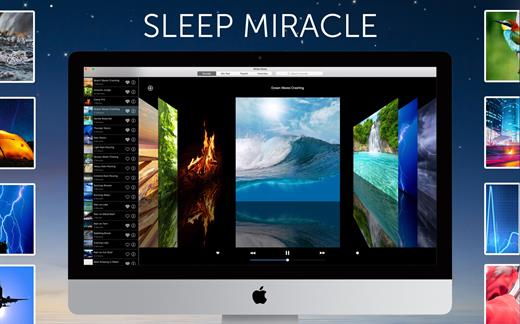
White Noise provides ambient sounds of the environment to help you relax or sleep. Are you in a hotel and miss the familiar sound of your fan or air conditioner? Flying on a plane and just want to nap? Includes high quality looping noises such as ocean waves crashing, hard rain pouring, and flowing stream water.

Features


  • Beautiful cover flow interface allows you to swipe to your favorite sound.
  • Digital Clock is the perfect bedside sleep companion. Swipe left or right to change colors. Drag up and down to adjust brightness.
  • Sound timers that slowly fade audio out so you don’t suddenly awake.
  • Multiple alarms that slowly fade in so you wake up feeling refreshed.
  • Full screen mode supported!
  • On-screen media and volume control
  • Includes beautiful images that match the high quality of each sound
  • Includes 40 ambient sounds and pictures:

    • Air, Airplane, Amazon, Beach, Blue Noise, Boat, Brown Noise, Car Rain, Cars, Cat Purring, Chimes, City, Clock, Clothes Dryer, Crickets, Crowd, Extreme Rain, Fan, Fireplace, Frogs, Hair Dryer, Heavy Rain, Heartbeat, Light Rain, Ocean, Pink Noise, Rain Storm, Shower, Sprinkler, Stream, Tibetan Singing Bowl, Thunder, Train, Vacuum, Violet Noise, Washer, Water, Water Drip, White Noise, and Wind.
What’s New

Version 7.6.1:


  • Release notes were unavailable when this listing was updated.
Compatibility

macOS 11.5 or later.


Release Name: White Noise 7.6.1
Size: 53.8 MB
Links: HOMEPAGE – NFO – Torrent Search

Download: RAPiDGATOR
5 Comments
May 10

iPulse 3.14159

iPulse is a system monitoring application that lets you peek at the inner workings of OS X through a clever and visually compact user interface. Using iPulse’s customizable gauges, users can monitor system activity such as CPU and memory usage, free disk space, network activity and more. However, unlike other OS X monitoring apps, iPulse takes up minimal screen real estate, and does so with a unique, informative and visually pleasing user interface.

What’s New

Version 3.14159:


  • The CPU gauge can now show up to 48 cores - you never know…
  • General Information window now reports Apple Silicon processor family
  • Preferences were renamed as Settings
  • Fixed a typo in Settings [Yay Pascal!]
Compatibility

macOS 10.13 or later


Release Name: iPulse 3.14159
Size: 8.3 MB
Links: HOMEPAGE – NFO – Torrent Search

Download: RAPiDGATOR
5 Comments
May 10

Zipic 1.9.5

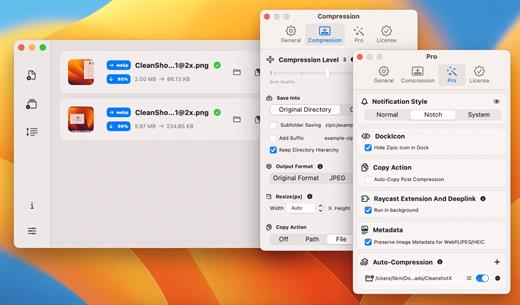
Zipic is a native macOS application designed for efficient, high-quality image compression. It lets users shrink image files locally, with no uploads or dependency on the cloud. All processing happens on your own device—so your privacy and speed stay intact.

Key Features and Highlights:


  • High Compression, Near-Lossless Quality: Zipic utilizes powerful compression algorithms to achieve a high compression ratio with minimal perceived quality loss, making the compressed image virtually indistinguishable from the original.
  • Fast & Local Processing: Being a native macOS application, all image processing occurs locally on your device. This ensures lightning-fast performance, efficient handling of massive batches, and high data privacy with no cloud uploads or network dependence.
  • Comprehensive Format Support: The tool supports a wide range of formats, including basic ones like JPEG, PNG, WebP, HEIC, and GIF, and Pro formats like AVIF, JXL, TIFF, and ICNS.
  • Effortless Workflow: It offers multiple simple compression methods, including drag-and-drop, folder monitoring, and Finder integration (right-click).
  • Custom Control: Users can create custom presets for different quality levels and scenarios, allowing for precise control over the compression outcome.
  • Pro Features for Automation: Advanced features include Clipboard auto-compress, Folder Watch for automated compression in specific directories, and integration options like Raycast Extension and Apple Shortcuts.
Zipic aims to be the seamless solution for developers, designers, bloggers, and photographers who need to optimize and compress images efficiently.

What’s New

Version 1.9.5:


  • Release notes were unavailable when this listing was updated.
Compatibility

macOS 13.0 or later


Release Name: Zipic 1.9.5
Size: 20.7 MB
Links: HOMEPAGE – NFO – Torrent Search

Download: RAPiDGATOR
5 Comments