Please REGISTER or RENEW your account on RAPiDGATOR.net and support us by doing through all RAPiDGATOR working download links on main posts...
Apr 23

Art Text 4.5.9

Art Text is graphic design software specifically tuned for lettering, typography, text mockups and various artistic text effects. Supplied with a great variety of ready to use styles and materials, selection of textures, icons, fonts and backgrounds, special designed effects and shape transformations, Art Text guarantees striking appearance of your badges, logos, cards, flyers and presentations.
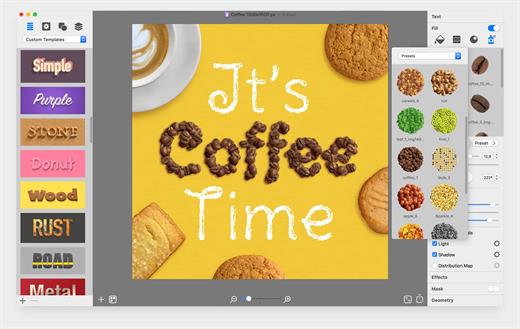
Both professional designers and amateurs will be amazed by the exceptional ease of creating sophisticated effects such as realistic 3D text with any natural material on it – wood, rust, shatter glass, or even chocolate, soft shadow and glow, graphics painted by oil or watercolors, aged and grunge style, and many more.


  • Customizable Templates – Ready-made templates will help with logo design, produce beautiful word art, web elements and picture captions.
  • Fill Tools – Gradient presets, textures, and shading materials.
  • 2D Effects – Adjustable shadow and glow effects, over 30 masks.
  • Graphic Content – Vector icons, symbols and shapes; flash, flare, sparkle, and light trace objects; and backgrounds and textures.
  • 3D Materials – Customize 3D materials using textures, bump map surfaces, and environment map textures.
  • 3D Effects – Apply soft-edged shadow or glow to 3D objects. Use optical effect tools to make background objects out of focus.
  • Geometry Transformations – Apply transformation shapes to 2D or 3D texts to bend, warp, or give the text a wavy shape.
  • Sharing the Result – Share the art on Facebook, Twitter and Instagram with just one click, or export to an image file to use virtually anywhere.
What’s New

Version 4.5.9:


  • Release notes were unavailable when this listing was updated.
Compatibility

macOS 10.14 or later


Release Name: Art Text 4.5.9
Size: 757 MB
Links: HOMEPAGE – NFO – Torrent Search

Download: RAPiDGATOR

5 Comments
Apr 23

SponsorBlock 6.1.5

SponsorBlock lets you skip over sponsors, intros, outros, subscription reminders, and other annoying parts of YouTube videos. SponsorBlock is a crowdsourced browser extension that let’s anyone submit the start and end time’s of sponsored segments and other segments of YouTube videos.

Once one person submits this information, everyone else with this extension will skip right over the sponsored segment.

What’s New

Version 6.1.5:


  • Release notes were unavailable when this listing was updated.
Compatibility

macOS 10.14 or later


Release Name: SponsorBlock 6.1.5
Size: 6.3 MB
Links: HOMEPAGE – NFO – Torrent Search

Download: RAPiDGATOR

4 Comments
Apr 23

One Switch 1.35.4

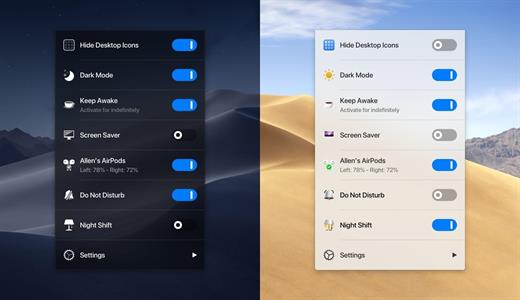
One Switch is a little menubar app that gives easy access to a bunch of handy features, and it keeps all your powerful switches in one place.


  • Hide Desktop Icons Hide your messy desktop with one click.
  • Dark Mode Toggle Dark Mode at any time.
  • Keep Awake Prevent your Mac from going to sleep or displaying the screen saver.
  • Screen Saver Sometimes you will like to turn it on manually.
  • AirPods Connect Connect AirPods with your Mac in just a second.
  • Do Not Disturb
  • Night Shift One Switch is not intrusive and only lives in the menu bar of your Mac, it’s also designed for macOS Mojave, perfectly in dark mode as well.
What’s New

Version 1.35.4:


  • Release notes were unavailable when this listing was updated.
Compatibility

macOS 10.15 or later

Apple Silicon or Intel Core processor


Release Name: One Switch 1.35.4
Size: 9 MB
Links: HOMEPAGE – NFO – Torrent Search

Download: RAPiDGATOR

4 Comments
Apr 23

Structured 4.4.7

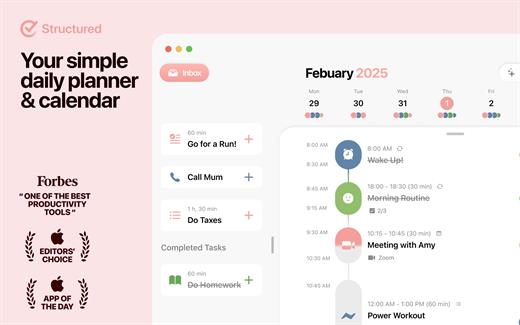
A visual daily planner to organize tasks, routines, and habits. Stay focused, reduce overwhelm, and plan your day in one clear timeline.

Finally take control of your day.
Plan with a clear visual timeline that brings your calendar, to-dos, routines, and habits together.

Join over 1.5 million active planners who feel calmer, focus faster, and get more done — every single day.

Perfect for work, study, travel, and busy ADHD minds. Plan in minutes and stay focused all day.


  • Organize your day and week in an intuitive timeline
  • Capture ideas instantly in Inbox and sort them later
  • Sync across iPhone, iPad, Apple Watch and Mac
  • Break big projects down with notes & sub-tasks
  • Stay on track with a Pomodoro focus timer, Live Activities, and interactive widgets
  • Personalize your planner with color-coding and hundreds of icons
  • Benefit from accessibility features like VoiceOver, Voice Control, a dyslexia-friendly font, and multiple languages
  • Get a complete overview by connecting your calendars and Reminders
  • Build recurring tasks & routines that actually stick
  • Powered by AI, draft your day in seconds
  • Replan, automatically reschedules missed or forgotten tasks
  • Customize notifications to match your workflow
What’s New

Version 4.4.7:


  • Release notes were unavailable when this listing was updated.
Compatibility

macOS 14.0 or later.


Release Name: Structured 4.4.7
Size: 72.4 MB
Links: HOMEPAGE – NFO – Torrent Search

Download: RAPiDGATOR

5 Comments
Apr 23

MouseBoost Pro 4.3.0

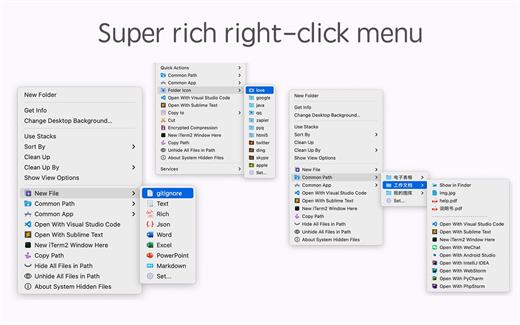
MouseBoost Pro integrates more than 30 kinds of small tools, and the operation way is very simple, as long as you click the right mouse button, you can activate all kinds of functions you want, so that your work efficiency is greatly improved.

You can create any file type you want, open any APP you want, self-sorting, fully customized!

*** Main Features ***
– All menus support custom sorting.
– Quickly create all kinds of commonly used files, and supports custom creation of various file types you want.
– Quickly open your terminal, iTerm2, and go to the directory you want.
– Quickly open VSCode, Sublime Text and Emacs, and customize the various apps you want to open.
– Quickly copy the current path power.
– Complete files deletion is supported.
– Supports files moving, copying and cutting.
– Supports files encrypted compression.
– Quickly open your favorite directory.
– Quickly get file MD5,SHA1,SHA256 and other information.
– Supports hiding and displaying of specified files.
– Supports modify folder icon.

What’s New

Version 4.3.0:


  • Release notes were unavailable when this listing was updated.
Compatibility

macOS 10.11 or later


Release Name: MouseBoost Pro 4.3.0
Size: 18.4 MB
Links: HOMEPAGE – NFO – Torrent Search

Download: RAPiDGATOR
5 Comments
Apr 23

Unclutter 2.2.17

Unclutter is a new handy place on your desktop for storing notes, files and pasteboard clips. To open the pocket, simply move your mouse to the very top of screen and scroll down. Drag items from other applications to the top of screen to store them in Unclutter.

Features


  • Instant, configurable access even in full screen mode.
  • Full multi-display support.
  • File Storage, to keep your Desktop clean from temporary files.
  • Notes, to write down something quickly.
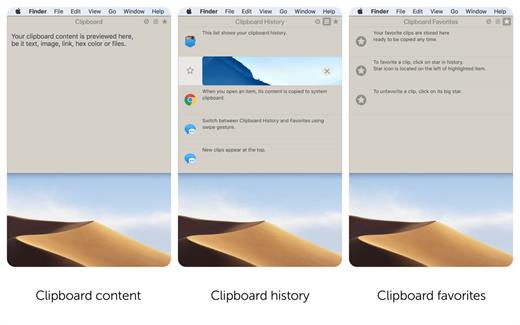
  • Clipboard manager, to track what you copy and paste, browse clipboard history.
  • Draggable cards that can stick on top of other windows.
  • Files and notes auto-sync across all your Macs via Dropbox.
  • Retina display support.
What’s New

Version 2.2.17:


  • Release notes were unavailable when this listing was updated.
Compatibility

macOS 10.13 or later


Release Name: Unclutter 2.2.17
Size: 13.5 MB
Links: HOMEPAGE – NFO – Torrent Search

Download: RAPiDGATOR

5 Comments
Apr 22

Numbers 15.2 fix

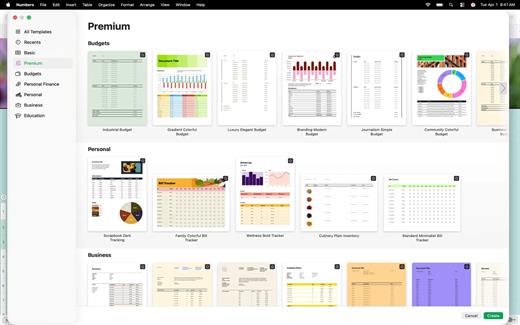
Create gorgeous spreadsheets with Numbers on iPhone, iPad and Mac. Get started with Apple-designed templates for everything from a home budget to an invoice. Add tables, charts, text, and images anywhere on the flexible canvas. Animate your data with interactive charts, find patterns with pivot tables, and use hundreds of powerful functions.

Get Started Quickly


  • Work from iPhone, iPad, Mac, or even a PC with iCloud.com
  • Select from a wide variety of Apple-designed templates
  • Add from a library of shapes, tables, and charts with pre-defined styles
  • Import and edit Microsoft Excel and CSV files
Create Beautiful Spreadsheets

  • Place tables, charts, text, and images anywhere on the flexible canvas
  • Create a form on iPhone or iPad to quickly enter data on the go
  • Draw or write with Apple Pencil on iPad
Formulas for Everyone

  • Choose from hundreds of powerful functions, including XLOOKUP and RegEx
  • Search the integrated function browser for built-in help and sample formulas
  • Easily add stock information to spreadsheets
  • See results from a single formula across multiple cells using spilling arrays
Everything Adds Up Beautifully

  • Use pivot tables and categories to see your data in a whole new way
  • Quickly organize and summarize tables to gain new insights
  • Insert gorgeous 2D and 3D charts, including bar, column, line, area, pie, donut, and radar charts
  • Animate data with interactive column, bar, scatter, and bubble charts
  • Easily filter through large tables for specific values, text, or duplicate entries
  • Change values in cells using sliders, steppers, checkboxes, pop-ups, and star ratings
Share with Anyone

  • Share your spreadsheet publicly or collaborate with specific people using iCloud or Box
  • Make changes from any device and see a list of changes from others in real-time
  • Export your spreadsheet in CSV, TSV, PDF, and Microsoft Excel
Apple Intelligence

  • Use Writing Tools to proofread, rewrite, summarize, and compose text
  • Create your own fun images with Image Playground based on a description
What’s New

Version 15.2:


  • Release notes were unavailable when this listing was updated.
Compatibility

macOS 15.6 or later.


Release Name: Numbers 15.2 fix
Size: 243.1 MB
Links: HOMEPAGE – NFO – Torrent Search

Download: RAPiDGATOR
5 Comments
Apr 22

Valentina Studio Pro 17.3.0

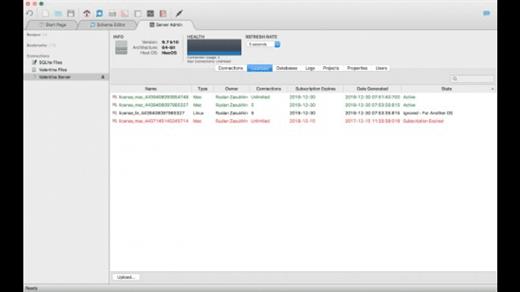
Valentina Studio is the ultimate data management tool for database administrators. Valentina Studio includes a wealth of database administration tools. Valentina Studio PRO to unlock advanced data modeling tools, report design and editing and more.

Valentina Studio brings you powerful, visual editors for your data including:


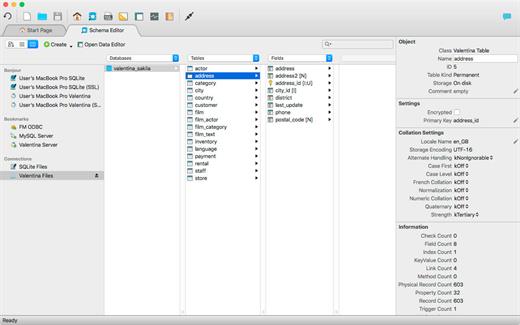
  • Schema Editor (tree view and column view) – create and modify all schema objects of supported databases: Tables, Views, Fields, Enums, Links, Constraints, Triggers, Indexes, Stored Procedures, …
  • Diagram Editor – design new diagrams or do reverse engineering, e.i explore existing databases visually.
  • Data Editor – easily browse table records in the grid, modify records, an inline edit of values, sort, filter records and save favorite filters, preview images, hex editors for binary values, …
  • Related Data Editor – easily learn and manage linked records of two tables, link/unlink records by a mouse click, do set operations over linked records, …
  • SQL Editor – with color syntax, auto-completion, recent and saved favorite queries, templates, console with error/warning reporting, …
  • Query Editor – build SQL queries visually using just a few mouse clicks
  • Server Admin – where you can manage users, learn logs and other parameters of servers.
Open as many editors as you like at the same time for different databases/servers opened in tab-panels. You also get different DB related utilities, including: Import/Export, Dumps, Diagnose, Clone, Reindex, …

MAS version of Valentina Studio uses iCloud to share bookmarks between your devices!

Valentina Studio Pro as an in-app purchase to get additional advanced pro-features such as:


  • Report Editor – visual editor of Valentina Reports that can be saved into Valentina Project file (.vsp). Reports can use as datasource MS SQL, MySQL, PostgreSQL, SQLite, Valentina DB, ODBC.
  • Form Editor – visual editor of Valentina Forms that can be saved into Valentina Project file (.vsp). Forms can use all supported databases as the datasource.
  • Data Editor – enables go to parent record function.
  • Data Editor Layouts – save columns and their order as a named layout
  • Data Editor Multiple Update – update few records at once.
  • Data Transfer – copy data between different databases
  • Diagram Editor – enables forward engineering – i.e. generation of SQL scripts for new/changed database objects.
  • Dump Wizard – enables filter for tables to select them for a dump.
  • Error Lookup – search for error description by its code.
  • Keyboard Shortcuts – enables the ability to redefine the shortcuts and create own shortcut sets.
  • Object Colors – enables marking objects with specific colors.
  • Query Editor – enables the ability to copy the generated query.
  • Schema Cache – save and reuse the schema cache.
  • Schema Editor – copy one or few schema objects using drag&drop mechanism.
  • Schema Editor – expanding and collapsing the tree items with subitems using OPTION + click
  • Schema Snapshot – save and load schema in structured format.
  • Source Control – develop database using any VCS.
  • SQLDiff – find differences between two states of a databases and generate SQL script to move between these states.
  • SQL Search – search of schema objects.
  • SQL Editor – enables autocompletion for table aliases.
  • SQL Editor – format SQL queries.
  • SQL Editor – edit the result of SQL queries.
What’s New

Version 17.3.0:


  • Release notes were unavailable when this listing was updated.
Compatibility

macOS 10.12 or later, 64-bit processor


Release Name: Valentina Studio Pro 17.3.0
Size: 205 MB
Links: HOMEPAGE – NFO – Torrent Search

Download: RAPiDGATOR

5 Comments
Apr 22

ChatGPT for macOS 1.2026.104

This is the official OpenAI ChatGPT app for macOS.

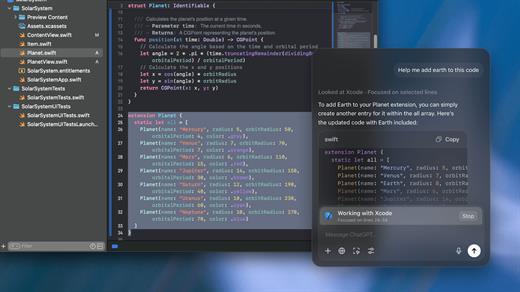
Whether you’re writing emails, exploring ideas, learning something new, or just curious about the world, ChatGPT is here to help. Designed with a clean, native experience for Mac users, the app makes it easier than ever to start a conversation with advanced AI.

Get answers. Find inspiration. Be more productive.

Free to use. Easy to try. Just ask and ChatGPT can assist with writing, learning, brainstorming, coding, and more. It’s like having an intelligent assistant, tutor, or creative partner always within reach—right from your menu bar.

Includes access to GPT-5 (for pro users), memory features, and voice input. Works seamlessly on macOS, optimized for speed and simplicity.

Key Features:

  • Instant AI-powered responses on your desktop
  • Natural language understanding and generation
  • Voice conversations with the built-in Whisper model
  • Synced across devices with your OpenAI account
  • Support for both GPT-5 (free) and GPT-5.4 (with Plus subscription)

Get started in seconds—no complex setup required. Just launch the app, l

What’s New

Version 1.2026.104:


  • Release notes were unavailable when this listing was updated.
Compatibility

macOS 14.0 and Apple Silicon (M1 or better)


Release Name: ChatGPT for macOS 1.2026.104
Size: 60.3 MB
Links: HOMEPAGE – NFO – Torrent Search

Download: RAPiDGATOR
5 Comments
Apr 22

Valentina Server 17.3.0

Serve reports from all major databases or with its own advanced, object-relational database system.

Valentina Client ADK for iOS

Build iOS apps with an embedded VCLIENT to Valentina Server

Valentina Forms Server

Register Valentina Forms to Valentina Server to share them with colleagues and clients.

Fast Web Applications

Build high performance server-side web applications with PHP, Python or Ruby on Rails.

Valentina Reports Objects

Build your report visually with drag-and-drop, scriptable report objects in Valentina Studio Pro.

REST & JSON Access Anywhere

Build web applications accessible anywhere using these lightweight protocols.

Notifications

Valentina Server can push notifications through a notification channel which in turn can spread among subscribing applications asynchronously.

Hot Back Up Your Data

Automatically back up your databases to any directory on your network without having to shut down your server.

Valentina SQLite Server

Valentina SQLite Server is a full featured, standards compliant multi-user access SQLite based database server.

Event Scheduler

Automate business and data management processes with Valentina Server support for triggers and event scheduling.

Valentina Reports Server

Server-side business applications with a data-rich reports, charts, graphs, barcodes, export to PDF, HTML and more with all major databases and servers.

Auto Discover on Network

Optionally make Valentina Server automatically and securely discoverable on your network using Bonjour, a form of zero-config.

Valentina DB Server

Blazingly fast object-relational database server based on the Valentina DB core model.

What’s New

Version 17.3.0:


  • Release notes were unavailable when this listing was updated.
Compatibility

macOS 10.15 or later


Release Name: Valentina Server 17.3.0
Size: 82.1 MB
Links: HOMEPAGE – NFO – Torrent Search

Download: RAPiDGATOR

6 Comments