Please REGISTER or RENEW your account on RAPiDGATOR.net and support us by doing through all RAPiDGATOR working download links on main posts...
Apr 12

Keynote 15.2

Create memorable presentations on iPhone, iPad, Mac, and Apple Vision Pro. Start with an Apple-designed theme and add text, images, charts, and shapes. Bring it all to life with cinematic animations and transitions. Confidently present from anywhere, in person or virtually, and take turns controlling a presentation in multi-presenter slideshows.
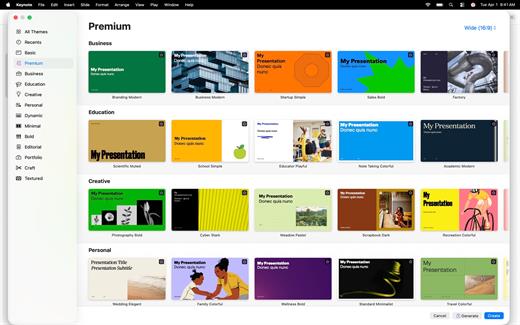
Get Started Quickly


  • Work from iPhone, iPad, Mac, Apple Vision Pro, or even a PC with iCloud.com
  • Select from a wide variety of Apple-designed themes
  • Import and edit Microsoft PowerPoint presentations
Create Stunning Presentations

  • Easily change slide layouts and backgrounds
  • Add recorded audio, live video, and image galleries
  • Use powerful graphics tools including background removal and masking
  • Draw or write with Apple Pencil on iPad
Cinema-Quality Animations

  • Beautiful cinematic slide transitions and impressive animations
  • Emphasis builds and Magic Move let you effortlessly add impact
  • See live on-canvas previews as you animate your slides
  • Draw a motion path with Apple Pencil on iPad
Present to Your Audience

  • Rehearse with a customizable presenter display
  • Practice in an immersive Conference Room or Theater environment on Apple Vision Pro
  • Highlight with Apple Pencil or with your finger while presenting on iPad
  • Control your slideshow from an iPhone, iPad, or Apple Watch
Share with Anyone

  • Share your presentation publicly or collaborate with specific people using iCloud or Box
  • Make changes from any device and see a list of changes from others in real-time
  • Export presentations to Microsoft PowerPoint, PDF, HTML, movies, and image files
Apple Intelligence

  • Use Writing Tools to proofread, rewrite, summarize, and compose text
  • Create your own fun images with Image Playground based on a description
What’s New

Version 15.2:


  • Release notes were unavailable when this listing was updated.
Compatibility

macOS 15.6 or later.


Release Name: Keynote 15.2
Size: 358 MB
Links: HOMEPAGE – NFO – Torrent Search

Download: RAPiDGATOR

8 Comments
Apr 12

Pages 15.2

Create beautiful documents with Pages on iPhone, iPad and Mac. Start with an Apple-designed template for a report, resume, poster, or digital book. Easily add images, movies, audio, tables, charts, and shapes. Use comments, change tracking, and highlights to review your work. On iPhone and iPad, Screen View optimizes content for your screen, making it easier to edit.

Get Started Quickly


  • Work from iPhone, iPad, Mac, or even a PC with iCloud.com
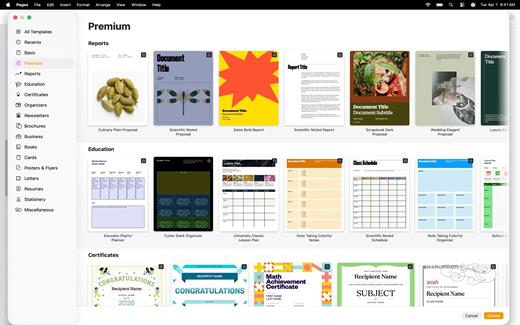
  • Select from a wide variety of Apple-designed templates
  • Add from a library of shapes, tables, and charts with pre-defined styles
  • Import and edit Microsoft Word and text files
Create Beautiful Documents

  • Format your document with gorgeous styles, fonts, and textures
  • Make your content more engaging with recorded audio, video, and image galleries
  • Create page templates to keep the design consistent across your page layout document
  • Use powerful graphics tools including image background removal and masking
  • Design interactive EPUB books that can be shared with others or published to Apple Books
  • Draw, write or annotate with Apple Pencil on iPad
Advanced Tools

  • Use the table of contents view to easily navigate your document or book
  • Add comments and join threaded conversations
  • Turn on change tracking to mark up a document as you edit it
  • Create footnotes and endnotes and view character, word, and paragraph counts
  • Add elegant mathematical equations using LaTeX or MathML notation
  • Use presenter mode on iPhone and iPad to auto scroll text while giving a speech
  • Seamless integration with EndNote for inserting citations on Mac*
Share with Anyone

  • Share your document publicly or collaborate with specific people using iCloud or Box
  • Make changes from any device and see a list of changes from others in real-time
  • Export your document in EPUB, Microsoft Word, RTF, TXT, and PDF format
Apple Intelligence

  • Use Writing Tools to proofread, rewrite, summarize, and compose text
  • Create your own fun images with Image Playground based on a description
  • EndNote sold separately. EndNote integration requires a plug-in available from Apple Support.
What’s New

Version 15.2:


  • Release notes were unavailable when this listing was updated.
Compatibility

macOS 15.6 or later.


Release Name: Pages 15.2
Size: 312 MB
Links: HOMEPAGE – NFO – Torrent Search

Download: RAPiDGATOR
9 Comments
Apr 12

Numbers 15.2

Create gorgeous spreadsheets with Numbers on iPhone, iPad and Mac. Get started with Apple-designed templates for everything from a home budget to an invoice. Add tables, charts, text, and images anywhere on the flexible canvas. Animate your data with interactive charts, find patterns with pivot tables, and use hundreds of powerful functions.

Get Started Quickly


  • Work from iPhone, iPad, Mac, or even a PC with iCloud.com
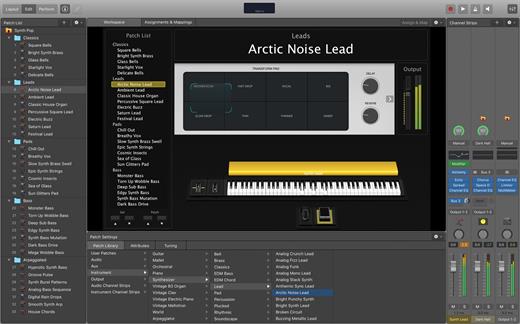
  • Select from a wide variety of Apple-designed templates
  • Add from a library of shapes, tables, and charts with pre-defined styles
  • Import and edit Microsoft Excel and CSV files
Create Beautiful Spreadsheets

  • Place tables, charts, text, and images anywhere on the flexible canvas
  • Create a form on iPhone or iPad to quickly enter data on the go
  • Draw or write with Apple Pencil on iPad
Formulas for Everyone

  • Choose from hundreds of powerful functions, including XLOOKUP and RegEx
  • Search the integrated function browser for built-in help and sample formulas
  • Easily add stock information to spreadsheets
  • See results from a single formula across multiple cells using spilling arrays
Everything Adds Up Beautifully

  • Use pivot tables and categories to see your data in a whole new way
  • Quickly organize and summarize tables to gain new insights
  • Insert gorgeous 2D and 3D charts, including bar, column, line, area, pie, donut, and radar charts
  • Animate data with interactive column, bar, scatter, and bubble charts
  • Easily filter through large tables for specific values, text, or duplicate entries
  • Change values in cells using sliders, steppers, checkboxes, pop-ups, and star ratings
Share with Anyone

  • Share your spreadsheet publicly or collaborate with specific people using iCloud or Box
  • Make changes from any device and see a list of changes from others in real-time
  • Export your spreadsheet in CSV, TSV, PDF, and Microsoft Excel
Apple Intelligence

  • Use Writing Tools to proofread, rewrite, summarize, and compose text
  • Create your own fun images with Image Playground based on a description
What’s New

Version 15.2:


  • Release notes were unavailable when this listing was updated.
Compatibility

macOS 15.6 or later.


Release Name: Numbers 15.2
Size: 243 MB
Links: HOMEPAGE – NFO – Torrent Search

Download: RAPiDGATOR

9 Comments
Apr 12

MainStage 4.2

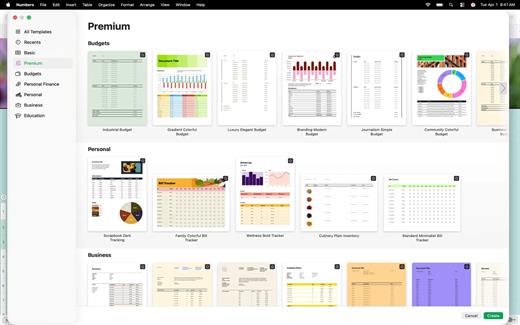
MainStage lets you take your Mac to the stage with a full-screen interface optimized for live performance, flexible hardware control, and a massive collection of plug-ins and sounds that are fully compatible with Logic Pro.

The Ultimate Live Rig


  • Perform live with over 100 instrument, effect, and MIDI plug-ins or your favorite Audio Units plug-ins
  • Add any patches from Logic Pro to bring your studio sound to the stage
  • Combine instruments and live audio, such as keyboards and vocals, in a single Patch
  • Switch between Patches without stopping sound output or cutting off held notes
  • Design rich keyboard Patches using splits and layers
  • Perform with stereo or multitrack backing tracks using Playback
Hardware Control

  • Connect your favorite MIDI hardware and use it to play and control your plug-ins
  • Use USB and MIDI-equipped controllers like keyboards, foot pedals, and drum pads
  • Quickly assign hardware knobs, buttons, and faders to onscreen controls
  • Manage sophisticated rigs using the Assignments & Mapping overview
Designed for the Stage

  • See only what you need during your performance using a customizable, full-screen live interface
  • Screen controls adapt for each Patch using Smart Controls
  • Smart Controls offer dynamic performance controls that change with each Patch
  • Easily view your Mac screen from a distance using a high-contrast, full-screen performance view
Instrument Plug-ins

  • Play or create a wide variety of rich sampled instruments with Sampler and Quick Sampler
  • Turn your favorite hardware synthesizers into sampled instruments using the Auto Sampler plug-in
  • Quickly find sounds or create unique new ones with Alchemy, the ultimate sample manipulation synthesizer
  • Play classic ’70s- and ’80s-style synthesizer sounds using Retro Synth
  • Perform inspired sounds using a collection of synths that provide analog, wavetable, FM, additive, granular, spectral, and modeling synthesis
MIDI Plug-ins

  • Transform simple ideas into elaborate performances using nine MIDI plug-ins
  • Instantly turn a simple chord into a rich performance with the Arpeggiator
  • Play a single note to trigger predefined chords with Chord Trigger
  • Perform a part and conform notes to a specific scale using Transposer
Creative and Production Effects

  • Play your sounds through a variety of realistic acoustic spaces or creative synthesized reverbs
  • Use a range of multi-tap, vintage tape, and stereo delays
  • Add movement to your tracks with a variety of modulation effects
  • Get the perfect mix with a collection of vintage and modern EQs, dynamics, and other mixing tools
System Requirements: 6GB available disk space for minimum install / 44GB or more storage space for full Sound Library installation

What’s New

Version 4.2:


  • Release notes were unavailable when this listing was updated.
Compatibility

macOS 15.6 or later and a Mac with Apple M1 chip or later.


Release Name: MainStage 4.2
Size: 954.5 MB
Links: HOMEPAGE – NFO – Torrent Search

Download: RAPiDGATOR
9 Comments
Apr 12

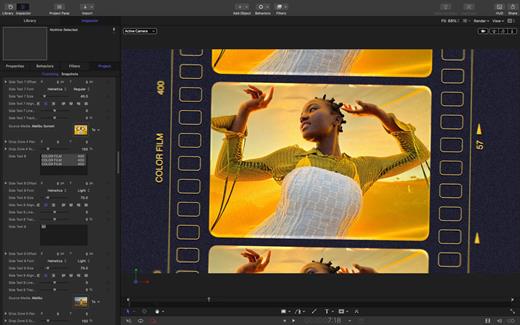
Motion 6.2

Motion is now part of Apple Creator Studio, an amazing collection of Apple’s most powerful creative apps designed to help you bring your ideas to life. The suite includes Final Cut Pro, Logic Pro, Pixelmator Pro, Motion, Compressor, and MainStage — plus premium content and intelligence features in Keynote, Pages, Numbers, and Freeform*, all in one simple plan.

New Features
AI-powered Magnetic Mask automatically tracks and isolates people, objects, and shapes in any footage
3D text is now dramatically faster on Apple silicon, with Metal-powered improvements to playback and rendering

Overview

Designed for video editors, Motion is a powerful motion graphics tool that makes it easy to create cinematic 2D and 3D titles, fluid transitions, and realistic effects in real time.

2D and 3D Titles


  • Import 360° media and design 360° titles, generators, and effects
  • Build 3D titles from scratch, design them with easy-to-use templates, or instantly convert any existing 2D title to 3D
  • Easily create beautiful titles that you can animate using more than 100 drag-and-drop behaviors and intuitive text animation tools
  • Customize 3D titles to create endless looks with over 90 Apple-designed 3D materials including metal, wood, and stone surfaces
Motion Graphics for Final Cut Pro

  • Save any title, effect, transition, or generator and access it directly in Final Cut Pro
  • Customize Final Cut Pro titles, effects, and transitions by opening them in Motion
  • Create Motion Templates with any combination of single parameters and rigs that let you control a group of parameters with a slider, pop-up menu, or checkbox in Final Cut Pro
  • Use Display Aspect Ratio snapshots to create templates that support multiple aspect ratios
Stunning Effects

  • Choose from more than 230 behaviors for natural animation without keyframes
  • Change focus points or the depth effect for video shot in Cinematic mode on iPhone
  • Design your own particle emitters or choose from 200 presets for real-world effects like smoke and sparkles
  • Use professional masking tools to quickly draw and adjust control points for rotoscoping
  • Automatically detect, track, and match the movement of faces or objects using machine learning
  • Choose between different tracking analysis types
  • Add the Neon filter to easily add a neon glow to text, shapes, video, stills, and more
  • Harness an ecosystem of third-party FxPlug plug-ins for tasks like advanced tracking, advanced motion graphics, and more
Effortless 3D

  • Transition from 2D to 3D space by adding cameras
  • Create 3D scenes within a 360° project for ultra-realistic 360° environments
  • Set up realistic shadows that animate dynamically with the movement of cameras and lights
  • Turn any shape, video plane, or paint stroke into a reflective surface in 3D space
  • Import third-party USDZ objects or use one of 60 premade objects in the Motion Library
Breakthrough Speed, Quality, and Output

  • Import wide color HDR images, view them on supported Mac computers, and export in standard Rec. 709 or wide Rec. 2020 color space
  • Unrivaled speed and efficiency with optimizations for the latest generation of Apple silicon
System Requirements: macOS 15.6 or later, 8 GB of memory (16 GB recommended), Metal-capable graphics card (Intel-based Mac computers only), 4.7 GB of available disk space. Some features require internet access; fees may apply.

  • Premium content and features in Freeform are not currently available and are expected to be included in the Apple Creator Studio subscription later this year.
What’s New

Version 6.2:


  • Motion is now part of Apple Creator Studio.
Compatibility

macOS 15.6 or later.


Release Name: Motion 6.2
Size: 2.5 GB
Links: HOMEPAGE – NFO – Torrent Search

Download: RAPiDGATOR

6 Comments
Apr 12

Compressor 5.2

Compressor is now part of Apple Creator Studio, an amazing collection of Apple’s most powerful creative apps designed to help you bring your ideas to life. The suite includes Final Cut Pro, Logic Pro, Pixelmator Pro, Motion, Compressor, and MainStage — plus premium content and intelligence features in Keynote, Pages, Numbers, and Freeform*, all in one simple plan.

New Feature


  • Create files for an Apple Immersive Video package for playback, and HTTP live streaming on Apple Vision Pro
Overview

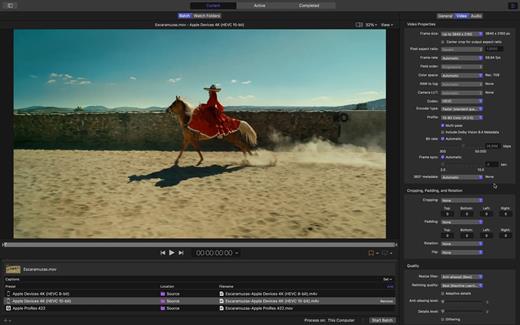
Compressor integrates tightly with Final Cut Pro and Motion to add power and flexibility to your video conversions. Quickly customize output settings, enhance images, and package your movie for sale on the iTunes Store.

Advanced Encoding for Final Cut Pro


  • Customize encoding settings for use in Final Cut Pro and Motion
  • Set up batch processes to streamline the encoding of large numbers of files
  • Create self-contained Droplets to encode on the desktop with drag-and-drop ease
  • Automatically encode videos that are added to selected folders in the file system
  • Encode stereoscopic spatial video and deliver directly to Apple Vision Pro
  • Unrivaled performance with optimizations for the latest generation of Apple silicon
iTunes Store Package Creation

  • Import and organize your movie, trailer, closed captions, audio descriptions, and subtitles into an iTunes Store-compliant package for submission to an Apple-certified iTunes delivery partner
  • Audition video with any audio, caption, or subtitle to verify sync
  • Built-in error detection helps you identify issues with your iTunes Store Package
  • Deliver HDR video as P3 D65 PQ, Rec. 2020 HLG, and Rec. 2020 PQ for HDR10
  • Support in the iTunes Store Package to link a Dolby Vision graded video file to a Dolby Vision XML
Support for Industry Standards

  • Encode to a broad range of industry standard formats including HEVC, MV-HEVC, H.264, MXF, and ProRes
  • Import Targa, DPX, TIFF, PSD, PNG, or OpenEXR image sequences and encode them using any setting
  • Create, view, adjust, and deliver closed captions in CEA-608, SRT, and iTT formats
Pristine Format Conversions

  • Convert any file between formats — such as SD to HD, or progressive to interlaced video
  • Import and manipulate wide color video, then deliver in standard Rec. 601 and Rec. 709 color spaces or in wide Rec. 2020 color space
  • Deliver High Dynamic Range (HDR) video with controls for color space conversions and HDR metadata
  • Deliver HDR video as P3 D65 PQ, Rec. 2020 HLG, and Rec. 2020 PQ
  • Add effects to your content like custom LUTs, a timecode overlay, and watermarks
  • Speed up video, slow it down, or adjust the frame rate to make the duration match a runtime
  • Convert log-encoded video to SDR and HDR color spaces using built-in camera LUTs for Panasonic, Sony, Canon, Blackmagic, Nikon and ARRI or add a custom camera LUT
  • Convert ProRes RAW and ProRes RAW HQ media to other professional file formats
System Requirements: macOS 15.6 or later, 8 GB of memory, 1.2 GB of available disk space. Apple Immersive Video processing requires macOS 15.0 or later, 32 GB memory (64 GB recommended). Storage read speed of 2000 MB/s or faster is recommended. Some features require a Mac with Apple silicon.

  • Premium content and features in Freeform are not currently available and are expected to be included in the Apple Creator Studio subscription later this year.
What’s New

Version 5.2:


  • Release notes were unavailable when this listing was updated.
Compatibility

macOS 15.6 or later.


Release Name: Compressor 5.2
Size: 112 MB
Links: HOMEPAGE – NFO – Torrent Search

Download: RAPiDGATOR
8 Comments
Apr 12

Cookie 8.4.7

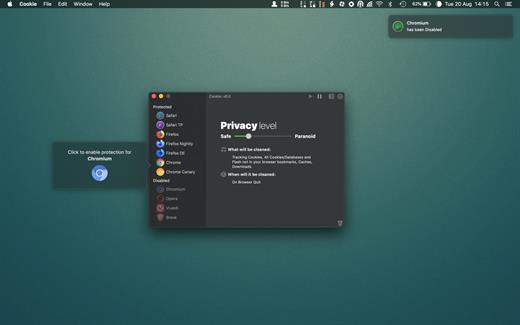
Cookie prevents third parties from hijacking your browsing experience. The sites you visit store “cookies” in your browser without your knowledge or consent. Some are helpful, but others are frustrating and invasive. Cookie can help.

Features:


  • Consolidate all your browser privacy settings
  • Simplified View that takes care of all the technical details for you
  • Advanced View which puts you in total control of all your privacy settings
  • Combined cookie view displaying all cookie/flash/localStorage data in one easy to manage view
  • Cookie’s can be favorited on a per domain, or per cookie basis. You decide
  • Individual Browser settings. It is possible to configure different automatic removal options for each browser. In the case of Chrome/Chromium/Canary/Brave you can even configure settings per user!
  • A number of removal schedules are possible: When quitting Cookie, when a Browser is Quit, on computer login, On computer waking from sleep, on a customizable time schedule, or entirely manually
  • Hotkey support, so you can remove all unwanted data quickly and easily
  • Customizable tracking cookie definitions
  • Whitelist individual tracking cookies
  • Clean, modern and Intuitive User Interface
  • Helpful setup window
  • Browser extension protection
  • Full Screen support
  • iCloud support
  • Dark/Regular theme
What’s New

Version 8.4.7:


  • Release notes were unavailable when this listing was updated.
Compatibility

macOS 10.14 or later, 64-bit processor


Release Name: Cookie 8.4.7
Size: 9.8 MB
Links: HOMEPAGE – NFO – Torrent Search

Download: RAPiDGATOR

9 Comments
Apr 12

Debit & Credit Premium 7.7.1

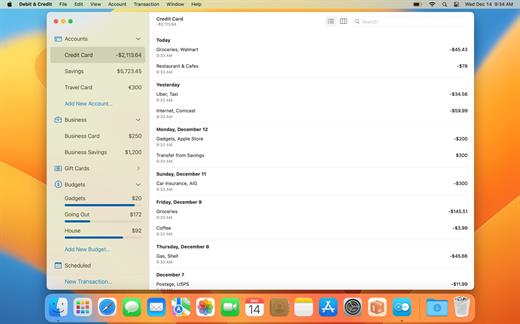
Debit & Credit can help you better manage your finances by providing the most relevant reports possible. It is designed with simplicity and convenience in mind. Based on the reports generated by the app, you can get a clear understanding of what is happening to your financial position and what you need to do to improve it.

*** You need to disable the System Integrity Protection (SIP) to perform the selected Application.

What’s New

Version 7.7.1:


  • Release notes were unavailable when this listing was updated.
Compatibility

macOS 10.14.5 or later


Release Name: Debit & Credit Premium 7.7.1
Size: 14.6 MB
Links: HOMEPAGE – NFO – Torrent Search

Download: RAPiDGATOR
8 Comments
Apr 12

Logic Pro 12.2

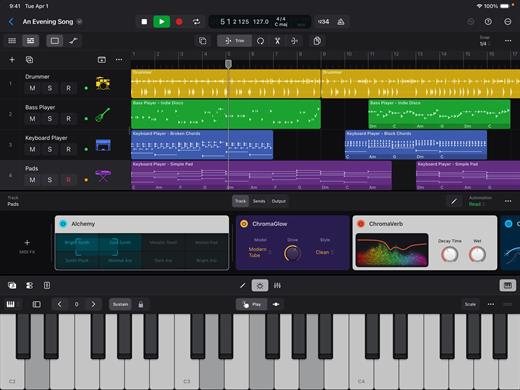
Logic Pro for Mac is a complete collection of sophisticated creative tools for songwriting, beat making, editing, and mixing, built around a modern interface that’s designed to get results quickly and also deliver more power whenever it’s needed. Logic Pro includes a massive collection of instruments, effects, loops, and samples, providing a complete toolkit to create amazing-sounding music.

Music Production


  • Use Stem Splitter to separate nearly any mixed audio recording into six distinct parts: Drums, Bass, Vocals, Guitar, Piano, and Other instruments
  • Smart Tempo instantly conforms imported or recorded audio to your project’s tempo
  • Record and edit MIDI or audio using a comprehensive set of editors and tools
  • Use Live Loops to capture inspiration and quickly build arrangements by mixing and matching loops, samples, and your recordings
  • Manipulate the pitch and timing of any recording with Flex Time and Flex Pitch
  • Keep takes organized with take folders and build comps quickly with Quick Swipe Comping
  • Track Alternatives let you create, duplicate, and then switch between different versions of tracks
  • Deliver a release-ready mix using Mastering Assistant
AI Session Players

  • Discover six virtual musicians designed to create nuanced performances that respond to your direction
  • Synth Player, Bass Player, Keyboard Player, Acoustic Drummer, Electronic Drummer, and Percussionist offer a wide range of genres and distinct playing styles
Beat Production

  • Reshuffle audio with Beat Breaker, a creative time and pitch effect
  • Build custom drum kits using your favorite samples
  • Create drum beats, bass lines, and melodic parts, and reshape sounds over time using Step Sequencer
Sampling

  • Use Sampler to quickly create and edit sophisticated multi-sampled instruments
  • Use Sample Alchemy to transform audio into entirely new malleable sounds
  • Chop and manipulate samples using Quick Sampler
Professional Instrument and Effects Plug-ins

  • Create music with a massive collection of powerful software instruments
  • Shape your sound using a wide variety of high-quality effects
Compatibility

  • Roundtrip capabilities let you open projects back-and-forth between Logic Pro for Mac or Logic Pro for iPad
  • Import and export XML to support Final Cut Pro workflows
System Requirements: 6GB available storage space for minimum install / 44GB or more storage space for full Sound Library installation

What’s New

Version 12.2:


  • Release notes were unavailable when this listing was updated.
Compatibility

macOS 15.6 or later and a Mac with Apple M1 chip or later.


Release Name: Logic Pro 12.2
Size: 1.3 GB
Links: HOMEPAGE – NFO – Torrent Search

Download: RAPiDGATOR

8 Comments
Apr 12

Color Folder Pro 4.9

Color Folder can help you to change the icon of folder quickly, and to manage folders more efficiently

「Main Features」


  • quickly change folder icon color
  • Select any picture to set as folder icon
  • support changing multiple folder icons at the same time
  • save as Icon
  • provide a variety of icon templates (over 700+)
  • support any color to modify folder icons
What’s New

Version 4.9:


  • Release notes were unavailable when this listing was updated.
Compatibility

macOS 10.10 or later


Release Name: Color Folder Pro 4.9
Size: 23 MB
Links: HOMEPAGE – NFO – Torrent Search

Download: RAPiDGATOR
9 Comments